Page 135 of 393

134 Controls in detailTempmatic
3
\1To switch off: press theÄ switch
again.
The indicator lamp in the switch goes
out.
The engine stores residual heat after long
periods of driving. You can use the residual
heat of the engine to heat the stationary
vehicle for a further 30 minutes.\1To switch on: turn key to position 0 in
the ignition lock (\2page 67) or re-
move it.
\1Set as required:
\4temperature (\2page 132)
\4air distribution (\2page 133)
\4the air vents (\2page 129)
\1Press the° switch (\2page 131).
The indicator lamp in the switch comes
on.
\1To switch off: press ° switch
again (\2page 131).
The indicator lamp in the switch goes
out.The reheat function quickly ensures de-
frosted windows and dehumidification in
the vehicle interior.
\1To switch on: press theÅ switch
(\2page 131).
The indicator lamp in the switch comes
on.
\1To switch on: press theÅ switch
(\2page 131).
\1The indicator lamp in the switch goes
out.
Fogged-up windows
\1If necessary, switch off air-recirculation
mode by pressing theÄ switch
(\2page 131).
The indicator lamp in the switch goes
out. Fresh air is supplied to the interior.
\1Switch on the reheat function using
theÅ switch (\2page 131).
iAir-recirculation mode is automatically
switched off after about 10 to 30 min-
utes, depending on the outside temper-
ature.Residual heat mode iThe heating period depends on:
\4the coolant temperature
\4the interior temperature selected
\4the on-board voltage
The blower runs at speed1 regardless
of the position of the airflow control.
iResidual heat switches off automati-
cally:
\4after about 30 minutes
\4when you switch on the ignition
\4if the battery’s voltage drops
Reheat function (dehumidification)Special settingsiOnly use special settings briefly.
\2\2
Page 143 of 393

142 Controls in detailAuxiliary heating/ventilation*
3
Selecting a switch-on time
You can use the operating system to define
up to 3 switch-on times, one of which can
be selected to switch on the auxiliary
heating / ventilation.
Operating system without steering
wheel buttons
\1Switch on the ignition (\2page 67).
\1Press theö switch.
Theö symbol in the display flashes.
or
\1Press the menu button on the in-
strument cluster repeatedly until the
ö symbol in the display flashes.
\1Use the or button on the instru-
ment cluster to select desired switch-
on time
1 to
3.
The switch-on time selected is dis-
played.\1Wait 10 seconds for the standard dis-
play to appear.
The switch-on time is selected.
The yellow indicator lamp in theö
switch comes on.
If you have not selected a switch-on time
and
--:--
appears in the display, the auto-
matic switch-on is deactivated. The yellow
indicator lamp in theö switch goes
out.Operating system with steering wheel
buttons*
\1Switch on the ignition (\2page 67).
\1Briefly press theö switch.
The
Aux. heat.
submenu is shown in
the display.
The selected switch-on time is high-
lighted or
Timer off
is highlighted if no
switch-on time has been selected.
\1Press theæ orç button to se-
lect the desired switch-on time. The au-
tomatic switch-on is deactivated if the
Timer off
setting is selected.
iIf you turn the key to position0 in the
ignition lock, the yellow indicator lamp
in theö switch goes out after
30 minutes.
The red indicator lamp in theö
switch comes on when the auxiliary
heating switches on.
iYou can reach the
Aux. heat.
submenu
via the
Settings
menu (\2page 96).
N54.32-2277-31
\2\2
Page 144 of 393

143 Controls in detail
Auxiliary heating/ventilation*
3
\1Press the è button.
The switch-on time is selected.
The yellow indicator lamp in theö
switch comes on.
Setting the switch-on time
Operating system without steering
wheel buttons
\1Select a switch-on time as described
under “Selecting a switch-on time”
(\2page 142).\1Press the reset button on the instru-
ment cluster to set the selected switch-
on time.
The hours figure flashes and the”
symbol appears in the display.
\1Set the hours using the or am
button on the instrument cluster.
\1Press the reset button.
The minute display flashes.
\1Set the minutes using the or
button.Operating system with steering wheel
buttons
\1Select a switch-on time as described
under “Selecting a switch-on time”
(\2page 142).
\1Press thej button.
The
Hours
menu appears in the display.
\1Set the hours using theæ orç
button.
\1Press thej button.
The
Minutes
menu appears in the dis-
play.
\1Set the minutes using theæ
orç button.
\1Press the è button.
The switch-on time is set and selected.
iIf you turn the key to position0 in the
ignition lock, the yellow indicator lamp
in theö switch goes out after
30 minutes.
The red indicator lamp in theö
switch comes on when the auxiliary
heating switches on.
iIf you keep the button pressed, the val-
ues will change continuously.
To return to the standard display:
\4press and hold the button on
the instrument cluster for more
than 1 second
\4do not press a button for
10 seconds
iTo return to the standard display, press
theè or ÿ button repeatedly
until the standard display appears.
Page 145 of 393

144 Controls in detailOpen air
3
\3 Open airYou can open and close the side windows
electrically.
The switches for all side windows are locat-
ed on the door control panel.
Power window switches (driver’s side)1Power window, left
2Power window, right
\1Switch on the ignition (\2page 67).
\1To open: press and hold switch1
or2 until the window has reached the
desired position.\1To close: pull and hold switch1 or2
until the window has reached the de-
sired position.
Resetting the side windows
The side windows must be reset if the bat-
tery has been disconnected:
\1Pull the two power window switches
until the side windows are closed.
\1Hold the switches in this position for
about 1 second.
The side windows are reset.
Side windowsWarning
G
Make sure that nobody can become trapped
as you close a side window.
Remove the key from the ignition lock even
if you are only leaving the vehicle for a short
time.
Never leave children unsupervised in the ve-
hicle.
iThe window opens automatically when
you press the switch beyond the pres-
sure point and then release it.
To stop the window, pull or press the
switch again.
Page 146 of 393

145 Controls in detail
Open air
3
Sliding sunroof switch1To open
2To close
3To raise
4To lower\1Switch on the ignition (\2page 67).
\1Press the sliding sunroof switch in the
desired direction as far as the first
pressure point.
\1Release the sliding sunroof switch
when the desired position has been
reached.
Sliding sunroof*Warning
G
M a k e s u r e t h a t n o b o d y c a n b e c o m e t r a p p e d
as you close the sliding sunroof.
The glass may shatter in the event of an ac-
cident.
If you or other occupants are not wearing
your seat belt, there is a risk of being thrown
out of the opening in the event of the vehicle
overturning. Therefore, always wear a seat
belt to reduce the risk of injuries.
In accidents in which the vehicle overturns,
there is an increased risk of injury even for
occupants who have fastened their seat
belts correctly, as their head or limbs could
be thrust through the opening.
Remove the key from the ignition lock even
if you are only leaving the vehicle for a short
time.
!
CAUTION
Do not raise the sliding sunroof if you
have mounted a roof rack. It would oth-
erwise strike the roof rack.
You could thereby damage the sliding
sunroof and the roof rack.
iThe sliding sunroof opens automatical-
ly when you press the sliding sunroof
switch for opening beyond the pressure
point and then release it.
To stop the sliding sunroof, press the
sliding sunroof switch again in any di-
rection.!
CAUTION
Do not transport objects protruding
through the sliding sunroof. You could
otherwise damage the sliding sunroof.
Page 147 of 393

146 Controls in detailOpen air
3
Resetting the sliding sunroof
The sliding sunroof must be reset after:
\4the sunroof has been closed manually
using the emergency operation key
(\2page 304)
\4the sunroof has opened with a jerk
\4a malfunction
\1Switch on the ignition (\2page 67).
\1Press the sliding sunroof switch in the
direction of arrow2 (\2page 145).
\1Wait until the sliding sunroof is closed
and then keep the sliding sunroof
switch pressed for approximately
3seconds.
The sliding sunroof is reset.The roof ventilator can be used to ventilate
or remove air from the load compartment.
The switch is between the light switch and
the steering wheel.
1To ventilate the load compartment
(air out)
2To ventilate the load compartment
(air in)\1Switch on the ignition (\2page 67).
\1Air out: press upper part 1 of the
switch.
The roof ventilator removes used air
from the load compartment.
\1Air in: press lower part 2 of the
switch.
The roof ventilator feeds fresh air into
the load compartment.
\1To switch off: set the switch to the
center position.
Roof ventilator in the load compart-
ment*
N54.25-2929-31
Page 151 of 393

150 Controls in detailDriving systems
3
Parktronic is an electronic parking aid and
informs you visually and audibly of the dis-
tance between the vehicle and an obsta-
cle.
Parktronic is automatically switched on
when you switch on the ignition and re-
lease the handbrake. You must also move
the selector lever to position D, N or R.
Parktronic switches off at speeds of over
11 mph (18 km/h). Parktronic switches on
again as soon as the vehicle’s speed falls
below this limit speed.
Parktronic is equipped with sensors in the
front and rear bumper to monitor the area
around your vehicle.Range of the sensors
The sensors must be free from dirt, ice and
slush, otherwise they may not function cor-
rectly. Clean the sensors regularly, taking
care not to scratch or damage them
(\2page 244).
Parktronic system (PTS)*Warning
G
Parktronic is only an aid and may not detect
all obstacles. This system does not relieve
you of the need to pay attention.
You are always responsible for safety and
must continue to pay attention to your im-
mediate surroundings when parking and
maneuvering. Otherwise, you could endan-
ger yourself and others.Warning
G
Make sure that no persons or animals are in
the maneuvering range of the vehicle. They
could otherwise be injured.
Page 170 of 393
169 Controls in detail
Features
3
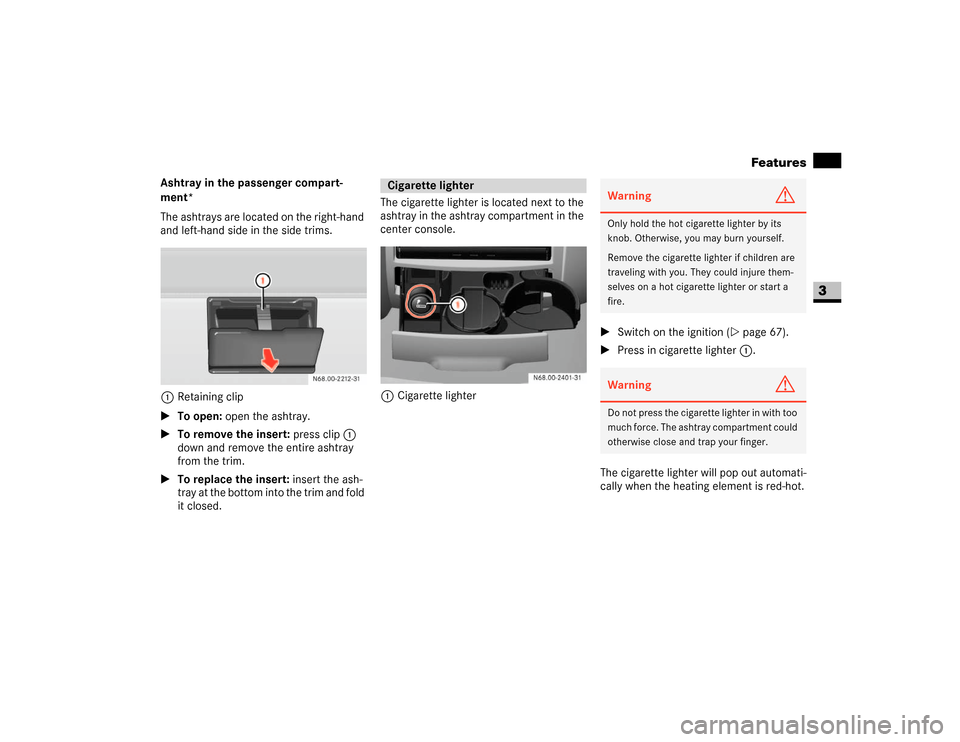
Ashtray in the passenger compart-
ment*
The ashtrays are located on the right-hand
and left-hand side in the side trims.
1Retaining clip
\1To open: open the ashtray.
\1To remove the insert: press clip1
down and remove the entire ashtray
from the trim.
\1To replace the insert: insert the ash-
tray at the bottom into the trim and fold
it closed.The cigarette lighter is located next to the
ashtray in the ashtray compartment in the
center console.
1Cigarette lighter\1Switch on the ignition (\2page 67).
\1Press in cigarette lighter 1.
The cigarette lighter will pop out automati-
cally when the heating element is red-hot.
Cigarette lighter
Warning
G
Only hold the hot cigarette lighter by its
knob. Otherwise, you may burn yourself.
Remove the cigarette lighter if children are
traveling with you. They could injure them-
selves on a hot cigarette lighter or start a
fire.Warning
G
Do not press the cigarette lighter in with too
much force. The ashtray compartment could
otherwise close and trap your finger.