2007 DODGE SPRINTER ignition
[x] Cancel search: ignitionPage 172 of 393

171 Controls in detail
Features
3
Telephones may only be used inside the
vehicle if they are connected to a separate
exterior antenna of a type tested and ap-
proved by the manufacturer.The installation of the antenna must be ap-
proved by a qualified specialist workshop.
Always have maintenance work carried out
at a qualified specialist workshop, e.g. an
authorized Sprinter Dealer.Telephone*Warning
G
You must observe the legal requirements for
the country in which you are driving when
operating a cell phone in the vehicle.
If it is permitted to operate a cell phone
while the vehicle is in motion, you must only
operate it when road and traffic conditions
permit. You may otherwise be distracted
from the traffic conditions, cause an acci-
dent and injure yourself and others.
Cell phones without exterior antennas may
interfere with the vehicle electronics and
thereby jeopardize the operational safety of
the vehicle. You must therefore only use
these devices when they are connected to a
separate exterior antenna.
Warning
G
Only use the telephone when road, weather
and traffic conditions permit you to do so.
You will otherwise be too distracted. If you
are not using the hands-free system, pull
over to make a phone call.
Bear in mind that at a speed of just 30 mph
(approx. 50 km/h), your vehicle is covering
a distance of 44 feet (approx. 14 m) every
second.
Telephones without exterior antennas may
interfere with the vehicle electronics and
thereby jeopardize the operational safety of
the vehicle.
iObserve all legal requirements.iThe cell phone battery will be charged
depending on the charge status and
the position of the key in the ignition
lock. The cell phone display indicates
the charging process.
Page 185 of 393
184 OperationRefueling
4
\3 Refueling
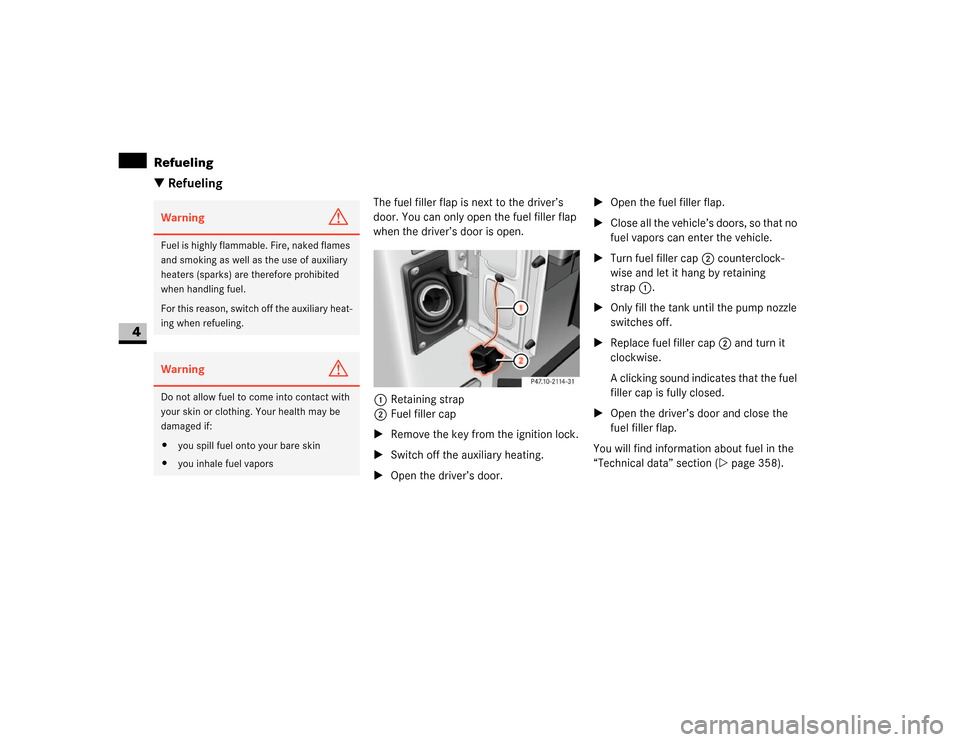
The fuel filler flap is next to the driver’s
door. You can only open the fuel filler flap
when the driver’s door is open.
1Retaining strap
2Fuel filler cap
\1Remove the key from the ignition lock.
\1Switch off the auxiliary heating.
\1Open the driver’s door.\1Open the fuel filler flap.
\1Close all the vehicle’s doors, so that no
fuel vapors can enter the vehicle.
\1Turn fuel filler cap2 counterclock-
wise and let it hang by retaining
strap1.
\1Only fill the tank until the pump nozzle
switches off.
\1Replace fuel filler cap2 and turn it
clockwise.
A clicking sound indicates that the fuel
filler cap is fully closed.
\1Open the driver’s door and close the
fuel filler flap.
You will find information about fuel in the
“Technical data” section (\2page 358).
Warning
G
Fuel is highly flammable. Fire, naked flames
and smoking as well as the use of auxiliary
heaters (sparks) are therefore prohibited
when handling fuel.
For this reason, switch off the auxiliary heat-
ing when refueling.Warning
G
Do not allow fuel to come into contact with
your skin or clothing. Your health may be
damaged if:
\4you spill fuel onto your bare skin
\4you inhale fuel vapors
Page 187 of 393

186 OperationEngine
4
\1Swing the hood upward until support
strut3 engages and the hood is sup-
ported.
Closing\1Lift the hood gently.
\1Push back support strut3
(\2page 185).
\1Let the hood drop from a height of ap-
proximately 05. ft (30 cm).
The hood engages audibly.
\1Check to make sure the hood is fully
closed.Warning
G
If the hood support strut is not engaged, the
hood can fall shut. You could be injured.
After opening the hood, you should there-
fore check whether the support strut is en-
gaged.Warning
G
Engine parts may be hot and can rotate.
There is a risk of injury if the hood is open
and the engine is running.
Only open the hood when the engine has
stopped and cooled down.
Warning
G
The engine has an electronic ignition system
which carries a high voltage. For this reason,
you must never touch the ignition system
components (ignition coil, test socket)
while:
\4the engine is running
\4the engine is being started
\4the key is in position2 in the ignition
lock and the engine is being cranked by
handWarning
G
Make sure that nobody can become trapped
as you close the hood.
Warning
G
Make sure that the hood is securely en-
gaged before driving off. Do no continue
driving if the hood can no longer engage af-
ter an accident, for example.
The hood could otherwise come loose while
the vehicle is in motion and endanger you
and/or others.!
CAUTION
When you press the support strut back,
make sure that you do not press it
against the detent position and cause it
to bend.
Page 189 of 393

188 OperationEngine
4
Checking the engine oil level in the dis-
play
In vehicles with diesel engines, you can
view the engine oil level in the display.
When the oil is being checked, the vehicle
must
\4be standing level
\4be at normal operating temperature
\4have been standing with the engine
switched off for at least five minutes\1Switch on the ignition (\2page 67).
The display is activated.
Vehicles without steering wheel buttons
\1Press the menu button on the in-
strument cluster repeatedly until you
see the P symbol in the display.
The
--:--
display flashes during the
measurement process.The following messages may be displayed:
\1Check the engine oil level again after a
few minutes.
Vehicles with steering wheel buttons*
\1Press the button on the instrument
cluster (\2page 84).
iIf no oil level reading is shown again,
check the engine oil level with the dip-
stick.
Have the engine oil level display
checked at an authorized Sprinter
Dealer.!
CAUTION
Have any excess oil drained or si-
phoned off at an authorized Sprinter
Dealer. Otherwise, the engine or cata-
lytic converter could be damaged.
iIf at extremely low temperatures no en-
gine oil level is displayed after 5 min-
utes, wait a further 5 minutes before
repeating the engine oil level check.
POK
\1Do not add oil.
-1.0 qt
\1Add the amount of oil
shown (\2page 190).
-1.5 qts-2.0 qtsHI
\1The engine oil level is
too high. Have the oil
siphoned off.
iEngine oil level display:
\4
qt in USA only
\4l in Canada only
Page 190 of 393

189 Operation
Engine
4
\1The following message is displayed for
the duration of the measurement pro-
cess:
N
Engine oil level Measuring in
progress
The following messages may be displayed:Checking the engine oil level with the
dipstick
When the oil is being checked, the vehicle
must
\4be at normal operating temperature
\4be standing level
\4have been standing with the engine
switched off for at least five minutes
Diesel engine1Engine oil filler neck
2Engine oil dipstick
NEngine oil
level OK
\1Do not add oil.
Engine oil
Add
1.0 quart
\1Add the amount of oil
shown (\2page 190).
\1Check the engine oil
level again after a few
minutes.
Engine oil
Add
1.5 quartsEngine oil
Add
2.0 quartsEngine oil
level Reduce
oil level
\1The engine oil level is
too high. Have the oil
siphoned off.
Eng. oil
lev. Turn
ignition on
for level
\1Switch on the ignition
(\2page 67).
Observe
wait. period
\1Carry out another
measurement after
approximately 5 min-
utes when the engine
is at normal operat-
ing temperature.
\1Carry out another
measurement after
approximately
30 minutes when the
engine has cooled
down.
Engine oil
level Not
when eng.
running
\1Switch off the engine
and wait for approxi-
mately 5 minutes if
the engine is at nor-
mal operating tem-
perature.
iEngine oil level display:
\4
quart(s)
in USA only
\4
liter(s)
in Canada only
N
Page 198 of 393

197 Operation
Battery isolating switch*
4
You can disconnect the current to all your
vehicle’s consumers using the battery
isolating switch. This will prevent uncon-
trolled battery discharge caused by quies-
cent current consumption.The battery isolating switch is to the right
of the accelerator pedal in the driver’s foot-
well.
1Connector
2Slide\1Take the key out of the ignition lock
and wait for approx. 20 seconds.
\1Move red slide2 down in the direc-
tion of the arrow and disconnect
connector1 from the ground pin.
\1Clamp connector1 under the acceler-
ator pedal so that it cannot make con-
tact with the ground pin.
The consumers of the vehicle battery
are cut off from the electrical circuit.Warning
G
If the vehicle is equipped with an auxiliary
battery in the engine compartment, it is nec-
essary to disconnect both batteries when
working on the vehicle electrical system.
Only then is the electrical system fully dis-
connected from the power supply.iOnly disconnect the vehicle electrical
system from the power supply using
the battery isolating switch if the vehi-
cle is to be parked up for a long period
or when this is absolutely necessary.
After the power supply is switched on,
you must reset the electric sliding door
(\2page 57).
!
CAUTION
Make sure that the key is in position0
in the ignition lock and wait at least
20 seconds before disconnecting or
connecting the battery isolating
switch. You could otherwise damage
electrical system components.
Switching off the electrical system!
CAUTION
When you clamp the connector under
the accelerator pedal, make sure that
the connector does not become:
\4dirty
\4damaged
It may otherwise not be possible to re-
store the electrical connection when
the parts are reassembled.
Page 199 of 393

198 OperationBattery isolating switch*
4
1Connector
2Ground pin\1Insert the key into the ignition lock.
\1Press connector1 onto ground
pin2 until you feel it engage and the
lock inhibitor is released.
The connector must be in full contact
with ground pin2.
\1Move the red slide up until it engages.
All consumers are reconnected to the
power supply circuit.Switching on the electrical system
Page 217 of 393

216 OperationTires and wheels
4
Reactivating the TPMS
The TPMS must be reactivated when you
have adjusted the tire inflation pressure to
a new level (e.g. because of different load
or driving conditions). The TPMS is then
recalibrated to the current tire inflation
pressures.\1Using the tire and loading information
placard on the driver’s door B-pillar
(\2page 206), make sure the tire infla-
tion pressure of all four tires is correct.
\1Switch on the ignition (\2page 67).
\1Press the 5menu button on the instru-
ment cluster until you see the
+CAL TPMS
message in the display.
TPMS malfunctions may occur for a variety
of reasons, including the installation of in-
compatible replacement or alternate tires or
wheels on the vehicle that prevent the TPMS
from functioning properly. Always check the
TPMS malfunction telltale after replacing
one or more tires or wheels on your vehicle
to ensure that the replacement or alternate
tires and wheels allow the TPMS to continue
to function properly.iIf a condition causing the TPMS to mal-
function develops, it may take up to 10
minutes for the system to signal a mal-
function using the TPMS telltale flash-
ing and illumination sequence.
The telltale extinguishes after driving a
few minutes if the malfunction has
been corrected.
iOperating radio transmission equip-
ment (e.g. wireless headsets, two-way
radios) in or near the vehicle could
cause the TPMS to malfunctionWarning
G
It is the driver’s responsibility to calibrate
the TPMS on the recommended cold infla-
tion pressure. Underinflated tires affect the
ability to steer or brake the vehicle. You
might lose control over the vehicle.
iReactivate the TPMS after adjusting
the tire inflation pressure to the infla-
tion pressure recommended for the ve-
hicle operating condition. Tire pressure
should only be adjusted on cold tires.
Observe the recommended tire infla-
tion pressure on the tire and loading in-
formation placard on the driver’s door
B-pillar (\2page 206).