2007 DODGE SPRINTER ignition
[x] Cancel search: ignitionPage 53 of 393

52 Controls in detailOpening and closing
3
\3 Opening and closingIncluded with your vehicle are 2 or 4* re-
mote keyless entry transmitters with a
folding mechanical key.Keys which were not included with delivery
must be activated at an authorized Sprint-
er Dealer before they can be used.
The remote keyless entry transmitter
transmits in all directions. It does not have
to be pointed at the vehicle.
The remote keyless entry transmitter has
an average range of about 32 ft
(about 10 m). Always verify the correct op-
eration of the remote keyless entry trans-
mitter by checking whether the locking
knobs on the driver's and co-driver's doors
move down and whether the turn signals
flash.
The remote control unlocks the driver's
door and/or all doors centrally. If pro-
grammed as a factory setting, it locks the
following centrally:
\4the driver’s and co-driver’s door
\4the sliding doors
\4the rear doorsThe remote keyless entry transmitter will
not function when there is a vehicle key in-
serted in the ignition lock.Remote control with keyiUSA only:
This device complies with Part 15 of
the FCC rules. Operation is subject to
the following two conditions:
(1) This device may not cause harmful
interference, and
(2) this device must accept any inter-
ference received, including interfer-
ence that may cause undesired
operation.
Any unauthorized modification to this
device could void the user’s authority
to operate the equipment.iCanada only:
This device complies with RSS-210 of
Industry Canada.
iIf the driver’s or co-driver’s door is not
completely closed, the respective door
is not locked.
If one sliding door or rear door is not
completely closed, all doors of the load
compartment are not locked.
Page 56 of 393

55 Controls in detail
Opening and closing
3
Rear door1To lock
2To unlock
\1Insert the key all the way into the door
lock and turn it in direction2.
The door is unlocked.The alarm can be disabled in the following
ways:
\1Press the Πbutton on the remote
control.
or
\1Insert the key into the ignition lock.
Locking the vehicle
Only the driver's door and the rear doors
can be locked with the key.
\1For all other doors, press the locking
knob down.
\1Close the doors.
The doors are locked.
\1Insert the key all the way into the rear
door lock and turn it to the left.
The rear doors are locked.
\1Insert the key all the way into the driv-
er’s door lock and turn it to the right.
The driver’s door is locked.You can open the driver’s / co-driver’s door
from the inside at any time, even if it is
locked.
1Inside door handle
2Locking knob
\1Pull door handle 1.
The door opens.
iThe anti-theft alarm system (ATA) is
triggered when you open the vehicle
using the key.
N72.10-2147-31
Opening the driver’s or co-driver’s
door from the inside
Page 60 of 393

59 Controls in detail
Opening and closing
3
Opening / closing using the inside and
outside door handles
Observe the notes on anti-trap protection
(\2page 60).
1Button
2Outside door handle\1Briefly press button1 or pull outside
door handle 2.
The sliding door opens or closes and a
signal sounds.
\1Press button1 again or pull outside
door handle 2 again.
The sliding door stops.
Opening/closing with the remote con-
trol
\1Press and hold the button for
more than half a second.
The sliding door unlocks and opens or
closes.
\1Press the button again.
The sliding door stops.
Programming the remote control
If the vehicle is equipped with 2 sliding
doors, it is only possible to program the re-
mote control for one of the sliding doors.1Switch for sliding door on left-hand
side
2Switch for sliding door on right-hand
side
\1Make sure that the doors are closed.
\1Switch on the ignition (\2page 67).
\1Press and hold the upper part of
relevant switch1 or 2 on the center
console for 5 seconds.
The indicator lamp in the switch for the
sliding door concerned flashes and a
warning tone sounds three times as
confirmation. N72.16-2118-31
N72.16-2136-31
Page 64 of 393

63 Controls in detail
Opening and closing
3
\1To close: make sure that the left-hand
rear door is closed.
\1Pull the right-hand rear door firmly
closed by the door handle.
\1To lock: slide catch2 to the right.
Only the rear door is locked.
The white marking is no longer visible.Using the central locking switch, you can
centrally lock or unlock from the inside ei-
ther the entire vehicle or the sliding doors
and rear doors only.The central locking switch is located on the
center console.
1To lock / unlock the entire vehicle
2To lock / unlock the sliding doors and
rear doorWarning
G
M a k e s u r e t h a t n o b o d y c a n b e c o m e t r a p p e d
as you close the rear door.
Locking and unlocking centrally
from the insideWarning
G
Do not leave children unsupervised in the
vehicle, even if they are secured by a child
restraint system. The children could:
\4injure themselves on parts of the vehicle
\4be severely or even fatally injured by
prolonged exposure to intense heat
If the children open a door, they could:
\4cause injury to others as a result
\4get out of the vehicle and could either
injure themselves when doing so or they
could be injured by passing vehicles
\4sustain serious injuries if they were to
fall out of the vehicle, due in particular
to the height of the passenger compart-
ment from the ground
iIf the key is in position0 or no longer in
the ignition lock, the indicator lamp in
the central locking switch lights up for
5 seconds after it is pressed. It lights
up permanently if the key is in position
1 or2 in the ignition lock.
N54.25-2917-31
Page 66 of 393

65 Controls in detail
Opening and closing
3
Activating the automatic locking when
driving function for the entire vehicle
\1Close all the doors.
\1Turn the key to position1 or2 in the ig-
nition lock (\2page 67).
\1Press upper part 1 of the switch. Keep
it pressed for approximately
5seconds.
The indicator lamp in the switch flashes
four times.Deactivating the automatic locking
when driving function for the entire
vehicle
\1Close all the doors.
\1Turn the key to position1 or2 in the ig-
nition lock (\2page 67).
\1Press upper part 1 of the switch. Keep
it pressed for approximately
5seconds.
The indicator lamp in the switch flashes
twice.
Activating the automatic locking when
driving function for the sliding doors
and the rear door
\1Close all the doors.
\1Turn the key to position1 or2 in the ig-
nition lock (\2page 67).
\1Press lower part 2 of the switch. Keep
it pressed for approximately
5seconds.
The indicator lamp in the switch flashes
four times.
!
CAUTION
If your vehicle is centrally locked, this
could hinder rescue operations from
the outside in the event of an accident.
When the automatic locking when driv-
ing function is activated, there is a risk
of being locked out if the vehicle is
pushed or towed.
For this reason, always deactivate the
automatic locking when driving func-
tion:
\4before pushing the vehicle
\4before having the vehicle towed
\4if you are only leaving the vehicle
for a brief period
iThe vehicle is locked automatically if
the ignition is switched on and the ve-
hicle is moving (default setting). For in-
formation about different settings,
please ask your authorized Sprinter
Dealer.
iIf activated, automatic locking is deac-
tivated if the vehicle is unlocked or
locked using the central locking switch.
Automatic locking is reactivated after
the ignition is switched off or a door is
opened with the vehicle stationary.
Page 68 of 393

67 Controls in detail
Key positions
3
\3 Key positions0 To remove the key, to lock the steering
wheel
1 To unlock the steering wheel (power
supply for some consumers, e.g. radio)
2 To switch on the ignition (power supply
for all consumers)
Preglow
1 and drive position
3 To start
1 Only vehicles with a diesel engine
iThe key can only be removed from
position0. Also observe the notes in
the “Driving and parking” section
(\2page 110).
To unlock the steering, turn the steer-
ing wheel slightly while turning the key
to position 1.
On vehicles with a battery isolating
switch, you must first switch on the
electrical system (\2page 198).
Page 74 of 393
73 Controls in detail
Seats
3
Removing the head restraints
\1Pull the head restraint up as far as it
will go.
\1Press release button1 and pull the
head restraint out.
Installing the head restraints
\1Insert the head restraint so that the rod
with the notches is in the direction of
travel on the left.
\1Push the head restraint down until it
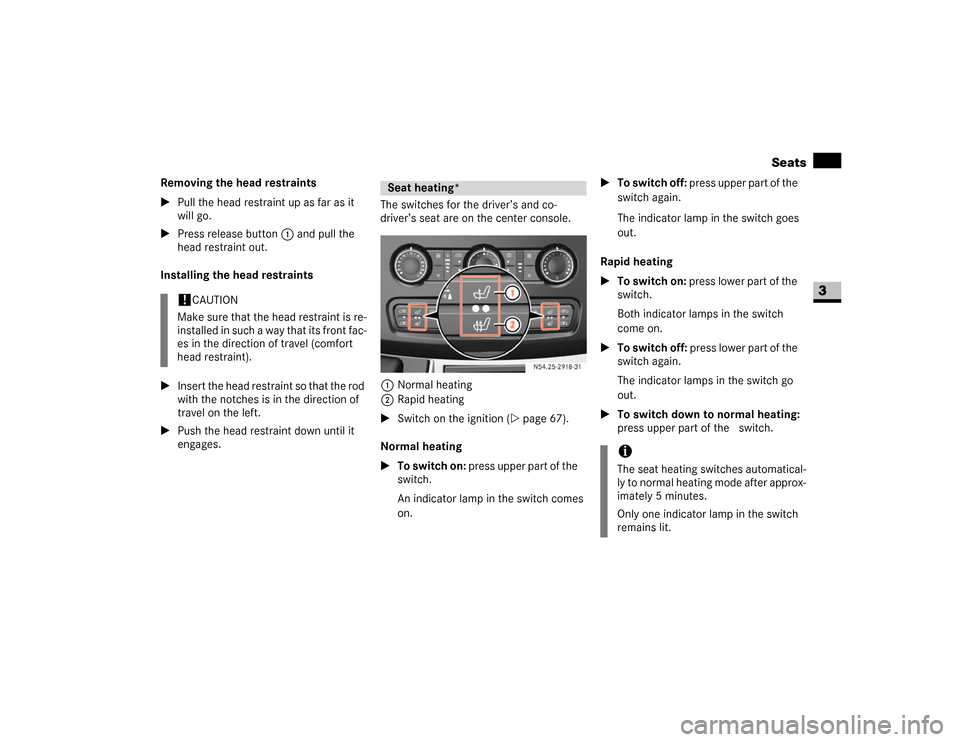
engages.The switches for the driver’s and co-
driver’s seat are on the center console.
1Normal heating
2Rapid heating
\1Switch on the ignition (\2page 67).
Normal heating
\1To switch on: press upper part of the&
switch.
An indicator lamp in the switch comes
on.\1To switch off: press upper part of the&
switch again.
The indicator lamp in the switch goes
out.
Rapid heating
\1To switch on: press lower part of the
switch.
Both indicator lamps in the switch
come on.
\1To switch off: press lower part of the
switch again.
The indicator lamps in the switch go
out.
\1To switch down to normal heating:
press upper part of the& switch.
!
CAUTION
Make sure that the head restraint is re-
installed in such a way that its front fac-
es in the direction of travel (comfort
head restraint).
Seat heating*
N54.25-2918-31
iThe seat heating switches automatical-
ly to normal heating mode after approx-
imately 5 minutes.
Only one indicator lamp in the switch
remains lit.
Page 79 of 393

78 Controls in detailLighting
3
\1Turn key to position1 in ignition lock
(\2page 67).
\1Turn light switch to B.
\1Press combination switch forward 1.
The indicator lampA in the instru-
ment cluster lights up.
Headlamp flasher
\1Turn key to position1 in ignition lock
(\2page 67).
\1Pull combination switch briefly in
direction2.
Constant headlamp mode*
On vehicles with steering wheel buttons,
you can set constant headlamp mode
(\2page 102). This does not apply to coun-
tries in which there is a legal requirement
to use constant headlamp mode.\1Turn light switch to M.
The low-beam headlamps, parking
lamps and license plate lamp are
switched on when the engine is
running.
TheB indicator lamp in the instru-
ment cluster lights up.
Automatic headlamp control*
The parking lamps, low-beam headlamps
and license plate lamp are switched on au-
tomatically when the brightness of ambi-
ent light falls below a predetermined level.\1Turn light switch toU.
The parking lamps are switched on / off
automatically when the key is in posi-
tion 1 (\2page 67) in the ignition lock.
The parking lamps, low-beam head-
lamps and license plate lamp are
switched on / off automatically when
the engine is running, depending on the
ambient light conditions.
Only use manual headlamp mode when
you are driving in countries where driving
with the low-beam headlamps switched on
is required by law.
\1In this case, turn the light switch to
B.
Warning
G
If the light switch is atU:
\4the headlamps could switch off tempo-
rarily due to extreme glare, e.g. from on-
coming traffic
\4the lights do not switch on automatically
in foggy conditions
Set the light switch to B. Otherwise you
are endangering yourself and others.
If it is dark, only turn the light switch from
U toB when the vehicle is stationary.
You could otherwise cause an accident if the
headlamps were to switch off briefly.
Automatic headlamp mode is only a driving
aid. You are responsible for the vehicle’s
lighting at all times.