2007 CHEVROLET MALIBU buttons
[x] Cancel search: buttonsPage 169 of 510
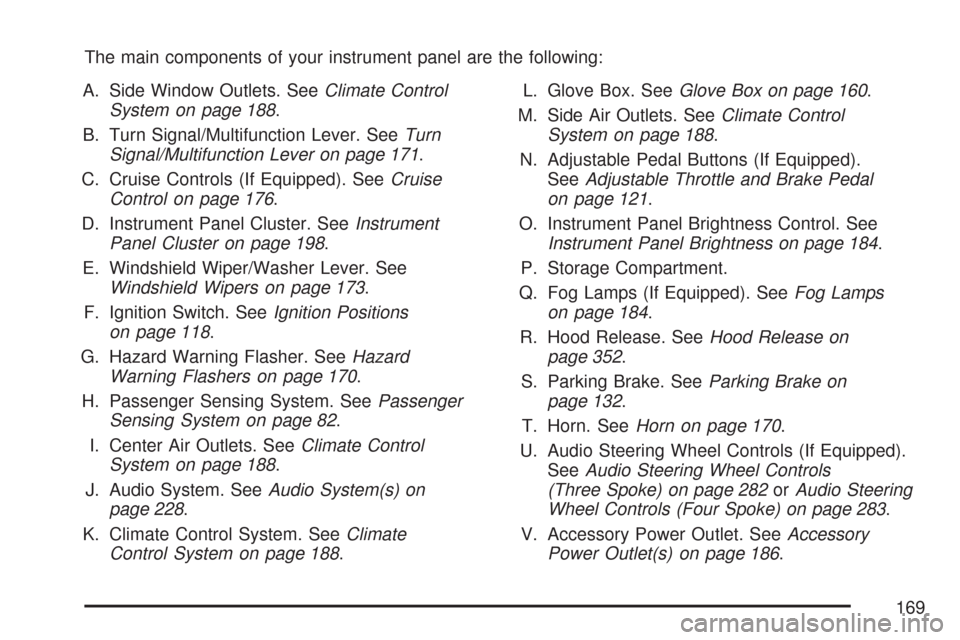
The main components of your instrument panel are the following:
A. Side Window Outlets. SeeClimate Control
System on page 188.
B. Turn Signal/Multifunction Lever. SeeTurn
Signal/Multifunction Lever on page 171.
C. Cruise Controls (If Equipped). SeeCruise
Control on page 176.
D. Instrument Panel Cluster. SeeInstrument
Panel Cluster on page 198.
E. Windshield Wiper/Washer Lever. See
Windshield Wipers on page 173.
F. Ignition Switch. SeeIgnition Positions
on page 118.
G. Hazard Warning Flasher. SeeHazard
Warning Flashers on page 170.
H. Passenger Sensing System. SeePassenger
Sensing System on page 82.
I. Center Air Outlets. SeeClimate Control
System on page 188.
J. Audio System. SeeAudio System(s) on
page 228.
K. Climate Control System. SeeClimate
Control System on page 188.L. Glove Box. SeeGlove Box on page 160.
M. Side Air Outlets. SeeClimate Control
System on page 188.
N. Adjustable Pedal Buttons (If Equipped).
SeeAdjustable Throttle and Brake Pedal
on page 121.
O. Instrument Panel Brightness Control. See
Instrument Panel Brightness on page 184.
P. Storage Compartment.
Q. Fog Lamps (If Equipped). SeeFog Lamps
on page 184.
R. Hood Release. SeeHood Release on
page 352.
S. Parking Brake. SeeParking Brake on
page 132.
T. Horn. SeeHorn on page 170.
U. Audio Steering Wheel Controls (If Equipped).
SeeAudio Steering Wheel Controls
(Three Spoke) on page 282orAudio Steering
Wheel Controls (Four Spoke) on page 283.
V. Accessory Power Outlet. SeeAccessory
Power Outlet(s) on page 186.
169
Page 176 of 510
Cruise Control
With cruise control, you can maintain a speed
of about 25 mph (40 km/h) or more without
keeping your foot on the accelerator. This can
really help on long trips. Cruise control does not
work at speeds below about 25 mph (40 km/h).
{CAUTION:
Cruise control can be dangerous where
you cannot drive safely at a steady speed.
So, do not use your cruise control on
winding roads or in heavy traffic.
Cruise control can be dangerous on
slippery roads. On such roads, fast
changes in tire traction can cause
excessive wheel slip, and you could
lose control. Do not use cruise control
on slippery roads.
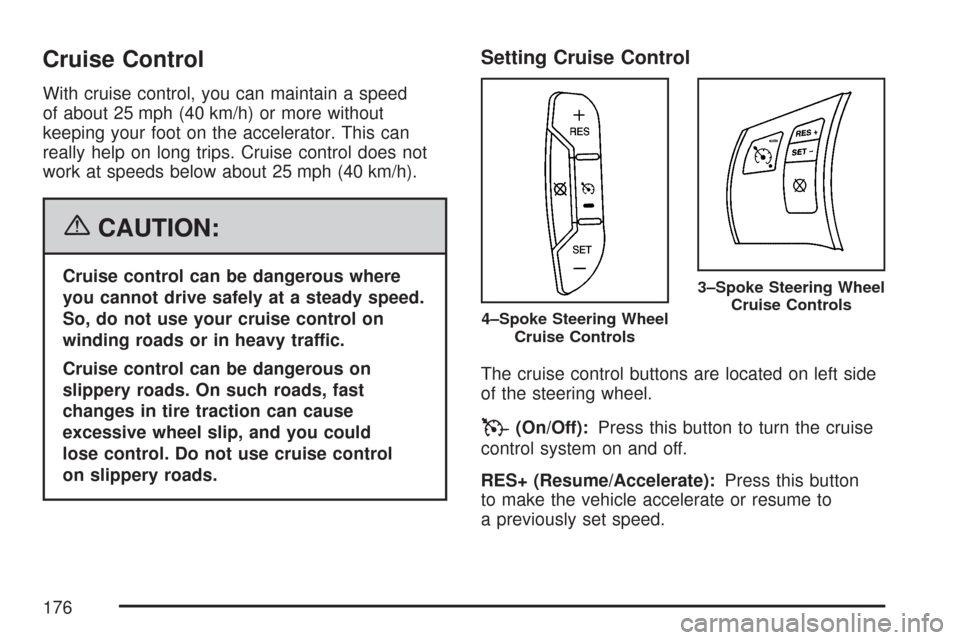
Setting Cruise Control
The cruise control buttons are located on left side
of the steering wheel.
T(On/Off):Press this button to turn the cruise
control system on and off.
RES+ (Resume/Accelerate):Press this button
to make the vehicle accelerate or resume to
a previously set speed.
4–Spoke Steering Wheel
Cruise Controls
3–Spoke Steering Wheel
Cruise Controls
176
Page 192 of 510
Automatic Climate Control System
If your vehicle has this system, you can
automatically control the heating, cooling and
ventilation in your vehicle.
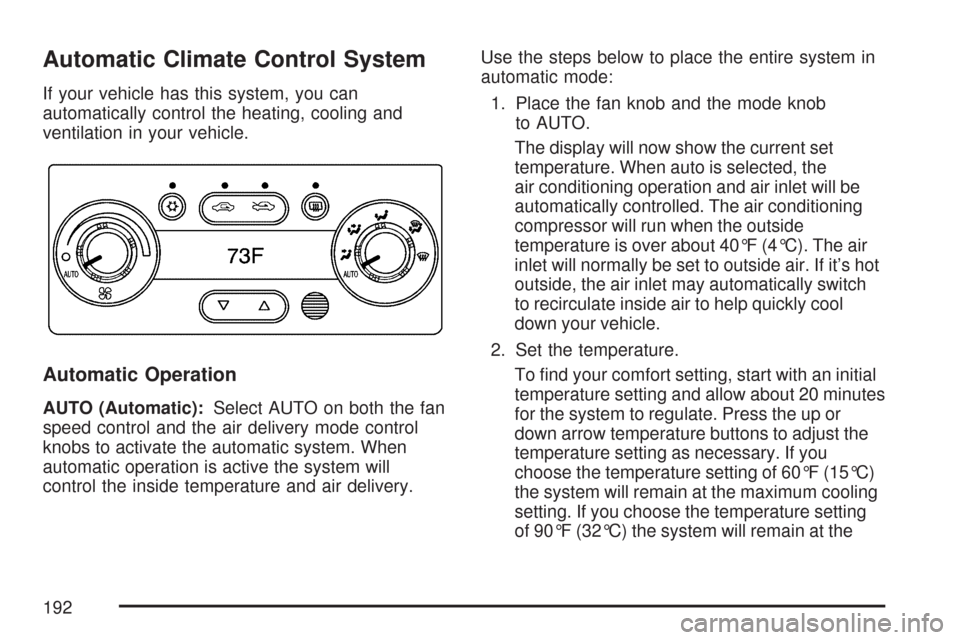
Automatic Operation
AUTO (Automatic):Select AUTO on both the fan
speed control and the air delivery mode control
knobs to activate the automatic system. When
automatic operation is active the system will
control the inside temperature and air delivery.Use the steps below to place the entire system in
automatic mode:
1. Place the fan knob and the mode knob
to AUTO.
The display will now show the current set
temperature. When auto is selected, the
air conditioning operation and air inlet will be
automatically controlled. The air conditioning
compressor will run when the outside
temperature is over about 40°F (4°C). The air
inlet will normally be set to outside air. If it’s hot
outside, the air inlet may automatically switch
to recirculate inside air to help quickly cool
down your vehicle.
2. Set the temperature.
To nd your comfort setting, start with an initial
temperature setting and allow about 20 minutes
for the system to regulate. Press the up or
down arrow temperature buttons to adjust the
temperature setting as necessary. If you
choose the temperature setting of 60°F (15°C)
the system will remain at the maximum cooling
setting. If you choose the temperature setting
of 90°F (32°C) the system will remain at the
192
Page 194 of 510
Manual Operation
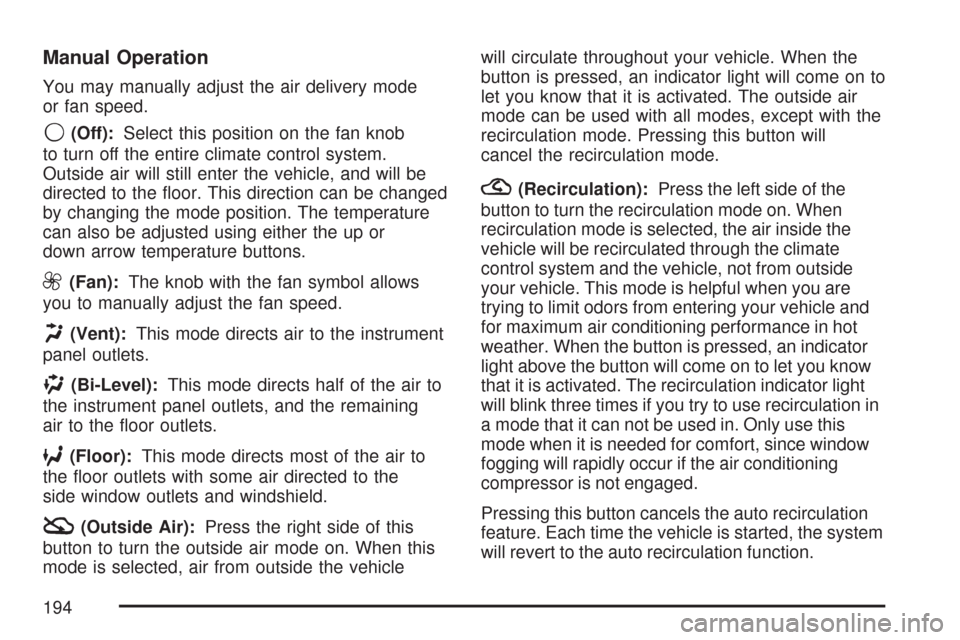
You may manually adjust the air delivery mode
or fan speed.
9(Off):Select this position on the fan knob
to turn off the entire climate control system.
Outside air will still enter the vehicle, and will be
directed to the oor. This direction can be changed
by changing the mode position. The temperature
can also be adjusted using either the up or
down arrow temperature buttons.
9(Fan):The knob with the fan symbol allows
you to manually adjust the fan speed.
H(Vent):This mode directs air to the instrument
panel outlets.
)(Bi-Level):This mode directs half of the air to
the instrument panel outlets, and the remaining
air to the oor outlets.
6(Floor):This mode directs most of the air to
the oor outlets with some air directed to the
side window outlets and windshield.
:(Outside Air):Press the right side of this
button to turn the outside air mode on. When this
mode is selected, air from outside the vehiclewill circulate throughout your vehicle. When the
button is pressed, an indicator light will come on to
let you know that it is activated. The outside air
mode can be used with all modes, except with the
recirculation mode. Pressing this button will
cancel the recirculation mode.
?(Recirculation):Press the left side of the
button to turn the recirculation mode on. When
recirculation mode is selected, the air inside the
vehicle will be recirculated through the climate
control system and the vehicle, not from outside
your vehicle. This mode is helpful when you are
trying to limit odors from entering your vehicle and
for maximum air conditioning performance in hot
weather. When the button is pressed, an indicator
light above the button will come on to let you know
that it is activated. The recirculation indicator light
will blink three times if you try to use recirculation in
a mode that it can not be used in. Only use this
mode when it is needed for comfort, since window
fogging will rapidly occur if the air conditioning
compressor is not engaged.
Pressing this button cancels the auto recirculation
feature. Each time the vehicle is started, the system
will revert to the auto recirculation function.
194
Page 195 of 510
If you select recirculation while in defrost, defog or
oor, the light on the button will ash three times
and go out to let you know this is not allowed.
This is to prevent window fogging.
When the weather is cool or damp, operating the
system in recirculation for extended periods of
time may cause fogging of the vehicle’s windows.
To clear the fog, select either defog or defrost.
Make sure the air conditioning is on. You will want
to allow the air conditioning to run automatically
to help dehumidify the air.
xw(Temperature Control):Press the up
and down arrows to increase or decrease the
temperature inside the vehicle.
#(Air Conditioning):Press this button to
turn the air conditioning compressor on and off.
A light above the button will illuminate when the
air conditioning is on.
When air conditioning is selected or in AUTO
mode, the system will run the air conditioning
automatically to cool and dehumidify the air
entering the vehicle.On hot days, open the windows to let hot inside
air escape; then close them. This helps to reduce
the time it takes for your vehicle to cool down.
It also helps the system to operate more efficiently.
On cool, but sunny days while using manual
operation of the automatic system, use bi-level to
deliver warm air to the oor and cooler air to
the instrument panel outlets. To warm or cool the
air delivered, press the temperature buttons to
the desired setting.
In AUTO mode the system will cool and dehumidify
the air inside the vehicle. Also while in AUTO
mode, the system will maximize its performance
by using recirculation as necessary.
On cold days when using manual operation of the
automatic system, choose oor mode to deliver
air to the oor outlets. To warm or cool the
air delivered, push the temperature buttons to
the desired setting.
If you want to use the automatic mode, turn the
knob to AUTO and adjust the temperature by
pressing the temperature buttons.
195
Page 218 of 510
Driver Information Center (DIC)
The Driver Information Center (DIC) provides
the following:
A way to personalize your vehicle
Trip information
Warning messages
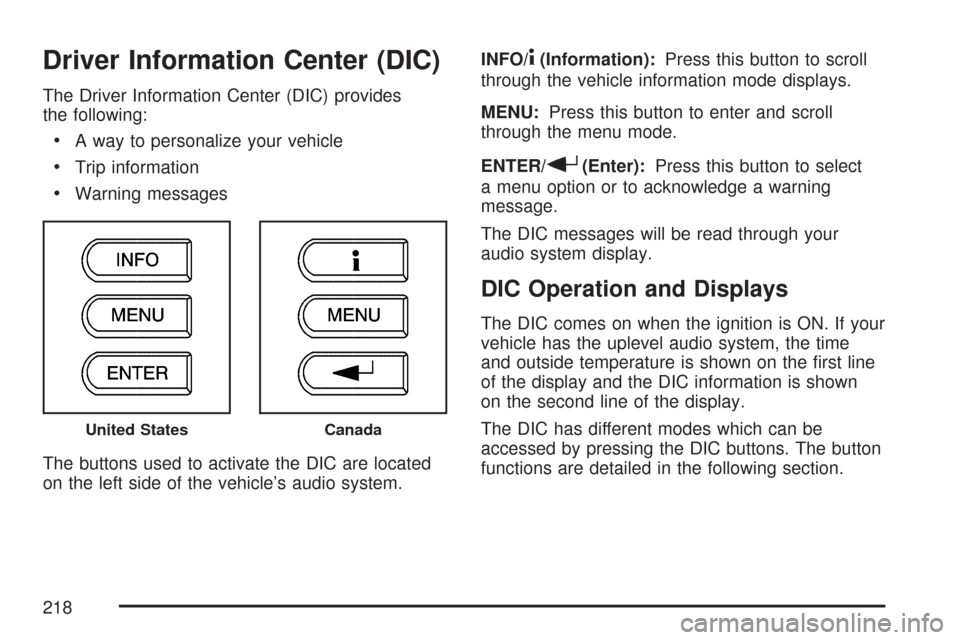
The buttons used to activate the DIC are located
on the left side of the vehicle’s audio system.INFO/
4(Information):Press this button to scroll
through the vehicle information mode displays.
MENU:Press this button to enter and scroll
through the menu mode.
ENTER/
r(Enter):Press this button to select
a menu option or to acknowledge a warning
message.
The DIC messages will be read through your
audio system display.
DIC Operation and Displays
The DIC comes on when the ignition is ON. If your
vehicle has the uplevel audio system, the time
and outside temperature is shown on the rst line
of the display and the DIC information is shown
on the second line of the display.
The DIC has different modes which can be
accessed by pressing the DIC buttons. The button
functions are detailed in the following section.
United StatesCanada
218
Page 222 of 510
DIC Warnings and Messages
These messages appear if there is a problem
detected in one of your vehicle’s systems.
A message will clear when that condition is no
longer present on the vehicle. To acknowledge a
message and clear it from the display, press
any of the three DIC buttons. If the condition is
still present, the warning message will come back
on the next time the vehicle is turned off and
back on. With most messages, a warning chime
sounds when the message displays. Your
vehicle may have other warning messages.
AUTO (Automatic) LIGHTS OFF:This message
displays if the automatic headlamp system is
disabled with the headlamp switch.
AUTO (Automatic) LIGHTS ON:This message
displays if the automatic headlamp system is
enabled with the headlamp switch.BRAKE FLUID:This message displays to
inform the driver that the brake uid level is low
while the ignition is in ON. The brake system
warning light on the instrument panel cluster
also comes on. SeeBrake System Warning Light
on page 206for more information. Have the
brake system serviced by your dealer/retailer
as soon as possible.
CHANGE OIL SOON:This message displays
when the life of the engine oil has expired and it
should be changed.
When you acknowledge the CHANGE OIL SOON
message by clearing it from the display, you still
must reset the engine oil life system separately.
SeeEngine Oil Life System on page 362,Engine
Oil on page 359, andScheduled Maintenance
on page 460for more information.
222
Page 226 of 510
UNLOCK HORN:If your vehicle has Remote
Keyless Entry (RKE), this option which allows
the vehicle’s horn to chirp every time the unlock
button on the RKE transmitter is pressed, can
be enabled or disabled. When UNLOCK HORN
appears on the display, press the enter button
to move between ON and OFF. When you have
made your choice, press the MENU button to
record your selection. The initial setting from
the factory is OFF.
LIGHT FLASH:If your vehicle has Remote
Keyless Entry (RKE), this option which allows
the vehicle’s exterior perimeter lighting to
ash every time the lock, unlock, or trunk release
buttons on the RKE transmitter are pressed,
can be enabled or disabled. When LIGHT FLASH
appears on the display, press the enter button
to move between OFF and ON. When you have
made your choice, press the MENU button to
record your selection. The initial setting from
the factory is ON.DELAY LOCK:The delayed locking option, which
delays the actual locking of the vehicle, can be
enabled or disabled. When DELAY LOCK appears
on the display, press the enter button to move
between OFF and ON. When you have made your
choice, press the MENU button to record your
selection. The initial setting from the factory is ON.
AUTO UNLK (Unlock):The automatic door
unlocking option, which allows the vehicle
to automatically unlock certain doors can
be enabled or disabled. When AUTO UNLK
appears on the display, press the enter button
to move between ALL, DRIVER, or NONE.
When you have made your choice, press and
the MENU button to record your selection.
The initial setting from the factory is ALL.
SeeProgrammable Automatic Door Locks
on page 106for more information.
226