2007 CHEVROLET MALIBU buttons
[x] Cancel search: buttonsPage 268 of 510
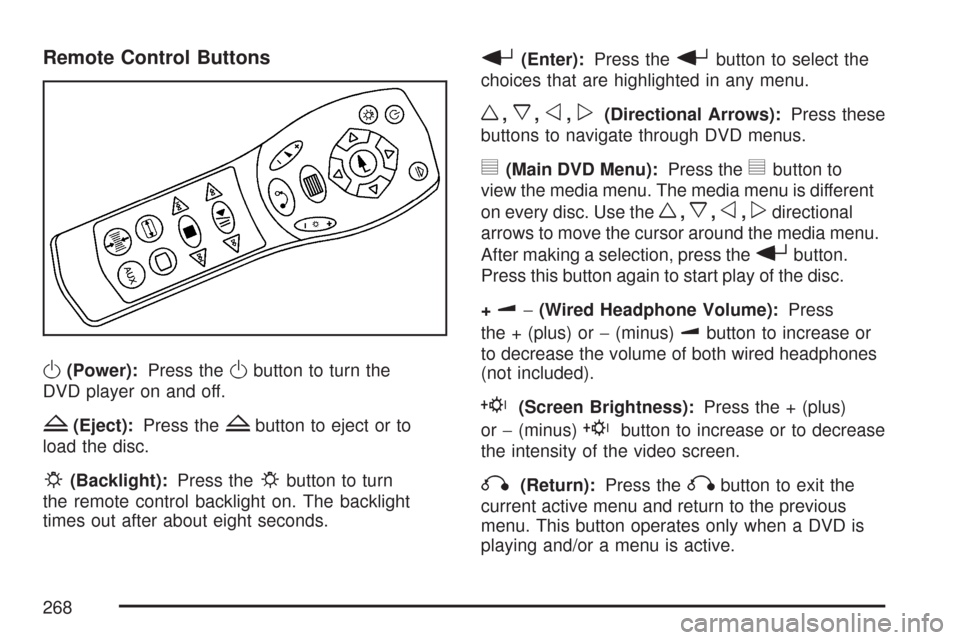
Remote Control Buttons
O(Power):Press theObutton to turn the
DVD player on and off.
Z(Eject):Press theZbutton to eject or to
load the disc.
P(Backlight):Press thePbutton to turn
the remote control backlight on. The backlight
times out after about eight seconds.
r(Enter):Press therbutton to select the
choices that are highlighted in any menu.
w,x,o,p(Directional Arrows):Press these
buttons to navigate through DVD menus.
y(Main DVD Menu):Press theybutton to
view the media menu. The media menu is different
on every disc. Use the
w,x,o,pdirectional
arrows to move the cursor around the media menu.
After making a selection, press the
rbutton.
Press this button again to start play of the disc.
+
u−(Wired Headphone Volume):Press
the + (plus) or−(minus)
ubutton to increase or
to decrease the volume of both wired headphones
(not included).
E(Screen Brightness):Press the + (plus)
or−(minus)
Ebutton to increase or to decrease
the intensity of the video screen.
q(Return):Press theqbutton to exit the
current active menu and return to the previous
menu. This button operates only when a DVD is
playing and/or a menu is active.
268
Page 270 of 510
z(Display):Press thezbutton to display the
title, chapter, the time of a DVD or track number,
the time of a CD, and the menu functions on
the video screen. Press the
zbutton again to
turn off the display item.
}(Audio Compression):DVDs have a
wide dynamic audio range. Audio compression
can be used to reduce the difference between
soft and loud selections of the DVD. Press
the
}button to switch the audio compression
on and off.
AUX (Auxiliary):Press this button to switch the
system between the DVD player and an auxiliary
source.
Setup Menu
To access the setup menu, ensure that a DVD
is in the player and the video is stopped. Press
the
z(display) button. Once the menu is
activated, use the
w,x,o,p(directional)
arrows and the
r(enter) button to navigate
the screen.
Picture Preferences
The USER PREFERENCE SETTINGS menu
allows the default viewing preferences to be
modied. Use the remote control up and down
arrow buttons to select. The movie can stop while
selections are being made.
TV Shape:The default video screen display
can be selected from 4:3 letterbox, 4:3 panscan,
or 16:9.
Black Level Shift:The default black level to the
video screen can be adjusted.
Video Shift:The default position of the video on
the display can be adjusted.
Color Settings:The default color setting of the
video screen can be selected from Personal, Rich,
Natural, Soft, or Animation.
Personal Color:The default setting for
Saturation, Brightness, and Contrast can be
adjusted.
270
Page 271 of 510
Sound Preferences
The USER PREFERENCE SETTINGS menu
allows the default sound preferences to be
modied. Use the remote control up and down
arrow buttons to select. The movie can stop
while selections are being made.
Analog Output:The default sound output can
be selected from Stereo or Dolby
®surround.
Dynamic Compression:The default setting
can be selected as On or Off.
Karaoke Vocal:The default setting can be
selected as On or Off.
Language Preferences
The USER PREFERENCE SETTINGS menu
allows the default language preferences to be
modied. Use the remote control up and down
arrow buttons to select. The movie can stop
while selections are being made.
Audio Language:The default DVD playback
audio language can be selected from various
languages. The audio output is dependent
on whether a DVD supports the selected language.Subtitle:The default DVD subtitle language can
be selected from English, Spanish, or French.
The subtitle language is dependent on whether
the DVD supports the selected language.
Menu:The default on-screen display language
can be selected from various languages.
Features
The USER PREFERENCE SETTINGS menu
allows you to modify the default feature
preferences from the display. Use the remote
control up and down arrow buttons to select.
The movie can stop while selections are
being made.
Status Window:The status window can be
selected as On or Off. The status window
provides disc type, elapsed time, and number
of titles information while the menu bar is
displayed or the DVD is stopped.
Help Text:Help text can be selected as On
or Off. A help text bar is provided at the bottom
of the screen describing the functions of an
item selected from any of the user menus.
271
Page 272 of 510
Menu Bar
The menu bar can be displayed across the top of
the screen by pressing the
z(display) button
on the remote control. Selecting icons from
the menu bar allows adjustments to the audio and
video settings. Use the remote control left and
right arrow buttons to scroll through the menu bar.
A description of the highlighted icon appears at
the bottom of the screen. Use the down arrow to
display the options for the highlighted icon.
The movie can stop playing while selections are
being made.
Current Subtitle Language:The subtitle
language can be selected as Off, English,
Spanish, or French. The actual subtitle language
is dependent on whether a DVD supports the
selected language.
Current Audio Language:The audio language
can be selected as Off, English, Spanish, or
French. The actual audio language is dependent
on whether a DVD supports the selected language.
Smart Color:This color setting can be selected
without changing the default from the color
settings menu.Sound Mode:This analog output can be changed
without changing the default from the analog
output menu.
Frame-by-Frame:The DVD pauses and can
be viewed frame-by-frame, in forward or reverse,
by using the remote control arrow buttons.
Press
s(play) to resume play of the DVD.
DVD audio does not be available during selection.
Slow Motion:The DVD pauses and can be viewed
in slow motion, at various speeds, in forward or
reverse, by using the remote control arrow buttons.
Press
s(play) to resume play of the DVD.
DVD audio is not available during selection.
Scan Speeds:The DVD can be viewed in fast
motion, at various speeds, in forward or reverse,
by using the remote control arrow buttons.
Press
s(play) to resume play of the DVD.
DVD audio is not available during selection.
Enlarge Picture:The DVD pauses and the frame
can be enlarged by using the remote control arrow
key buttons. Pressing the
r(enter) button on the
remote control allows panning of the frame using
the remote control arrow buttons. Press
s(play)
to resume play of the DVD. DVD audio is not
available during selection.
272
Page 273 of 510
Title:Move between DVD titles by using the
remote control arrow buttons.
Chapter:Move between DVD chapters by
using the remote control arrow buttons.
Time Search:The user can jump to different
areas of a DVD by using the remote control
arrow and
r(enter) buttons to select a
specic time position.
Favorite Track Selection (FTS):You can
program the unit to play only your favorite track
selections from a DVD or Audio CD. For a
DVD, FTS is accessed from the Menu bar.
For a CD, the FTS screen displays immediately
when the CD is inserted. From the screen, choose
the tracks on the CD that you wish to store,
using the remote control right and left arrows and
the
rbutton to select. The player remembers
the selections and each time the CD is inserted
in the player, only those tracks are played, if FTS
is turned on. The player can remember selections
for up to 50 discs. To remove FTS for a disc,
the disc must be in the player and the highlighted
tracks must be de-selected. Use the right and
left arrow buttons and the
rbutton or select
CLEAR ALL on the display.Not all DVDs support all of the feature defaults
in the setup menus. In the event a feature is
not supported, defaults are provided by the
DVD media.
Exit the setup menu by pressing the
q(return)
button on the remote control. If changes are made
to the setup menu, the DVD resumes play from
the beginning.
Battery Replacement
To change the remote control batteries, do the
following:
1. Unclip the battery door located on the back
of the remote control.
2. Replace the two AA batteries. Make sure that
they are installed correctly, using the diagram
on the inside of the battery compartment.
3. Close the battery door.
If the remote control is to be stored for a long
period of time, remove the batteries and keep
them in a cool, dry place.
273
Page 275 of 510
Problem Recommended Action
How do I get subtitles
on or off?Press the display button
on the remote control to
go to the DVDs main
menu. Then follow the
screen prompts.
After stopping the player,
I push the play button
but sometimes the DVD
starts where I left off,
and sometimes at the
beginning.Press the stop button on
the remote control to
resume where the DVD
left off. Press the stop
button twice to start the
DVD at the beginning.
If the power is off and the
DVD is still in the player,
press the play button.
The DVD is playing but
there is no picture or
sound. The auxiliary
source is running but
there is no picture
or sound.Press and release the
AUX button on the
remote control or the
SRCE and play buttons
on the DVD player to
get to auxiliary input.
Check to make sure
that the auxiliary source
is connected to the
inputs properly.
The audio or video
skips or jumps.The DVD could be
dirty or scratched.
Try cleaning the DVD.Problem Recommended Action
When I return to the
DVD from the system
menu, sometimes it plays
from the beginning and
sometimes from where
it left off.If the stop button was
pressed once, it resumes
play from where it left off.
If the stop button was
pressed twice, it starts at
the beginning of the DVD.
However, if a change
was made to the menu
the DVD starts from
where it left off, even if
the stop button was only
pressed once.
The fast forward, reverse,
previous, and next
functions do not work.Some commands that
do one thing for DVDs
does not always work or
perform the same function
for audio CDs or games.
These functions can
also be disabled when
the DVD is playing the
copyright information
or the previews.
275
Page 277 of 510
DVD Messages
The following errors can display on the
video screen:
Disc Format Error:This message displays if a
disc is inserted upside down, if the disc is not
readable, or if the disc format is not compatible.
Disc Play Error:This message displays if the
mechanism cannot play the disc. Scratched or
damaged discs can cause this error.
Region Code Error:This message displays if
the region code of the DVD is not compatible
with the region code of the DVD player.
Load/Eject Error:This message displays if
the disc is not properly loaded or ejected.
Disc Not Present:This message displays when
the play or the stop button is pressed without
a disc in the player.
DVD Distortion
There could be an experience with video distortion
when operating cellular phones, scanners,
CB radios, Global Position Systems (GPS)*,
two-way radios, mobile fax, or walkie talkies.
It might be necessary to turn off the DVD player
when operating one of these devices in or near
the vehicle.
*Excludes the OnStar
®System.
Cleaning the DVD Player
When cleaning the outside DVD faceplate and
buttons, use only a clean cloth dampened
with clean water.
Cleaning the Video Screen
When cleaning the video screen, use only
a clean cloth dampened with clean water.
Use care when directly touching or cleaning
the screen, as damage could result.
277
Page 280 of 510
Rear Seat Audio (RSA)
(With Entertainment System)
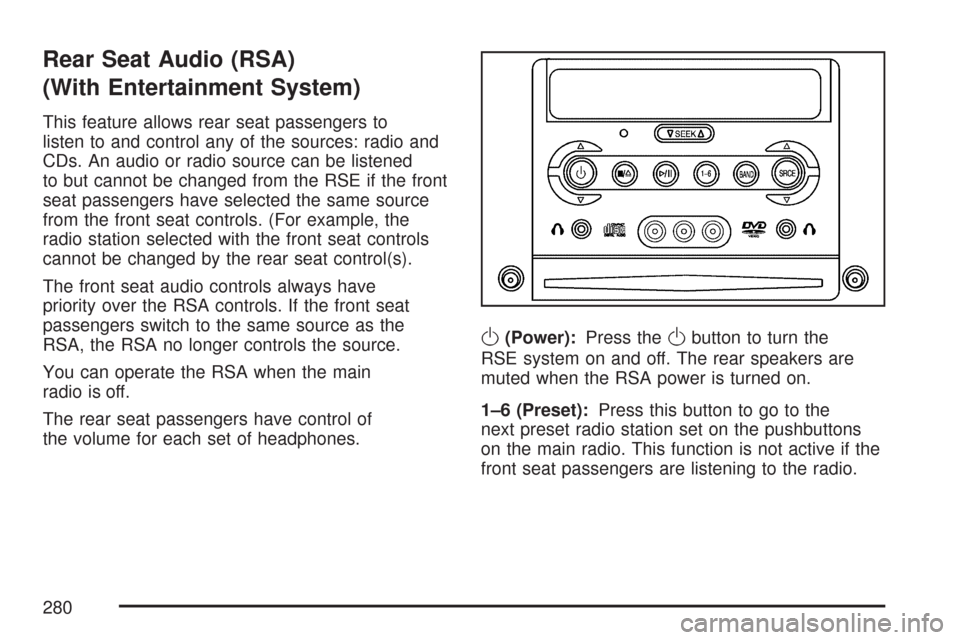
This feature allows rear seat passengers to
listen to and control any of the sources: radio and
CDs. An audio or radio source can be listened
to but cannot be changed from the RSE if the front
seat passengers have selected the same source
from the front seat controls. (For example, the
radio station selected with the front seat controls
cannot be changed by the rear seat control(s).
The front seat audio controls always have
priority over the RSA controls. If the front seat
passengers switch to the same source as the
RSA, the RSA no longer controls the source.
You can operate the RSA when the main
radio is off.
The rear seat passengers have control of
the volume for each set of headphones.
O(Power):Press theObutton to turn the
RSE system on and off. The rear speakers are
muted when the RSA power is turned on.
1–6 (Preset):Press this button to go to the
next preset radio station set on the pushbuttons
on the main radio. This function is not active if the
front seat passengers are listening to the radio.
280