2007 CHEVROLET MALIBU buttons
[x] Cancel search: buttonsPage 231 of 510
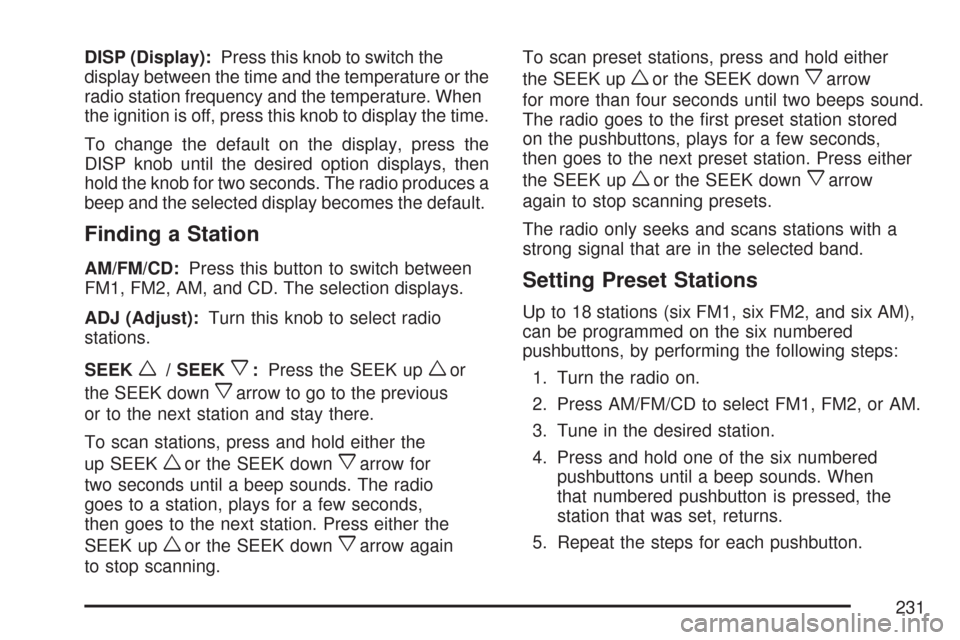
DISP (Display):Press this knob to switch the
display between the time and the temperature or the
radio station frequency and the temperature. When
the ignition is off, press this knob to display the time.
To change the default on the display, press the
DISP knob until the desired option displays, then
hold the knob for two seconds. The radio produces a
beep and the selected display becomes the default.
Finding a Station
AM/FM/CD:Press this button to switch between
FM1, FM2, AM, and CD. The selection displays.
ADJ (Adjust):Turn this knob to select radio
stations.
SEEK
w/ SEEKx:Press the SEEK upwor
the SEEK down
xarrow to go to the previous
or to the next station and stay there.
To scan stations, press and hold either the
up SEEK
wor the SEEK downxarrow for
two seconds until a beep sounds. The radio
goes to a station, plays for a few seconds,
then goes to the next station. Press either the
SEEK up
wor the SEEK downxarrow again
to stop scanning.To scan preset stations, press and hold either
the SEEK up
wor the SEEK downxarrow
for more than four seconds until two beeps sound.
The radio goes to the rst preset station stored
on the pushbuttons, plays for a few seconds,
then goes to the next preset station. Press either
the SEEK up
wor the SEEK downxarrow
again to stop scanning presets.
The radio only seeks and scans stations with a
strong signal that are in the selected band.
Setting Preset Stations
Up to 18 stations (six FM1, six FM2, and six AM),
can be programmed on the six numbered
pushbuttons, by performing the following steps:
1. Turn the radio on.
2. Press AM/FM/CD to select FM1, FM2, or AM.
3. Tune in the desired station.
4. Press and hold one of the six numbered
pushbuttons until a beep sounds. When
that numbered pushbutton is pressed, the
station that was set, returns.
5. Repeat the steps for each pushbutton.
231
Page 238 of 510
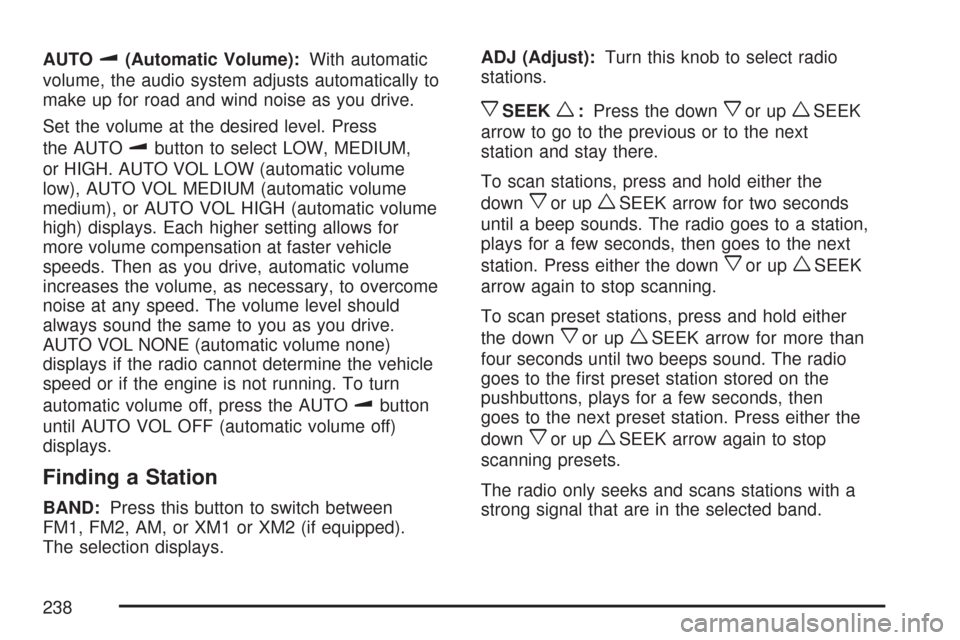
AUTOu(Automatic Volume):With automatic
volume, the audio system adjusts automatically to
make up for road and wind noise as you drive.
Set the volume at the desired level. Press
the AUTO
ubutton to select LOW, MEDIUM,
or HIGH. AUTO VOL LOW (automatic volume
low), AUTO VOL MEDIUM (automatic volume
medium), or AUTO VOL HIGH (automatic volume
high) displays. Each higher setting allows for
more volume compensation at faster vehicle
speeds. Then as you drive, automatic volume
increases the volume, as necessary, to overcome
noise at any speed. The volume level should
always sound the same to you as you drive.
AUTO VOL NONE (automatic volume none)
displays if the radio cannot determine the vehicle
speed or if the engine is not running. To turn
automatic volume off, press the AUTO
ubutton
until AUTO VOL OFF (automatic volume off)
displays.
Finding a Station
BAND:Press this button to switch between
FM1, FM2, AM, or XM1 or XM2 (if equipped).
The selection displays.ADJ (Adjust):Turn this knob to select radio
stations.
xSEEKw:Press the downxor upwSEEK
arrow to go to the previous or to the next
station and stay there.
To scan stations, press and hold either the
down
xor upwSEEK arrow for two seconds
until a beep sounds. The radio goes to a station,
plays for a few seconds, then goes to the next
station. Press either the down
xor upwSEEK
arrow again to stop scanning.
To scan preset stations, press and hold either
the down
xor upwSEEK arrow for more than
four seconds until two beeps sound. The radio
goes to the rst preset station stored on the
pushbuttons, plays for a few seconds, then
goes to the next preset station. Press either the
down
xor upwSEEK arrow again to stop
scanning presets.
The radio only seeks and scans stations with a
strong signal that are in the selected band.
238
Page 239 of 510
Setting Preset Stations
Up to 30 stations (six FM1, six FM2, and six AM,
six XM1 and six XM2 (if equipped)), can be
programmed on the six numbered pushbuttons,
by performing the following steps:
1. Turn the radio on.
2. Press BAND to select FM1, FM2, AM,
or XM1 or XM2.
3. Tune in the desired station.
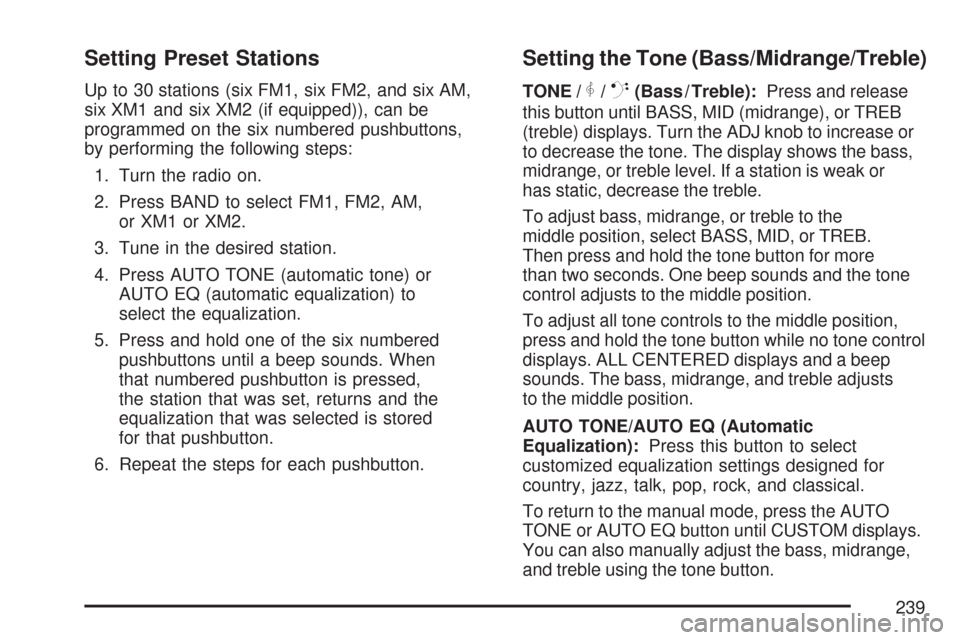
4. Press AUTO TONE (automatic tone) or
AUTO EQ (automatic equalization) to
select the equalization.
5. Press and hold one of the six numbered
pushbuttons until a beep sounds. When
that numbered pushbutton is pressed,
the station that was set, returns and the
equalization that was selected is stored
for that pushbutton.
6. Repeat the steps for each pushbutton.
Setting the Tone (Bass/Midrange/Treble)
TONE /P/Q(Bass / Treble):Press and release
this button until BASS, MID (midrange), or TREB
(treble) displays. Turn the ADJ knob to increase or
to decrease the tone. The display shows the bass,
midrange, or treble level. If a station is weak or
has static, decrease the treble.
To adjust bass, midrange, or treble to the
middle position, select BASS, MID, or TREB.
Then press and hold the tone button for more
than two seconds. One beep sounds and the tone
control adjusts to the middle position.
To adjust all tone controls to the middle position,
press and hold the tone button while no tone control
displays. ALL CENTERED displays and a beep
sounds. The bass, midrange, and treble adjusts
to the middle position.
AUTO TONE/AUTO EQ (Automatic
Equalization):Press this button to select
customized equalization settings designed for
country, jazz, talk, pop, rock, and classical.
To return to the manual mode, press the AUTO
TONE or AUTO EQ button until CUSTOM displays.
You can also manually adjust the bass, midrange,
and treble using the tone button.
239
Page 248 of 510
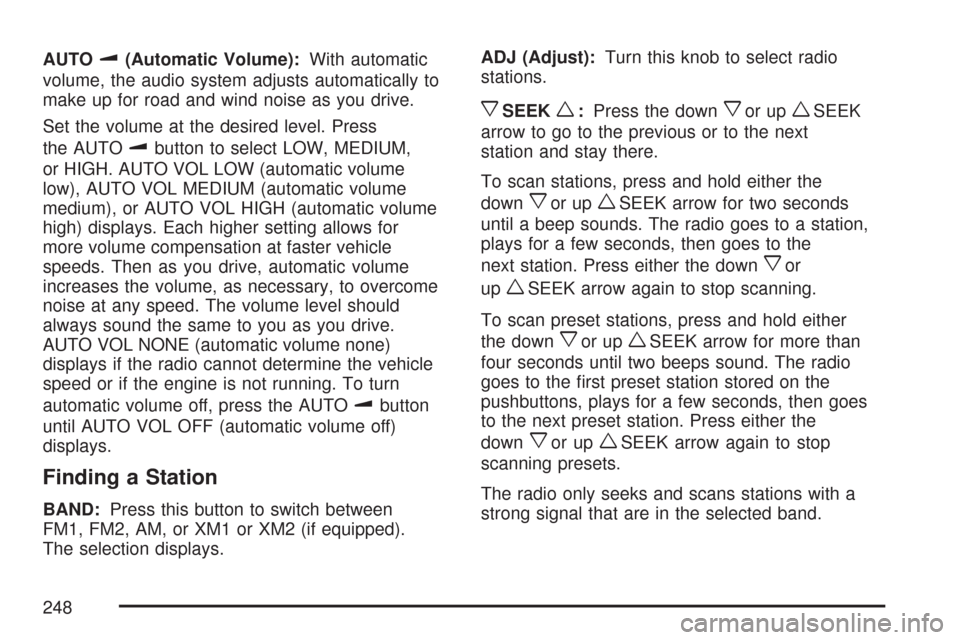
AUTOu(Automatic Volume):With automatic
volume, the audio system adjusts automatically to
make up for road and wind noise as you drive.
Set the volume at the desired level. Press
the AUTO
ubutton to select LOW, MEDIUM,
or HIGH. AUTO VOL LOW (automatic volume
low), AUTO VOL MEDIUM (automatic volume
medium), or AUTO VOL HIGH (automatic volume
high) displays. Each higher setting allows for
more volume compensation at faster vehicle
speeds. Then as you drive, automatic volume
increases the volume, as necessary, to overcome
noise at any speed. The volume level should
always sound the same to you as you drive.
AUTO VOL NONE (automatic volume none)
displays if the radio cannot determine the vehicle
speed or if the engine is not running. To turn
automatic volume off, press the AUTO
ubutton
until AUTO VOL OFF (automatic volume off)
displays.
Finding a Station
BAND:Press this button to switch between
FM1, FM2, AM, or XM1 or XM2 (if equipped).
The selection displays.ADJ (Adjust):Turn this knob to select radio
stations.
xSEEKw:Press the downxor upwSEEK
arrow to go to the previous or to the next
station and stay there.
To scan stations, press and hold either the
down
xor upwSEEK arrow for two seconds
until a beep sounds. The radio goes to a station,
plays for a few seconds, then goes to the
next station. Press either the down
xor
up
wSEEK arrow again to stop scanning.
To scan preset stations, press and hold either
the down
xor upwSEEK arrow for more than
four seconds until two beeps sound. The radio
goes to the rst preset station stored on the
pushbuttons, plays for a few seconds, then goes
to the next preset station. Press either the
down
xor upwSEEK arrow again to stop
scanning presets.
The radio only seeks and scans stations with a
strong signal that are in the selected band.
248
Page 249 of 510
Setting Preset Stations
Up to 30 stations (six FM1, six FM2, and six AM,
six XM1 and six XM2 (if equipped)), can be
programmed on the six numbered pushbuttons,
by performing the following steps:
1. Turn the radio on.
2. Press BAND to select FM1, FM2, AM,
or XM1 or XM2.
3. Tune in the desired station.
4. Press AUTO TONE (automatic tone) or
AUTO EQ (automatic equalization) to
select the equalization.
5. Press and hold one of the six numbered
pushbuttons until a beep sounds. When
that numbered pushbutton is pressed,
the station that was set, returns and the
equalization that was selected is stored
for that pushbutton.
6. Repeat the steps for each pushbutton.
Setting the Tone (Bass/Midrange/Treble)
TONE /P/Q(Bass / Treble):Press and release
this button until BASS, MID (midrange), or TREB
(treble) displays. Turn the ADJ knob to increase orto decrease the tone. The display shows the bass,
mid, or treble level. If a station is weak or has static,
decrease the treble.
To adjust bass, midrange, or treble to the
middle position, select BASS, MID, or TREB.
Then press and hold the tone button for more
than two seconds. The display level adjusts to
the middle position and a beep sounds.
To adjust all tone controls to the middle position,
press and hold the tone button when no tone
control displays. ALL CENTERED displays and
a beep sounds.
AUTO TONE/AUTO EQ (Automatic
Equalization):Press this button to select
customized equalization settings designed for
country, jazz, talk, pop, rock, and classical.
The equalization setting last chosen displays when
you rst press this button. Each time you press
this button, another equalization setting displays
and automatic tone or automatic equalization
switches to that preset equalization settings.
To return to the manual mode, press the
AUTO TONE or AUTO EQ button until
CUSTOM displays. Then manually adjust the
bass, midrange, and treble using the tone button.
249
Page 263 of 510
Stereo RCA Jacks
The RCA jacks are located on the DVD faceplate
on the oor console. The RCA jacks allow
audio and video signals to be connected from
an auxiliary device such as a camcorder or a video
game unit to the RSE system. The yellow RCA
jack is used for video inputs, the red RCA jack
for right audio inputs, and the white RCA jack
for left audio inputs. The system requires
standard RCA cables, not included, to connect
the auxiliary device to the RCA jacks. Refer to
the manufacturer’s instructions for proper usage.
To use the auxiliary audio and video inputs,
connect an external auxiliary device such as a
camcorder to the RCA jacks and turn on both
the auxiliary device power and the power on the
front of the RSE system. Press the play and
source buttons at the same time or the AUX button
on the remote control to switch to the auxiliary
device. See “DVD Player” and “Remote Control”
later in this section for more information.
Audio Output
Audio from the DVD player or auxiliary devices
can be heard through the following possible
sources:
Wireless Headphones
Vehicle’s Speakers
Wired Headphones (not included)
Only one audio source can be heard through
the vehicles speakers at a time.
The RSE system or an auxiliary device can
be heard through all of the vehicles speakers
when the following occurs:
The RSE system is off
A DVD or auxiliary device is playing
The front audio system is on and the SRCE
button is pressed to enable the RSE system
The headphone symbol appears on the radio
display when the RSE system is on and the
headphone symbol disappears from the
display when it is off.
263
Page 265 of 510
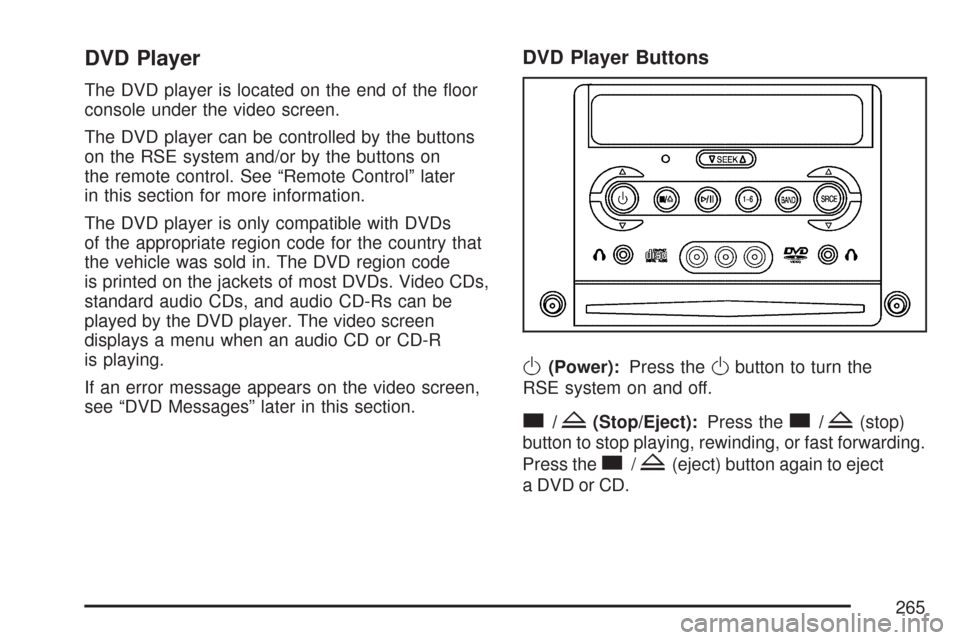
DVD Player
The DVD player is located on the end of the oor
console under the video screen.
The DVD player can be controlled by the buttons
on the RSE system and/or by the buttons on
the remote control. See “Remote Control” later
in this section for more information.
The DVD player is only compatible with DVDs
of the appropriate region code for the country that
the vehicle was sold in. The DVD region code
is printed on the jackets of most DVDs. Video CDs,
standard audio CDs, and audio CD-Rs can be
played by the DVD player. The video screen
displays a menu when an audio CD or CD-R
is playing.
If an error message appears on the video screen,
see “DVD Messages” later in this section.
DVD Player Buttons
O(Power):Press theObutton to turn the
RSE system on and off.
c/Z(Stop/Eject):Press thec/Z(stop)
button to stop playing, rewinding, or fast forwarding.
Press the
c/Z(eject) button again to eject
a DVD or CD.
265
Page 266 of 510
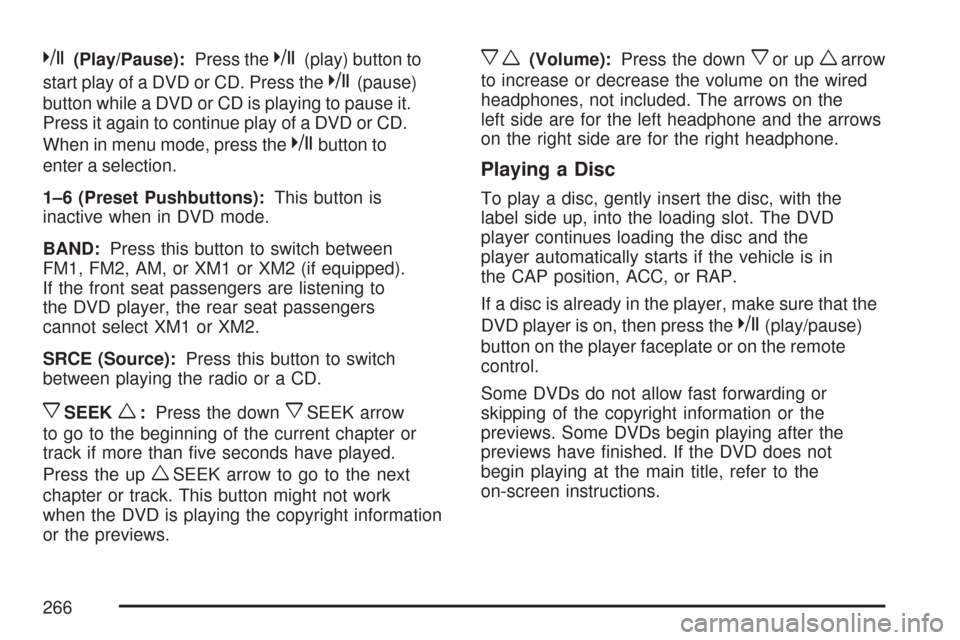
k(Play/Pause):Press thek(play) button to
start play of a DVD or CD. Press the
k(pause)
button while a DVD or CD is playing to pause it.
Press it again to continue play of a DVD or CD.
When in menu mode, press the
kbutton to
enter a selection.
1–6 (Preset Pushbuttons):This button is
inactive when in DVD mode.
BAND:Press this button to switch between
FM1, FM2, AM, or XM1 or XM2 (if equipped).
If the front seat passengers are listening to
the DVD player, the rear seat passengers
cannot select XM1 or XM2.
SRCE (Source):Press this button to switch
between playing the radio or a CD.
xSEEKw:Press the downxSEEK arrow
to go to the beginning of the current chapter or
track if more than ve seconds have played.
Press the up
wSEEK arrow to go to the next
chapter or track. This button might not work
when the DVD is playing the copyright information
or the previews.
xw(Volume):Press the downxor upwarrow
to increase or decrease the volume on the wired
headphones, not included. The arrows on the
left side are for the left headphone and the arrows
on the right side are for the right headphone.
Playing a Disc
To play a disc, gently insert the disc, with the
label side up, into the loading slot. The DVD
player continues loading the disc and the
player automatically starts if the vehicle is in
the CAP position, ACC, or RAP.
If a disc is already in the player, make sure that the
DVD player is on, then press the
k(play/pause)
button on the player faceplate or on the remote
control.
Some DVDs do not allow fast forwarding or
skipping of the copyright information or the
previews. Some DVDs begin playing after the
previews have nished. If the DVD does not
begin playing at the main title, refer to the
on-screen instructions.
266