2006 SUZUKI SX4 Can troubleshooting
[x] Cancel search: Can troubleshootingPage 1009 of 1556

Downloaded from www.Manualslib.com manuals search engine Air Conditioning System: Automatic Type 7B-69
DTC B1541: Back-Up Power Supply Circuit MalfunctionS6RW0D7224018
Wiring Diagram
DTC Detecting Condition and Trouble Area
NOTE
When checking DTC after connecting battery cable, be sure to turn ignition switch from OFF to ON and
from ON to OFF at least once, or DTC B1541 will be detected.
DTC Troubleshooting
12V5V
WHTG20-7 2
31G201 2 3 4 5 6 7 8 9 10 11 12 13 14
15 16 17 18 19 20 21 24 23 22 25 26 27 28 29 30WHT/RED [B]
I7RW01722011-01
[B]: Back-up power supply circuit 2. Main fuse
1. HVAC control module 3. Circuit fuse
DTC Detecting Condition Trouble Area
• Back-up power supply voltage is lower than specified value continuously.
• When connect battery with vehicle and then, turn ignition switch to ON
position for first time.• Battery voltage supply circuit
• HVAC control module
Step Action Yes No
1Was “Air Conditioning System Check” performed?Go to Step 2. Go to “Air Conditioning
System Check”.
2DTC check
1) Turn ignition switch to ON position for 20 sec. or more.
2) Ignition switch turned OFF and connect scan tool to
DLC.
3) Turn ON ignition switch and check DTC.
Is there DTC B1541?Go to Step 3. Intermittent trouble.
Check for intermittent
referring to “Intermittent
and Poor Connection
Inspection in Section
00”.
3Battery voltage supply circuit check
1) Disconnect connector from HVAC control module with
ignition switch turned OFF.
2) Check for proper connection to back-up power supply
circuit terminal of HVAC control module connector.
3) If OK, measure voltage between back-up power supply
circuit terminal of HVAC control module connector and
vehicle body ground.
Is voltage 10 – 14 V?Substitute a known-
good HVAC control
module and recheck.Back-up power supply
circuit is open or
shorted to ground.
Page 1010 of 1556
Downloaded from www.Manualslib.com manuals search engine 7B-70 Air Conditioning System: Automatic Type
DTC B1546: A/C Refrigerant Pressure MalfunctionS6RW0D7224019
DTC Detecting Condition and Trouble Area
DTC Troubleshooting
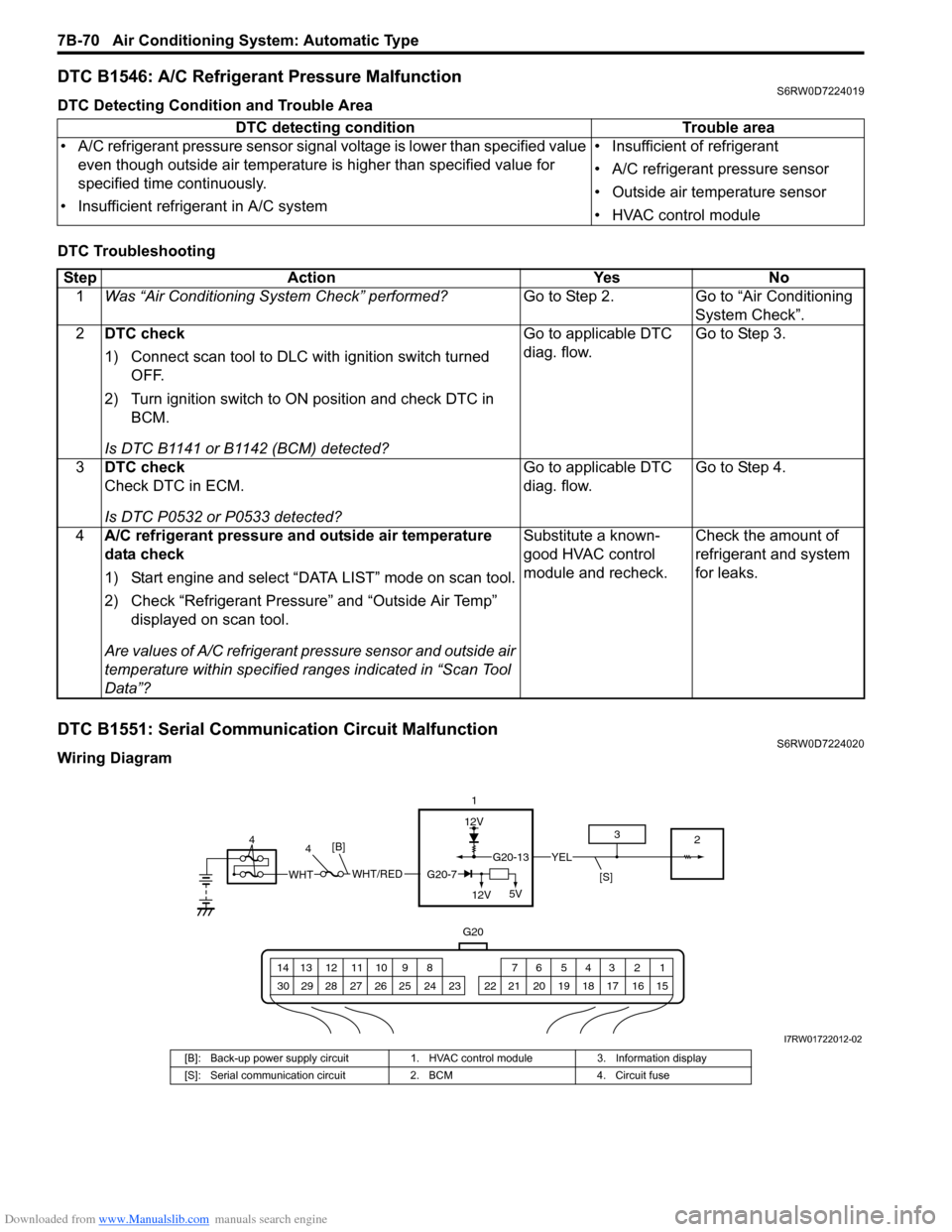
DTC B1551: Serial Communication Circuit MalfunctionS6RW0D7224020
Wiring DiagramDTC detecting condition Trouble area
• A/C refrigerant pressure sensor signal voltage is lower than specified value
even though outside air temperature is higher than specified value for
specified time continuously.
• Insufficient refrigerant in A/C system• Insufficient of refrigerant
• A/C refrigerant pressure sensor
• Outside air temperature sensor
• HVAC control module
Step Action Yes No
1Was “Air Conditioning System Check” performed?Go to Step 2. Go to “Air Conditioning
System Check”.
2DTC check
1) Connect scan tool to DLC with ignition switch turned
OFF.
2) Turn ignition switch to ON position and check DTC in
BCM.
Is DTC B1141 or B1142 (BCM) detected?Go to applicable DTC
diag. flow.Go to Step 3.
3DTC check
Check DTC in ECM.
Is DTC P0532 or P0533 detected?Go to applicable DTC
diag. flow.Go to Step 4.
4A/C refrigerant pressure and outside air temperature
data check
1) Start engine and select “DATA LIST” mode on scan tool.
2) Check “Refrigerant Pressure” and “Outside Air Temp”
displayed on scan tool.
Are values of A/C refrigerant pressure sensor and outside air
temperature within specified ranges indicated in “Scan Tool
Data”?Substitute a known-
good HVAC control
module and recheck.Check the amount of
refrigerant and system
for leaks.
12V
G20
G20-13YEL
1 2 3 4 5 6 7 8 9 10 11 12 13 14
15 16 17 18 19 20 21 24 23 22 25 26 27 28 29 30
1
2 3
[S]WHT/REDWHTG20-7
12V5V
[B]4 4
I7RW01722012-02
[B]: Back-up power supply circuit 1. HVAC control module 3. Information display
[S]: Serial communication circuit 2. BCM 4. Circuit fuse
Page 1012 of 1556
Downloaded from www.Manualslib.com manuals search engine 7B-72 Air Conditioning System: Automatic Type
DTC B1552: HVAC Control Module Check Sum ErrorS6RW0D7224021
DTC Detecting Condition and Trouble Area
DTC Troubleshooting
DTC B1553: CAN Communication Circuit MalfunctionS6RW0D7224022
DTC Detecting Condition and Trouble Area
DTC TroubleshootingDTC detecting condition Trouble area
Data received by HVAC control module from BCM is erroneous continuously. • BCM
• HVAC control module
Step Action Yes No
1Was “Air Conditioning System Check” performed?Go to Step 2. Go to “Air Conditioning
System Check”.
2Serial communication signal data check
1) Connect scan tool to DLC with ignition switch turned
OFF.
2) Start engine and select “DATA LIST” mode on scan tool.
3) Check “Refrigerant Pressure”, “Vehicle Speed”, “Coolant
Temp” and “Outside Air Temp” displayed on scan tool.
Are values of A/C refrigerant pressure sensor and outside air
temperature within specified ranges indicated in “Scan Tool
Data”?Intermittent trouble.
Check for intermittent
referring to “Intermittent
and Poor Connection
Inspection in Section
00”Substitute a known-
good HVAC control
module and recheck.
If DTC is still detected
substitute a known-
good BCM and recheck.
DTC detecting condition Trouble area
HVAC control module receives error code from BCM continuously. • CAN communication circuit
•BCM
•ECM
• Combination meter
• HVAC control module
Step Action Yes No
1Was “Air Conditioning System Check” performed?Go to Step 2. Go to “Air Conditioning
System Check”.
2DTC check
1) Connect scan tool to DLC with ignition switch turned
OFF.
2) Check DTC in BCM.
Is DTC U0073 (No.0073), U0100 (No.0100) and/or U0155
(No.0155) detected?Go to applicable DTC
diag. flow.Substitute a known-
good HVAC control
module and recheck.
Page 1013 of 1556
Downloaded from www.Manualslib.com manuals search engine Air Conditioning System: Automatic Type 7B-73
DTC B1557: VSS Signal FailureS6RW0D7224023
DTC Detecting Condition and Trouble Area
DTC Troubleshooting
DTC B1561: ECT Signal FailureS6RW0D7224024
DTC Detecting Condition and Trouble Area
DTC TroubleshootingDTC detecting condition Trouble area
HVAC control module receives invalid data of VSS signal from BCM. • VSS circuit
• VSS
• HVAC control module
Step Action Yes No
1Was “Air Conditioning System Check” performed?Go to Step 2. Go to “Air Conditioning
System Check”.
2DTC check
1) Connect scan tool to DLC with ignition switch turned
OFF.
2) Check DTC in ECM.
Is DTC P0500 detected?Go to applicable DTC
diag flow.Substitute a known-
good HVAC control
module and recheck.
DTC detecting condition Trouble area
HVAC control module receives invalid data of ECT signal from BCM. • ECT sensor circuit
• ECT sensor
• HVAC control module
Step Action Yes No
1Was “Air Conditioning System Check” performed?Go to Step 2. Go to “Air Conditioning
System Check”.
2DTC check
1) Connect scan tool to DLC with ignition switch turned
OFF.
2) Check DTC in ECM.
Is DTC P0116, P0117 or P0118 detected?Go to applicable DTC
diag. flow.Substitute a known-
good HVAC control
module and recheck.
Page 1014 of 1556
Downloaded from www.Manualslib.com manuals search engine 7B-74 Air Conditioning System: Automatic Type
DTC B1562: Outside Air Temperature Signal FailureS6RW0D7224025
DTC Detecting Condition and Trouble Area
DTC Troubleshooting
DTC B1563: A/C Refrigerant Pressure Signal FailureS6RW0D7224026
DTC Detecting Condition and Trouble Area
DTC TroubleshootingDTC detecting condition Trouble area
HVAC control module receives invalid data of outside air temperature signal
from BCM.• Outside air temperature sensor
circuit
• Outside air temperature sensor
• HVAC control module
Step Action Yes No
1Was “Air Conditioning System Check” performed?Go to Step 2. Go to “Air Conditioning
System Check”.
2DTC check
1) Connect scan tool to DLC with ignition switch turned
OFF.
2) Check DTC in BCM.
Is DTC B1141 or B1142 detected?Go to applicable DTC
diag. flow.Substitute a known-
good HVAC control
module and recheck.
DTC detecting condition Trouble area
HVAC control module receives invalid data of A/C refrigerant pressure signal
from BCM.• A/C refrigerant pressure sensor
circuit
• A/C refrigerant pressure sensor
• HVAC control module
Step Action Yes No
1Was “Air Conditioning System Check” performed?Go to Step 2. Go to “Air Conditioning
System Check”.
2DTC check
1) Connect scan tool to DLC with ignition switch turned
OFF.
2) Check DTC in ECM.
Is DTC P0532 or P0533 detected?Go to applicable DTC
diag. flow.Substitute a known-
good HVAC control
module and recheck.
Page 1015 of 1556
Downloaded from www.Manualslib.com manuals search engine Air Conditioning System: Automatic Type 7B-75
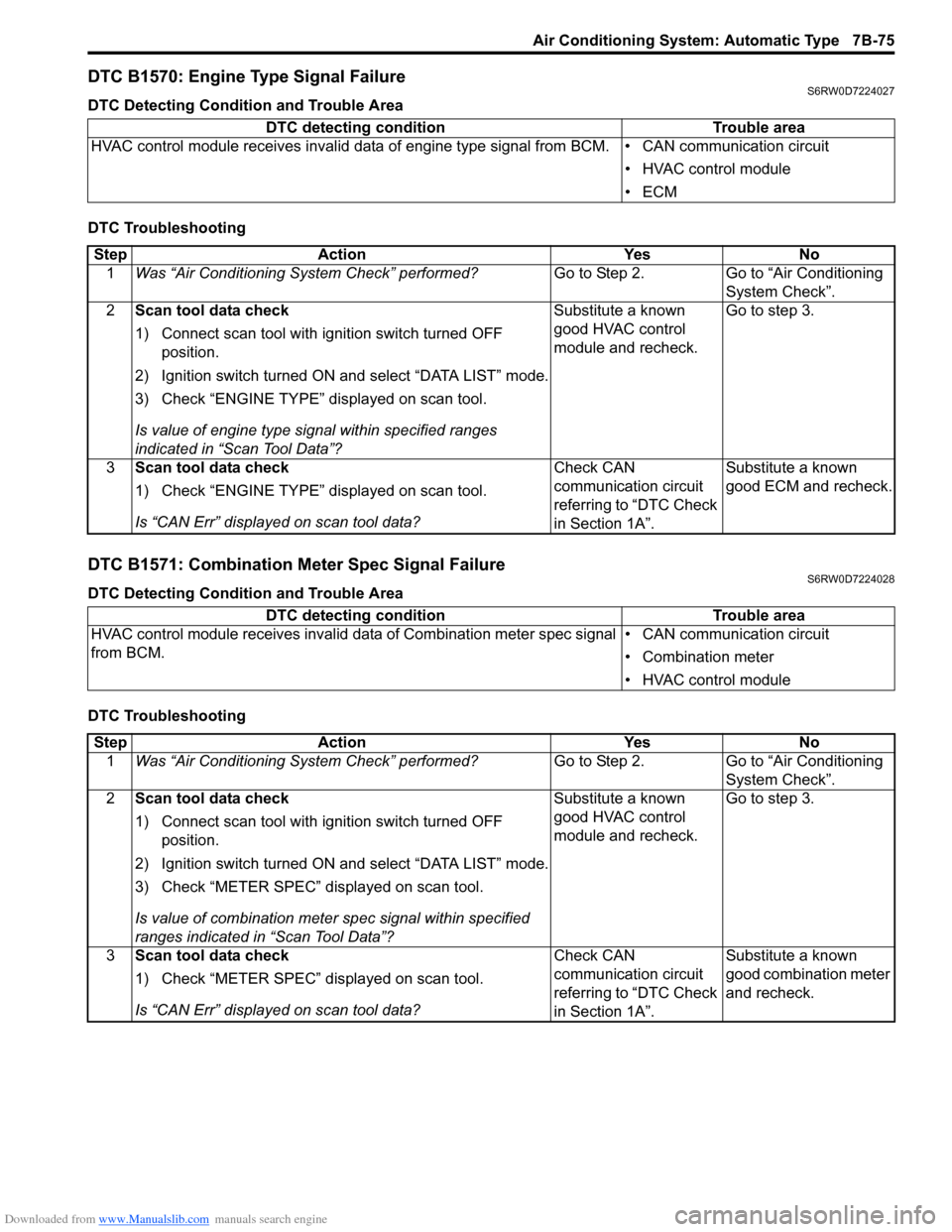
DTC B1570: Engine Type Signal FailureS6RW0D7224027
DTC Detecting Condition and Trouble Area
DTC Troubleshooting
DTC B1571: Combination Meter Spec Signal FailureS6RW0D7224028
DTC Detecting Condition and Trouble Area
DTC TroubleshootingDTC detecting condition Trouble area
HVAC control module receives invalid data of engine type signal from BCM. • CAN communication circuit
• HVAC control module
•ECM
Step Action Yes No
1Was “Air Conditioning System Check” performed?Go to Step 2. Go to “Air Conditioning
System Check”.
2Scan tool data check
1) Connect scan tool with ignition switch turned OFF
position.
2) Ignition switch turned ON and select “DATA LIST” mode.
3) Check “ENGINE TYPE” displayed on scan tool.
Is value of engine type signal within specified ranges
indicated in “Scan Tool Data”?Substitute a known
good HVAC control
module and recheck.Go to step 3.
3Scan tool data check
1) Check “ENGINE TYPE” displayed on scan tool.
Is “CAN Err” displayed on scan tool data?Check CAN
communication circuit
referring to “DTC Check
in Section 1A”.Substitute a known
good ECM and recheck.
DTC detecting condition Trouble area
HVAC control module receives invalid data of Combination meter spec signal
from BCM.• CAN communication circuit
• Combination meter
• HVAC control module
Step Action Yes No
1Was “Air Conditioning System Check” performed?Go to Step 2. Go to “Air Conditioning
System Check”.
2Scan tool data check
1) Connect scan tool with ignition switch turned OFF
position.
2) Ignition switch turned ON and select “DATA LIST” mode.
3) Check “METER SPEC” displayed on scan tool.
Is value of combination meter spec signal within specified
ranges indicated in “Scan Tool Data”?Substitute a known
good HVAC control
module and recheck.Go to step 3.
3Scan tool data check
1) Check “METER SPEC” displayed on scan tool.
Is “CAN Err” displayed on scan tool data?Check CAN
communication circuit
referring to “DTC Check
in Section 1A”.Substitute a known
good combination meter
and recheck.
Page 1063 of 1556
Downloaded from www.Manualslib.com manuals search engine Air Bag System: 8B-24
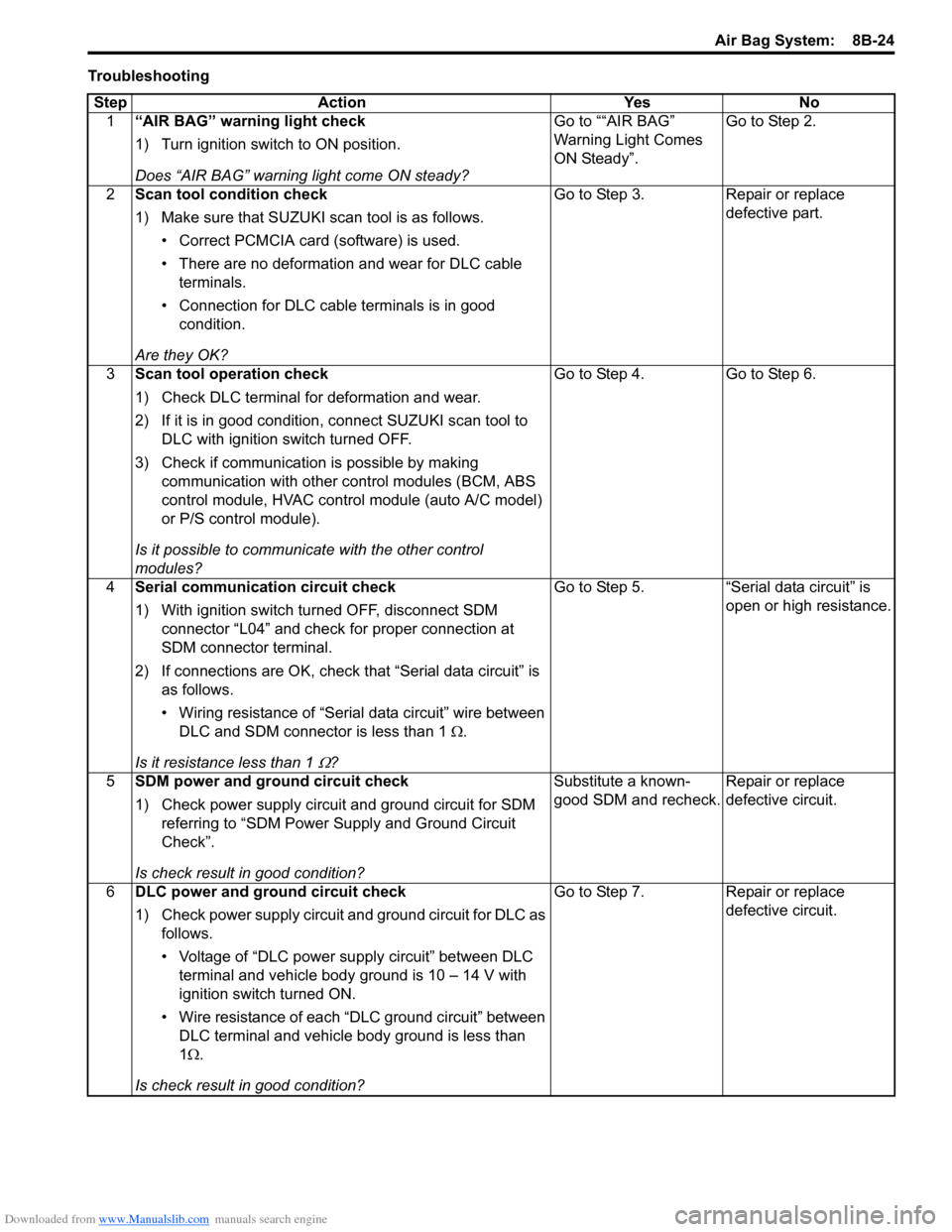
Troubleshooting
Step Action Yes No
1“AIR BAG” warning light check
1) Turn ignition switch to ON position.
Does “AIR BAG” warning light come ON steady?Go to ““AIR BAG”
Warning Light Comes
ON Steady”.Go to Step 2.
2Scan tool condition check
1) Make sure that SUZUKI scan tool is as follows.
• Correct PCMCIA card (software) is used.
• There are no deformation and wear for DLC cable
terminals.
• Connection for DLC cable terminals is in good
condition.
Are they OK?Go to Step 3. Repair or replace
defective part.
3Scan tool operation check
1) Check DLC terminal for deformation and wear.
2) If it is in good condition, connect SUZUKI scan tool to
DLC with ignition switch turned OFF.
3) Check if communication is possible by making
communication with other control modules (BCM, ABS
control module, HVAC control module (auto A/C model)
or P/S control module).
Is it possible to communicate with the other control
modules?Go to Step 4. Go to Step 6.
4Serial communication circuit check
1) With ignition switch turned OFF, disconnect SDM
connector “L04” and check for proper connection at
SDM connector terminal.
2) If connections are OK, check that “Serial data circuit” is
as follows.
• Wiring resistance of “Serial data circuit” wire between
DLC and SDM connector is less than 1 Ω.
Is it resistance less than 1
Ω?Go to Step 5. “Serial data circuit” is
open or high resistance.
5SDM power and ground circuit check
1) Check power supply circuit and ground circuit for SDM
referring to “SDM Power Supply and Ground Circuit
Check”.
Is check result in good condition?Substitute a known-
good SDM and recheck.Repair or replace
defective circuit.
6DLC power and ground circuit check
1) Check power supply circuit and ground circuit for DLC as
follows.
• Voltage of “DLC power supply circuit” between DLC
terminal and vehicle body ground is 10 – 14 V with
ignition switch turned ON.
• Wire resistance of each “DLC ground circuit” between
DLC terminal and vehicle body ground is less than
1Ω.
Is check result in good condition?Go to Step 7. Repair or replace
defective circuit.
Page 1064 of 1556
Downloaded from www.Manualslib.com manuals search engine 8B-25 Air Bag System:
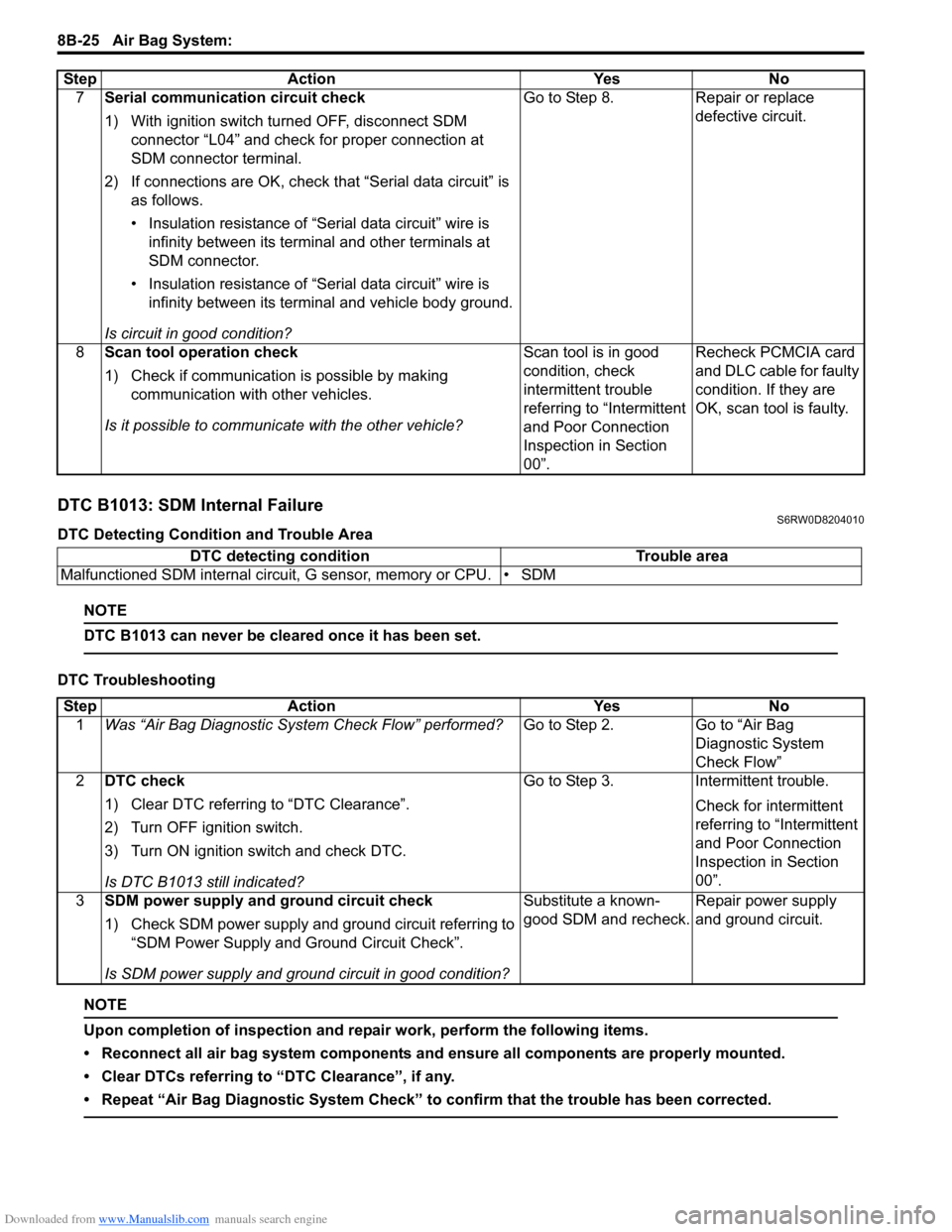
DTC B1013: SDM Internal FailureS6RW0D8204010
DTC Detecting Condition and Trouble Area
NOTE
DTC B1013 can never be cleared once it has been set.
DTC Troubleshooting
NOTE
Upon completion of inspection and repair work, perform the following items.
• Reconnect all air bag system components and ensure all components are properly mounted.
• Clear DTCs referring to “DTC Clearance”, if any.
• Repeat “Air Bag Diagnostic System Check” to confirm that the trouble has been corrected.
7Serial communication circuit check
1) With ignition switch turned OFF, disconnect SDM
connector “L04” and check for proper connection at
SDM connector terminal.
2) If connections are OK, check that “Serial data circuit” is
as follows.
• Insulation resistance of “Serial data circuit” wire is
infinity between its terminal and other terminals at
SDM connector.
• Insulation resistance of “Serial data circuit” wire is
infinity between its terminal and vehicle body ground.
Is circuit in good condition?Go to Step 8. Repair or replace
defective circuit.
8Scan tool operation check
1) Check if communication is possible by making
communication with other vehicles.
Is it possible to communicate with the other vehicle?Scan tool is in good
condition, check
intermittent trouble
referring to “Intermittent
and Poor Connection
Inspection in Section
00”.Recheck PCMCIA card
and DLC cable for faulty
condition. If they are
OK, scan tool is faulty. Step Action Yes No
DTC detecting condition Trouble area
Malfunctioned SDM internal circuit, G sensor, memory or CPU. • SDM
Step Action Yes No
1Was “Air Bag Diagnostic System Check Flow” performed?Go to Step 2. Go to “Air Bag
Diagnostic System
Check Flow”
2DTC check
1) Clear DTC referring to “DTC Clearance”.
2) Turn OFF ignition switch.
3) Turn ON ignition switch and check DTC.
Is DTC B1013 still indicated?Go to Step 3. Intermittent trouble.
Check for intermittent
referring to “Intermittent
and Poor Connection
Inspection in Section
00”.
3SDM power supply and ground circuit check
1) Check SDM power supply and ground circuit referring to
“SDM Power Supply and Ground Circuit Check”.
Is SDM power supply and ground circuit in good condition?Substitute a known-
good SDM and recheck.Repair power supply
and ground circuit.