2006 SUZUKI SX4 Can troubleshooting
[x] Cancel search: Can troubleshootingPage 889 of 1556

Downloaded from www.Manualslib.com manuals search engine Power Assisted Steering System: 6C-9
DTC ClearanceS6RW0D6304004
1) Turn ignition switch to OFF position.
2) Connect SUZUKI scan tool to data link connector
(DLC) (1) located on underside of instrument panel
at driver’s seat side.
Special tool
(A): SUZUKI scan tool3) Turn ignition switch to ON position.
4) Erase DTC according to the instructions displayed
on SUZUKI scan tool. For further details, refer to
operator’s manual for SUZUKI scan tool.
5) After completing the clearance, turn ignition switch to
OFF position and disconnect SUZUKI scan tool from
DLC.
DTC TableS6RW0D6304005
CAUTION!
Be sure to perform the “EPS System Check” before starting troubleshooting corresponding to each
DTC.
(A)
1I5RW0A630004-01
DTC No. Detecting itemDetecting condition
(DTC will set when detecting)Trouble area DTC“EPS”
warning
light
No
CODESNormal — — — —
) C1111Steering torque sensor
(Main) circuit voltageCircuit voltage of sensor main is
more than 4.5 V or less than 0.5
V
• Torque sensor signal
circuit
• Torque sensor
• P/S control module1 driving
cycle1 driving
cycle
)
C1113Steering torque sensor
(Main and Sub) circuit
correlationDifference between steering
torque calculated based on
sensor main signal and steering
torque calculated based on
sensor sub signal is more than
4.9 N⋅m
or
Difference between
instantaneous value and average
value of steering torque
calculated based on sensor main
signal and steering torque
calculated based on sensor sub
signal is more than 2.94 N⋅m1 driving
cycle1 driving
cycle
)
C1115Steering torque sensor
(Sub) circuit voltageCircuit voltage of sensor sub
signal is more than 4.5 V or less
than 0.5 V1 driving
cycle1 driving
cycle
)
C1116Steering torque sensor
power supply circuit Circuit voltage of torque sensor 9
V power supply is less than 7 V• Torque sensor 9 V
power supply circuit
• Torque sensor
• P/S control module1 driving
cycle1 driving
cycle
Page 894 of 1556

Downloaded from www.Manualslib.com manuals search engine 6C-14 Power Assisted Steering System:
DLC and Its Communication Check (No communication to P/S Control Module)S6RW0D6304009
Wiring Diagram
Troubleshooting
[A]
123
4567
8
9 11
10 12 13
141516
17 18 1920
1
2
[B]
10 9 8 7654 3 21
16 15 14 13 12 11
26 25 24 2322 21 20 19 18 17
32 31 30 29 28 27
[C]
LT GRN/BLKE11-1
E11-11
E13-1 GRN
GRN
WHT
8
13
318
19
20
5
6 17
4
12
712V
E13-2BLK
9
G241-31
+BB
BLU/
WHTE04-9
10
11
RED/BLK
G241-25E11-5GRY
L313-312
BLKBLK/
ORN
16
16
15
14[D]
I6RW0D630002-01
[A]: P/S control module connector No.1 “E11” (viewed from harness side) 5. Combination meter 13. Individual circuit fuse box No.1
[B]: P/S control module connector No2 “E13” (viewed from harness side) 6. “EPS” warning light 14. Serial data circuit
[C]: Combination meter connector “G241” (viewed from harness side) 7. Data link connector (DLC) 15. DLC power supply circuit
[D]: Junction block without BCM model (Taiwan model) 8. P/S control module 16. DLC ground circuit
1. Main fuse box 9. BCM 17. “IGN” fuse
2. Ignition switch 10. To HVAC control module 18. “P/S” fuse
3. Junction block assembly 11. To ABS control module 19. “IG1 SIG” fuse
4. Main fuse 12. To SDM 20. “MTR” fuse
Step Action Yes No
1“EPS” warning light check
1) Turn ignition switch to ON position.
Does “EPS” warning light turn on?Go to step 2. Go to ““EPS” Warning
Light Does Not Come
ON with Ignition Switch
Turned ON before
Engine Starts”.
2Scan tool condition check
1) Make sure that SUZUKI scan tool is as follows.
• Correct PCMCIA card (software) is used.
• There are no deformation and wear for DLC cable
terminals.
• Connection for DLC cable terminals is in good
condition.
Are they OK?Go to step 3. Repair or replace
defective part.
Page 898 of 1556
Downloaded from www.Manualslib.com manuals search engine 6C-18 Power Assisted Steering System:
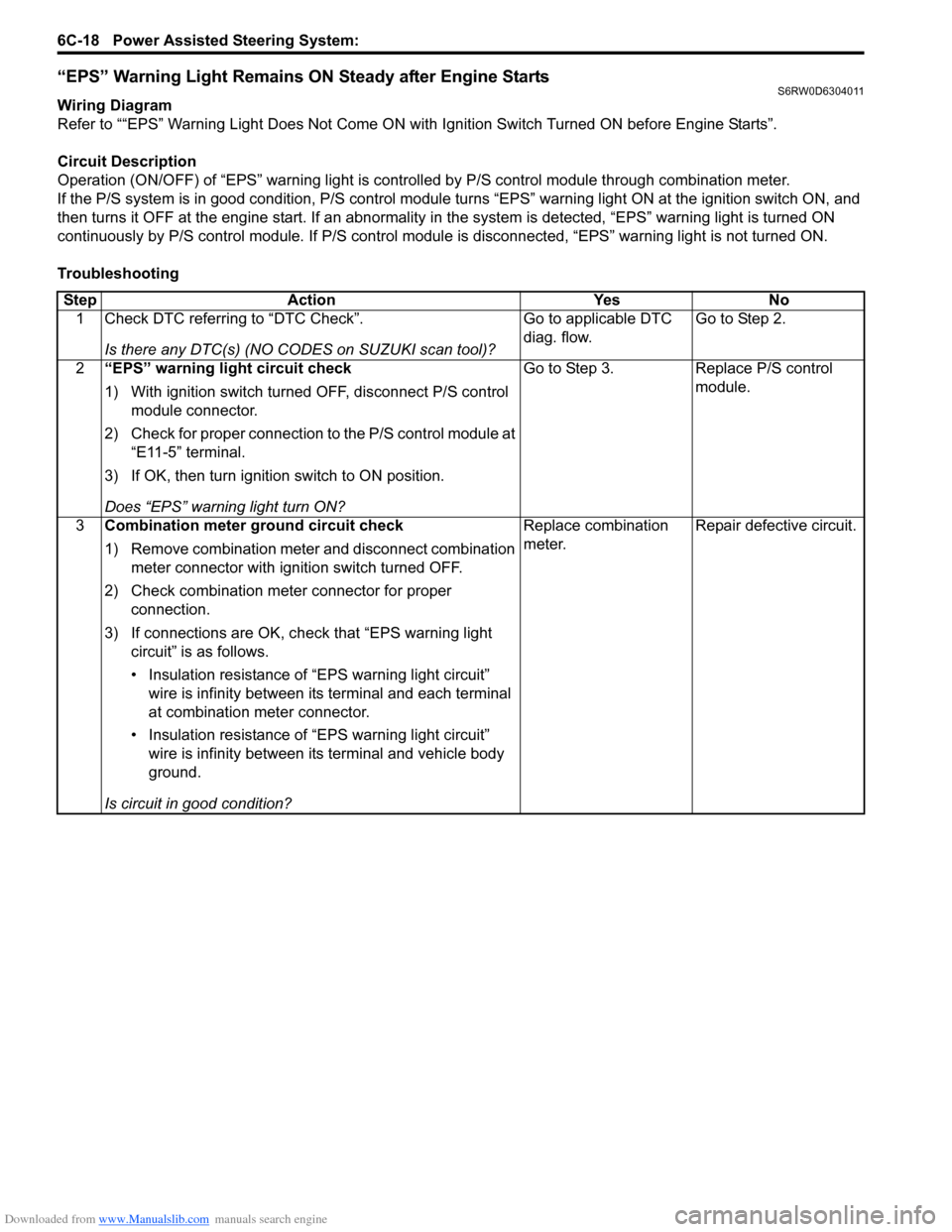
“EPS” Warning Light Remains ON Steady after Engine StartsS6RW0D6304011
Wiring Diagram
Refer to ““EPS” Warning Light Does Not Come ON with Ignition Switch Turned ON before Engine Starts”.
Circuit Description
Operation (ON/OFF) of “EPS” warning light is controlled by P/S control module through combination meter.
If the P/S system is in good condition, P/S control module turns “EPS” warning light ON at the ignition switch ON, and
then turns it OFF at the engine start. If an abnormality in the system is detected, “EPS” warning light is turned ON
continuously by P/S control module. If P/S control module is disconnected, “EPS” warning light is not turned ON.
Troubleshooting
Step Action Yes No
1 Check DTC referring to “DTC Check”.
Is there any DTC(s) (NO CODES on SUZUKI scan tool)?Go to applicable DTC
diag. flow.Go to Step 2.
2“EPS” warning light circuit check
1) With ignition switch turned OFF, disconnect P/S control
module connector.
2) Check for proper connection to the P/S control module at
“E11-5” terminal.
3) If OK, then turn ignition switch to ON position.
Does “EPS” warning light turn ON?Go to Step 3. Replace P/S control
module.
3Combination meter ground circuit check
1) Remove combination meter and disconnect combination
meter connector with ignition switch turned OFF.
2) Check combination meter connector for proper
connection.
3) If connections are OK, check that “EPS warning light
circuit” is as follows.
• Insulation resistance of “EPS warning light circuit”
wire is infinity between its terminal and each terminal
at combination meter connector.
• Insulation resistance of “EPS warning light circuit”
wire is infinity between its terminal and vehicle body
ground.
Is circuit in good condition?Replace combination
meter.Repair defective circuit.
Page 903 of 1556

Downloaded from www.Manualslib.com manuals search engine Power Assisted Steering System: 6C-23
DTC Detecting Condition and Trouble Area
DTC TroubleshootingDTC detecting condition Trouble area
DTC C1121:
Vehicle speed signal is 0 km/h even though engine speed
is more than 4000 rpm for more than 60 seconds
continuously (before elapse of 5 min from engine start)
or
Vehicle speed signal is 0 km/h even though engine speed
is more than 2500 rpm for more than 60 seconds
continuously (after elapse of 5 min for engine start).
(1 driving cycle detection logic but “EPS” warning light
does not light up)
DTC C1123:
Vehicle speed signal is 0 km/h with continuously more
than 3 driving cycles even though engine speed is more
than 4000 rpm for more than 30 seconds continuously
(before elapse of 5 min from engine start)
or
Vehicle speed signal is 0 km/h with continuously more
than 3 driving cycles even though engine speed is more
than 2500 rpm for more than 30 seconds continuously
(after elapse of 5 min for engine start).
(3 driving cycle detection logic)
DTC C1124:
Vehicle speed signal is less than 5 km/h for more than 5
seconds continuously with more than specified
deceleration speed (–20 m/s
2) from over 20 km/h.
(1 driving cycle detection logic but “EPS” warning light
does not light up)• Vehicle speed signal circuit
•BCM
•ECM
• TCM (A/T model)
• ABS control module (M/T model)
• P/S control module
• CAN communication line circuit
Step Action Yes No
1Was “EPS System Check” performed?Go to Step 2. Go to “EPS System
Check”.
2DTC check
1) DTC check for ECM referring to “DTC Check in Section
1A”.
Is there any DTC detected?Go to applicable DTC
diag. flow.Go to Step 3.
3Vehicle spec check
Is vehicle equipped with A/T?Go to Step 4 Go to Step 5
4DTC check
1) Check TCM for DTC referring to “DTC Check in Section
5A”.
Is there any DTC detected?Go to applicable DTC
diag. flow.Go to Step 6.
5DTC check
1) Check ABS control module and BCM for DTC referring
to “DTC Check in Section 4E” and “DTC Check in
Section 10B”.
Is there any DTC detected?Go to applicable DTC
diag. flow.Go to Step 6.
Page 978 of 1556

Downloaded from www.Manualslib.com manuals search engine 7B-38 Air Conditioning System: Automatic Type
Automatic Type
Precautions
A/C System CautionS6RW0D7220001
Refer to “A/C System Caution”.
Precautions in Diagnosing TroubleS6RW0D7220002
• Do not disconnect couplers from HVAC control module, battery cable from battery, HVAC control module ground
wire harness from body or main fuse before confirming diagnostic information (diagnostic trouble code) stored in
HVAC control module memory.
• Diagnostic information (diagnostic trouble code) stored in HVAC control module can be checked by display of HVAC
control module. Also, it can be checked by using SUZUKI scan tool. Before checking diagnostic information
(diagnostic trouble code), read this manual and operator's manual for SUZUKI scan tool to know how to read
diagnostic information (diagnostic trouble code).
• When trouble is diagnosed using diagnostic information (diagnostic trouble code) on display of HVAC control
module, keep in your mind that each diagnostic information (diagnostic trouble code) has priority, and only
diagnostic information (diagnostic trouble code) which has the highest priority is indicated. Therefore, after
troubleshooting the malfunction, make sure if there exists any other diagnostic information (diagnostic trouble
code).
• Be sure to read “Air Bag Warning in Section 00” before inspection.
Precautions on Servicing A/C SystemS6RW0D7220003
Refer to “Precautions on Servicing A/C System”.
Page 990 of 1556

Downloaded from www.Manualslib.com manuals search engine 7B-50 Air Conditioning System: Automatic Type
Not Using SUZUKI Scan Tool
NOTE
In case of malfunction of temperature
selector, blower speed selector and air flow
selector, DTC can not be checked by the
following procedure. Use SUZUKI scan tool
for DTC check.
1) Light over sunload sensor vertically with an
incandescent light of approximately 100 W apart
from about 100 mm (3.94 in.).
NOTE
If sunload sensor is not lighted over with an
incandescent light, DTC of sunload sensor is
detected as current DTC even though there is
not any malfunction.
2) Set the following selectors to specified positions
below respectively with ignition switch off position.
• Temperature selector (1) is maximum cool
position
• Blower speed selector (2) is OFF position
• Air flow selector (3) is AUTO position
3) While pressing A/C switch (4) and air intake selector
(5) simultaneously, turn ignition switch to ON
position.
4) Wait for about 5 seconds (start of diagnosis).
5) Read flashing pattern of “FRE” (6) and “REC” (7)
indicator lights which represents DTC and write it
down.
NOTE
• When 2 or more current DTCs are
detected, only DTC having the highest
priority is indicated. Therefore, after
troubleshooting the malfunction, DTC
check has to be performed again to see if
any other DTC(s) is detected.
• Pressing “A/C” switch alternates display
of current DTC and history DTC. “A/C”
indicator light (8) remains off when display
is in current DTC mode and it lights up
when display is in history DTC mode.
• When a history DTC is indicated while 2 or
more history DTCs are detected, it is
possible to have other history DTC(s)
stored in HVAC control module displayed
by pressing the air intake selector.
Example: When inside air temperature sensor
circuit malfunction (Open) is set
Example: When VSS signal failure (Data error) is
set
6) After completing above check, turn ignition switch to
“OFF” position.
[A]: “REC” indicator light L: OFF
[B]: “FRE” indicator light a. About 0.5 seconds
H: ON b. About 2 seconds
[A]: “REC” indicator light a. About 0.5 seconds
[B]: “FRE” indicator light b. About 3 seconds
H: ON c. About 1.5 seconds
L: OFF
123
458
6
7I5RW0A722005-01
[A]
[B]H
L
H
L [B]
[A]
ab
aI5RW0A722006-02
[A]
[B]H
L
H
L [B]
[A]
ab
aaaa
c
I5RW0A722025-01
Page 1006 of 1556
Downloaded from www.Manualslib.com manuals search engine 7B-66 Air Conditioning System: Automatic Type
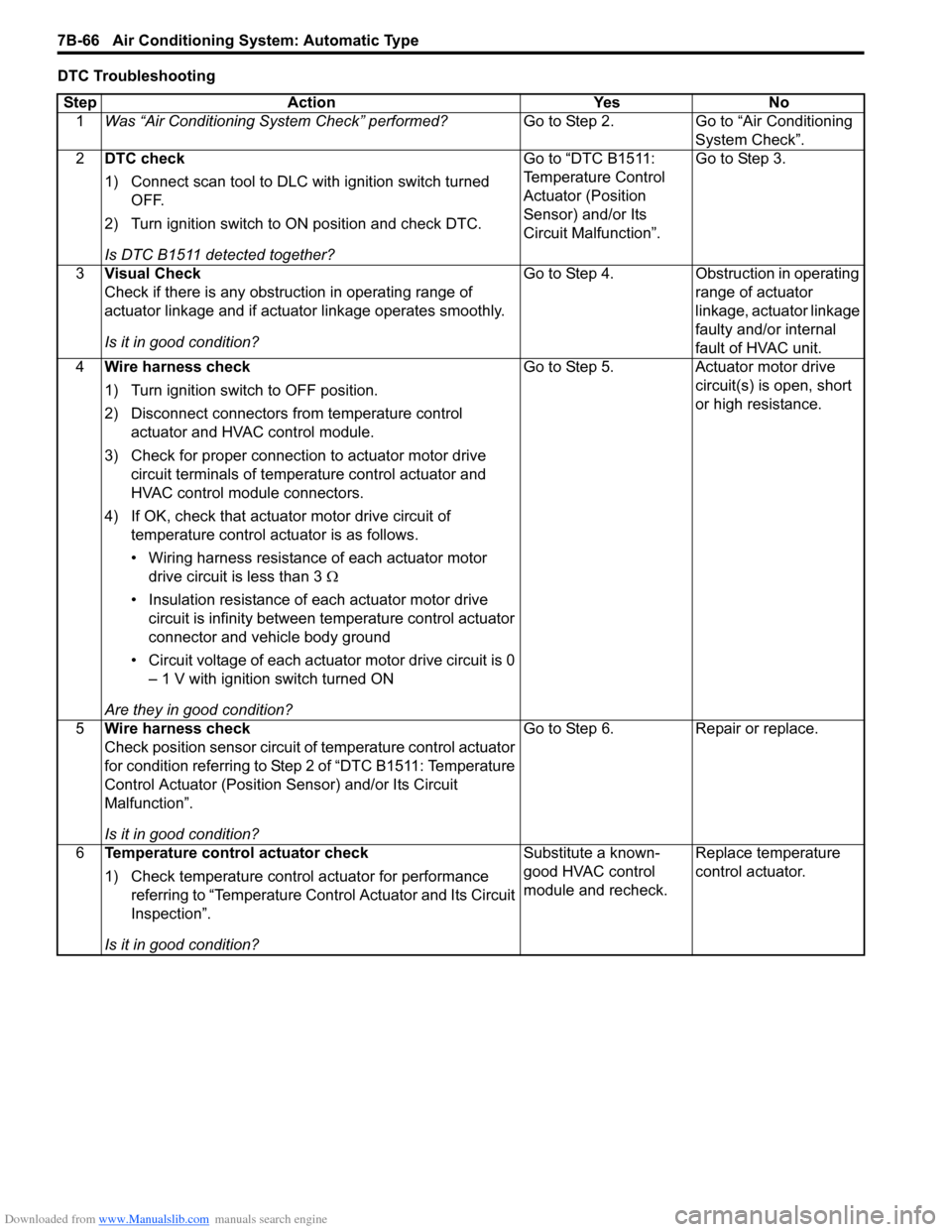
DTC Troubleshooting
Step Action Yes No
1Was “Air Conditioning System Check” performed?Go to Step 2. Go to “Air Conditioning
System Check”.
2DTC check
1) Connect scan tool to DLC with ignition switch turned
OFF.
2) Turn ignition switch to ON position and check DTC.
Is DTC B1511 detected together?Go to “DTC B1511:
Temperature Control
Actuator (Position
Sensor) and/or Its
Circuit Malfunction”.Go to Step 3.
3Visual Check
Check if there is any obstruction in operating range of
actuator linkage and if actuator linkage operates smoothly.
Is it in good condition?Go to Step 4. Obstruction in operating
range of actuator
linkage, actuator linkage
faulty and/or internal
fault of HVAC unit.
4Wire harness check
1) Turn ignition switch to OFF position.
2) Disconnect connectors from temperature control
actuator and HVAC control module.
3) Check for proper connection to actuator motor drive
circuit terminals of temperature control actuator and
HVAC control module connectors.
4) If OK, check that actuator motor drive circuit of
temperature control actuator is as follows.
• Wiring harness resistance of each actuator motor
drive circuit is less than 3 Ω
• Insulation resistance of each actuator motor drive
circuit is infinity between temperature control actuator
connector and vehicle body ground
• Circuit voltage of each actuator motor drive circuit is 0
– 1 V with ignition switch turned ON
Are they in good condition?Go to Step 5. Actuator motor drive
circuit(s) is open, short
or high resistance.
5Wire harness check
Check position sensor circuit of temperature control actuator
for condition referring to Step 2 of “DTC B1511: Temperature
Control Actuator (Position Sensor) and/or Its Circuit
Malfunction”.
Is it in good condition?Go to Step 6. Repair or replace.
6Temperature control actuator check
1) Check temperature control actuator for performance
referring to “Temperature Control Actuator and Its Circuit
Inspection”.
Is it in good condition?Substitute a known-
good HVAC control
module and recheck.Replace temperature
control actuator.
Page 1007 of 1556
Downloaded from www.Manualslib.com manuals search engine Air Conditioning System: Automatic Type 7B-67
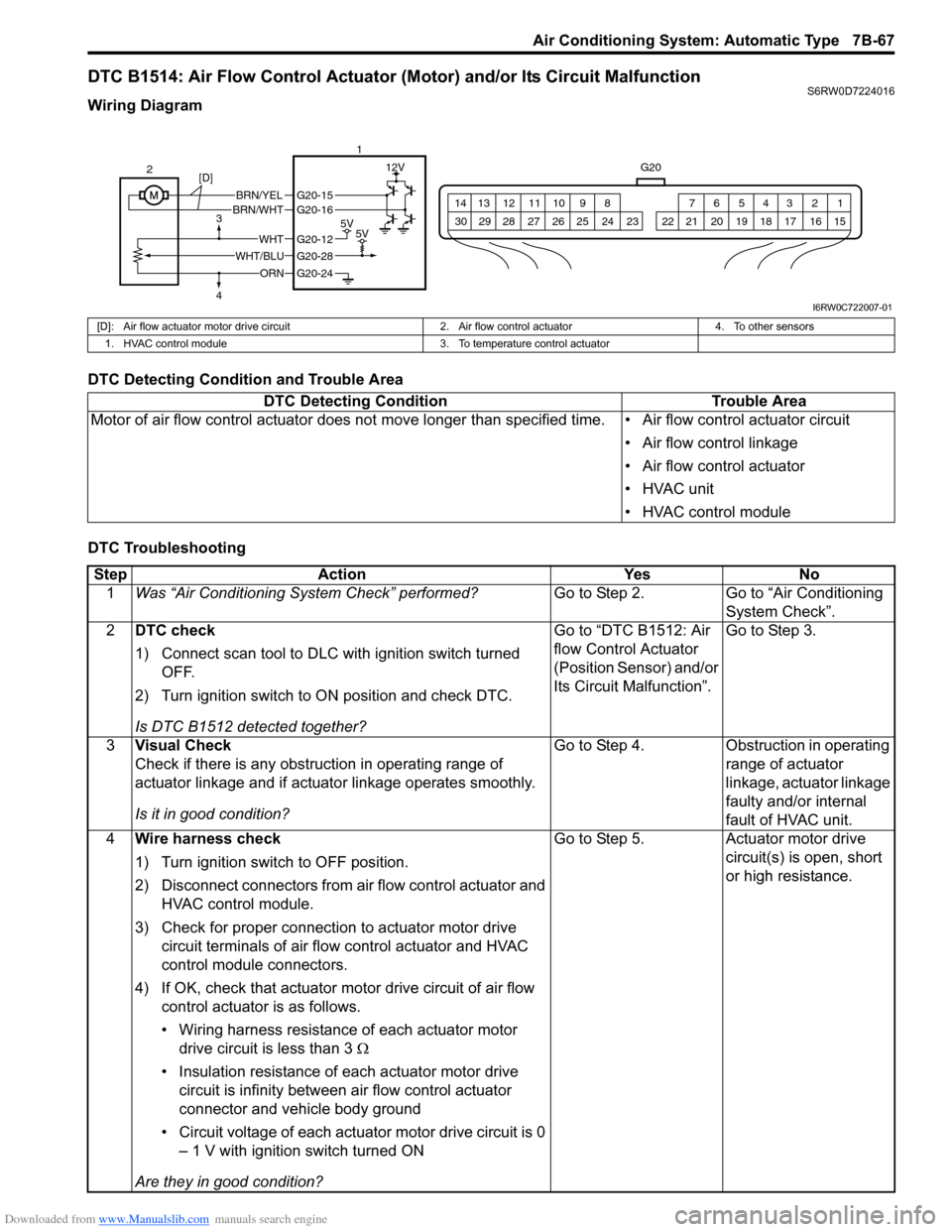
DTC B1514: Air Flow Control Actuator (Motor) and/or Its Circuit MalfunctionS6RW0D7224016
Wiring Diagram
DTC Detecting Condition and Trouble Area
DTC Troubleshooting
G20
1 2 3 4 5 6 7 8 9 10 11 12 13 14
15 16 17 18 19 20 21 24 23 22 25 26 27 28 29 30
BRN/YELBRN/WHT
5V5V
12V
ORN
WHTG20-12
G20-28
G20-24
G20-15G20-16
WHT/BLU 2
3
41
[D]
I6RW0C722007-01
[D]: Air flow actuator motor drive circuit 2. Air flow control actuator 4. To other sensors
1. HVAC control module 3. To temperature control actuator
DTC Detecting Condition Trouble Area
Motor of air flow control actuator does not move longer than specified time. • Air flow control actuator circuit
• Air flow control linkage
• Air flow control actuator
• HVAC unit
• HVAC control module
Step Action Yes No
1Was “Air Conditioning System Check” performed?Go to Step 2. Go to “Air Conditioning
System Check”.
2DTC check
1) Connect scan tool to DLC with ignition switch turned
OFF.
2) Turn ignition switch to ON position and check DTC.
Is DTC B1512 detected together?Go to “DTC B1512: Air
flow Control Actuator
(Position Sensor) and/or
Its Circuit Malfunction”.Go to Step 3.
3Visual Check
Check if there is any obstruction in operating range of
actuator linkage and if actuator linkage operates smoothly.
Is it in good condition?Go to Step 4. Obstruction in operating
range of actuator
linkage, actuator linkage
faulty and/or internal
fault of HVAC unit.
4Wire harness check
1) Turn ignition switch to OFF position.
2) Disconnect connectors from air flow control actuator and
HVAC control module.
3) Check for proper connection to actuator motor drive
circuit terminals of air flow control actuator and HVAC
control module connectors.
4) If OK, check that actuator motor drive circuit of air flow
control actuator is as follows.
• Wiring harness resistance of each actuator motor
drive circuit is less than 3 Ω
• Insulation resistance of each actuator motor drive
circuit is infinity between air flow control actuator
connector and vehicle body ground
• Circuit voltage of each actuator motor drive circuit is 0
– 1 V with ignition switch turned ON
Are they in good condition?Go to Step 5. Actuator motor drive
circuit(s) is open, short
or high resistance.