2006 SUZUKI SX4 Can troubleshooting
[x] Cancel search: Can troubleshootingPage 1473 of 1556
Downloaded from www.Manualslib.com manuals search engine Precautions: 10-1
Control Systems
Precautions
Precautions
Precautions for Control SystemsS6RW0DA000001
Air Bag Warning
Refer to “Air Bag Warning in Section 00”.
Precaution of Troubleshooting for CAN
Refer to “Precaution on CAN Troubleshooting in Section 1A”.
Page 1482 of 1556
Downloaded from www.Manualslib.com manuals search engine 10B-9 Body Electrical Control System:
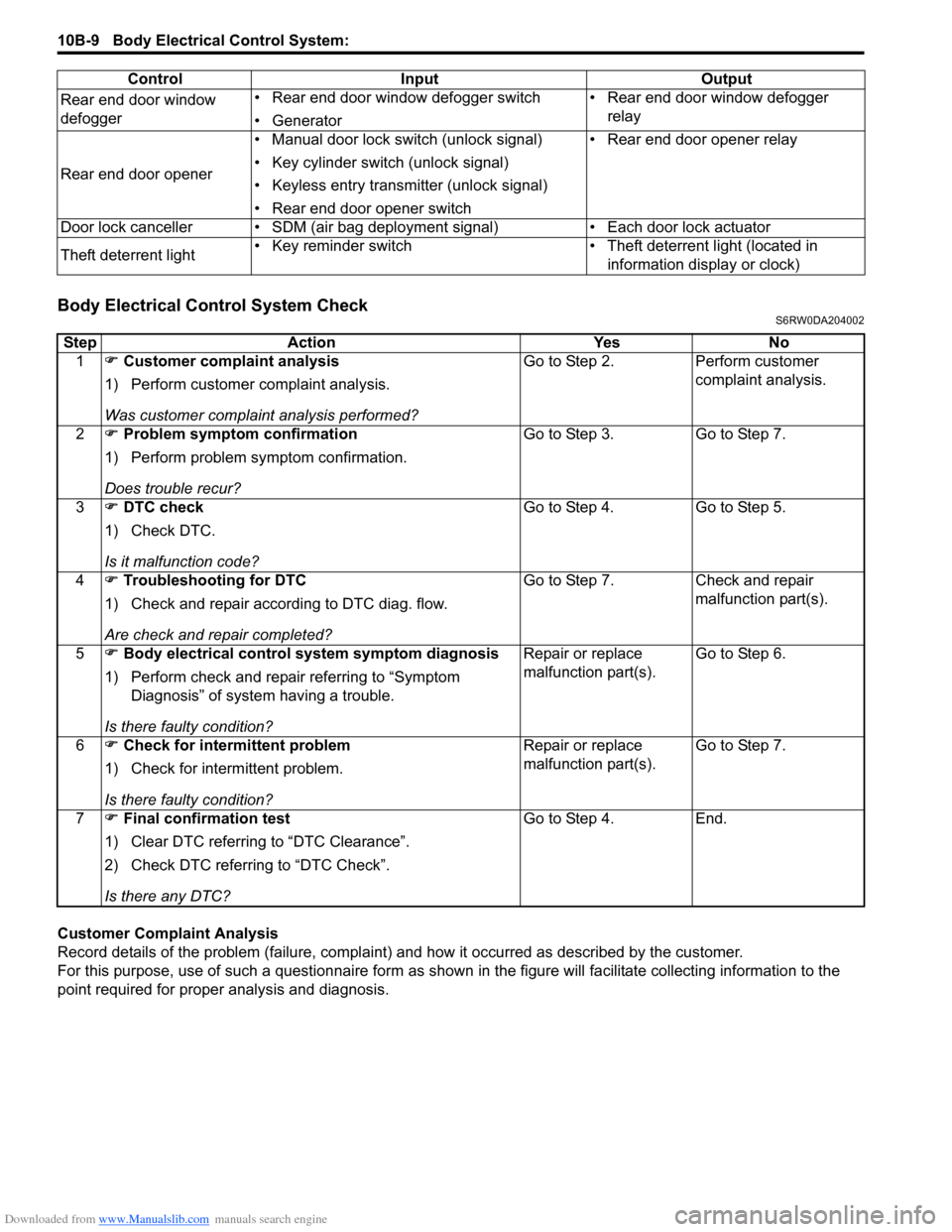
Body Electrical Control System CheckS6RW0DA204002
Customer Complaint Analysis
Record details of the problem (failure, complaint) and how it occurred as described by the customer.
For this purpose, use of such a questionnaire form as shown in the figure will facilitate collecting information to the
point required for proper analysis and diagnosis.Rear end door window
defogger• Rear end door window defogger switch
• Generator• Rear end door window defogger
relay
Rear end door opener• Manual door lock switch (unlock signal)
• Key cylinder switch (unlock signal)
• Keyless entry transmitter (unlock signal)
• Rear end door opener switch• Rear end door opener relay
Door lock canceller • SDM (air bag deployment signal) • Each door lock actuator
Theft deterrent light• Key reminder switch • Theft deterrent light (located in
information display or clock) Control Input Output
Step Action Yes No
1) Customer complaint analysis
1) Perform customer complaint analysis.
Was customer complaint analysis performed?Go to Step 2. Perform customer
complaint analysis.
2) Problem symptom confirmation
1) Perform problem symptom confirmation.
Does trouble recur?Go to Step 3. Go to Step 7.
3) DTC check
1) Check DTC.
Is it malfunction code?Go to Step 4. Go to Step 5.
4) Troubleshooting for DTC
1) Check and repair according to DTC diag. flow.
Are check and repair completed?Go to Step 7. Check and repair
malfunction part(s).
5) Body electrical control system symptom diagnosis
1) Perform check and repair referring to “Symptom
Diagnosis” of system having a trouble.
Is there faulty condition?Repair or replace
malfunction part(s).Go to Step 6.
6) Check for intermittent problem
1) Check for intermittent problem.
Is there faulty condition?Repair or replace
malfunction part(s).Go to Step 7.
7) Final confirmation test
1) Clear DTC referring to “DTC Clearance”.
2) Check DTC referring to “DTC Check”.
Is there any DTC?Go to Step 4. End.
Page 1493 of 1556
Downloaded from www.Manualslib.com manuals search engine Body Electrical Control System: 10B-20
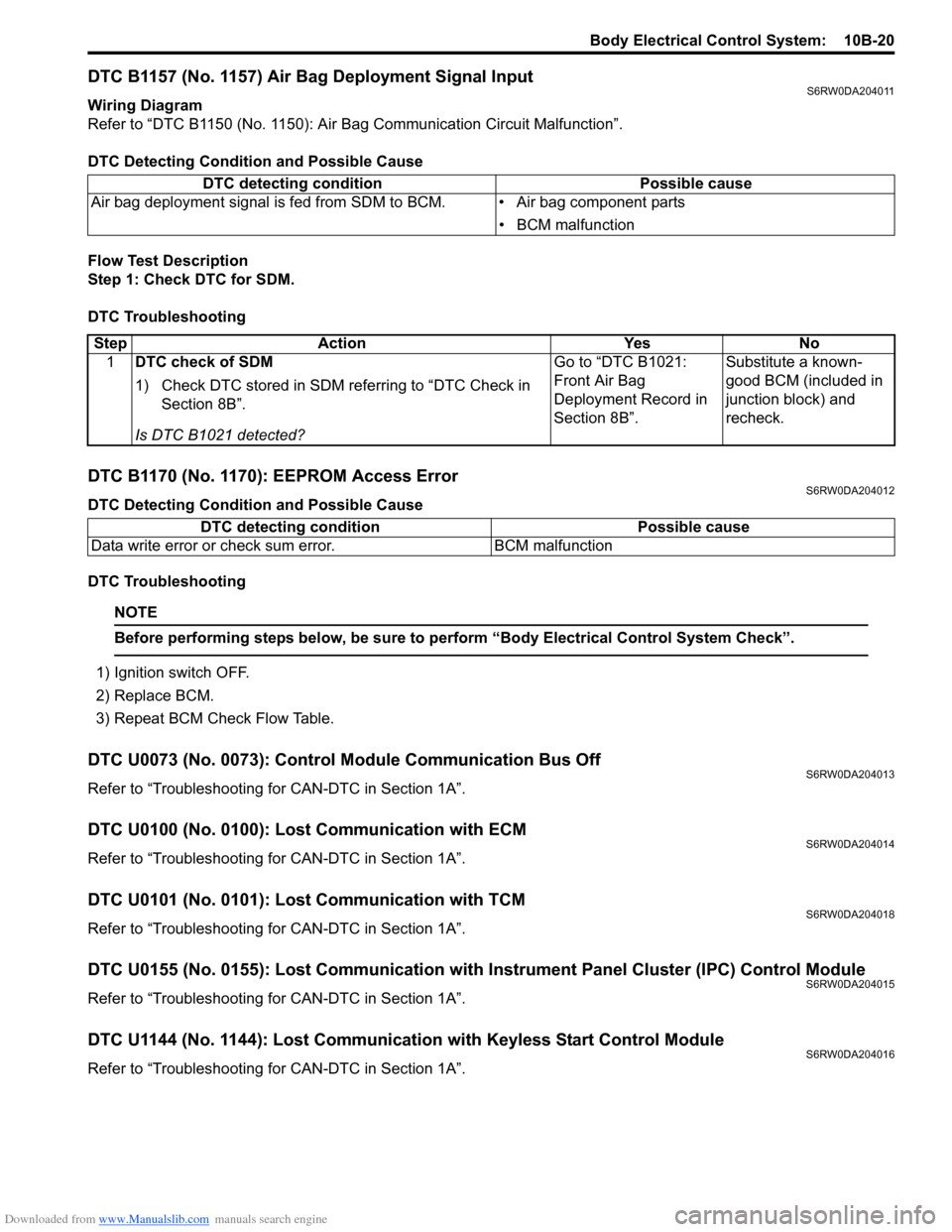
DTC B1157 (No. 1157) Air Bag Deployment Signal InputS6RW0DA204011
Wiring Diagram
Refer to “DTC B1150 (No. 1150): Air Bag Communication Circuit Malfunction”.
DTC Detecting Condition and Possible Cause
Flow Test Description
Step 1: Check DTC for SDM.
DTC Troubleshooting
DTC B1170 (No. 1170): EEPROM Access ErrorS6RW0DA204012
DTC Detecting Condition and Possible Cause
DTC Troubleshooting
NOTE
Before performing steps below, be sure to perform “Body Electrical Control System Check”.
1) Ignition switch OFF.
2) Replace BCM.
3) Repeat BCM Check Flow Table.
DTC U0073 (No. 0073): Control Module Communication Bus OffS6RW0DA204013
Refer to “Troubleshooting for CAN-DTC in Section 1A”.
DTC U0100 (No. 0100): Lost Communication with ECMS6RW0DA204014
Refer to “Troubleshooting for CAN-DTC in Section 1A”.
DTC U0101 (No. 0101): Lost Communication with TCMS6RW0DA204018
Refer to “Troubleshooting for CAN-DTC in Section 1A”.
DTC U0155 (No. 0155): Lost Communication with Instrument Panel Cluster (IPC) Control ModuleS6RW0DA204015
Refer to “Troubleshooting for CAN-DTC in Section 1A”.
DTC U1144 (No. 1144): Lost Communication with Keyless Start Control ModuleS6RW0DA204016
Refer to “Troubleshooting for CAN-DTC in Section 1A”. DTC detecting condition Possible cause
Air bag deployment signal is fed from SDM to BCM. • Air bag component parts
• BCM malfunction
Step Action Yes No
1DTC check of SDM
1) Check DTC stored in SDM referring to “DTC Check in
Section 8B”.
Is DTC B1021 detected?Go to “DTC B1021:
Front Air Bag
Deployment Record in
Section 8B”.Substitute a known-
good BCM (included in
junction block) and
recheck.
DTC detecting condition Possible cause
Data write error or check sum error. BCM malfunction
Page 1508 of 1556
Downloaded from www.Manualslib.com manuals search engine 10C-6 Immobilizer Control System:
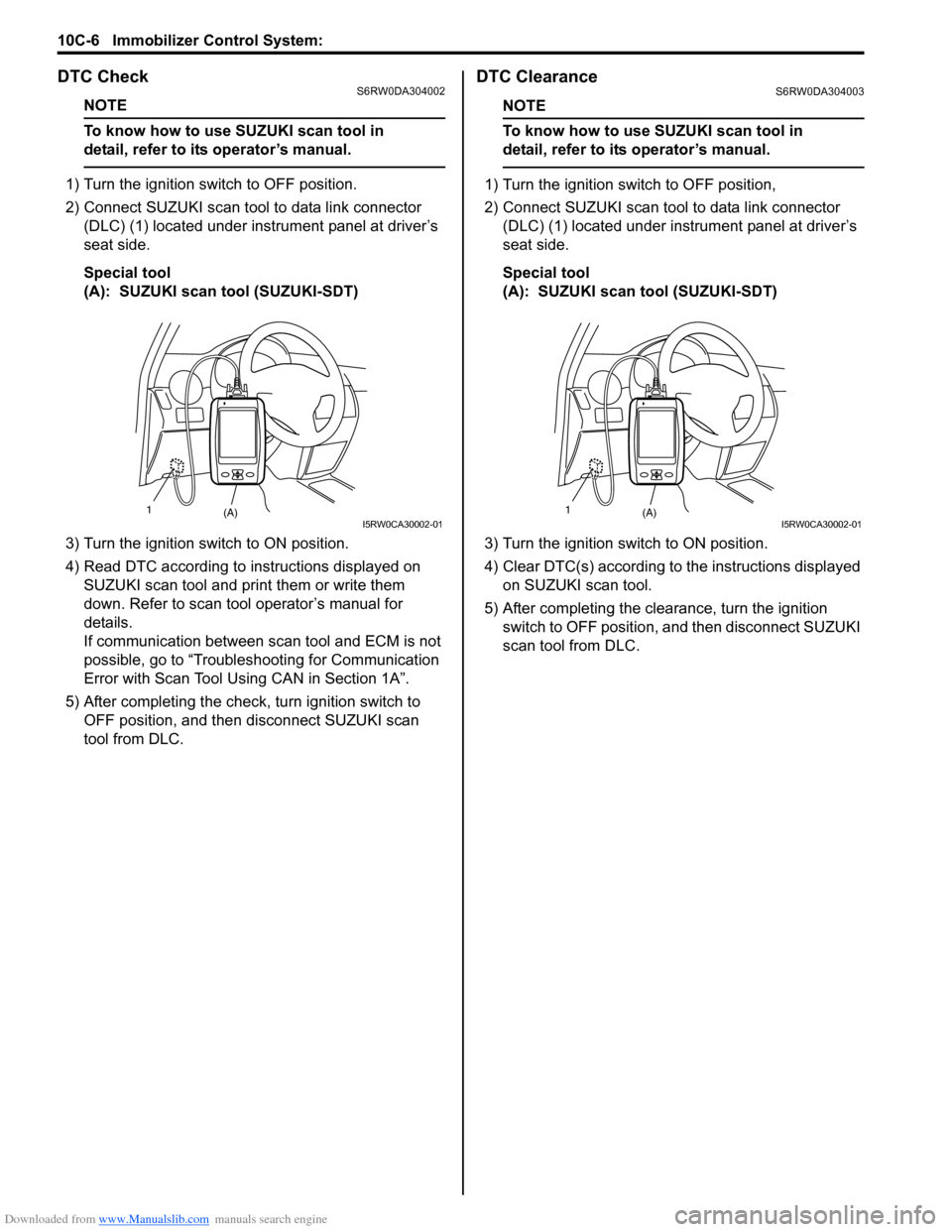
DTC CheckS6RW0DA304002
NOTE
To know how to use SUZUKI scan tool in
detail, refer to its operator’s manual.
1) Turn the ignition switch to OFF position.
2) Connect SUZUKI scan tool to data link connector
(DLC) (1) located under instrument panel at driver’s
seat side.
Special tool
(A): SUZUKI scan tool (SUZUKI-SDT)
3) Turn the ignition switch to ON position.
4) Read DTC according to instructions displayed on
SUZUKI scan tool and print them or write them
down. Refer to scan tool operator’s manual for
details.
If communication between scan tool and ECM is not
possible, go to “Troubleshooting for Communication
Error with Scan Tool Using CAN in Section 1A”.
5) After completing the check, turn ignition switch to
OFF position, and then disconnect SUZUKI scan
tool from DLC.
DTC ClearanceS6RW0DA304003
NOTE
To know how to use SUZUKI scan tool in
detail, refer to its operator’s manual.
1) Turn the ignition switch to OFF position,
2) Connect SUZUKI scan tool to data link connector
(DLC) (1) located under instrument panel at driver’s
seat side.
Special tool
(A): SUZUKI scan tool (SUZUKI-SDT)
3) Turn the ignition switch to ON position.
4) Clear DTC(s) according to the instructions displayed
on SUZUKI scan tool.
5) After completing the clearance, turn the ignition
switch to OFF position, and then disconnect SUZUKI
scan tool from DLC.
(A) 1I5RW0CA30002-01(A) 1I5RW0CA30002-01
Page 1512 of 1556
Downloaded from www.Manualslib.com manuals search engine 10C-10 Immobilizer Control System:
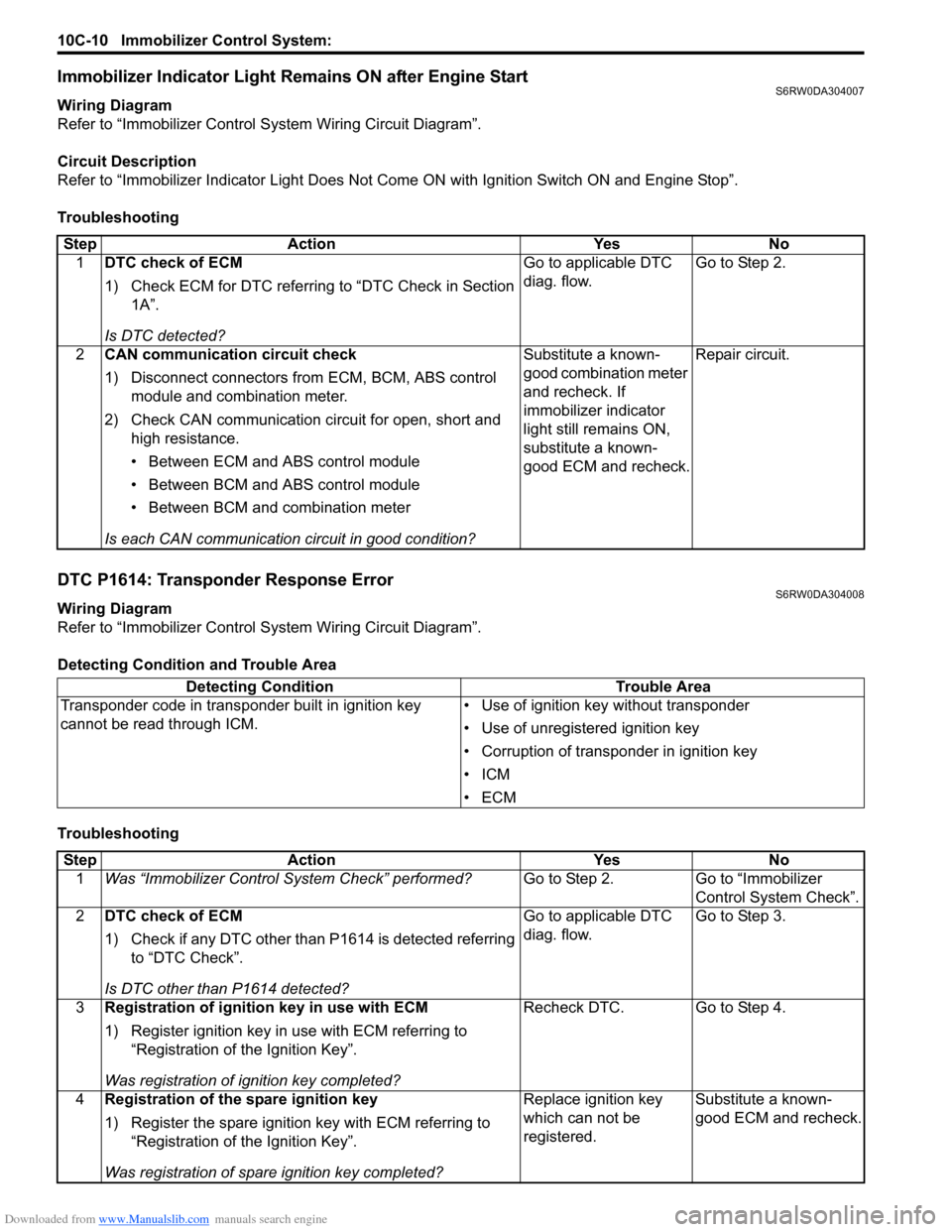
Immobilizer Indicator Light Remains ON after Engine StartS6RW0DA304007
Wiring Diagram
Refer to “Immobilizer Control System Wiring Circuit Diagram”.
Circuit Description
Refer to “Immobilizer Indicator Light Does Not Come ON with Ignition Switch ON and Engine Stop”.
Troubleshooting
DTC P1614: Transponder Response ErrorS6RW0DA304008
Wiring Diagram
Refer to “Immobilizer Control System Wiring Circuit Diagram”.
Detecting Condition and Trouble Area
TroubleshootingStep Action Yes No
1DTC check of ECM
1) Check ECM for DTC referring to “DTC Check in Section
1A”.
Is DTC detected?Go to applicable DTC
diag. flow.Go to Step 2.
2CAN communication circuit check
1) Disconnect connectors from ECM, BCM, ABS control
module and combination meter.
2) Check CAN communication circuit for open, short and
high resistance.
• Between ECM and ABS control module
• Between BCM and ABS control module
• Between BCM and combination meter
Is each CAN communication circuit in good condition?Substitute a known-
good combination meter
and recheck. If
immobilizer indicator
light still remains ON,
substitute a known-
good ECM and recheck.Repair circuit.
Detecting Condition Trouble Area
Transponder code in transponder built in ignition key
cannot be read through ICM.• Use of ignition key without transponder
• Use of unregistered ignition key
• Corruption of transponder in ignition key
•ICM
•ECM
Step Action Yes No
1Was “Immobilizer Control System Check” performed?Go to Step 2. Go to “Immobilizer
Control System Check”.
2DTC check of ECM
1) Check if any DTC other than P1614 is detected referring
to “DTC Check”.
Is DTC other than P1614 detected?Go to applicable DTC
diag. flow.Go to Step 3.
3Registration of ignition key in use with ECM
1) Register ignition key in use with ECM referring to
“Registration of the Ignition Key”.
Was registration of ignition key completed?Recheck DTC. Go to Step 4.
4Registration of the spare ignition key
1) Register the spare ignition key with ECM referring to
“Registration of the Ignition Key”.
Was registration of spare ignition key completed?Replace ignition key
which can not be
registered.Substitute a known-
good ECM and recheck.
Page 1513 of 1556
Downloaded from www.Manualslib.com manuals search engine Immobilizer Control System: 10C-11
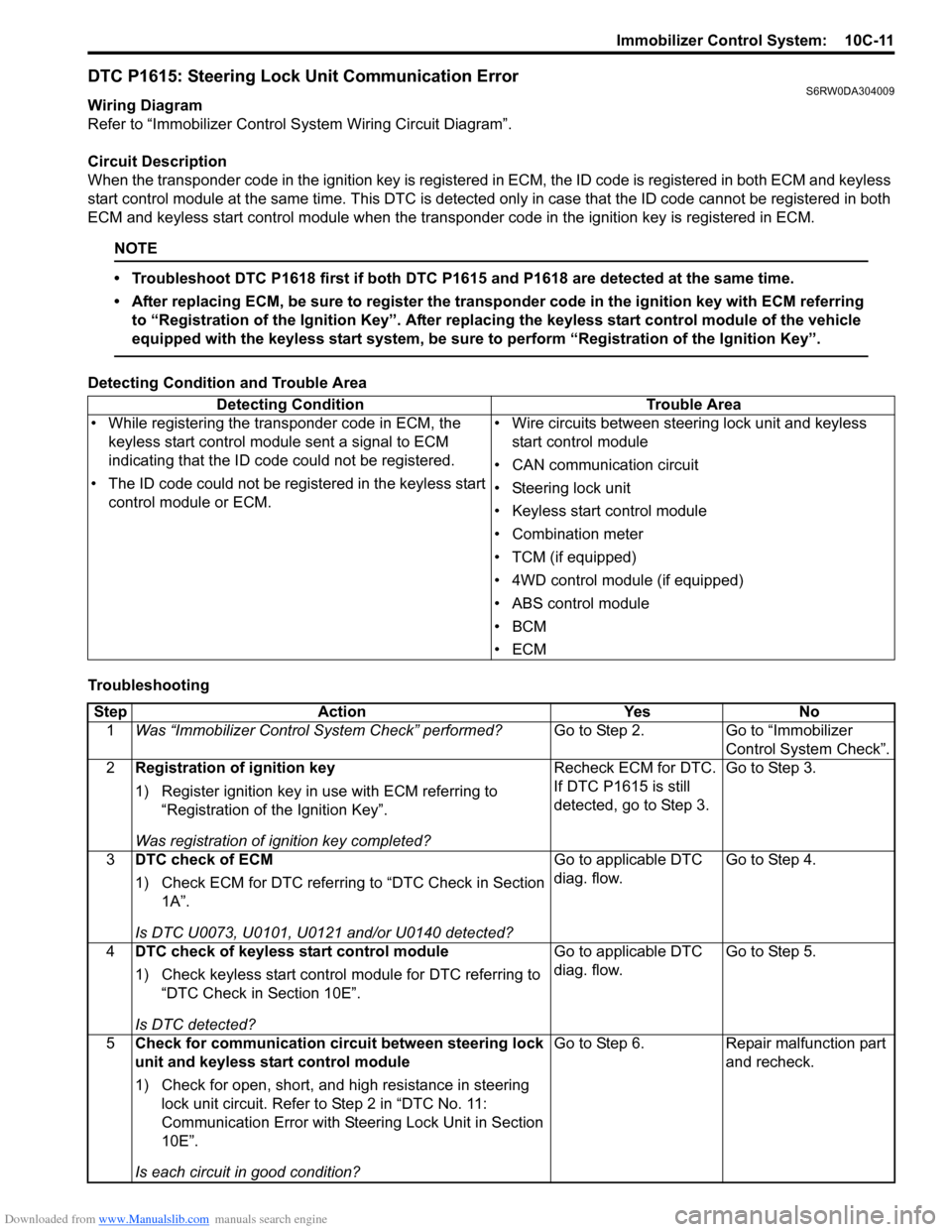
DTC P1615: Steering Lock Unit Communication ErrorS6RW0DA304009
Wiring Diagram
Refer to “Immobilizer Control System Wiring Circuit Diagram”.
Circuit Description
When the transponder code in the ignition key is registered in ECM, the ID code is registered in both ECM and keyless
start control module at the same time. This DTC is detected only in case that the ID code cannot be registered in both
ECM and keyless start control module when the transponder code in the ignition key is registered in ECM.
NOTE
• Troubleshoot DTC P1618 first if both DTC P1615 and P1618 are detected at the same time.
• After replacing ECM, be sure to register the transponder code in the ignition key with ECM referring
to “Registration of the Ignition Key”. After replacing the keyless start control module of the vehicle
equipped with the keyless start system, be sure to perform “Registration of the Ignition Key”.
Detecting Condition and Trouble Area
TroubleshootingDetecting Condition Trouble Area
• While registering the transponder code in ECM, the
keyless start control module sent a signal to ECM
indicating that the ID code could not be registered.
• The ID code could not be registered in the keyless start
control module or ECM.• Wire circuits between steering lock unit and keyless
start control module
• CAN communication circuit
• Steering lock unit
• Keyless start control module
• Combination meter
• TCM (if equipped)
• 4WD control module (if equipped)
• ABS control module
•BCM
•ECM
Step Action Yes No
1Was “Immobilizer Control System Check” performed?Go to Step 2. Go to “Immobilizer
Control System Check”.
2Registration of ignition key
1) Register ignition key in use with ECM referring to
“Registration of the Ignition Key”.
Was registration of ignition key completed?Recheck ECM for DTC.
If DTC P1615 is still
detected, go to Step 3.Go to Step 3.
3DTC check of ECM
1) Check ECM for DTC referring to “DTC Check in Section
1A”.
Is DTC U0073, U0101, U0121 and/or U0140 detected?Go to applicable DTC
diag. flow.Go to Step 4.
4DTC check of keyless start control module
1) Check keyless start control module for DTC referring to
“DTC Check in Section 10E”.
Is DTC detected?Go to applicable DTC
diag. flow.Go to Step 5.
5Check for communication circuit between steering lock
unit and keyless start control module
1) Check for open, short, and high resistance in steering
lock unit circuit. Refer to Step 2 in “DTC No. 11:
Communication Error with Steering Lock Unit in Section
10E”.
Is each circuit in good condition?Go to Step 6. Repair malfunction part
and recheck.
Page 1515 of 1556
Downloaded from www.Manualslib.com manuals search engine Immobilizer Control System: 10C-13
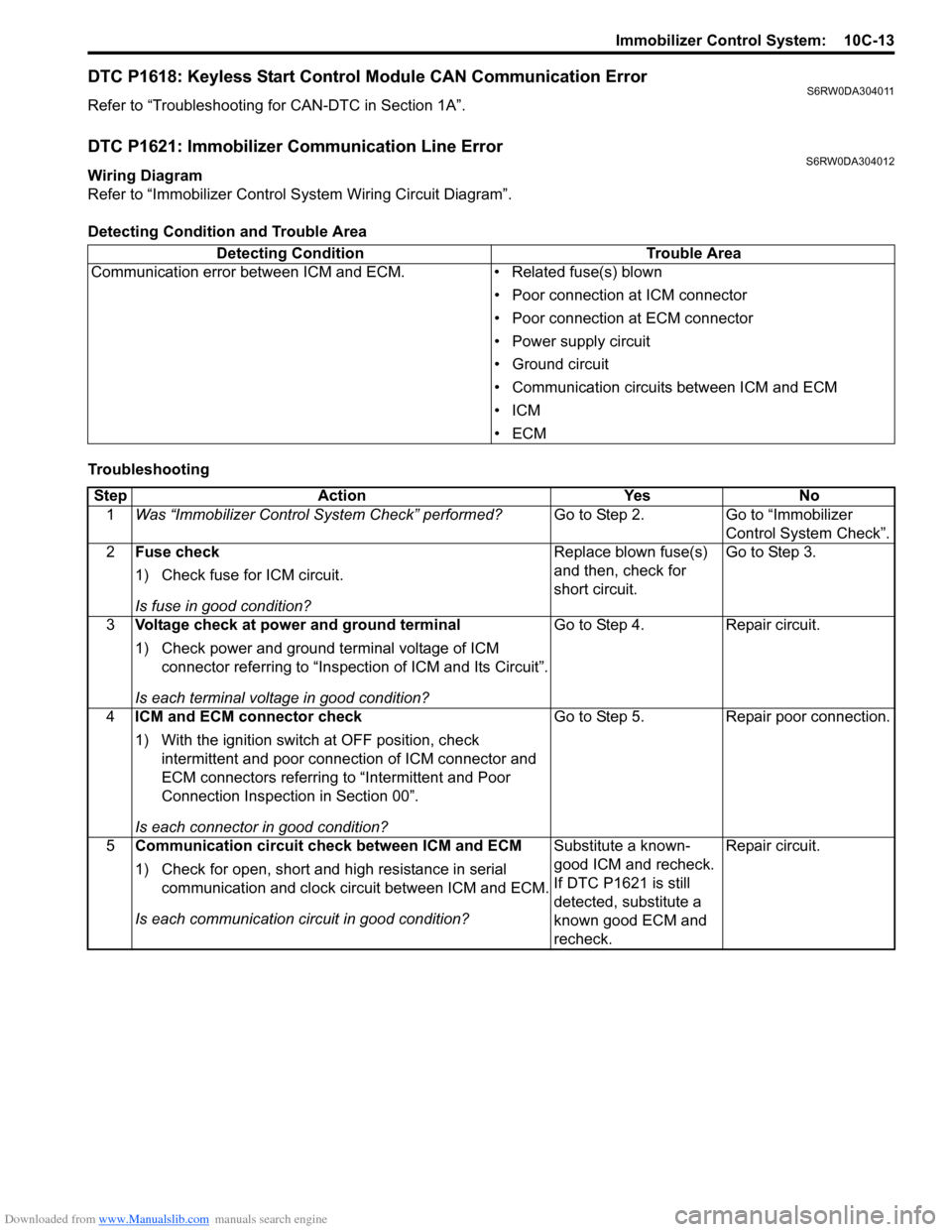
DTC P1618: Keyless Start Control Module CAN Communication ErrorS6RW0DA304011
Refer to “Troubleshooting for CAN-DTC in Section 1A”.
DTC P1621: Immobilizer Communication Line ErrorS6RW0DA304012
Wiring Diagram
Refer to “Immobilizer Control System Wiring Circuit Diagram”.
Detecting Condition and Trouble Area
TroubleshootingDetecting Condition Trouble Area
Communication error between ICM and ECM. • Related fuse(s) blown
• Poor connection at ICM connector
• Poor connection at ECM connector
• Power supply circuit
• Ground circuit
• Communication circuits between ICM and ECM
•ICM
•ECM
Step Action Yes No
1Was “Immobilizer Control System Check” performed?Go to Step 2. Go to “Immobilizer
Control System Check”.
2Fuse check
1) Check fuse for ICM circuit.
Is fuse in good condition?Replace blown fuse(s)
and then, check for
short circuit.Go to Step 3.
3Voltage check at power and ground terminal
1) Check power and ground terminal voltage of ICM
connector referring to “Inspection of ICM and Its Circuit”.
Is each terminal voltage in good condition?Go to Step 4. Repair circuit.
4ICM and ECM connector check
1) With the ignition switch at OFF position, check
intermittent and poor connection of ICM connector and
ECM connectors referring to “Intermittent and Poor
Connection Inspection in Section 00”.
Is each connector in good condition?Go to Step 5. Repair poor connection.
5Communication circuit check between ICM and ECM
1) Check for open, short and high resistance in serial
communication and clock circuit between ICM and ECM.
Is each communication circuit in good condition?Substitute a known-
good ICM and recheck.
If DTC P1621 is still
detected, substitute a
known good ECM and
recheck.Repair circuit.
Page 1516 of 1556
Downloaded from www.Manualslib.com manuals search engine 10C-14 Immobilizer Control System:
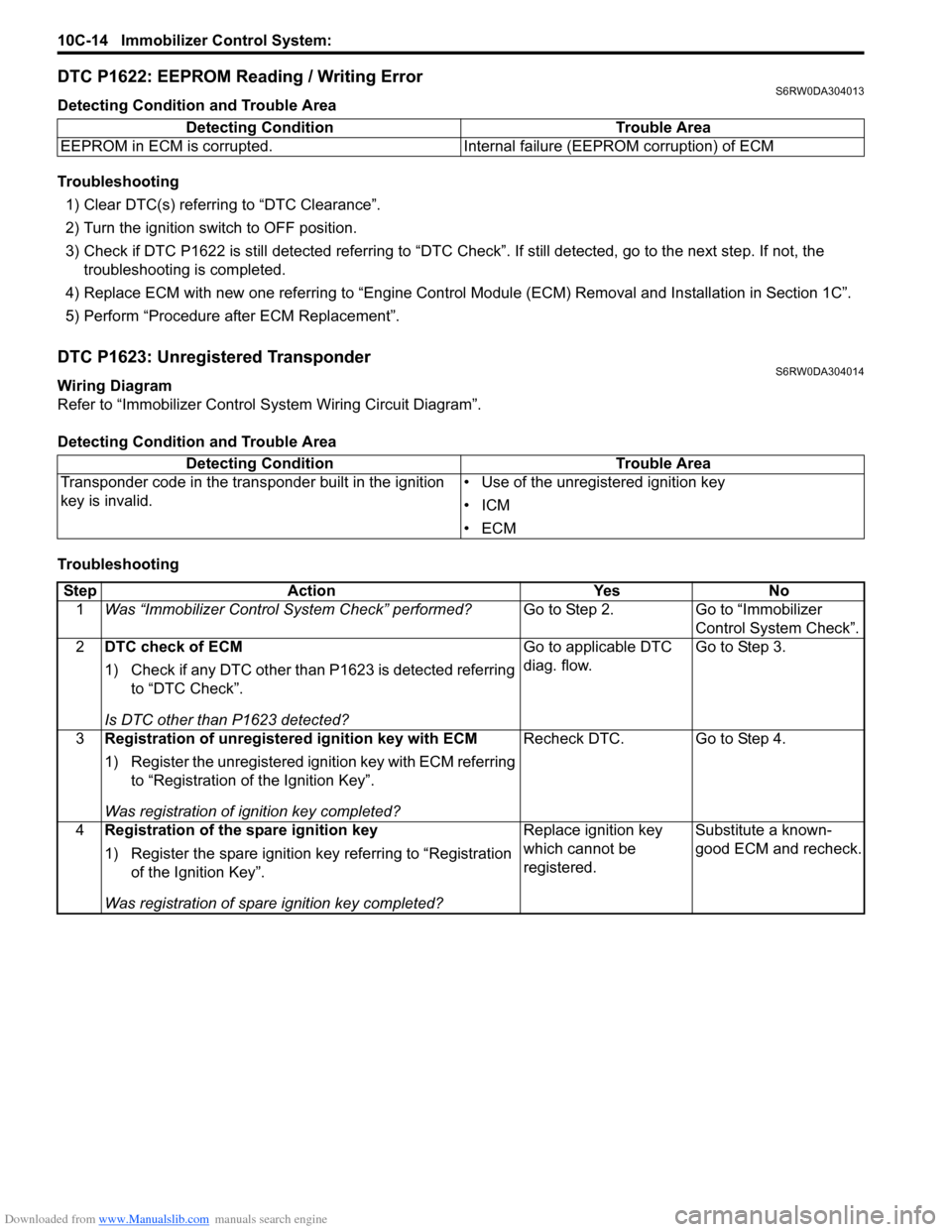
DTC P1622: EEPROM Reading / Writing ErrorS6RW0DA304013
Detecting Condition and Trouble Area
Troubleshooting
1) Clear DTC(s) referring to “DTC Clearance”.
2) Turn the ignition switch to OFF position.
3) Check if DTC P1622 is still detected referring to “DTC Check”. If still detected, go to the next step. If not, the
troubleshooting is completed.
4) Replace ECM with new one referring to “Engine Control Module (ECM) Removal and Installation in Section 1C”.
5) Perform “Procedure after ECM Replacement”.
DTC P1623: Unregistered TransponderS6RW0DA304014
Wiring Diagram
Refer to “Immobilizer Control System Wiring Circuit Diagram”.
Detecting Condition and Trouble Area
TroubleshootingDetecting Condition Trouble Area
EEPROM in ECM is corrupted. Internal failure (EEPROM corruption) of ECM
Detecting Condition Trouble Area
Transponder code in the transponder built in the ignition
key is invalid.• Use of the unregistered ignition key
•ICM
•ECM
Step Action Yes No
1Was “Immobilizer Control System Check” performed?Go to Step 2. Go to “Immobilizer
Control System Check”.
2DTC check of ECM
1) Check if any DTC other than P1623 is detected referring
to “DTC Check”.
Is DTC other than P1623 detected?Go to applicable DTC
diag. flow.Go to Step 3.
3Registration of unregistered ignition key with ECM
1) Register the unregistered ignition key with ECM referring
to “Registration of the Ignition Key”.
Was registration of ignition key completed?Recheck DTC. Go to Step 4.
4Registration of the spare ignition key
1) Register the spare ignition key referring to “Registration
of the Ignition Key”.
Was registration of spare ignition key completed?Replace ignition key
which cannot be
registered.Substitute a known-
good ECM and recheck.