2006 SUBARU IMPREZA Door open
[x] Cancel search: Door openPage 118 of 365
Instruments and controls 3-5
The key is near another key that con-
tains an immobilizer transponder.
Key reminder chime
The reminder chime sounds when the
driver s door opens and the key is in the
LOCK or ACC positions. The chime
stops when the key is removed from the
ignition switch.
Ignition switch light
For easy access to the ignition switch in
the dark, the ignition switch light comes on
when driver s door is opened. The light re-
mains on for 10 seconds and goes out af-
ter driver s door is closed or if the key is
turned to the ON position.
Key interlock release (AT ve-
hicles only)
If the key can not be turned to the LOCK
position even when the selector lever is in
the P position:
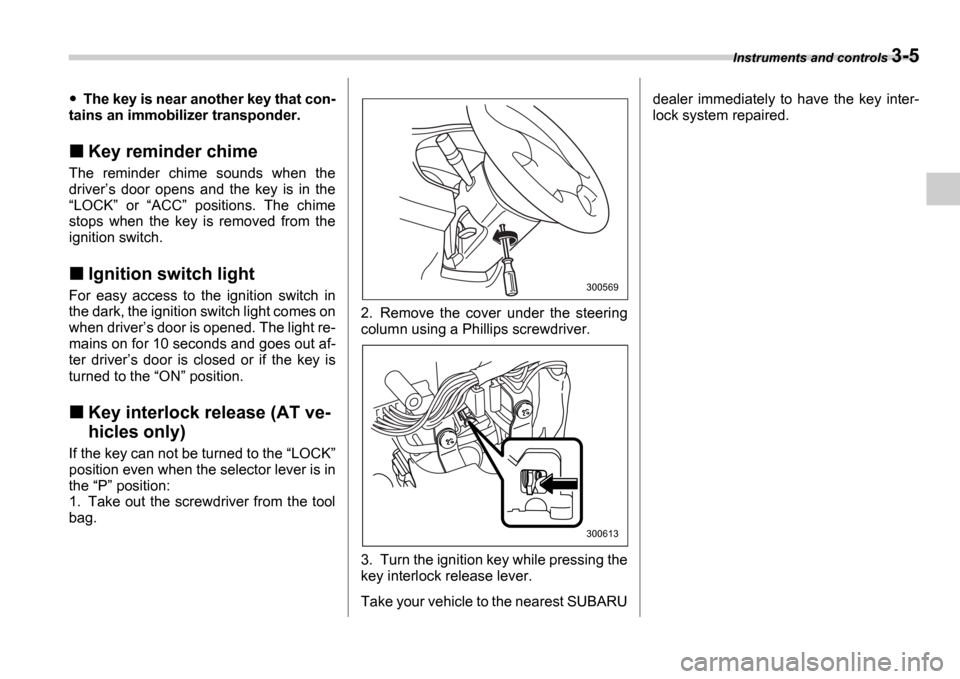
1. Take out the screwdriver from the tool
bag. 2. Remove the cover under the steering
column using a Phillips screwdriver.
3. Turn the ignition key while pressing the
key interlock release lever.
Take your vehicle to the nearest SUBARUdealer immediately to have the key inter-
lock system repaired.
300569
300613
Page 132 of 365
Instruments and controls 3-19
CONTINUED
minates if a malfunction occurs in the EBD
system. In that event, it comes on together
with the ABS warning light.
The EBD system may be malfunctioning if
the brake system warning light and ABS
warning light illuminate simultaneously
during driving.
Even if the EBD system fails, the conven-
tional braking system will still function.
However, the rear wheels will be more
prone to locking when the brakes are ap-
plied harder than usual and the vehicle
s
motion may therefore become somewhat
harder to control.
If the brake system warning light and ABS
warning light illuminate simultaneously,
take the following steps:
1. Stop the vehicle in the nearest safe, flat
place.
2. Shut down the engine, then restart it.
3. Release the parking brake. If both
warning lights go out, the EBD system
may be faulty. Drive carefully to the near-
est SUBARU dealer and have the system
inspected.
4. If both warning lights come on again
and stay illuminated after the engine has
been restarted, shut down the engine
again, apply the parking brake, and check
the brake fluid level.
5. If the brake fluid level is not below the MIN mark, the EBD system may be faulty. Drive carefully to the nearest
SUBARU dealer and have the system in-
spected.
6. If the brake fluid level is below the
MIN mark, DO NOT drive the vehicle. In-
stead, have the vehicle towed to the near-
est SUBARU dealer for repair.
Door open warning light
The door open warning light comes on if
any door or the rear gate is not fully
closed.
Always make sure this light is out before
you start to drive.
All-Wheel Drive warn-
ing light (AWD AT vehi-
cles if equipped)
The All-Wheel Drive warning light comes
on when the ignition switch is turned to the ON position and goes out after approxi-
mately two seconds.
This light comes on when All-Wheel Drive
is disengaged and the drive mechanism is
switched to Front Wheel Drive for mainte-
nance or similar purposes (Non-turbo ve-
hicles).
It flashes if the vehicle is driven with tires
of differing diameters fitted on the wheels
or with an excessively low air pressure in any of the tires.
Intercooler water
spray warning light
(WRX-STI)
This light comes on when the water level
in the intercooler water spray tank falls to
the lower limit (approximately 0.4 US qt,
0.4 liter, 0.4 Imp qt).
Continuing to drive with the AWD
warning light flashing can damage
the powertrain. If the AWD warning
light starts to flash, promptly park in
a safe place and check whether the
tires have differing diameters and
whether any of the tires has an ex-
cessively low inflation pressure.
Page 146 of 365
Instruments and controls 3-33
CONTINUED
cover the sensors with stickers, or other
similar items. Periodically wipe the sen-
sors clean using a piece of dry soft cotton
cloth or an applicator.
Compass calibration
1. For optimum calibration, switch off all
nonessential electrical accessories (rear
window defogger, heater/air conditioning
system, spotlight, etc.) and ensure all
doors are shut.
2. Drive to an open, level area away from
large metallic objects or structures and
make certain the ignition switch is in the ON position.
3. Press and hold the left button for 3 sec-
onds then release, and the compass will
enter the calibration mode. CAL and di-
rection will be displayed.
4. Drive slowly in a circle until CAL dis-
appears from the display (approximately
two or three circles). The compass is now
calibrated.
5. Further calibration may be necessary
should outside. Influences cause the mir-
ror to read inaccurately. You will know that
this has occurred if your compass begins
to read in only limited directions. Should
you encounter this situation, return to step
one of the above procedure and recali-
brate the mirror.
Compass zone adjustment
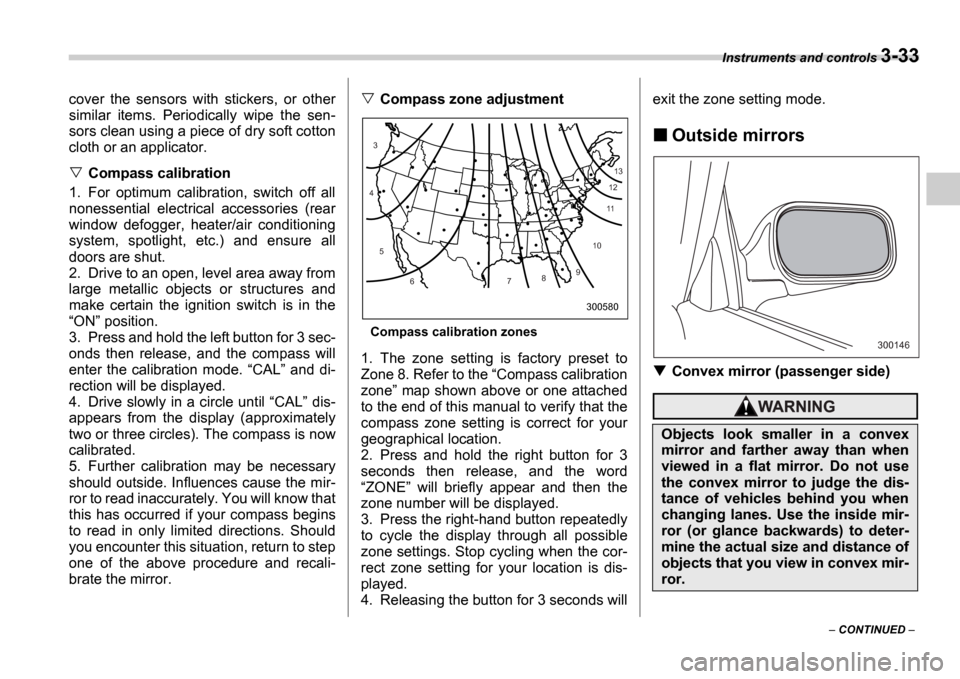
Compass calibration zones
1. The zone setting is factory preset to
Zone 8. Refer to the Compass calibration
zone map shown above or one attached
to the end of this manual to verify that the
compass zone setting is correct for your
geographical location.
2. Press and hold the right button for 3
seconds then release, and the word ZONE will briefly appear and then the
zone number will be displayed.
3. Press the right-hand button repeatedly
to cycle the display through all possible
zone settings. Stop cycling when the cor-
rect zone setting for your location is dis-
played.
4. Releasing the button for 3 seconds will exit the zone setting mode.
Outside mirrors
Convex mirror (passenger side)
10
9
8
7
6
5
4
3
1112
13
300580
Objects look smaller in a convex
mirror and farther away than when
viewed in a flat mirror. Do not use
the convex mirror to judge the dis-
tance of vehicles behind you when
changing lanes. Use the inside mir-
ror (or glance backwards) to deter-
mine the actual size and distance of
objects that you view in convex mir-
ror.
300146
Page 183 of 365
5-20 Audio
To insert a disc
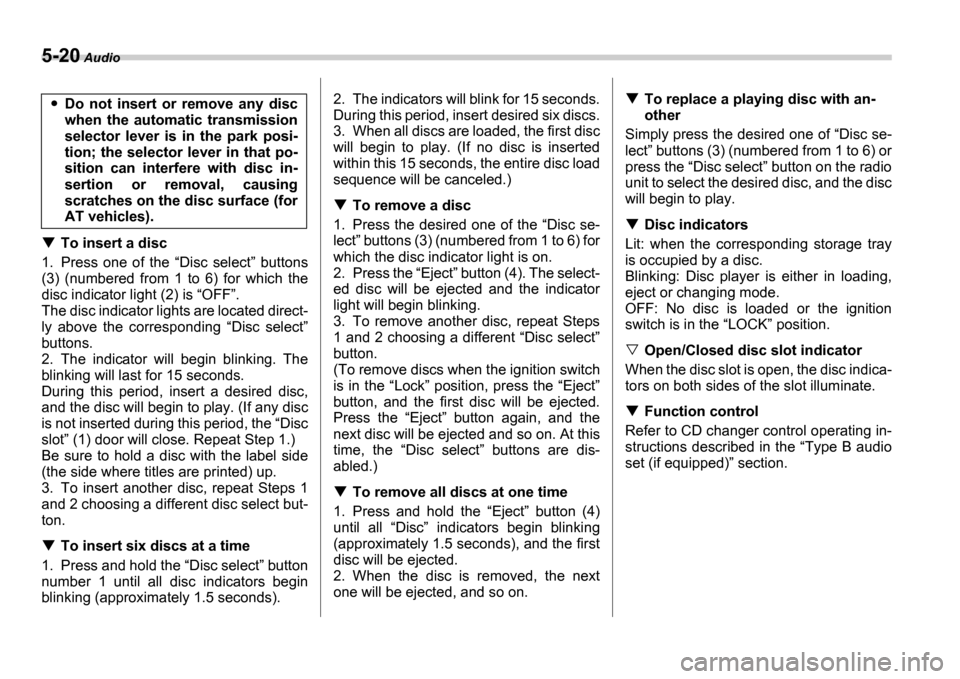
1. Press one of the Disc select buttons
(3) (numbered from 1 to 6) for which the
disc indicator light (2) is OFF .
The disc indicator lights are located direct-
ly above the corresponding Disc select
buttons.
2. The indicator will begin blinking. The
blinking will last for 15 seconds.
During this period, insert a desired disc,
and the disc will begin to play. (If any disc
is not inserted during this period, the Disc
slot (1) door will close. Repeat Step 1.)
Be sure to hold a disc with the label side
(the side where titles are printed) up.
3. To insert another disc, repeat Steps 1
and 2 choosing a different disc select but-
ton.
To insert six discs at a time
1. Press and hold the Disc select button
number 1 until all disc indicators begin
blinking (approximately 1.5 seconds). 2. The indicators will blink for 15 seconds.
During this period, insert desired six discs.
3. When all discs are loaded, the first disc
will begin to play. (If no disc is inserted
within this 15 seconds, the entire disc load
sequence will be canceled.)
To remove a disc
1. Press the desired one of the Disc se-
lect buttons (3) (numbered from 1 to 6) for
which the disc indicator light is on.
2. Press the Eject button (4). The select-
ed disc will be ejected and the indicator
light will begin blinking.
3. To remove another disc, repeat Steps
1 and 2 choosing a different Disc select
button.
(To remove discs when the ignition switch
is in the Lock position, press the Eject
button, and the first disc will be ejected.
Press the Eject button again, and the
next disc will be ejected and so on. At this
time, the Disc select buttons are dis-
abled.)
To remove all discs at one time
1. Press and hold the Eject button (4)
until all Disc indicators begin blinking
(approximately 1.5 seconds), and the first
disc will be ejected.
2. When the disc is removed, the next
one will be ejected, and so on.
To replace a playing disc with an-
other
Simply press the desired one of Disc se-
lect buttons (3) (numbered from 1 to 6) or
press the Disc select button on the radio
unit to select the desired disc, and the disc
will begin to play.
Disc indicators
Lit: when the corresponding storage tray
is occupied by a disc.
Blinking: Disc player is either in loading,
eject or changing mode.
OFF: No disc is loaded or the ignition
switch is in the LOCK position.
Open/Closed disc slot indicator
When the disc slot is open, the disc indica-
tors on both sides of the slot illuminate.
Function control
Refer to CD changer control operating in-
structions described in the Type B audio
set (if equipped) section.
Do not insert or remove any disc
when the automatic transmission
selector lever is in the park posi-
tion; the selector lever in that po-
sition can interfere with disc in-
sertion or removal, causing
scratches on the disc surface (for
AT vehicles).
Page 187 of 365
6-2 Interior equipment
Interior equipm entInterior light
When leaving your vehicle, make sure the
light goes out to avoid battery discharge.
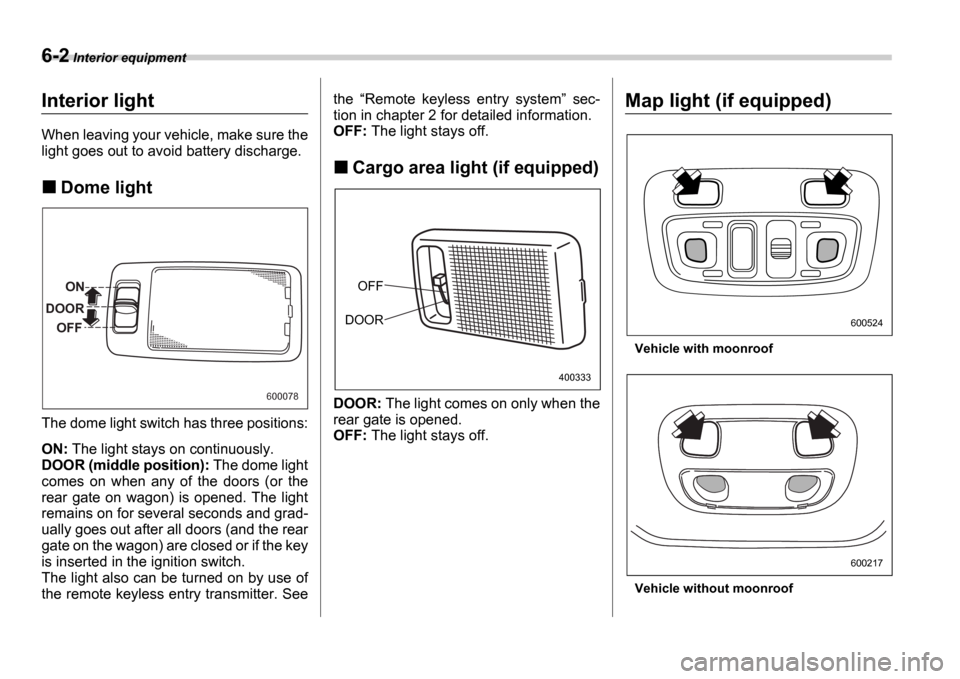
Dome light
The dome light switch has three positions:
ON: The light stays on continuously.
DOOR (middle position): The dome light
comes on when any of the doors (or the
rear gate on wagon) is opened. The light
remains on for several seconds and grad-
ually goes out after all doors (and the rear
gate on the wagon) are closed or if the key
is inserted in the ignition switch.
The light also can be turned on by use of
the remote keyless entry transmitter. See the
Remote keyless entry system sec-
tion in chapter 2 for detailed information.
OFF: The light stays off.
Cargo area light (if equipped)
DOOR: The light comes on only when the
rear gate is opened.
OFF: The light stays off.
Map light (if equipped)
Vehicle with moonroof
Vehicle without moonroof
ON
DOOR OFF
600078
OFF
DOOR
400333
600524
600217
Page 201 of 365
7-4 Starting and operating
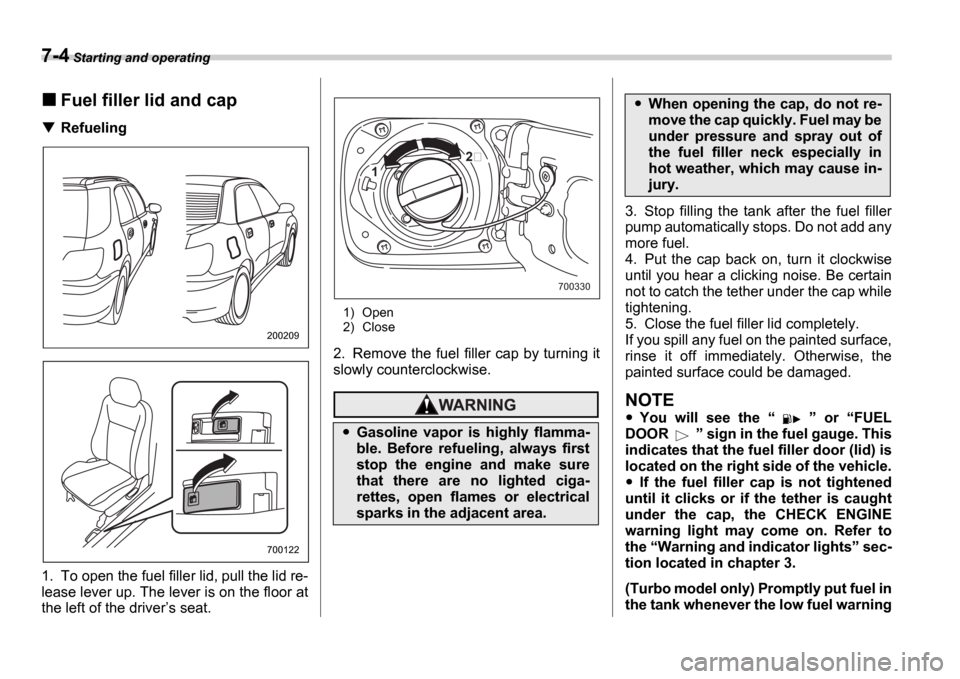
Fuel filler lid and cap
Refueling0
1. To open the fuel filler lid, pull the lid re-
lease lever up. The lever is on the floor at
the left of the driver s seat.
1) Open
2) Close
2. Remove the fuel filler cap by turning it
slowly counterclockwise.
3. Stop filling the tank after the fuel filler
pump automatically stops. Do not add any
more fuel.
4. Put the cap back on, turn it clockwise
until you hear a clicking noise. Be certain
not to catch the tether under the cap while
tightening.
5. Close the fuel filler lid completely.
If you spill any fuel on the painted surface,
rinse it off immediately. Otherwise, the
painted surface could be damaged.
NOTE
You will see the or FUEL
DOOR sign in the fuel gauge. This
indicates that the fuel filler door (lid) is
located on the right side of the vehicle.
If the fuel filler cap is not tightened
until it clicks or if the tether is caught
under the cap, the CHECK ENGINE
warning light may come on. Refer to
the Warning and indicator lights sec-
tion located in chapter 3.
(Turbo model only) Promptly put fuel in
the tank whenever the low fuel warning
200209
700122
Gasoline vapor is highly flamma-
ble. Before refueling, always first
stop the engine and make sure
that there are no lighted ciga-
rettes, open flames or electrical
sparks in the adjacent area.
1
700330
When opening the cap, do not re-
move the cap quickly. Fuel may be
under pressure and spray out of
the fuel filler neck especially in
hot weather, which may cause in-
jury.
Page 235 of 365
8-8 Driving tips
Winter driving
Operation during cold weath-
er
Carry some emergency equipment, such
as tire chains, a window scraper, a bag of
sand, flares, a small shovel, and jumper
cables.
Check the battery and cables. Cold tem-
peratures reduce battery capacity. The
battery must be in good condition to pro-
vide enough power for cold winter starts.
Use an engine oil of proper grade and vis-
cosity for cold weather. Heavy summer oil
will cause harder starting.
Keep the door locks from freezing by squirting them with deicer or glycerin.
Forcing a frozen door open may damage
or separate the rubber weather strips
around the door. If the door is frozen, use
hot water to melt the ice, and afterwards
thoroughly wipe the water away.
Use a windshield washer fluid that con-
tains an antifreeze solution. Do not use
engine antifreeze or other substitutes be-
cause they may damage the paint of the
vehicle.
SUBARU Windshield Washer Fluid con-
tains 58.5% methyl alcohol and 41.5%
surfactant, by volume. Its freezing temper-
ature varies according to how much it is di-
luted, as indicated in the following table.
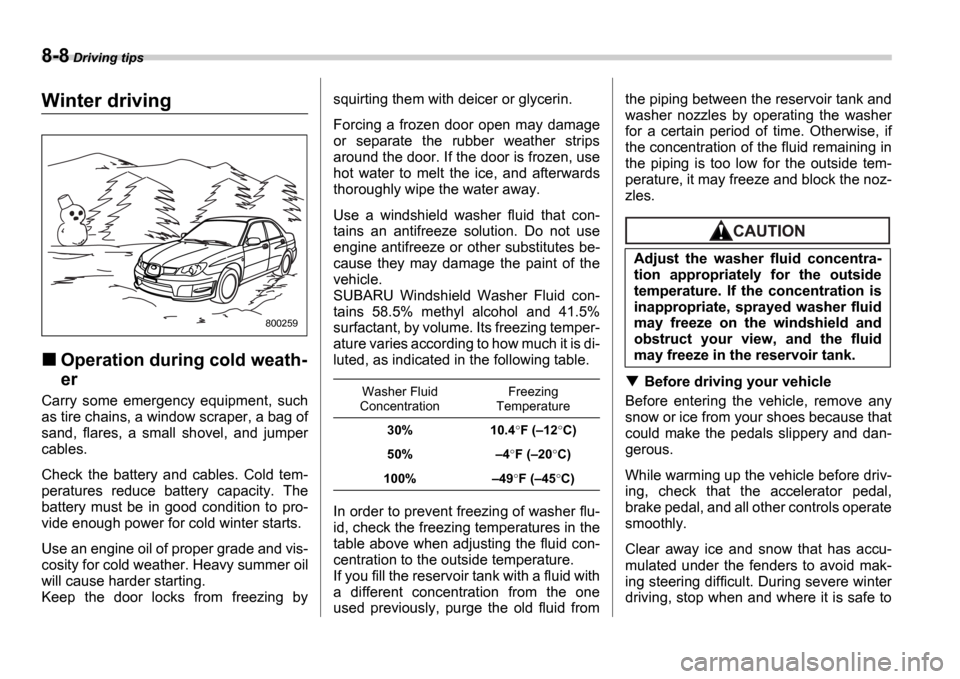
In order to prevent freezing of washer flu-
id, check the freezing temperatures in the
table above when adjusting the fluid con-
centration to the outside temperature.
If you fill the reservoir tank with a fluid with
a different concentration from the one
used previously, purge the old fluid fromthe piping between the reservoir tank and
washer nozzles by operating the washer
for a certain period of time. Otherwise, if
the concentration of the fluid remaining in
the piping is too low for the outside tem-
perature, it may freeze and block the noz-
zles.
Before driving your vehicle
Before entering the vehicle, remove any
snow or ice from your shoes because that
could make the pedals slippery and dan-
gerous.
While warming up the vehicle before driv-
ing, check that the accelerator pedal,
brake pedal, and all other controls operate
smoothly.
Clear away ice and snow that has accu-
mulated under the fenders to avoid mak-
ing steering difficult. During severe winter
driving, stop when and where it is safe to
800259
Washer Fluid
Concentration Freezing
Temperature
30% 10.4 F ( 12 C)
50% 4F ( 20 C)
100% 49 F ( 45 C)
Adjust the washer fluid concentra-
tion appropriately for the outside
temperature. If the concentration is
inappropriate, sprayed washer fluid
may freeze on the windshield and
obstruct your view, and the fluid
may freeze in the reservoir tank.
Page 270 of 365
In case of emergency 9-15
CONTINUED
Rear gate if the rear gate
cannot be unlocked
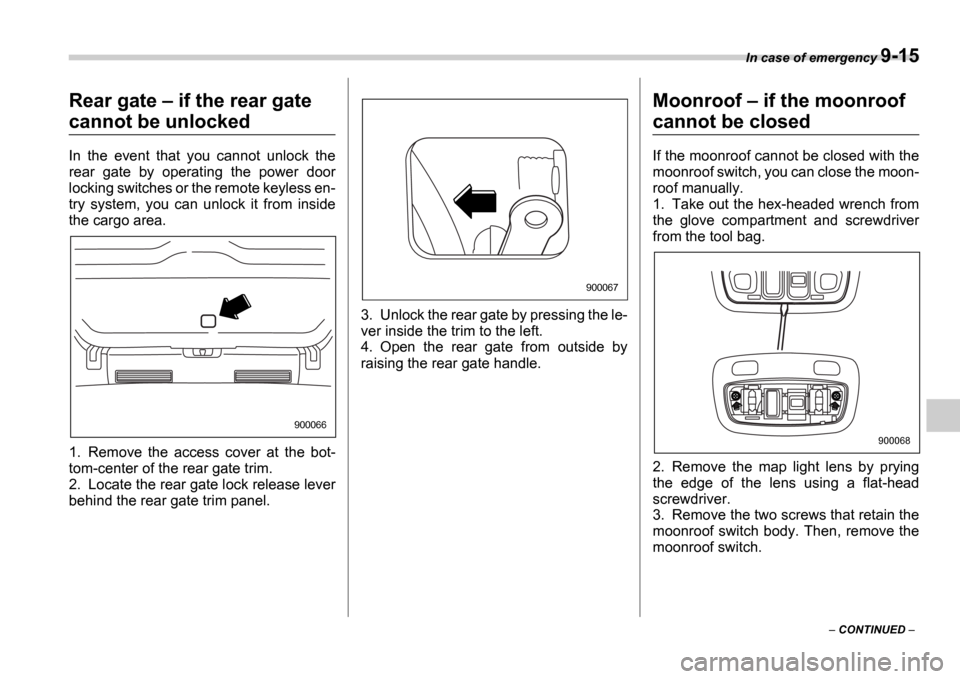
In the event that you cannot unlock the
rear gate by operating the power door
locking switches or the remote keyless en-
try system, you can unlock it from inside
the cargo area.
0
1. Remove the access cover at the bot-
tom-center of the rear gate trim.
2. Locate the rear gate lock release lever
behind the rear gate trim panel. 3. Unlock the rear gate by pressing the le-
ver inside the trim to the left.
4. Open the rear gate from outside by
raising the rear gate handle.
Moonroof
if the moonroof
cannot be closed
If the moonroof cannot be closed with the
moonroof switch, you can close the moon-
roof manually.
1. Take out the hex-headed wrench from
the glove compartment and screwdriver
from the tool bag.
2. Remove the map light lens by prying
the edge of the lens using a flat-head
screwdriver.
3. Remove the two screws that retain the
moonroof switch body. Then, remove the
moonroof switch.
900066
900067
900068