2006 SUBARU IMPREZA ESP
[x] Cancel search: ESPPage 72 of 365

Seat, seatbelt and SRS airbags 1-45
CONTINUED
When a heavy article is placed on the
seat.
When the front passenger s seat is occu-
pied by an adult, observe the following
precautions. Failure to do so may lessen
the load on the front passenger s seat, de-
activating the front passenger s SRS fron-
tal airbag despite the fact that the seat is
occupied by an adult.
Do not allow the rear seat occupant to
lift the front passenger s seat cushion us-
ing his/her feet.
Do not place any article under the front
passenger s seat, or squeeze any article
from behind and under the seat. This may
lift the seat cushion.
Do not squeeze any article between the
front passenger s seat and side trim/pillar,
door or center console box. This may lift
the seat cushion.
If the passenger s frontal airbag
OFF indicator illuminates and the
ON indicator extinguishes even
when the front passenger s seat is
occupied by an adult
This can be caused by the adult incorrect-
ly sitting in the front passenger s seat.
Turn the ignition switch to the OFF posi-
tion. Ask the front passenger to set the
seatback to the upright position, sit up
straight in the center of the seat cushion, correctly fasten the seatbelt, position his/
her legs out forward, and adjust the seat
to the rearmost position. Turn the ignition
switch to the
ON position. If the OFF in-
dicator remains illuminated while the ON
indicator remains extinguished, take the
following actions.
Turn the ignition switch to the OFF po-
sition.
Ensure that there is no article, book,
shoe, or other object trapped under the
seat, at the rear of the seat, or on the side
of the seat.
Ensure that the backward-forward posi-
tion and seatback of front passenger s
seat are locked into place securely by
moving the seat back and forth.
Next, turn the ignition switch to the ON
position and wait 6 seconds to allow the
system to complete self-checking. Follow-
ing the system check, both indicators ex-
tinguish for 2 seconds. Now, the ON indi-
cator should illuminate while the OFF indi-
cator remains extinguished.
If the OFF indicator still illuminates while
the ON indicator remains extinguished,
ask the occupant to move to the rear seat
and immediately contact your SUBARU
dealer for an inspection.
Effect vehicle modifications made
for persons with disabilities may
have on Subaru advanced frontal
airbag system operation (U.S. only)
Changing or moving any parts of the front
seats, seat belts, front bumper, front side
frame, instrument panel, combination
meter, steering wheel, steering column,
tire, suspension or floor panel can affect
the operation of the Subaru advanced air-
bag system. If you have any questions,
you may contact the following Subaru dis-
tributors:
Subaru of America, Inc.
Customer Dealer Services Department
P.O. Box 6000
Cherry Hill, NJ 08034-6000
1-800-SUBARU3 (1-800-782-2783)
Schuman Carriage Motors, Inc.
1234 South Beretania Street, Honolulu, HI
96814
808-592-4497
Triple J Enterprises, Inc.
P.O. Box 6066, Tamuning, Guam 96931
671-646-9126
Page 90 of 365
Keys and doors 2-3
CONTINUED
Immobilizer (Turbo models)
The immobilizer system is designed to
prevent an unauthorized person from
starting the engine. Only keys registered
with your vehicle s immobilizer system
can be used to operate your vehicle. Even
if an unregistered key fits into the ignition
switch and can be turned to the START
position, the engine will automatically stop
after several seconds.
Each immobilizer key contains a tran-
sponder in which the key s ID code is
stored. When a key is inserted into the ig-
nition switch and turned to the ON posi-
tion, the transponder transmits the key s
ID code to the immobilizer system s re-
ceiver. If the transmitted ID code matches
the ID code registered in the immobilizer
system, the system allows the engine to
be started. Since the ID code is transmit-
ted and acted upon almost instantly, the
immobilizer system does not impede nor-
mal starting of the engine.
If the engine fails to start, pull out the key
once before trying again. (Refer to the Ig-
nition switch section [chapter 3].)
This device complies with Part 15 of
the FCC Rules and with RSS-210 of In-
dustry Canada. Operation is subject to
the following two conditions: (1) This device may not cause harmful interfer-
ence, and (2) this device must accept
any interference received, including in-
terference that may cause undesired
operation.
Changes or modifications not express-
ly approved by the party responsible
for compliance could void the user
s
authority to operate the equipment.
NOTE
To protect your vehicle from theft,
please pay close attention to the fol-
lowing security precautions:
Never leave your vehicle unattended
with its keys inside.
Before leaving your vehicle, close all
windows and lock the doors and rear
gate.
Do not leave spare keys or any
record of your key number in the vehi-
cle.
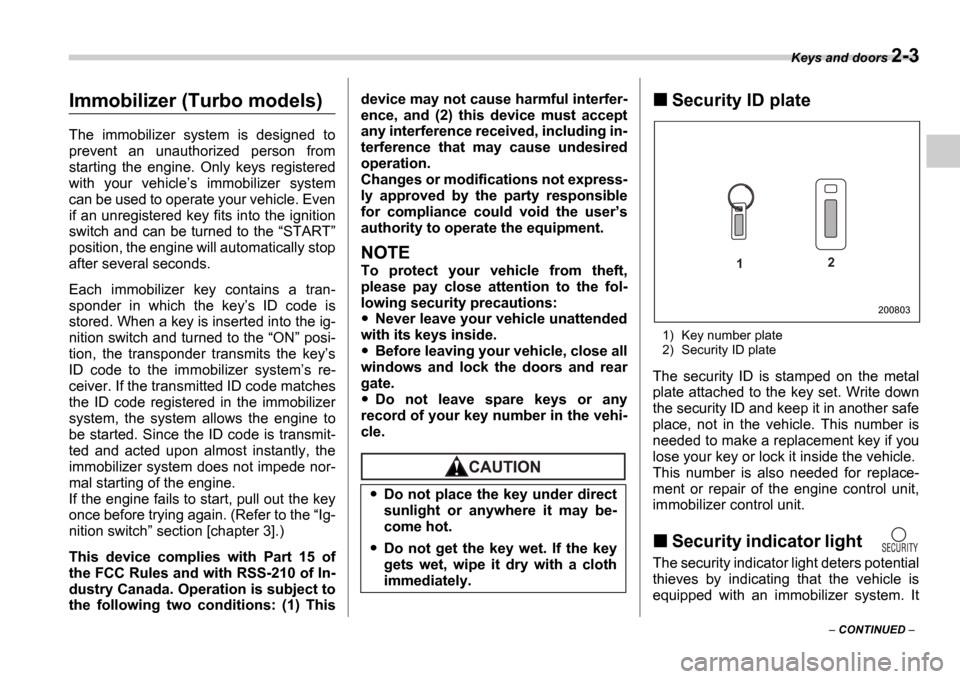
Security ID plate
1) Key number plate
2) Security ID plate
The security ID is stamped on the metal
plate attached to the key set. Write down
the security ID and keep it in another safe
place, not in the vehicle. This number is
needed to make a replacement key if you
lose your key or lock it inside the vehicle.
This number is also needed for replace-
ment or repair of the engine control unit,
immobilizer control unit.
Security indicator light
The security indicator light deters potential
thieves by indicating that the vehicle is
equipped with an immobilizer system. It
Do not place the key under direct
sunlight or anywhere it may be-
come hot.
Do not get the key wet. If the key
gets wet, wipe it dry with a cloth
immediately.
1 2
200803
Page 92 of 365
Keys and doors 2-5
CONTINUED
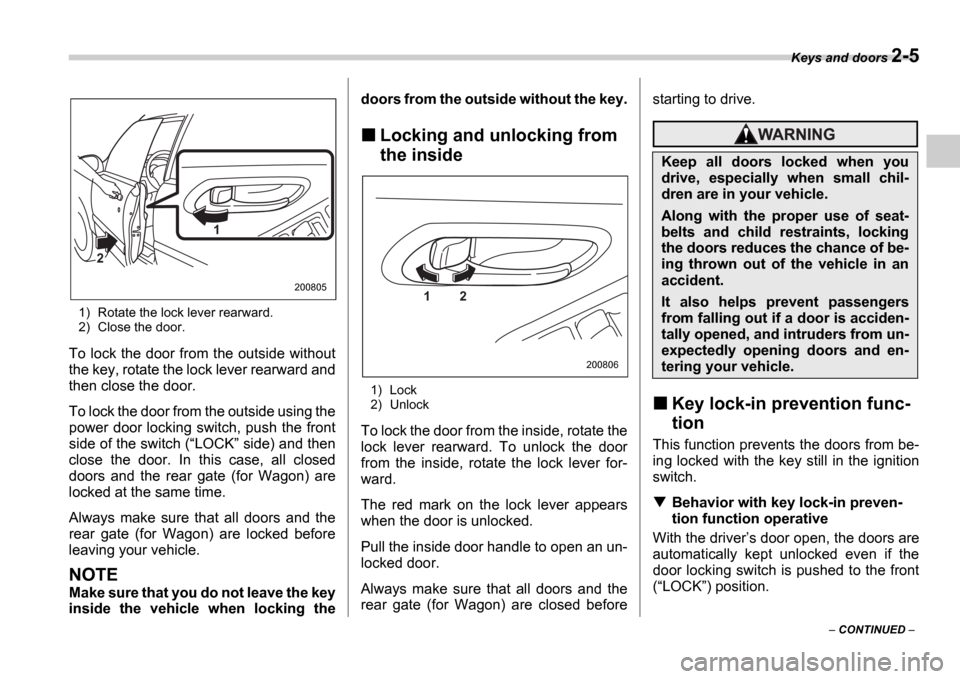
1) Rotate the lock lever rearward.
2) Close the door.
To lock the door from the outside without
the key, rotate the lock lever rearward and
then close the door.
To lock the door from the outside using the
power door locking switch, push the front
side of the switch ( LOCK side) and then
close the door. In this case, all closed
doors and the rear gate (for Wagon) are
locked at the same time.
Always make sure that all doors and the
rear gate (for Wagon) are locked before
leaving your vehicle.
NOTE
Make sure that you do not leave the key
inside the vehicle when locking the doors from the outside without the key.
Locking and unlocking from
the inside
1) Lock
2) Unlock
To lock the door from the inside, rotate the
lock lever rearward. To unlock the door
from the inside, rotate the lock lever for-
ward.
The red mark on the lock lever appears
when the door is unlocked.
Pull the inside door handle to open an un-
locked door.
Always make sure that all doors and the
rear gate (for Wagon) are closed before starting to drive.
Key lock-in prevention func-
tion
This function prevents the doors from be-
ing locked with the key still in the ignition
switch.
Behavior with key lock-in preven-
tion function operative
With the driver s door open, the doors are
automatically kept unlocked even if the
door locking switch is pushed to the front( LOCK ) position.
1
2
2008051 2
200806
Keep all doors locked when you
drive, especially when small chil-
dren are in your vehicle.
Along with the proper use of seat-
belts and child restraints, locking
the doors reduces the chance of be-
ing thrown out of the vehicle in an
accident.
It also helps prevent passengers
from falling out if a door is acciden-
tally opened, and intruders from un-
expectedly opening doors and en-
tering your vehicle.
Page 94 of 365
Keys and doors 2-7
CONTINUED
Remote keyless entry sys-
tem
Two transmitters are provided for your ve-
hicle.
The remote keyless entry system has the
following functions.
Locking and unlocking the doors (and
rear gate on the Wagon) without a key
Sounding a panic alarm
Arming and disarming the alarm sys-
tem. See the next section Alarm system
for detailed information.
This device complies with Part 15 of
the FCC Rules and with RSS-210 of In-
dustry Canada. Operation is subject to
the following two conditions: (1) This
device may not cause harmful interfer-
ence, and (2) this device must accept
any interference received, including in-
terference that may cause undesired
operation.
Changes or modifications not express-
ly approved by the party responsible
for compliance could void the user s
authority to operate the equipment.
The operable distance of the keyless entry
system is approximately 30 feet (10
meters). However, this distance will vary
depending on environmental conditions. The system
s operable distance will be
shorter in areas near a facility or electronic
equipment emitting strong radio waves
such as a power plant, broadcast station,
TV tower, or remote controller of home
electronic appliances.
The remote keyless entry system does not
operate when the key is inserted in the ig-
nition switch to prevent accidental lockout.
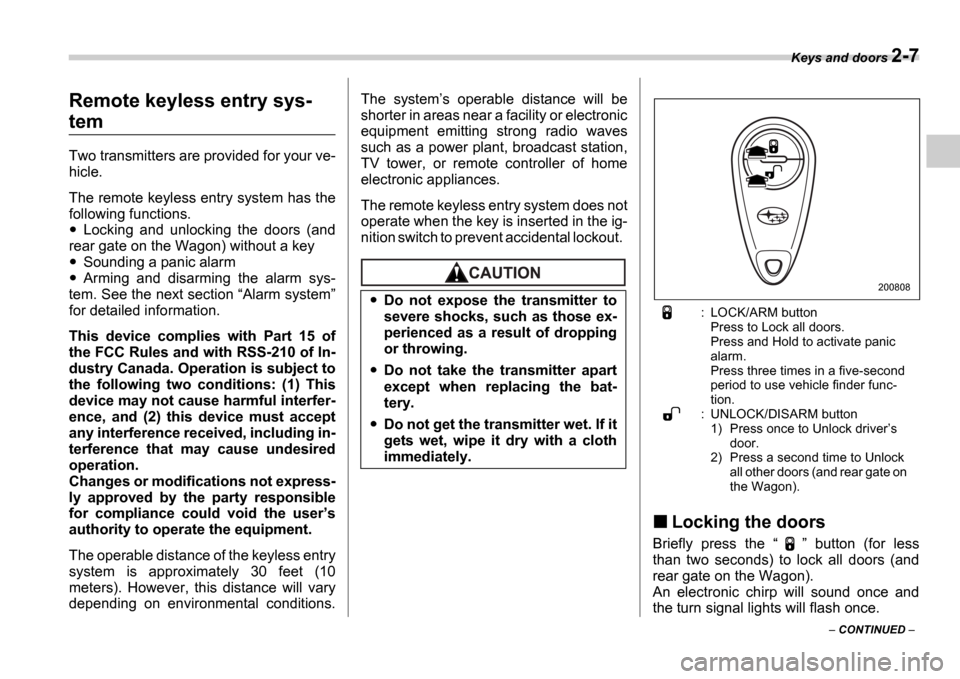
: LOCK/ARM button Press to Lock all doors.
Press and Hold to activate panic
alarm.
Press three times in a five-second
period to use vehicle finder func-
tion.
: UNLOCK/DISARM button 1) Press once to Unlock driver s
door.
2) Press a second time to Unlock
all other doors (and rear gate on
the Wagon).
Locking the doors
Briefly press the button (for less
than two seconds) to lock all doors (and
rear gate on the Wagon).
An electronic chirp will sound once and
the turn signal lights will flash once.
Do not expose the transmitter to
severe shocks, such as those ex-
perienced as a result of dropping
or throwing.
Do not take the transmitter apart
except when replacing the bat-
tery.
Do not get the transmitter wet. If it
gets wet, wipe it dry with a cloth
immediately.
200808
Page 95 of 365
2-8 Keys and doors
If any of the doors (or the rear gate) is not
fully closed, an electronic chirp will sound
five times and the turn signal lights will
flash five times to alert you that the doors
(or the rear gate) are not properly closed.
When you close the door, it will automati-
cally lock.
NOTE
If the button is pressed for two
seconds or longer, the panic alarm will
sound. When locking the doors in nor-
mal circumstances, press the
button for less than two seconds. For
details on the panic alarm, refer to Sounding a panic alarm .
Unlocking the doors
Briefly press the button (for less
than two seconds) to unlock the driver s
door. An electronic chirp will sound twice
and the turn signal lights will flash twice.
To unlock all other doors (and rear gate on
the Wagon), briefly press the but-
ton a second time within 5 seconds.
NOTE
If the interval between the first and sec-
ond presses of the button (for
unlocking of all of the doors and the
rear gate) is extremely short, the sys-
tem may not respond.
Illuminated entry
The interior (dome) light and ignition
switch light (for turbo models) will illumi-
nate when the button is pressed.
These lights stay illuminated for approxi-
mately 30 seconds if any of the doors (or
the rear gate on the Wagon) is not
opened.
If the button is pressed before 30
seconds have elapsed, these lights will go
out. Also, these lights will go out if the key
is inserted in the ignition switch. The inte-
rior light switch must be set to the middle
position in order for this function to oper-
ate.
Vehicle finder function
Use this function to find your vehicle
parked among many vehicles in a large
parking lot. Provided you are within 30
feet (10 meters) of the vehicle, pressing
the button three times in a five-sec-
ond period will cause your vehicle s horn
to sound once and its turn signal lights to
flash three times.
NOTE
If the interval between presses is too
short when you press the button
three times, the system may not re-
spond to the signals from the remote transmitter.
Sounding a panic alarm
To activate the alarm, keep the
but-
ton pressed for more than two seconds .
The horn will sound and the turn signal
lights will flash.
To deactivate it, press the button or
button. Unless a button on the re-
mote is pressed, the alarm will be deacti-
vated after approximately 30 seconds.
Selecting audible signal op-
eration
Using an electronic chirp, the system will
give you an audible signal when the doors
lock and unlock. If desired, you may turn
the audible signal off.
Do the following to deactivate the audible
signal. You can also use the same steps
to restore the function.
1. Sit in the driver s seat and shut all
doors and the rear gate.
2. Open the driver s door, then remove
the key from the ignition switch.
3. Hold down the UNLOCK side of the
power door locking switch.
4. While holding down the UNLOCK
side of the power door locking switch, in-
sert the key into the ignition switch and re-
move it again at least 6 times within 10
Page 127 of 365
3-14 Instruments and controls
Warning and indicator lights
Several of the warning and indicator lights
come on momentarily and then go out
when the ignition switch is initially turned
to the ON position. This permits check-
ing the operation of the bulbs.
Apply the parking brake and turn the igni-
tion switch to the ON position. The fol-
lowing lights come on:
Seatbelt warning light
SRS airbag system warning light
Front passenger s frontal airbag ON in-
dicator light
Front passenger s frontal airbag OFF
indicator light
CHECK ENGINE warning light/Mal-
function indicator lamp
Charge warning light
Oil pressure warning light
AT OIL temperature warning light (AT
vehicles)
ABS warning light
Brake system warning light
All-Wheel Drive warning light (AT vehi-
cles)
Cruise control indicator light (if
equipped)
Cruise control set indicator light (if
equipped)
If any lights fail to come on, it indicates a burned-out bulb or a malfunction of the
corresponding system.
Consult your authorized SUBARU dealer
for repair.
Seatbelt warning light
and chime
Your vehicle is equipped with a seatbelt
warning device at the driver
s seat, as re-
quired by current safety standards. There
is a seatbelt warning light in the combina-
tion meter.
If the driver has not yet fastened the seat-
belt when the ignition switch is turned to
the ON position, the seatbelt warning
light will flash for 6 seconds, to warn that
the seatbelt is unfastened. If the driver s
seatbelt is not fastened, a chime will also
sound simultaneously.
If the driver s seatbelt is still not fastened
6 seconds later, the warning light will re-
main lit for 15 seconds. If the driver s seat-
belt is still not fastened even 15 seconds
later (21 seconds after turning ON the ig-
nition switch), the warning lights will alter-
nate between flashing and steady illumi-
nation at 15-second intervals, and the
chime will sound while the warning light is
flashing.
Alternate flashing and steady illumination
of the warning lights and sounding of the chime will continue until the driver fastens
the seatbelt.
NOTE
If the driver unfastens the seatbelt af-
ter fastening, the seatbelt warning de-
vice operates as follows according to
the vehicle speed.
At speeds lower than approximate-
ly 9 mph (15 km/h)
The warning light will alternate be-
tween flashing and steady illumina-
tion at 15-second intervals. The
chime will not sound.
At speeds higher than approxi-
mately 9 mph (15 km/h)
The warning light will alternate be-
tween flashing and steady illumina-
tion at 15-second intervals and the
chime will sound while the warning
light is flashing.
It is possible to cancel the warning
operation that follows the 6-second
warning after turning ON the ignition
switch by unfastening and refastening
the driver s seatbelt. When the ignition
switch is turned ON next time, howev-
er, the complete sequence of the warn-
ing operation resumes. For further de-
tails about canceling the warning oper-
ation, please contact your SUBARU
dealer.
Page 172 of 365
Audio 5-9
CONTINUED
CD changer control (if optional in-dash CD changer is connect-
ed)
An optional CD changer can be connected to this audio un it. Consult the instructions that
accompany the CD changer for operating the CD changer i tself (e.g., how to load or un-
load CDs). See your SUBARU dealer for more informatio n.
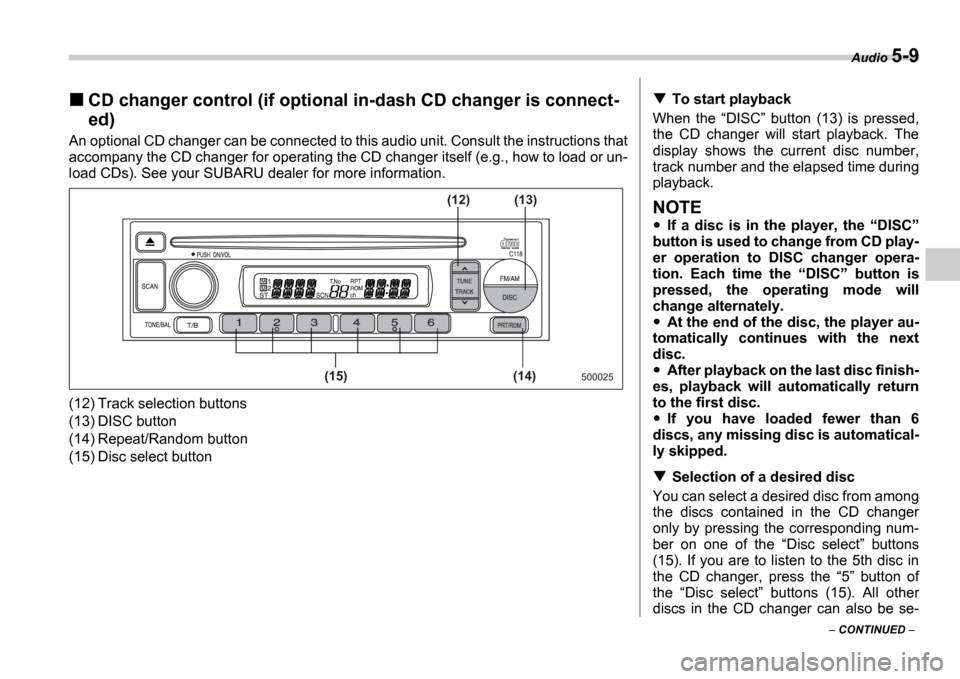
(12) Track selection buttons
(13) DISC button
(14) Repeat/Random button
(15) Disc select button
500025(14)
(15) (13)
(12)
To start playback
When the DISC button (13) is pressed,
the CD changer will start playback. The
display shows the current disc number,
track number and the elapsed time during
playback.
NOTE
If a disc is in the player, the DISC
button is used to change from CD play-
er operation to DISC changer opera-
tion. Each time the DISC button is
pressed, the operating mode will
change alternately.
At the end of the disc, the player au-
tomatically continues with the next
disc.
After playback on the last disc finish-
es, playback will automatically return
to the first disc.
If you have loaded fewer than 6
discs, any missing disc is automatical-
ly skipped.
Selection of a desired disc
You can select a desired disc from among
the discs contained in the CD changer
only by pressing the corresponding num-
ber on one of the Disc select buttons
(15). If you are to listen to the 5th disc in
the CD changer, press the 5 button of
the Disc select buttons (15). All other
discs in the CD changer can also be se-
Page 173 of 365
5-10 Audio
lected in a similar way.
NOTE
No disc change takes place if the
button corresponding to the storage
tray in which no disc is loaded is
pressed.
If the disc select button correspond-
ing to the disc now in playback is
pressed again, the disc will be replayed
from its beginning.
To select a song from its beginning
Forward direction
Briefly press the side of the button
(12) to skip to the beginning of the next
track. Each time this side of the button is
pressed, the indicated track number will
increase.
Backward direction
Briefly press the side of the button
(12) to skip to the beginning of the current
track. Each time this side of the button is
pressed, the indicated track number will
decrease.
Fast-forwarding and fast-reversing
Fast-forwarding
Press the side of the button (12)
continuously to fast-forward the disc.
Release the button to stop fast-forward- ing.
If you continue fast-forwarding to the end
of the disc, the CD changer will automati-
cally stop fast-forwarding and start play-
back beginning with the first track on the
current disc.
Fast-reversing
Press the side of the button (12)
continuously to fast-reverse the disc.
Release the button to stop fast-reversing.
If you continue fast-reverse to the begin-
ning of the disc, the CD changer will auto-
matically stop fast-reverse and start play-
back beginning with the first track on the
current disc.
Repeat playback
Use this to play a certain track repeatedly.
During playback, press the RPT/RDM
button (14) and release it in less than 2
seconds. The RPT indicator will come on
and the song will be played continuously.
To cancel the repeat mode, press the but-
ton again. Then the RPT indicator goes
out, and normal playback mode is re-
stored.
Random playback
Use this to play the tracks on the disc in
random order. During playback, press the RPT/RDM button (14) and hold it in for
more than 2 seconds. The RDM indica- tor will come on and all songs on the disc
will be played in a random order.
To cancel the random mode, press the
button again. Then the
RDM indicator
goes out, and normal playback mode is
restored.