2006 MERCEDES-BENZ SPRINTER light
[x] Cancel search: lightPage 982 of 2305

(3) Pull the dome/reading lamp unit from its
mounting location far enough to access and discon-
nect the vehicle wire harness from the lamp connec-
tor receptacle.
(4) Remove the dome/reading lamp unit from its
mounting location.
INSTALLATION
(1) Position the dome/reading lamp unit to its
mounting location.
(2) Reconnect the vehicle wire harness connector
to the dome/reading lamp connector receptacle (Fig.
6).
(3) Position the edge of the dome/reading lamp
housing opposite from the retainer clip into the
mounting hole.
(4) Push firmly and evenly on the notched edge of
the dome/reading lamp housing until the retainer
clip latches into place.
(5) Reconnect the battery negative cable.
DOME LAMP / INTRUSION
SENSOR BULB
REMOVAL
(1) Disconnect and isolate the battery negative
cable.
(2) Remove the dome lamp/intrusion sensor unit
from its mounting location, but do not disconnect the
vehicle wire harness from the lamp connector recep-
tacle. (Refer to 8 - ELECTRICAL/LAMPS/LIGHTING
- INTERIOR/DOME LAMP/INTRUSION SENSOR
UNIT - REMOVAL).
(3) Grasp the lamp housing in one hand and rotate
the bulb holder and bulb unit counterclockwise about
30 degrees on the circuit board (Fig. 7).(4) Pull the bulb holder and bulb unit straight out
from the mounting hole in the circuit board.
INSTALLATION
(1) Grasp the dome lamp/intrusion sensor unit
housing in one hand and align the bulb holder and
bulb unit with the bulb mounting hole in the circuit
board with the other hand (Fig. 7).
(2) Insert the bulb holder and bulb unit straight
into the circuit board bulb mounting hole until it is
firmly seated.
(3) Rotate the bulb holder and bulb unit clockwise
about 30 degrees on the circuit board.
(4) Reinstall the dome lamp/intrusion sensor unit
into its mounting location. (Refer to 8 - ELECTRI-
CAL/LAMPS/LIGHTING - INTERIOR/DOME LAMP/
INTRUSION SENSOR UNIT - INSTALLATION).
(5) Reconnect the battery negative cable.
DOME LAMP / INTRUSION
SENSOR
REMOVAL
(1) Disconnect and isolate the battery negative
cable.
(2) Insert the tip of a small flat-bladed screwdriver
into the notch on one edge of the dome lamp/intru-
sion sensor unit housing to depress the retainer clip
and pull that edge of the lamp away from its mount-
ing location (Fig. 8).
Fig. 6 Dome/Reading Lamp Unit Remove/Install
1 - LAMP HOUSING
2 - SWITCH BUTTON
3 - NOTCH
4 - SUN VISOR (2)
5 - HEADLINER
Fig. 7 Dome Lamp/Intrusion Sensor Bulb Remove/
Install
1 - BULB HOLDER/BULB (4)
2 - LAMP HOUSING
VALAMPS/LIGHTING - INTERIOR 8L - 33
Page 983 of 2305

(3) Pull the dome lamp/intrusion sensor unit from
its mounting location far enough to access and dis-
connect the vehicle wire harness from the lamp con-
nector receptacle.
(4) Remove the dome lamp/intrusion sensor unit
from its mounting location.
INSTALLATION
(1) Position the dome lamp/intrusion sensor unit to
its mounting location (Fig. 8).
(2) Reconnect the vehicle wire harness connector
to the dome lamp/intrusion sensor unit connector
receptacle.
(3) Position the edge of the dome lamp/intrusion
sensor unit housing opposite from the retainer clip
into the mounting hole.
(4) Push firmly and evenly on the notched edge of
the dome lamp/intrusion sensor unit housing until
the retainer clip latches into place.
(5) Reconnect the battery negative cable.
DOOR JAMB SWITCH
REMOVAL
(1) Disconnect and isolate the battery negative
cable.
(2) Open the door and remove the screw that
secures the door jamb switch to the hinge pillar of
the door opening (Fig. 9).(3) Pull the door jamb switch away from the
mounting hole in the pillar far enough to access and
disconnect the vehicle wire harness connector from
the back of the switch.
INSTALLATION
(1) Position the door jamb switch close enough to
the mounting hole in the hinge pillar of the door
opening to reconnect the vehicle wire harness connec-
tor to the back of the switch.
(2) Position the door jamb switch into the mount-
ing hole in the hinge pillar (Fig. 9).
(3) Install and tighten the screw that secures the
door jamb switch to the hinge pillar.
(4) Reconnect the battery negative cable.
ENTRY / EXIT LAMP BULB
REMOVAL
(1) Disconnect and isolate the battery negative
cable.
(2) Remove the entry/exit lamp unit from its
mounting location. (Refer to 8 - ELECTRICAL/
LAMPS/LIGHTING - INTERIOR/ENTRY/EXIT
LAMP UNIT - REMOVAL).
(3) Grasp the lamp housing firmly in one hand,
then rotate the bulb holder counterclockwise and pull
it straight out from the housing with the other hand
(Fig. 10).
Fig. 8 Dome Lamp/Intrusion Sensor Unit Remove/
Install
1 - NOTCH
2 - SENSOR (3)
3 - HOUSING
4 - SWITCH (2)
Fig. 9 Door Jamb Switch Remove/Install
1 - DOOR JAMB SWITCH
2 - PLUNGER
3 - PILLAR
4 - SCREW
8L - 34 LAMPS/LIGHTING - INTERIORVA
Page 984 of 2305
(4) Remove the bulb from the bulb holder.
INSTALLATION
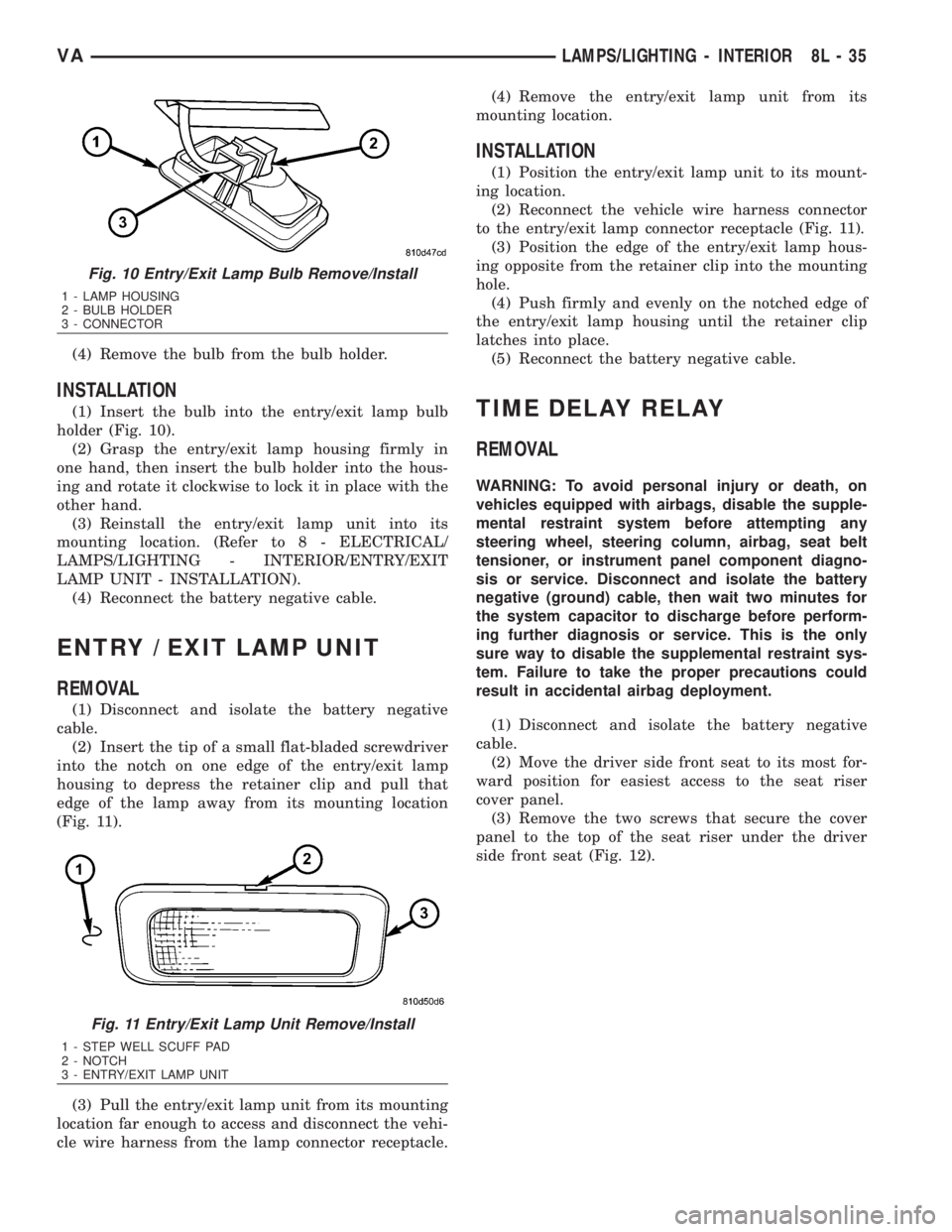
(1) Insert the bulb into the entry/exit lamp bulb
holder (Fig. 10).
(2) Grasp the entry/exit lamp housing firmly in
one hand, then insert the bulb holder into the hous-
ing and rotate it clockwise to lock it in place with the
other hand.
(3) Reinstall the entry/exit lamp unit into its
mounting location. (Refer to 8 - ELECTRICAL/
LAMPS/LIGHTING - INTERIOR/ENTRY/EXIT
LAMP UNIT - INSTALLATION).
(4) Reconnect the battery negative cable.
ENTRY / EXIT LAMP UNIT
REMOVAL
(1) Disconnect and isolate the battery negative
cable.
(2) Insert the tip of a small flat-bladed screwdriver
into the notch on one edge of the entry/exit lamp
housing to depress the retainer clip and pull that
edge of the lamp away from its mounting location
(Fig. 11).
(3) Pull the entry/exit lamp unit from its mounting
location far enough to access and disconnect the vehi-
cle wire harness from the lamp connector receptacle.(4) Remove the entry/exit lamp unit from its
mounting location.
INSTALLATION
(1) Position the entry/exit lamp unit to its mount-
ing location.
(2) Reconnect the vehicle wire harness connector
to the entry/exit lamp connector receptacle (Fig. 11).
(3) Position the edge of the entry/exit lamp hous-
ing opposite from the retainer clip into the mounting
hole.
(4) Push firmly and evenly on the notched edge of
the entry/exit lamp housing until the retainer clip
latches into place.
(5) Reconnect the battery negative cable.
TIME DELAY RELAY
REMOVAL
WARNING: To avoid personal injury or death, on
vehicles equipped with airbags, disable the supple-
mental restraint system before attempting any
steering wheel, steering column, airbag, seat belt
tensioner, or instrument panel component diagno-
sis or service. Disconnect and isolate the battery
negative (ground) cable, then wait two minutes for
the system capacitor to discharge before perform-
ing further diagnosis or service. This is the only
sure way to disable the supplemental restraint sys-
tem. Failure to take the proper precautions could
result in accidental airbag deployment.
(1) Disconnect and isolate the battery negative
cable.
(2) Move the driver side front seat to its most for-
ward position for easiest access to the seat riser
cover panel.
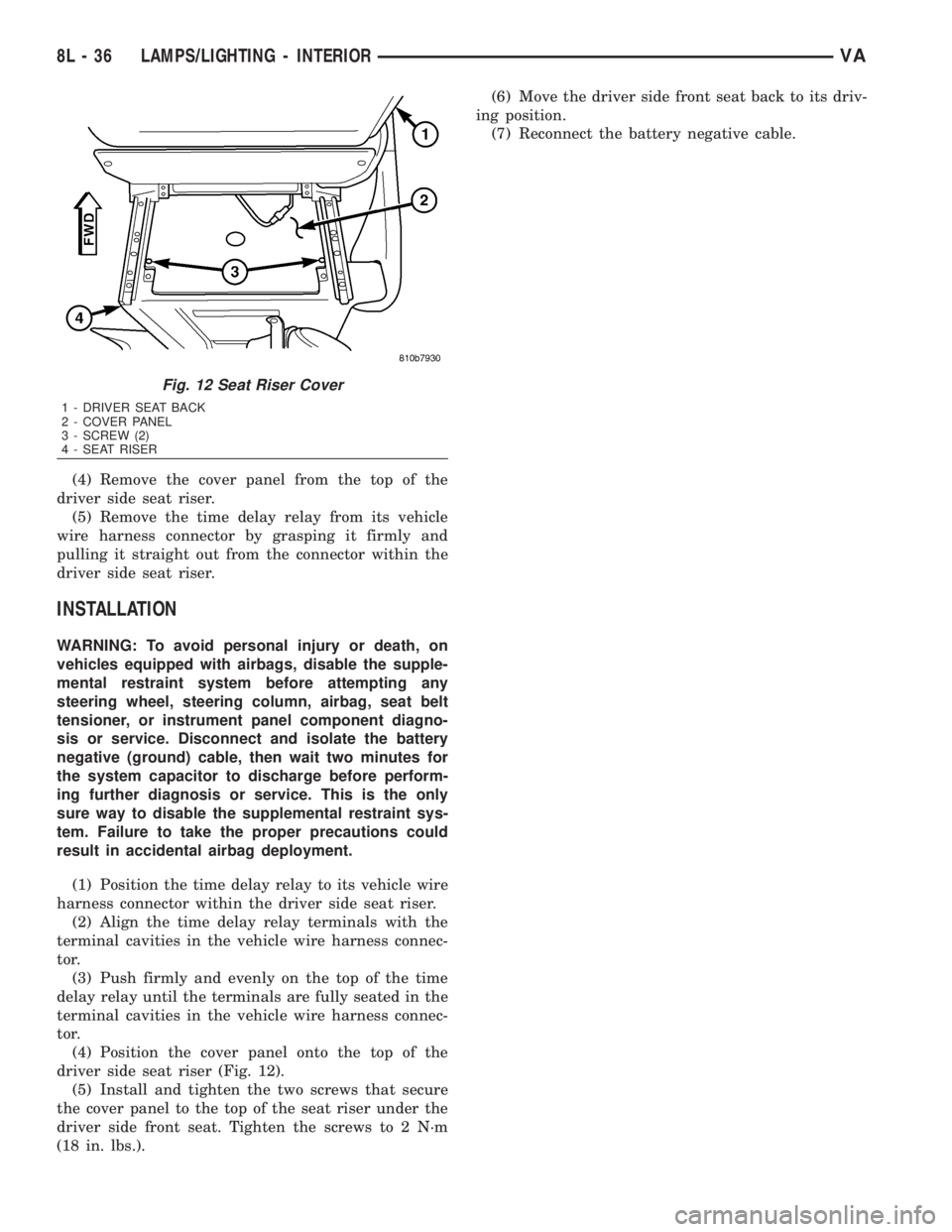
(3) Remove the two screws that secure the cover
panel to the top of the seat riser under the driver
side front seat (Fig. 12).
Fig. 10 Entry/Exit Lamp Bulb Remove/Install
1 - LAMP HOUSING
2 - BULB HOLDER
3 - CONNECTOR
Fig. 11 Entry/Exit Lamp Unit Remove/Install
1 - STEP WELL SCUFF PAD
2 - NOTCH
3 - ENTRY/EXIT LAMP UNIT
VALAMPS/LIGHTING - INTERIOR 8L - 35
Page 985 of 2305
(4) Remove the cover panel from the top of the
driver side seat riser.
(5) Remove the time delay relay from its vehicle
wire harness connector by grasping it firmly and
pulling it straight out from the connector within the
driver side seat riser.
INSTALLATION
WARNING: To avoid personal injury or death, on
vehicles equipped with airbags, disable the supple-
mental restraint system before attempting any
steering wheel, steering column, airbag, seat belt
tensioner, or instrument panel component diagno-
sis or service. Disconnect and isolate the battery
negative (ground) cable, then wait two minutes for
the system capacitor to discharge before perform-
ing further diagnosis or service. This is the only
sure way to disable the supplemental restraint sys-
tem. Failure to take the proper precautions could
result in accidental airbag deployment.
(1) Position the time delay relay to its vehicle wire
harness connector within the driver side seat riser.
(2) Align the time delay relay terminals with the
terminal cavities in the vehicle wire harness connec-
tor.
(3) Push firmly and evenly on the top of the time
delay relay until the terminals are fully seated in the
terminal cavities in the vehicle wire harness connec-
tor.
(4) Position the cover panel onto the top of the
driver side seat riser (Fig. 12).
(5) Install and tighten the two screws that secure
the cover panel to the top of the seat riser under the
driver side front seat. Tighten the screws to 2 N´m
(18 in. lbs.).(6) Move the driver side front seat back to its driv-
ing position.
(7) Reconnect the battery negative cable.
Fig. 12 Seat Riser Cover
1 - DRIVER SEAT BACK
2 - COVER PANEL
3 - SCREW (2)
4 - SEAT RISER
8L - 36 LAMPS/LIGHTING - INTERIORVA
Page 999 of 2305

restraint system is functioning normally and that the
repairs are complete. If the airbag indicator fails to
light, or lights and stays on, there is still an active
supplemental restraint system fault or malfunction.
Refer to the appropriate diagnostic information to
diagnose the problem.
NOTE: If the Airbag Control Module (ACM) has been
replaced with a new unit, it will be necessary to ini-
tialize the new ACM. In order to function properly,
the ACM must be programmed for the correct stan-
dard and optional supplemental restraint system
components installed in the vehicle. To initialize the
ACM, a diagnostic scan tool is required. Refer to
the appropriate diagnostic information.
AIRBAG CONTROL MODULE
DESCRIPTION
The Airbag Control Module (ACM) is secured with
three screws to the top mounting surface of a
stamped steel bracket that is welded onto the floor
panel within the seat riser underneath the driver
side front seat in the passenger compartment of the
vehicle (Fig. 6). A molded plastic protective cover is
installed over the ACM and secured with integral
snap features to a flat metal base plate sandwiched
between the bottom of the ACM and the mounting
bracket on the floor panel (Fig. 7). This cover is
designed to shield the ACM and its wire harness con-
nection from other electrical components and wiring
located within the seat riser area beneath the driver
seat, and must always be reinstalled following ser-
vice removal.Concealed within a hollow in the center of the die
cast aluminum ACM housing is the electronic cir-
cuitry of the ACM which includes a microprocessor,
an electronic impact sensor, an electronic safing sen-
sor, and an energy storage capacitor. A stamped
metal cover plate is permanently secured to the bot-
tom of the ACM housing to enclose and protect the
internal electronic circuitry and components.
An arrow printed on a label on the top of the ACM
housing near the rear provides a visual verification
of the proper orientation of the unit, and should
always be pointed toward the front of the vehicle.
The ACM housing has integral mounting flanges on
three corners. A molded plastic electrical connector
receptacle containing numerous terminal pins is inte-
gral to the left facing side of the ACM housing. These
terminal pins connect the ACM to the vehicle electri-
cal system through a dedicated take out and connec-
tor of the vehicle wire harness.
The impact sensor internal to the ACM are cali-
brated for the specific vehicle, and are only serviced
as a unit with the ACM. In addition, the ACM must
be electronically programmed for the correct stan-
dard and optional supplemental restraint system
components installed in the vehicle. The ACM cannot
be repaired or adjusted and, if damaged or faulty, it
must be replaced.
OPERATION
The microprocessor in the Airbag Control Module
(ACM) contains the supplemental restraint system
logic circuits and controls all of the supplemental
restraint system components. The ACM uses
On-Board Diagnostics (OBD) and can communicate
with a diagnostic scan tool using a diagnostic Serial
Fig. 6 Airbag Control Module
1 - AIRBAG CONTROL MODULE
2 - LABEL
3 - ORIENTATION ARROW
4 - CONNECTOR RECEPTACLE
Fig. 7 ACM Bracket
1 - ACM BRACKET
2 - SEAT RISER
3 - EYELET TERMINAL
4 - ACM CONNECTOR
5 - FLOOR PANEL
8O - 8 RESTRAINTSVA
Page 1038 of 2305
VEHICLE THEFT SECURITY
TABLE OF CONTENTS
page page
VEHICLE THEFT SECURITY
DESCRIPTION..........................1
OPERATION............................1
DIAGNOSIS AND TESTING - VEHICLE THEFT
SECURITY............................1
INTRUSION SENSOR
REMOVAL.............................1
INSTALLATION..........................2
SECURITY SYSTEM MODULE
REMOVAL.............................2
INSTALLATION..........................2SENTRY KEY REMOTE ENTRY MODULE
DESCRIPTION..........................2
OPERATION............................3
REMOVAL.............................3
INSTALLATION..........................4
SIREN
REMOVAL.............................4
INSTALLATION..........................4
TRANSPONDER KEY
DESCRIPTION..........................5
OPERATION............................5
VEHICLE THEFT SECURITY
DESCRIPTION
A vehicle theft alarm with a battery powered siren
is available as an option and includes interior moni-
toring, anti-tow away protection and rear window
monitoring based on the heater wires. The alarm is
automatically activated when the central locking sys-
tem is operated.
The alarm will sound when any of the following
occur:
²A door is opened
²A door is unlocked from inside the vehicle
²The hood is opened
²The vehicle is raised at the front or rear
²The trailer wire harness is disconnected
²Movements inside the vehicle
²The central locking is unlocked by a key at any
other door than the driver's door
The alarm is functional about 30 seconds after the
vehicle is locked using the RKE transmitter or the
key in the driver's door. Activation is indicated by the
indicator lights flashing three times and the warning
lamp flashing in the switch. If persons or animals
remain in the locked vehicle, the operator should
switch off the interior monitor to avoid a false alarm.
OPERATION
The anti-theft alarm is activated/deactivated by
locking/unlocking the vehicle with the remote trans-
mitter or with the key at the driver's door. The key
must be held in the locking position for more than
two seconds. Activation is indicated by the turn sig-
nal lights flashing once. Unlocking the vehicle at one
of the other doors will trigger an alarm.
The interior monitoring system included in the
anti-theft alarm is based on ultrasonics and triggersan alarm if an object intrudes the interior of the
vehicle or if any movement is detected inside the
vehicle. For proper and effective protection, all win-
dows and the sunroof must be closed.
To switch off the interior monitoring system and /
or the anti-tow away protection, a switch with LED
indicator light is provided in the switch panel. An
alarm button enables the operator to trigger an
alarm manually and to lock all doors if they are
closed. Triggering an alarm makes the horn sound
and the turn signals flash until the alarm is switched
off.
The anti-theft alarm control unit includes a gradi-
ent indicator as anti-tow away protection. The gradi-
ent indicator triggers an audible and visual alarm if
the vehicle is lifted (to tow away or to remove the
wheels). The alarm remains effective even if the bat-
tery is disconnected as the horn is powered by its
own battery. The interior monitoring system should
be switched off if people and/or animals are left in
the vehicle.
DIAGNOSIS AND TESTING - VEHICLE THEFT
SECURITY
Any diagnosis of the Vehicle Theft Security
system should begin with the use of a diagnos-
tic scan tool. Refer to the appropriate diagnos-
tic information.
INTRUSION SENSOR
REMOVAL
(1) Disconnect and isolate the battery negative
cable.
(2) Insert the tip of a small flat-bladed screwdriver
into the notch on one edge of the dome lamp/intru-
sion sensor unit housing to depress the retainer clip
VAVEHICLE THEFT SECURITY 8Q - 1
Page 1042 of 2305
TRANSPONDER KEY
DESCRIPTION
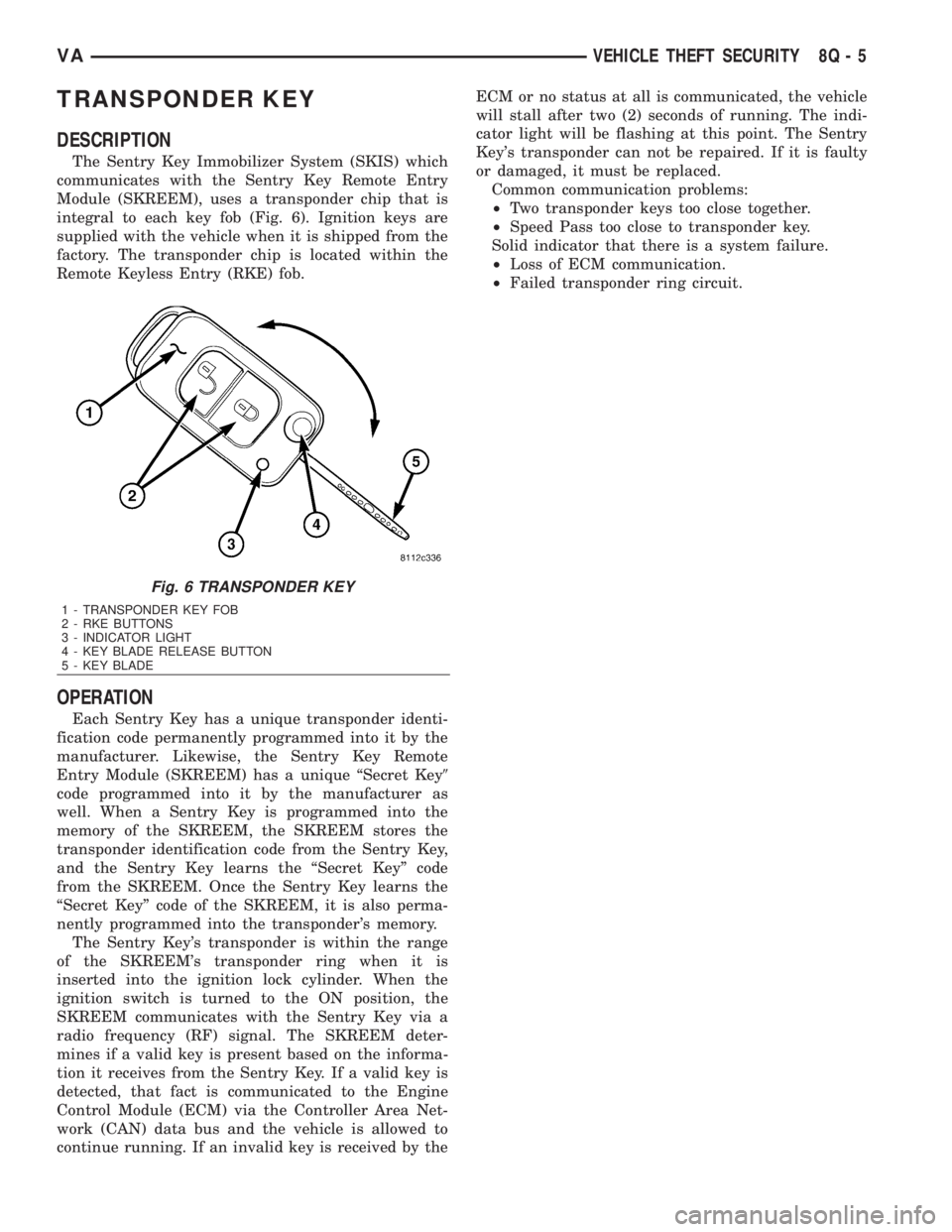
The Sentry Key Immobilizer System (SKIS) which
communicates with the Sentry Key Remote Entry
Module (SKREEM), uses a transponder chip that is
integral to each key fob (Fig. 6). Ignition keys are
supplied with the vehicle when it is shipped from the
factory. The transponder chip is located within the
Remote Keyless Entry (RKE) fob.
OPERATION
Each Sentry Key has a unique transponder identi-
fication code permanently programmed into it by the
manufacturer. Likewise, the Sentry Key Remote
Entry Module (SKREEM) has a unique ªSecret Key9
code programmed into it by the manufacturer as
well. When a Sentry Key is programmed into the
memory of the SKREEM, the SKREEM stores the
transponder identification code from the Sentry Key,
and the Sentry Key learns the ªSecret Keyº code
from the SKREEM. Once the Sentry Key learns the
ªSecret Keyº code of the SKREEM, it is also perma-
nently programmed into the transponder's memory.
The Sentry Key's transponder is within the range
of the SKREEM's transponder ring when it is
inserted into the ignition lock cylinder. When the
ignition switch is turned to the ON position, the
SKREEM communicates with the Sentry Key via a
radio frequency (RF) signal. The SKREEM deter-
mines if a valid key is present based on the informa-
tion it receives from the Sentry Key. If a valid key is
detected, that fact is communicated to the Engine
Control Module (ECM) via the Controller Area Net-
work (CAN) data bus and the vehicle is allowed to
continue running. If an invalid key is received by theECM or no status at all is communicated, the vehicle
will stall after two (2) seconds of running. The indi-
cator light will be flashing at this point. The Sentry
Key's transponder can not be repaired. If it is faulty
or damaged, it must be replaced.
Common communication problems:
²Two transponder keys too close together.
²Speed Pass too close to transponder key.
Solid indicator that there is a system failure.
²Loss of ECM communication.
²Failed transponder ring circuit.
Fig. 6 TRANSPONDER KEY
1 - TRANSPONDER KEY FOB
2 - RKE BUTTONS
3 - INDICATOR LIGHT
4 - KEY BLADE RELEASE BUTTON
5 - KEY BLADE
VAVEHICLE THEFT SECURITY 8Q - 5
Page 1045 of 2305
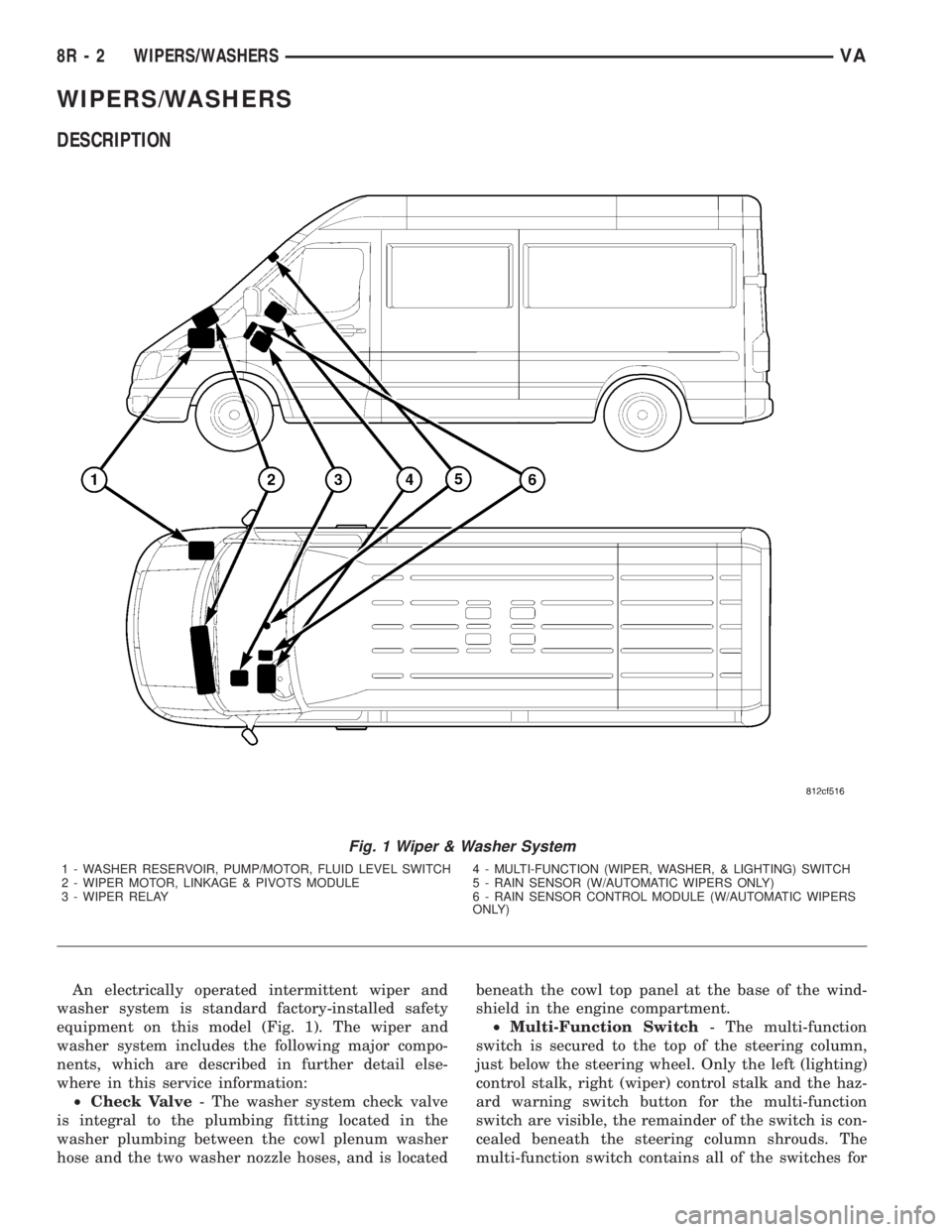
WIPERS/WASHERS
DESCRIPTION
An electrically operated intermittent wiper and
washer system is standard factory-installed safety
equipment on this model (Fig. 1). The wiper and
washer system includes the following major compo-
nents, which are described in further detail else-
where in this service information:
²Check Valve- The washer system check valve
is integral to the plumbing fitting located in the
washer plumbing between the cowl plenum washer
hose and the two washer nozzle hoses, and is locatedbeneath the cowl top panel at the base of the wind-
shield in the engine compartment.
²Multi-Function Switch- The multi-function
switch is secured to the top of the steering column,
just below the steering wheel. Only the left (lighting)
control stalk, right (wiper) control stalk and the haz-
ard warning switch button for the multi-function
switch are visible, the remainder of the switch is con-
cealed beneath the steering column shrouds. The
multi-function switch contains all of the switches for
Fig. 1 Wiper & Washer System
1 - WASHER RESERVOIR, PUMP/MOTOR, FLUID LEVEL SWITCH 4 - MULTI-FUNCTION (WIPER, WASHER, & LIGHTING) SWITCH
2 - WIPER MOTOR, LINKAGE & PIVOTS MODULE 5 - RAIN SENSOR (W/AUTOMATIC WIPERS ONLY)
3 - WIPER RELAY 6 - RAIN SENSOR CONTROL MODULE (W/AUTOMATIC WIPERS
ONLY)
8R - 2 WIPERS/WASHERSVA