Page 325 of 651

AUDIO
304(i) If the player malfunctions
If the player or another unit equipped with the player
malfunctions, your audio system will display following error
messages.
If “WAIT” appears on the display:
It indicates that the inside
of the player unit may be too hot due to the very high ambient
temperature. Remove the CD from the player and allow the
player to cool down.
If “ERROR 1” appears on the display: It indicates that the CD
is dirty, damaged, or it was inserted up −side down. Clean the
CD or insert it correctly.
If “ERROR 3” or “ERROR 4” appears on the display: It
indicates there is a trouble inside the system. Eject the CD.
If the malfunction is not rectified: Take your vehicle to your
Lexus dealer.
AUDIO REMOTE CONTROLS
The switches are installed on the left side of the steering wheel.
“MODE” switch: Use this switch to turn on or off the audio
system, or change the audio mode.
� To turn on the system, push the switch briefly. To turn off the
system, push and hold the switch until you hear a beep.
� To change the audio mode, turn on the system and push the
switch briefly. If a tape or CD is not inserted, the “T APE” or
“CD” mode is skipped.
The DVD player will be selectable if a rear seat entertainment
system is installed in your vehicle.
Page 327 of 651
AUDIO
306
REAR SEAT ENTERTAINMENTSYSTEM�1Front audio system
2Headphone volume control dial
3Headphone input jack
4DVD player
5Rear seat entertainment system display
6Rear seat entertainment system remote control
7Input terminal adapter
8Power outlet
9Power outlet main switch
Page 329 of 651

AUDIO
308The illumination of the screen is automatically turned off when
the display is closed. However, the rear seat entertainment
system is not turned off.
CAUTION
To reduce the chance of injury in case of an accident or
sudden stop while driving, close the display when it is
not in use.
NOTICE
�
The screen should be cleaned with a dry soft cloth.
If the screen is pushed by hand or wiped with a hard
cloth, the surface of the screen may be scratched.
� Benzene or alkaline solutions may damage the
coated surface of the screen.
� To prevent the battery from being discharged, do not
turn on the rear seat entertainment system longer
than necessary when the engine is not running.
Rear seat entertainment system remote
control
The rear seat entertainment system can be operated with
the rear seat entertainment system remote control and the
switches on the DVD player. The system cannot be
operated by touching the switches on the screen directly.
CAUTION
Do not disassemble or modify the remote control. It
may cause an accident, fire or electric shock.
NOTICE
Keep the remote control away from direct sunlight, high
heat and high humidity. These conditions could cause
the case to deform or the battery to explode or leak.
Page 330 of 651
AUDIO
309
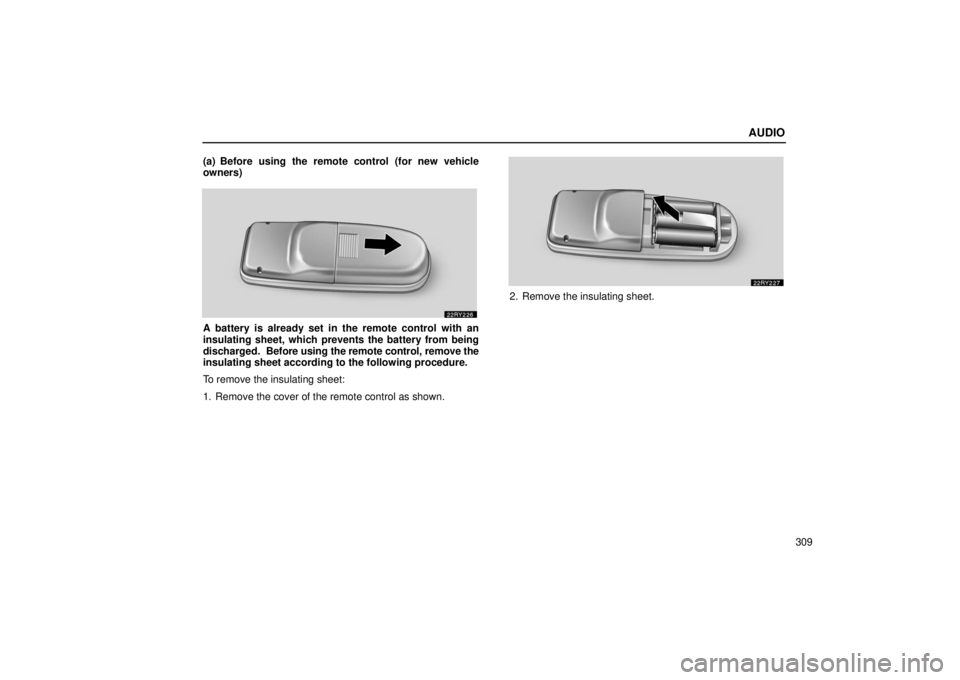
(a) Before using the remote control (for new vehicle
owners)
A battery is already set in the remote control with an
insulating sheet, which prevents the battery from being
discharged.
Before using the remote control, remove the
insulating sheet according to the following procedure.
To remove the insulating sheet:
1. Remove the cover of the remote control as shown.
2. Remove the insulating sheet.
Page 331 of 651
AUDIO
310(b) Using the remote control
To use the rear seat entertainment system remote control,
direct
the signal output portion of the remote control to the
signal reception portion of the rear seat entertainment
system display.
The remote control does not operate properly when the signal
reception portion of the display is exposed to direct sunlight.
Block the display from direct sunlight.
CAUTION
To reduce the chance of injury in case of an accident or
a sudden stop while driving, stow the remote control in
the console box or front seatback pocket when it is not
in use.
Page 332 of 651
AUDIO
311
NOTICE
Observe the followings, otherwise the remote control
may be damaged.
�Do not drop or strongly knock the remote control
against hard objects.
� Do not sit on or place heavy objects on the remote
control.
� Do not leave the remote control exposed to high
temperatures (such as on the instrument panel) for a
long time, otherwise the remote control may be
damaged.
(c) Locating the remote control
If you lose sight of the remote control, push and hold the
“CURSOR (REMOTE)” button on the DVD player unit until you
hear a beep. A buzzer sounds from the remote control to let you
know where it is.
To stop the buzzer, push any button of the remote control.
If the remote control is located close to something that blocks
the signal, such as some kind of metal, the remote control may
not receive the signal and the buzzer may not sound.
Page 333 of 651
AUDIO
312
FCC InformationCaution: Any changes or modifications in
construction of this device which are not expressly
approved by the party responsible for compliance
could void the user’s authority to operate the
equipment.
FCC Label Information This device complies with part 15 of the FCC Rules.
Operation is subject to the following two conditions:
(1) This device may not cause harmful interference,
and (2) this device must accept any interference
received, Including interference that may cause
undesired operation.Quick reference for your remote control
� With navigation system
Page 337 of 651
/chapter·track (“DVD\
”
mode).
� To select a desired track (“CD” mode) or chap")
AUDIO
316CD or DVD
mode: Use this switch to fast forward/rewind a disc
or select a desired track (“CD” mode)/chapter·track (“DVD\
”
mode).
� To select a desired track (“CD” mode) or chapter/track
(“DVD” mode), push this switch briefly.
� To fast forward or rewind a disc, push and hold this switch
until you hear a beep. To stop fast forwarding or rewinding,
push and hold the same side of the switch until you hear a
beep.
4“DISC/CH/PROG” switch: Use this switch to select a
preset station (radio mode), reverse side of a tape
(“TAPE” mode) or a desired CD (“CD” mode).
Radio mode: Push this switch to select a preset station. The
station you assigned to that particular switch on the audio
system will be selected.
“TAPE” mode: Push this switch to select the reverse side of
a cassette tape.
“CD” mode: Push this switch to select a desired CD (for a CD
changer only). Push until the desired CD number appears.
5“CURSOR (REMOTE)” switch: Use this switch to
display the DVD control switches or to locate the remote
control when you lose sight of the remote control.
6Joy stick and “ENT” switch: Use this joy stick to select
a control switch, mode switch on the screen or the menu
for a disc. Push the “ENT” switch to input the selected
switch or menu.
7“DISC” indicator light: This light indicates that the disc
is loaded.