Page 381 of 651
AUDIO
360
Video CD/audio CD/CD text player operation
(a) Selecting the disc menu number (video CD only)
�1Remote control button
2Screen switch
Push the “SEARCH” button on the remote control or the
“Sel. Number” switch on the screen, and the disc menu
number search screen will appear.
Enter the disc menu number by using the “ −”, “+” and “+10”
switches and push the “Enter” switch. The player starts playing
the disc from the entered disc menu number. The entered disc
menu number will appear on the screen.
Push the “Back” switch to return to the menu screen.
Move up and down the switches by pushing the “Move Buttons”
on the screen.
Page 382 of 651
AUDIO
361
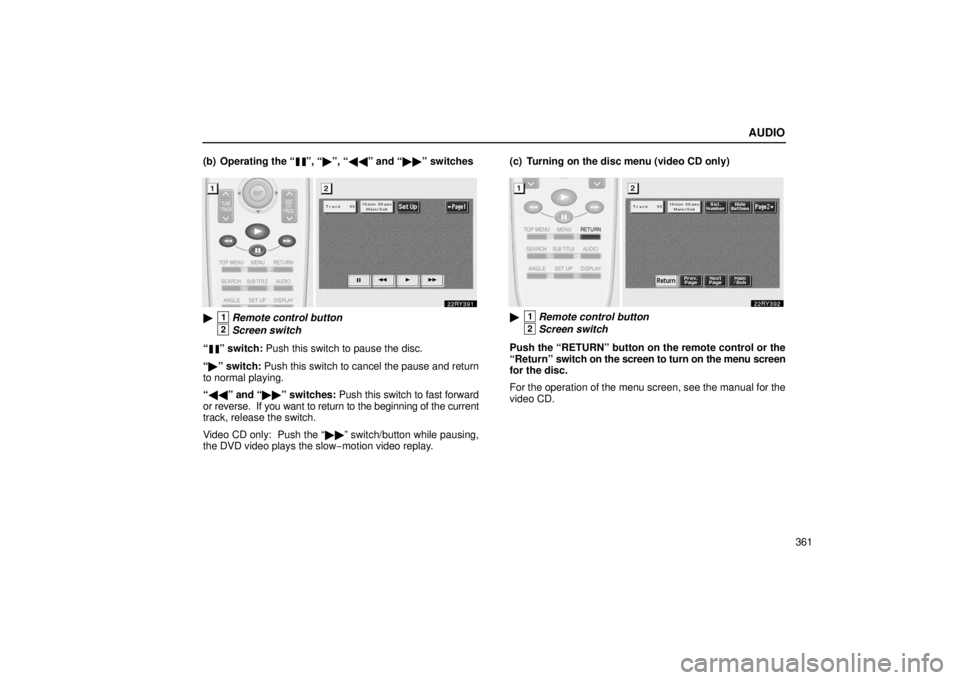
(b) Operating the “
”, “�
”, “�� ” and “�� ” switches
�1Remote control button
2Screen switch
“
” switch: Push this switch to pause the disc.
“ � ” switch: Push this switch to cancel the pause and return
to normal playing.
“ �� ” and “�� ” switches: Push this switch to fast forward
or reverse. If you want to return to the beginning of the current
track, release the switch.
Video CD only: Push the “�� ” switch/button while pausing,
the DVD video plays the slow −motion video replay. (c) Turning on the disc menu (video CD only)
�1Remote control button
2Screen switch
Push the “RETURN” button on the remote control or the
“Return” switch on the screen to turn on the menu screen
for the disc.
For the operation of the menu screen, see the manual for the
video CD.
Page 384 of 651
AUDIO
363
(f) Changing the initial setting (video CD only)
�1Remote control button
2Screen switch
Push the “SET UP” button on the remote control or the
“Set Up” switch on the screen, and the initial setting
screen will appear. You can change the initial setting. (See
“(k) Changing the initial setting” on page 348 for details.)
After the setting is done, the player plays from the beginning
of the chapter or the track. (g) Using the control screen
�1For video CD2For audio CD3For CD text
Page 385 of 651

AUDIO
364When
playing a disc, push the “DVD” button on the remote
control. The control screen will appear on the screen.
CD text only — The CD title and track title will appear on the
screen when pushing the “DVD” button.
Details of the specific switches, controls and features are
described below.
“PICTURE” switch (video CD only): Push the “PICTURE”
switch to turn off the control screen and return to the picture
previously displayed.
“RPT” switch (audio CD and CD text): Push the “RPT”
switch while the track is playing. When the track ends, it will
automatically replay. To turn off the repeat feature, push this
switch again.
“RAND” switch (audio CD and CD text): Push the “RAND”
switch. The player will play the tracks on the CD in random
order. To turn off the random feature, push this switch again.
“SCAN” switch (audio CD and CD text): Push the “SCAN”
switch. The player will scan all the tracks on the CD. To stop
scanning, push this switch again. When the player has
scanned all the tracks on the CD, it will stop scanning.
“
” and “” switches: Push the “” or “” switch
to fast forward or reverse the disc. When you push the switch
again, the DVD player will resume playing. (h) Error messages
If the player malfunctions, your audio system will display
following error messages.
If “DISC CHECK” appears on the screen:
It indicates that the
disc is dirty, damaged or it was inserted upside down. Clean
the disc or insert it correctly.
If “REGION CODE ERROR” appears on the screen: It
indicates that the DVD region code is not set properly.
If “DVD ERROR” appears on the screen: There is a problem
inside the player. Eject the disc. Set the disc again.
If the malfunction still exists, take your vehicle to your Lexus
dealer.
Page 386 of 651
AUDIO
365
Screen adjustment
You can adjust the color, contrast, tone and brightness of
the screen.
Push the “DISPLAY” button on the remote control 1 and
then the “Display” screen 2 will appear.
The screen may turn purple to deflect the sunlight. This is not
a malfunction.
Each time you push the “+” or “ −” switch, you can adjust the
color, contrast, tone and brightness of the screen.
“+” or “RED”“ − ” or “GREEN”
COLORStrengthens the
red colorStrengthens the
green color
CONTRASTStrengthens the
contrastWeakens the
contrast
TONEStrengthens the
toneWeakens the tone
BRIGHTNESSBrightensDarkens
After adjusting the screen, push the “OK” switch to return to the
previous screen.
Page 387 of 651

AUDIO
366
Selecting the video mode
The audio machine connected to the input terminal
adapter can be played in the video mode.
�1Remote control button (without navigation system)
2Screen switch
With navigation system —
You can select the video mode on the mode selection
screen mentioned above. Using joy stick and the “ENT”
button, select the video mode.
Without navigation system —
To select the video mode, push the “VIDEO” button on the
remote control
1. You can also select the video mode on
the mode selection screen 2 mentioned above. Using joy
stick and the “ENT” button, select the video mode.
DVD video disc information
(a) DVD player and DVD video discs
This DVD player conforms to NTSC color TV formats. DVD
video discs conforming to other formats such as PAL or
SECAM cannot be used.
Region codes: Some DVD video discs have a region code
indicating where you can use. If the DVD video disc is not
labeled “ALL” or “1”, you cannot use it in this DVD player. If you
attempt to play an inappropriate DVD video disc in this player,
“REGION CODE ERROR” appears on the screen. Even if the
DVD video disc does not have a region code, in some cases
you cannot use it.
Page 546 of 651

IN CASE OF AN EMERGENCY
525
3Push down the shift lock override button. You can shift out
of “P” position only while pushing the button.
4Shift into “N” position.
Insert the cover. Start the engine. For your safety, keep
the brake pedal depressed.
Be sure to have the system checked by your Lexus dealer as
soon as possible.
IF YOU LOSE YOUR KEYS OR LOCK YOURSELF OUT
You can purchase a new key at your Lexus dealer if you
can give them the key number and master key.
Even if you lose only one key, contact your Lexus dealer to
make a new key. If you lose all your master keys, you cannot
make new keys; the whole engine immobilizer system must be
replaced.
See the suggestion given in “Keys” on page 12.
You can use the wireless remote control system with the new
key. Contact your Lexus dealer for detailed information.
If your keys are locked in the vehicle and you cannot get a
duplicate, many Lexus dealers can still open the door for you
using special tools. If you must break a window to get in, we
suggest breaking the smallest side window because it is the
least expensive to replace. Be extremely cautious to avoid
glass cuts.
Page 619 of 651

ELECTRICAL COMPONENTS
598
No.FUSEAMPERECIRCUIT
26 ECUB7.5
Power window, multiplex
communication system, gauge
and meters, instrument cluster
lights, instrument panel lights, air
conditioning system, garage
door opener, illuminated entry
system, wireless remote control
system, power back door, driving
position memory system,
navigation system display, moon
roof, tilt and telescopic steering,
power seats, outside rear view
mirror, windshield wipers
27 DOME7.5
Gauge and meters, personal
lights, vanity lights, door
courtesy lights, inside door
handle lights, ignition switch
light, foot lights, scuff plate lights,
luggage compartment light,
interior light
28 TEL7.5No circuit
29 AMP30Audio system
30 DOORNO. 125Multiplex communication system
No.FUSEAMPERECIRCUIT
31 A/F25Multiport fuel injection
system/sequential multiport fuel
injection system
32 EFI NO. 125
Multiport fuel injection
system/sequential multiport fuel
injection system and all
components in “EFI NO. 2” fuse
33 HLP R LW R15Right− hand headlight (low beam)
34 EFI NO. 210Multiport fuel injection
system/sequential multiport fuel
injection system
35 RR DOOR
RH20Rear right side power window
36 RR DOOR LH20Rear left side power window
37 FUELOPN7.5Fuel filler door opener
38 FR FOG15Front fog lights
39 OBD7.5On− board diagnosis system
40 FR DEF25Windshield wiper de −icer and all
components in “MIR HTR” fuse