2006 INFINITI M35 check
[x] Cancel search: checkPage 3500 of 5621
SERVICE INFORMATION FOR ELECTRICAL INCIDENT
GI-37
C
D
E
F
G
H
I
J
K
L
MB
GI
Revision: 2006 January2006 M35/M45
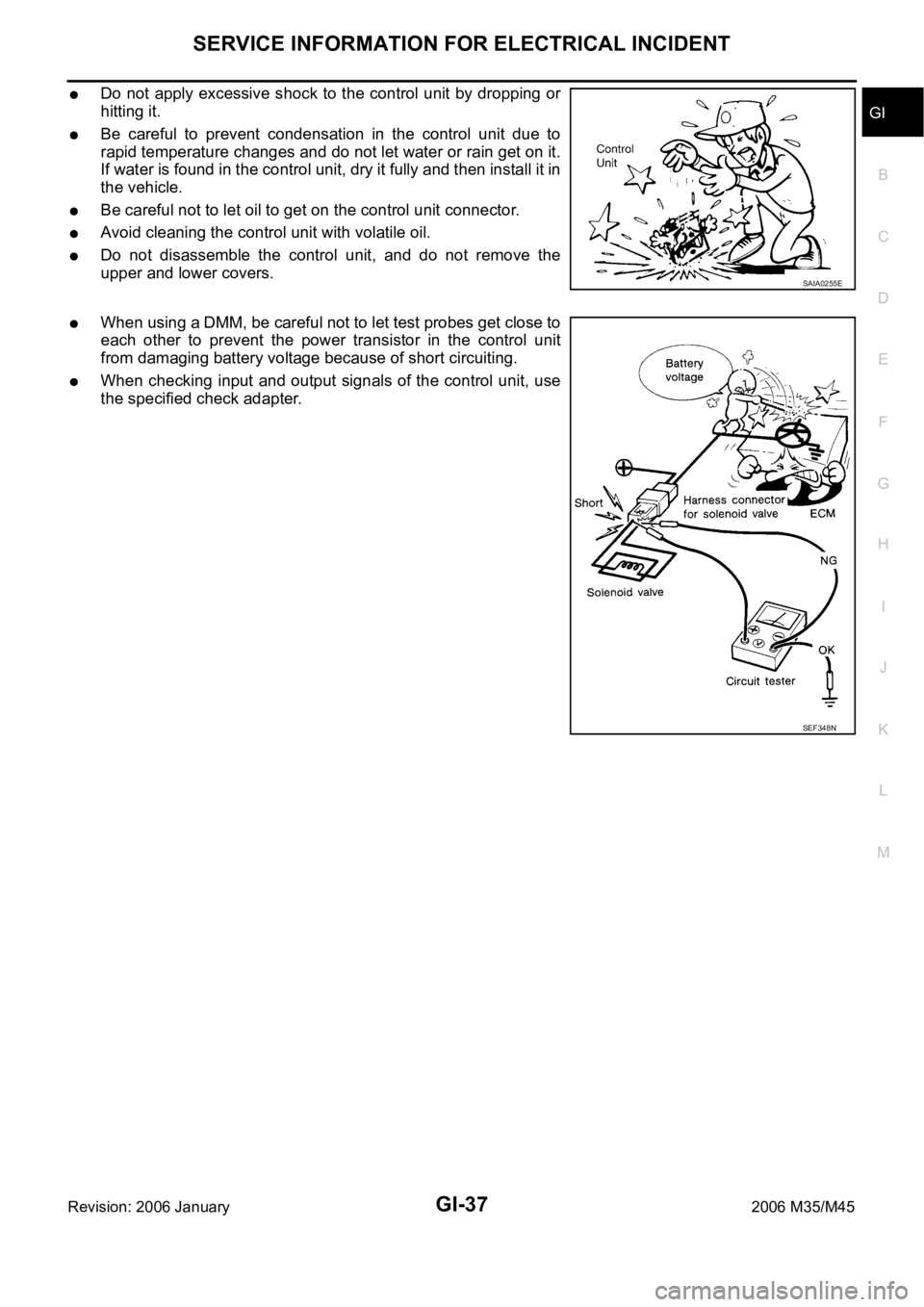
Do not apply excessive shock to the control unit by dropping or
hitting it.
Be careful to prevent condensation in the control unit due to
rapid temperature changes and do not let water or rain get on it.
If water is found in the control unit, dry it fully and then install it in
the vehicle.
Be careful not to let oil to get on the control unit connector.
Avoid cleaning the control unit with volatile oil.
Do not disassemble the control unit, and do not remove the
upper and lower covers.
When using a DMM, be careful not to let test probes get close to
each other to prevent the power transistor in the control unit
from damaging battery voltage because of short circuiting.
When checking input and output signals of the control unit, use
the specified check adapter.
SAIA0255E
SEF348N
Page 3501 of 5621

GI-38
CONSULT-II CHECKING SYSTEM
Revision: 2006 January2006 M35/M45
CONSULT-II CHECKING SYSTEMPFP:00000
DescriptionNAS0007S
CONSULT-II is a hand-held type tester. When it is connected with a diagnostic connector equipped on the
vehicle side, it will communicate with the control unit equipped in the vehicle and then enable various
kinds of diagnostic tests.
Refer to “CONSULT-II Software Operation Manual” for more information.
Function and System Application NAS0007T
x: Applicable
*: NISSAN Anti-Theft System (INFINITI/NISSAN Vehicle Immobilizer System) Diagnostic test
modeFunction
ENGINE
A/T
AIR BAG
METER A/C AMP
BCM
AUTO DRIVE POS.
ABS (Including VDC)
NATS (IVIS/NATS) *
IPDM E/R
ICC
ALL MODE AWD/4WD
INTELLIGENT KEY
LDW
AIR PRESSURE MONITOR
RAS/HICAS
ADAPTIVE LIGHT
PRECRASH SEATBELT
MULTI AV
Work supportThis mode enables a technician to adjust
some devices faster and more accurately by
following the indications on CONSULT-II.x - - - xxx -- x- xxx- x- -
Self-diagnostic
resultsSelf-diagnostic results can be read and
erased quickly.xxxxxxxxxxxxxxxxxx
Trouble diagnos-
tic recordCurrent self-diagnostic results and all trouble
diagnostic records previously stored can be
read.--x---------------
Data monitor Input/Output data in the ECU can be read. x x - x x x x - x xxxxxxxxx
CAN diagnosis
support monitorThe condition of CAN communication line
can be read.xx- xxxx- xxxxxxxxxx
Active testDiagnostic Test Mode in which CONSULT-II
drives some actuators apart from the ECUs
and also shifts some parameters in a speci-
fied range.x- - - xxx -xxxxxxxx- -
DTC & SRT con-
firmationThe results of SRT (System Readiness Test)
and the self-diagnosis status/result can be
confirmed.x- ----------------
DTC work sup-
portThe operating condition to confirm Diagnosis
Trouble Codes can be selected.xx----------------
ECU (ECM/TCM)
part numberECU (ECM/TCM) part number can be read. xx - - xxx -- xxxxxxxxx
ECU discrimi-
nated No.Classification number of a replacement ECU
can be read to prevent an incorrect ECU from
being installed.-- x---------------
Function testThis mode can show results of self-diagnosis
of ECU with either 'OK' or 'NG'. For engines,
more practical tests regarding sensors/
switches and/or actuators are available.xxx---x-----------
Control unit ini-
tializationAll registered ignition key IDs in NATS com-
ponents can be initialized and new IDs can
be registered.-- -----x----------
AV COMM moni-
torThe condition of AV communication can be
Indicated.------------ ---- -x
Page 3502 of 5621
CONSULT-II CHECKING SYSTEM
GI-39
C
D
E
F
G
H
I
J
K
L
MB
GI
Revision: 2006 January2006 M35/M45
Nickel Metal Hydride Battery Replacement NAS0007U
CONSULT-II contains a nickel metal hydride battery. When replacing the battery obey the following:
WAR NING :
Replace the nickel metal hydride battery with Genuine CONSULT-II battery only. Use of another bat-
tery may present a risk of fire or explosion. The battery may present a fire or chemical burn hazard if
mistreated. Do not recharge, disassemble or dispose of in fire.
Keep the battery out of reach of children and discard used battery conforming to the local regulations.
Checking Equipment NAS0007V
When ordering the following equipment, contact your NISSAN/INFINITI distributor.
NOTE:
The CONSULT-II must be used in conjunction with a program card.
CONSULT-II does not require loading (Initialization) procedure.
Be sure the CONSULT-II is turned off before installing or removing a program card.
CAUTION:
If CONSULT-II is used with no connection of CONSULT-II CONVERTER, malfunctions might be
detected in self-diagnosis depending on control unit which carry out CAN communication.
If CONSULT-II CONVERTER is not connected with CONSULT-II, vehicle occur the “FAIL SAFE
MODE” which is “LIGHT UP the HEAD LIGHT” and/or “COOLING FAN ROTAT I N G ” w h e n C O N -
SULT-II is started.
Previous CONSULT-II “I” and “Y” DLC-I and DLC-II cables should NOT be used anymore because
their DDL connector pins can be damaged during cable swapping.
CONSULT-II Start ProcedureNAS0007W
NOTE:
Turning ignition switch off when performing CAN diagnosis could cause CAN memory to be erased.
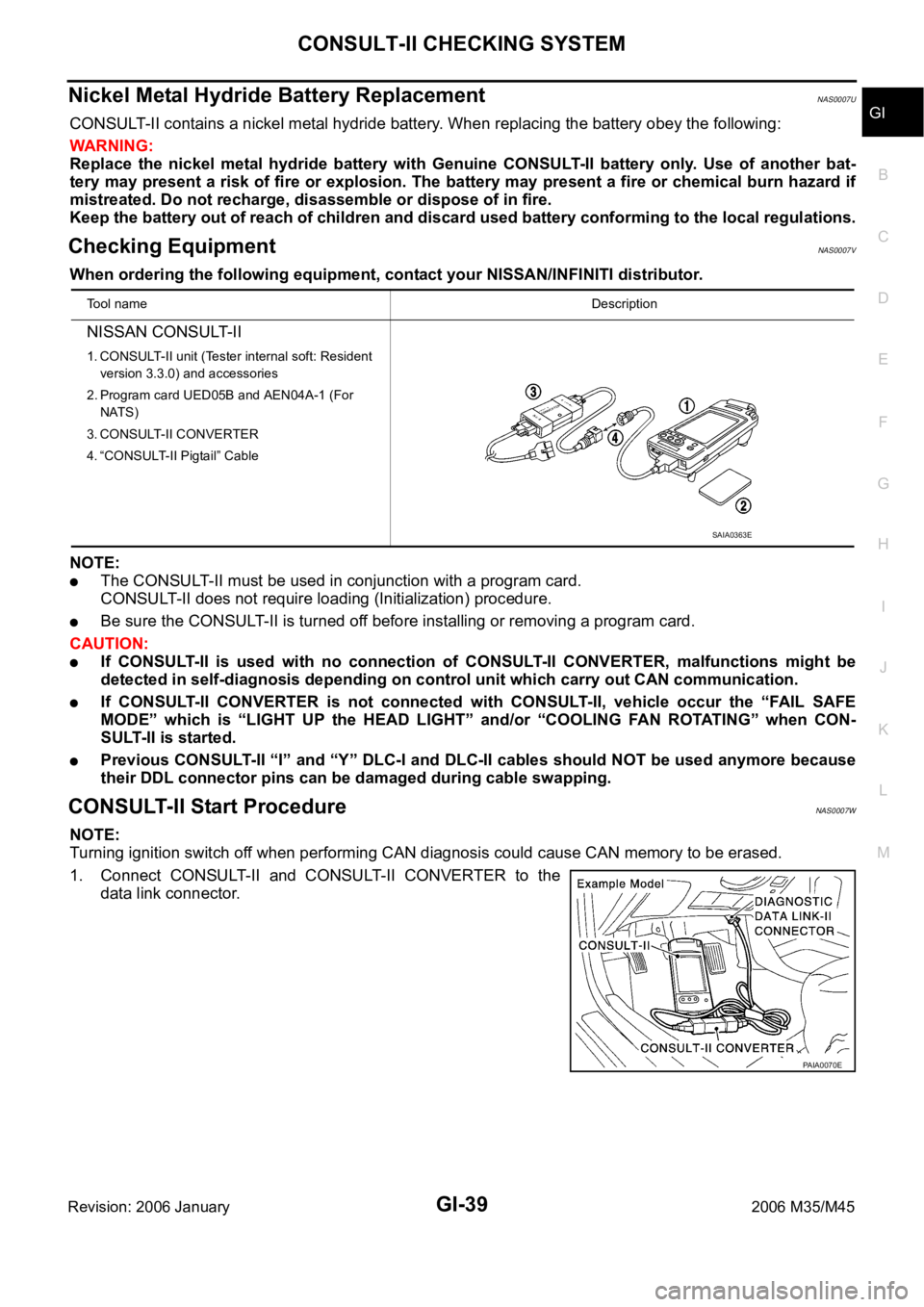
1. Connect CONSULT-II and CONSULT-II CONVERTER to the
data link connector.
Tool nameDescription
NISSAN CONSULT-II
1. CONSULT-II unit (Tester internal soft: Resident
version 3.3.0) and accessories
2. Program card UED05B and AEN04A-1 (For
NATS)
3. CONSULT-II CONVERTER
4. “CONSULT-II Pigtail” Cable
SAIA0363E
PAIA0070E
Page 3503 of 5621
GI-40
CONSULT-II CHECKING SYSTEM
Revision: 2006 January2006 M35/M45
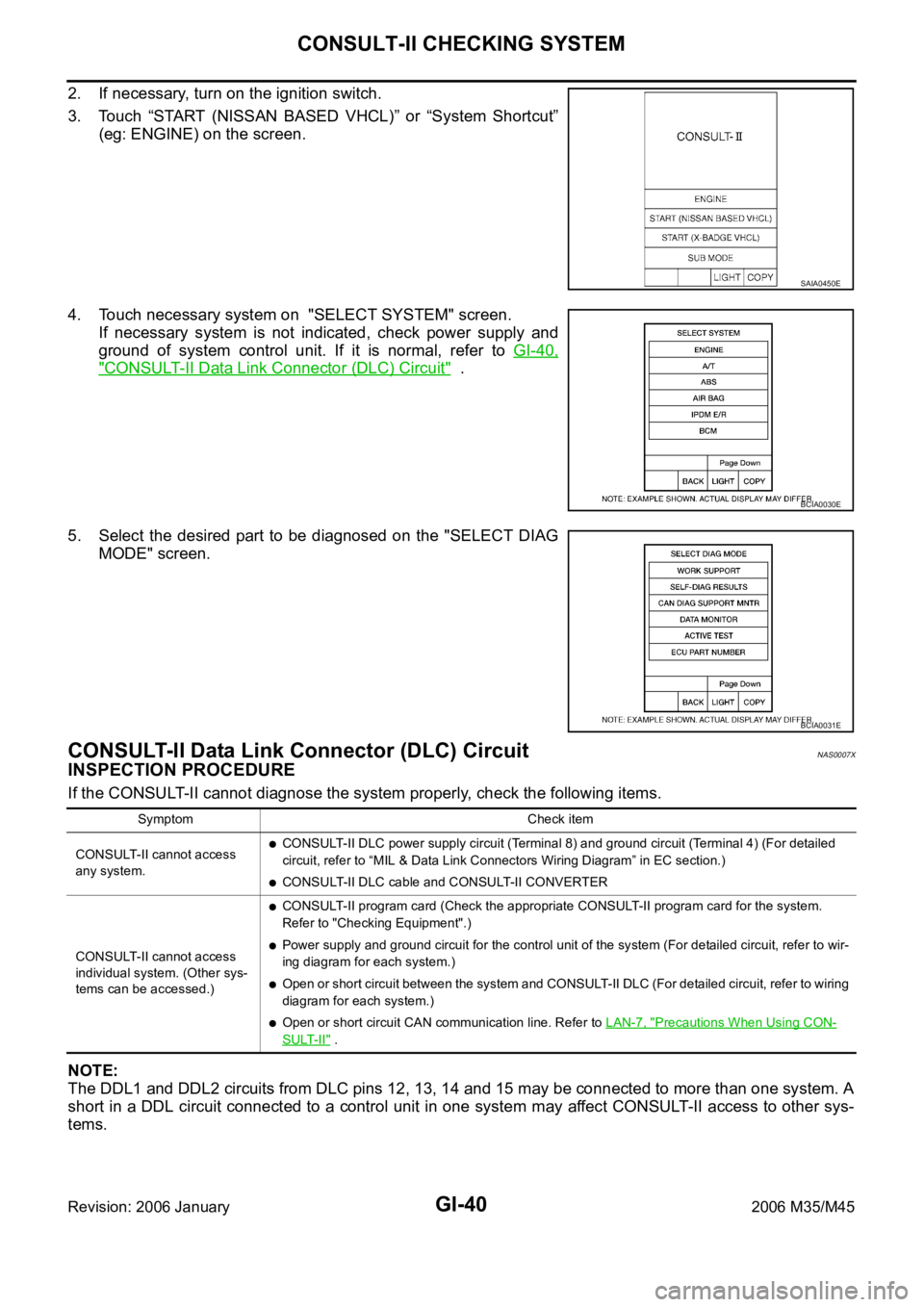
2. If necessary, turn on the ignition switch.
3. Touch “START (NISSAN BASED VHCL)” or “System Shortcut”
(eg: ENGINE) on the screen.
4. Touch necessary system on "SELECT SYSTEM" screen.
If necessary system is not indicated, check power supply and
ground of system control unit. If it is normal, refer to GI-40,
"CONSULT-II Data Link Connector (DLC) Circuit" .
5. Select the desired part to be diagnosed on the "SELECT DIAG
MODE" screen.
CONSULT-II Data Link Connector (DLC) CircuitNAS0007X
INSPECTION PROCEDURE
If the CONSULT-II cannot diagnose the system properly, check the following items.
NOTE:
The DDL1 and DDL2 circuits from DLC pins 12, 13, 14 and 15 may be connected to more than one system. A
short in a DDL circuit connected to a control unit in one system may affect CONSULT-II access to other sys-
tems.
SAIA0450E
BCIA0030E
BCIA0031E
Symptom Check item
CONSULT-II cannot access
any system.
CONSULT-II DLC power supply circuit (Terminal 8) and ground circuit (Terminal 4) (For detailed
circuit, refer to “MIL & Data Link Connectors Wiring Diagram” in EC section.)
CONSULT-II DLC cable and CONSULT-II CONVERTER
CONSULT-II cannot access
individual system. (Other sys-
tems can be accessed.)
CONSULT-II program card (Check the appropriate CONSULT-II program card for the system.
Refer to "Checking Equipment".)
Power supply and ground circuit for the control unit of the system (For detailed circuit, refer to wir-
ing diagram for each system.)
Open or short circuit between the system and CONSULT-II DLC (For detailed circuit, refer to wiring
diagram for each system.)
Open or short circuit CAN communication line. Refer to LAN-7, "Precautions When Using CON-
SULT-II" .
Page 3504 of 5621
CONSULT-II CHECKING SYSTEM
GI-41
C
D
E
F
G
H
I
J
K
L
MB
GI
Revision: 2006 January2006 M35/M45
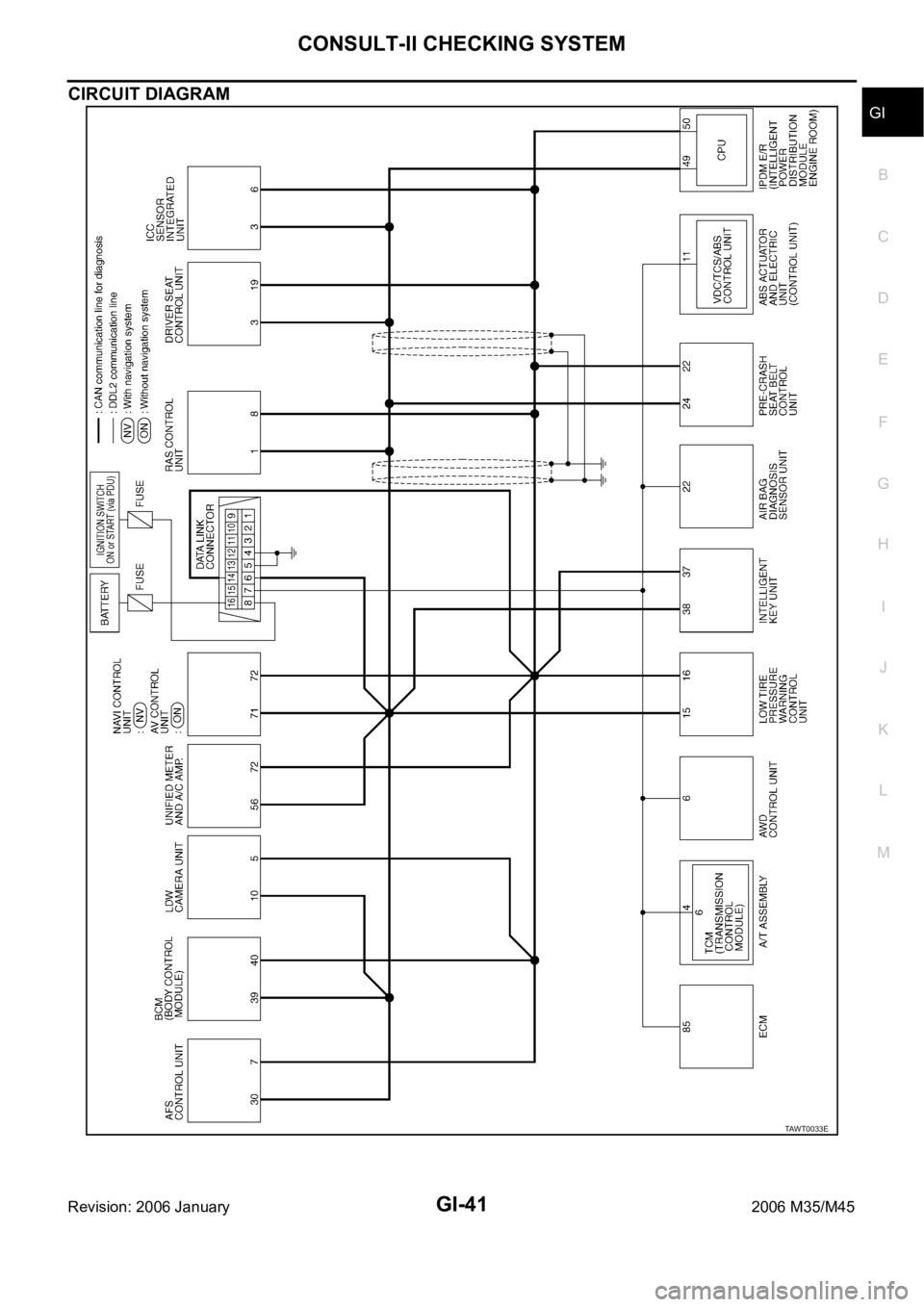
CIRCUIT DIAGRAM
TAWT0033E
Page 3517 of 5621

GI-54
TERMINOLOGY
Revision: 2006 January2006 M35/M45
Exhaust gas recirculation control-BPT
valveEGRC-BPT valve BPT valve
Exhaust gas recirculation control-solenoid
valveEGRC-solenoid valve EGR control solenoid valve
Exhaust gas recirculation temperature sen-
sor
EGRT sensor Exhaust gas temperature sensor
EGR temperature sensor
Flash electrically erasable programmable
read only memoryFEEPROM ***
Flash erasable programmable read only
memoryFEPROM ***
Flexible fuel sensor FFS ***
Flexible fuel system FF system ***
Fuel pressure regulator *** Pressure regulator
Fuel pressure regulator control solenoid
valve*** PRVR control solenoid valve
Fuel trim FT ***
Heated Oxygen sensor HO2S Exhaust gas sensor
Idle air control system IAC system Idle speed control
Idle air control valve-air regulator IACV-air regulator Air regulator
Idle air control valve-auxiliary air control
valveIACV-AAC valve Auxiliary air control (AAC) valve
Idle air control valve-FICD solenoid valve IACV-FICD solenoid valve FICD solenoid valve
Idle air control valve-idle up control sole-
noid valveIACV-idle up control solenoid valve Idle up control solenoid valve
Idle speed control-FI pot ISC-FI pot FI pot
Idle speed control system ISC system ***
Ignition control IC ***
Ignition control module ICM ***
Indirect fuel injection system IFI system ***
Intake air IA Air
Intake air temperature sensor IAT sensor Air temperature sensor
Knock *** Detonation
Knock sensor KS Detonation sensor
Malfunction indicator lamp MIL Check engine light
Manifold absolute pressure MAP ***
Manifold absolute pressure sensor MAPS ***
Manifold differential pressure MDP ***
Manifold differential pressure sensor MDPS ***
Manifold surface temperature MST ***
Manifold surface temperature sensor MSTS ***
Manifold vacuum zone MVZ ***
Manifold vacuum zone sensor MVZS ***
Mass air flow sensor MAFS Air flow meter
Mixture control solenoid valve MC solenoid valve Air-fuel ratio control solenoid valve
Multiport fuel injection System MFI system Fuel injection controlNEW TERMNEW ACRONYM /
ABBREVIATIONOLD TERM
Page 3520 of 5621

GW-1
GLASSES, WINDOW SYSTEM & MIRRORS
I BODY
CONTENTS
C
D
E
F
G
H
J
K
L
M
SECTION GW
A
B
GW
Revision: 2006 January2006 M35/M45
GLASSES, WINDOW SYSTEM & MIRRORS
PRECAUTIONS .......................................................... 3
Precautions for Supplemental Restraint System
(SRS) “AIR BAG” and “SEAT BELT PRE-TEN-
SIONER” .................................................................. 3
Precautions for Procedures without Cowl Top Cover ..... 3
Handling for Adhesive and Primer ........................... 3
PREPARATION ........................................................... 4
Special Service Tools ............................................... 4
Commercial Service Tools ........................................ 4
SQUEAK AND RATTLE TROUBLE DIAGNOSES ..... 5
Work Flow ................................................................ 5
CUSTOMER INTERVIEW ..................................... 5
DUPLICATE THE NOISE AND TEST DRIVE ....... 6
CHECK RELATED SERVICE BULLETINS ........... 6
LOCATE THE NOISE AND IDENTIFY THE
ROOT CAUSE ...................................................... 6
REPAIR THE CAUSE ........................................... 6
CONFIRM THE REPAIR ....................................... 7
Generic Squeak and Rattle Troubleshooting ........... 7
INSTRUMENT PANEL .......................................... 7
CENTER CONSOLE ............................................. 7
DOORS ................................................................. 7
TRUNK .................................................................. 8
SUNROOF/HEADLINING ..................................... 8
SEATS ................................................................... 8
UNDERHOOD ....................................................... 8
Diagnostic Worksheet .............................................. 9
WINDSHIELD GLASS ...............................................11
Removal and Installation ......................................... 11
REMOVAL ........................................................
.... 11
INSTALLATION ................................................... 12
POWER WINDOW SYSTEM .................................... 13
Component Parts and Harness Connector Location ... 13
System Description ................................................ 13
MANUAL OPERATION ....................................... 14
AUTO OPERATION ............................................ 16
POWER WINDOW SERIAL LINK ....................... 16
POWER WINDOW LOCK ................................... 16
RETAINED POWER OPERATION ...................... 16ANTI-PINCH SYSTEM ........................................ 17
INITIALIZATION .................................................. 17
FAIL-SAFE CONTROL ........................................ 18
POWER WINDOW CONTROL BY THE KEY
CYLINDER SWITCH ........................................... 18
CAN Communication System Description .............. 19
CAN Communication Unit ....................................... 19
Schematic ............................................................... 20
Wiring Diagram — WINDOW — ............................. 21
Terminal and Reference Value for BCM ................. 27
Terminal and Reference Value for Power Window
Main Switch ............................................................ 28
Terminal and Reference Value for (Front and Rear)
Power Window Sub-Switch .................................... 29
CONSULT-II Function (BCM) ................................. 30
WORK SUPPORT ............................................... 31
DATE MONITOR ................................................. 31
Work Flow ............................................................... 32
Trouble Diagnosis Symptom Chart ......................... 32
BCM Power Supply and Ground Circuit Check ...... 34
Power Window Main Switch Power Supply Circuit
Check ..................................................................... 35
Power Window Sub-Switch (Front Passenger Side)
Power Supply and Ground Circuit Check ............... 36
Power Window Sub-Switch (Rear LH or RH) Power
Supply and Ground Circuit Check .......................... 37
Power Window Motor (Front Driver Side) Circuit
Check ..................................................................... 38
Power Window Motor (Front Passenger Side) Cir-
cuit Check ............................................................... 39
Power Window Motor (Rear LH or RH) Circuit Check ... 40
Encoder Circuit Check (Driver Side) ....................... 42
Encoder Circuit Check (Passenger Side) ............... 45
Encoder Circuit Check (Rear LH or RH) ................. 48
Door Switch Check ..............................................
... 52
Front Door Key Cylinder Switch Check .................. 54
Power Window Serial Link Check (Passenger Side) ... 56
Power Window Serial Link Check (Rear LH or RH) ... 58
Power Window Lock Switch Check ........................ 58
Page 3521 of 5621

GW-2Revision: 2006 January2006 M35/M45 SIDE WINDOW GLASS ............................................ 59
Removal and Installation ........................................ 59
REMOVAL ........................................................
... 59
INSTALLATION .................................................... 60
REAR WINDOW GLASS AND MOLDING ................ 61
Removal and Installation ........................................ 61
REMOVAL ........................................................
... 61
INSTALLATION .................................................... 62
FRONT DOOR GLASS AND REGULATOR ............. 63
Removal and Installation ........................................ 63
DOOR GLASS ..................................................... 63
REGULATOR ASSEMBLY .................................. 64
Disassembly and Assembly .................................... 65
REGULATOR ASSEMBLY .................................. 65
Inspection after Installation ..................................... 65
SYSTEM INITIALIZATION ................................... 65
INSPECT THE FUNCTION OF THE ANTI-
PINCH SYSTEM. ................................................. 65
FITTING INSPECTION ........................................ 66
REAR DOOR GLASS AND REGULATOR ............... 67
Removal and Installation ........................................ 67
DOOR GLASS ..................................................... 67
REGULATOR ASSEMBLY .................................. 68
Disassembly and Assembly .................................... 70
REGULATOR ASSEMBLY .................................. 70
Inspection after Installation ..................................... 70
SYSTEM INITIALIZATION ................................... 70
INSPECT THE FUNCTION OF THE ANTI-
PINCH SYSTEM .................................................. 70
FITTING INSPECTION ........................................ 70
INSIDE MIRROR ....................................................... 71
Wiring Diagram –I/MIRR– ....................................... 71
Removal and Installation ........................................ 72
REMOVAL ........................................................
... 72
INSTALLATION .................................................... 72
REAR WINDOW DEFOGGER .................................. 73
Component Parts and Harness Connector Location ... 73
System Description ................................................. 73
CAN Communication System Description .............. 75
CAN Communication Unit ....................................... 75
Schematic ............................................................... 76
Wiring Diagram — DEF — ..................................... 77
Terminal and Reference Value for BCM ................. 81
Terminal and Reference Value for IPDM E/R ......... 81
CONSULT-II Inspection Procedure ......................... 82
DATA MONITOR .................................................. 83
ACTIVE TEST ..................................................... 83
Work Flow ............................................................... 84Trouble Diagnoses Symptom Chart .....................
... 84
BCM Power Supply and Ground Circuit Check ...... 85
Rear Window Defogger Switch Circuit Check ......... 86
Rear Window Defogger Power Supply Circuit
Check ...................................................................... 86
Rear Window Defogger Circuit Check .................... 88
Door Mirror Defogger Power Supply Circuit Check ... 89
Driver Side Door Mirror Defogger Circuit Check ..... 91
Passenger Side Door Mirror Defogger Circuit Check
... 92
Filament Check ....................................................... 94
Filament Repair ....................................................... 94
REPAIR EQUIPMENT ......................................... 94
REPAIRING PROCEDURE ................................. 95
REVERSE INTERLOCK DOOR MIRROR SYSTEM ... 96
Component Parts and Harness Connector Location ... 96
System Description ................................................. 96
OPERATION CONDITIONS ................................ 96
MIRROR UNGLE MEMORY FUNCTION ............ 96
REVERSE INTERLOCK DOOR MIRROR SYS-
TEM OPERATION ............................................... 97
CAN Communication System Description .............. 97
CAN Communication Unit ....................................... 97
Schematic ............................................................... 98
Wiring Diagram —MIRROR— ................................ 99
Terminals and Reference Values for Automatic
Drive Positioner Control Unit .................................104
Terminals and Reference Values for Driver Seat
Control Unit ...........................................................105
CONSULT-II Function (AUTO DRIVE POS.) ........106
CONSULT-II INSPECTION PROCEDURE ........106
DATA MONITOR ................................................107
ACTIVE TEST ....................................................107
Work Flow .............................................................108
Symptom Chart .....................................................108
Check Changeover Switch Circuit ........................109
Check Mirror Switch Circuit Check ....................... 111
Check Mirror Motor Circuit Check .........................113
Check Mirror Sensor Circuit Check .......................116
Check A/T Control Device R Position Circuit ........119
DOOR MIRROR .......................................................120
Automatic Drive Positioner Interlocking Door Mirror .120
Removal and Installation .......................................120
REMOVAL ..........................................................120
INSTALLATION ..................................................120
Disassembly and Assembly ..................................121
DISASSEMBLY ..................................................121
ASSEMBLY ........................................................122