Page 2932 of 5135
550RQ±02
55±6
±
HEATER & AIR CONDITIONER AIR CONDITIONING SYSTEM
AVENSIS REPAIR MANUAL (RM1018E)
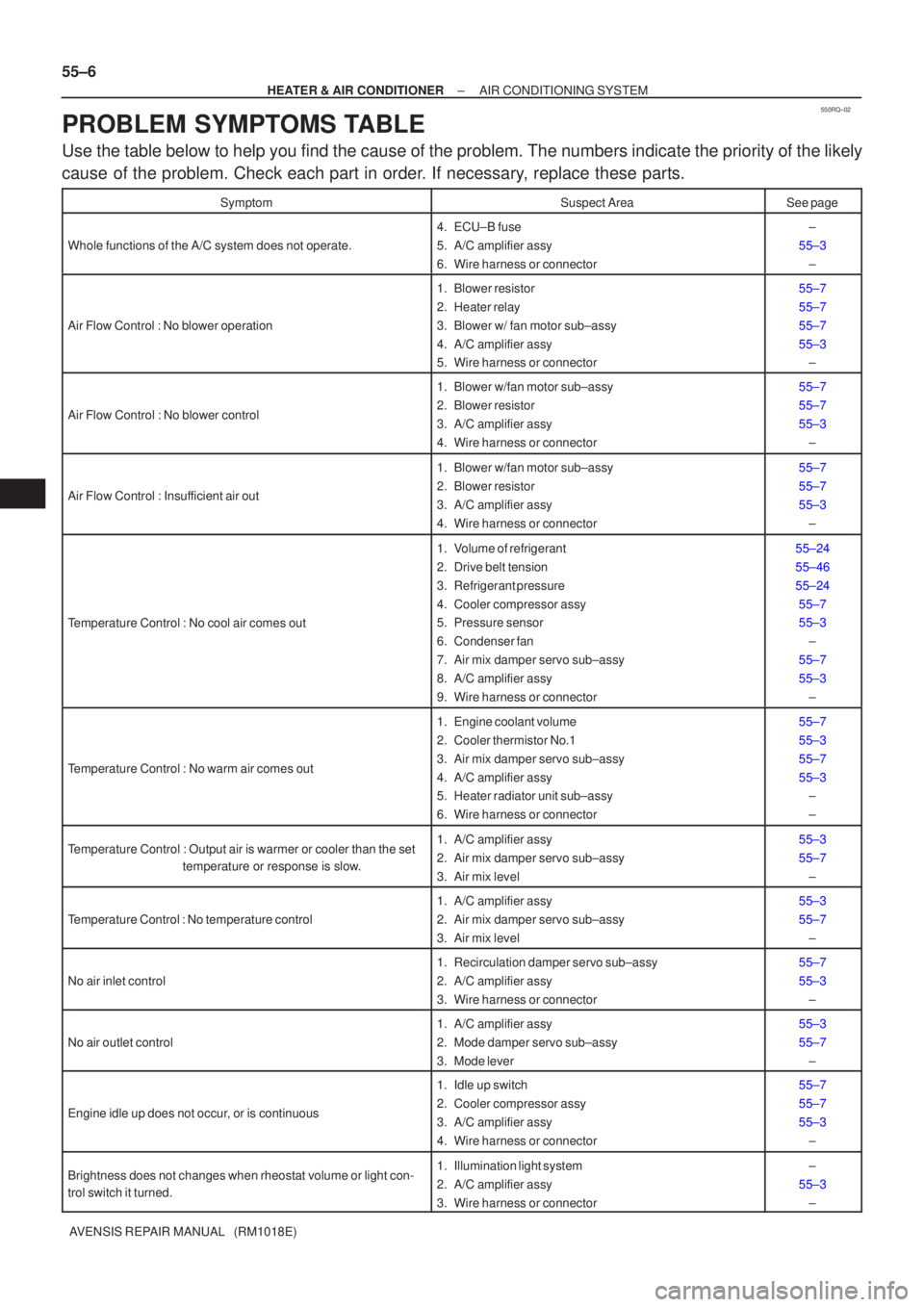
PROBLEM SYMPTOMS TABLE
Use the table below to help you find the cause of the problem. The numbers \
indicate the priority of the likely
cause of the problem. Check each part in order. If necessary, replace these parts.
SymptomSuspect AreaSee page
Whole functions of the A/C system does not operate.
4. ECU±B fuse
5. A/C amplifier assy
6. Wire harness or connector±
55±3 ±
Air Flow Control : No blower operation
1. Blower resistor
2. Heater relay
3. Blower w/ fan motor sub±assy
4. A/C amplifier assy
5. Wire harness or connector55±7
55±7
55±7
55±3±
Air Flow Control : No blower control
1. Blower w/fan motor sub±assy
2. Blower resistor
3. A/C amplifier assy
4. Wire harness or connector55±7
55±7
55±3
±
Air Flow Control : Insufficient air out
1. Blower w/fan motor sub±assy
2. Blower resistor
3. A/C amplifier assy
4. Wire harness or connector55±7
55±7
55±3±
Temperature Control : No cool air comes out
1. Volume of refrigerant
2. Drive belt tension
3. Refrigerant pressure
4. Cooler compressor assy
5. Pressure sensor
6. Condenser fan
7. Air mix damper servo sub±assy
8. A/C amplifier assy
9. Wire harness or connector55±24
55±46
55±2455±7
55±3 ±
55±7
55±3 ±
Temperature Control : No warm air comes out
1. Engine coolant volume
2. Cooler thermistor No.1
3. Air mix damper servo sub±assy
4. A/C amplifier assy
5. Heater radiator unit sub±assy
6. Wire harness or connector55±7
55±3
55±7
55±3±
±
Temperature Control : Output air is warmer or cooler than the set
temperature or response is slow.1. A/C amplifier assy
2. Air mix damper servo sub±assy
3. Air mix level55±3
55±7
±
Temperature Control : No temperature control
1. A/C amplifier assy
2. Air mix damper servo sub±assy
3. Air mix level55±3
55±7±
No air inlet control
1. Recirculation damper servo sub±assy
2. A/C amplifier assy
3. Wire harness or connector55±7
55±3±
No air outlet control
1. A/C amplifier assy
2. Mode damper servo sub±assy
3. Mode lever55±3
55±7±
Engine idle up does not occur, or is continuous
1. Idle up switch
2. Cooler compressor assy
3. A/C amplifier assy
4. Wire harness or connector55±7
55±7
55±3±
Brightness does not changes when rheostat volume or light con-
trol switch it turned.1. Illumination light system
2. A/C amplifier assy
3. Wire harness or connector±
55±3 ±
Page 2955 of 5135
I353162 Claws
I35318
I35319Clamp
I35320
55±66
± HEATER & AIR CONDITIONERBLOWER ASSY
AVENSIS REPAIR MANUAL (RM1018E)
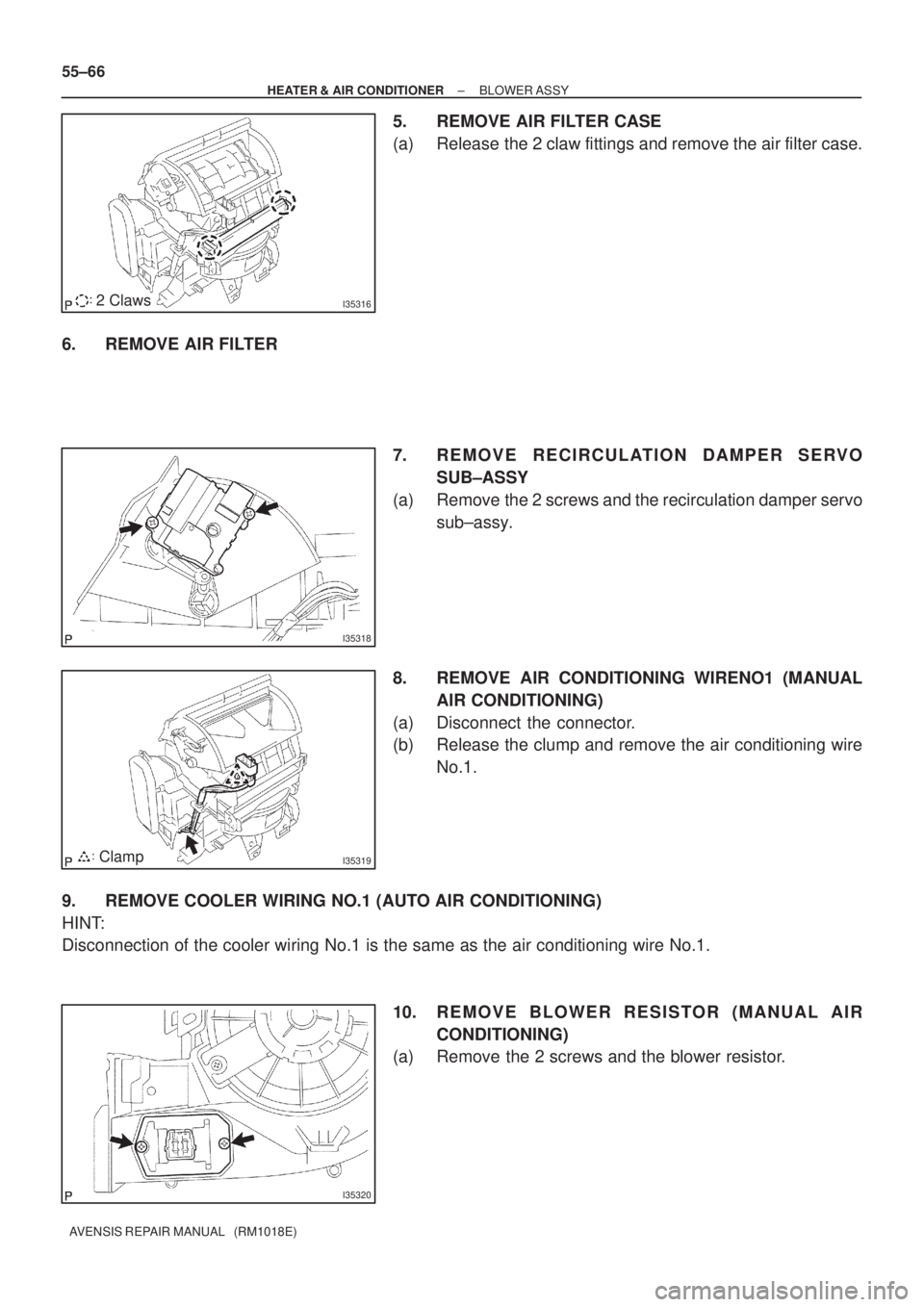
5. REMOVE AIR FILTER CASE
(a) Release the 2 claw fittings and remove the air filter case.
6. REMOVE AIR FILTER
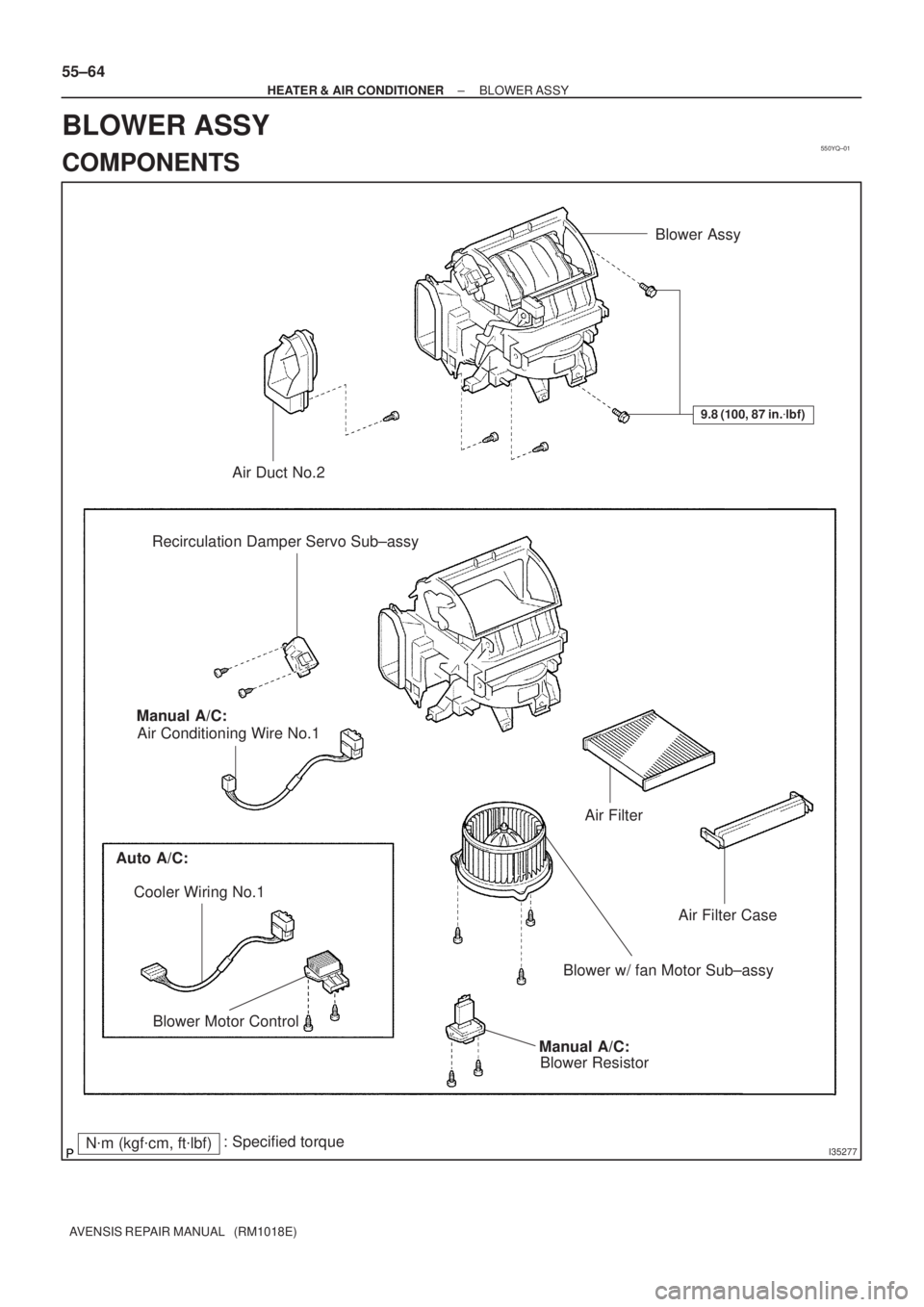
7. REMOVE RECIRCULATION DAMPER SERVO
SUB±ASSY
(a) Remove the 2 screws and the recirculation damper servo
sub±assy.
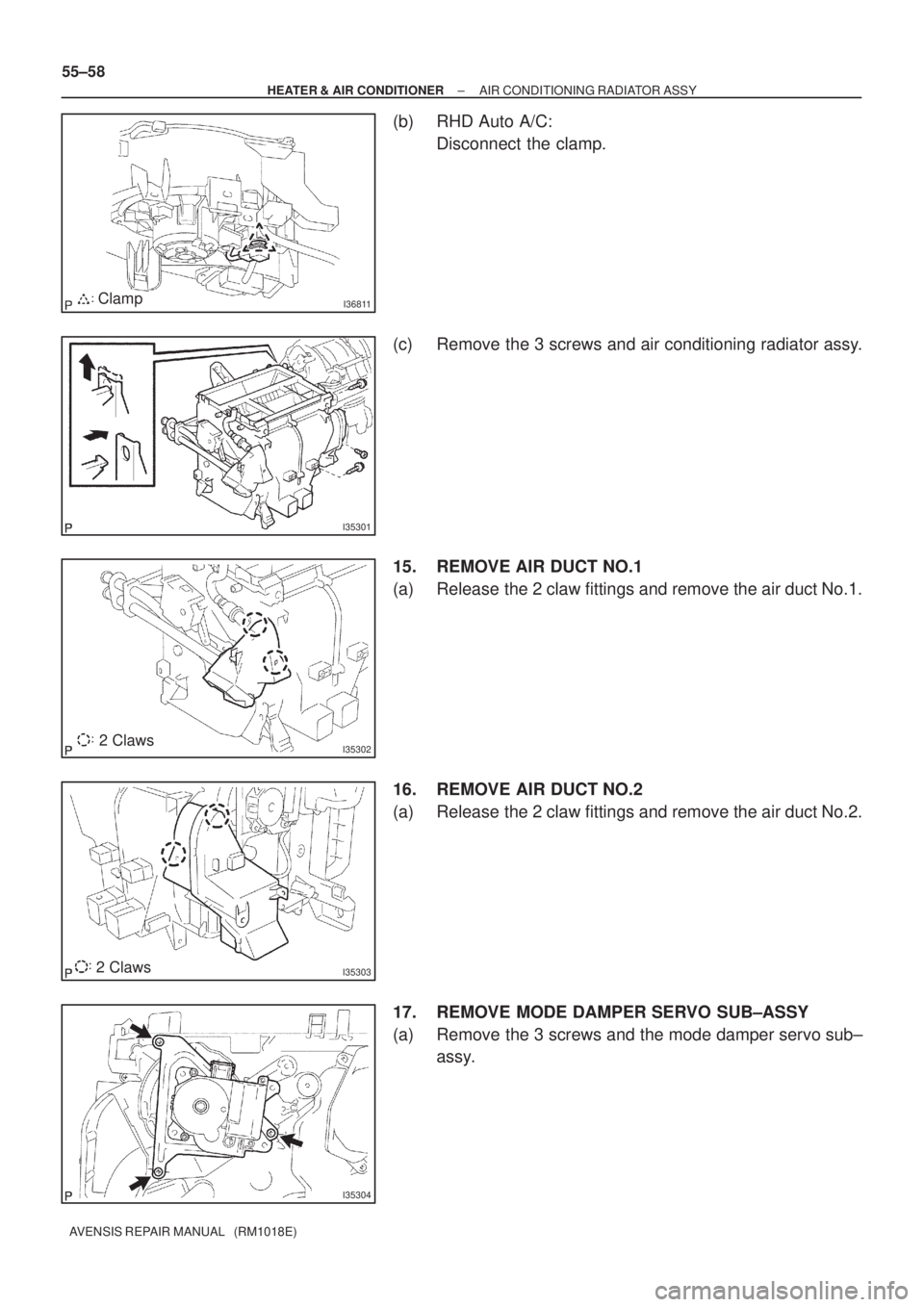
8. REMOVE AIR CONDITIONING WIRENO1 (MANUAL
AIR CONDITIONING)
(a) Disconnect the connector.
(b) Release the clump and remove the air conditioning wire
No.1.
9. REMOVE COOLER WIRING NO.1 (AUTO AIR CONDITIONING)
HINT:
Disconnection of the cooler wiring No.1 is the same as the air conditioning wire No.1.
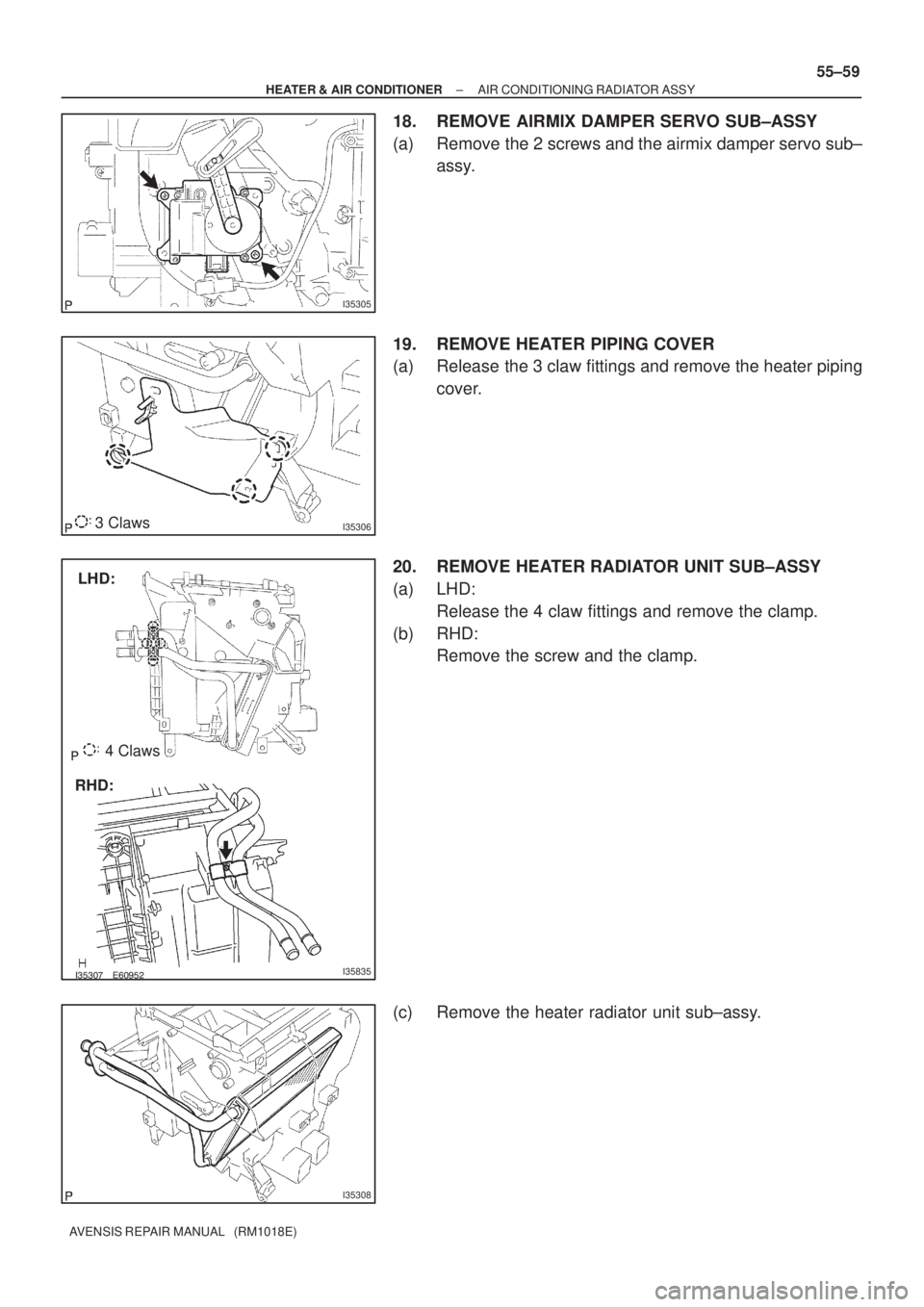
10. REMOVE BLOWER RESISTOR (MANUAL AIR
CONDITIONING)
(a) Remove the 2 screws and the blower resistor.
Page 2958 of 5135
550YQ±01
I35277
Blower Assy
Air Duct No.2
Recirculation Damper Servo Sub±assy
Air Filter
Air Filter Case
Blower w/ fan Motor Sub±assy
Manual A/C:
Blower Resistor Air Conditioning Wire No.1
Auto A/C:
Blower Motor Control
9.8 (100, 87 in.�lbf)
Cooler Wiring No.1Manual A/C:
N�m (kgf�cm, ft�lbf): Specified torque
55±64
± HEATER & AIR CONDITIONERBLOWER ASSY
AVENSIS REPAIR MANUAL (RM1018E)
BLOWER ASSY
COMPONENTS
Page 2962 of 5135
I36811Clamp
I35301
I353022 Claws
I353032 Claws
I35304
55±58
± HEATER & AIR CONDITIONERAIR CONDITIONING RADIATOR ASSY
AVENSIS REPAIR MANUAL (RM1018E)
(b) RHD Auto A/C:
Disconnect the clamp.
(c) Remove the 3 screws and air conditioning radiator assy.
15. REMOVE AIR DUCT NO.1
(a) Release the 2 claw fittings and remove the air duct No.1.
16. REMOVE AIR DUCT NO.2
(a) Release the 2 claw fittings and remove the air duct No.2.
17. REMOVE MODE DAMPER SERVO SUB±ASSY
(a) Remove the 3 screws and the mode damper servo sub±
assy.
Page 2963 of 5135
I35305
I353063 Claws
�����������I35835
LHD:
RHD:4 Claws
I35308
± HEATER & AIR CONDITIONERAIR CONDITIONING RADIATOR ASSY
55±59
AVENSIS REPAIR MANUAL (RM1018E)
18. REMOVE AIRMIX DAMPER SERVO SUB±ASSY
(a) Remove the 2 screws and the airmix damper servo sub±
assy.
19. REMOVE HEATER PIPING COVER
(a) Release the 3 claw fittings and remove the heater piping
cover.
20. REMOVE HEATER RADIATOR UNIT SUB±ASSY
(a) LHD:
Release the 4 claw fittings and remove the clamp.
(b) RHD:
Remove the screw and the clamp.
(c) Remove the heater radiator unit sub±assy.
Page 2964 of 5135
I35309
I35310Claw
I35311
������I37394
55±60
± HEATER & AIR CONDITIONERAIR CONDITIONING RADIATOR ASSY
AVENSIS REPAIR MANUAL (RM1018E)
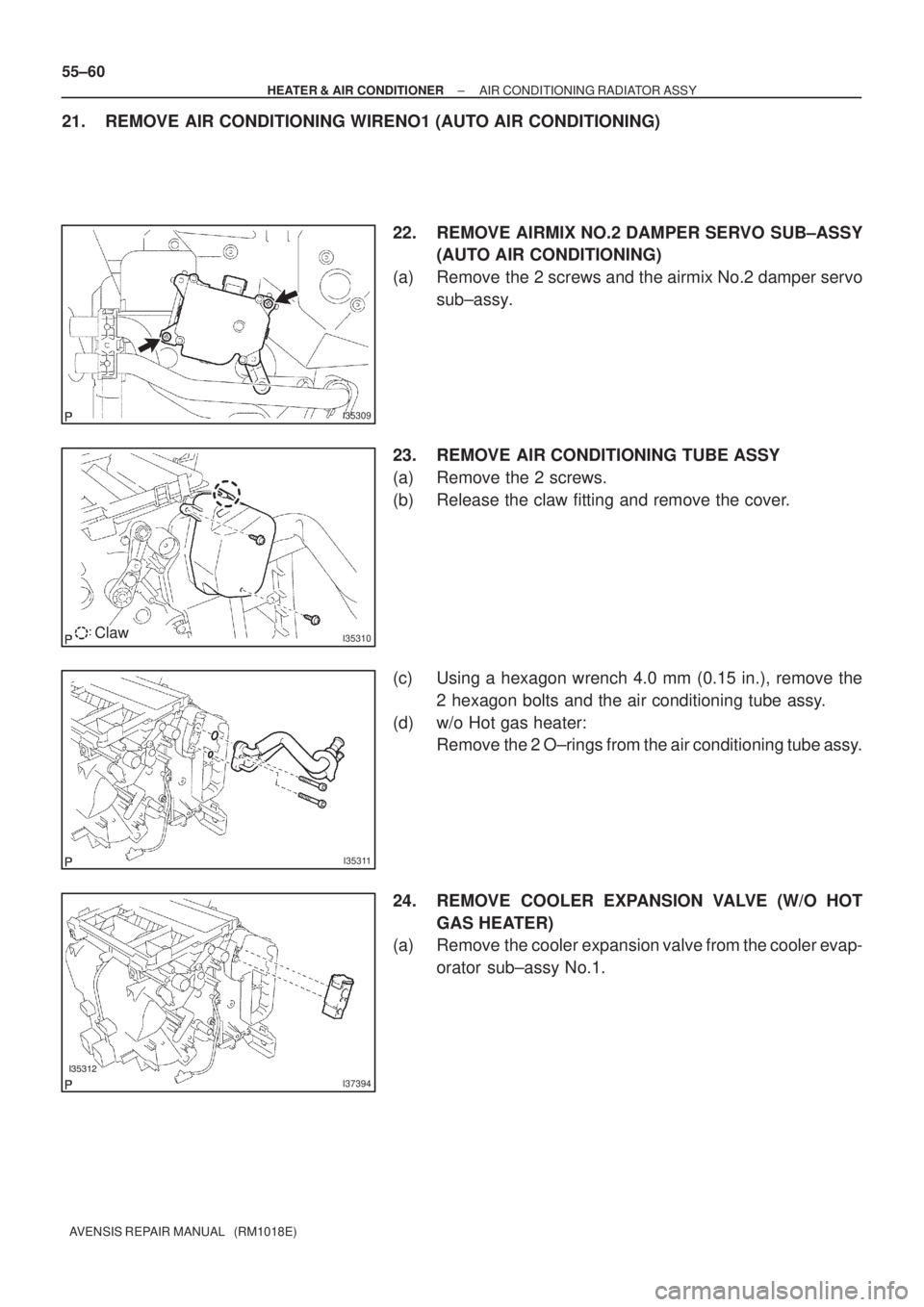
21. REMOVE AIR CONDITIONING WIRENO1 (AUTO AIR CONDITIONING)
22. REMOVE AIRMIX NO.2 DAMPER SERVO SUB±ASSY
(AUTO AIR CONDITIONING)
(a) Remove the 2 screws and the airmix No.2 damper servo
sub±assy.
23. REMOVE AIR CONDITIONING TUBE ASSY
(a) Remove the 2 screws.
(b) Release the claw fitting and remove the cover.
(c) Using a hexagon wrench 4.0 mm (0.15 in.), remove the
2 hexagon bolts and the air conditioning tube assy.
(d) w/o Hot gas heater:
Remove the 2 O±rings from the air conditioning tube assy.
24. REMOVE COOLER EXPANSION VALVE (W/O HOT
GAS HEATER)
(a) Remove the cooler expansion valve from the cooler evap-
orator sub±assy No.1.
Page 3237 of 5135
IG
SPEED
BKL SW
(D±seat)
BKL SW
(P seat)
WRN LAMP
BUZZERON
OFF
15km/h
0
BELT ON
BELT OFF
LVL1
LVL2 BELT ON
BELT OFF
ON
OFF OFF
30s
90s30s
90s
± INSTRUMENT PANEL/METERCOMBINATION METER
71±5
AVENSIS REPAIR MANUAL (RM1018E)
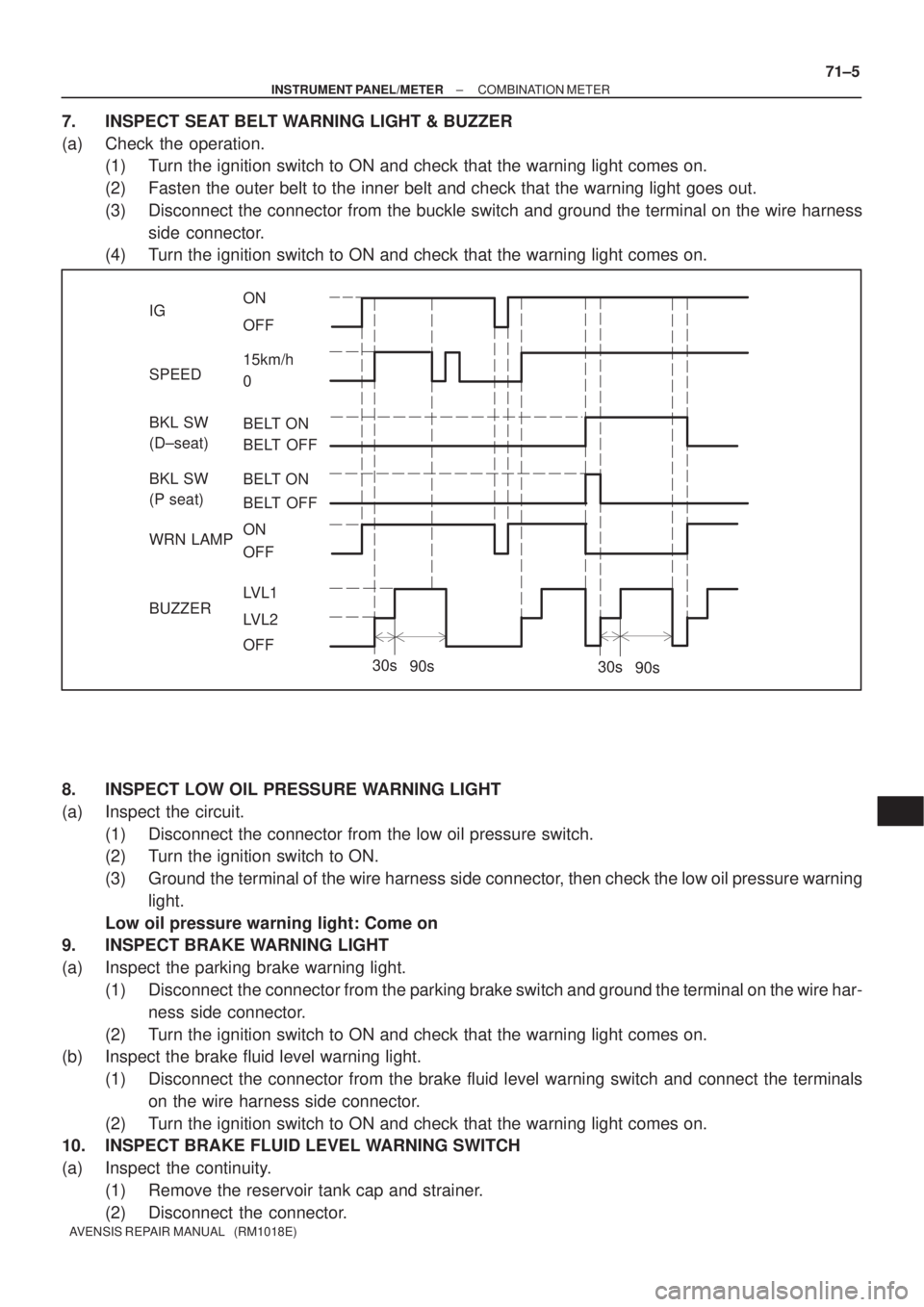
7. INSPECT SEAT BELT WARNING LIGHT & BUZZER
(a) Check the operation.
(1) Turn the ignition switch to ON and check that the warning light comes on.
(2) Fasten the outer belt to the inner belt and check that the warning light goes out.
(3) Disconnect the connector from the buckle switch and ground the terminal on the wire harness
side connector.
(4) Turn the ignition switch to ON and check that the warning light comes on.
8. INSPECT LOW OIL PRESSURE WARNING LIGHT
(a) Inspect the circuit.
(1) Disconnect the connector from the low oil pressure switch.
(2) Turn the ignition switch to ON.
(3) Ground the terminal of the wire harness side connector, then check the low oil pressure warning
light.
Low oil pressure warning light: Come on
9. INSPECT BRAKE WARNING LIGHT
(a) Inspect the parking brake warning light.
(1) Disconnect the connector from the parking brake switch and ground the terminal on the wire har-
ness side connector.
(2) Turn the ignition switch to ON and check that the warning light comes on.
(b) Inspect the brake fluid level warning light.
(1) Disconnect the connector from the brake fluid level warning switch and connect the terminals
on the wire harness side connector.
(2) Turn the ignition switch to ON and check that the warning light comes on.
10. INSPECT BRAKE FLUID LEVEL WARNING SWITCH
(a) Inspect the continuity.
(1) Remove the reservoir tank cap and strainer.
(2) Disconnect the connector.
Page 3238 of 5135
71±6
±
INSTRUMENT PANEL/METER COMBINATION METER
AVENSIS REPAIR MANUAL (RM1018E)
(3)Check that the continuity exists between the terminals.
Float up (switch off): No continuity
(4)Use a syphon, etc., to take fluid out of the reservoir tank.
(5)Check that the continuity exists between the terminals.
Float down (switch on): Continuity
(6)Pour the fluid back in the reservoir tank.
(7)Reconnect the connector.
(8)Check that the buzzer stop after about 4 to 8 seconds.
11.INSPECT KEY REMINDER WARNING BUZZER
(a)Check warning buzzer function. (1)Turn the ignition switch ON and check that the key reminder warning sounds i\
f the ignition keyis insert the key cylinder and front driver side door is opened (See Page 05±1586).