Page 799 of 969

B00540
A88419
Disconnect Wire
from Terminal B
Generator Voltmeter
BatteryAmmeter 19-18
- STARTING & CHARGINGCHARGING SYSTEM (3MZ-FE)
2350 Author�: Date�:
2005 LEXUS ES330 REPAIR MANUAL (RM1124U)
(b) Check that the belt fits properly in the ribbed grooves.
Confirm that the belt has not slipped out of the groove on the
bottom of the pulley by hand.
5. INSPECT GENERATOR WIRING
(a) Visually check the generator wiring.
(1) Check that the wiring is in good condition.
6. INSPECT ABNORMAL NOISES
(a) Listen to abnormal noises from generator.
(1) Check that no abnormal noise is heard from the generator while the engine is running.
7. INSPECT CHARGE WARNING LIGHT CIRCUIT
(a) Turn the ignition switch ON. Check that the charge warning light comes on.
(b) Start the engine, then check that the light goes off.
If the light does not operate as specified, troubleshoot the charge warning light circuit.
8. INSPECT CHARGING CIRCUIT WITHOUT LOAD
(a) If a tester is not available, connect a voltmeter to the
charging circuit as follows.
(1) Disconnect the wire from terminal B of the genera-
tor, then connect it to the negative (-) lead of the
ammeter.
(2) Connect the positive (+) lead of the ammeter to ter-
minal B of the generator.
(3) Connect the positive (+) lead of the voltmeter to ter-
minal B of the generator.
(4) Ground the negative (-) lead of the voltmeter.
(b) Check the charging circuit.
(1) Keep the engine speed at 2,000 rpm, then check
the reading on the ammeter and voltmeter.
Standard amperage: 10 A or less
Standard voltage: 13.2 to 14.8 V
9. INSPECT CHARGING CIRCUIT WITH LOAD
(a) With the engine running at 2,000 rpm, turn the high beam headlights ON and turn the heater blower
switch to the ºHIº position.
(b) Check the reading on the ammeter.
Standard amperage: 30 A or more
�If the ammeter reading is less than the standard amperage, repair the generator.
�If the battery is fully charged, the indication will sometimes be less than the standard amperage.
Page 820 of 969

C90693
Screw Extractor
C90695
C90696
- STEERING COLUMNSTEERING COLUMN ASSY
50-1 1
2572 Author�: Date�:
24. REMOVE STEERING COLUMN UPPER W/SWITCH
BRACKET ASSY
(a) Using a centering punch, mark the center of the 2 ta-
pered-head bolts.
(b) Using a 3 - 4 mm (0.12 - 0.16 in.) drill, drill in to the 2 bolts.
(c) Using a screw extractor, remove the 2 bolts and steering
column upper w/switch bracket assy.
25. REMOVE IGNITION SWITCH LOCK CYLINDER ASSY
(a) Place the ignition switch lock cylinder assy at the ACC
position.
(b) Push down the stop pin with a screwdriver, and pull out
the ignition switch lock cylinder assy.
26. REMOVE UN-LOCK WARNING SWITCH ASSY
(a) Disconnect the un-lock warning switch assy connector
from the ignition or starter switch assy.
(b) Remove the un-lock warning switch assy by pushing up
the center part and releasing the 2 screws.
27. REMOVE IGNITION OR STARTER SWITCH ASSY
(a) Remove the 2 screws and ignition or starter switch assy from the steering column upper w/switch
bracket assy.
28. INSTALL IGNITION OR STARTER SWITCH ASSY
(a) Install the ignition switch assy to the steering column upper w/switch bracket assy with the 2 screws.
29. INSTALL UN-LOCK WARNING SWITCH ASSY
(a) Install the un-lock warning switch assy.
(b) Connect the un-lock warning switch assy connector to the ignition or starter switch assy.
30. INSTALL IGNITION SWITCH LOCK CYLINDER ASSY
(a) Make sure the ignition switch lock cylinder assy at the ACC position.
(b) Install the ignition switch lock cylinder assy.
31. INSPECT STEERING LOCK OPERATION
(a) Check that the steering lock mechanism is activated when removing the key.
(b) Check that the steering lock mechanism is deactivated when inserting the key and turning it to ACC
position.
Page 823 of 969
50-14
- STEERING COLUMNSTEERING COLUMN ASSY
2575 Author�: Date�:
51. INSTALL STEERING WHEEL ASSY
(a) Align the matchmarks on the steering wheel assy and steering main shaft assy.
(b) Install the steering wheel assy set nut.
Torque: 50 NVm (510 kgfVcm, 37 ftVlbf)
52. INSPECT HORN BUTTON ASSY(See page 60-22)
53. INSTALL HORN BUTTON ASSY(See page 60-22)
54. INSTALL STEERING PAD SWITCH
(a) Connect the connector.
(b) Install the steering pad switch with the 2 screws.
55. INSTALL CONNECTOR COVER
56. INSTALL STEERING WHEEL COVER LOWER NO.2
57. INSPECT SRS WARNING LIGHT(See page 05-818)
Page 885 of 969

IRON PARTICLE RUST CONTAMINATION REPAIR ± PA001-05 January 12, 2005
Page 2 of 2
WARNING:
Auto Magic
� Special Cleaner Concentrate� is a corrosive material. Appropriate
personal protection equipment must be worn to protect persons performing the
contamination removal procedure. Please refer to the precautions on the product prior
to use.
CAUTION:
Consult local or state regulations regarding the handling, use, and disposal of Auto
Magic
� Special Cleaner Concentrate� prior to use.
Under no circumstances should contamination removal be performed in direct
sunlight or contamination removal solution be allowed to dry on vehicle surfaces, as
staining of plastic, rubber, or painted parts may result.
1. Move vehicle out of direct sunlight. Initially rinse with cool water then wash with liquid
car wash detergent. Rinse again thoroughly with fresh water.
2. Dilute the mixture to a 1:8 ratio for painted surfaces. Use the recommended dilution
ratio when applying to any other surface. Apply the diluted cleaner concentrate so
that it evenly covers the affected area. Use an appropriate mitt or sponge to agitate
the surface.
3. Thoroughly rinse vehicle with fresh water.
4. Inspect vehicle carefully both visually and by feel to determine if all iron particles
have been removed. Repeat the wash several times if necessary to achieve
complete removal.
5. Dry vehicle with a soft terry cloth towel and apply a non±abrasive, non±silicone glaze
to obtain a high±gloss finish.
General
Precautions
Repair
Procedure
Page 897 of 969
Lexus Supports ASE CertificationPage 1 of 1
Title:
POWER SYSTEM INITIALIZATION
DURING PDS
Models:
'05 All Lexus Models
Technical Service
Information Bulletin
February 11, 2005
PD010-05
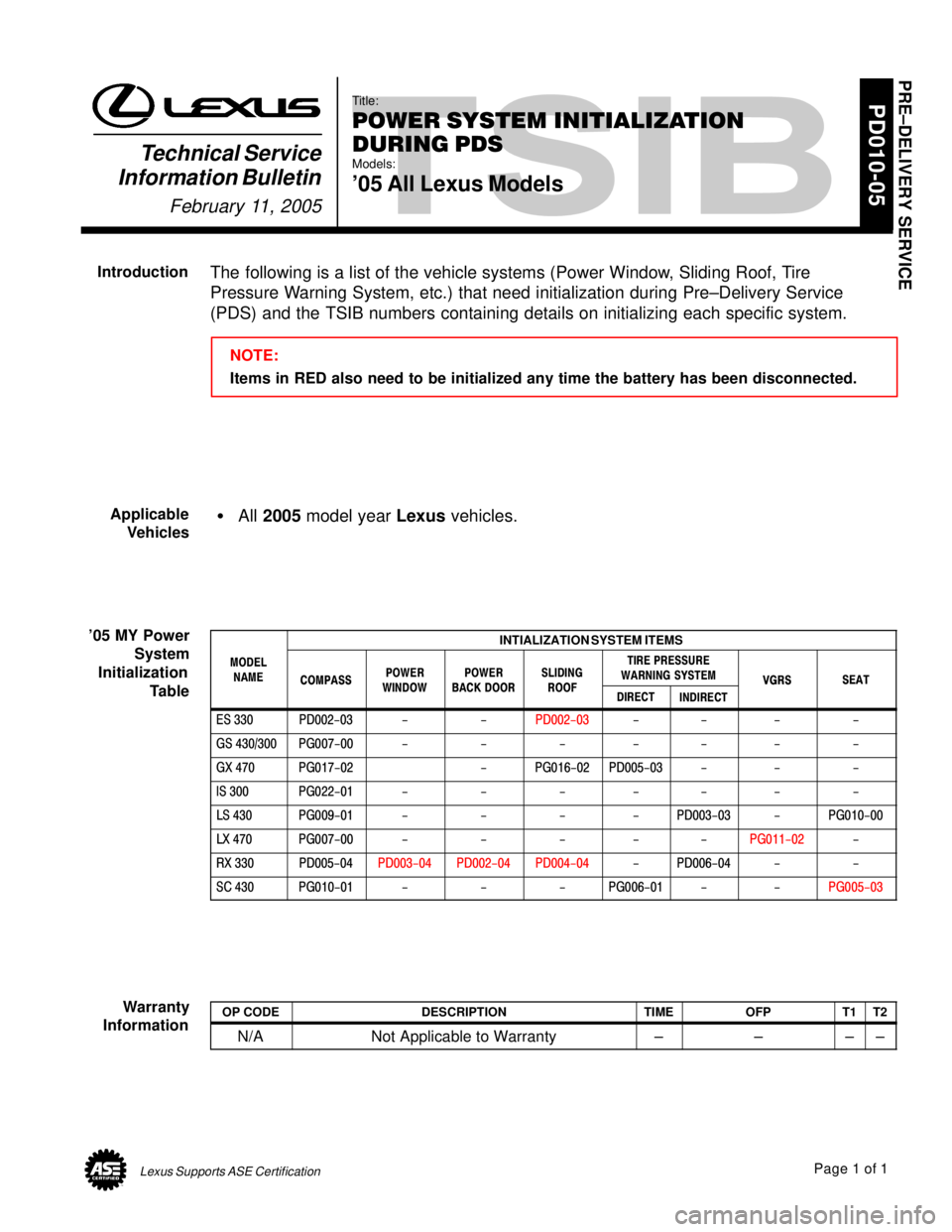
The following is a list of the vehicle systems (Power Window, Sliding Roof, Tire
Pressure Warning System, etc.) that need initialization during Pre±Delivery Service
(PDS) and the TSIB numbers containing details on initializing each specific system.
NOTE:
Items in RED also need to be initialized any time the battery has been disconnected.
All 2005 model year Lexus vehicles.
INTIALIZATION SYSTEM ITEMS
MODEL
NAME
COMPASSPOWERWINDOWPOWERBACK DOORSLIDINGROOF
TIRE PRESSURE
WARNING SYSTEM
VGRSSEATNAMECOMPASSWINDOWBACK DOORROOFDIRECTINDIRECT
VGRSSEAT
ES 330PD002-03--PD002-03----
GS 430/300PG007-00-------
GX 470PG017-02-PG016-02PD005-03---
IS 300PG022-01-------
LS 430PG009-01----PD003-03-PG010-00
LX 470PG007-00-----PG011-02-
RX 330PD005-04PD003-04PD002-04PD004-04-PD006-04--
SC 430PG010-01---PG006-01--PG005-03
OP CODEDESCRIPTIONTIMEOFPT1T2
N/ANot Applicable to Warranty±±±±
PRE±DELIVERY SERVICE
Introduction
Applicable
Vehicles
'05 MY Power
System
Initialization
Table
Warranty
Information
Page 938 of 969
DIAGNOSTIC TESTER IMMOBILIZER FUNCTIONS ± SS005-01 Revised July 6, 2001
Page 7 of 14
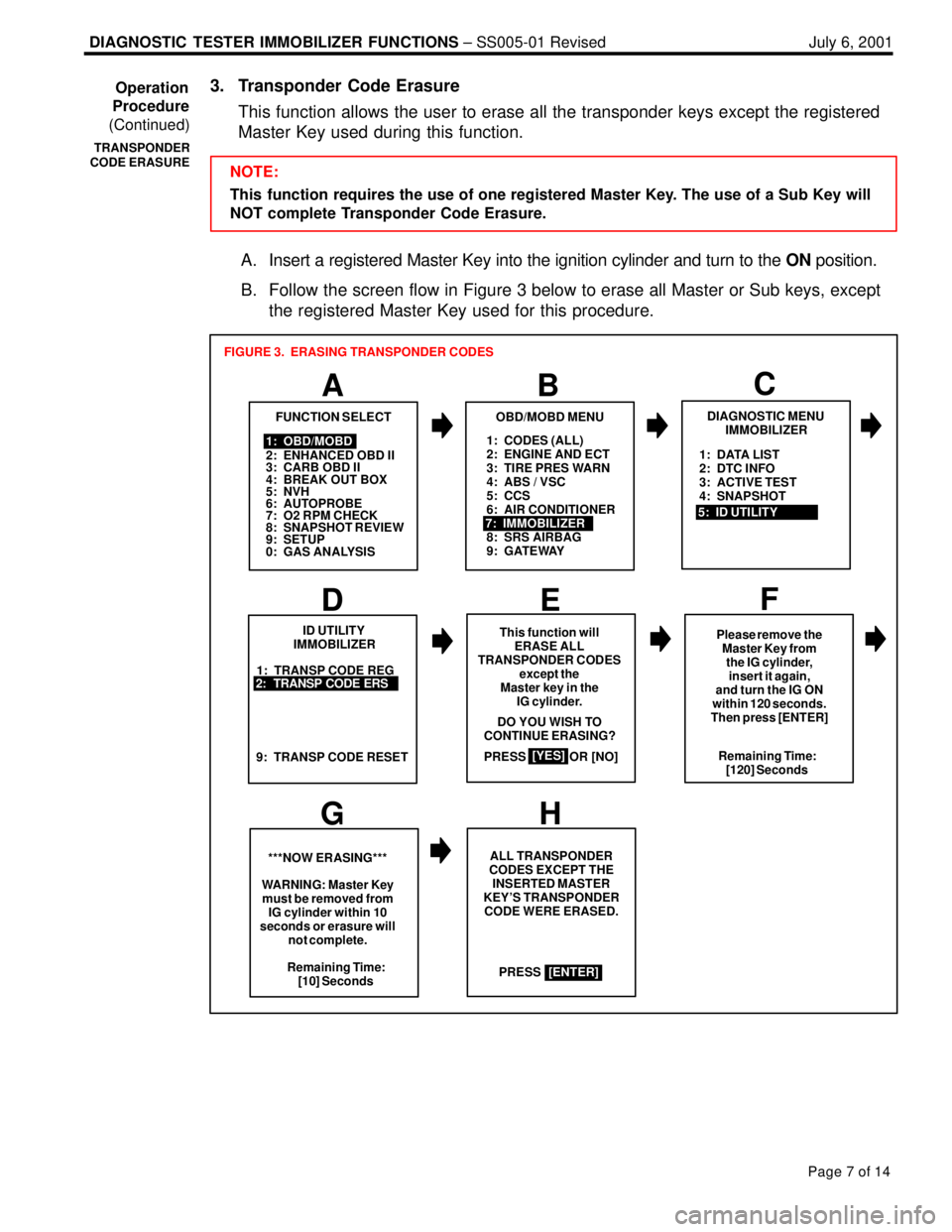
3. Transponder Code Erasure
This function allows the user to erase all the transponder keys except the registered
Master Key used during this function.
NOTE:
This function requires the use of one registered Master Key. The use of a Sub Key will
NOT complete Transponder Code Erasure.
A. Insert a registered Master Key into the ignition cylinder and turn to the ON position.
B. Follow the screen flow in Figure 3 below to erase all Master or Sub keys, except
the registered Master Key used for this procedure.
1: CODES (ALL)
2: ENGINE AND ECT
3: TIRE PRES WARN
4: ABS / VSC
5: CCS
6: AIR CONDITIONER
8: SRS AIRBAG
9: GATEWAY
A
FUNCTION SELECT
B
1: OBD/MOBD
2: ENHANCED OBD II
3: CARB OBD II
4: BREAK OUT BOX
5: NVH
6: AUTOPROBE
7: O2 RPM CHECK
8: SNAPSHOT REVIEW
9: SETUP
0: GAS ANALYSIS
OBD/MOBD MENU
7: IMMOBILIZER
FIGURE 3. ERASING TRANSPONDER CODES
1: TRANSP CODE REG
D
ID UTILITY
IMMOBILIZER
EF
GH
This function will
ERASE ALL
TRANSPONDER CODES
except the
Master key in the
IG cylinder.
PRESS OR [NO]
[YES]
2: TRANSP CODE ERS
9: TRANSP CODE RESETRemaining Time:
[120] Seconds
***NOW ERASING***
WARNING: Master Key
must be removed from
IG cylinder within 10
seconds or erasure will
not complete.ALL TRANSPONDER
CODES EXCEPT THE
INSERTED MASTER
KEY'S TRANSPONDER
CODE WERE ERASED.
PRESS DO YOU WISH TO
CONTINUE ERASING?
Remaining Time:
[10] Seconds
[ENTER]Please remove the
Master Key from
the IG cylinder,
insert it again,
and turn the IG ON
within 120 seconds.
Then press [ENTER]
C
DIAGNOSTIC MENU
IMMOBILIZER
5: ID UTILITY1: DATA LIST
2: DTC INFO
3: ACTIVE TEST
4: SNAPSHOT
Operation
Procedure
(Continued)
TRANSPONDER
CODE ERASURE