2004 SUBARU FORESTER warning
[x] Cancel search: warningPage 386 of 2870

IDI-2
INSTRUMENTATION/DRIVER INFO
General Description
1. General Description
A: SPECIFICATION
B: CAUTION
Be careful not to damage meters and instrument panel.
Be careful not to damage meter glasses.
Make sure that electrical connector is connected securely.
After installation, make sure that each meter operates normally.
Use gloves to avoid damage and getting fingerprints on the glass surface and meter surfaces.
Do not apply excessive force to the printed circuit.
Do not drop or otherwise apply impact.
C: PREPARATION TOOL
1. GENERAL TOOL
Combination meterSpeedometer Electric pulse type
Temperature gauge Cross coil type
Fuel gauge Cross coil type
Tachometer Electric pulse type
Turn signal indicator light 14 V — 2 W
Charge indicator light 14 V — 1.4 W
Oil pressure indicator light LED
ABS warning light 14 V — 1.4 W
Malfunction indicator light LED
HI-beam indicator light 14 V — 2 W
Door open warning light LED
Seat belt warning light LED
Brake fluid and parking brake warning
light14 V — 2 W
FWD indicator light LED
AIRBAG warning light LED
Meter illumination light 14 V — 3.4 W, 14 V — 2 W
AT OIL TEMP. warning light LED
LO indicator light LED
HOLD indicator light LED
Immobilizer indicator light LED
Rear differential oil temperature warn-
ing light14 V — 2 W
Cruise indicator light 14 V — 1.4 W
Rear fog light indicator light 14 V — 2 W
POWER indicator light 14 V — 1.4 W
Low fuel warning light LED
AT select lever position indicator light 14 V — 100 mA
LCD back light 14 V — 1.4 W
TOOL NAME REMARKS
Circuit tester Used for measuring resistance and voltage.
Page 389 of 2870

IDI-5
INSTRUMENTATION/DRIVER INFO
Combination Meter System
2. CHECK POWER SUPPLY AND GROUND CIRCUIT
3. CHECK VEHICLE SPEED SENSOR
Step Check Yes No
1 CHECK POWER SUPPLY FOR COMBINA-
TION METER.
1) Remove the combination meter.
Assembly.>
2) Disconnect the combination meter harness
connector.
3) Turn the ignition switch to ON.
4) Measure the voltage between combination
meter connector and chassis ground.
Connector & terminal
(i10) No. 9 (+) — Chassis ground (
−):Is the voltage more than 10 V? Go to step 2.Check the harness
for open or short
between ignition
switch and combi-
nation meter.
2 CHECK POWER SUPPLY FOR COMBINA-
TION METER.
Measure the voltage between combination
meter connector and chassis ground.
Connector & terminal
(i10) No. 8 (+) — Chassis ground (
−):Is the voltage more than 10 V? Go to step 3.Check the harness
for open or short
between fuse and
combination
meter.
3 CHECK GROUND CIRCUIT OF COMBINA-
TION METER.
1) Turn the ignition switch to OFF.
2) Measure the resistance of harness
between combination meter connector and
chassis ground.
Connector & terminal
(i10) No. 10 — Chassis ground:Is the resistance less than 10
Ω?Replace the com-
bination meter
printed circuit.Repair the wiring
harness.
Step Check Yes No
1 CHECK VEHICLE SPEED SENSOR.
1) Lift-up the vehicle and support it with rigid
racks.
2) Remove the combination meter with har-
ness connector.
3) Drive the vehicle at a speed greater than 20
km/h (12 MPH).
Warning:
Be careful not to get caught in the running
wheels.
4) Measure the voltage between combination
meter connector and chassis ground.
Connector & terminal
(i10) No. 12 (+) — Chassis ground (
−):Is the voltage 1 V ← → 5 V? Check the speed-
ometer.
TION, Speedome-
ter.>Go to step 2.
2 CHECK VEHICLE SPEED SENSOR POWER
SUPPLY.
1) Turn the ignition switch to OFF.
2) Disconnect the vehicle speed sensor har-
ness connector.
3) Turn the ignition switch to ON.
4) Measure the voltage between vehicle
speed sensor connector and engine ground.
Connector & terminal
(B17) No. 3 (+) — Engine ground (
−):Is the voltage more than 10 V? Go to step 3.Check the harness
for open or short
between ignition
switch and vehicle
speed sensor.
Page 390 of 2870

IDI-6
INSTRUMENTATION/DRIVER INFO
Combination Meter System
4. CHECK TRANSMISSION CONTROL MODULE (TCM)
3 CHECK HARNESS BETWEEN VEHICLE
SPEED SENSOR AND ENGINE GROUND.
1) Turn the ignition switch to OFF.
2) Measure the resistance between vehicle
speed sensor connector and engine ground.
Connector & terminal
(B17) No. 2 — Engine ground:Is the resistance less than 10
Ω?Go to step 4.Repair the wiring
harness.
4 CHECK HARNESS BETWEEN VEHICLE
SPEED SENSOR AND COMBINATION
METER.
1) Disconnect the connector from combination
meter.
2) Measure the resistance between vehicle
speed sensor harness connector and combi-
nation meter harness connector.
Connector & terminal
(B17) No. 1 — (i10) No. 12:Is the resistance less than 10
Ω?Replace the vehi-
cle speed sensor.Repair the wiring
harness.
Step Check Yes No
1 CHECK TCM SIGNAL.
1) Lift-up the vehicle and support it with rigid
racks.
2) Drive the vehicle faster than 10 km/h (6
MPH).
Warning:
Be careful not to get caught in the running
wheels.
3) Measure the voltage between TCM con-
nector and chassis ground.
Connector & terminal
(B56) No. 17 (+) — Chassis ground (
−):Is the voltage 1 V ← → 5 V? Go to step 2.Check TCM.
Basic Diagnostic
Procedure.>
2 CHECK HARNESS BETWEEN TCM AND
COMBINATION METER.
1) Turn the ignition switch to OFF.
2) Disconnect the connector from TCM and
combination meter.
3) Measure the resistance between TCM har-
ness connector and combination meter har-
ness connector.
Connector & terminal
(B56) No. 17 — (i10) No. 12:Is the resistance less than 10
Ω?Check the speedo
meter.
Speedometer.>Repair the wiring
harness. Step Check Yes No
Page 396 of 2870
IDI-12
INSTRUMENTATION/DRIVER INFO
Combination Meter Assembly
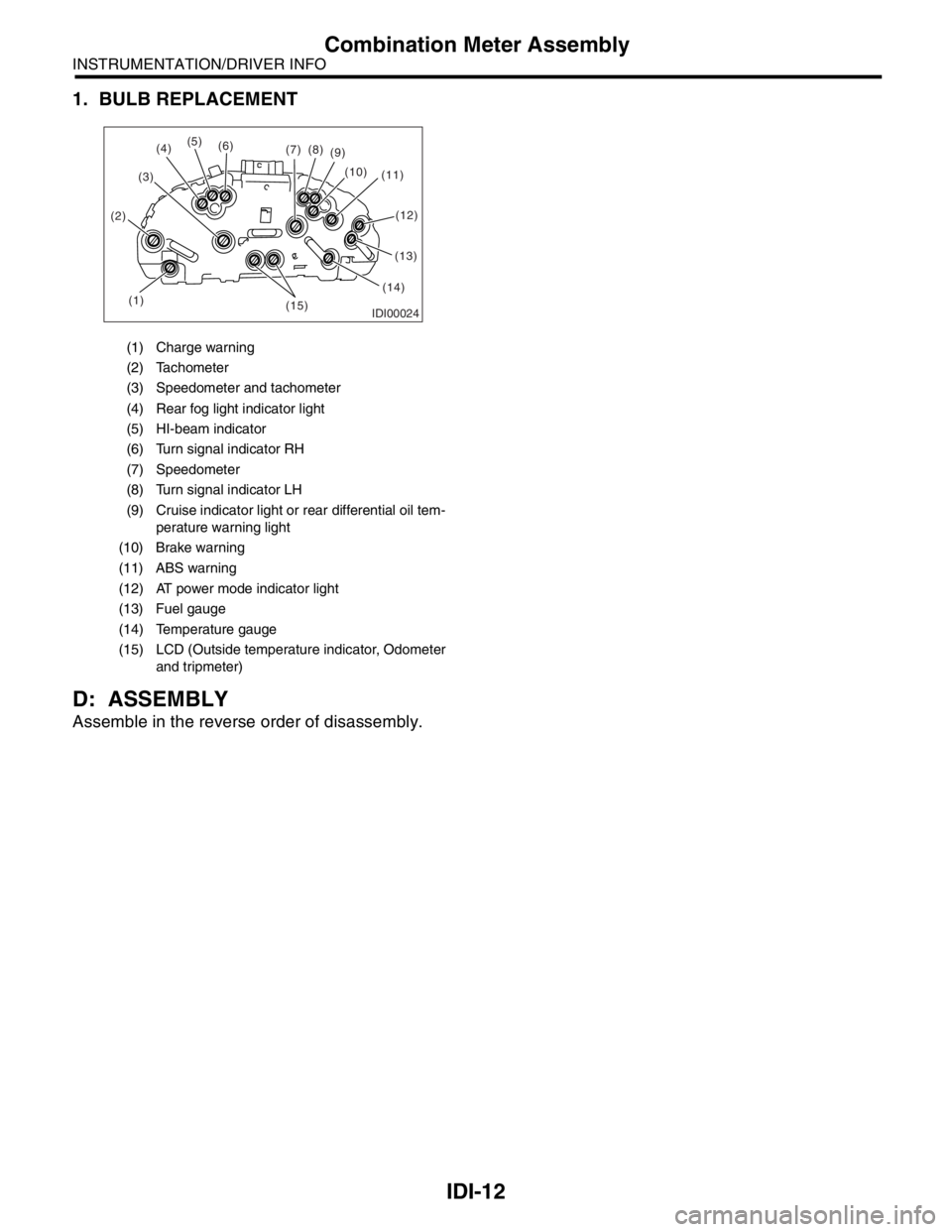
1. BULB REPLACEMENT
D: ASSEMBLY
Assemble in the reverse order of disassembly.
(1) Charge warning
(2) Tachometer
(3) Speedometer and tachometer
(4) Rear fog light indicator light
(5) HI-beam indicator
(6) Turn signal indicator RH
(7) Speedometer
(8) Turn signal indicator LH
(9) Cruise indicator light or rear differential oil tem-
perature warning light
(10) Brake warning
(11) ABS warning
(12) AT power mode indicator light
(13) Fuel gauge
(14) Temperature gauge
(15) LCD (Outside temperature indicator, Odometer
and tripmeter)
IDI00024(1) (2)(3)(5)
(6)
(7)(8)
(9)
(10)
(11)
(13)
(14)
(15)
(4)
(12)
Page 410 of 2870
SE-6
SEAT
Front Seat
2. Front Seat
A: REMOVAL
1) Disconnect the ground cable from battery.
WARNING:
The airbag system is fitted with a backup power
source. If the airbag system is serviced within 20
seconds after the ground cable is disconnected,
it may inflate.
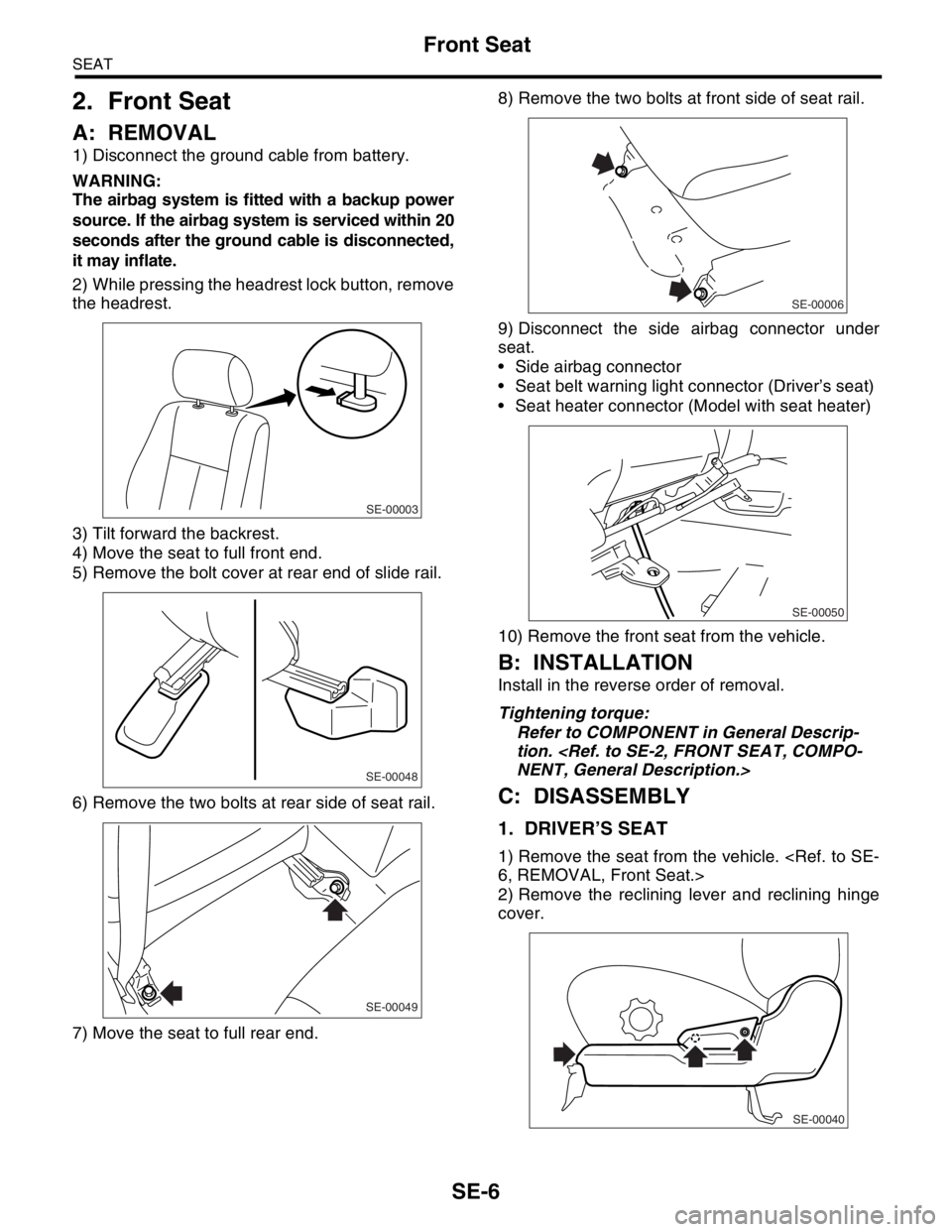
2) While pressing the headrest lock button, remove
the headrest.
3) Tilt forward the backrest.
4) Move the seat to full front end.
5) Remove the bolt cover at rear end of slide rail.
6) Remove the two bolts at rear side of seat rail.
7) Move the seat to full rear end.8) Remove the two bolts at front side of seat rail.
9) Disconnect the side airbag connector under
seat.
Side airbag connector
Seat belt warning light connector (Driver’s seat)
Seat heater connector (Model with seat heater)
10) Remove the front seat from the vehicle.
B: INSTALLATION
Install in the reverse order of removal.
Tightening torque:
Refer to COMPONENT in General Descrip-
tion.
C: DISASSEMBLY
1. DRIVER’S SEAT
1) Remove the seat from the vehicle.
2) Remove the reclining lever and reclining hinge
cover.
SE-00003
SE-00048
SE-00049
SE-00006
SE-00050
SE-00040
Page 434 of 2870
SL-14
SECURITY AND LOCK
Keyless Entry System
3. Keyless Entry System
A: WIRING DIAGRAM
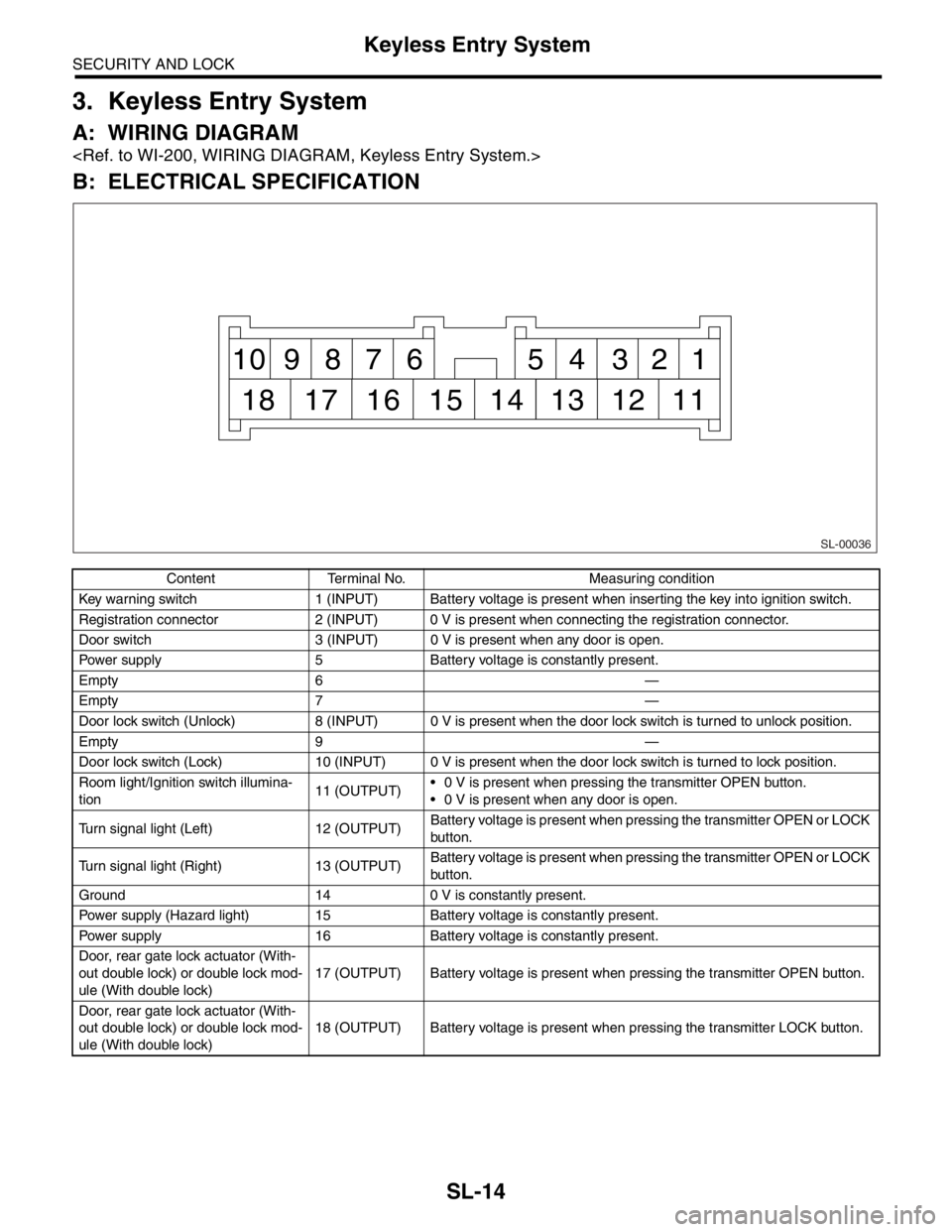
B: ELECTRICAL SPECIFICATION
Content Terminal No. Measuring condition
Key warning switch 1 (INPUT) Battery voltage is present when inserting the key into ignition switch.
Registration connector 2 (INPUT) 0 V is present when connecting the registration connector.
Door switch 3 (INPUT) 0 V is present when any door is open.
Power supply 5 Battery voltage is constantly present.
Empty 6 —
Empty 7 —
Door lock switch (Unlock) 8 (INPUT) 0 V is present when the door lock switch is turned to unlock position.
Empty 9 —
Door lock switch (Lock) 10 (INPUT) 0 V is present when the door lock switch is turned to lock position.
Room light/Ignition switch illumina-
tion11 (OUTPUT) 0 V is present when pressing the transmitter OPEN button.
0 V is present when any door is open.
Turn signal light (Left) 12 (OUTPUT)Battery voltage is present when pressing the transmitter OPEN or LOCK
button.
Turn signal light (Right) 13 (OUTPUT)Battery voltage is present when pressing the transmitter OPEN or LOCK
button.
Ground 14 0 V is constantly present.
Power supply (Hazard light) 15 Battery voltage is constantly present.
Power supply 16 Battery voltage is constantly present.
Door, rear gate lock actuator (With-
out double lock) or double lock mod-
ule (With double lock)17 (OUTPUT) Battery voltage is present when pressing the transmitter OPEN button.
Door, rear gate lock actuator (With-
out double lock) or double lock mod-
ule (With double lock)18 (OUTPUT) Battery voltage is present when pressing the transmitter LOCK button.
SL-00036
1 2 3 4 5 6 7 8 9 10
11 12 13 14 15 16 17 18
Page 435 of 2870

SL-15
SECURITY AND LOCK
Keyless Entry System
C: INSPECTION
1. SYMPTOM CHART
Symptom Repair order Reference
None of the functions of keyless entry
system operate.1. Check the transmitter battery.
less Entry System.>
2. Check the fuse.
tem.>
3. Check the keyless entry control module power
supply and ground circuit.
INSPECTION, Keyless Entry Sys-
tem.>
4. Replace the keyless entry control module.
The transmitter cannot be registered. 1. Check the transmitter battery.
less Entry System.>
2. Check the registration connector circuit.
INSPECTION, Keyless Entry Sys-
tem.>
3. Check the door lock switch and circuit.
Entry System.>
4. Replace the keyless entry control module.
The door lock or unlock does not
operate.
N
OTE:
If the door lock control system does
not operate when using the door lock
switch, check the door lock control
system.
less Entry System.>
2. Make sure the registration connector is not
connected.Make sure the registration connector
is not connected because keyless
entry system does not operate during
the registration connector connected.
3. Check the key warning switch.
Entry System.>
4. Check the door switch.
Entry System.>
5. Check output signal to double lock module.
(With double lock)
ULE, INSPECTION, Keyless Entry
System.>
6. Replace the keyless entry control module.
The hazard light does not operate. 1. Check the hazard light operation.
Keyless Entry System.>
2. Replace the keyless entry control module.
Page 439 of 2870

SL-19
SECURITY AND LOCK
Keyless Entry System
7. CHECK KEY WARNING SWITCH
Step Check Yes No
1 CHECK FUSE.
Remove and visually check the fuse No. 6 (in
the main fuse box).Is the fuse blown out? Go to step 2.Replace the fuse
with a new one.
2 CHECK KEY WARNING SWITCH CIRCUIT.
1) Disconnect the keyless entry control mod-
ule harness connector.
2) Insert the key into ignition switch. (LOCK
position)
3) Measure the voltage between harness con-
nector terminal and chassis ground.
Connector & terminal
(B176) No. 1 (+) — Chassis ground (
−):Is the voltage more than 10 V? Go to step 3.Go to step 4.
3 CHECK KEY WARNING SWITCH CIRCUIT.
1) Remove the key from ignition switch.
2) Measure the voltage between harness con-
nector terminal and chassis ground.
NOTE:
The voltage is not 0 V due to noise, etc.
Connector & terminal
(B176) No. 1 (+) — Chassis ground (
−):Is the voltage approx. less than
0 V?The key warning
switch is OK.Go to step 4.
4 CHECK KEY WARNING SWITCH.
1) Disconnect the key warning switch harness
connector.
2) Insert the key into ignition switch. (LOCK
position)
3) Measure the resistance between key warn-
ing switch terminals.
Te r m i n a l
No. 1 — No. 2:Is the resistance less than 1
Ω?Go to step 5.Replace the key
warning switch.
5 CHECK KEY WARNING SWITCH.
1) Remove the key from ignition switch.
2) Measure the resistance between key warn-
ing switch terminals.
Te r m i n a l
No. 1 — No. 2:Is the resistance less than 1
MΩ?Check the follow-
ing:
Harness for
open circuits or
shorts between
the key warn-
ing switch and
fuse
Harness for
open circuits
and shorts
between the
keyless entry
control module
and key warn-
ing switchReplace the key
warning switch.