Page 2565 of 2870
4AT(H4SO)-106
AUTOMATIC TRANSMISSION (DIAGNOSTIC)
Diagnostic Procedure without Diagnostic Trouble Code (DTC)
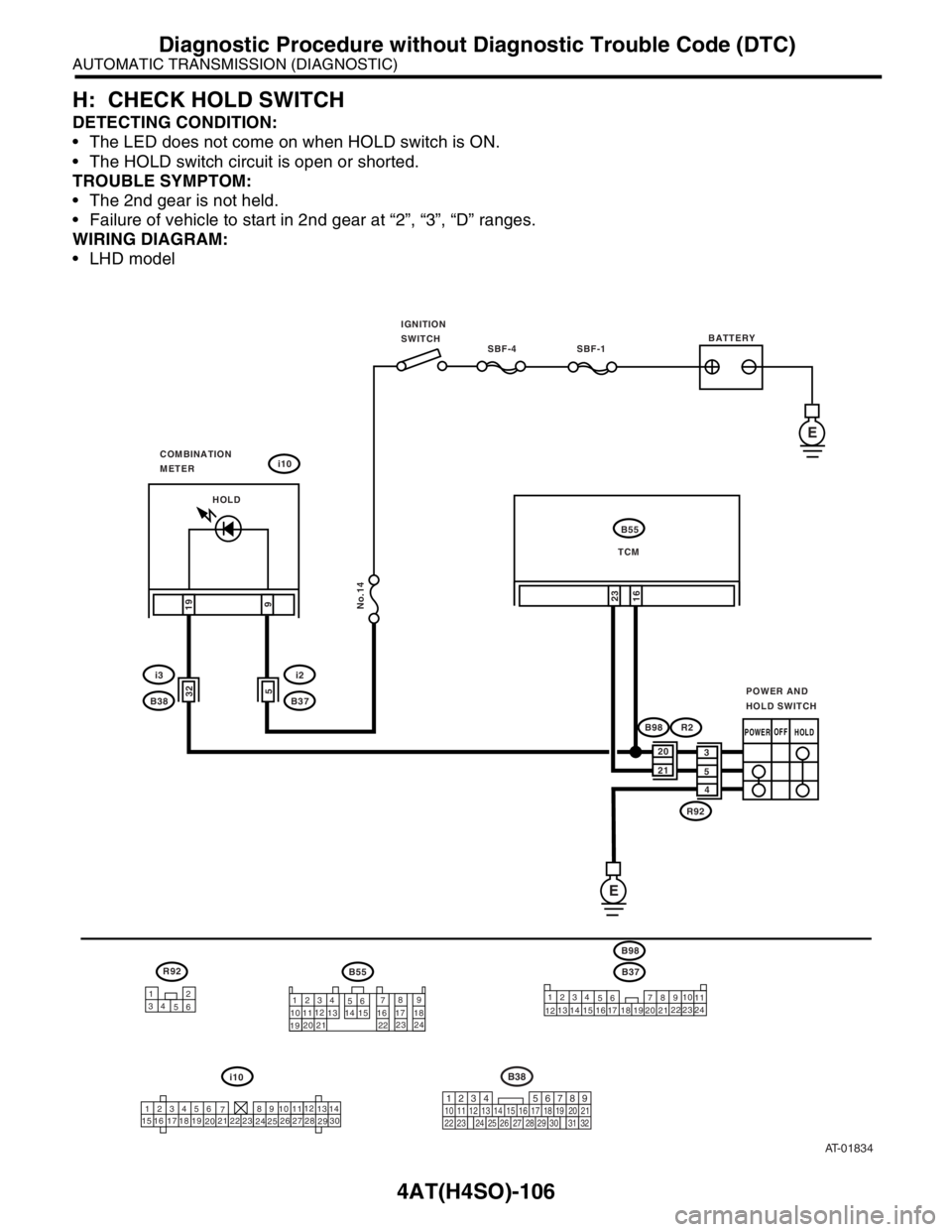
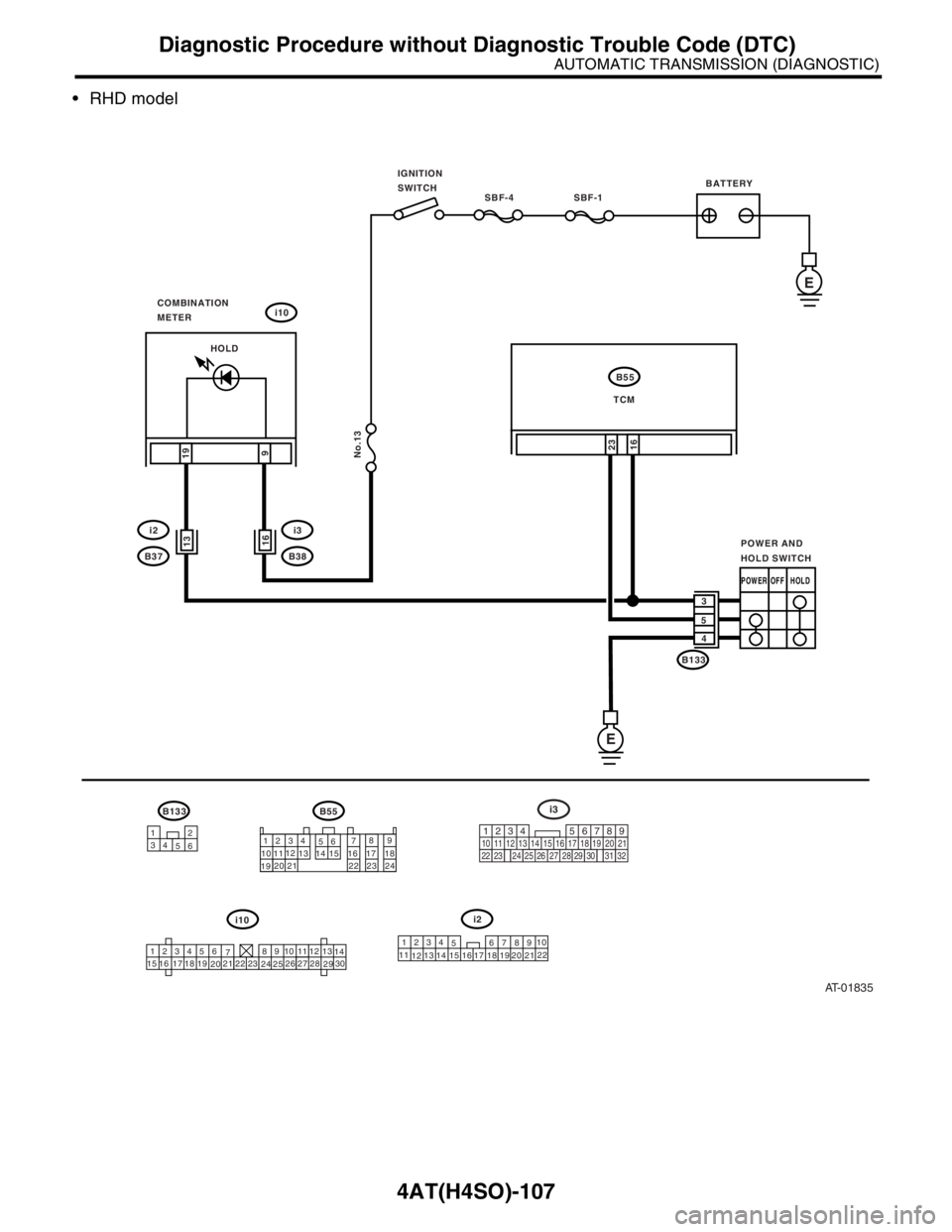
H: CHECK HOLD SWITCH
DETECTING CONDITION:
The LED does not come on when HOLD switch is ON.
The HOLD switch circuit is open or shorted.
TROUBLE SYMPTOM:
The 2nd gear is not held.
Failure of vehicle to start in 2nd gear at “2”, “3”, “D” ranges.
WIRING DIAGRAM:
LHD model
AT-01834
SBF-4 SBF-1
No.14
IGNITION
SWITCH
i10
i2
B37BATTERY
B55
TCM
19
923
COMBINATION
METER
E
E
B55
1234
56789
10 1112
13 14 15 16 17 18
192021
2223 24
123456
78 9 10 1112
13
14
15 16 17
1819
2021
2223
24
2526
2728
2930
i10
B37
1234
578
910112324
121314
156
16 17 1819
20 2122
16
POWER AND
HOLD SWITCH
3
5
4 HOLD
POWEROFF
532
i3
B38
R92
12
34
56
219
32
B38
1234
5610 11 12 13 14 15716
23 3019 20
22 26 27 28 29817
24 3118
25
20
21
R92
B98R2
B98
HOLD
Page 2566 of 2870
4AT(H4SO)-107
AUTOMATIC TRANSMISSION (DIAGNOSTIC)
Diagnostic Procedure without Diagnostic Trouble Code (DTC)
RHD model
AT-01835
SBF-4 SBF-1
No.13
IGNITION
SWITCH
i10
i3
B38
B55
TCM
B133
19
9
16
23
COMBINATION
METER
E
B55
1234
56789
10 1112
13 14 15 16 17 18
192021
2223 24
123456
78 9 10 1112
13
14
15 16 17
1819
2021
2223
24
2526
2728
2930
i10
16
POWEROFF
POWER AND
HOLD SWITCH
3
5
4
E
BATTERY
i2
1234
5678
910
11
121314
1516 17 1819
20 2122
B133
12
34
56219
32
i3
1234
5610 11 12 13 14 15716
23 3019 20
22 26 27 28 29817
24 3118
25
13i2
B37
HOLD
HOLD
Page 2567 of 2870

4AT(H4SO)-108
AUTOMATIC TRANSMISSION (DIAGNOSTIC)
Diagnostic Procedure without Diagnostic Trouble Code (DTC)
Step Check Yes No
1 CHECK HOLD SWITCH OPERATION.When the HOLD switch is
turned to OFF, does LED light
up?Go to step 5.Go to step 2.
2 CHECK HOLD SWITCH OPERATION.When the HOLD switch is turned
to ON, does LED light up?Refer to “Symptom
Related Diagnos-
tic”.
4AT(H4SO)-110,
Symptom Related
Diagnostic.>Go to step 3.
3 CHECK HOLD INDICATOR LIGHT.
1) Turn the ignition switch to OFF.
2) Disconnect the TCM connector.
3) Turn the ignition switch to ON.
4) Short the combination meter connector to
chassis ground.
CAUTION:
Be sure to short through fuse.
Connector & terminal
(i10) No. 19 — Chassis ground:Does the HOLD indicator light
illuminate?Go to step 4.Inspect the combi-
nation meter.
Combination
Meter Assembly.>
4 CHECK HOLD SWITCH GROUND LINE.
1) Turn the ignition switch to OFF.
2) Disconnect the connector from HOLD
switch.
3) Measure the resistance of harness connec-
tor between HOLD switch and chassis ground.
Connector & terminal
LHD model
(R92) No. 4 — Chassis ground:
RHD model
(B133) No. 4 — Chassis ground:Is the resistance less than 1
Ω?Go to step 5.Repair the open
circuit in harness
between HOLD
switch and chas-
sis ground.
5 CHECK HOLD SWITCH.
1) Turn the HOLD switch to ON.
2) Measure the resistance between terminals
of HOLD switch.
Te r m i n a l s
No. 4 — No. 3:Is the resistance less than 1
Ω?Go to step 6.Replace the HOLD
switch.
6 CHECK HOLD SWITCH.
1) Turn the HOLD switch to OFF.
2) Measure the resistance between terminals
of HOLD switch.
Te r m i n a l s
No. 4 — No. 3:Is the resistance more than 1
MΩ?Go to step 7.Replace the HOLD
switch.
7 CHECK HARNESS CONNECTOR BETWEEN
TCM AND HOLD SWITCH.
1) Disconnect the connector TCM and combi-
nation meter.
2) Measure the resistance of harness connec-
tor between TCM and HOLD switch.
Connector & terminal
LHD model
(B55) No. 16 — (R92) No. 2:
RHD model
(B55) No. 16 — (B133) No. 2:Is the resistance less than 1
Ω?Go to step 8.Repair the open
circuit in harness
between TCM and
HOLD switch con-
nector and poor
contact in cou-
pling connector.
8 CHECK HARNESS CONNECTOR BETWEEN
TCM AND COMBINATION METER.
Measure the resistance of harness connector
TCM and combination meter.
Connector & terminal
(B55) No. 16 — (i10) No. 19:Is the resistance less than 1
Ω?Go to step 9.Repair the open
circuit in harness
between TCM and
combination
meter, and poor
contact in cou-
pling connector.
Page 2580 of 2870

4AT(H4DOTC)-4
AUTOMATIC TRANSMISSION (DIAGNOSTIC)
Check List for Interview
2. Check List for Interview
A: CHECK
Check the following items when problem has occurred.
NOTE:
Use copies of this page for interviewing customers.
Customer’s name
Date of purchase
Date of repair
Trans. model TRANSMISSION VIN
Odometer readingkm/h or miles
Frequency❏ Continuous ❏ Intermittent ( times a day)
Weather❏ Fine ❏ Cloudy ❏ Rainy ❏ Snowy
❏ Va r i o u s / O t h e r s
()
Place❏ High ❏ Suburbs ❏ Inner city ❏ Uphill ❏ Rough road
❏ Others
()
Outdoor temperature❏ Hot ❏ War m ❏ Cool ❏ Cold
Vehicle speedkm/h (MPH)
AT warning light (POWER indicator
light)❏ Continuously blinking❏ Not blinking
Select lever position❏ P ❏ R ❏ N ❏ D ❏ 3 ❏ 2 ❏ 1
Driving condition❏ Not affected
❏ At racing
❏ While decelerating❏ At starting
❏ While accelerating
❏ While turning (❏ RH / ❏ LH)❏ While idling
❏ While cruising
POWER switch❏ ON / ❏ OFF
HOLD switch❏ ON / ❏ OFF
Symptoms❏ No up-shift
❏ No down-shift
❏ No kick down
❏ Vehicle does not move (❏ Any position ❏ Particular position)
❏ Lock-up malfunction
❏ Noise or vibration
❏ Shift shock or slip
❏ Select lever does not move
❏ Others
()
Page 2581 of 2870
4AT(H4DOTC)-5
AUTOMATIC TRANSMISSION (DIAGNOSTIC)
General Description
3. General Description
A: CAUTION
Supplemental Restraint System “Airbag”
The airbag system wiring harness is routed near
the TCM.
CAUTION:
All airbag system wiring harness and con-
nectors are colored yellow. Do not use an elec-
trical test equipment on these circuit.
Be careful not to damage the airbag system
wiring harness when performing diagnostics and
servicing the TCM.
Measurement
When measuring the voltage and resistance of
ECM, TCM or each sensor, use a tapered pin with
diameter of less than 0.64 mm (0.025 in) in order to
avoid poor contact. Do not insert the pin more than
0.65 mm (0.026 in).
B: INSPECTION
1. BATTERY
Measure the battery voltage and specific gravity of
electrolyte.
Standard voltage: 12 V or more
Specific gravity: Above 1.260
2. TRANSMISSION GROUND
Make sure that the ground terminal bolt is tightened
securely.
Chassis side
Tightening torque:
13 N
⋅m (1.3 kgf-m, 9.4 ft-lb)
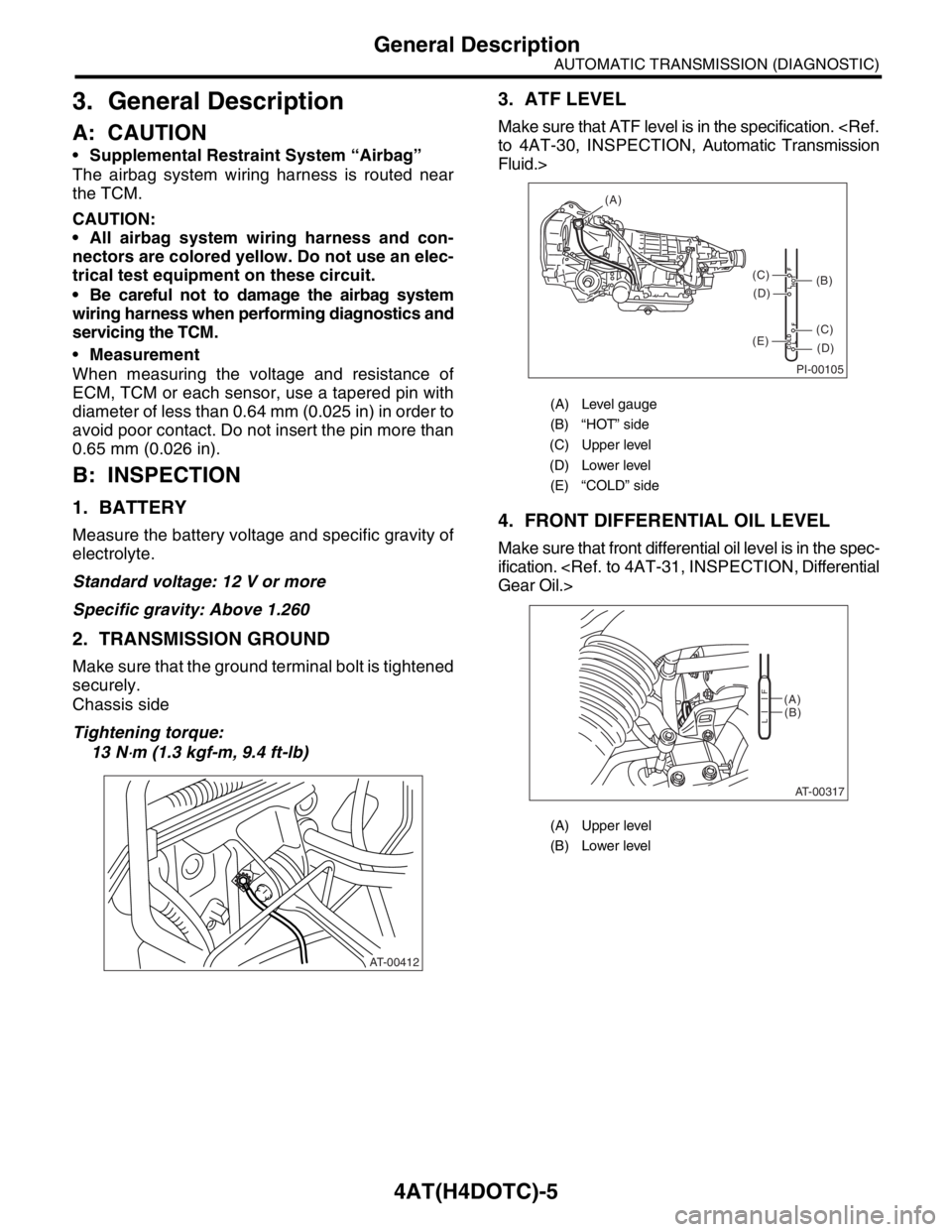
3. ATF LEVEL
Make sure that ATF level is in the specification.
to 4AT-30, INSPECTION, Automatic Transmission
Fluid.>
4. FRONT DIFFERENTIAL OIL LEVEL
Make sure that front differential oil level is in the spec-
ification.
Gear Oil.>
AT-00412
(A) Level gauge
(B) “HOT” side
(C) Upper level
(D) Lower level
(E) “COLD” side
(A) Upper level
(B) Lower level
PI-00105
COLD
LFHOT LF
(A)
(C)
(D)
(C)
(D)
(E)
(B)
AT-00317
(A)
(B)
LF
Page 2582 of 2870
4AT(H4DOTC)-6
AUTOMATIC TRANSMISSION (DIAGNOSTIC)
General Description
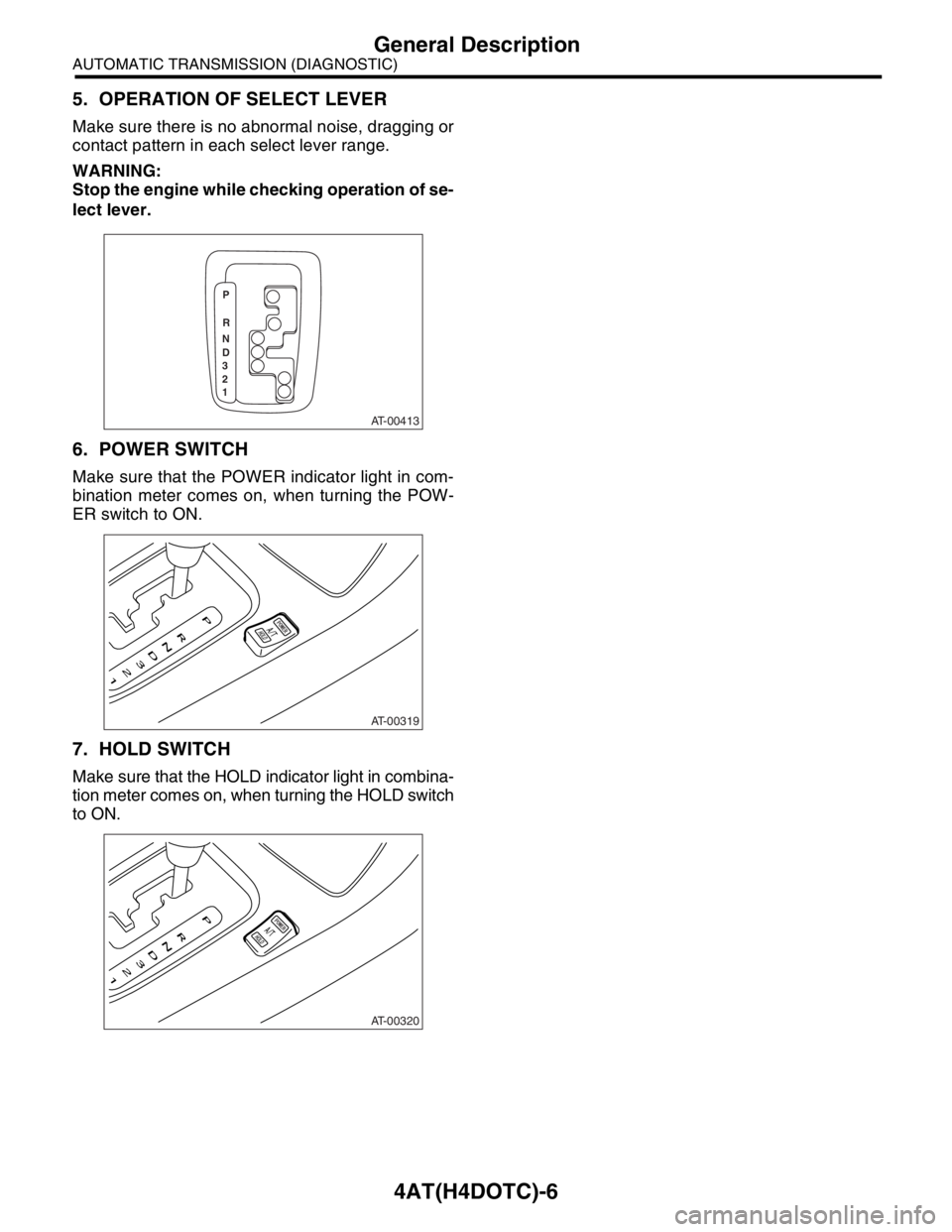
5. OPERATION OF SELECT LEVER
Make sure there is no abnormal noise, dragging or
contact pattern in each select lever range.
WARNING:
Stop the engine while checking operation of se-
lect lever.
6. POWER SWITCH
Make sure that the POWER indicator light in com-
bination meter comes on, when turning the POW-
ER switch to ON.
7. HOLD SWITCH
Make sure that the HOLD indicator light in combina-
tion meter comes on, when turning the HOLD switch
to ON.
AT-00413
P
R
N
D
3
2
1
AT-00319
AT-00320
Page 2590 of 2870

4AT(H4DOTC)-14
AUTOMATIC TRANSMISSION (DIAGNOSTIC)
Transmission Control Module (TCM) I/O Signal
POWER switch B54 8POWER switch ON Less than 1
—
POWER switch OFF More than 8
POWER indicator light B56 25Light ON Less than 1
—
Light OFF More than 9
ABS signal B54 12ABS switch ON Less than 1
—
ABS switch OFF 6.5 — 15
Front vehicle speed sensor
groundB55 15 — 0 Less than 1
Rear vehicle speed sensor
groundB55 23 — 0 Less than 1
Combination meter B54 6 Ignition switch ON Pulse signal —
System ground lineB55 17
— 0 Less than 1 B56 2
B56 3
B55 8
Sensor ground line 3 B55 9 — 0 Less than 1
Sensor ground line 4 B56 19 — 0 Less than 1
Range lock signal B56 18“D” range 0 km/h (0 MPH) More than 10.5
20 — 40
“D” range 20 km/h
(12 MPH)Less than 1
Data link signal (Subaru
Select Monitor)B56 12 — — —
CAN communication signal
(+)B55 3 Ignition switch ON Pulse signal —
CAN communication signal
(−)B55 12 Ignition switch ON Pulse signal —Check with ignition switch ON.
ItemConnector
No.Terminal No. Measuring conditions Voltage (V)Resistance
to chassis
ground (Ω)
Page 2593 of 2870
![SUBARU FORESTER 2004 Service Repair Manual 4AT(H4DOTC)-17
AUTOMATIC TRANSMISSION (DIAGNOSTIC)
Subaru Select Monitor
3. CLEAR MEMORY MODE
1) On the «Main Menu» display screen, select the
{2. Each System Check} and press the [YES] key.
2) On t](/manual-img/17/57426/w960_57426-2592.png "SUBARU FORESTER 2004 Service Repair Manual 4AT(H4DOTC)-17
AUTOMATIC TRANSMISSION (DIAGNOSTIC)
Subaru Select Monitor
3. CLEAR MEMORY MODE
1) On the «Main Menu» display screen, select the
{2. Each System Check} and press the [YES] key.
2) On t")
4AT(H4DOTC)-17
AUTOMATIC TRANSMISSION (DIAGNOSTIC)
Subaru Select Monitor
3. CLEAR MEMORY MODE
1) On the «Main Menu» display screen, select the
{2. Each System Check} and press the [YES] key.
2) On the «System Selection Menu» display screen,
select the {Transmission Control System} and press
the [YES] key.
3) Press the [YES] key after the information of
transmission type is displayed.
4) On the «Transmission Diagnosis» display screen,
select the {Clear Memory} and press the [YES] key.
5) When the “Done” is shown on display screen,
turn the Subaru Select Monitor and ignition switch
to OFF.
NOTE:
For details concerning operation procedure, refer
to the SUBARU SELECT MONITOR OPERATION
MANUAL.
When {Clear Memory 2} is selected and executed,
DTC and learned control memory is cleared. If Clear
Memory 2 is performed, execute the learning con-
trol.
OF LEARNING CONTROL, OPERATION, Subaru
Select Monitor.>
4. FACILITATION OF LEARNING CON-
TROL
1) Shift the select lever to “P” range, and apply
parking brake.
2) Lift-up the vehicle.
3) Connect the Subaru Select Monitor to data link
connector, and then turn the ignition switch to ON.
4) Perform the {Clear Memory 2} using Subaru Select
Monitor.
ORY MODE, OPERATION, Subaru Select Monitor.>
5) Using Subaru Select Monitor, check that the DTC
is not output.
AGNOSTIC TROUBLE CODE, OPERATION, Sub-
aru Select Monitor.>
6) Warm-up the engine until the ATF temperature
which is displayed on the Subaru Select Monitor is
within 60 — 90°C (140 — 194°F).
4AT(H4DOTC)-15, READ CURRENT DATA, OP-
ERATION, Subaru Select Monitor.>
7) Shift the select lever to “R” range.
8) Turn all switches including headlight, air condi-
tioner, seat heater, rear defogger and etc. to OFF.
9) Turn the ignition switch to OFF.
10) Depress the brake pedal fully until the facilitation
of learning control is completed when the “Communi-
cation Failed!” is displayed on Subaru Select Monitor.
11) Turn the ignition switch to ON.
12) Check that the Subaru Select Monitor is re-
turned to normal operation.
13) Shift the select lever to “P” range, and then wait
for more than 3 seconds.14) Shift the select lever to “R” range, and then wait
for more than 3 seconds.
15) Shift the select lever to “N” range, and then wait
for more than 3 seconds.
16) Shift the select lever to “D” range, and then wait
for more than 3 seconds.
17) Shift the select lever to “N” range, and then wait
for more than 3 seconds.
18) Slightly depress the accelerator pedal fully.
19) Slightly release the accelerator pedal fully.
20) Start the engine, and idle it.
21) Shift the select lever to “D” range.
22) Start the facilitation of learning control. At this
time, the POWER indicator light in combination meter
blinks at 2 Hz. When the POWER indicator light does
not blink, turn the ignition switch to OFF and repeat
the procedures from step 4). When the POWER indi-
cator light which blinking at 2 Hz changes to blink at
0.5 Hz, facilitation of learning control is completed.
NOTE:
When blinking of POWER indicator light changes
from 2 Hz to 4 Hz during facilitation of learning con-
trol, repeat the procedure from step 4).
23) Shift the select lever to “N” range, and then turn
the ignition switch to OFF.
24) Shift the select lever to the “P” range, and then
complete the facilitation of learning control.