2004 SUBARU FORESTER fuel type
[x] Cancel search: fuel typePage 1427 of 2870
FU(H4DOTC)-72
FUEL INJECTION (FUEL SYSTEM)
Fuel Delivery, Return and Evaporation Lines
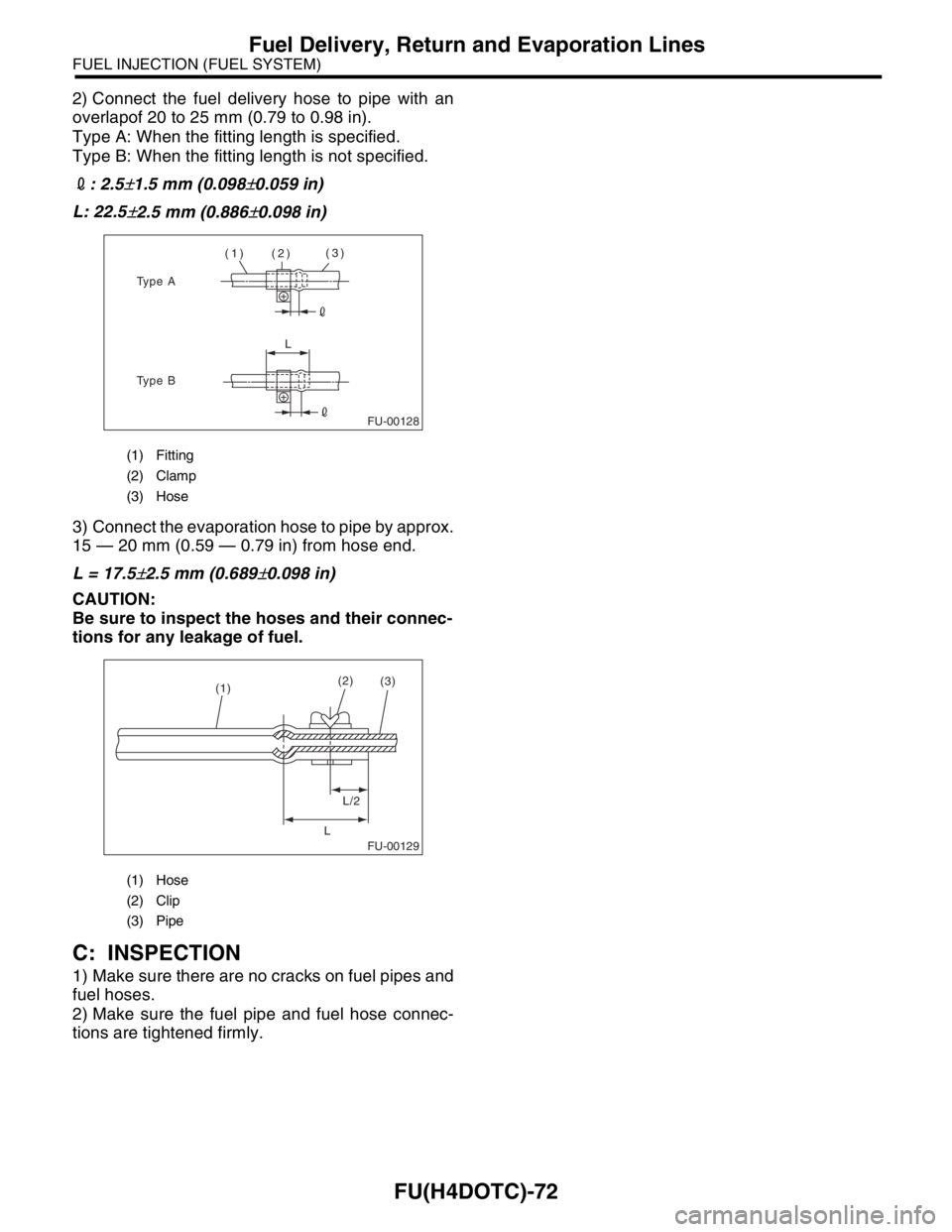
2) Connect the fuel delivery hose to pipe with an
overlapof 20 to 25 mm (0.79 to 0.98 in).
Type A: When the fitting length is specified.
Type B: When the fitting length is not specified.
2: 2.5
±1.5 mm (0.098±0.059 in)
L: 22.5
±2.5 mm (0.886±0.098 in)
3) Connect the evaporation hose to pipe by approx.
15 — 20 mm (0.59 — 0.79 in) from hose end.
L = 17.5
±2.5 mm (0.689±0.098 in)
CAUTION:
Be sure to inspect the hoses and their connec-
tions for any leakage of fuel.
C: INSPECTION
1) Make sure there are no cracks on fuel pipes and
fuel hoses.
2) Make sure the fuel pipe and fuel hose connec-
tions are tightened firmly.
(1) Fitting
(2) Clamp
(3) Hose
(1) Hose
(2) Clip
(3) Pipe
FU-00128
(1) (2)(3)
L
Type A
Type B
FU-00129
(1)(2)
L/2
L(3)
Page 1487 of 2870
ME(H4DOTC)-31
MECHANICAL
Compression
2. Compression
A: INSPECTION
CAUTION:
After warming-up, engine becomes very hot. Be
careful not to burn yourself during measure-
ment.
1) After warming-up the engine, turn the ignition
switch to OFF.
2) Make sure that the battery is fully charged.
3) Release the fuel pressure.
SURE, OPERATION, Fuel.>
4) Remove all the spark plugs.
5) Fully open the throttle valve.
6) Check the starter motor for satisfactory perfor-
mance and operation.
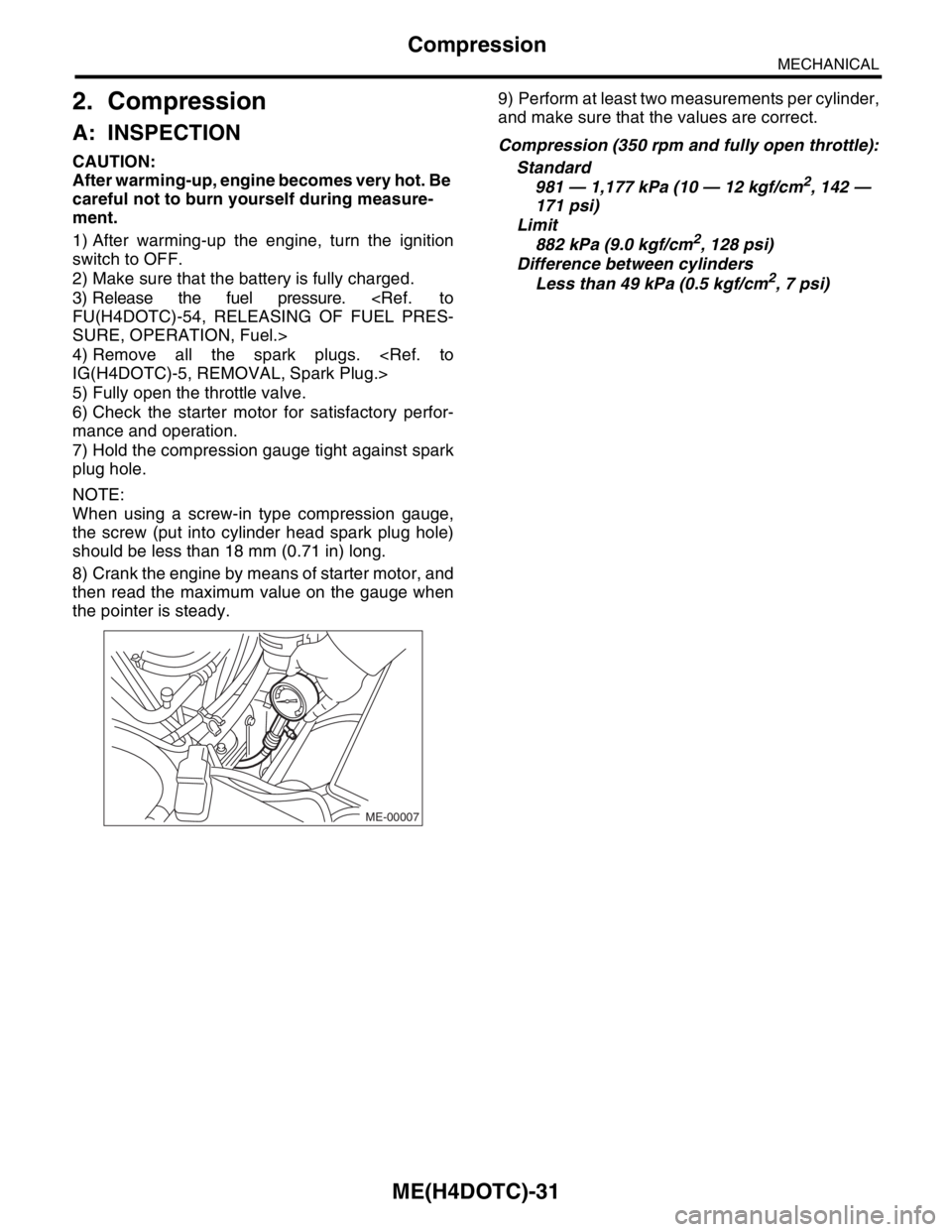
7) Hold the compression gauge tight against spark
plug hole.
NOTE:
When using a screw-in type compression gauge,
the screw (put into cylinder head spark plug hole)
should be less than 18 mm (0.71 in) long.
8) Crank the engine by means of starter motor, and
then read the maximum value on the gauge when
the pointer is steady.9) Perform at least two measurements per cylinder,
and make sure that the values are correct.
Compression (350 rpm and fully open throttle):
Standard
981 — 1,177 kPa (10 — 12 kgf/cm
2, 142 —
171 psi)
Limit
882 kPa (9.0 kgf/cm
2, 128 psi)
Difference between cylinders
Less than 49 kPa (0.5 kgf/cm
2, 7 psi)
ME-00007
Page 1583 of 2870

ME(H4DOTC)-123
MECHANICAL
Engine Noise
26.Engine Noise
A: INSPECTION
NOTE*:
When disconnecting the fuel injector connector, Malfunction Indicator Light illuminates and DTC is stored in
ECM memory.
Therefore, carry out the CLEAR MEMORY MODE
necting the fuel injector connector.
Type of sound Condition Possible cause
Regular clicking soundSound increases as engine
speed increases. Valve mechanism is defective.
Incorrect valve clearance
Worn valve rocker
Worn camshaft
Broken valve spring
Heavy and dull clankOil pressure is low. Worn crankshaft main bearing
Worn connecting rod bearing (big end)
Oil pressure is normal. Loose flywheel mounting bolts
Damaged engine mounting
High-pitched clank (Spark
knock)Sound is noticeable when
accelerating with an overload. Ignition timing advanced
Accumulation of carbon inside combustion chamber
Wrong heat range of spark plug
Improper octane number of gasoline
Clank when engine speed is
medium (1,000 to 2,000 rpm).Sound is reduced when fuel
injector connector of noisy cyl-
inder is disconnected.
(NOTE*) Worn crankshaft main bearing
Worn bearing at crankshaft end of connecting rod
Knocking sound when engine
is operating under idling speed
and engine is warmSound is reduced when fuel
injector connector of noisy cyl-
inder is disconnected.
(NOTE*) Worn cylinder liner and piston ring
Broken or stuck piston ring
Worn piston pin and hole at piston end of connecting rod
Sound is not reduced if each
fuel injector connector is dis-
connected in turn. (NOTE*) Unusually worn valve lifter
Worn cam gear
Worn camshaft journal bore in crankcase
Squeaky sound — Insufficient generator lubrication
Rubbing sound — Defective generator brush and rotor contact
Gear scream when starting
engine— Defective ignition starter switch
Worn gear and starter pinion
Sound like polishing glass with
a dry cloth— Loose drive belt
Defective water pump shaft
Hissing sound — Loss of compression
Air leakage in air intake system, hoses, connections or mani-
folds
Timing belt noise — Loose timing belt
Belt contacting case/adjacent part
Valve tappet noise — Incorrect valve clearance
Page 1637 of 2870
EN(H4DOTC)-7
ENGINE (DIAGNOSTIC)
General Description
12) Observe the following cautions when installing
a radio in MFI equipped models.
CAUTION:
The antenna must be kept as far apart as pos-
sible from the control unit. (The ECM is located
under the steering column, inside of the instru-
ment panel lower trim panel.)
The antenna feeder must be placed as far
apart as possible from the ECM and MFI har-
ness.
Carefully adjust the antenna for correct
matching.
When mounting a large power type radio, pay
special attention to the three items above men-
tioned.
Incorrect installation of the radio may affect
the operation of the ECM.
13) Before disconnecting the fuel hose, disconnect
the fuel pump connector and crank the engine for
more than five seconds to release pressure in the
fuel system.If engine starts during this operation,
run it until it stops.
14) Problems in the electronic-controlled automatic
transmission may be caused by failure of the en-
gine, the electronic control system, the transmis-
sion proper, or by a combination of these.These
three causes (engine, electronic control system,
transmission) must be distinguished clearly when
performing diagnostics.
15) Diagnostics should be conducted by rotating
with simple, easy operations and proceeding to
complicated, difficult operations.The most impor-
tant thing in diagnostics is to understand the cus-
tomer’s complaint, and distinguish between the
three causes.
16) On the model with ABS, when performing driv-
ing test in jacked-up or lifted-up position, some-
times the warning light may be lit, but this is not a
malfunction of the system.The reason for this is the
speed difference between the front and rear
wheels.After diagnosis of engine control system,
perform the ABS memory clearance procedure of
self-diagnosis function.
B: INSPECTION
Before performing diagnostics, check the following
items which might affect engine problems:
1. BATTERY
1) Measure battery voltage and specific gravity of
electrolyte.
Standard voltage: 12 V
Specific gravity: Above 1.2602) Check the condition of the main and other fuses,
and harnesses and connectors.Also check for
proper grounding.
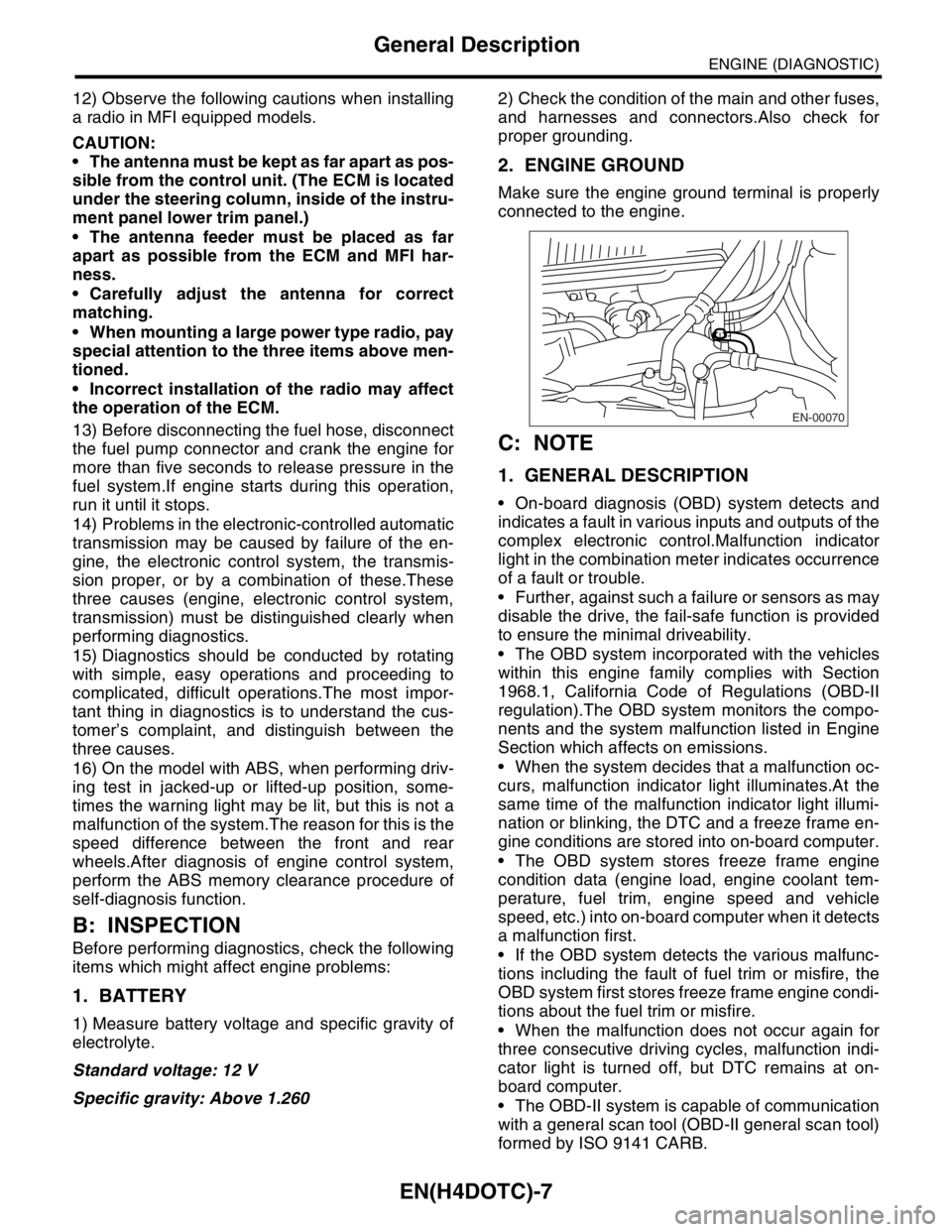
2. ENGINE GROUND
Make sure the engine ground terminal is properly
connected to the engine.
C: NOTE
1. GENERAL DESCRIPTION
On-board diagnosis (OBD) system detects and
indicates a fault in various inputs and outputs of the
complex electronic control.Malfunction indicator
light in the combination meter indicates occurrence
of a fault or trouble.
Further, against such a failure or sensors as may
disable the drive, the fail-safe function is provided
to ensure the minimal driveability.
The OBD system incorporated with the vehicles
within this engine family complies with Section
1968.1, California Code of Regulations (OBD-II
regulation).The OBD system monitors the compo-
nents and the system malfunction listed in Engine
Section which affects on emissions.
When the system decides that a malfunction oc-
curs, malfunction indicator light illuminates.At the
same time of the malfunction indicator light illumi-
nation or blinking, the DTC and a freeze frame en-
gine conditions are stored into on-board computer.
The OBD system stores freeze frame engine
condition data (engine load, engine coolant tem-
perature, fuel trim, engine speed and vehicle
speed, etc.) into on-board computer when it detects
a malfunction first.
If the OBD system detects the various malfunc-
tions including the fault of fuel trim or misfire, the
OBD system first stores freeze frame engine condi-
tions about the fuel trim or misfire.
When the malfunction does not occur again for
three consecutive driving cycles, malfunction indi-
cator light is turned off, but DTC remains at on-
board computer.
The OBD-II system is capable of communication
with a general scan tool (OBD-II general scan tool)
formed by ISO 9141 CARB.
EN-00070
Page 1664 of 2870
![SUBARU FORESTER 2004 Service Repair Manual EN(H4DOTC)-34
ENGINE (DIAGNOSTIC)
Subaru Select Monitor
4. READ CURRENT DATA FOR ENGINE. (NORMAL MODE)
1) On the «Main Menu» display screen, select the {Each System Check} and press the [YES] key.
2](/manual-img/17/57426/w960_57426-1663.png "SUBARU FORESTER 2004 Service Repair Manual EN(H4DOTC)-34
ENGINE (DIAGNOSTIC)
Subaru Select Monitor
4. READ CURRENT DATA FOR ENGINE. (NORMAL MODE)
1) On the «Main Menu» display screen, select the {Each System Check} and press the [YES] key.
2")
EN(H4DOTC)-34
ENGINE (DIAGNOSTIC)
Subaru Select Monitor
4. READ CURRENT DATA FOR ENGINE. (NORMAL MODE)
1) On the «Main Menu» display screen, select the {Each System Check} and press the [YES] key.
2) On the «System Selection Menu» display screen, select the {Engine} and press the [YES] key.
3) Press the [YES] key after the information of engine type was displayed.
4) On the «Engine Diagnosis» screen, select the {Current Data Display/Save}, and then press the [YES] key.
5) On the «Data Display Menu» screen, select the {Data Display} and press the [YES] key.
6) Using the scroll key, move the display screen up or down until the desired data is shown.
A list of the support data is shown in the following table.
Remarks Display Unit of measure
Battery voltage Battery Voltage V
Vehicle speed signal Vehicle Speed km/h or MPH
Engine speed signal Engine Speed rpm
Engine coolant temperature signal Coolant Temp.°C or °F
Ignition timing signal Ignition Timing deg
Throttle position signal Throttle Opening Angle %
Throttle position signal Throttle Sensor Voltage V
Injection pulse width Fuel Injection #1 Pulse ms
Idle air control signal ISC Valve Duty Ratio %
generated duty control signal ALT Duty %
Fuel pump duty control signal Fuel Pump Duty %
A/F sensor current A/F Sensor #1 Current mA
A/F sensor resistance A/F Sensor #1 ResistanceΩ
Front oxygen (A/F) sensor output signal A/F Sensor #1 —
Rear oxygen sensor output signalRear O
2 Sensor
V
Short term fuel trim A/F Correction #1 %
Knock sensor correction Knocking Correction deg
Atmospheric pressure signal Atmosphere Pressure mmHg, kPa, inHg or psi
Intake manifold relative pressure signal Mani. Relative Pressure mmHg, kPa, inHg or psi
Intake manifold absolute pressure signal Mani. Absolute Pressure mmHg, kPa, inHg or psi
A/F correction (short term fuel trim) by rear oxygen sensor A/F Correction #3 %
Long term whole fuel trim A/F Learning #1 %
Canister purge control solenoid valve duty ratio CPC Valve Duty Ratio %
Primary supercharged pressure control signal Primary Control %
Tumble generated valve position sensor signal (RH side) TGV Position Sensor R V
Tumble generated valve position sensor signal (LH side) TGV Position Sensor L V
Tumble generated valve drive signal TGV Drive OPEN or CLOSE
Fuel level signal Fuel Level Voltage V
Intake air temperature signal Intake Air Temp.°C or °F
Mass air flow sensor signal Mass Air Flow g/s
Mass air flow sensor signal Air Flow Sensor Voltage V
Valve Timing Signal VVT Adv. Ang. amount R deg
Valve Timing Signal VVT Adv. Ang. amount L deg
Oil flow control solenoid valve signal OCV Duty R %
Oil flow control solenoid valve signal OCV Duty L %
Oil flow control solenoid valve current OCV current R mA
Oil flow control solenoid valve current OCV Current L mA
AT/MT identification signal AT Vehicle ID Signal AT or MT
Test Mode Signal Test Mode Signal ON or OFF
Load switch signal Electric Load Signal ON or OFF
Ignition switch signal Ignition Switch ON or OFF
Neutral position switch signal Neutral Position Switch ON or OFF
Air conditioning switch signal A/C Switch ON or OFF
Page 1665 of 2870

EN(H4DOTC)-35
ENGINE (DIAGNOSTIC)
Subaru Select Monitor
NOTE:
For detailed operation procedure, refer to the “SUBARU SELECT MONITOR OPERATION MANUAL”.
5. READ CURRENT DATA FOR ENGINE (OBD MODE)
1) On the «Main Menu» display screen, select the {Each System Check} and press the [YES] key.
2) On the «System Selection Menu» display screen, select the {Engine} and press the [YES] key.
3) Press the [YES] key after the information of engine type was displayed.
4) On the «Engine Diagnosis» display screen, select the {OBD System} and press the [YES] key.
5) On the «OBD Menu» screen, select the {Current Data Display/Save}, and then press the [YES] key.
6) On the «Data Display Menu» screen, select the {Data Display} and press the [YES] key.
7) Using the scroll key, move the display screen up or down until the desired data is shown.
A list of the support data is shown in the following table.
Air conditioning signal A/C Compressor Signal ON or OFF
Radiator main fan relay signal Radiator Fan Relay #1 ON or OFF
Knocking signal Knocking Signal ON or OFF
Radiator sub fan relay signal Radiator Fan Relay #2 ON or OFF
Power steering switch signal P/S Switch ON or OFF
Engine torque control permission signal Torque Permission Signal ON or OFF
Rear oxygen sensor rich signal Rear Oxygen Rich Signal ON or OFF
Starter switch signal Starter Switch ON or OFF
Idle switch signal Idle Switch ON or OFF
Crankshaft position sensor signal Crankshaft Position Sig. ON or OFF
Camshaft position sensor signal Camshaft Position Sig. ON or OFF
Rear defogger switch signal Rear Defogger SW ON or OFF
Blower fan switch signal Blower Fan SW ON or OFF
Small light switch signal Light Switch ON or OFF
Tumble generated valve output signal TGV Output ON or OFF
Exhaust temperature signal Exhaust Gas Temperature°C
Estimated cumulative driving distance Odd Meter km
Roughness Monitor for #1 cylinder Roughness Monitor #1 —
Roughness Monitor for #2 cylinder Roughness Monitor #2 —
Roughness Monitor for #3 cylinder Roughness Monitor #3 —
Roughness Monitor for #4 cylinder Roughness Monitor #4 —
Wiper switch signal Wiper Switch ON or OFF
A/C middle pressure switch signal A/C Mid pressure switch ON or OFF
AT retard angle demand signal Retard Signal from AT ON or OFF
AT fuel cut demand signal Fuel Cut Signal from AT ON or OFF
Description Display Unit of measure
Number of diagnosis code Number of Diag. Code —
Condition of malfunction indicator light MI (MIL) ON or OFF
Monitoring test of misfire Misfire monitoring Complete or incomplete
Monitoring test of fuel system Fuel system monitoring Complete or incomplete
Monitoring test of comprehensive component Component monitoring Complete or incomplete
Test of catalyst Catalyst Diagnosis Complete or incomplete
Test of heating-type catalyst Heated catalyst No support
Test of evaporative emission purge control system Evaporative purge system No support
Test of secondary air system Secondary air system No support
Test of air conditioning system refrigerant A/C system refrigerant No support
Test of oxygen sensor Oxygen sensor Complete or incomplete
Test of oxygen sensor heater Oxygen Heater Diagnosis Complete or incomplete
Test of EGR system EGR system No supportRemarks Display Unit of measure
Page 1666 of 2870

EN(H4DOTC)-36
ENGINE (DIAGNOSTIC)
Subaru Select Monitor
NOTE:
For detailed operation procedure, refer to the “SUBARU SELECT MONITOR OPERATION MANUAL”.
6. READ FREEZE FRAME DATA FOR ENGINE. (OBD MODE)
1) On the «Main Menu» display screen, select the {Each System Check} and press the [YES] key.
2) On the «System Selection Menu» display screen, select the {Engine} and press the [YES] key.
3) Press the [YES] key after the information of engine type was displayed.
4) On the «Engine Diagnosis» display screen, select the {OBD System} and press the [YES] key.
5) On the «OBD Menu» display screen, select the {Freeze Frame Data} and press the [YES] key.
A list of the support data is shown in the following table.
NOTE:
For detailed operation procedure, refer to the “SUBARU SELECT MONITOR OPERATION MANUAL”.
Air fuel ratio control system for bank 1 Fuel System for Bank 1 —
Engine load data Calculated load value %
Engine coolant temperature signal Coolant Temp.°C or °F
Short term fuel trim by front oxygen (A/F) sensor Short term fuel trim B1 %
Long term fuel trim by front oxygen (A/F) sensor Long term fuel trim B1 %
Intake manifold absolute pressure signal Mani. Absolute Pressure mmHg, kPa, inHg or psi
Engine speed signal Engine Speed rpm
Vehicle speed signal Vehicle Speed km/h or MPH
Ignition timing advance for #1 cylinder Ignition timing adv. #1°
Intake air temperature signal Intake Air Temp.°C or °F
Amount of intake air Mass Air Flow g/s
Throttle position signal Throttle Opening Angle %
Rear oxygen sensor output signal Oxygen Sensor #12 V
Air fuel ratio correction by rear oxygen sensor Short term fuel trim #12 %
On-board diagnostic system OBD System —
Rear oxygen sensor signal Oxygen Sensor #11 —
Rear oxygen sensor signal Oxygen Sensor #12 —
Malfunction indicator light illuminating process Lighted MI Lamp History —
A/F sensor output signal (voltage) A/F sensor #11 V
A/F lambda signal A/F sensor #11 —
A/F sensor lambda signal A/F sensor #11 —
A/F sensor signal (power supply) A/F sensor #11 mA
Description Display Unit of measure
Diagnostic code of freeze frame data Freeze frame data Diagnostic code
Air fuel ratio control system for bank 1 Fuel system for Bank 1 —
Air fuel ratio control system for bank 2 Fuel System for Bank 2 —
Engine load data Calculated Load Valve %
Engine coolant temperature signal Coolant Temp.°C or °F
Short term fuel trim by front oxygen (A/F) sensor Short term fuel trim B1 %
Long term fuel trim by front oxygen (A/F) sensor Long term fuel trim B1 %
Intake manifold absolute pressure signal Mani. Absolute Pressure mmHg, kPa, inHg or psi
Engine speed signal Engine Speed rpm
Vehicle speed signal Vehicle Speed km/h or MPH
Ignition timing advance for #1 cylinder Ignition timing adv. #1°
Intake air temperature signal Intake Air Temp.°C or °F
Amount of intake air Mass Air Flow g/s
Throttle position signal Throttle Opening Angle %Description Display Unit of measure
Page 1667 of 2870
![SUBARU FORESTER 2004 Service Repair Manual EN(H4DOTC)-37
ENGINE (DIAGNOSTIC)
Subaru Select Monitor
7. LED OPERATION MODE FOR ENGINE
1) On the «Main Menu» display screen, select the {Each System Check} and press the [YES] key.
2) On the «Sys](/manual-img/17/57426/w960_57426-1666.png "SUBARU FORESTER 2004 Service Repair Manual EN(H4DOTC)-37
ENGINE (DIAGNOSTIC)
Subaru Select Monitor
7. LED OPERATION MODE FOR ENGINE
1) On the «Main Menu» display screen, select the {Each System Check} and press the [YES] key.
2) On the «Sys")
EN(H4DOTC)-37
ENGINE (DIAGNOSTIC)
Subaru Select Monitor
7. LED OPERATION MODE FOR ENGINE
1) On the «Main Menu» display screen, select the {Each System Check} and press the [YES] key.
2) On the «System Selection Menu» display screen, select the {Engine} and press the [YES] key.
3) Press the [YES] key after the information of engine type was displayed.
4) On the «Engine Diagnosis» screen, select the {Current Data Display/Save}, and then press the [YES] key.
5) On the «Data Display» screen, select the {Data & LED Display} and press the [YES] key.
6) Using the scroll key, move the display screen up or down until the desired data is shown.
A list of the support data is shown in the following table.
NOTE:
For detailed operation procedure, refer to the “SUBARU SELECT MONITOR OPERATION MANUAL”.
Description Display Message LED “ON” requirements
Ignition switch signal Ignition Switch ON or OFF When ignition switch is ON.
Test mode connector signal Test Mode Signal ON or OFF When test mode connector is connected.
Neutral position switch signal Neutral Position Switch ON or OFF When neutral position signal is entered.
Air conditioning switch signal A/C Switch ON or OFF When air conditioning switch is ON.
Air conditioning relay signal A/C Compressor Signal ON or OFF When air conditioning relay is in function.
Radiator main fan relay signal Radiator Fan Relay #1 ON or OFF When radiator main fan relay is in function.
Knocking signal Knocking Signal ON or OFF When knocking signal is input.
Radiator sub fan relay signal Radiator Fan Relay #2 ON or OFF When radiator sub fan relay is in function.
Engine torque control permission
signalTorque Control Permission ON or OFFWhen engine torque control permission sig-
nal is entered.
Rear oxygen sensor rich signalRear O
2 Rich Signal
ON or OFFWhen rear oxygen sensor mixture ratio is
rich.
Starter switch signal Starter Switch ON or OFF When starter switch signal is entered.
Idle switch signal Idle Switch ON or OFF When idle switch signal is entered.
Crankshaft position sensor signal Crankshaft Position Signal ON or OFFWhen crankshaft position sensor signal is
input.
Camshaft position sensor signal Camshaft Position Signal ON or OFFWhen camshaft position sensor signal is
entered.
Power steering switch signal P/S Switch ON or OFF When power steering switch is entered.
Rear defogger switch signal Rear Defogger Switch ON or OFF When rear defogger switch is ON.
Blower fan switch signal Blower Fan Switch ON or OFF When blower fan switch is ON.
Light switch signal Light Switch ON or OFF When small light switch is ON.
Wiper switch signal Wiper Switch ON or OFF When wiper switch is ON.
A/C middle pressure switch signal A/C Mid Pressure Switch ON or OFF When A/C switch is ON.
AT retard angle demand signal Retard Signal from AT ON or OFF When AT retard angle demand signal exists.
AT fuel cut demand signal Fuel Cut Signal from AT ON or OFF When AT fuel cut demand signal exists.
AT/MT identification signal AT Vehicle ID Signal ON or OFF For AT model
Tumble generated valve actuator
signalTGV Output ON or OFF When TGV actuator signal is output.
Tumble generated valve drive sig-
nalTGV DriveOPEN or
CLOSEWhen TGV moves and valve opens.