Page 1056 of 2870
SP(H4SO)-3
SPEED CONTROL SYSTEM
General Description
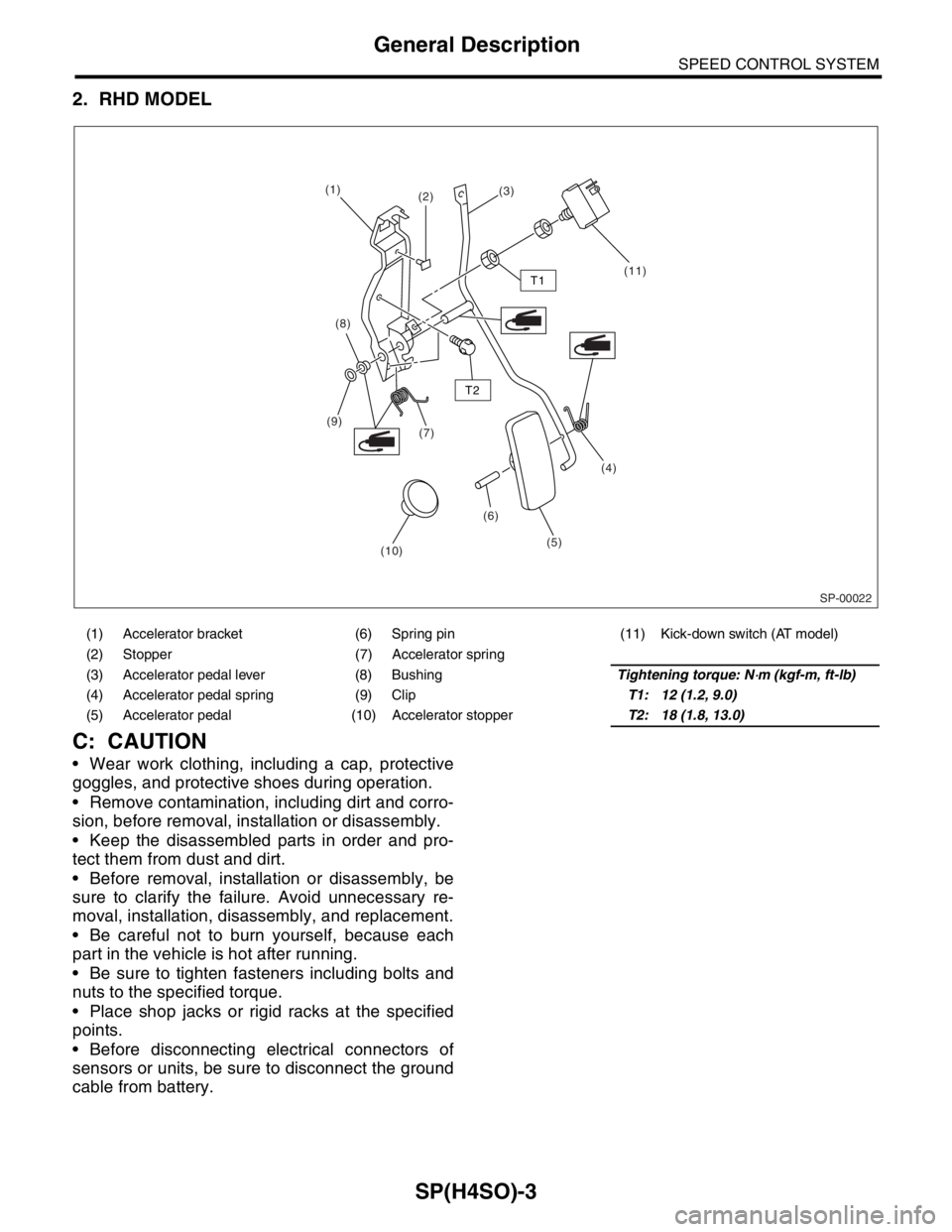
2. RHD MODEL
C: CAUTION
Wear work clothing, including a cap, protective
goggles, and protective shoes during operation.
Remove contamination, including dirt and corro-
sion, before removal, installation or disassembly.
Keep the disassembled parts in order and pro-
tect them from dust and dirt.
Before removal, installation or disassembly, be
sure to clarify the failure. Avoid unnecessary re-
moval, installation, disassembly, and replacement.
Be careful not to burn yourself, because each
part in the vehicle is hot after running.
Be sure to tighten fasteners including bolts and
nuts to the specified torque.
Place shop jacks or rigid racks at the specified
points.
Before disconnecting electrical connectors of
sensors or units, be sure to disconnect the ground
cable from battery.
(1) Accelerator bracket (6) Spring pin (11) Kick-down switch (AT model)
(2) Stopper (7) Accelerator spring
(3) Accelerator pedal lever (8) BushingTightening torque: N
⋅m (kgf-m, ft-lb)
(4) Accelerator pedal spring (9) ClipT1: 12 (1.2, 9.0)
(5) Accelerator pedal (10) Accelerator stopperT2: 18 (1.8, 13.0)
SP-00022
(1)
(2)(3)
(11)
(8)
(7) (9)
(6)(4)
(5)
(10)
T1
T2
Page 1058 of 2870
SP(H4SO)-5
SPEED CONTROL SYSTEM
Accelerator Pedal
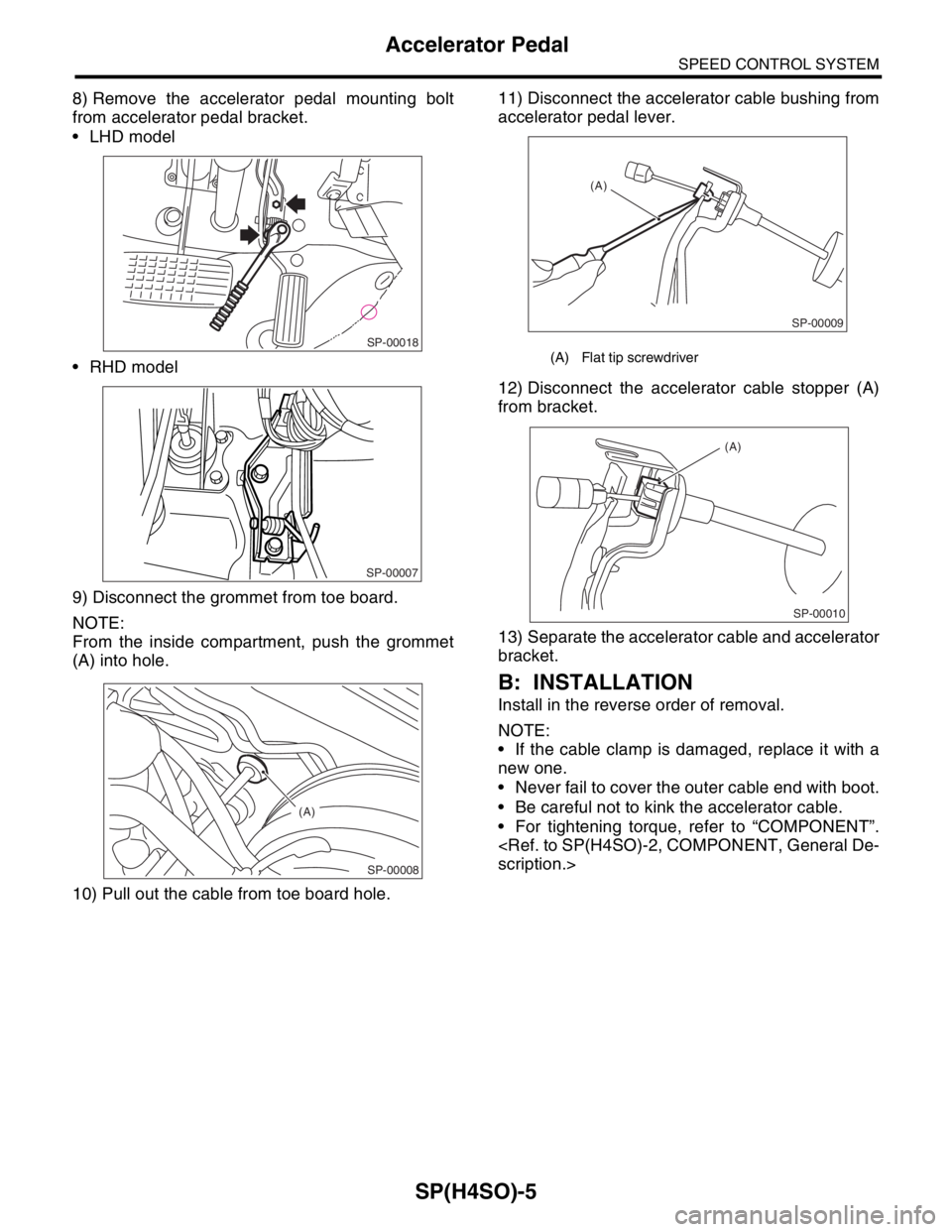
8) Remove the accelerator pedal mounting bolt
from accelerator pedal bracket.
LHD model
RHD model
9) Disconnect the grommet from toe board.
NOTE:
From the inside compartment, push the grommet
(A) into hole.
10) Pull out the cable from toe board hole.11) Disconnect the accelerator cable bushing from
accelerator pedal lever.
12) Disconnect the accelerator cable stopper (A)
from bracket.
13) Separate the accelerator cable and accelerator
bracket.
B: INSTALLATION
Install in the reverse order of removal.
NOTE:
If the cable clamp is damaged, replace it with a
new one.
Never fail to cover the outer cable end with boot.
Be careful not to kink the accelerator cable.
For tightening torque, refer to “COMPONENT”.
scription.>
SP-00018
SP-00007
SP-00008
(A)
(A) Flat tip screwdriver
SP-00009
(A)
SP-00010
(A)
Page 1068 of 2870
IG(H4SO)-4
IGNITION
General Description
C: CAUTION
Wear working clothing, including a cap, protec-
tive goggles, and protective shoes during opera-
tion.
Remove contamination including dirt and corro-
sion before removal, installation or disassembly.
Keep the disassembled parts in order and pro-
tect them from dust or dirt.
Before removal, installation or disassembly, be
sure to clarify the failure. Avoid unnecessary re-
moval, installation, disassembly, and replacement.
Be careful not to burn yourself, because each
part on the vehicle is hot after running.
Be sure to tighten fasteners including bolts and
nuts to the specified torque.
Place shop jacks or rigid racks at the specified
points.
Before disconnecting electrical connectors of
sensors or units, be sure to disconnect the ground
cable from battery.
Page 1072 of 2870
IG(H4SO)-8
IGNITION
Ignition Coil & Ignitor Assembly
3. Ignition Coil & Ignitor Assem-
bly
A: REMOVAL
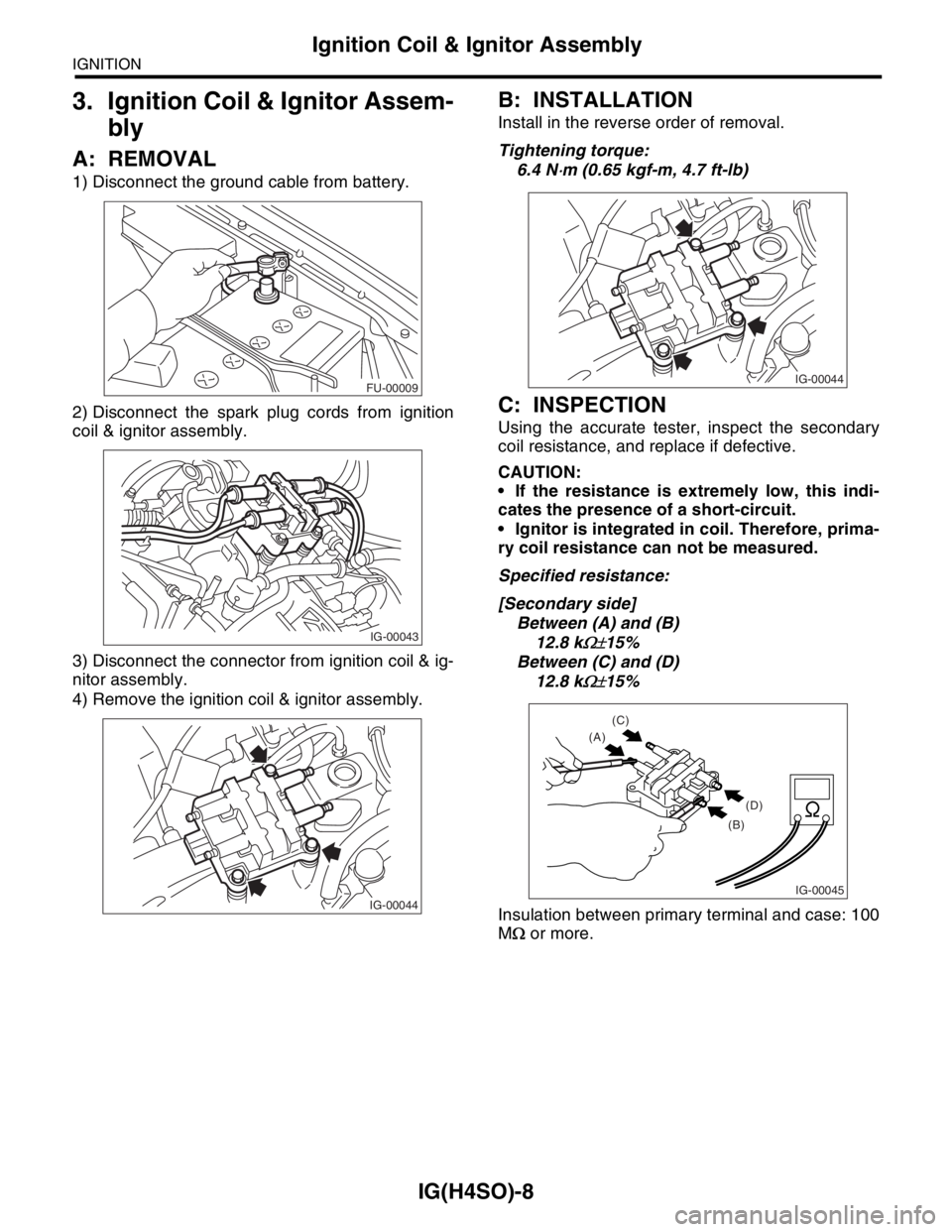
1) Disconnect the ground cable from battery.
2) Disconnect the spark plug cords from ignition
coil & ignitor assembly.
3) Disconnect the connector from ignition coil & ig-
nitor assembly.
4) Remove the ignition coil & ignitor assembly.
B: INSTALLATION
Install in the reverse order of removal.
Tightening torque:
6.4 N
⋅m (0.65 kgf-m, 4.7 ft-lb)
C: INSPECTION
Using the accurate tester, inspect the secondary
coil resistance, and replace if defective.
CAUTION:
If the resistance is extremely low, this indi-
cates the presence of a short-circuit.
Ignitor is integrated in coil. Therefore, prima-
ry coil resistance can not be measured.
Specified resistance:
[Secondary side]
Between (A) and (B)
12.8 k
Ω±15%
Between (C) and (D)
12.8 k
Ω±15%
Insulation between primary terminal and case: 100
MΩ or more.
FU-00009
IG-00043
IG-00044
IG-00044
IG-00045
(C)
(A)
(D)
(B)
Page 1080 of 2870
SC(H4SO)-5
STARTING/CHARGING SYSTEM
General Description
C: CAUTION
Wear working clothing, including a cap, protec-
tive goggles, and protective shoes during opera-
tion.
Remove contamination including dirt and corro-
sion before removal, installation or disassembly.
Keep the disassembled parts in order and pro-
tect them from dust or dirt.
Before removal, installation or disassembly, be
sure to clarify the failure. Avoid unnecessary re-
moval, installation, disassembly, and replacement.
Be careful not to burn yourself, because each
part in the vehicle is hot after running.
Be sure to tighten fasteners including bolts and
nuts to the specified torque.
Place shop jacks or rigid racks at the specified
points.
Before disconnecting electrical connectors of
sensors or units, be sure to disconnect the ground
cable from battery.
Page 1087 of 2870
SC(H4SO)-12
STARTING/CHARGING SYSTEM
Starter
2. YOKE
Make sure the pole is set in position.
3. OVERRUNNING CLUTCH
Inspect the teeth of pinion for wear and damage.
Replace if it is damaged. Rotate the pinion in direc-
tion of rotation (counterclockwise). It should rotate
smoothly. But in opposite direction, it should be
locked.
CAUTION:
Do not clean the overrunning clutch with oil to
prevent grease from flowing out.
4. BRUSH AND BRUSH HOLDER
1) Brush length
Measure the brush length, and then replace if it ex-
ceeds the service limit.
Replace if abnormal wear or cracks are noticed.
Brush length:
Standard
12.3 mm (0.484 in)
Service limit
7.0 mm (0.276 in)
2) Brush movement
Be sure the brush moves smoothly inside brush
holder.
3) Brush spring force
Measure the brush spring force with a spring scale.
If it is less than the service limit, replace the brush
holder.
Brush spring force:
Standard
15.9 — 19.5 N (1.62 — 1.99 kgf, 3.57 — 4.38
lb) (when new)
Service limit
2.5 N (0.25 kgf, 0.56 lb)
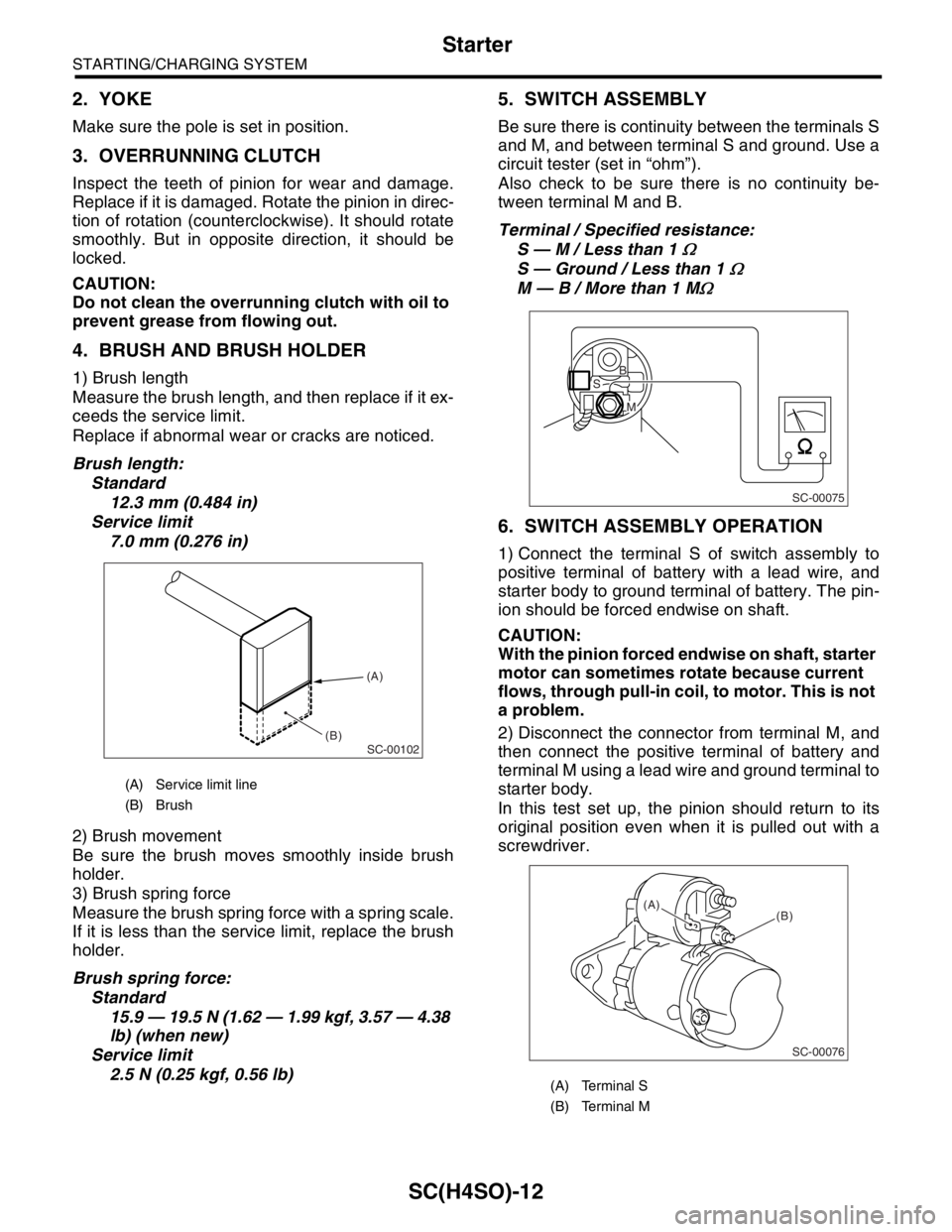
5. SWITCH ASSEMBLY
Be sure there is continuity between the terminals S
and M, and between terminal S and ground. Use a
circuit tester (set in “ohm”).
Also check to be sure there is no continuity be-
tween terminal M and B.
Terminal / Specified resistance:
S — M / Less than 1
Ω
S — Ground / Less than 1 Ω
M — B / More than 1 MΩ
6. SWITCH ASSEMBLY OPERATION
1) Connect the terminal S of switch assembly to
positive terminal of battery with a lead wire, and
starter body to ground terminal of battery. The pin-
ion should be forced endwise on shaft.
CAUTION:
With the pinion forced endwise on shaft, starter
motor can sometimes rotate because current
flows, through pull-in coil, to motor. This is not
a problem.
2) Disconnect the connector from terminal M, and
then connect the positive terminal of battery and
terminal M using a lead wire and ground terminal to
starter body.
In this test set up, the pinion should return to its
original position even when it is pulled out with a
screwdriver.
(A) Service limit line
(B) Brush
SC-00102
(A)
(B)
(A) Terminal S
(B) Terminal M
SC-00075
B
M
S
SC-00076
(B) (A)
Page 1148 of 2870

EN(H4SO)-50
ENGINE (DIAGNOSTIC)
Malfunction Indicator Light
Step Check Yes No
1 CHECK OUTPUT SIGNAL FROM ECM.
1) Turn the ignition switch to ON.
2) Measure the voltage between ECM con-
nector and chassis ground.
Connector & terminal
(B134) No. 28 (+) — Chassis ground (
−):Is the voltage less than 1 V? Go to step 4.Go to step 2.
2 CHECK POOR CONTACT.
Check for poor connection when shaking or
pulling ECM connector and harness.Does malfunction indicator
light illuminate?Repair the poor
contact in ECM
connector.Go to step 3.
3 CHECK ECM CONNECTOR.
Check the connection of ECM connector.Is the ECM connector correctly
connected?Replace the ECM.
FU(H4SO)-44,
Engine Control
Module (ECM).>Repair the con-
nection of ECM
connector.
4 CHECK HARNESS BETWEEN COMBINA-
TION METER AND ECM CONNECTOR.
1) Turn the ignition switch to OFF.
2) Remove the combination meter.
IDI-10, Combination Meter Assembly.>
3) Disconnect the connector from ECM and
combination meter.
4) Measure the resistance of harness
between ECM and combination meter connec-
tor.
Connector & terminal
(B134) No. 28 — (i12) No. 1:Is the resistance less than 1
Ω?Go to step 5.Repair harness
and connector.
N
OTE:
In this case repair
the following:
Open circuit in
harness between
ECM and combi-
nation meter con-
nector
Poor contact in
coupling connector
5 CHECK POOR CONTACT.
Check poor contact in combination meter con-
nector.Is there poor contact in combi-
nation meter connector?Repair poor con-
tact in combination
meter connector.Go to step 6.
Page 1150 of 2870
EN(H4SO)-52
ENGINE (DIAGNOSTIC)
Malfunction Indicator Light
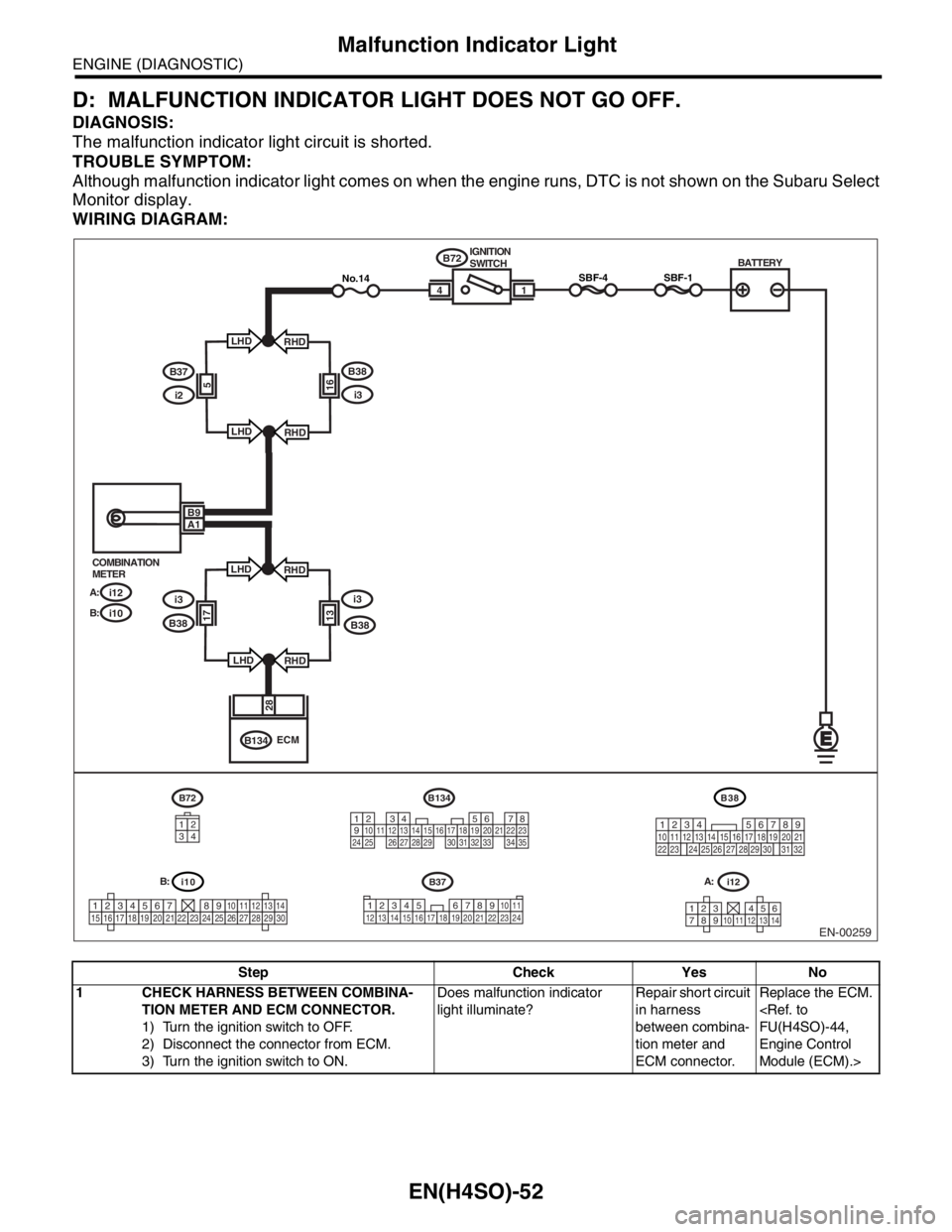
D: MALFUNCTION INDICATOR LIGHT DOES NOT GO OFF.
DIAGNOSIS:
The malfunction indicator light circuit is shorted.
TROUBLE SYMPTOM:
Although malfunction indicator light comes on when the engine runs, DTC is not shown on the Subaru Select
Monitor display.
WIRING DIAGRAM:
Step Check Yes No
1 CHECK HARNESS BETWEEN COMBINA-
TION METER AND ECM CONNECTOR.
1) Turn the ignition switch to OFF.
2) Disconnect the connector from ECM.
3) Turn the ignition switch to ON.Does malfunction indicator
light illuminate?Repair short circuit
in harness
between combina-
tion meter and
ECM connector.Replace the ECM.
FU(H4SO)-44,
Engine Control
Module (ECM).>
EN-00259
i10
123456789101112131415161718192021222324252627282930
BATTERY
1
B72
B134IGNITION
SWITCH
i12 COMBINATION
METER
A:
i10 B:
SBF-44
28
ECM
B9A1
i12
1234568791011121314
B134
1234567891011121314151617181920212223242526272829303132333435
B72
34
12
SBF-1No.14
B37
34 12 8910 11
12 13 14 15 16 17 18 19 20 21 22 23 24567
B38
219
32
1234 5610 11 12 13 14 15716
23 3019 20
22 26 27 28 29817
24 3118
25
B37
i2
B38
i3165
LHD
LHDRHD
RHD
i3i3
B381317
LHD
LHDRHD
RHD B38
A: B: