Page 111 of 442
111 Controls in detailSeats
Removing and installing rear seat head
restraints
For removing and installing rear seat head
restraints, see “Expanding the cargo ar-
ea*” (
�page 239)
Multicontour seat*
The multicontour seat has a movable seat
cushion and inflatable air cushions built
into the backrest to provide additional lum-
bar and side support.
The seat cushion movement, backrest
cushion height and curvature can be con-
tinuously varied with switches on the right
side of the seat after turning the SmartKey
in the starter switch to position2 or press-
ing the KEYLESS-GO* start/stop button
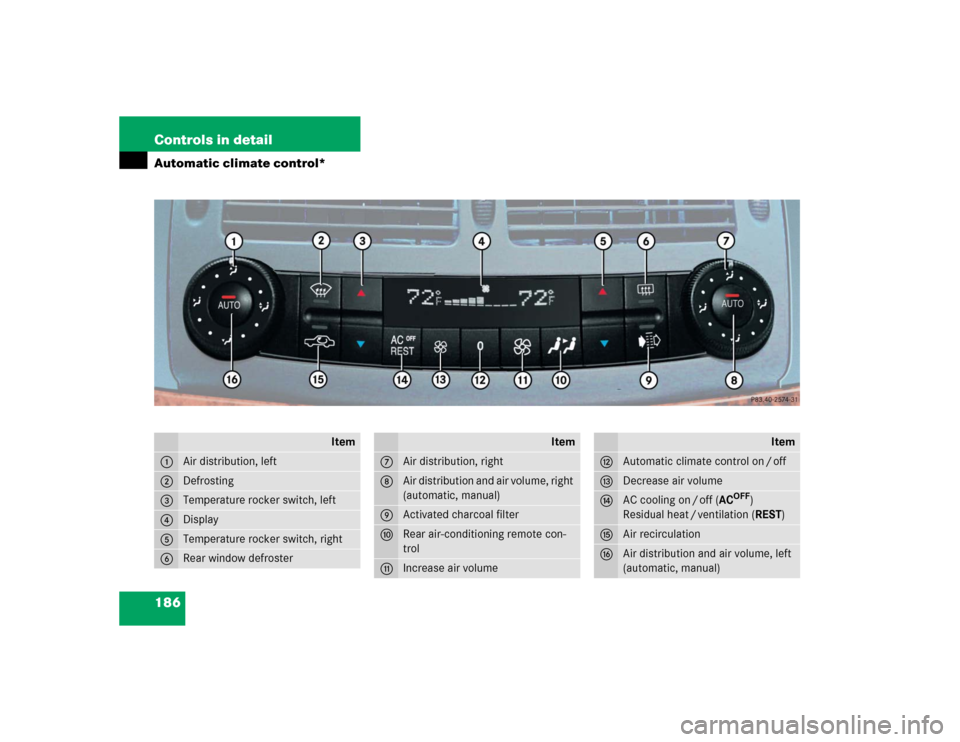
twice.1Seat cushion depth
2Backrest bottom
3Backrest center
4Backrest side bolster adjustment
�
Make sure the ignition is switched on.
All lights in the instrument cluster
come on.Seat cushion depth
�
Adjust the seat cushion depth to the
length of your upper leg using
switch1.
Backrest contour
�
Adjust the contour of the backrest to
the desired position using æ or
ç.
�
Move the backrest support to the bot-
tom by using button2 or to the center
by using button3.
Backrest side bolsters
�
Adjust the side bolsters so that they
provide good lateral support using
switch4.
Page 112 of 442
112 Controls in detailSeatsDrive - Dynamic seat*
The Drive - Dynamic seat automatically ad-
justs the lateral support provided by the
backrest to your driving style.
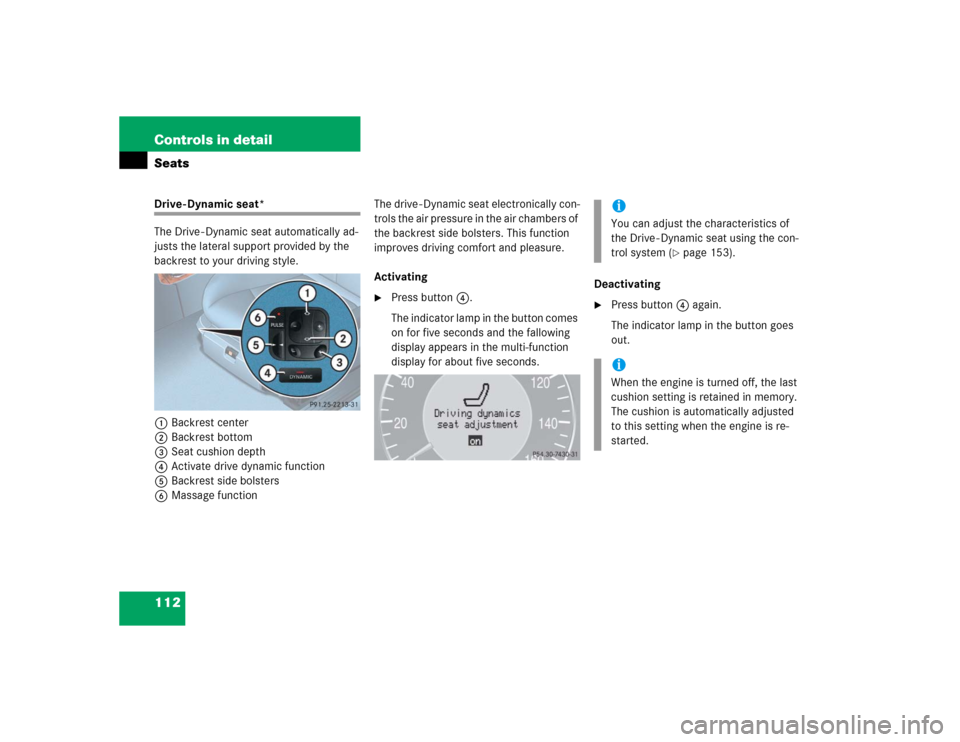
1Backrest center
2Backrest bottom
3Seat cushion depth
4Activate drive dynamic function
5Backrest side bolsters
6Massage functionThe drive - Dynamic seat electronically con-
trols the air pressure in the air chambers of
the backrest side bolsters. This function
improves driving comfort and pleasure.
Activating
�
Press button4.
The indicator lamp in the button comes
on for five seconds and the fallowing
display appears in the multi-function
display for about five seconds.Deactivating
�
Press button4 again.
The indicator lamp in the button goes
out.iYou can adjust the characteristics of
the Drive - Dynamic seat using the con-
trol system (
�page 153).
iWhen the engine is turned off, the last
cushion setting is retained in memory.
The cushion is automatically adjusted
to this setting when the engine is re-
started.
Page 116 of 442
116 Controls in detailMemory function
�Memory function
You can store up to three different settings
per SmartKey.
The following settings are saved for each
stored position:�
Driver’s seat and backrest position
�
Steering wheel position
�
Driver’s side exterior rear view mirror
position
�
Passenger side exterior rear view mir-
ror position
�
Front passenger seat position
These SmartKey-dependent memory set-
tings can be deactivated if desired
(
�page 152).
!Prior to operating the vehicle, the driv-
er should check and adjust the seat
height, seat position fore and aft, and
seat backrest angle if necessary, to en-
sure adequate control, reach and com-
fort. The head restraint should also be
adjusted for proper height. See also the
section on airbags (
�page 57) for
more information on proper seat posi-
tioning.
In addition, adjust the steering wheel to
ensure adequate control, reach, opera-
tion and comfort. Both the interior and
outside rear view mirrors should be ad-
justed for adequate rear vision.
Fasten seat belts. Infants and small
children should be seated in a properly
secured restraint system that complies
with U.S. Federal Motor Vehicle Safety
Standards 213 and 225 and Canadian
Motor Vehicle Safety Standards 213
and 210.2.
Warning!
G
Do not activate the memory function while
driving. Activating the memory function
while driving could cause the driver to lose
control of the vehicle.
Page 117 of 442
117 Controls in detail
Memory function
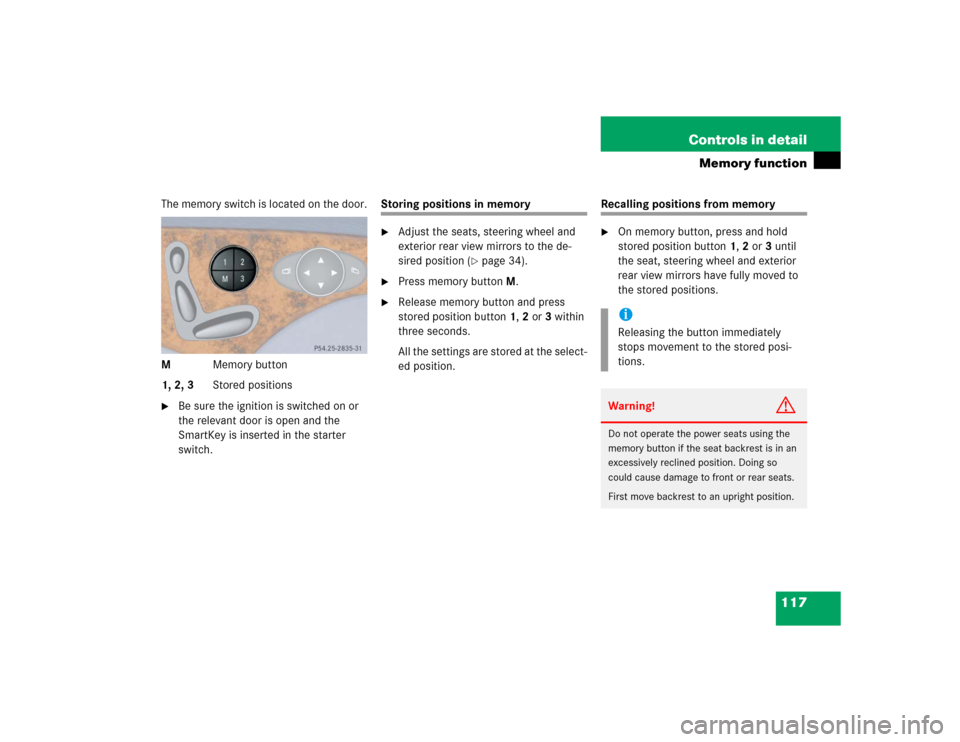
The memory switch is located on the door.
MMemory button
1, 2, 3Stored positions�
Be sure the ignition is switched on or
the relevant door is open and the
SmartKey is inserted in the starter
switch.
Storing positions in memory�
Adjust the seats, steering wheel and
exterior rear view mirrors to the de-
sired position (
�page 34).
�
Press memory buttonM.
�
Release memory button and press
stored position button 1, 2 or 3 within
three seconds.
All the settings are stored at the select-
ed position.
Recalling positions from memory�
On memory button, press and hold
stored position button1, 2 or3 until
the seat, steering wheel and exterior
rear view mirrors have fully moved to
the stored positions.iReleasing the button immediately
stops movement to the stored posi-
tions.Warning!
G
Do not operate the power seats using the
memory button if the seat backrest is in an
excessively reclined position. Doing so
could cause damage to front or rear seats.
First move backrest to an upright position.
Page 167 of 442
167 Controls in detail
Automatic transmission
Deactivating manual shift program�
Press the program mode selector
switch repeatedly until
S or
C appears
in the multifunction display.
or
�
Restart the engine.
The transmission will go into the last
automatic shift program mode selected
(SorC).
Program modeM is not stored.Emergency operation (Limp Home
Mode)
If vehicle acceleration worsens or the
transmission no longer shifts, the trans-
mission is most likely operating in limp
home (emergency operation) mode. In this
mode only second gear and reverse gear
can be activated.�
Stop the vehicle.
�
Move gear selector lever toP.
�
Turn off the engine.
�
Wait at least ten seconds before
restarting.
�
Restart the engine.
�
Move gear selector lever to positionD
(for second gear) orR.
�
Have the transmission checked at an
authorized Mercedes-Benz Center as
soon as possible.
iThe last selected automatic program
mode (S orC) is switched on when the
engine is restarted in the automatic
program mode.
Page 182 of 442
182 Controls in detailClimate controlAir conditioning
The air conditioning is operational while
the engine is running and cools the interior
air to the temperature set by the operator.
Deactivating
It is possible to deactivate the air condi-
tioning (cooling) function of the climate
control system. The air in the vehicle will
then no longer be cooled or dehumidified.�
Press button± (
�page 176).
The indicator lamp on the button±
comes on.Activating
Moist air can fog up the windows. You can
dehumidify the air with the air condition-
ing.
�
Press± again (
�page 176).
The indicator lamp on the button±
goes out.
The air conditioning uses the refrigerant
R134a. This refrigerant is free of CFCs
which are harmful to the ozone layer.
Residual heat and ventilation*
With the engine switched off, it is possible
to continue to heat or ventilate the interior
for up to 30 minutes. This feature makes
use of the residual heat produced by the
engine.
Activating�
Turn the SmartKey in the starter switch
to position0or1, or remove it from
the starter switch.
�
Press buttonT (
�page 176).
The indicator lamp on buttonT
comes on.
iCondensation may drip out from under-
neath the vehicle. This is normal and
not an indication of a malfunction.
!If the air conditioning cannot be turned
on again, this indicates that the air con-
ditioning is losing refrigerant. The com-
pressor has turned itself off.
Have the air conditioning checked at
the nearest authorized Mercedes-Benz
Center.
Page 186 of 442
186 Controls in detailAutomatic climate control*
Item
1
Air distribution, left
2
Defrosting
3
Temperature rocker switch, left
4
Display
5
Temperature rocker switch, right
6
Rear window defroster
Item
7
Air distribution, right
8
Air distribution and air volume, right
(automatic, manual)
9
Activated charcoal filter
a
Rear air-conditioning remote con-
trol
b
Increase air volume
Item
c
Automatic climate control on / off
d
Decrease air volume
e
AC cooling on / off (AC
OFF
)
Residual heat / ventilation (REST)
f
Air recirculation
g
Air distribution and air volume, left
(automatic, manual)
Page 194 of 442
194 Controls in detailAutomatic climate control*Air conditioning
The air conditioning is operational while
the engine is running and cools the interior
air to the temperature set by the operator.
Deactivating
It is possible to deactivate the air condi-
tioning (cooling) function of the automatic
climate control system. The air in the vehi-
cle will then no longer be cooled or dehu-
midified.�
Press button°.
The indicator lamp on the button°
comes on.Activating
Moist air can fog up the windows. You can
dehumidify the air with the air condition-
ing.
�
Press° again.
The indicator lamp on the°button
goes out.
The air conditioning uses the refrigerant
R134a. This refrigerant is free of CFCs
which are harmful to the ozone layer.
Residual heat and ventilation
With the engine switched off, it is possible
to continue to heat or ventilate the interior
for up to 30 minutes. This feature makes
use of the residual heat produced by the
engine.
Activating�
Turn the SmartKey in the starter switch
to position0 or1, or remove it from
the starter switch.
�
Press button°.
The indicator lamp on button°
comes on.
Deactivating
�
Press button°.
The indicator lamp on button°
goes out.
iCondensation may drip out from under-
neath the vehicle. This is normal and
not an indication of a malfunction.
!If the air conditioning cannot be turned
on again, this indicates that the air con-
ditioning is losing refrigerant. The com-
pressor has turned itself off.
Have the air conditioning checked at
the nearest authorized Mercedes-Benz
Center.