2004 CHEVROLET MALIBU lock
[x] Cancel search: lockPage 163 of 426
AV SPEED:Press the INFO button until AV SPEED
appears in the display. This is the vehicle’s average
speed in miles per hour or kilometers per hour.
Press and hold the ENTER button while AV SPEED
is displayed to reset the average vehicle speed.
OIL LIFE:Press the button until OIL LIFE appears in
the display. The Oil Life Monitor system shows an
estimate of the oil’s remaining useful life. It will show
100% when the system is reset after an oil change.
It will alert you to change your oil on a schedule
consistent with your driving conditions.
Always reset the engine oil life after an oil change.
The oil change reminder does not measure how much
oil you have in your engine. So, be sure to check your
oil level often.
Personalization
The following options can be accessed in order by
pressing the MENU button anytime while the vehicle is
in ON. Press this button to scroll through each option.
All of the personalization options may not be available
on your vehicle. Only the options available will be
displayed on your DIC.
Oil Life Monitor Reset
Units Selection (English/Metric)
Remote Start Capability
Horn Chirp During Remote Keyless Entry Locking
Horn Chirp During Remote Keyless Entry Unlocking
Exterior Light Flash During Remote Keyless
Entry Locking or Unlocking
Delayed Locking
Automatic Vehicle Unlocking: Specic Doors
Automatic Vehicle Unlocking: When Key is Off or
When Shift To Park
Exterior Perimeter Lighting During Remote Keyless
Entry Unlock
Security System Passive or Remote Keyless
Entry Arming
Select Language: (English, French, Spanish or
German)
When the desired option is reached, use the ENTER
button to toggle between the modes of that option.
To make a selection, press the MENU button again.
If no selection is made within 10 seconds, the display
will revert back to the previous information displayed.
The MENU mode is exited when the INFO button is
pressed, a ten second time period has elapsed, the
ignition is turned to OFF or the end of the MENU list
is reached.
3-47
Page 164 of 426
The following display messages may appear on your
vehicle’s audio display by pressing the MENU button:
OIL LIFE RESET:When this option is displayed
you can reset the Oil Life Monitor system. To reset the
system to 100%, press and hold the ENTER button
for at least one second. An ACKNOWLEDGED display
message will appear for three seconds or until the
next button is pressed. This will tell you the system has
been reset.
UNITS:When UNITS appears on the display, press the
ENTER button to move between Metric or English.
When you have made your choice, press the MENU
button to record your selection. The initial setting
from the factory is English.
If you choose English, all information will be displayed
in English units. For example, distance in miles and fuel
economy in miles per gallon is displayed.
If you choose metric, all information will be displayed in
metric units. For example, distance in kilometers and
fuel economy in liters per 100 kilometers is displayed.
The unit measurement will also change the trip
odometer, temperature and average fuel economy
displays.REMOTE START:The remote start feature, if
equipped, can be enabled or disabled. When REMOTE
START appears on the display, press the ENTER
button to move between OFF and ON. When you have
made your choice, press the MENU button to record
your selection. The initial setting from the factory is ON.
LOCK HORN:If your vehicle has remote keyless
entry, this feature which allows the vehicle’s horn to
chirp every time the LOCK button on the remote
keyless entry transmitter is pressed, can be enabled or
disabled. When LOCK HORN appears on the display,
press the ENTER button to move between ON and OFF.
When you have made your choice, press the MENU
button to record your selection. The initial setting from
the factory is ON.
UNLOCK HORN:If your vehicle has remote keyless
entry, this feature which allows the vehicle’s horn
to chirp every time the UNLOCK button on the remote
keyless entry transmitter is pressed, can be enabled
or disabled. When UNLOCK HORN appears on
the display, press the ENTER button to move between
ON and OFF. When you have made your choice,
press the MENU button to record your selection.
The initial setting from the factory is OFF.
3-48
Page 165 of 426
LIGHT FLASH:If your vehicle has remote keyless
entry, this feature which allows the vehicle’s exterior
perimeter lighting to ash every time the LOCK or
UNLOCK button on the remote keyless entry transmitter
is pressed, can be enabled or disabled. When LIGHT
FLASH appears on the display, press the ENTER
button to move between OFF and ON. When you have
made your choice, press the MENU button to record
your selection. The initial setting from the factory is ON.
DELAY LOCK:The delayed locking feature, which
delays the actual locking of the vehicle, can be
enabled or disabled. When DELAY LOCK appears on
the display, use the ENTER button to move between
OFF and ON. When you have made your choice,
press the MENU button to record your selection.
The initial setting from the factory is ON.
AUTO UNLK:The automatic door unlocking feature,
which allows the vehicle to automatically unlock certain
doors can be enabled or disabled. When AUTO UNLK
appears on the display, use the ENTER button to move
between: ALL, DRVR or NONE. When you have made
your choice, press and the MENU button to record your
selection. The initial setting from the factory is ALL.UNLK:This feature determines when the automatic
door unlocking will occur, when either the key is turned
to OFF or the vehicle is shifted into PARK (P). When
UNLK appears on the display, use the ENTER button to
move between KEY OFF and SHIFT TO P. When
you have made your choice, press the MENU button to
record your selection. The initial setting from the
factory is SHIFT TO P.
EXT LIGHTS:If your vehicle has remote keyless entry,
this feature, which allows the vehicle’s exterior perimeter
lighting to turn on each time the UNLOCK button on the
remote keyless entry transmitter is pressed, can be
enabled or disabled. When EXT LIGHTS appears on the
display, use the ENTER button to move between ON
and OFF. When you have made your choice, press the
MENU button to record your selection. The initial setting
from the factory is ON.
SECURITY:If your vehicle has the remote keyless entry
system, this feature allows you to select the method used
to arm the vehicle’s security system. When SECURITY
appears on the display, use the ENTER button to move
between RKE and PASSIVE. When you have made your
choice, press the MENU button to record your selection.
SeeContent Theft-Deterrent on page 2-18for more
information.
3-49
Page 168 of 426
Audio System(s)
Notice:Before you add any sound equipment to
your vehicle — like a tape player, CB radio, mobile
telephone or two-way radio — be sure you can add
what you want. If you can, it’s very important to do it
properly. Added sound equipment may interfere with
the operation of your vehicle’s engine, radio or other
systems, and even damage them. Your vehicle’s
systems may interfere with the operation of sound
equipment that has been added improperly.
So, before adding sound equipment, check with
your dealer and be sure to check federal rules
covering mobile radio and telephone units.
Your audio system has been designed to operate easily
and to give years of listening pleasure. You will get
the most enjoyment out of it if you acquaint yourself with
it rst. Figure out which radio you have in your vehicle,
nd out what your audio system can do and how to
operate all of its controls to be sure you’re getting the
most out of the advanced engineering that went into it.Your vehicle has a feature called Retained Accessory
Power (RAP). With RAP, you can play your audio
system even after the ignition is turned off. See
“Retained Accessory Power (RAP)” underIgnition
Positions on page 2-22.
Setting the Time for Radios without
Radio Data Systems (RDS)
To set the hour, press the clock button. The clock icon
will appear on the display and the hour number will ash
on the display. Then turn the ADJ knob to increase or to
decrease. To set the minutes, press the clock button
again. The minute numbers will ash on the display.
Then turn the ADJ knob to increase or to decrease.
The time may be set with the ignition on or off.
3-52
Page 169 of 426
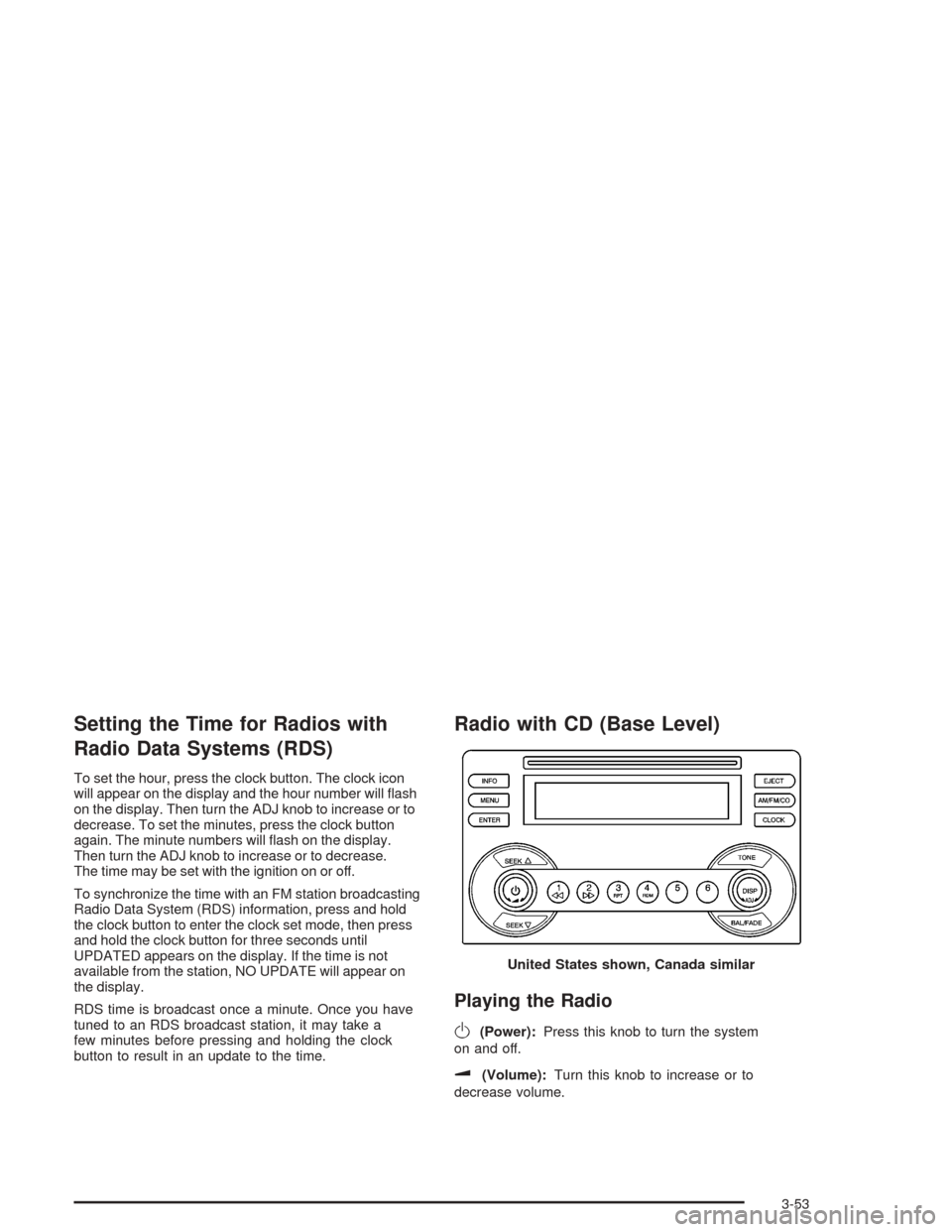
Setting the Time for Radios with
Radio Data Systems (RDS)
To set the hour, press the clock button. The clock icon
will appear on the display and the hour number will ash
on the display. Then turn the ADJ knob to increase or to
decrease. To set the minutes, press the clock button
again. The minute numbers will ash on the display.
Then turn the ADJ knob to increase or to decrease.
The time may be set with the ignition on or off.
To synchronize the time with an FM station broadcasting
Radio Data System (RDS) information, press and hold
the clock button to enter the clock set mode, then press
and hold the clock button for three seconds until
UPDATED appears on the display. If the time is not
available from the station, NO UPDATE will appear on
the display.
RDS time is broadcast once a minute. Once you have
tuned to an RDS broadcast station, it may take a
few minutes before pressing and holding the clock
button to result in an update to the time.
Radio with CD (Base Level)
Playing the Radio
O
(Power):Press this knob to turn the system
on and off.
u(Volume):Turn this knob to increase or to
decrease volume.United States shown, Canada similar
3-53
Page 172 of 426
Radio Messages
CALIBRATION:Your audio system has been calibrated
for your vehicle from the factory. If CALIBRATION
appears on the display it means that your radio has not
been congured properly for your vehicle and must
be returned to the dealer for service.
LOCKED:This message is displayed when the
Theftlock
®system has locked up. Your vehicle must
be returned to the dealer for service.
If any error occurs repeatedly or if an error cannot be
corrected, contact your dealer.
Playing a CD
Insert a CD partway into the slot, label side up. The
player will pull it in and the CD should begin playing.
If you want to insert a CD with the ignition off, rst press
the eject button or the DISP knob.
As each new track starts to play, the track number will
appear on the display.
If you turn off the ignition or radio with a CD in the
player, it will stay in the player. When you turn on the
ignition or radio, the CD will start playing, where it
stopped, if it was the last selected audio source.The CD player can play the smaller 8cm single CDs
with an adapter ring. Full-size CDs and the smaller CDs
are loaded in the same manner.
If playing a CD-R the sound quality may be reduced
due to CD-R quality, the method of recording, the quality
of the music that has been recorded, and the way the
CD-R has been handled. You may experience an
increase in skipping, difficulty in nding tracks, and/or
difficulty in loading and ejecting. If these problems occur
try a known good CD.
Do not add paper labels to CDs, they could get caught
in the CD player.
Do not play 3-inch CDs without a standard adapter CD.
If an error appears on the display, see “CD Messages”
later in this section.
1
s(Reverse):Press and hold this pushbutton to
reverse quickly within a track. You will hear sound at a
reduced volume. Release the pushbutton to play the
passage. The elapsed time of the track will appear
on the display.
2
\(Fast Forward):Press and hold this pushbutton
to advance quickly within a track. You will hear sound
at a reduced volume. Release the pushbutton to play the
passage. The elapsed time of the track will appear on
the display.
3-56
Page 180 of 426
If the whole message is not displayed, parts of the
message will appear every three seconds. To scroll
through the message at your own speed, press the MSG
button repeatedly. A new group of words will appear
on the display with each press. Once the complete
message has been displayed, MSG will disappear from
the display until another new message is received.
The old message can be displayed by pressing the MSG
button. You can view an old message until a new
message is received or a different station is tuned to.
When a message is not available from a station,
NO MESSAGE will appear on the display.
TRAF (Traffic):If TRAFFIC appears on the display,
the tuned station broadcasts traffic announcements and
when a traffic announcement comes on the tuned
radio station you will hear it.
If the current tuned station does not broadcast traffic
announcements, press this button and the radio will seek
to a station that does. When the radio nds a station that
broadcasts traffic announcements, the radio will stop
and TRAF and brackets will be displayed. When a traffic
announcement comes on the tuned radio station you will
hear it. If no station is found, NO TRAFFIC INFO will
appear on the display.If TRAF is on the display you can press the TRAF button
to turn off the traffic announcements.
Your radio will play the traffic announcement even if the
volume is low. Your radio will interrupt the play of a CD if
the last tuned station broadcasts traffic announcements.
This function does not apply to XM™ Satellite Radio
Service.
Radio Messages
CALIBRATE ERR (Error):Your audio system has been
calibrated for your vehicle from the factory. If CALIBRATE
ERR appears on the display it means that your radio has
not been congured properly for your vehicle and it must
be returned to the dealer for service.
LOCKED:This message is displayed when the
Theftlock
®system has locked up. Your vehicle must be
returned to the dealer for service.
If any error occurs repeatedly or if an error cannot be
corrected, contact your dealer.
3-64
Page 181 of 426
XM™ Radio Messages
Radio Display
MessageCondition Action Required
XL
(Explicit Language
Channels)XL on the radio display,
after the channel name,
indicates content with
explicit language.These channels, or any others, can be blocked at a
customer’s request, by calling 1-800-852-XMXM (9696).
Updating Updating encryption code The encryption code in your receiver is being updated,
and no action is required. This process should take no
longer than 30 seconds.
No Signal Loss of signal Your system is functioning correctly, but you are in a
location that is blocking the XM signal. When you move
into an open area, the signal should return.
Loading XM Acquiring channel audio
(after 4 second delay)Your radio system is acquiring and processing audio
and text data. No action is needed. This message should
disappear shortly.
Off Air Channel not in service This channel is not currently in service. Tune to another
channel.
CH Unavl Channel no longer
availableThis previously assigned channel is no longer assigned.
Tune to another station. If this station was one of your
presets, you may need to choose another station for that
preset button.
No Info Artist Name/Feature
not availableNo artist information is available at this time on this
channel. Your system is working properly.
No Info Song/Program Title
not availableNo song title information is available at this time on this
channel. Your system is working properly.
3-65