2004 CHEVROLET MALIBU door lock
[x] Cancel search: door lockPage 1 of 426
Seats and Restraint Systems........................... 1-1
Front Seats
............................................... 1-2
Rear Seats
............................................... 1-7
Safety Belts
.............................................1-10
Child Restraints
.......................................1-31
Air Bag Systems
......................................1-52
Restraint System Check
............................1-60
Features and Controls..................................... 2-1
Keys
........................................................ 2-3
Doors and Locks
......................................2-10
Windows
.................................................2-16
Theft-Deterrent Systems
............................2-18
Starting and Operating Your Vehicle
...........2-22
Mirrors
....................................................2-35
OnStar
®System
......................................2-38
HomeLink®Transmitter
.............................2-40
Storage Areas
.........................................2-44
Sunroof
..................................................2-48
Instrument Panel............................................. 3-1
Instrument Panel Overview
.......................... 3-4
Climate Controls
......................................3-21
Warning Lights, Gages, and Indicators
........3-31Driver Information Center (DIC)
..................3-45
Audio System(s)
.......................................3-52
Driving Your Vehicle....................................... 4-1
Your Driving, the Road, and Your Vehicle
..... 4-2
Towing
...................................................4-31
Service and Appearance Care.......................... 5-1
Service
..................................................... 5-3
Fuel
......................................................... 5-5
Checking Things Under the Hood
...............5-12
Bulb Replacement
....................................5-45
Windshield Wiper Blade Replacement
.........5-49
Tires
......................................................5-50
Appearance Care
.....................................5-78
Vehicle Identication
.................................5-86
Electrical System
......................................5-87
Capacities and Specications
.....................5-96
Maintenance Schedule..................................... 6-1
Maintenance Schedule
................................ 6-2
Customer Assistance and Information.............. 7-1
Customer Assistance and Information
........... 7-2
Reporting Safety Defects
...........................7-11
Index................................................................ 1
2004 Chevrolet Malibu Owner ManualM
Page 22 of 426
Driver Position
This part describes the driver’s restraint system.
Lap-Shoulder Belt
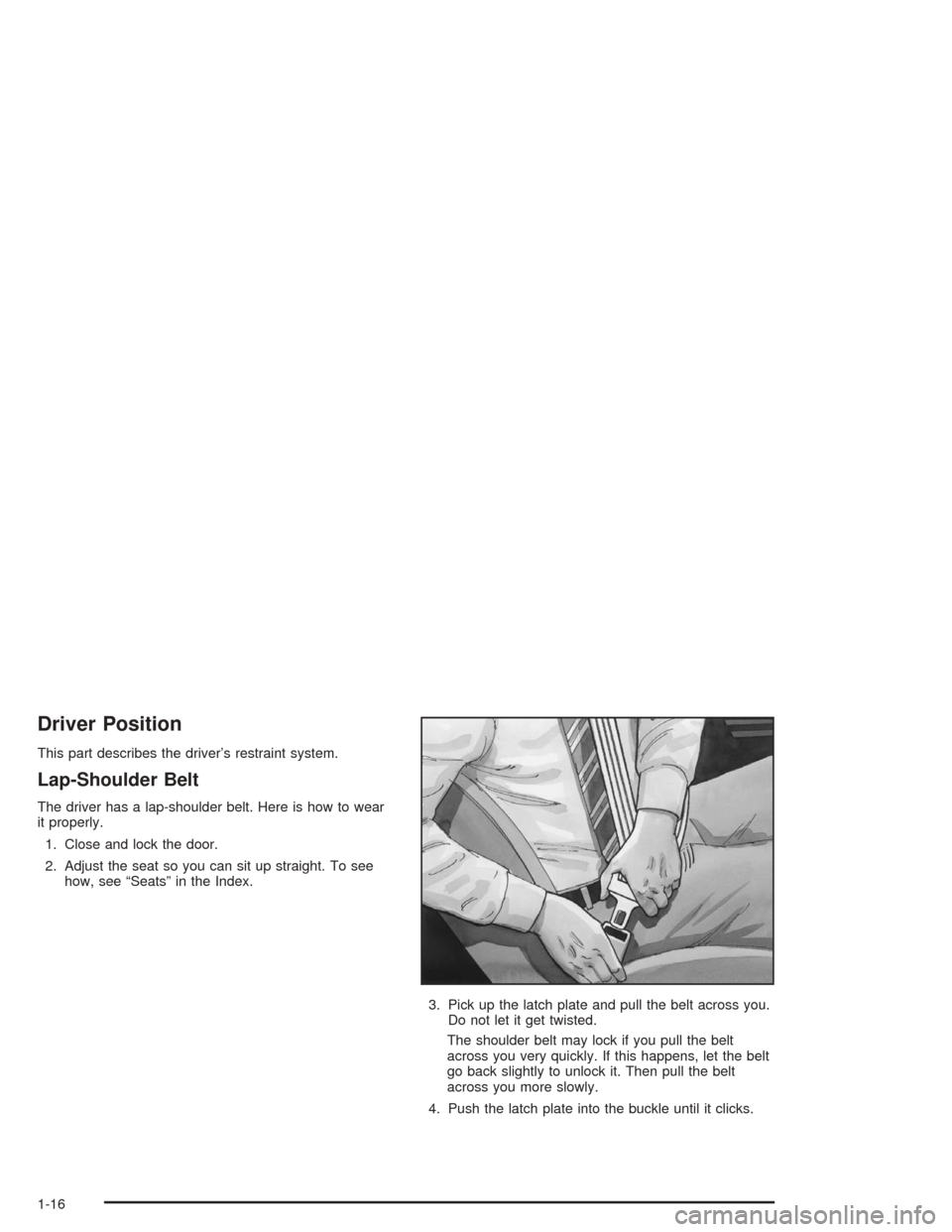
The driver has a lap-shoulder belt. Here is how to wear
it properly.
1. Close and lock the door.
2. Adjust the seat so you can sit up straight. To see
how, see “Seats” in the Index.
3. Pick up the latch plate and pull the belt across you.
Do not let it get twisted.
The shoulder belt may lock if you pull the belt
across you very quickly. If this happens, let the belt
go back slightly to unlock it. Then pull the belt
across you more slowly.
4. Push the latch plate into the buckle until it clicks.
1-16
Page 62 of 426
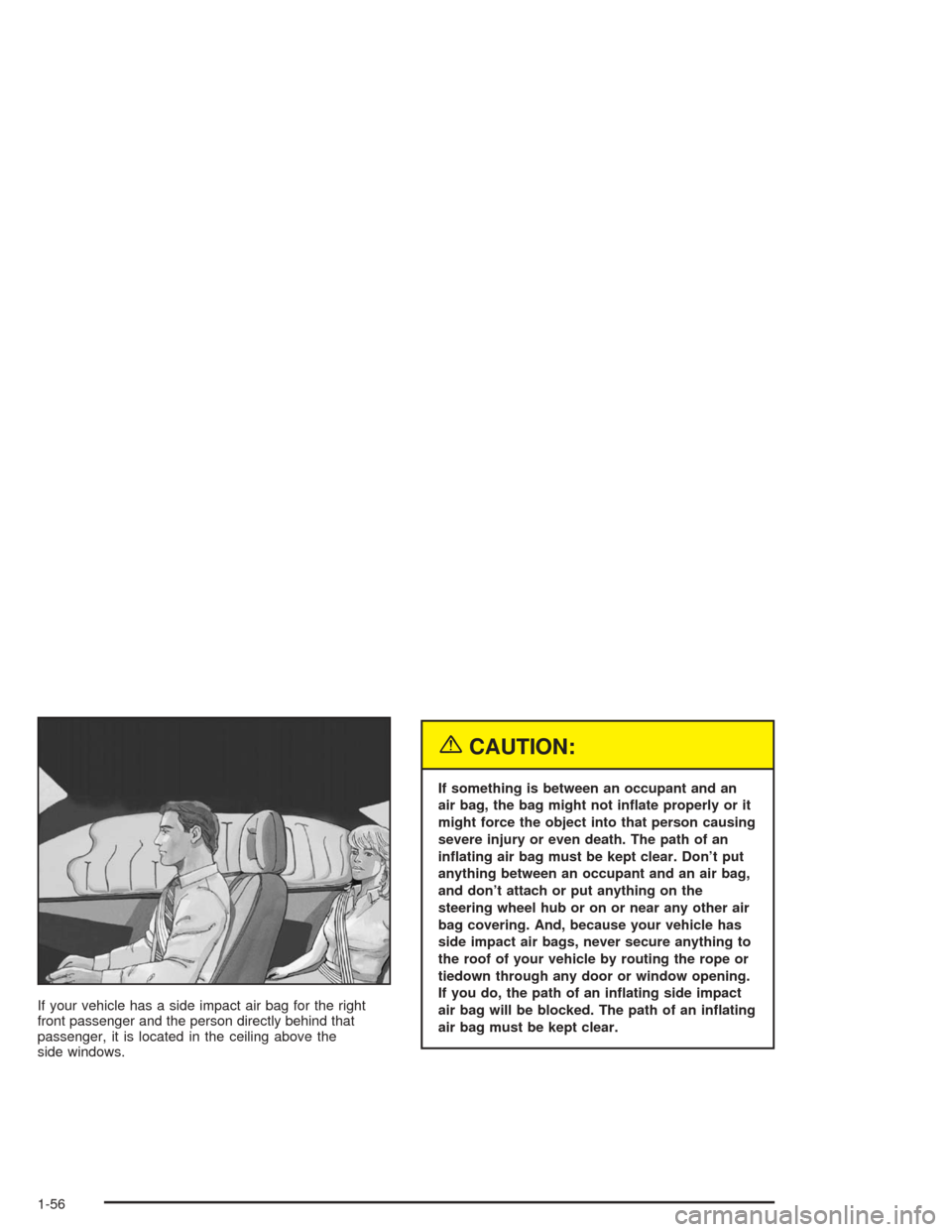
If your vehicle has a side impact air bag for the right
front passenger and the person directly behind that
passenger, it is located in the ceiling above the
side windows.
{CAUTION:
If something is between an occupant and an
air bag, the bag might not inate properly or it
might force the object into that person causing
severe injury or even death. The path of an
inating air bag must be kept clear. Don’t put
anything between an occupant and an air bag,
and don’t attach or put anything on the
steering wheel hub or on or near any other air
bag covering. And, because your vehicle has
side impact air bags, never secure anything to
the roof of your vehicle by routing the rope or
tiedown through any door or window opening.
If you do, the path of an inating side impact
air bag will be blocked. The path of an inating
air bag must be kept clear.
1-56
Page 69 of 426
Keys...............................................................2-3
Remote Keyless Entry System.........................2-5
Remote Keyless Entry System Operation...........2-6
Doors and Locks............................................2-10
Door Locks..................................................2-10
Power Door Locks........................................2-11
Door Ajar Reminder......................................2-12
Delayed Locking...........................................2-12
Programmable Automatic
Door Locks...............................................2-12
Lockout Protection........................................2-13
Leaving Your Vehicle....................................2-13
Trunk..........................................................2-13
Liftgate........................................................2-15
Windows........................................................2-16
Power Windows............................................2-17
Sun Visors...................................................2-17
Theft-Deterrent Systems..................................2-18
Content Theft-Deterrent.................................2-18
PASS-Key
®III+............................................2-20
PASS-Key®III+ Operation..............................2-20Starting and Operating Your Vehicle................2-22
New Vehicle Break-In....................................2-22
Ignition Positions..........................................2-22
Starting Your Engine.....................................2-23
Adjustable Throttle and Brake Pedal................2-24
Engine Coolant Heater..................................2-25
Automatic Transaxle Operation.......................2-27
Parking Brake..............................................2-29
Shifting Into Park (P).....................................2-30
Shifting Out of Park (P).................................2-32
Parking Over Things That Burn.......................2-32
Engine Exhaust............................................2-33
Running Your Engine While You Are Parked.......2-34
Mirrors...........................................................2-35
Manual Rearview Mirror.................................2-35
Manual Rearview Mirror with OnStar
®..............2-35
Automatic Dimming Rearview Mirror................2-35
Automatic Dimming Rearview Mirror with
OnStar
®...................................................2-36
Outside Power Mirrors...................................2-37
Outside Power Heated Mirrors........................2-37
Outside Convex Mirror...................................2-37
Section 2 Features and Controls
2-1
Page 74 of 426
Remote Keyless Entry System
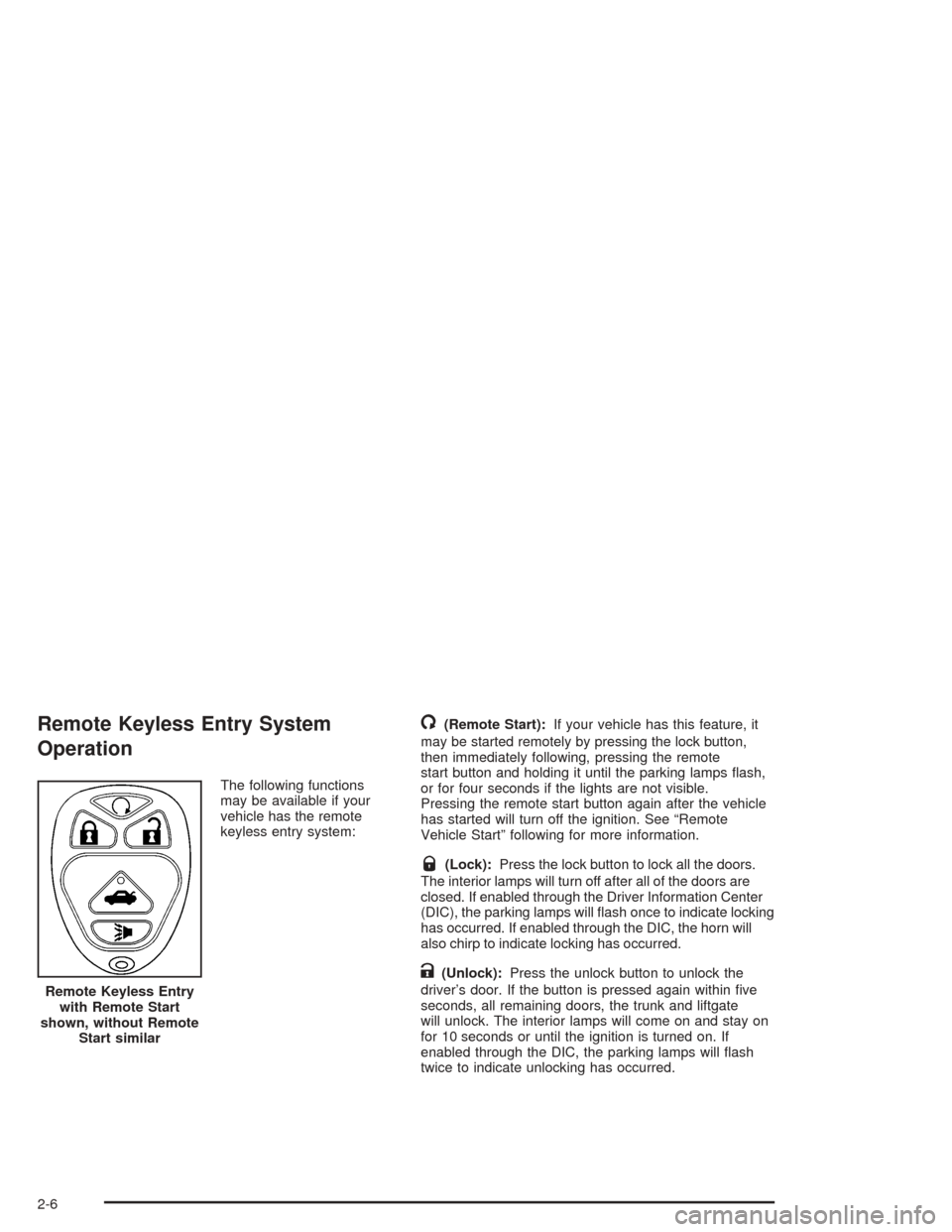
Operation
The following functions
may be available if your
vehicle has the remote
keyless entry system:
/(Remote Start):If your vehicle has this feature, it
may be started remotely by pressing the lock button,
then immediately following, pressing the remote
start button and holding it until the parking lamps ash,
or for four seconds if the lights are not visible.
Pressing the remote start button again after the vehicle
has started will turn off the ignition. See “Remote
Vehicle Start” following for more information.
Q(Lock):Press the lock button to lock all the doors.
The interior lamps will turn off after all of the doors are
closed. If enabled through the Driver Information Center
(DIC), the parking lamps will ash once to indicate locking
has occurred. If enabled through the DIC, the horn will
also chirp to indicate locking has occurred.
K(Unlock):Press the unlock button to unlock the
driver’s door. If the button is pressed again within ve
seconds, all remaining doors, the trunk and liftgate
will unlock. The interior lamps will come on and stay on
for 10 seconds or until the ignition is turned on. If
enabled through the DIC, the parking lamps will ash
twice to indicate unlocking has occurred. Remote Keyless Entry
with Remote Start
shown, without Remote
Start similar
2-6
Page 75 of 426
V(Remote Trunk Release):The trunk or liftgate
will open when this button on the transmitter is pressed
and held. You can open the trunk with the transmitter
when the vehicle is in PARK (P) or NEUTRAL (N). The
interior lamps will come on for 10 seconds or until
the ignition switch is turned to ON.
7(Vehicle Locator/Panic Alarm):Press this button
to locate your vehicle. The horn will chirp three times
and the headlamps and parking lamps will ash
three times. Press and hold the button for three seconds
to sound the panic alarm. The horn will chirp and the
headlamps and parking lamps will ash for two minutes.
Press the button again to cancel the panic alarm.
Programmable Horn Chirp
Through the DIC, you may choose whether or not to
have a horn chirp when you use the remote keyless
entry transmitter to lock or unlock the doors.
SeeDIC Operation and Displays on page 3-46for more
information.
Matching Transmitter(s) to Your
Vehicle
Each remote keyless entry transmitter is coded to
prevent another transmitter from unlocking your vehicle.
If a transmitter is lost or stolen, a replacement can
be purchased through your dealer. Remember to bring
any remaining transmitters with you when you go to
your dealer. When the dealer matches the replacement
transmitter to your vehicle, any remaining transmitters
must also be matched. Once your dealer has coded the
new transmitter, the lost transmitter will not unlock
your vehicle. Each vehicle can have a maximum of four
transmitters matched to it.
2-7
Page 77 of 426
Remote Vehicle Start
Your vehicle may have a remote starting feature. This
feature allows you to start the engine from outside of the
vehicle. It also starts up the vehicle’s heating or air
conditioning systems and rear window defogger. When
the remote start system is active and the vehicle
has an automatic climate control system, it will
automatically regulate the inside temperature. Normal
operation of the system will return after the key is turned
to the on position. A remote start occurs when buttons
on the remote keyless entry transmitter are pressed.
Laws in some local communities require that a person
using remote start have the vehicle in view when
doing so and may prohibit the execution of remote start
if not in view of the vehicle. Check local regulations
for any requirements on remote starting of vehicles.
Do not use the remote start feature if your vehicle is low
on fuel. Your vehicle may run out of fuel.
The remote start feature provides two separate starts,
each with 10 minutes of engine running. Or it provides
one start with 10 minutes of engine running, which can be
extended by 10 more minutes, for 20 minutes of total
running time. Once two starts or 20 minutes running time
has been provided, the vehicle must be started normally
with the ignition key to get more remote starts.The remote start feature will not operate if the key is in
the ignition or the hood is not closed.
Your remote keyless entry transmitter, with the remote
start button, provides an increased range of operation.
However, the range may be less while the vehicle
is running. As a result, you may need to be closer to
your vehicle to turn it off, than you were to turn it on.
There are other conditions which can affect the
performance of the transmitter, see “Remote Keyless
Entry System Operation” previously in this section.
/(Remote Start):Press the lock button and then
press this button to use the remote start feature.
To start the vehicle using the remote start feature, do
the following:
1. Aim the transmitter at the vehicle.
2. Press the transmitter’s lock button, release it and
then immediately press and hold the transmitter’s
remote start button until the vehicle’s turn signal
lights ash or for at least four seconds. The
vehicle’s doors will be locked.
3. When the vehicle starts, the parking lamps will turn
on and remain on while the vehicle is running.
4. If it is your rst remote start since last driving,
repeat these steps while the engine is still
running for a 10 minute time extension.
2-9
Page 78 of 426
When you enter the vehicle during a remote start, turn the
key to the on position to start the engine and drive.
If the vehicle is left running it will automatically shut off
after 10 minutes unless a time extension has been
done. To manually shut off a remote start, do any of the
following:
Aim the remote keyless entry transmitter at the
vehicle and press the remote start button until
the parking lamps turn off.
Turn on the hazards warning ashers.
Turn the ignition switch on and then off.
Doors and Locks
Door Locks
{CAUTION:
Unlocked doors can be dangerous.
Passengers — especially children — can
easily open the doors and fall out of a
moving vehicle. When a door is locked, the
handle will not open it. You increase the
chance of being thrown out of the vehicle
in a crash if the doors are not locked. So,
wear safety belts properly and lock the
doors whenever you drive.
Young children who get into unlocked
vehicles may be unable to get out. A child
can be overcome by extreme heat and can
suffer permanent injuries or even death
from heat stroke. Always lock your vehicle
whenever you leave it.
CAUTION: (Continued)
2-10