2004 CHEVROLET MALIBU radio controls
[x] Cancel search: radio controlsPage 227 of 426
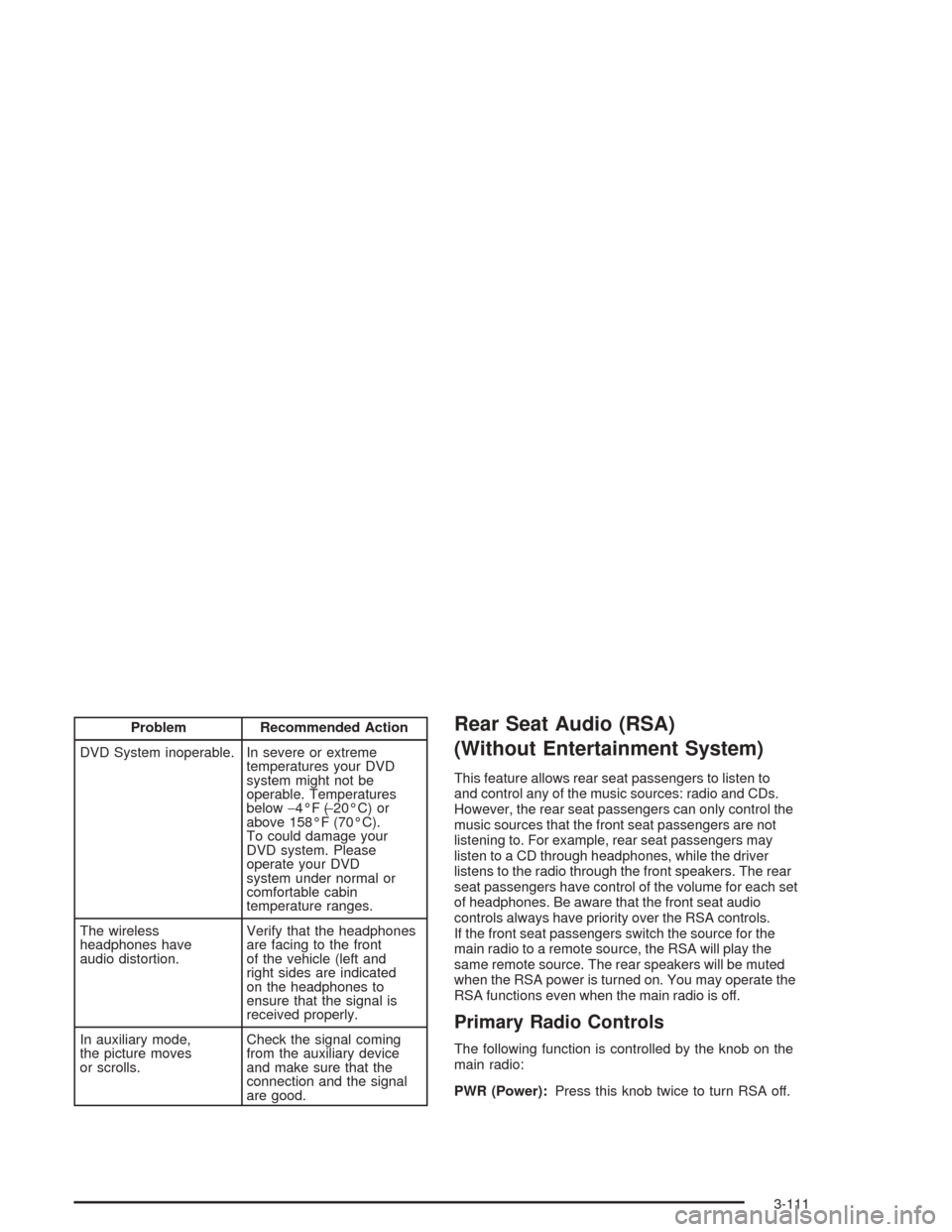
Problem Recommended Action
DVD System inoperable. In severe or extreme
temperatures your DVD
system might not be
operable. Temperatures
below−4°F (−20°C) or
above 158°F (70°C).
To could damage your
DVD system. Please
operate your DVD
system under normal or
comfortable cabin
temperature ranges.
The wireless
headphones have
audio distortion.Verify that the headphones
are facing to the front
of the vehicle (left and
right sides are indicated
on the headphones to
ensure that the signal is
received properly.
In auxiliary mode,
the picture moves
or scrolls.Check the signal coming
from the auxiliary device
and make sure that the
connection and the signal
are good.Rear Seat Audio (RSA)
(Without Entertainment System)
This feature allows rear seat passengers to listen to
and control any of the music sources: radio and CDs.
However, the rear seat passengers can only control the
music sources that the front seat passengers are not
listening to. For example, rear seat passengers may
listen to a CD through headphones, while the driver
listens to the radio through the front speakers. The rear
seat passengers have control of the volume for each set
of headphones. Be aware that the front seat audio
controls always have priority over the RSA controls.
If the front seat passengers switch the source for the
main radio to a remote source, the RSA will play the
same remote source. The rear speakers will be muted
when the RSA power is turned on. You may operate the
RSA functions even when the main radio is off.
Primary Radio Controls
The following function is controlled by the knob on the
main radio:
PWR (Power):Press this knob twice to turn RSA off.
3-111
Page 228 of 426
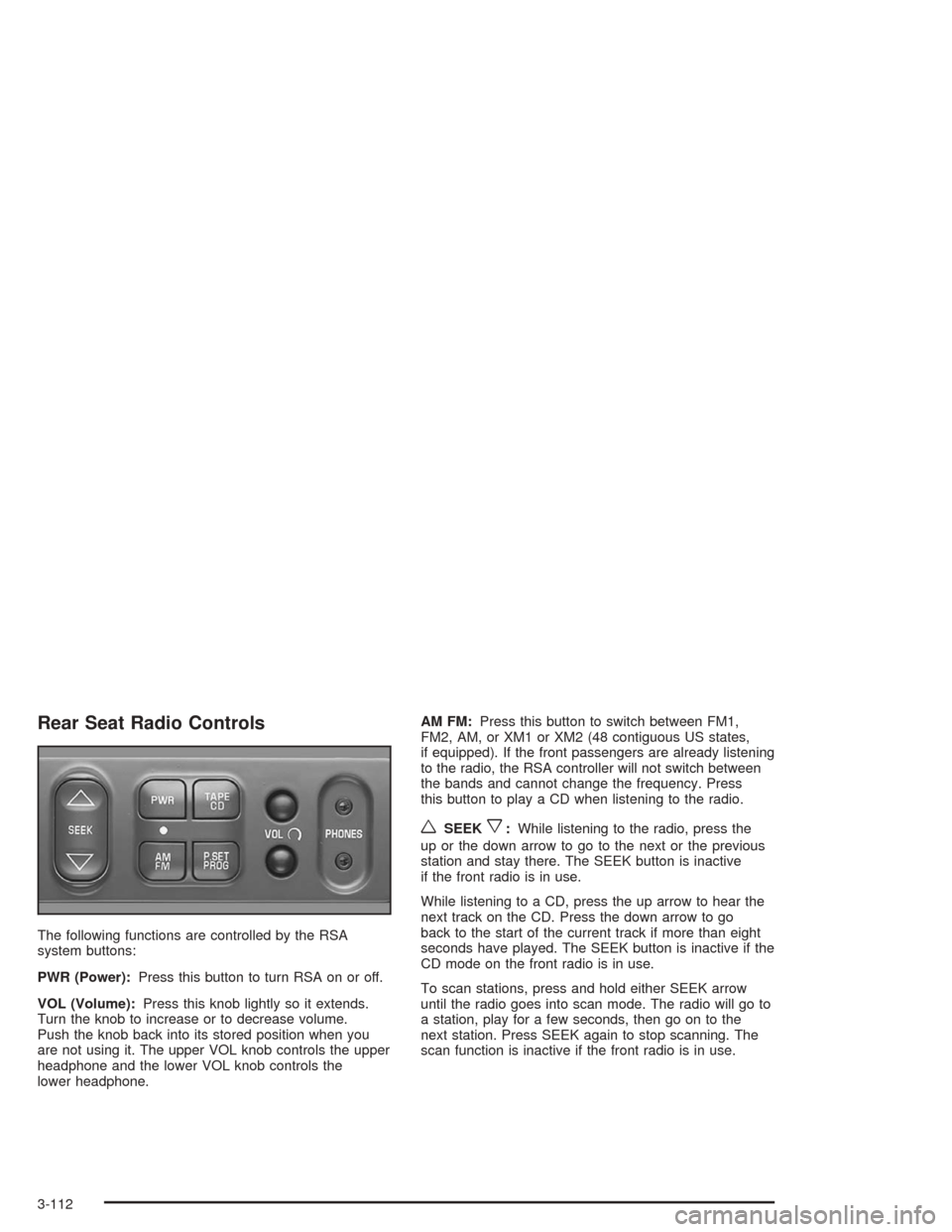
Rear Seat Radio Controls
The following functions are controlled by the RSA
system buttons:
PWR (Power):Press this button to turn RSA on or off.
VOL (Volume):Press this knob lightly so it extends.
Turn the knob to increase or to decrease volume.
Push the knob back into its stored position when you
are not using it. The upper VOL knob controls the upper
headphone and the lower VOL knob controls the
lower headphone.AM FM:Press this button to switch between FM1,
FM2, AM, or XM1 or XM2 (48 contiguous US states,
if equipped). If the front passengers are already listening
to the radio, the RSA controller will not switch between
the bands and cannot change the frequency. Press
this button to play a CD when listening to the radio.
wSEEKx:While listening to the radio, press the
up or the down arrow to go to the next or the previous
station and stay there. The SEEK button is inactive
if the front radio is in use.
While listening to a CD, press the up arrow to hear the
next track on the CD. Press the down arrow to go
back to the start of the current track if more than eight
seconds have played. The SEEK button is inactive if the
CD mode on the front radio is in use.
To scan stations, press and hold either SEEK arrow
until the radio goes into scan mode. The radio will go to
a station, play for a few seconds, then go on to the
next station. Press SEEK again to stop scanning. The
scan function is inactive if the front radio is in use.
3-112
Page 229 of 426
P.SET PROG (Preset Program):The front passengers
must be listening to something different for each of
these functions to work:
Press this button to scan through the preset radio
stations set on the pushbuttons on the main radio.
The radio will go to a preset station stored on
your pushbuttons, play for a few seconds, then go
on to the next preset station. Press this button
again to stop scanning presets.
If your vehicle has the Radio with Six-Disc CD,
when a CD is playing, press this button to select
the next CD, if multiple CDs are loaded.
TAPE CD:Press this button to play a CD when
listening to the radio.
Rear Seat Audio (RSA)
(With Entertainment System)
This feature allows rear seat passengers to listen to
and control any of the music sources: radio, cassette
tapes and CDs. However, the rear seat passengers
can only control the music sources that the front seat
passengers are not listening to. For example, rear
seat passengers may listen to and control a cassette
tape or CD through headphones, while the driver listens
to the radio through the front speakers. The rear seat
passengers have control of the volume for each
set of headphones.
The front seat audio controls always have priority over
the RSA controls. If the front seat passengers switch
the source for the main radio to a remote source,
the RSA will not be able to control the remote source.
The rear speakers will be muted when the RSA power
is turned on. You may operate the RSA functions
even when the main radio is off.
3-113
Page 230 of 426
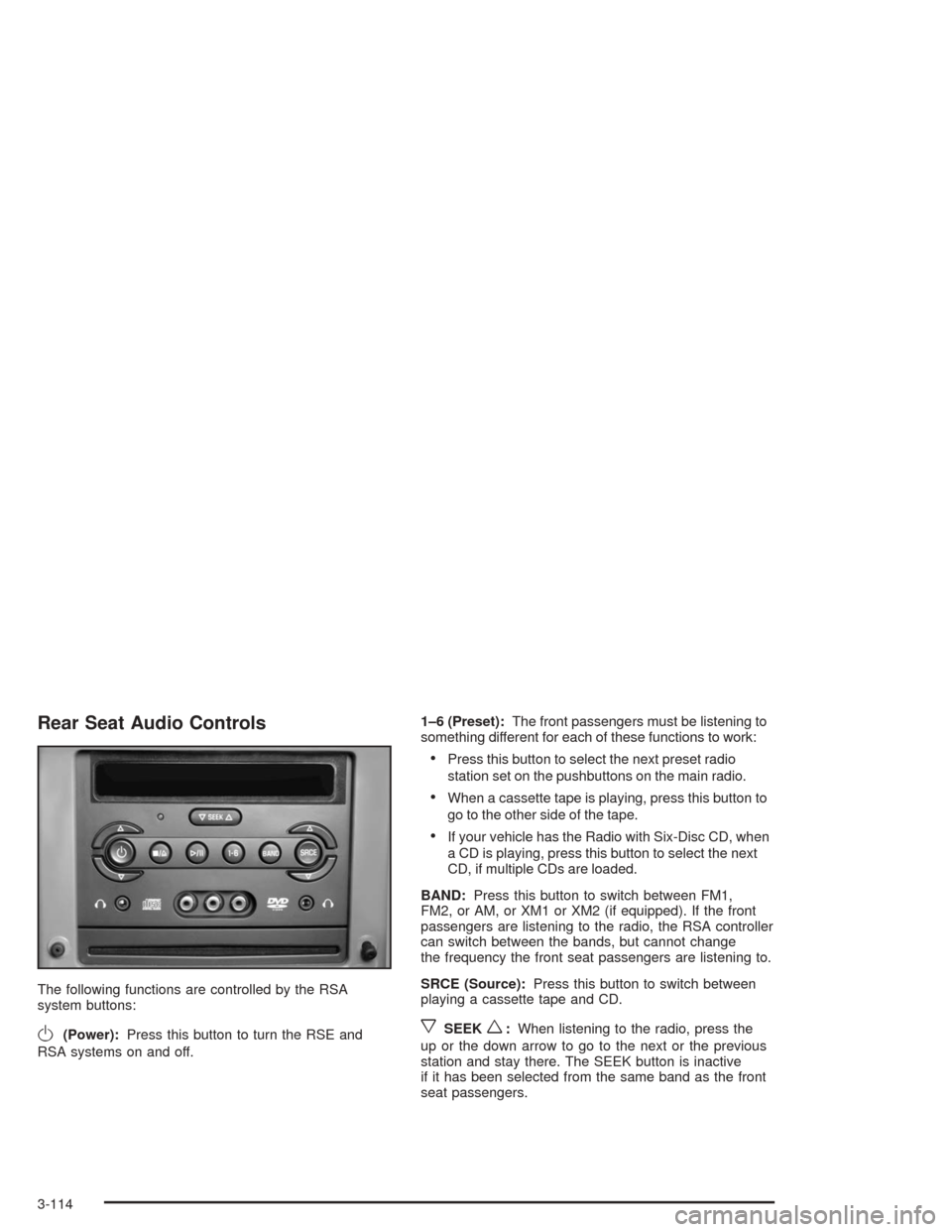
Rear Seat Audio Controls
The following functions are controlled by the RSA
system buttons:
O(Power):Press this button to turn the RSE and
RSA systems on and off.1–6 (Preset):The front passengers must be listening to
something different for each of these functions to work:
Press this button to select the next preset radio
station set on the pushbuttons on the main radio.
When a cassette tape is playing, press this button to
go to the other side of the tape.
If your vehicle has the Radio with Six-Disc CD, when
a CD is playing, press this button to select the next
CD, if multiple CDs are loaded.
BAND:Press this button to switch between FM1,
FM2, or AM, or XM1 or XM2 (if equipped). If the front
passengers are listening to the radio, the RSA controller
can switch between the bands, but cannot change
the frequency the front seat passengers are listening to.
SRCE (Source):Press this button to switch between
playing a cassette tape and CD.
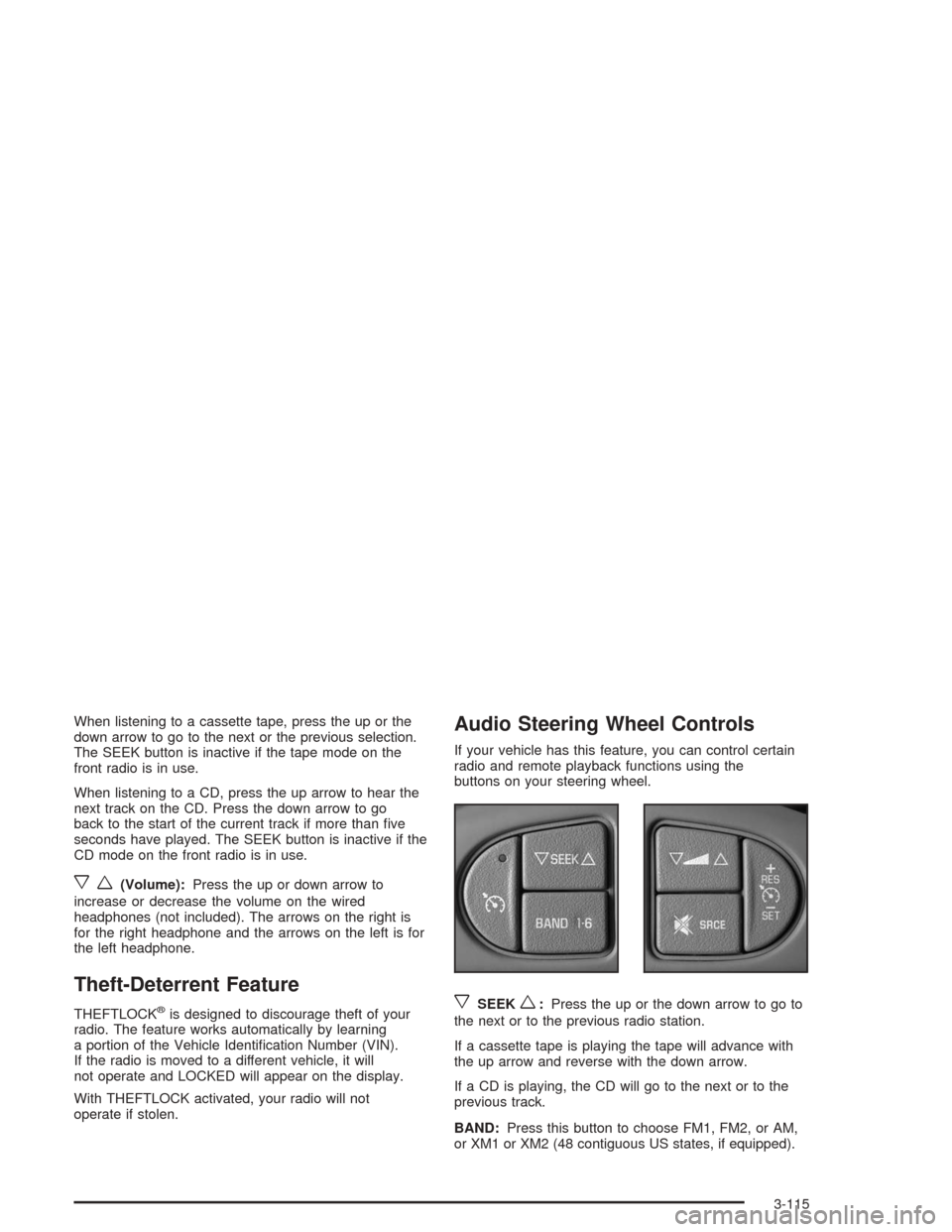
xSEEKw:When listening to the radio, press the
up or the down arrow to go to the next or the previous
station and stay there. The SEEK button is inactive
if it has been selected from the same band as the front
seat passengers.
3-114
Page 231 of 426
When listening to a cassette tape, press the up or the
down arrow to go to the next or the previous selection.
The SEEK button is inactive if the tape mode on the
front radio is in use.
When listening to a CD, press the up arrow to hear the
next track on the CD. Press the down arrow to go
back to the start of the current track if more than ve
seconds have played. The SEEK button is inactive if the
CD mode on the front radio is in use.
xw(Volume):Press the up or down arrow to
increase or decrease the volume on the wired
headphones (not included). The arrows on the right is
for the right headphone and the arrows on the left is for
the left headphone.
Theft-Deterrent Feature
THEFTLOCK®is designed to discourage theft of your
radio. The feature works automatically by learning
a portion of the Vehicle Identication Number (VIN).
If the radio is moved to a different vehicle, it will
not operate and LOCKED will appear on the display.
With THEFTLOCK activated, your radio will not
operate if stolen.
Audio Steering Wheel Controls
If your vehicle has this feature, you can control certain
radio and remote playback functions using the
buttons on your steering wheel.
xSEEKw:Press the up or the down arrow to go to
the next or to the previous radio station.
If a cassette tape is playing the tape will advance with
the up arrow and reverse with the down arrow.
If a CD is playing, the CD will go to the next or to the
previous track.
BAND:Press this button to choose FM1, FM2, or AM,
or XM1 or XM2 (48 contiguous US states, if equipped).
3-115
Page 377 of 426
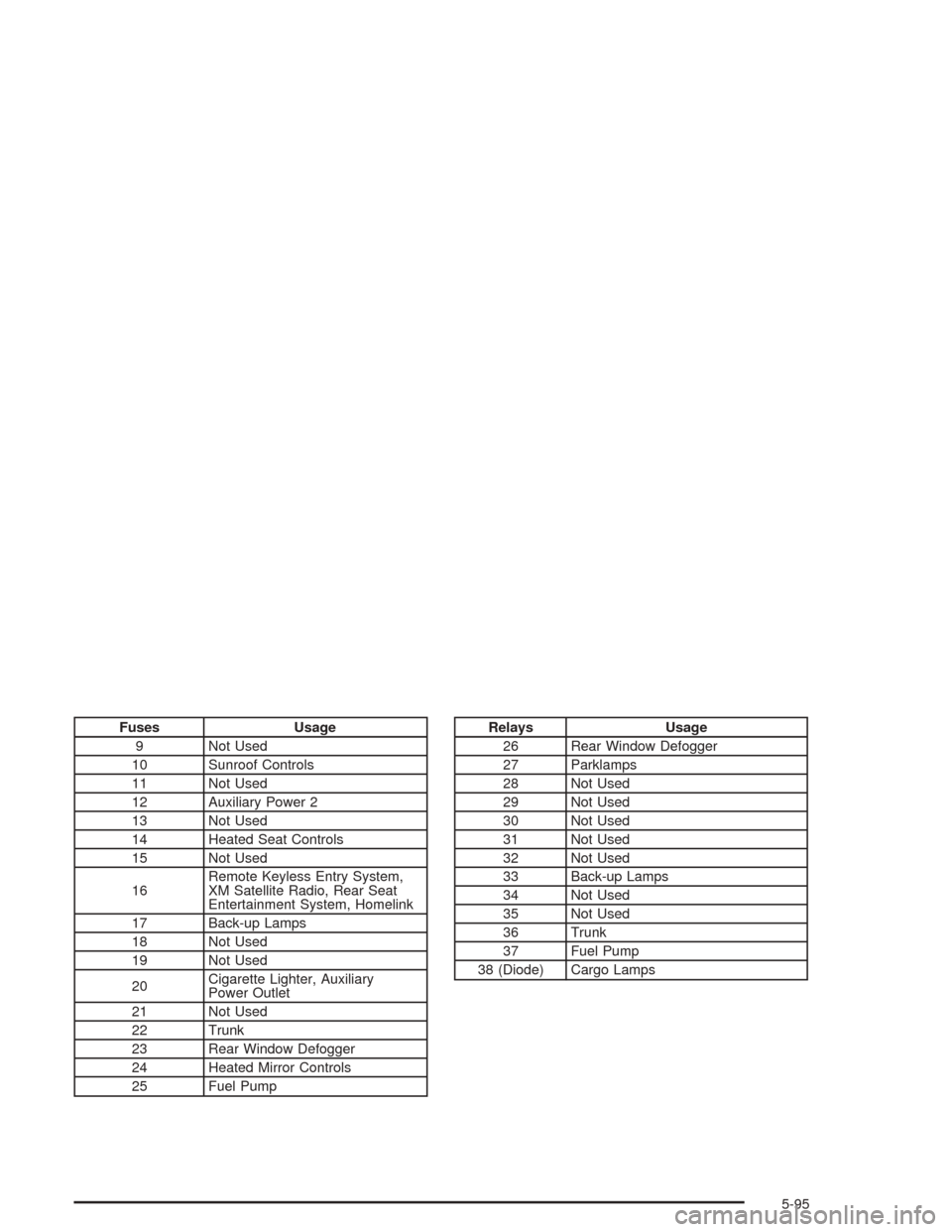
Fuses Usage
9 Not Used
10 Sunroof Controls
11 Not Used
12 Auxiliary Power 2
13 Not Used
14 Heated Seat Controls
15 Not Used
16Remote Keyless Entry System,
XM Satellite Radio, Rear Seat
Entertainment System, Homelink
17 Back-up Lamps
18 Not Used
19 Not Used
20Cigarette Lighter, Auxiliary
Power Outlet
21 Not Used
22 Trunk
23 Rear Window Defogger
24 Heated Mirror Controls
25 Fuel PumpRelays Usage
26 Rear Window Defogger
27 Parklamps
28 Not Used
29 Not Used
30 Not Used
31 Not Used
32 Not Used
33 Back-up Lamps
34 Not Used
35 Not Used
36 Trunk
37 Fuel Pump
38 (Diode) Cargo Lamps
5-95
Page 411 of 426
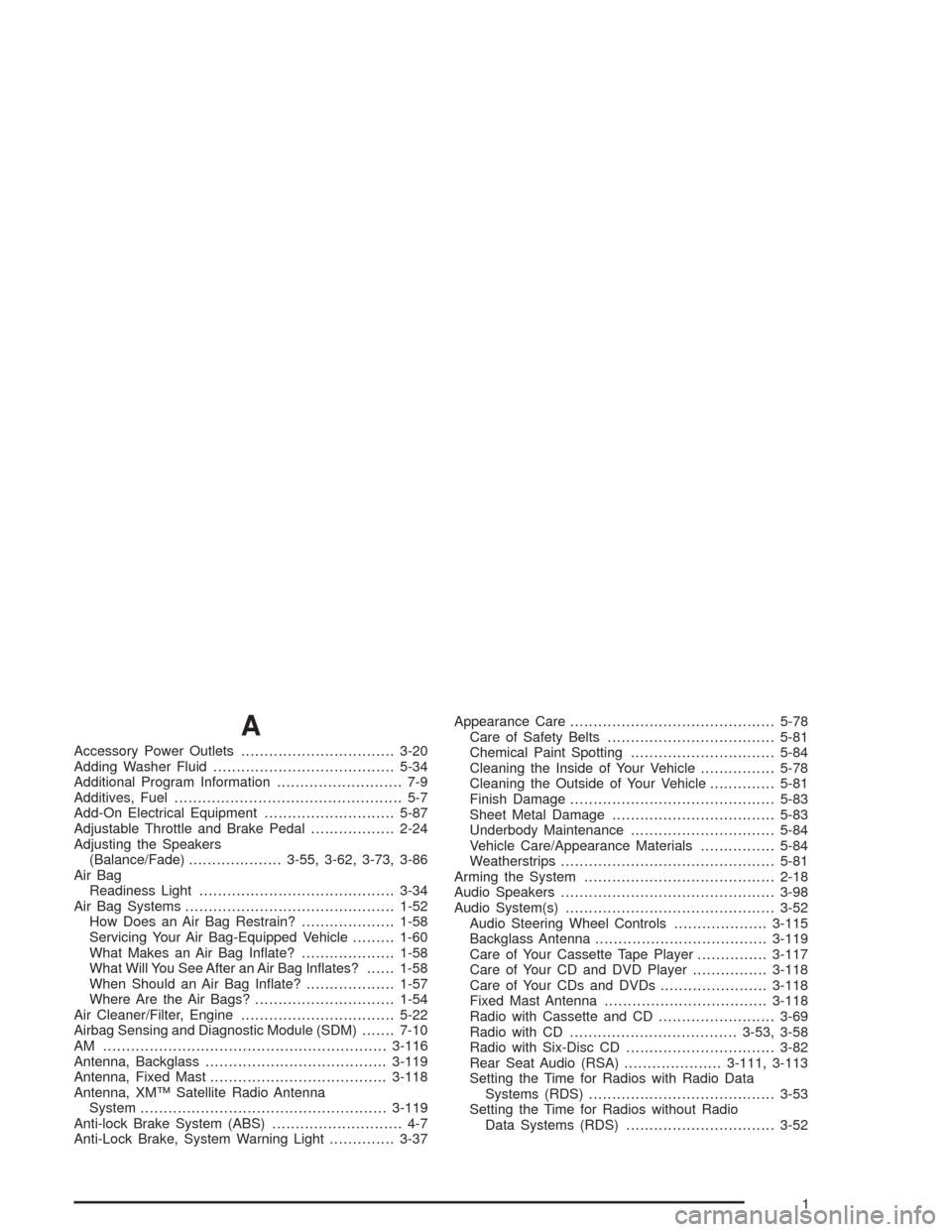
A
Accessory Power Outlets.................................3-20
Adding Washer Fluid.......................................5-34
Additional Program Information........................... 7-9
Additives, Fuel................................................. 5-7
Add-On Electrical Equipment............................5-87
Adjustable Throttle and Brake Pedal..................2-24
Adjusting the Speakers
(Balance/Fade)....................3-55, 3-62, 3-73, 3-86
Air Bag
Readiness Light..........................................3-34
Air Bag Systems.............................................1-52
How Does an Air Bag Restrain?....................1-58
Servicing Your Air Bag-Equipped Vehicle.........1-60
What Makes an Air Bag Inate?....................1-58
What Will You See After an Air Bag Inates?......1-58
When Should an Air Bag Inate?...................1-57
Where Are the Air Bags?..............................1-54
Air Cleaner/Filter, Engine.................................5-22
Airbag Sensing and Diagnostic Module (SDM).......7-10
AM .............................................................3-116
Antenna, Backglass.......................................3-119
Antenna, Fixed Mast......................................3-118
Antenna, XM™ Satellite Radio Antenna
System.....................................................3-119
Anti-lock Brake System (ABS)............................ 4-7
Anti-Lock Brake, System Warning Light..............3-37Appearance Care............................................5-78
Care of Safety Belts....................................5-81
Chemical Paint Spotting...............................5-84
Cleaning the Inside of Your Vehicle................5-78
Cleaning the Outside of Your Vehicle..............5-81
Finish Damage............................................5-83
Sheet Metal Damage...................................5-83
Underbody Maintenance...............................5-84
Vehicle Care/Appearance Materials................5-84
Weatherstrips..............................................5-81
Arming the System.........................................2-18
Audio Speakers..............................................3-98
Audio System(s).............................................3-52
Audio Steering Wheel Controls....................3-115
Backglass Antenna.....................................3-119
Care of Your Cassette Tape Player...............3-117
Care of Your CD and DVD Player................3-118
Care of Your CDs and DVDs.......................3-118
Fixed Mast Antenna...................................3-118
Radio with Cassette and CD.........................3-69
Radio with CD....................................3-53, 3-58
Radio with Six-Disc CD................................3-82
Rear Seat Audio (RSA).....................3-111, 3-113
Setting the Time for Radios with Radio Data
Systems (RDS)........................................3-53
Setting the Time for Radios without Radio
Data Systems (RDS)................................3-52
1
Page 420 of 426
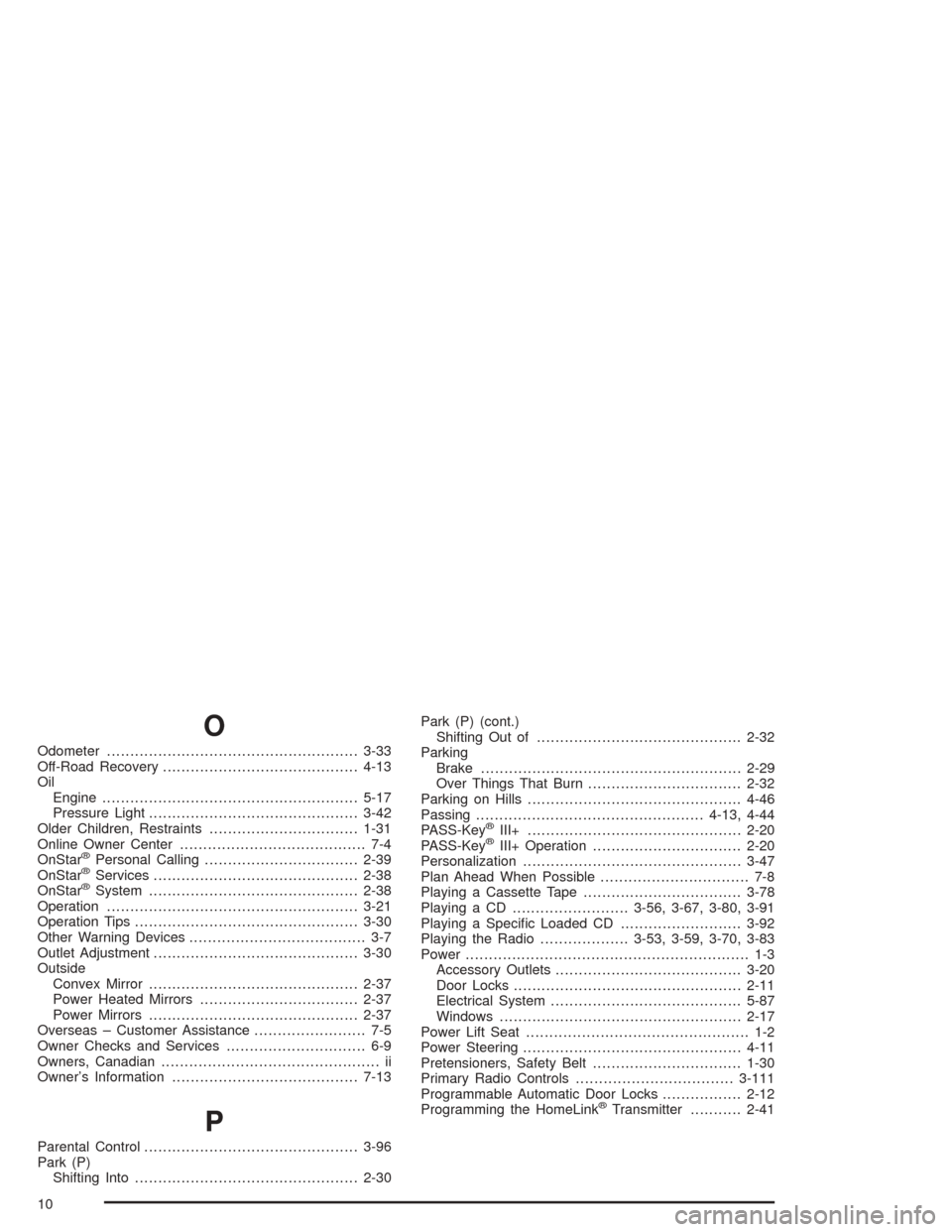
O
Odometer......................................................3-33
Off-Road Recovery..........................................4-13
Oil
Engine.......................................................5-17
Pressure Light.............................................3-42
Older Children, Restraints................................1-31
Online Owner Center........................................ 7-4
OnStar
®Personal Calling.................................2-39
OnStar®Services............................................2-38
OnStar®System.............................................2-38
Operation......................................................3-21
Operation Tips................................................3-30
Other Warning Devices...................................... 3-7
Outlet Adjustment............................................3-30
Outside
Convex Mirror.............................................2-37
Power Heated Mirrors..................................2-37
Power Mirrors.............................................2-37
Overseas – Customer Assistance........................ 7-5
Owner Checks and Services.............................. 6-9
Owners, Canadian............................................... ii
Owner’s Information........................................7-13
P
Parental Control..............................................3-96
Park (P)
Shifting Into................................................2-30Park (P) (cont.)
Shifting Out of............................................2-32
Parking
Brake........................................................2-29
Over Things That Burn.................................2-32
Parking on Hills..............................................4-46
Passing.................................................4-13, 4-44
PASS-Key
®III+..............................................2-20
PASS-Key®III+ Operation................................2-20
Personalization...............................................3-47
Plan Ahead When Possible................................ 7-8
Playing a Cassette Tape..................................3-78
Playing a CD.........................3-56, 3-67, 3-80, 3-91
Playing a Specic Loaded CD..........................3-92
Playing the Radio...................3-53, 3-59, 3-70, 3-83
Power............................................................. 1-3
Accessory Outlets........................................3-20
Door Locks.................................................2-11
Electrical System.........................................5-87
Windows....................................................2-17
Power Lift Seat................................................ 1-2
Power Steering...............................................4-11
Pretensioners, Safety Belt................................1-30
Primary Radio Controls..................................3-111
Programmable Automatic Door Locks.................2-12
Programming the HomeLink
®Transmitter...........2-41
10