2004 CHEVROLET MALIBU center console
[x] Cancel search: center consolePage 70 of 426
OnStar®System.............................................2-38
HomeLink®Transmitter...................................2-40
Programming the HomeLink®Transmitter.........2-41
Storage Areas................................................2-44
Glove Box...................................................2-44
Cupholder(s)................................................2-44
Center Console Storage Area.........................2-45Map Pocket.................................................2-45
Rear Compartment Storage Panel/Cover..........2-45
Table..........................................................2-47
Convenience Net..........................................2-47
Sunroof.........................................................2-48
Section 2 Features and Controls
2-2
Page 112 of 426
Reprogramming a Single HomeLink®
Button
To program a device to HomeLink®using a HomeLink®
button previously trained, follow these steps:
1. Press and hold the desired HomeLink
®button. Do
not release the button.
2. The indicator light will begin to ash after
20 seconds. While still holding the HomeLink
®
button, proceed with Step 2 under “Programming
HomeLink®.”
Resetting Defaults
To reset HomeLink®to default settings do the following:
1. Hold down the two outside buttons for about
20 seconds until the indicator light begins to ash.
2. Continue to hold both buttons until the HomeLink
®
indicator light turns off.
3. Release both buttons.
For questions or comments, contact HomeLink
®at
1-800-355-3515, or on the internet at
www.homelink.com.
Storage Areas
Glove Box
To open, pull the handle down and pull the glove box
door down until it stops and is fully open.
Cupholder(s)
The center console provides space for holding a cup or
soft drink container. One cupholder is located at the
rear of the shift lever and one is to the side of the shift
lever.
Pull down the door on the rear of the center console to
use the rear seat cupholders.
2-44
Page 113 of 426
Center Console Storage Area
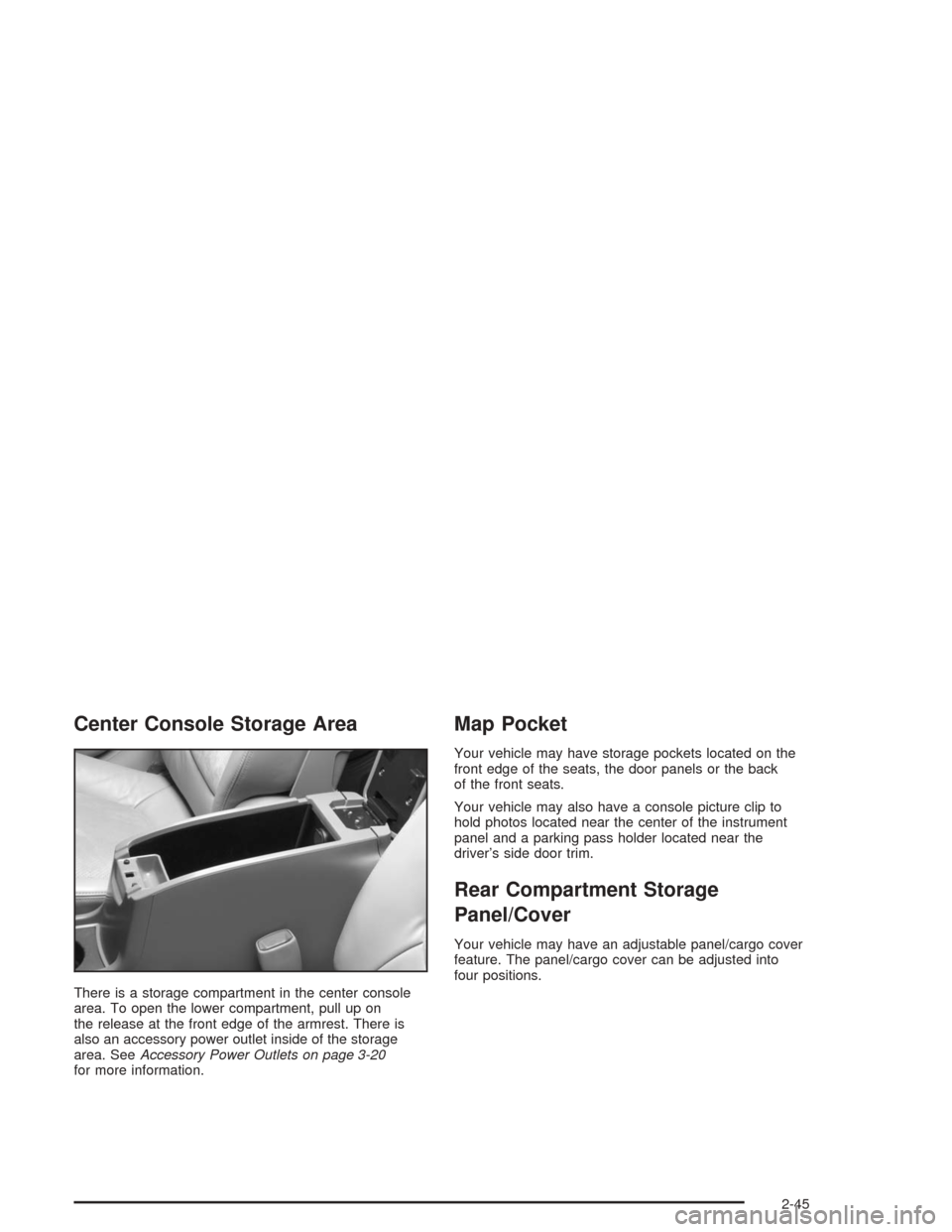
There is a storage compartment in the center console
area. To open the lower compartment, pull up on
the release at the front edge of the armrest. There is
also an accessory power outlet inside of the storage
area. SeeAccessory Power Outlets on page 3-20
for more information.
Map Pocket
Your vehicle may have storage pockets located on the
front edge of the seats, the door panels or the back
of the front seats.
Your vehicle may also have a console picture clip to
hold photos located near the center of the instrument
panel and a parking pass holder located near the
driver’s side door trim.
Rear Compartment Storage
Panel/Cover
Your vehicle may have an adjustable panel/cargo cover
feature. The panel/cargo cover can be adjusted into
four positions.
2-45
Page 121 of 426
The main components of your instrument panel are
the following:
A. Side Window Outlets. SeeClimate Control System
on page 3-21.
B. Turn Signal/Multifunction Lever. SeeTurn
Signal/Multifunction Lever on page 3-8.
C. Steering Wheel Controls and Cruise Controls.
SeeAudio Steering Wheel Controls on page 3-115
and “Cruise Control” underTurn Signal/Multifunction
Lever on page 3-8.
D. Instrument Panel Cluster. SeeInstrument Panel
Cluster on page 3-32.
E. Windshield Wiper/Washer Lever. See “Windshield
Wipers” underTurn Signal/Multifunction Lever
on page 3-8.
F. Ignition Switch. SeeIgnition Positions on page 2-22.
G. Hazard Warning Flasher. SeeHazard Warning
Flashers on page 3-6.
H. Center Air Outlets. SeeClimate Control System
on page 3-21.
I. Audio System. SeeAudio System(s) on page 3-52.
J. Climate Control System. SeeClimate Control
System on page 3-21.K. Glove Box. SeeGlove Box on page 2-44.
L. Side Air Outlets. SeeClimate Control System
on page 3-21.
M. Adjustable Pedal Buttons. SeeAdjustable Throttle
and Brake Pedal on page 2-24.
N. Instrument Panel Brightness Control. See “Instrument
Panel Brightness” underInterior Lamps on page 3-19.
O. Storage Compartment
P. Fog Lamps. SeeExterior Lamps on page 3-14.
Q. Hood Release. SeeHood Release on page 5-12.
R. Parking Brake. SeeParking Brake on page 2-29.
S. Horn. SeeHorn on page 3-7.
T. Accessory Power Outlet. SeeAccessory Power
Outlets on page 3-20.
U. Shift Lever. SeeShifting Into Park (P) on page 2-30.
V. Center Console Storage Compartment. See
Center Console Storage Area on page 2-45.
W. Traction Control Button (If Equipped). SeeEnhanced
Traction System (ETS) on page 4-9.
3-5
Page 136 of 426
Cargo Lamp
If your vehicle is the MAXX model, it has a cargo lamp.
The cargo lamp comes on when the liftgate is opened.
If you want to leave the liftgate open you can turn off the
cargo lamp by pushing on the lens.
Battery Run-Down Protection
Your vehicle has a battery run-down protection feature
designed to protect your vehicle’s battery.
When any interior lamp (trunk, reading, or visor vanity)
is left on while the ignition is turned off, the battery
run-down protection system will automatically shut the
lamp(s) off after 20 minutes. This will avoid draining
the battery.
To reactivate the interior lamps, do one of the following:
Turn on the ignition.
Turn the exterior lamp control off and then on.
Open a door.
Press any remote keyless entry transmitter button
(if equipped).
Press the remote trunk release button.
Press the power door lock switch.The battery run-down feature will also be activated
when any door on the vehicle is left open and the
ignition is in OFF.
Accessory Power Outlets
With accessory power outlets you can plug in auxiliary
electrical equipment such as a cellular telephone.
For vehicles with anti-lock brake system (ABS), the
accessory power outlets are located on the front of the
center console storage area and also inside the
console storage compartment. Vehicles without ABS,
both outlets are located on the front of the center
console storage area. The compartment has notches
that allow power cords to be routed outside of the
console while the lid is closed. There is also an outlet in
the rear cargo area of the MAXX.
Notice:Leaving electrical equipment on for
extended periods will drain the battery. Always turn
off electrical equipment when not in use and do
not plug in equipment that exceeds the maximum
amperage rating.
3-20
Page 153 of 426
Anti-Lock Brake System
Warning Light
If your vehicle has the
anti-lock brake system,
the light will come on
when your engine
is started and may stay
on for several seconds.
That’s normal.
If the light stays on, turn the ignition to OFF. Or, if the
light comes on and the chime sounds when you’re
driving, stop as soon as possible and turn the ignition off.
Then start the engine again to reset the system. If the
light still stays on, or comes on again while you’re driving,
your vehicle needs service. If the regular brake system
warning light isn’t on, you still have brakes, but you
don’t have anti-lock brakes. If the regular brake system
warning light is also on, you don’t have anti-lock brakes
and there’s a problem with your regular brakes. See
Brake System Warning Light on page 3-36earlier in
this section.
The anti-lock brake system warning light will come on
briey when you turn the ignition key to ON. This is
normal. If the light doesn’t come on then, have it xed
so it will be ready to warn you if there is a problem.
Enhanced Traction System
Warning Light
If your vehicle has the
Enhanced Traction
System (ETS), this light
may come on for the
following reasons:
If you turn the system off by pressing the TC
(traction control) button located on the center
console, the light will come on and stay on.
To turn the system back on, press the button
again and the warning light should go out.
If there’s a brake system problem that is
specically related to traction control, the ETS
will turn off and the warning light will come on.
If your brakes begin to overheat, the ETS; will
turn off and the warning light will come on until
the brakes cool down.
If the traction control system warning light comes on
and stays on for an extended period of time when the
system is turned on, your vehicle needs service.
3-37
Page 246 of 426
The Enhanced Traction System operates in all transaxle
shift lever positions. But the system can upshift the
transaxle only as high as the shift lever position you’ve
chosen, so you should use the lower gears only
when necessary.
When the system is on
and the parking brake is
fully released, this warning
light will come on to let
you know if there’s a
problem.
When this warning light is on, the system will not limit
wheel spin. Adjust your driving accordingly.
To limit wheel spin, especially in slippery road
conditions, you should always leave the Enhanced
Traction System on. But you can turn the system off if
you prefer.To turn the system on or
off, press the ETS button
on the center console
under the climate control
system.
When you turn the system off, the Enhanced Traction
System warning light will come on and stay on. If
the Enhanced Traction System is limiting wheel spin
when you press the button to turn the system off,
the warning light will come on – but the system won’t
turn off right away. It will wait until there’s no longer
a current need to limit wheel spin.
You can turn the system back on at any time by
pressing the button again. The Enhanced Traction
System OFF warning light should go off.
4-10
Page 370 of 426
Fuses
The wiring circuits in your vehicle are protected from
short circuits by fuses and fusible thermal links in
the wiring itself.
Look at the silver-colored band inside the fuse. If the
band is broken or melted, replace the fuse. Be sure you
replace a bad fuse with a new one of the identical
size and rating.
If you ever have a problem on the road and don’t have
a spare fuse, you can borrow one that has the same
amperage. Just pick a feature of your vehicle that
you can get along without — like the radio or cigarette
lighter — and use its fuse, if it is the correct amperage.
Replace it as soon as you can.There are three fuse blocks in your vehicle: one in the
center of the instrument panel, one in the engine
compartment and one in the trunk.
There is a fuse puller located on the instrument panel
fuse block. It can be used to easily remove fuses
from the fuse block.
The instrument panel fuse blocks is located at on the
lower front side of the console, on the passenger side of
the vehicle. To access the fuses, open the fuse panel
door by pulling out.
To reinstall the door, insert the hooks at the front end
rst, then push the door into the center console panel to
secure it.
5-88