Page 3139 of 4179
MULTI-REMOTE CONTROL SYSTEM
BL-85
C
D
E
F
G
H
J
K
L
MA
B
BL
Time Control Unit Unlock Signal Circuit CheckEIS008EW
1. CHECK TIME CONTROL UNIT OUTPUT SIGNAL
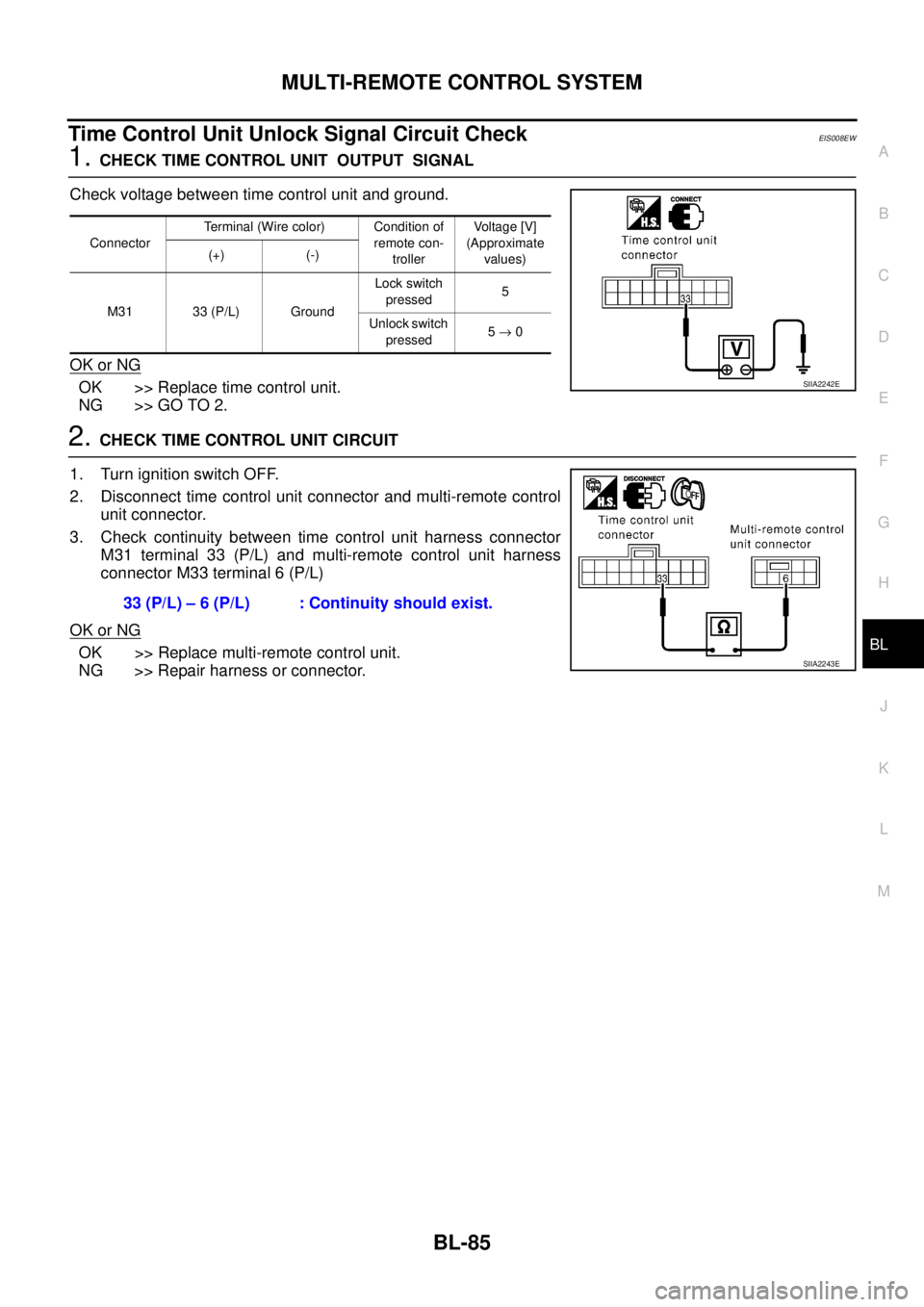
Check voltage between time control unit and ground.
OK or NG
OK >> Replace time control unit.
NG >> GO TO 2.
2. CHECK TIME CONTROL UNIT CIRCUIT
1. Turn ignition switch OFF.
2. Disconnect time control unit connector and multi-remote control
unit connector.
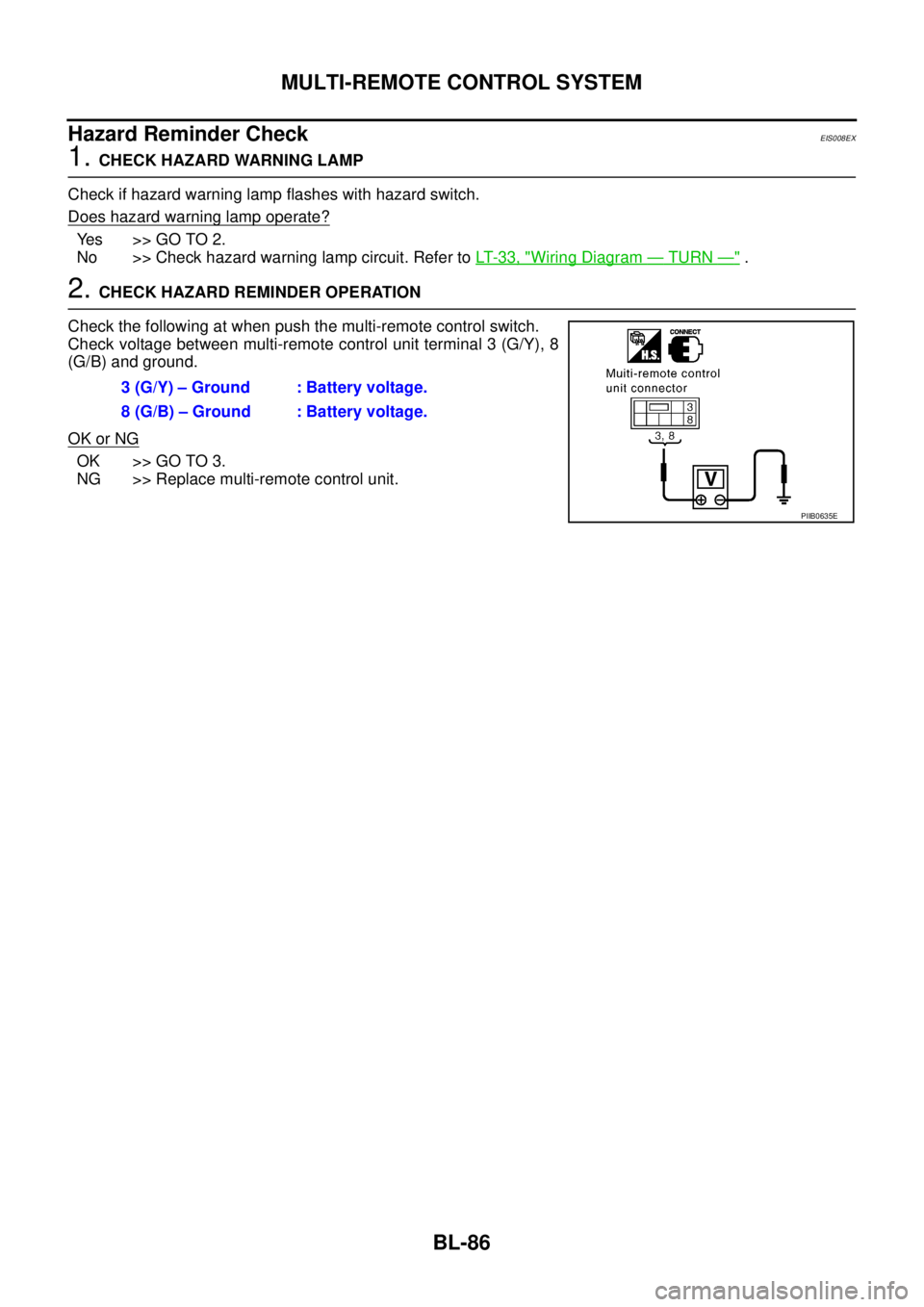
3. Check continuity between time control unit harness connector
M31 terminal 33 (P/L) and multi-remote control unit harness
connector M33 terminal 6 (P/L)
OK or NG
OK >> Replace multi-remote control unit.
NG >> Repair harness or connector.
ConnectorTerminal (Wire color) Condition of
remote con-
trollerVoltage [V]
(Approximate
values) (+) (-)
M31 33 (P/L) GroundLock switch
pressed5
Unlock switch
pressed5 → 0
SIIA2242E
33 (P/L) – 6 (P/L) : Continuity should exist.
SIIA2243E
Page 3140 of 4179
BL-86
MULTI-REMOTE CONTROL SYSTEM
Hazard Reminder CheckEIS008EX
1. CHECK HAZARD WARNING LAMP
Check if hazard warning lamp flashes with hazard switch.
Does hazard warning lamp operate?
Yes >> GO TO 2.
No >> Check hazard warning lamp circuit. Refer to LT- 3 3 , "
Wiring Diagram — TURN —" .
2. CHECK HAZARD REMINDER OPERATION
Check the following at when push the multi-remote control switch.
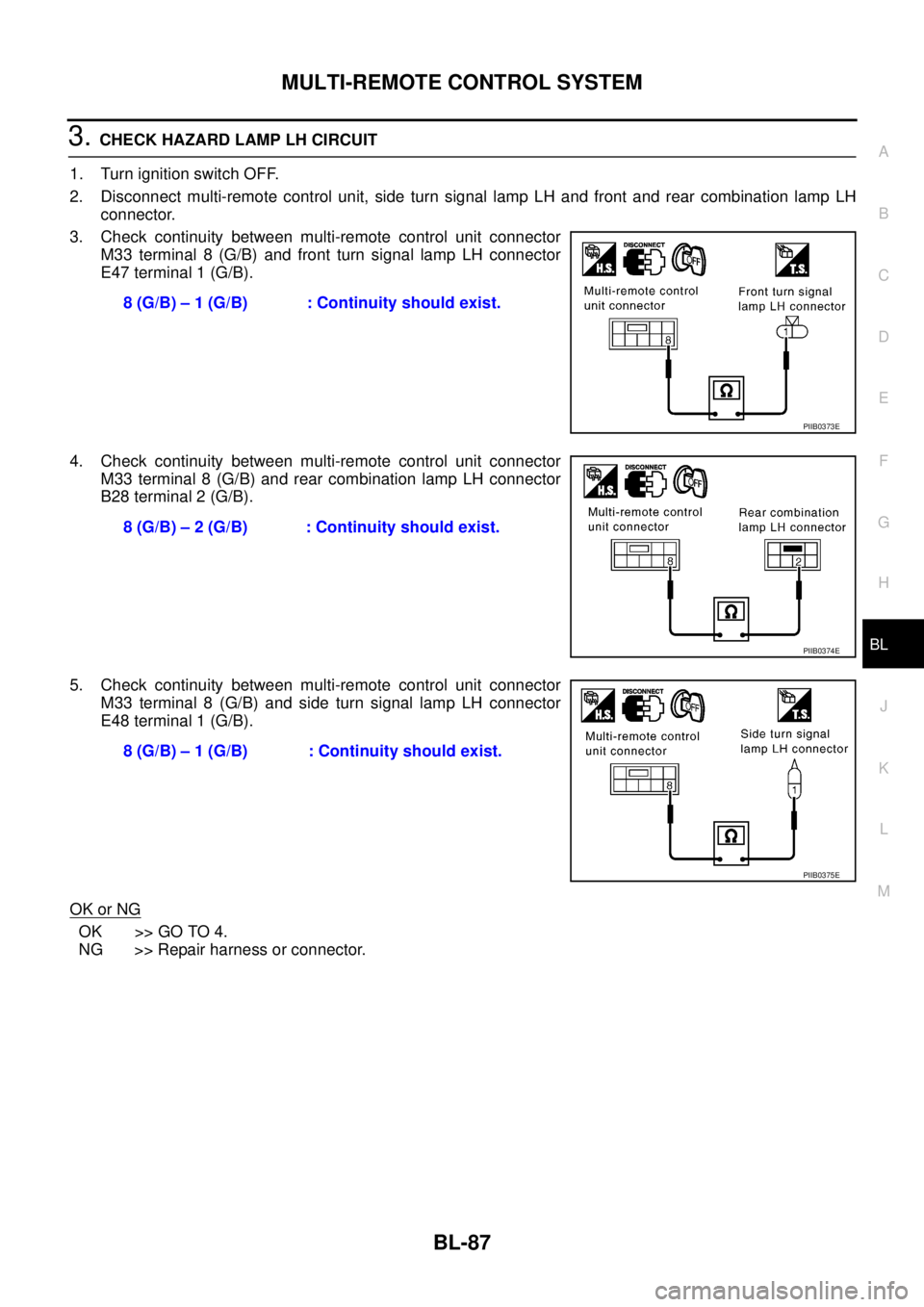
Check voltage between multi-remote control unit terminal 3 (G/Y), 8
(G/B) and ground.
OK or NG
OK >> GO TO 3.
NG >> Replace multi-remote control unit.3 (G/Y) – Ground : Battery voltage.
8 (G/B) – Ground : Battery voltage.
PIIB0635E
Page 3141 of 4179
MULTI-REMOTE CONTROL SYSTEM
BL-87
C
D
E
F
G
H
J
K
L
MA
B
BL
3. CHECK HAZARD LAMP LH CIRCUIT
1. Turn ignition switch OFF.
2. Disconnect multi-remote control unit, side turn signal lamp LH and front and rear combination lamp LH
connector.
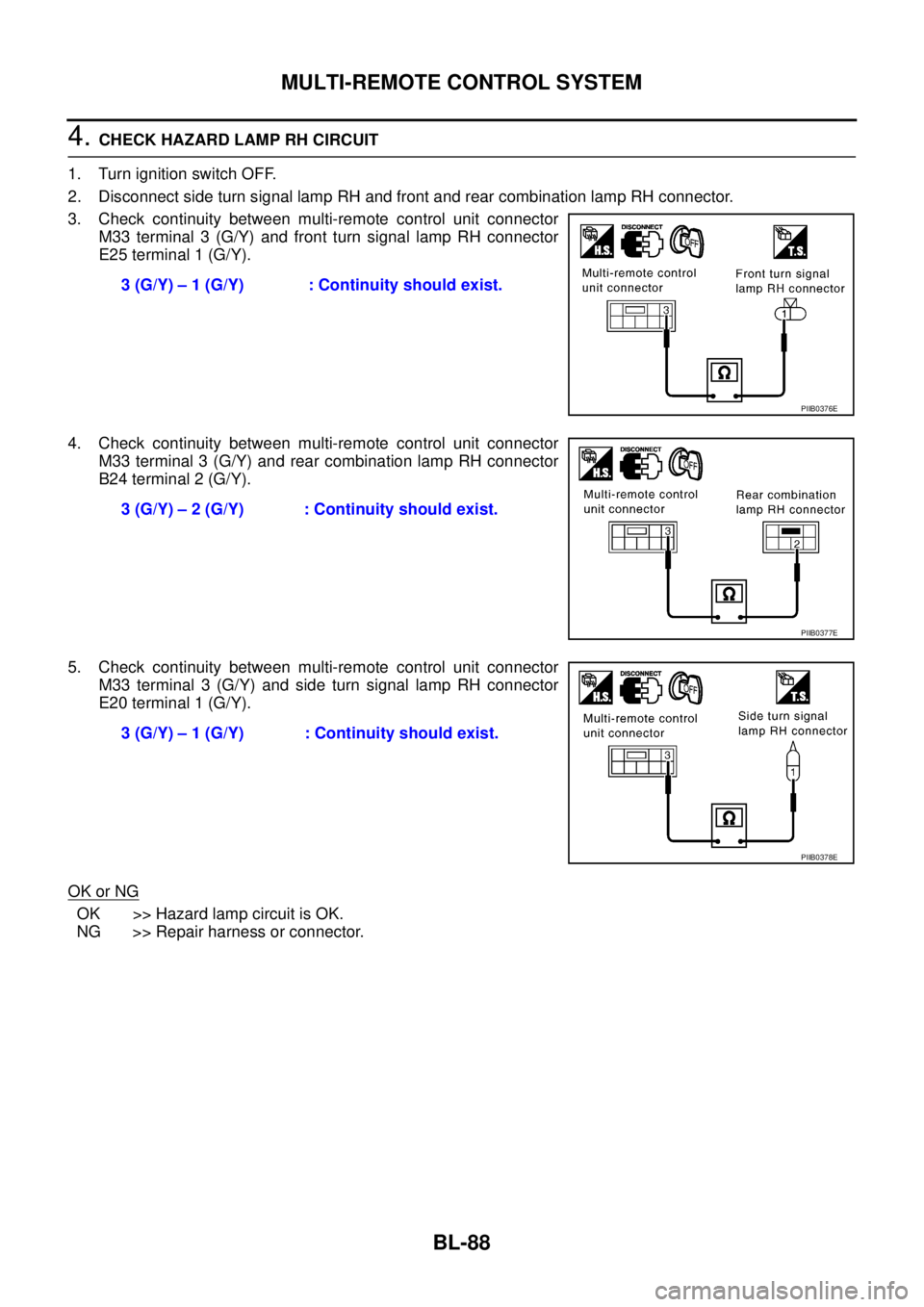
3. Check continuity between multi-remote control unit connector
M33 terminal 8 (G/B) and front turn signal lamp LH connector
E47 terminal 1 (G/B).
4. Check continuity between multi-remote control unit connector
M33 terminal 8 (G/B) and rear combination lamp LH connector
B28 terminal 2 (G/B).
5. Check continuity between multi-remote control unit connector
M33 terminal 8 (G/B) and side turn signal lamp LH connector
E48 terminal 1 (G/B).
OK or NG
OK >> GO TO 4.
NG >> Repair harness or connector.8 (G/B) – 1 (G/B) : Continuity should exist.
PIIB0373E
8 (G/B) – 2 (G/B) : Continuity should exist.
PIIB0374E
8 (G/B) – 1 (G/B) : Continuity should exist.
PIIB0375E
Page 3142 of 4179
BL-88
MULTI-REMOTE CONTROL SYSTEM
4. CHECK HAZARD LAMP RH CIRCUIT
1. Turn ignition switch OFF.
2. Disconnect side turn signal lamp RH and front and rear combination lamp RH connector.
3. Check continuity between multi-remote control unit connector
M33 terminal 3 (G/Y) and front turn signal lamp RH connector
E25 terminal 1 (G/Y).
4. Check continuity between multi-remote control unit connector
M33 terminal 3 (G/Y) and rear combination lamp RH connector
B24 terminal 2 (G/Y).
5. Check continuity between multi-remote control unit connector
M33 terminal 3 (G/Y) and side turn signal lamp RH connector
E20 terminal 1 (G/Y).
OK or NG
OK >> Hazard lamp circuit is OK.
NG >> Repair harness or connector.3 (G/Y) – 1 (G/Y) : Continuity should exist.
PIIB0376E
3 (G/Y) – 2 (G/Y) : Continuity should exist.
PIIB0377E
3 (G/Y) – 1 (G/Y) : Continuity should exist.
PIIB0378E
Page 3143 of 4179
MULTI-REMOTE CONTROL SYSTEM
BL-89
C
D
E
F
G
H
J
K
L
MA
B
BL
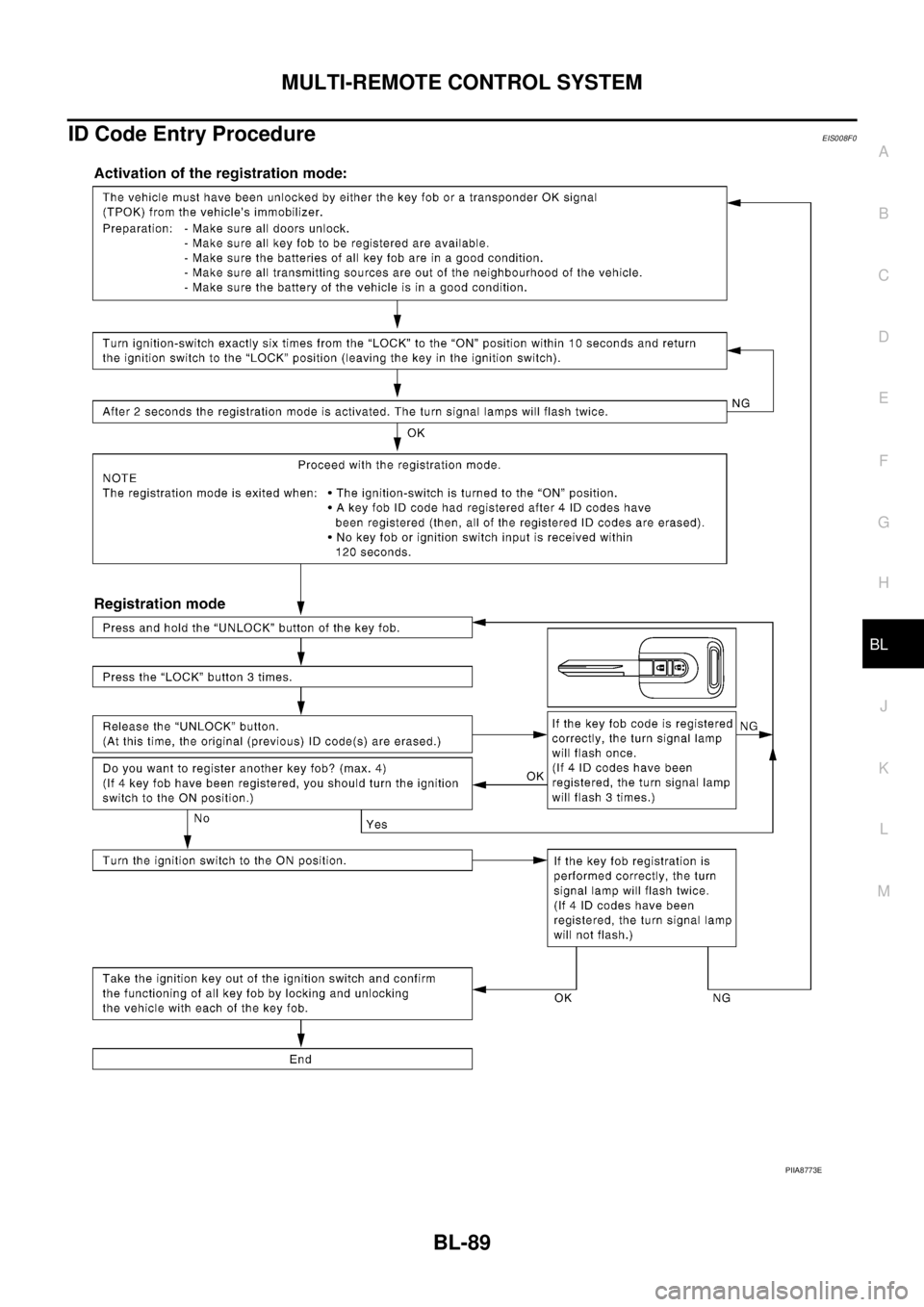
ID Code Entry ProcedureEIS008F0
PIIA8773E
Page 3144 of 4179
BL-90
MULTI-REMOTE CONTROL SYSTEM
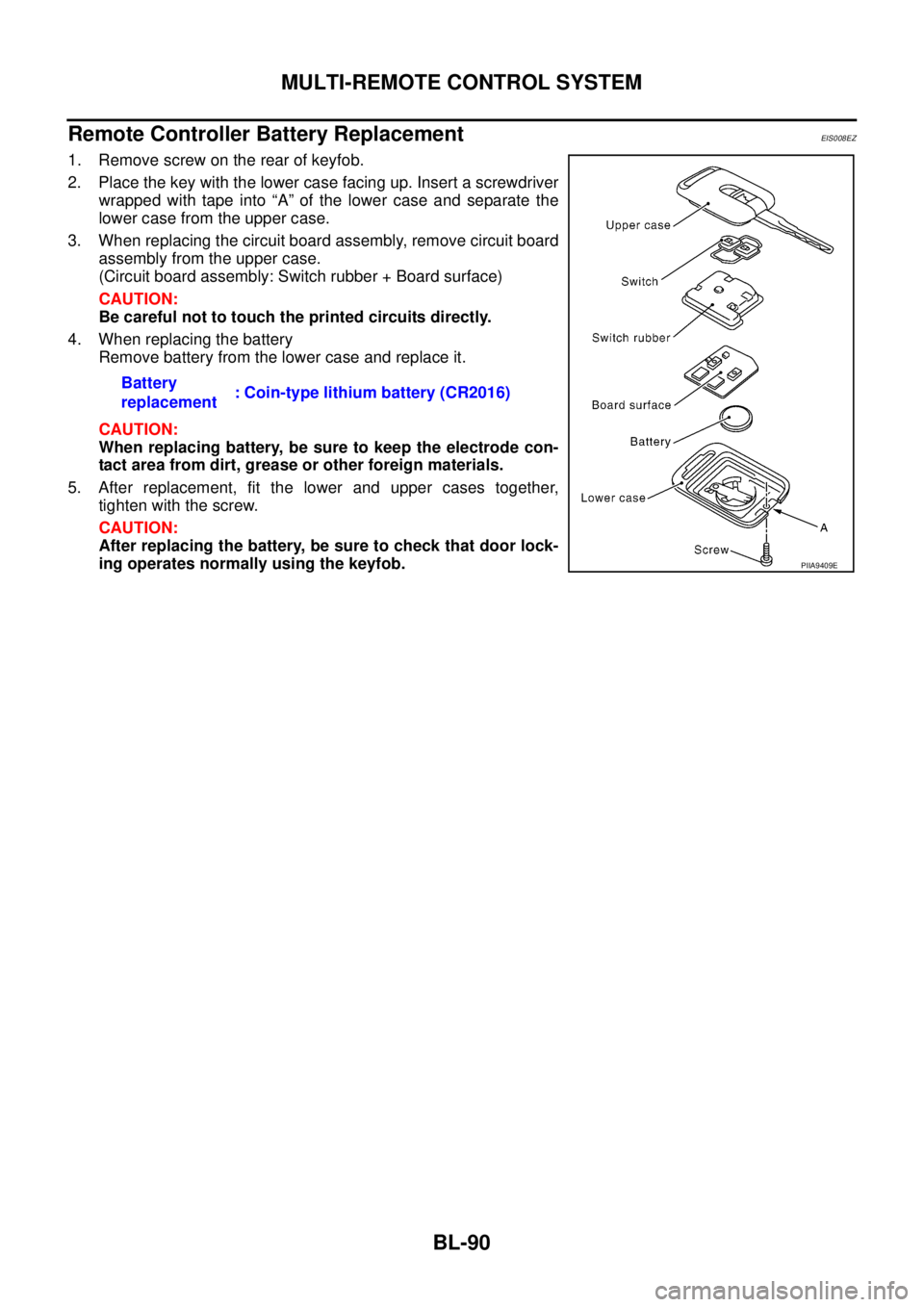
Remote Controller Battery ReplacementEIS008EZ
1. Remove screw on the rear of keyfob.
2. Place the key with the lower case facing up. Insert a screwdriver
wrapped with tape into “A” of the lower case and separate the
lower case from the upper case.
3. When replacing the circuit board assembly, remove circuit board
assembly from the upper case.
(Circuit board assembly: Switch rubber + Board surface)
CAUTION:
Be careful not to touch the printed circuits directly.
4. When replacing the battery
Remove battery from the lower case and replace it.
CAUTION:
When replacing battery, be sure to keep the electrode con-
tact area from dirt, grease or other foreign materials.
5. After replacement, fit the lower and upper cases together,
tighten with the screw.
CAUTION:
After replacing the battery, be sure to check that door lock-
ing operates normally using the keyfob. Battery
replacement: Coin-type lithium battery (CR2016)
PIIA9409E
Page 3776 of 4179

BCS-6
TIME CONTROL UNIT
15 W/GSeat belt warning lamp
(passenger side)Seat belt warning lamp (passenger
side) is illuminated (seat belt is unfas-
tened).12V
Seat belt warning lamp (passenger
side) is not illuminated (seat belt is
unfastened).0V
16 B/R Ground — 0V
17 G Ignition switch (ON) — 12V
18 W/L Ignition key switch (Insert)Key inserted → key removed from Igni-
tion key cylinder12V → 0V
19 R/L Lighting switch 1ST, 2ND position: ON → OFF 12V → 0V
20 GY Door lock/unlock switch Neutral → Locked 5V → 0V
21 BR/WSeat belt buckle switch
(driver side)Seat belt buckle switch (driver side) is
unfastened.*20V
Seat belt buckle switch (driver side) is
fastened.*212V
22 G/ORSeat belt buckle switch
(passenger side)Seat belt buckle switch (passenger
side) is unfastened.0V
Seat belt buckle switch (passenger
side) is fastened.12V
23 PU Door lock/unlock switchNeutral → Door lock/Unlock switch is
pushed.5V → 0V
24 LG/RDoor key cylinder switch
(driver side)OFF (neutral) → ON (locked) 5V → 0V
25 GY/LDoor key cylinder switch
(driver side)OFF (neutral) → ON (unlocked) 5V → 0V
26 R/Y Interior room lampWhen interior room lamp is operated
using remote controller
(Lamp switch is “DOOR” position.)12V → 0V
27 G/W Rear window defogger relayOFF → ON
(Ignition key is “ON” position.)12V → 0V
28 Y/G Door unlock sensor (driver side) Driver door: Locked → Unlocked 10V → 0V
29*1 Y/LDoor unlock sensor
(passenger side)Passenger door: Locked → Unlocked 5V → 0V
30 SB Front door switch (driver side) OFF (closed) → ON (open) 5V → 0V
31 R/W Passenger and rear doors switch OFF (closed) → ON (open) 5V → 0V
32 OR Multi-remote control unitRemote controller lock button is pushed.
(Ignition switch is not “ON” position.)0V → 5V
33 P/L Multi-remote control unitRemote controller unlock button is
pushed.
(Ignition switch is not “ON” position.)0V → 5V
34 B/Y NATS release signal Ignition switch ON→OFF 0V → 5V Terminal
No.Wire
colorConnections Operation condition Voltage (Approximate values)
Page 3920 of 4179
AV-30
AUDIO
26
(L/B)GroundRemote con-
trol AInput ONPress SOURCE
switchApprox.0V
Steering wheel
audio controls
donot function Press SEEK UP
switchApprox.1.7V
Press VOL UP
switchApprox.3.3V
Except for adove Approx.5V
27
(L/R)GroundRemote con-
trol BInput ONPress SPECIAL
switchApprox.0V
Steering wheel
audio controls
donot function Press SEEK
DOWN switchApprox.1.7V
Press VOL UP
switchApprox.3.3V
Except for adove Approx.5V
29
(B)GroundRemote con-
trol ground– ON – Approx.0V – Terminal
(Wire color)
ItemSignal
input/
outputCondition
Reference valueExample of symp-
tom
(+) (–)Igni-
tion
switchOperation