Page 2834 of 3502
LT-146
REAR FOG LAMP
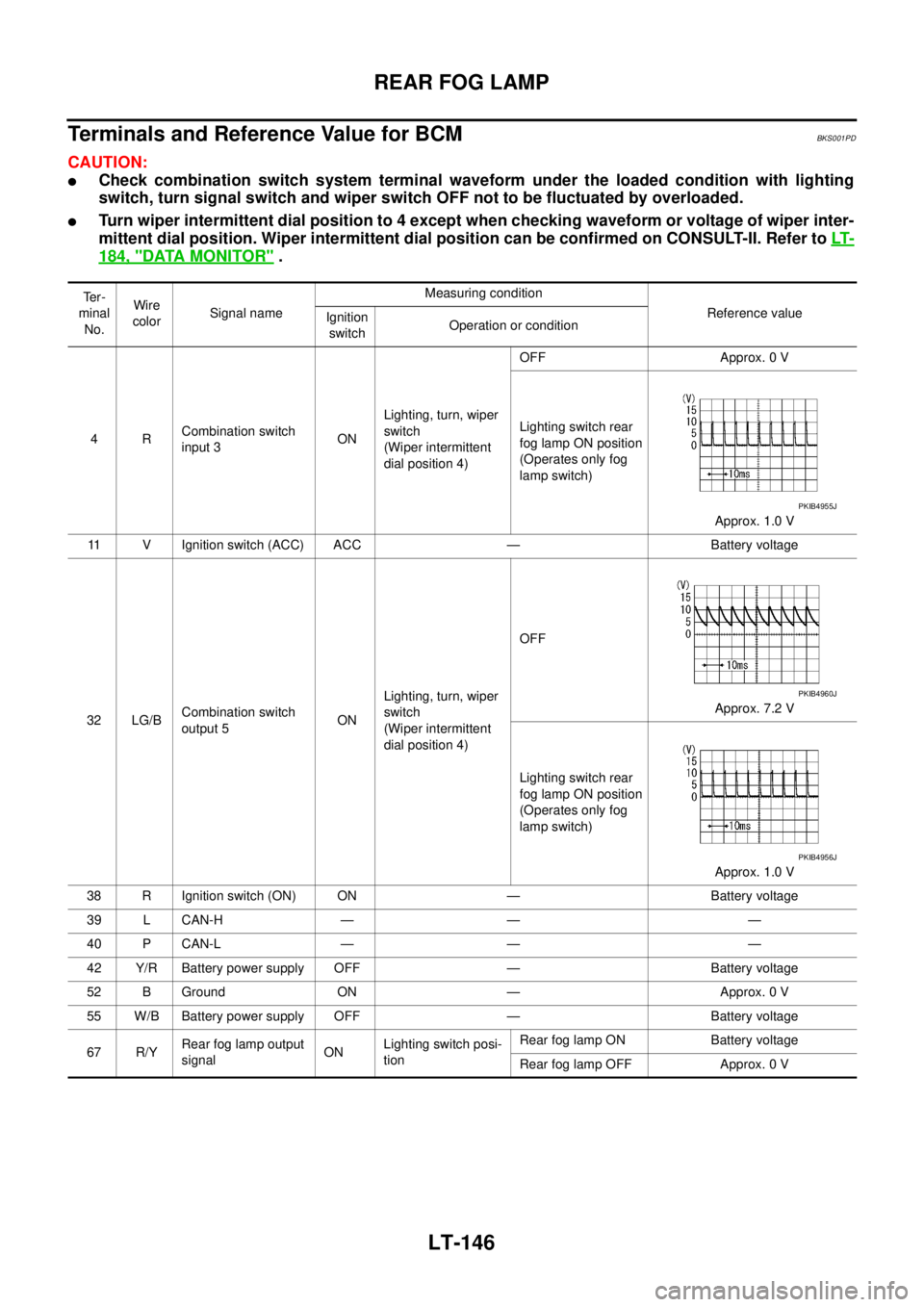
Terminals and Reference Value for BCMBKS001PD
CAUTION:
�Check combination switch system terminal waveform under the loaded condition with lighting
switch, turn signal switch and wiper switch OFF not to be fluctuated by overloaded.
�Turn wiper intermittent dial position to 4 except when checking waveform or voltage of wiper inter-
mittent dial position. Wiper intermittent dial position can be confirmed on CONSULT-II. Refer to LT-
184, "DATA MONITOR" .
Te r -
minal
No.Wire
colorSignal nameMeasuring condition
Reference value
Ignition
switchOperation or condition
4RCombination switch
input 3ONLighting, turn, wiper
switch
(Wiper intermittent
dial position 4)OFF Approx. 0 V
Lighting switch rear
fog lamp ON position
(Operates only fog
lamp switch)
Approx. 1.0 V
11 V Ignition switch (ACC) ACC — Battery voltage
32 LG/BCombination switch
output 5ONLighting, turn, wiper
switch
(Wiper intermittent
dial position 4)OFF
Approx. 7.2 V
Lighting switch rear
fog lamp ON position
(Operates only fog
lamp switch)
Approx. 1.0 V
38 R Ignition switch (ON) ON — Battery voltage
39 L CAN-H — — —
40 P CAN-L — — —
42 Y/R Battery power supply OFF — Battery voltage
52 B Ground ON — Approx. 0 V
55 W/B Battery power supply OFF — Battery voltage
67 R/YRear fog lamp output
signalONLighting switch posi-
tionRear fog lamp ON Battery voltage
Rear fog lamp OFF Approx. 0 V
PKIB4955J
PKIB4960J
PKIB4956J
Page 2836 of 3502
LT-148
REAR FOG LAMP
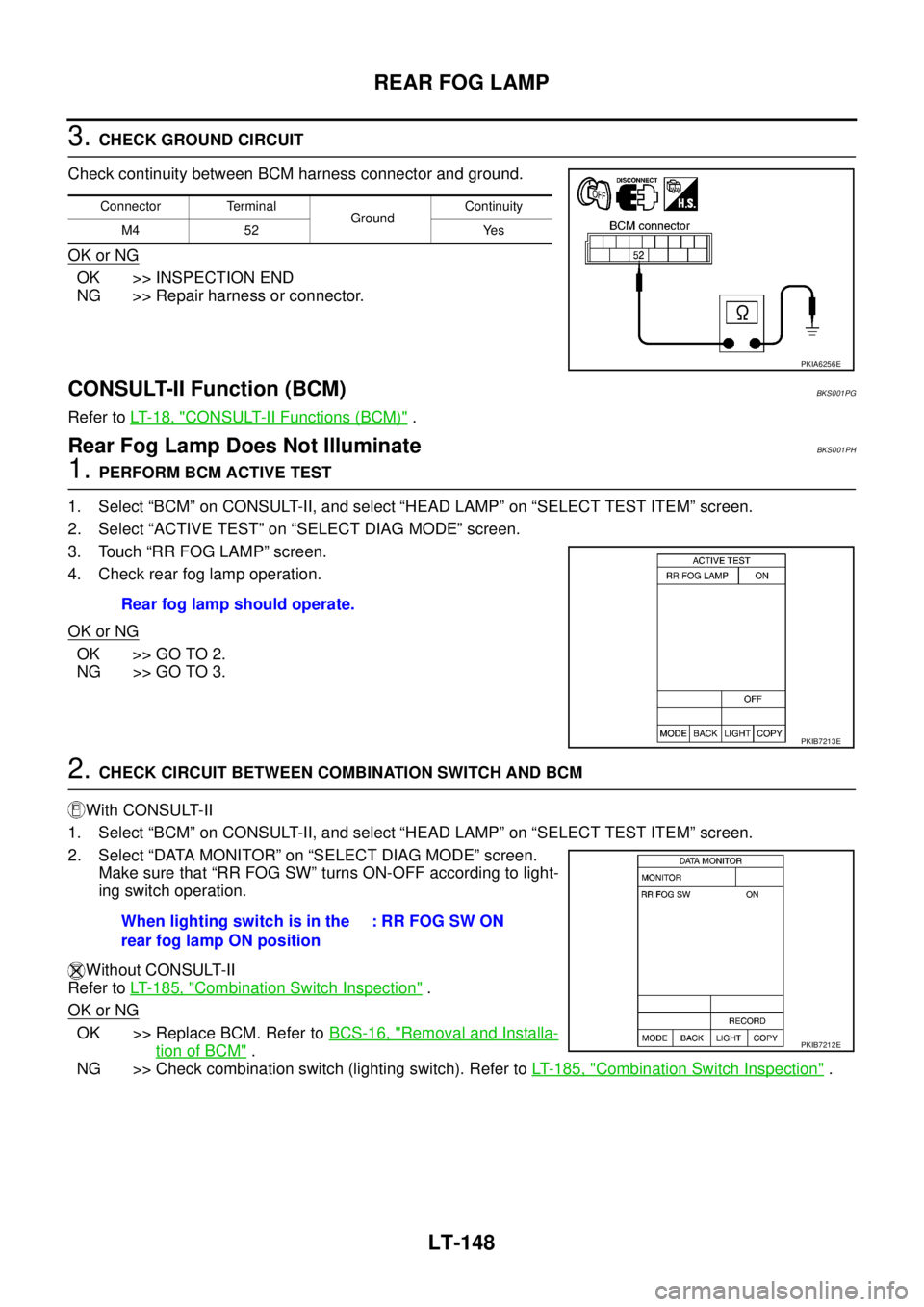
3. CHECK GROUND CIRCUIT
Check continuity between BCM harness connector and ground.
OK or NG
OK >> INSPECTION END
NG >> Repair harness or connector.
CONSULT-II Function (BCM)BKS001PG
Refer to LT- 1 8 , "CONSULT-II Functions (BCM)" .
Rear Fog Lamp Does Not IlluminateBKS001PH
1. PERFORM BCM ACTIVE TEST
1. Select “BCM” on CONSULT-II, and select “HEAD LAMP” on “SELECT TEST ITEM” screen.
2. Select “ACTIVE TEST” on “SELECT DIAG MODE” screen.
3. Touch “RR FOG LAMP” screen.
4. Check rear fog lamp operation.
OK or NG
OK >> GO TO 2.
NG >> GO TO 3.
2. CHECK CIRCUIT BETWEEN COMBINATION SWITCH AND BCM
With CONSULT-II
1. Select “BCM” on CONSULT-II, and select “HEAD LAMP” on “SELECT TEST ITEM” screen.
2. Select “DATA MONITOR” on “SELECT DIAG MODE” screen.
Make sure that “RR FOG SW” turns ON-OFF according to light-
ing switch operation.
Without CONSULT-II
Refer to LT- 1 8 5 , "
Combination Switch Inspection" .
OK or NG
OK >> Replace BCM. Refer to BCS-16, "Removal and Installa-
tion of BCM" .
NG >> Check combination switch (lighting switch). Refer to LT- 1 8 5 , "
Combination Switch Inspection" .
Connector Terminal
GroundContinuity
M4 52 Yes
PKIA6256E
Rear fog lamp should operate.
PKIB7213E
When lighting switch is in the
rear fog lamp ON position: RR FOG SW ON
PKIB7212E
Page 2837 of 3502
REAR FOG LAMP
LT-149
C
D
E
F
G
H
I
J
L
MA
B
LT
3. CHECK CIRCUIT BETWEEN BCM AND REAR FOG LAMP
1. Turn ignition switch OFF.
2. Disconnect BCM connector and rear fog lamp connector.
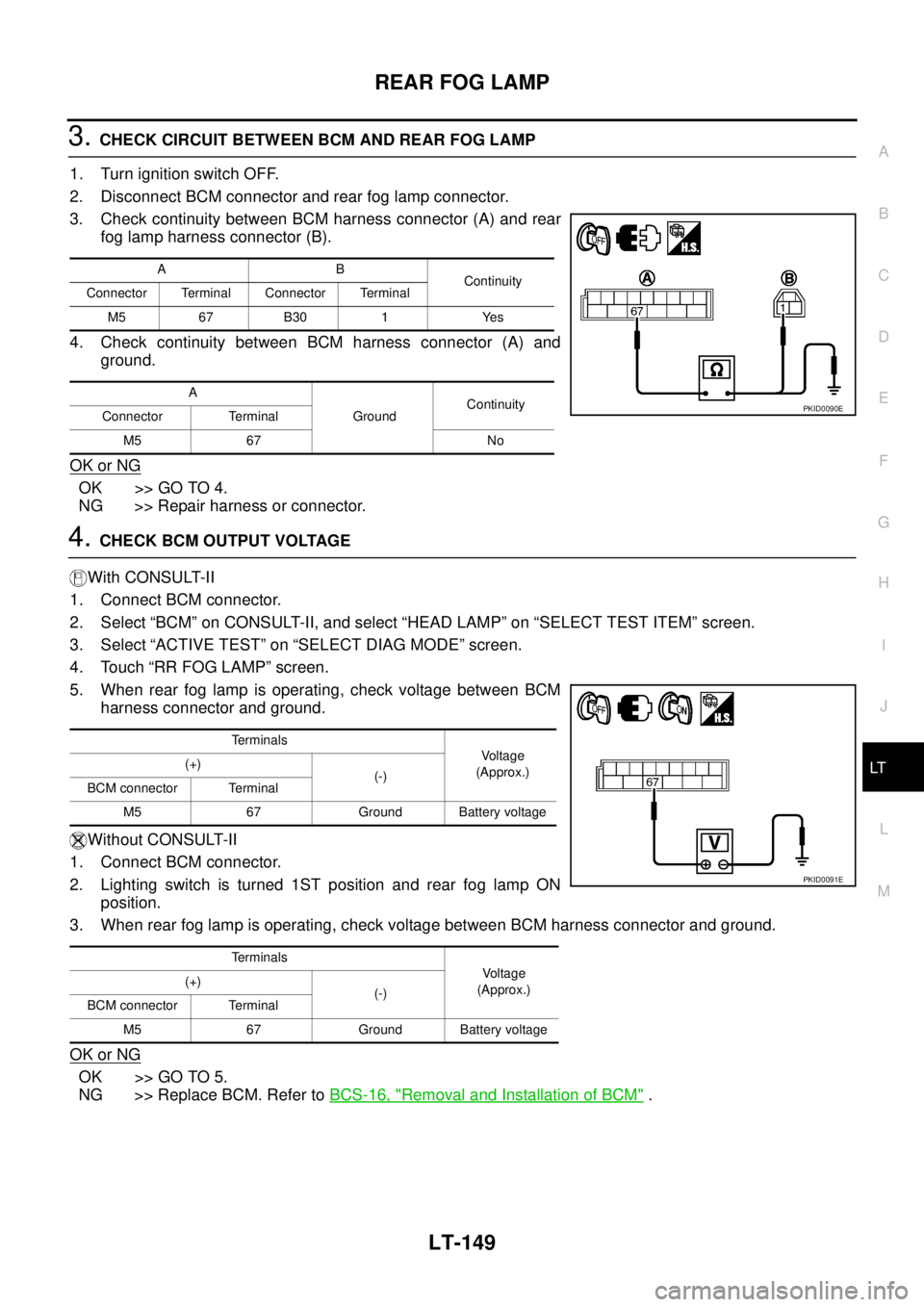
3. Check continuity between BCM harness connector (A) and rear
fog lamp harness connector (B).
4. Check continuity between BCM harness connector (A) and
ground.
OK or NG
OK >> GO TO 4.
NG >> Repair harness or connector.
4. CHECK BCM OUTPUT VOLTAGE
With CONSULT-II
1. Connect BCM connector.
2. Select “BCM” on CONSULT-II, and select “HEAD LAMP” on “SELECT TEST ITEM” screen.
3. Select “ACTIVE TEST” on “SELECT DIAG MODE” screen.
4. Touch “RR FOG LAMP” screen.
5. When rear fog lamp is operating, check voltage between BCM
harness connector and ground.
Without CONSULT-II
1. Connect BCM connector.
2. Lighting switch is turned 1ST position and rear fog lamp ON
position.
3. When rear fog lamp is operating, check voltage between BCM harness connector and ground.
OK or NG
OK >> GO TO 5.
NG >> Replace BCM. Refer to BCS-16, "
Removal and Installation of BCM" .
AB
Continuity
Connector Terminal Connector Terminal
M5 67 B30 1 Yes
A
GroundContinuity
Connector Terminal
M5 67 No
PKID0090E
Terminals
Voltage
(Approx.) (+)
(-)
BCM connector Terminal
M5 67 Ground Battery voltage
Terminals
Voltage
(Approx.) (+)
(-)
BCM connector Terminal
M5 67 Ground Battery voltage
PKID0091E
Page 2838 of 3502
LT-150
REAR FOG LAMP
5. CHECK CIRCUIT BETWEEN REAR FOG LAMP AND GROUND
1. Turn ignition switch OFF.
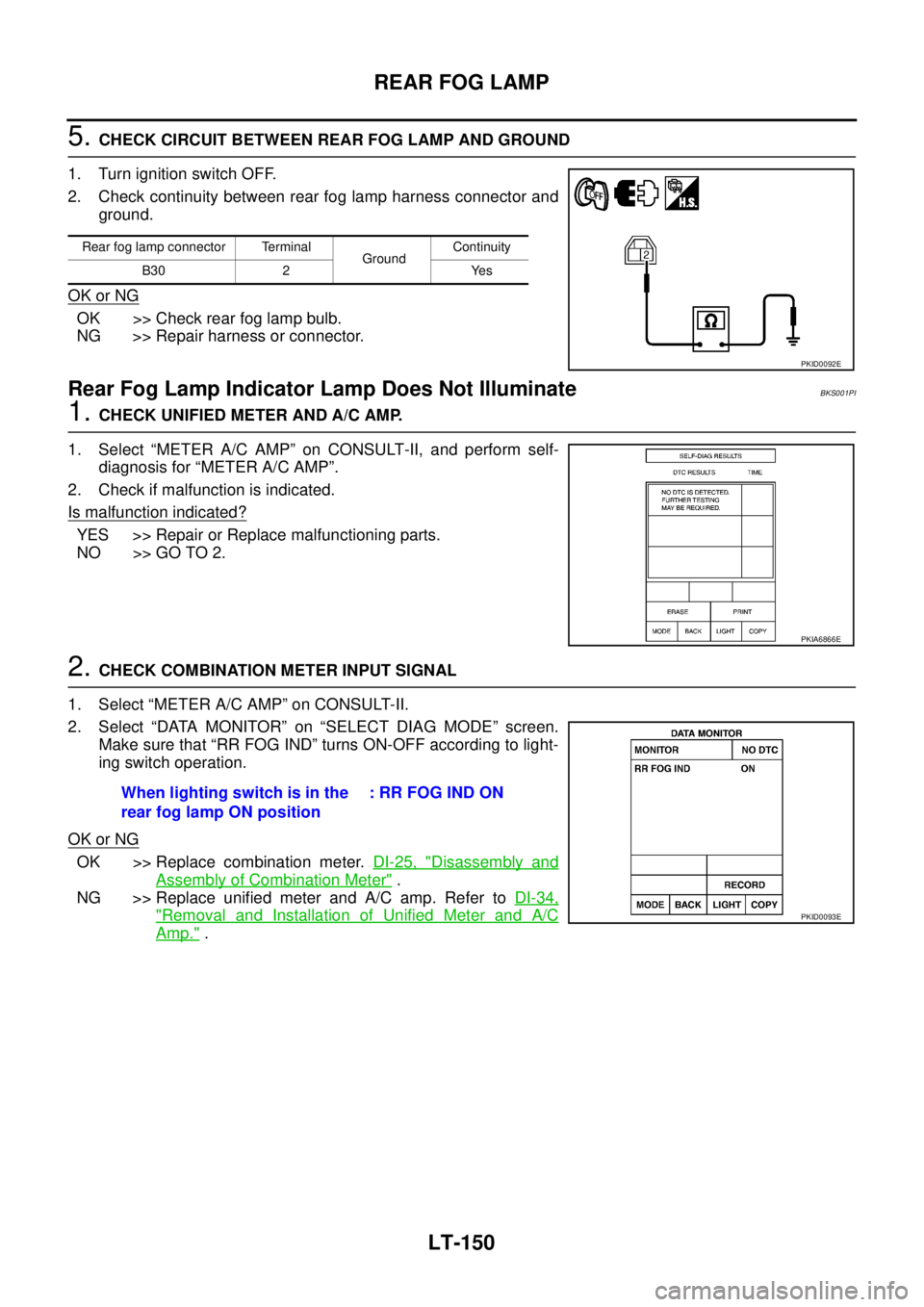
2. Check continuity between rear fog lamp harness connector and
ground.
OK or NG
OK >> Check rear fog lamp bulb.
NG >> Repair harness or connector.
Rear Fog Lamp Indicator Lamp Does Not IlluminateBKS001PI
1. CHECK UNIFIED METER AND A/C AMP.
1. Select “METER A/C AMP” on CONSULT-II, and perform self-
diagnosis for “METER A/C AMP”.
2. Check if malfunction is indicated.
Is malfunction indicated?
YES >> Repair or Replace malfunctioning parts.
NO >> GO TO 2.
2. CHECK COMBINATION METER INPUT SIGNAL
1. Select “METER A/C AMP” on CONSULT-II.
2. Select “DATA MONITOR” on “SELECT DIAG MODE” screen.
Make sure that “RR FOG IND” turns ON-OFF according to light-
ing switch operation.
OK or NG
OK >> Replace combination meter. DI-25, "Disassembly and
Assembly of Combination Meter" .
NG >> Replace unified meter and A/C amp. Refer to DI-34,
"Removal and Installation of Unified Meter and A/C
Amp." .
Rear fog lamp connector Terminal
GroundContinuity
B30 2 Yes
PKID0092E
PKIA6866E
When lighting switch is in the
rear fog lamp ON position: RR FOG IND ON
PKID0093E
Page 2839 of 3502
REAR FOG LAMP
LT-151
C
D
E
F
G
H
I
J
L
MA
B
LT
Rear Fog Lamp Does Not Go OFFBKS001PJ
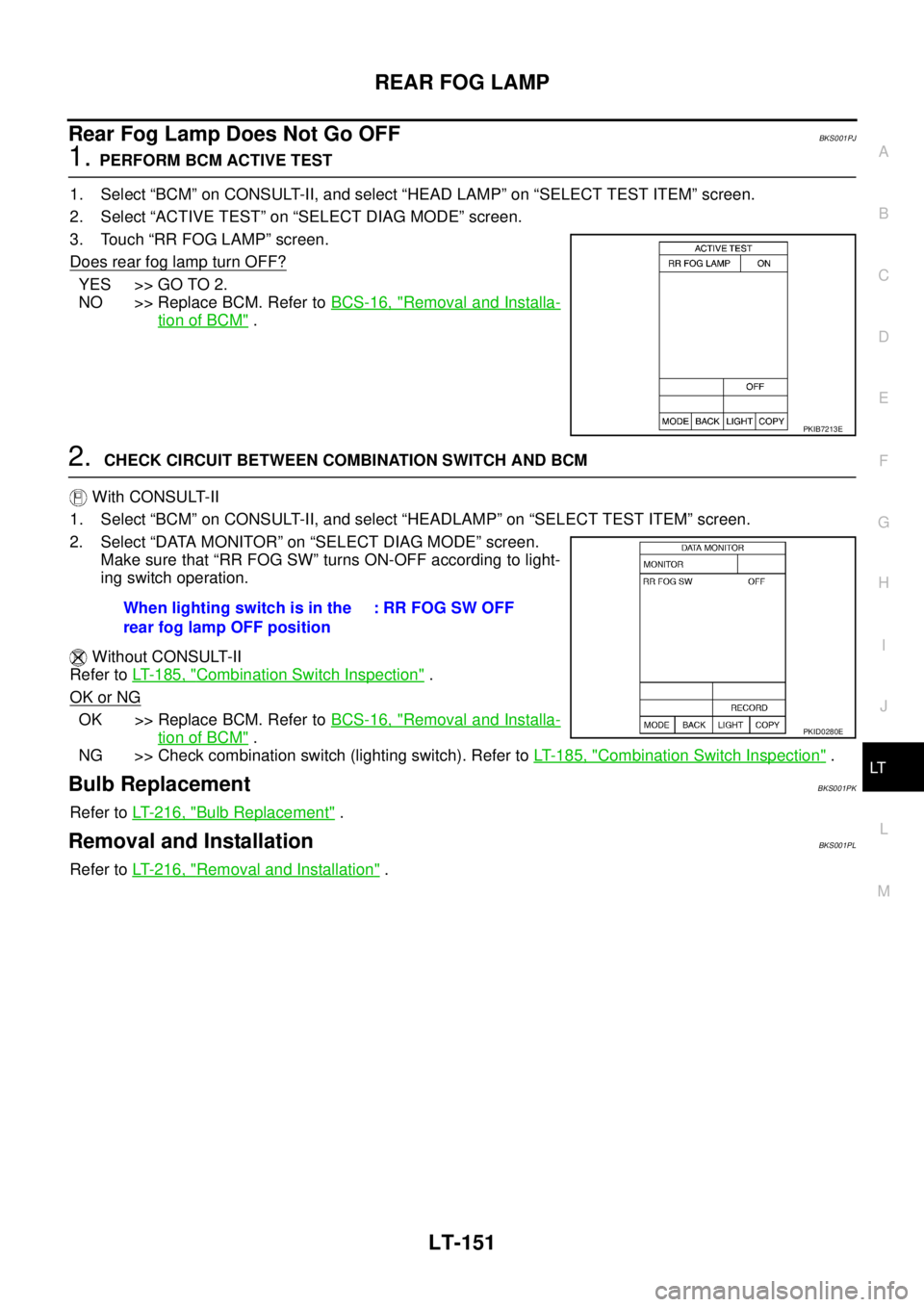
1. PERFORM BCM ACTIVE TEST
1. Select “BCM” on CONSULT-II, and select “HEAD LAMP” on “SELECT TEST ITEM” screen.
2. Select “ACTIVE TEST” on “SELECT DIAG MODE” screen.
3. Touch “RR FOG LAMP” screen.
Does rear fog lamp turn OFF?
YES >> GO TO 2.
NO >> Replace BCM. Refer to BCS-16, "
Removal and Installa-
tion of BCM" .
2. CHECK CIRCUIT BETWEEN COMBINATION SWITCH AND BCM
With CONSULT-II
1. Select “BCM” on CONSULT-II, and select “HEADLAMP” on “SELECT TEST ITEM” screen.
2. Select “DATA MONITOR” on “SELECT DIAG MODE” screen.
Make sure that “RR FOG SW” turns ON-OFF according to light-
ing switch operation.
Without CONSULT-II
Refer to LT- 1 8 5 , "
Combination Switch Inspection" .
OK or NG
OK >> Replace BCM. Refer to BCS-16, "Removal and Installa-
tion of BCM" .
NG >> Check combination switch (lighting switch). Refer to LT- 1 8 5 , "
Combination Switch Inspection" .
Bulb ReplacementBKS001PK
Refer to LT- 2 1 6 , "Bulb Replacement" .
Removal and InstallationBKS001PL
Refer to LT- 2 1 6 , "Removal and Installation" .
PKIB7213E
When lighting switch is in the
rear fog lamp OFF position: RR FOG SW OFF
PKID0280E
Page 2847 of 3502
TURN SIGNAL AND HAZARD WARNING LAMPS
LT-159
C
D
E
F
G
H
I
J
L
MA
B
LT
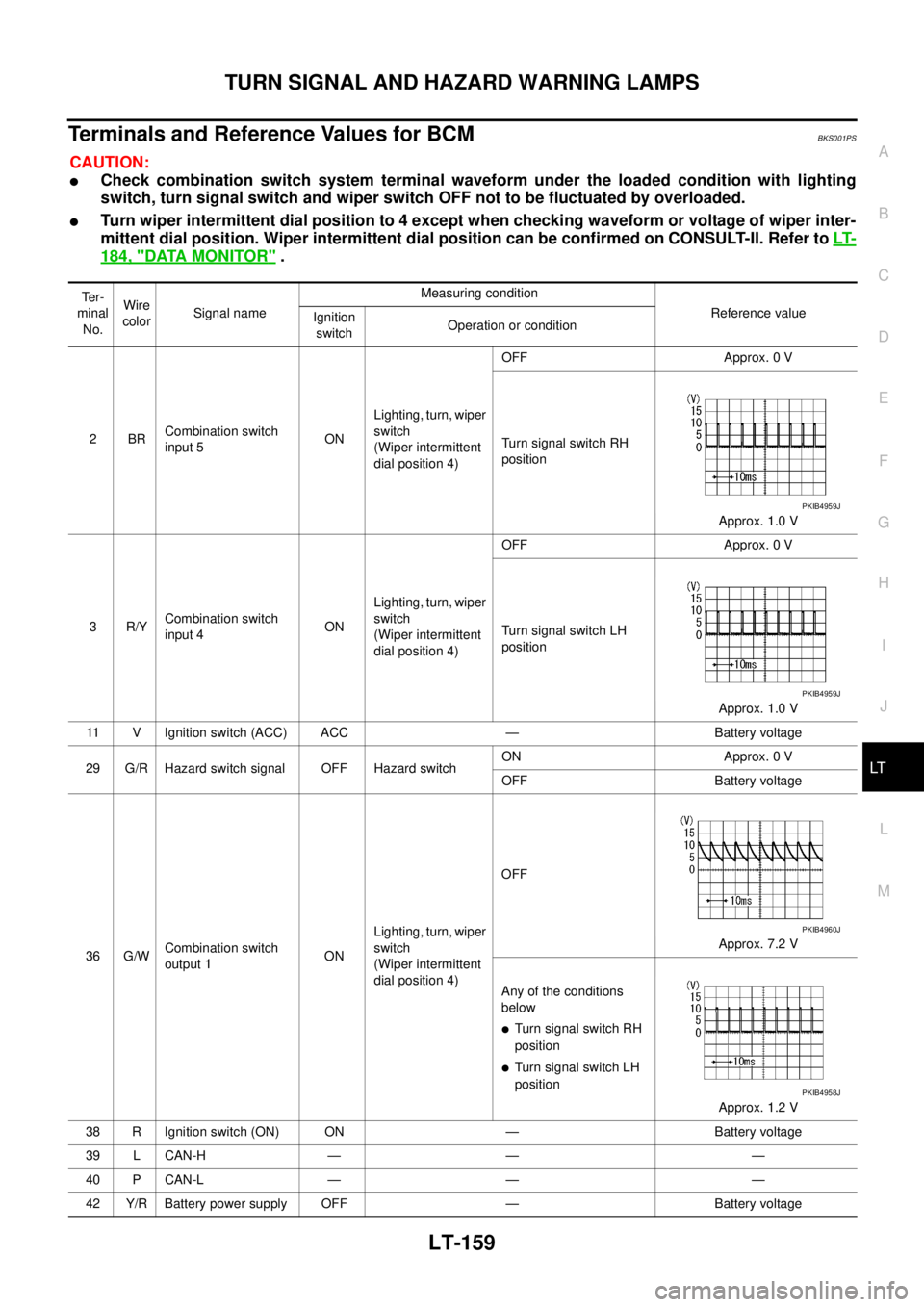
Terminals and Reference Values for BCMBKS001PS
CAUTION:
�Check combination switch system terminal waveform under the loaded condition with lighting
switch, turn signal switch and wiper switch OFF not to be fluctuated by overloaded.
�Turn wiper intermittent dial position to 4 except when checking waveform or voltage of wiper inter-
mittent dial position. Wiper intermittent dial position can be confirmed on CONSULT-II. Refer to LT-
184, "DATA MONITOR" .
Te r -
minal
No.Wire
colorSignal nameMeasuring condition
Reference value
Ignition
switchOperation or condition
2BRCombination switch
input 5ONLighting, turn, wiper
switch
(Wiper intermittent
dial position 4)OFF Approx. 0 V
Turn signal switch RH
position
Approx. 1.0 V
3R/YCombination switch
input 4ONLighting, turn, wiper
switch
(Wiper intermittent
dial position 4)OFF Approx. 0 V
Turn signal switch LH
position
Approx. 1.0 V
11 V Ignition switch (ACC) ACC — Battery voltage
29 G/R Hazard switch signal OFF Hazard switchON Approx. 0 V
OFF Battery voltage
36 G/WCombination switch
output 1ONLighting, turn, wiper
switch
(Wiper intermittent
dial position 4)OFF
Approx. 7.2 V
Any of the conditions
below
�Turn signal switch RH
position
�Turn signal switch LH
position
Approx. 1.2 V
38 R Ignition switch (ON) ON — Battery voltage
39 L CAN-H — — —
40 P CAN-L — — —
42 Y/R Battery power supply OFF — Battery voltage
PKIB4959J
PKIB4959J
PKIB4960J
PKIB4958J
Page 2850 of 3502

LT-162
TURN SIGNAL AND HAZARD WARNING LAMPS
CONSULT-II Functions (BCM)BKS001PV
CONSULT-II can display each diagnostic item using the diagnostic test mode shown following.
CONSULT-II BASIC OPERATION
Refer to GI-34, "CONSULT-II Start Procedure" .
DATA MONITOR
Operation Procedure
1. Touch “FLASHER” on “SELECT TEST ITEM” screen.
2. Touch “DATA MONITOR” on “SELECT DIAG MODE” screen.
3. Touch either “ALL SIGNALS” or “SELECTION FROM MENU” on “SELECT MONITOR ITEM” screen.
4. When “ALL SIGNALS” is selected, all the items will be monitored. When “SELECTION FROM MENU” is
selected, touch individual items to be monitored.
5. Touch “START”.
6. Touch “RECORD” while monitoring, then the status of the monitored item can be recorded. To stop
recording, touch “STOP”.
Display Item List
ACTIVE TEST
Operation Procedure
1. Touch “FLASHER” on “SELECT TEST ITEM” screen.
2. Touch “ACTIVE TEST” on “SELECT DIAG MODE” screen.
3. Touch item to be tested and check operation of the selected item.
4. During the operation check, touching “OFF” deactivates the operation.
Display Item List
BCM diagnosis part Diagnosis mode Description
FLASHERDATA MONITOR Displays BCM input data in real time.
ACTIVE TEST Operation of electrical loads can be checked by sending driving signal to them.
ALL SIGNALS Monitors all the items.
SELECTION FROM MENU Selects items and monitor them.
Monitor item Contents
IGN ON SW “ON/OFF” Displays “IGN position (ON)/OFF, ACC position (OFF)” judged from the ignition switch signal.
HAZARD SW “ON/OFF” Displays “hazard ON (ON)/hazard OFF (OFF)” status, determined from hazard switch signal.
TURN SIGNAL R “ON/OFF” Displays “turn right (ON)/other (OFF)” status, determined from lighting switch signal.
TURN SIGNAL L “ON/OFF” Displays “turn left (ON)/other (OFF)” status, determined from lighting switch signal.
CONSULT-II
screen displayTest item Description
FLASHER Turn signal lamp RH and LH
operation Turn signal lamp RH and LH are operated by switching operation (OFF, RH, LH).
(It is not blinking operation.)
Page 2851 of 3502
TURN SIGNAL AND HAZARD WARNING LAMPS
LT-163
C
D
E
F
G
H
I
J
L
MA
B
LT
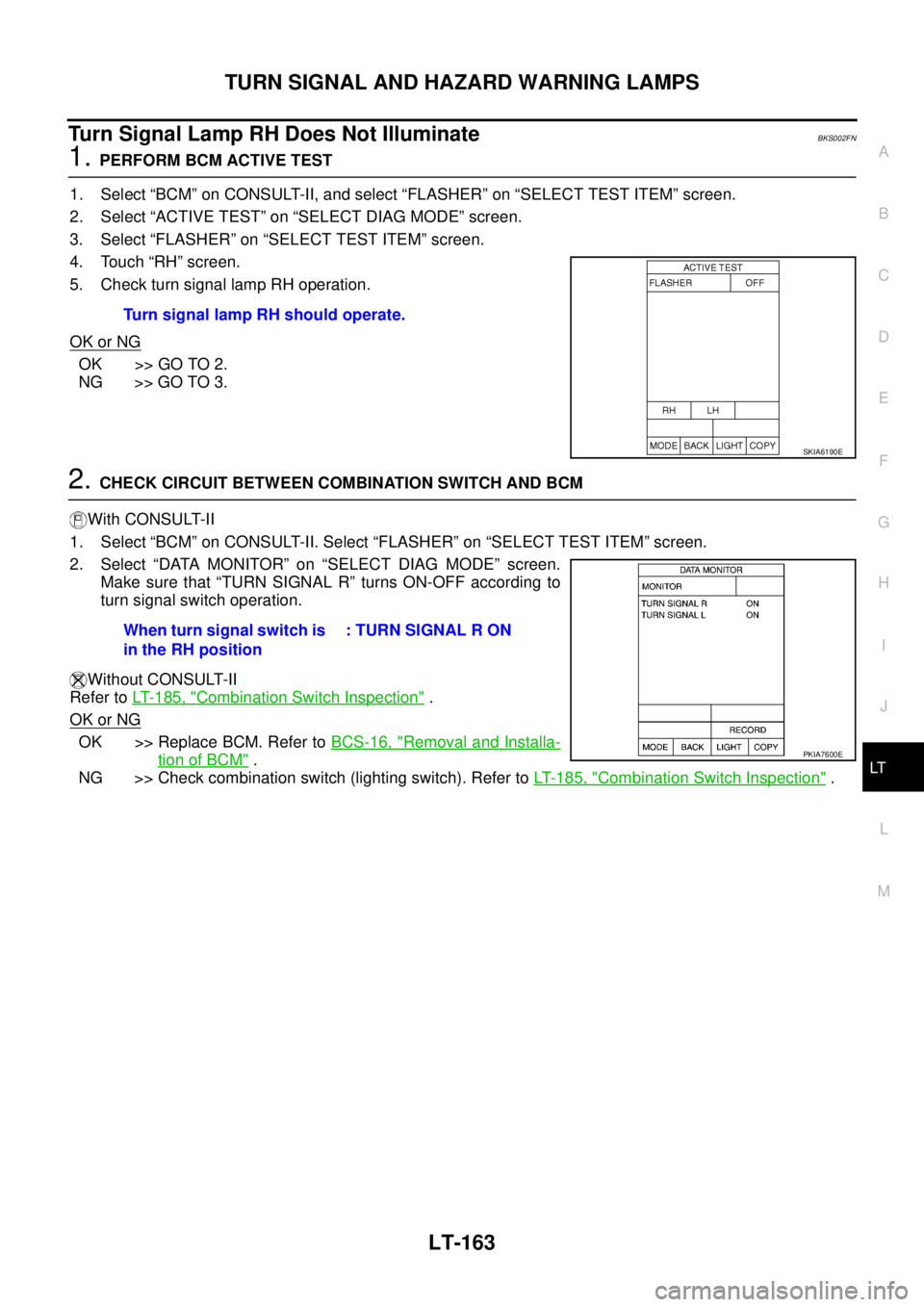
Turn Signal Lamp RH Does Not IlluminateBKS002FN
1. PERFORM BCM ACTIVE TEST
1. Select “BCM” on CONSULT-II, and select “FLASHER” on “SELECT TEST ITEM” screen.
2. Select “ACTIVE TEST” on “SELECT DIAG MODE” screen.
3. Select “FLASHER” on “SELECT TEST ITEM” screen.
4. Touch “RH” screen.
5. Check turn signal lamp RH operation.
OK or NG
OK >> GO TO 2.
NG >> GO TO 3.
2. CHECK CIRCUIT BETWEEN COMBINATION SWITCH AND BCM
With CONSULT-II
1. Select “BCM” on CONSULT-II. Select “FLASHER” on “SELECT TEST ITEM” screen.
2. Select “DATA MONITOR” on “SELECT DIAG MODE” screen.
Make sure that “TURN SIGNAL R” turns ON-OFF according to
turn signal switch operation.
Without CONSULT-II
Refer to LT- 1 8 5 , "
Combination Switch Inspection" .
OK or NG
OK >> Replace BCM. Refer to BCS-16, "Removal and Installa-
tion of BCM" .
NG >> Check combination switch (lighting switch). Refer to LT- 1 8 5 , "
Combination Switch Inspection" . Turn signal lamp RH should operate.
SKIA6190E
When turn signal switch is
in the RH position: TURN SIGNAL R ON
PKIA7600E