Page 453 of 3502
TROUBLE DIAGNOSIS
ATC-75
C
D
E
F
G
H
I
K
L
MA
B
AT C
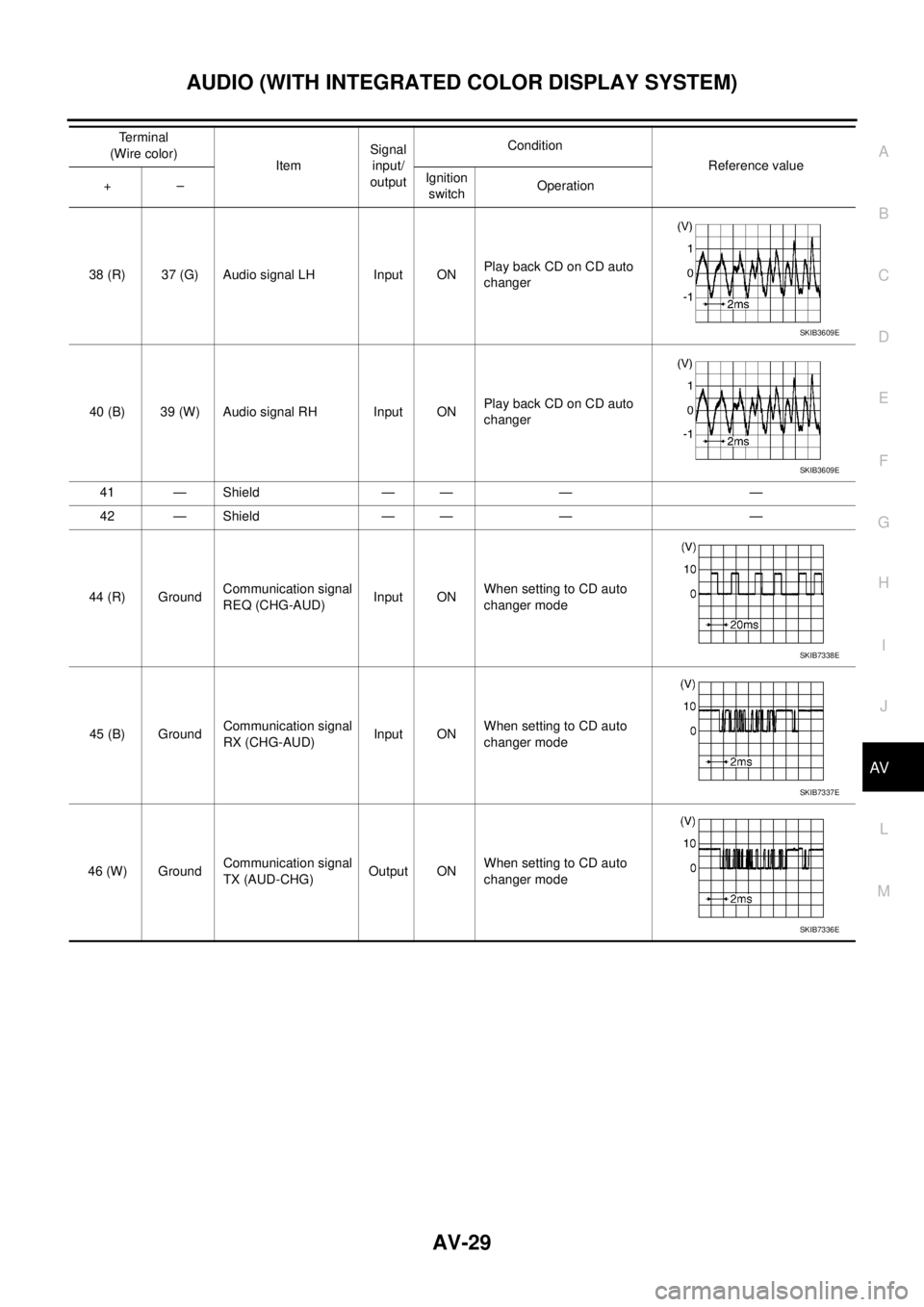
1. CHECK POWER SUPPLY FOR BLOWER MOTOR
1. Disconnect blower motor connector.
2. Turn ignition switch ON.
3. Check voltage between blower motor harness connector M48
terminal 1 and ground.
OK or NG
OK >> GO TO 2.
NG >> Check power supply circuit and 15A fuses [Nos. 10 and
11, located in the fuse block (J/B)]. Refer to PG-79,
"FUSE BLOCK - JUNCTION BOX (J/B)" .
�If fuses are OK, check harness for open circuit. Repair or replace if necessary.
�If fuses are NG, check harness for short circuit and replace fuse.
2. CHECK FAN FEEDBACK CIRCUIT
1. Turn ignition switch OFF.
2. Reconnect blower motor connector.
3. Turn ignition switch ON.
4. Check voltage between unified meter and A/C amp. harness
connector M45 terminal 47 and ground.
OK or NG
OK >> GO TO 3.
NG >> GO TO 9.
3. CHECK BLOWER MOTOR
Check blower motor. Refer to AT C - 7 7 , "
Blower Motor" .
OK or NG
OK >> GO TO 4.
NG >> Replace blower motor.
4. CHECK POWER SUPPLY FOR FAN CONTROL AMP.
1. Turn ignition switch ON.
2. Check voltage between fan control amp. harness connector
M86 terminal 3 and ground.
OK or NG
OK >> GO TO 5.
NG >> Repair harness or connector.1 – Ground : Battery voltage
RJIA2860E
47 – Ground : Battery voltage.
RJIA3266E
Terminals
Condition Voltage (+)
(−)
Fan control
amp. connectorTe r m i n a l N o .
M86 3 GroundFan speed: 1st
speedApprox. 8 V
RJIA2862E
Page 521 of 3502
REFRIGERANT LINES
ATC-143
C
D
E
F
G
H
I
K
L
MA
B
AT C
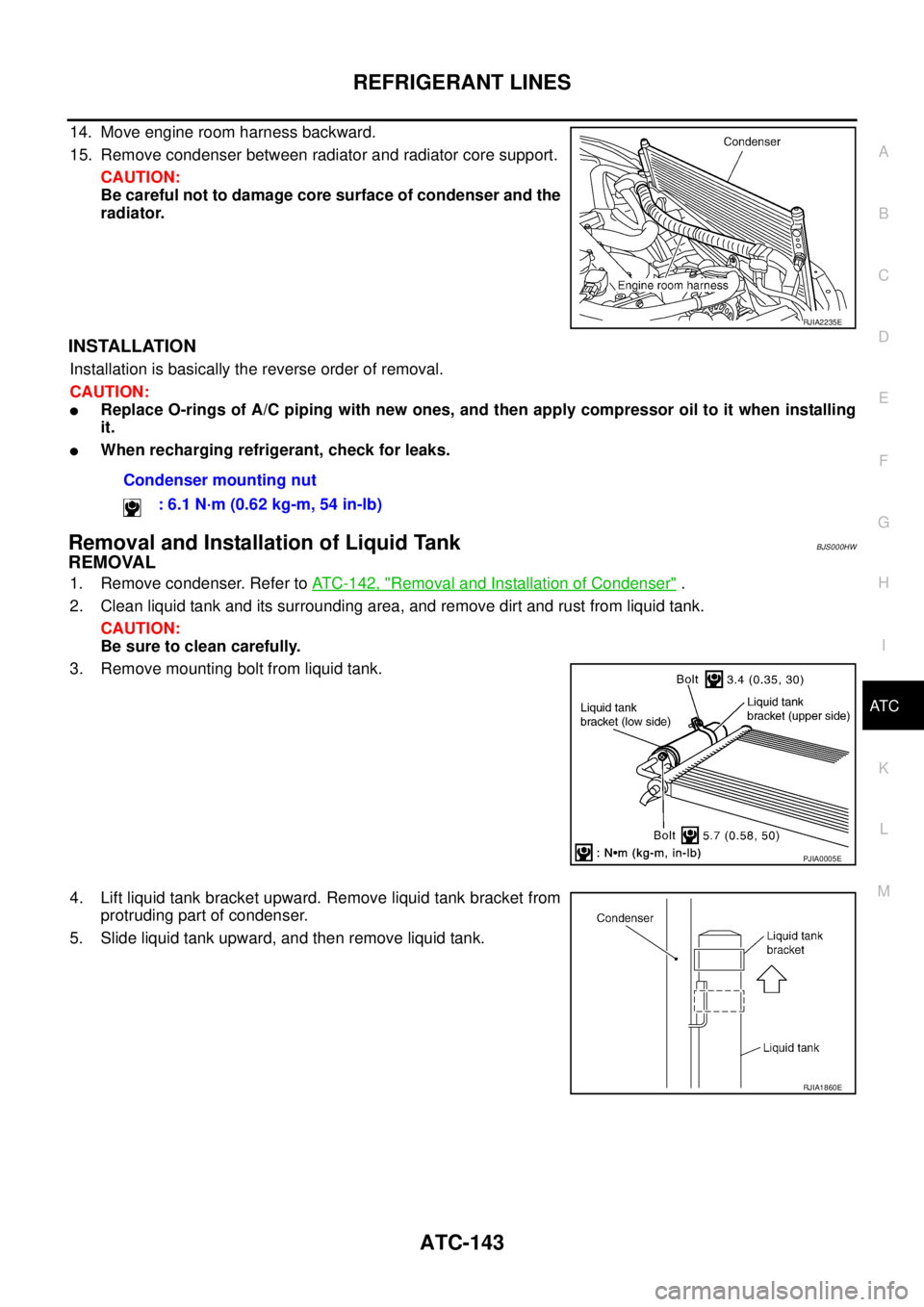
14. Move engine room harness backward.
15. Remove condenser between radiator and radiator core support.
CAUTION:
Be careful not to damage core surface of condenser and the
radiator.
INSTALLATION
Installation is basically the reverse order of removal.
CAUTION:
�Replace O-rings of A/C piping with new ones, and then apply compressor oil to it when installing
it.
�When recharging refrigerant, check for leaks.
Removal and Installation of Liquid TankBJS000HW
REMOVAL
1. Remove condenser. Refer to ATC-142, "Removal and Installation of Condenser" .
2. Clean liquid tank and its surrounding area, and remove dirt and rust from liquid tank.
CAUTION:
Be sure to clean carefully.
3. Remove mounting bolt from liquid tank.
4. Lift liquid tank bracket upward. Remove liquid tank bracket from
protruding part of condenser.
5. Slide liquid tank upward, and then remove liquid tank.
RJIA2235E
Condenser mounting nut
: 6.1 N·m (0.62 kg-m, 54 in-lb)
PJIA0005E
RJIA1860E
Page 557 of 3502
AUDIO (WITH INTEGRATED COLOR DISPLAY SYSTEM)
AV-29
C
D
E
F
G
H
I
J
L
MA
B
AV
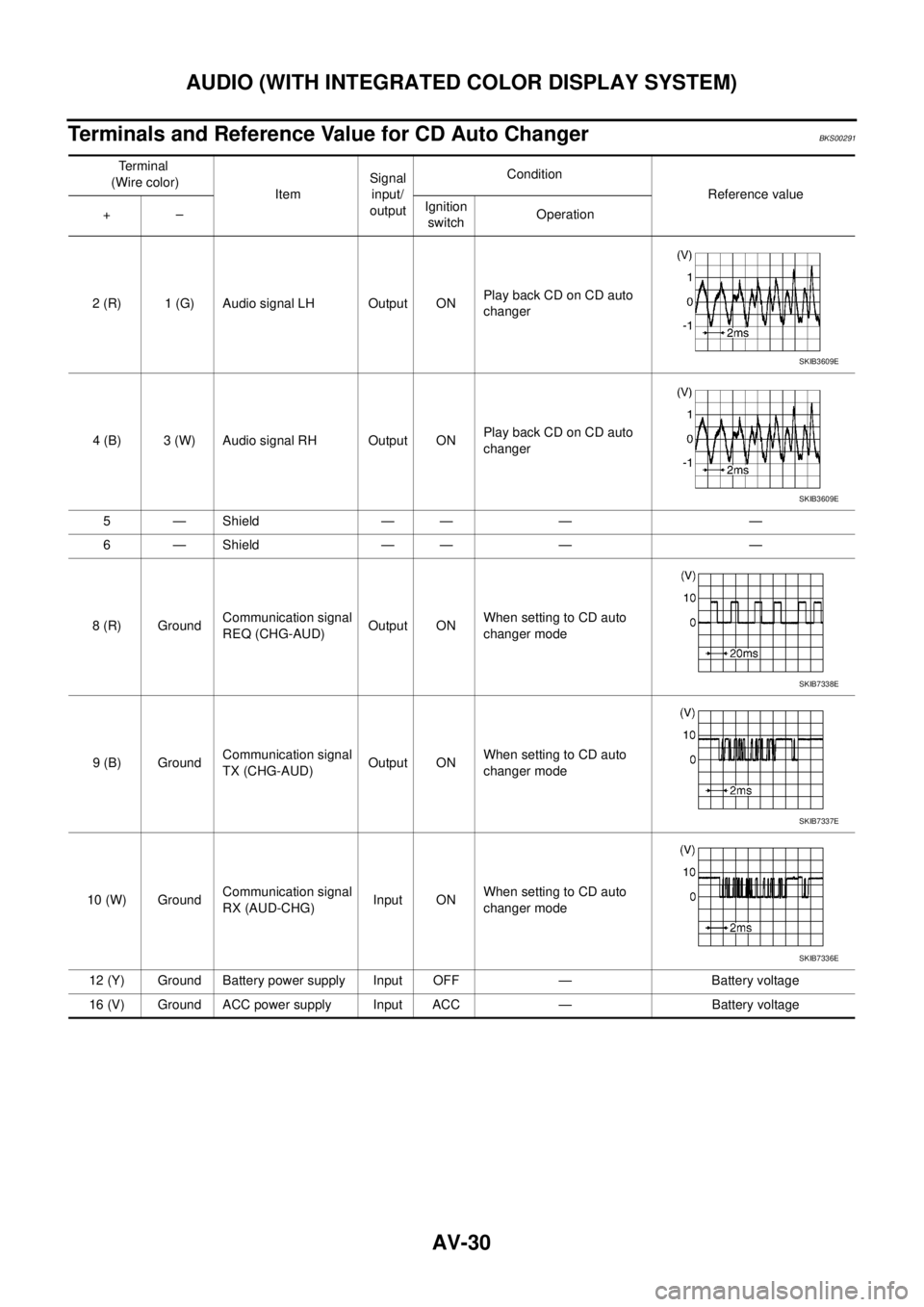
38 (R) 37 (G) Audio signal LH Input ONPlay back CD on CD auto
changer
40 (B) 39 (W) Audio signal RH Input ONPlay back CD on CD auto
changer
41 — Shield — — — —
42 — Shield — — — —
44 (R) GroundCommunication signal
REQ (CHG-AUD)Input ONWhen setting to CD auto
changer mode
45 (B) GroundCommunication signal
RX (CHG-AUD)Input ONWhen setting to CD auto
changer mode
46 (W) GroundCommunication signal
TX (AUD-CHG)Output ONWhen setting to CD auto
changer mode Terminal
(Wire color)
ItemSignal
input/
outputCondition
Reference value
+–Ignition
switchOperation
SKIB3609E
SKIB3609E
SKIB7338E
SKIB7337E
SKIB7336E
Page 558 of 3502
AV-30
AUDIO (WITH INTEGRATED COLOR DISPLAY SYSTEM)
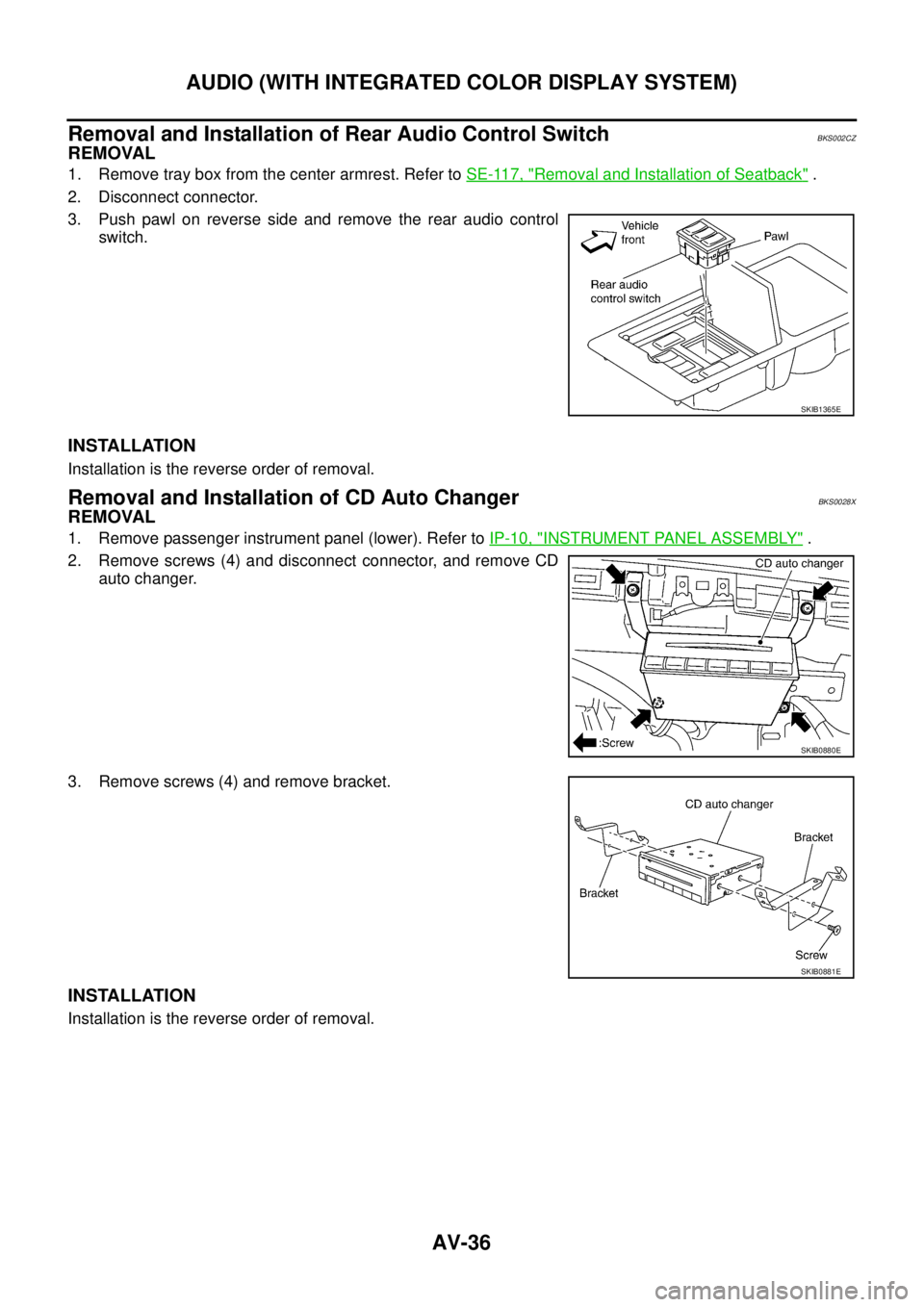
Terminals and Reference Value for CD Auto ChangerBKS00291
Te r m i n a l
(Wire color)
ItemSignal
input/
outputCondition
Reference value
+–Ignition
switchOperation
2 (R) 1 (G) Audio signal LH Output ONPlay back CD on CD auto
changer
4 (B) 3 (W) Audio signal RH Output ONPlay back CD on CD auto
changer
5 — Shield — — — —
6 — Shield — — — —
8 (R) GroundCommunication signal
REQ (CHG-AUD)Output ONWhen setting to CD auto
changer mode
9 (B) GroundCommunication signal
TX (CHG-AUD)Output ONWhen setting to CD auto
changer mode
10 (W) GroundCommunication signal
RX (AUD-CHG)Input ONWhen setting to CD auto
changer mode
12 (Y) Ground Battery power supply Input OFF — Battery voltage
16 (V) Ground ACC power supply Input ACC — Battery voltage
SKIB3609E
SKIB3609E
SKIB7338E
SKIB7337E
SKIB7336E
Page 564 of 3502
AV-36
AUDIO (WITH INTEGRATED COLOR DISPLAY SYSTEM)
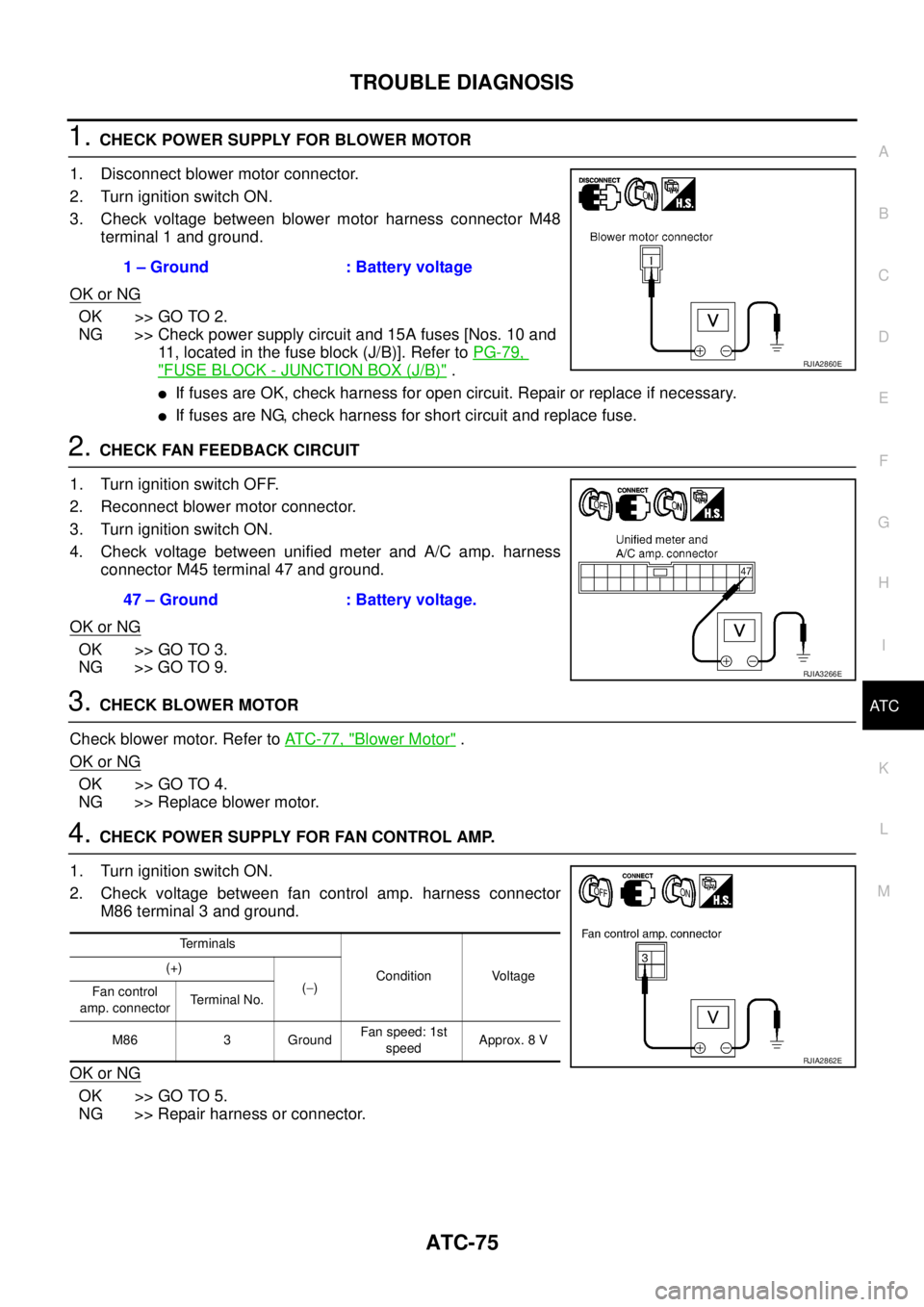
Removal and Installation of Rear Audio Control SwitchBKS002CZ
REMOVAL
1. Remove tray box from the center armrest. Refer to SE-117, "Removal and Installation of Seatback" .
2. Disconnect connector.
3. Push pawl on reverse side and remove the rear audio control
switch.
INSTALLATION
Installation is the reverse order of removal.
Removal and Installation of CD Auto ChangerBKS0028X
REMOVAL
1. Remove passenger instrument panel (lower). Refer to IP-10, "INSTRUMENT PANEL ASSEMBLY" .
2. Remove screws (4) and disconnect connector, and remove CD
auto changer.
3. Remove screws (4) and remove bracket.
INSTALLATION
Installation is the reverse order of removal.
SKIB1365E
SKIB0880E
SKIB0881E
Page 589 of 3502
INTEGRATED COLOR DISPLAY SYSTEM
AV-61
C
D
E
F
G
H
I
J
L
MA
B
AV
INTEGRATED COLOR DISPLAY SYSTEMPFP:28090
System DescriptionBKS0027J
For system operation information, refer to Owner's Manual.
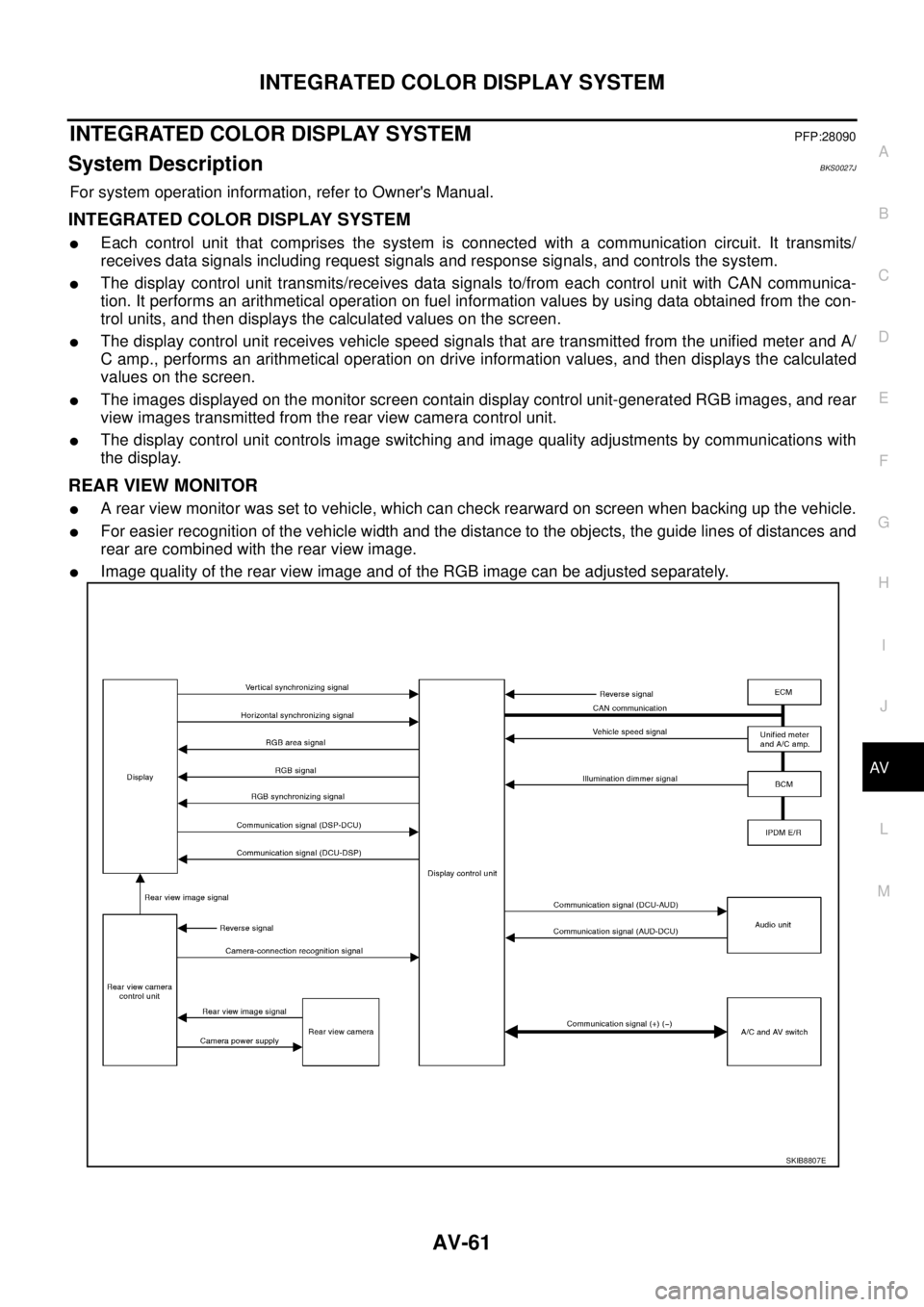
INTEGRATED COLOR DISPLAY SYSTEM
�Each control unit that comprises the system is connected with a communication circuit. It transmits/
receives data signals including request signals and response signals, and controls the system.
�The display control unit transmits/receives data signals to/from each control unit with CAN communica-
tion. It performs an arithmetical operation on fuel information values by using data obtained from the con-
trol units, and then displays the calculated values on the screen.
�The display control unit receives vehicle speed signals that are transmitted from the unified meter and A/
C amp., performs an arithmetical operation on drive information values, and then displays the calculated
values on the screen.
�The images displayed on the monitor screen contain display control unit-generated RGB images, and rear
view images transmitted from the rear view camera control unit.
�The display control unit controls image switching and image quality adjustments by communications with
the display.
REAR VIEW MONITOR
�A rear view monitor was set to vehicle, which can check rearward on screen when backing up the vehicle.
�For easier recognition of the vehicle width and the distance to the objects, the guide lines of distances and
rear are combined with the rear view image.
�Image quality of the rear view image and of the RGB image can be adjusted separately.
SKIB8807E
Page 668 of 3502

BL-10
SQUEAK AND RATTLE TROUBLE DIAGNOSES
TRUNK
Trunk noises are often caused by a loose jack or loose items put into the trunk by the owner.
In addition look for:
1. Trunk lid dumpers out of adjustment
2. Trunk lid striker out of adjustment
3. Trunk lid torsion bars knocking together
4. A loose license plate or bracket
Most of these incidents can be repaired by adjusting, securing or insulating the item(s) or component(s) caus-
ing the noise.
SUNROOF/HEADLINING
Noises in the sunroof/headlining area can often be traced to one of the following:
1. Sunroof lid, rail, linkage or seals making a rattle or light knocking noise
2. Sunvisor shaft shaking in the holder
3. Front or rear windshield touching headlining and squeaking
Again, pressing on the components to stop the noise while duplicating the conditions can isolate most of these
incidents. Repairs usually consist of insulating with felt cloth tape.
SEATS
When isolating seat noise it's important to note the position the seat is in and the load placed on the seat when
the noise is present. These conditions should be duplicated when verifying and isolating the cause of the
noise.
Cause of seat noise include:
1. Headrest rods and holder
2. A squeak between the seat pad cushion and frame
3. Rear seatback lock and bracket
These noises can be isolated by moving or pressing on the suspected components while duplicating the con-
ditions under which the noise occurs. Most of these incidents can be repaired by repositioning the component
or applying urethane tape to the contact area.
UNDERHOOD
Some interior noise may be caused by components under the hood or on the engine wall. The noise is then
transmitted into the passenger compartment.
Causes of transmitted underhood noise include:
1. Any component mounted to the engine wall
2. Components that pass through the engine wall
3. Engine wall mounts and connectors
4. Loose radiator mounting pins
5. Hood bumpers out of adjustment
6. Hood striker out of adjustment
These noises can be difficult to isolate since they cannot be reached from the interior of the vehicle. The best
method is to secure, move or insulate one component at a time and test drive the vehicle. Also, engine RPM
or load can be changed to isolate the noise. Repairs can usually be made by moving, adjusting, securing, or
insulating the component causing the noise.
Page 688 of 3502

BL-30
POWER DOOR LOCK SYSTEM
CONSULT-II Function (BCM)BIS000W3
CONSULT-II can display each diagnostic item using the diagnostic test modes shown following.
CONSULT-II START PROCEDURE
Refer to GI-34, "CONSULT-II Start Procedure" .
CONSULT-II APPLICATION ITEMS
Data Monitor
*: With Intelligent Key system
Active Test
BCM diagnosis
partInspection item, Self-diagnosis
modeContent
Door lockDATA MONITOR Displays BCM input data on real-time basis.
ACTIVE TEST Sends drive signals to door lock actuator to perform operation check.
Monitor item Content
IGN ON SW Indicates [ON/OFF] condition of ignition switch in ON position.
KEY ON SW Indicates [ON/OFF] condition of key switch.
CDL LOCK SW Indicates [ON/OFF] condition of lock signal from door lock and unlock switch.
CDL UNLOCK SW Indicates [ON/OFF] condition of unlock signal from door lock and unlock switch.
DOOR SW-DR Indicates [ON/OFF] condition of front door switch driver side.
DOOR SW-AS Indicates [ON/OFF] condition of front door switch passenger side.
DOOR SW-RR Indicates [ON/OFF] condition of rear door switch RH.
DOOR SW-RL Indicates [ON/OFF] condition of rear door switch LH.
BACK DOOR SW This is displayed even when it is not equipped.
LOCK STATUS Indicates [ON/OFF] condition of driver side door lock knob
SHOCK SENSOR Indicates [ON/OFF] condition of shock sensor
VEHICLE SPEED Indicates [km/h] condition of vehicle speed
KEYLESS LOCK Indicates [ON/OFF] condition of lock signal from keyfob.
KEYLESS UNLOCK Indicates [ON/OFF] condition of unlock signal from keyfob.
I-KEY LOCK* Indicates [ON/OFF] condition of lock signal from door request switch.
I-KEY UNLOCK* Indicates [ON/OFF] condition of unlock signal from door request switch.
Test item Content
DOOR LOCKThis test is able to check all door lock actuators lock or unlock operation.
These actuators lock or unlock when “LOCK” or “UNLOCK” on CONSULT-II screen is touched.