Page 112 of 392

Precautions to observe when using
wipers and washers
EE13C-I
(1) If the moving wipers become blocked
by ice or other deposits on the glass,
the motor may burn out even if the
wiper switch is turned to OFF. If
obstruction occurs, park your vehicle in
a safe place, turn off the ignition, and
clean the deposits from the glass so
that the wipers operate smoothly.
(2) Do not use the wipers when the glass
is dry. They may scratch the glass sur-
face or the blades may prematurely
wear out.
(3) Before using the wipers in cold weather,
check that the wiper blades are not fro-
zen onto the glass. The motor may
burn out if the wipers are used with the
blades frozen onto the glass.
(4) Avoid using the washer continuously for
more than 20 seconds. Do not oper-
ate the washer when the fluid reser-
voir is empty.
Otherwise, the motor may burn out.
(5) Periodically check the level of washer
fluid in the reservoir and refill if
required.
During cold weather, add a recom-
mended washer solution that will not
freeze in the washer reservoir. Fail-
ure to do so could result in loss of
washer function and frost damage to
the system components.
E16A058A
Hazard warning flasher switch
EE16A-Dd
Use the hazard warning flasher switch
when the vehicle has to be parked on the
road for any emergency.
The hazard warning flashers can always be
operated, regardless of the position of the
ignition key.
Push the switch to turn on the hazard warn-
ing flashers; push the switch again to turn
them off.
When this switch is operated, all turn-signal
lamps flash continuously, as do the
turn-signal indication lamps in the instru-
ment cluster.
CAUTION
If the lamps are kept flashing for a
long time, the battery will be dis-
charged, making it difficult or impos-
sible to start the engine.
Instruments and controls
4-20Div:
Out put date:
Page 113 of 392
I08B119A
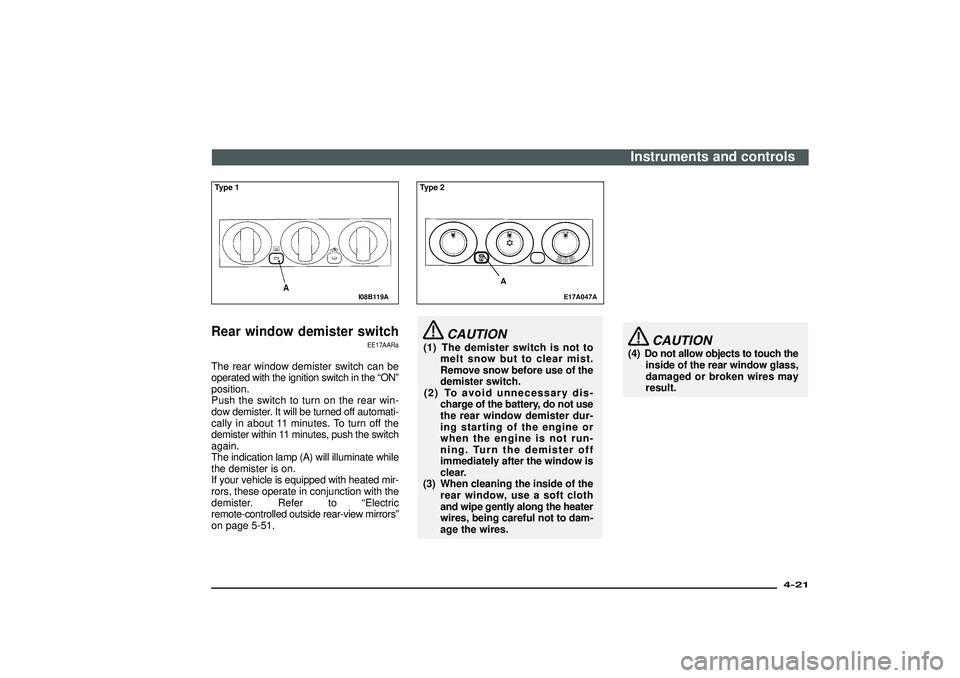
Type 1Rear window demister switch
EE17AARa
The rear window demister switch can be
operated with the ignition switch in the“ON”
position.
Push the switch to turn on the rear win-
dow demister. It will be turned off automati-
cally in about 11 minutes. To turn off the
demister within 11 minutes, push the switch
again.
The indication lamp (A) will illuminate while
the demister is on.
If your vehicle is equipped with heated mir-
rors, these operate in conjunction with the
demister. Refer to“Electric
remote-controlled outside rear-view mirrors”
on page 5-51.
E17A047A
Type 2
A
CAUTION
(1) The demister switch is not to
melt snow but to clear mist.
Remove snow before use of the
demister switch.
(2) To avoid unnecessary dis-
charge of the battery, do not use
the rear window demister dur-
ing starting of the engine or
when the engine is not run-
ning. Turn the demister off
immediately after the window is
clear.
(3) When cleaning the inside of the
rear window, use a soft cloth
and wipe gently along the heater
wires, being careful not to dam-
age the wires.
CAUTION
(4) Do not allow objects to touch the
inside of the rear window glass,
damaged or broken wires may
result.Instruments and controls
4-21
Div:
Out put date:
Page 116 of 392
E20A005A
Wiper deicer switch*
EE20A-Da
The wiper deicer switch can be operated
with the ignition switch in the“ON”posi-
tion.
When the front wipers have frozen to the
windscreen at the parked positions, turn-
ing on this switch will heat the wind-
screen to make the wipers operable. Press
the switch and the deicer will operate and
turn on the indication lamp (A).
NOTE
The switch is automatically turned off after
operating for approximately 15 minutes. To
turn off the switch while it is operating,
press the switch again.
E23A006A
Horn switch
EE23A-Ac
When the ignition switch is in the“ON”or
“ACC”position, pressing the“
”mark on
the steering wheel, causes the horn to
sound.
E19A099A
Room lamps
EE19AAI
Room lamp1(OFF) -The lamp goes out.
2(�) -[Vehicles without
keyless entry system]
The lamp illuminates when a
door or the backdoor is opened
and goes out when all doors are
closed.
Instruments and controls
4-24Div:
Out put date:
Page 117 of 392
![MITSUBISHI SHOGUN 2003 Owners Manual (in English) [Vehicles with
keyless entry system]
The room lamp goes on when a
door or the backdoor is opened.
When all doors are closed, the
room lamp is illuminated and
dimmed gradually for 30 sec-
onds and then](/manual-img/19/34883/w960_34883-116.png "MITSUBISHI SHOGUN 2003 Owners Manual (in English) [Vehicles with
keyless entry system]
The room lamp goes on when a
door or the backdoor is opened.
When all doors are closed, the
room lamp is illuminated and
dimmed gradually for 30 sec-
onds and then")
[Vehicles with
keyless entry system]
The room lamp goes on when a
door or the backdoor is opened.
When all doors are closed, the
room lamp is illuminated and
dimmed gradually for 30 sec-
onds and then goes out.
However, the lamp goes out
immediately without being
dimmed in case of the
followings:
•The ignition switch is turned
“ON”.
•All doors are locked using the
key mechanism of the front
doors/backdoor, the lock knob
of the driver’s door, or the
remote control switch of the
keyless entry system.
NOTE
If the ignition key is removed
with the doors closed, the lamp
is dimmed gradually for 30 sec-
onds and then goes out.
3(ON) - The lamp illuminates.
E19A111A
Personal lampsPush the switch (A) to turn on the lamp.
Push it again to turn it off.
NOTE
If you leave the lamps on without running
the engine, you will run down the battery.
Before you leave the vehicle, make sure
that all the lamps are off.
E09D001A
Rear personal lamp
EE09D-L
Instruments and controls
4-25
Div:
Out put date:
Page 119 of 392

D92A013D
Multi centre display*
ED92A-N
When the ignition switch is in the“ACC”position, the outside tem-
perature and clock are displayed in the multi centre display. When
the ignition switch is in the“ON”position, the average fuel con-
sumption is displayed besides outside temperature and digital
clock.
If your vehicle is equipped with an automatic air conditioning sys-
tem, set temperature, blower speed and air flow are displayed.
(Refer to“Automatic air conditioning”on page 6-43.)
A-Road surface freeze warning symbol
B-Outside temperature* / Set temperature*
C-Blower speed*
D-Air flow*
E-Average fuel consumption*
1/ Date*
2
F-Digital clock
G-DISP button (For vehicles with a MITSUBISHI genuine audio)
H-Display brightness / display unit selection button
*1: Average fuel consumption:
For petrol-powered vehicles without MITSUBISHI genuine
audio, only average fuel consumption is displayed.
For petrol-powered vehicles with MITSUBISHI genuine audio,
driving range and average speed can be displayed besides
average fuel consumption by pushing the DISP button in the
audio unit.
*2: Date - For diesel-powered vehicles
Instruments and controls
4-27
Div:
Out put date:
Page 123 of 392

Display mode
ED92G-I
For petrol-powered vehicles with MITSUB-
ISHI genuine audio, driving range and aver-
age speed can be displayed besides
average fuel consumption by pushing the
“DISP”button in the audio.
When the ignition switch is turned to the
“ON”position, the display shows the 3
items sequentially (Average fuel consump-
tion→Driving range→Average speed)
and returns to the original display that is
shown before the ignition switch was last
turned to the“OFF”position.
NOTE
If the DISP button is pressed while the dis-
play is scrolling through the sequence men-
tioned above, the display stops scrolling
and shows the item that was shown before
the ignition switch was last turned to the
“OFF”position.
D92G002A
Type 1Change of display mode
(Petrol-powered vehicles only)For vehicles with MITSUBISHI genuine
audio, every time the“DISP”button is
pressed lightly (less than 2 seconds), the
display can be changed.
Average fuel consumption→Driving range
→Average speed
D92G003A
Type 2Instruments and controls
4-31
Div:
Out put date:
Page 124 of 392

D92I003A
Average fuel consumption
(Petrol-powered vehicles only)
ED92I-Ca
This value shows the average fuel con-
sumption (in L/100 km or mpg) since the
display was reset. If you reset the display
at the time when you want to start the mea-
surements, average fuel consumption from
that point of time can be displayed.
To reset the display
[Vehicles without MITSUBISHI genuine
audio]
Push the button (A) for more than 2 sec-
onds.
D92G002A
Type 1[Vehicles with MITSUBISHI genuine audio]
Push the“DISP”button for more than 2
seconds.
NOTE
(1) When the ignition switch is turned on,
the average fuel consumption which
was being displayed when the igni-
tion switch was previously turned off will
be displayed once again.
(2) Average fuel consumption varies
according to the conditions under which
a vehicle is travelling (road condi-
tions, the manner in which the vehicle
is being driven, etc.).
Observe this display for reference
because the fuel consumption dis-
play may differ from the actual fuel con-
sumption.
D92G003A
Type 2
Instruments and controls
4-32Div:
Out put date:
Page 130 of 392
(5) If no buttons are pressed for more than
approx. 15 seconds, the currently
selected unit is set automatically. Then,
the display returns to the original dis-
play item.
D92M001A
When battery terminals are
disconnected
ED92M-C
The car type setting is erased when the
battery terminals are disconnected.
Re-enter the setting as follows:
1. Turn the ignition switch to the“ON”or
“ACC”position to activate the car set-
ting mode. The words“CAR TYPE”will
flash on the display.
D92M007A
2. In a 3-door models, press the“H”but-
ton once. (The word“SHORT”will be
displayed as shown in the illustration.)
In 5-door models, press“M”button
once. (The word“LONG”will be dis-
played as shown in the illustration.)
Instruments and controls
4-38Div:
Out put date:

