Page 95 of 288

Fold-away mirrors (if equipped)
Pull the side mirrors in carefully
when driving through a narrow
space, like an automatic car wash.
POWER ADJUSTABLE FOOT PEDALS
The accelerator and brake pedal
should only be adjusted when the
vehicle is stopped and the gearshift
lever is in the P (Park) position.
Press and hold the rocker control
(located on the instrument panel) to
adjust accelerator and brake pedal.
•Press the top of the control to
adjust the pedals away from you.
•Press the bottom of the control to adjust the pedals towards you.
Memory feature
The accelerator and brake pedal positions are saved when doing a
memory set function and can be recalled along with the vehicle
personality features when a memory position is selected through the
remote entry transmitter, keyless entry keypad or memory switch on the
driver’s door (if equipped with memory feature). Refer toMemory
seats/steering column/mirrors/adjustable pedalsin theSeating and
Safety Restraintschapter.
Never adjust the accelerator and brake pedal with feet on the
pedals while the vehicle is moving.
SPEED CONTROL
With speed control set, you can maintain a speed of 48 km/h (30 mph)
or more without keeping your foot on the pedal. Speed control does not
work at speeds below 48 km/h (30 mph).
Driver Controls
95
Page 117 of 288
INTERIORTRUNKCONTROL
Press the remote trunk release
control on the instrument panel to
open the trunk.
You can render the switch
inoperable by locking the button
with your master key. Do this and
also lock your glove box before you
give your vehicle to the valet
personnel(do not give them the
master key or remote entry keyfob, only the gray valet key).
The remote trunk release control and power door locks will be disabled
when the vehicle perimeter alarm system is armed. This control will not
work until the vehicle perimeter alarm system is disarmed. Refer to
Perimeter Alarm Systemin theLocks and Securitychapter.
FUEL DOOR RELEASE
Press the remote fuel door release
control on the instrument panel to
open the fuel door.
The fuel door has a manual override
release located in the trunk. Pull the
tab to open the fuel door.
Driver Controls
117
Page 132 of 288
engine. If a problem occurs, turn the ignition off, remove all objects on
the key chain away from the coded key and restart the engine.
Theft indicator
The theft indicator is located on top of the instrument panel.
•When the ignition is in the ON position, the indicator will glow for 3
seconds to indicate normal system functionality.
If a problem occurs with the SecuriLock�system, the indicator will flash
rapidly or glow steadily when the ignition is in the ON position. If this
occurs, the vehicle should be taken to an authorized dealer for service.
Replacement keys
If your keys are lost or stolen and you don’t have an extra coded key,
you will need to have your vehicle towed to a dealership. The key codes
need to be erased from your vehicle and new coded keys will need to be
programmed.
Replacing coded keys can be very costly. Store an extra programmed key
away from the vehicle in a safe place to help prevent any
inconveniences. Please visit an authorized dealer to purchase additional
spare or replacement keys.
Programming spare keys
You can program your own coded keys to your vehicle. Please read and
understand the entire procedure before you begin.
Tips:
•A maximum of eight keys can be coded to your vehicle.
•Only use Securilock�keys.
•You must have two previously programmed coded keys (keys that
already operate your vehicle’s engine) and the new unprogrammed
key(s) readily accessible.
•If no previously programmed coded keys are available, you must take
your vehicle to your dealer to have the spare key(s) programmed.
Locks and Security
132
Page 134 of 288

Arming the system
When armed, this system will respond if unauthorized entry is
attempted. When unauthorized entry occurs, the system will flash the
turn signal lamps and will sound the horn.
The system is ready to arm whenever key is removed from the ignition.
Any of the following actions will prearm the alarm system:
•Press the
control on the remote entry transmitter.
•Press the driver or passenger interior power door lock control while
that respective door is open, then close the door.
•Lock the vehicle with the key in the driver’s door key cylinder.
•Lock the vehicle by pressing the 7•8 and the 9•0 on the keypad at
the same time
Theft indicator
When the vehicle is locked using one of the listed methods, the theft
indicator located on the instrument panel will flash briefly every 2
seconds to indicate that the perimeter alarm system is armed.
Disarming the system
You can disarm the system by any of the following actions:
•Unlock the doors by pressing the
control on your remote entry
transmitter.
•Unlock the doors with a key. Turn the key full travel (toward the front
of the vehicle) to ensure the alarm disarms.
•Unlock the doors by entering the factory-set code or any of the three
custom codes into the keyless entry keypad.
•Turn the ignition to the 4 (RUN) position with a SecuriLock�coded
key.
Triggering the anti-theft system
The armed system will be triggered if any door, the trunk or the hood is
opened without using the key or the remote entry transmitter.
Locks and Security
134
Page 189 of 288
enhancement feature; the brake portion of the traction enhancement
feature will still function normally. Pressing and holding the control for
more than five seconds will disable the AdvanceTrac�stability
enhancementandtraction enhancement feature. If the vehicle is stuck
in snow or mud or when driving in deep sand, switching off the
AdvanceTrac�system may be beneficial so the wheels are allowed to
spin. If your vehicle seems to lose engine power while driving in deep
sand or very deep snow, switching off the AdvanceTrac�stability
enhancement feature will restore full engine power and will enhance
momentum through the obstacle.
Some drivers may notice a slight movement of the brake pedal when the
AdvanceTrac�performs a system self-check. During AdvanceTrac�
operation you may experience the following:
•A rumble or grinding noise
•A slight deceleration of the vehicle
•The AdvanceTrac�indicator light will flash
•If your foot is on the brake pedal, you will feel a vibration in the
pedal.
•If the driving condition is severe and your foot is not on the brake, the
brake pedal will move to apply higher brake forces. You may also hear
a whoosh of air from under the instrument panel during this severe
condition.
All these conditions are normal during AdvanceTrac�operation.
Do not alter or modify your vehicle’s wheel/tire size, suspension
or steering; the resulting changes to the vehicle’s handling can
adversely affect the AdvanceTrac�system.
Modification/Addition of supplemental radio components, such as
a subwoofer, may adversely affect the performance of the
AdvanceTrac�system.
Aggressive driving in any road conditions can cause you to lose
control of your vehicle increasing the risk of severe personal
injury or property damage. The occurrence of an AdvanceTrac�event
is an indication that at least some of the tires have exceeded their
ability to grip the road; this may lead to an increased risk of loss of
vehicle control, vehicle rollover, personal injury and death. If you
experience a severe road event, SLOW DOWN.
Driving
189
Page 236 of 288
•If tar or grease spots are present, use Ford Extra Strength Tar and
Road Oil Removal (B7A-19520–AA).
WINDOWS AND WIPER BLADES
The windshield, rear window and wiper blades should be cleaned
regularly. If the wiper does not wipe properly, substances on the
windshield, rear window or the wiper blades may be the cause. These
may include hot wax treatments used by commercial car washes, tree
sap, or other organic contamination. To clean these items, please follow
these tips:
•The windshield or rear window may be cleaned with a non-abrasive
cleaner such as Motorcraft Ultra Clear Spray Glass Cleaner (ZC-23),
available from your dealer.
•Do not use abrasives, as they may cause scratches.
•Do not use fuel, kerosene, or paint thinner to clean any parts.
•Wiper blades can be cleaned with isopropyl (rubbing) alcohol or
windshield washer solution. Be sure to replace wiper blades when they
appear worn or do not function properly.
INSTRUMENT PANEL AND CLUSTER LENS
Clean the instrument panel with a damp cloth, then dry with a dry cloth.
•Avoid cleaners or polish that increase the gloss of the upper portion of
the instrument panel. The dull finish in this area helps protect the
driver from undesirable windshield reflection.
Do not use chemical solvents or strong detergents when cleaning
the steering wheel or instrument panel to avoid contamination of
the air bag system.
•Be certain to wash or wipe your hands clean if you have been in
contact with certain products such as insect repellent and suntan
lotion in order to avoid possible damage to the interior painted
surfaces.
CLEANING SEATS EQUIPPED WITH SIDE AIR BAGS
Remove dust and loose dirt with a vacuum cleaner. In order to remove
stains and soil, clean with Extra Strength Upholstery Cleaner
(E8AZ-19523–AA).
Never saturate the seat covers with any cleaning solution.
Cleaning
236
Page 240 of 288
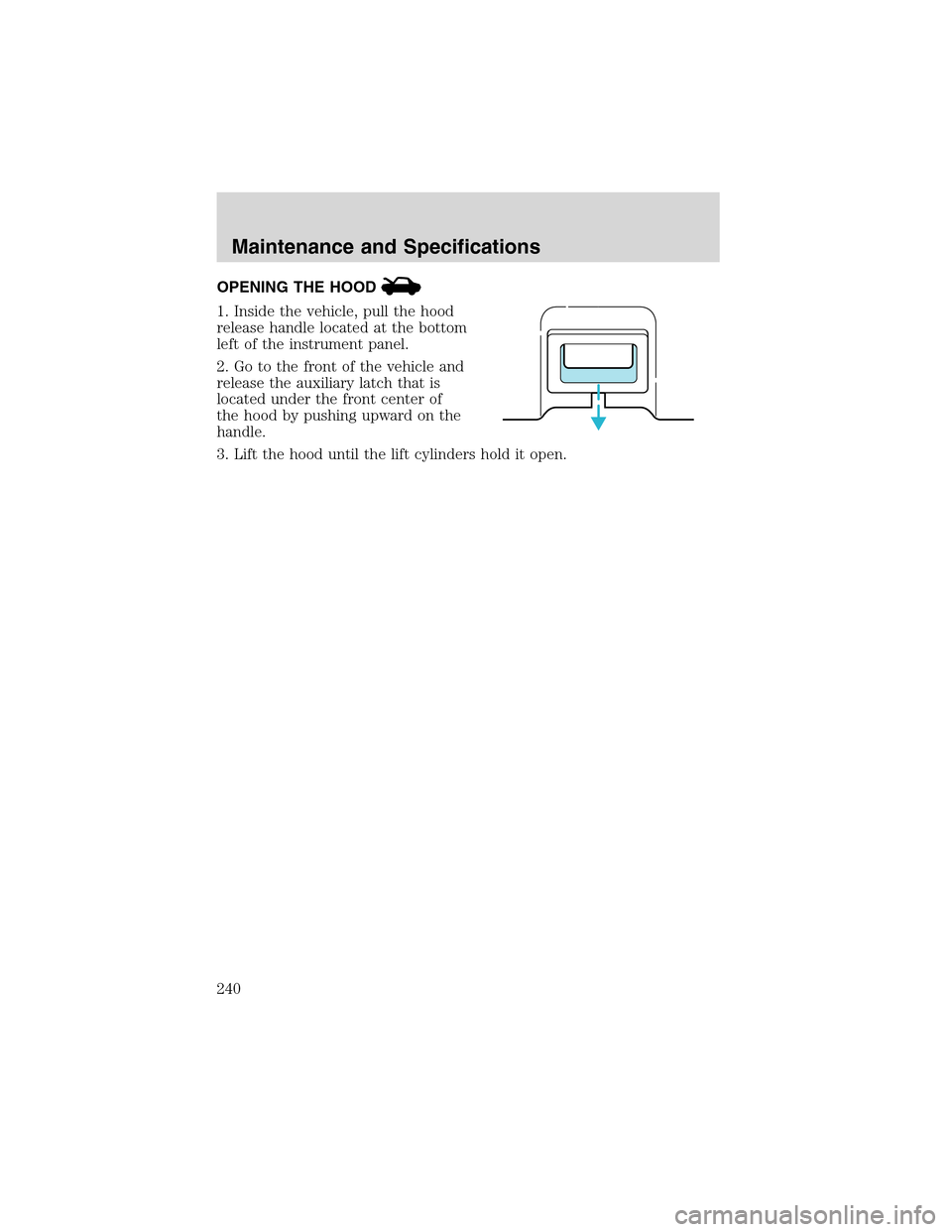
OPENING THE HOOD
1. Inside the vehicle, pull the hood
release handle located at the bottom
left of the instrument panel.
2. Go to the front of the vehicle and
release the auxiliary latch that is
located under the front center of
the hood by pushing upward on the
handle.
3. Lift the hood until the lift cylinders hold it open.
Maintenance and Specifications
240
Page 278 of 288
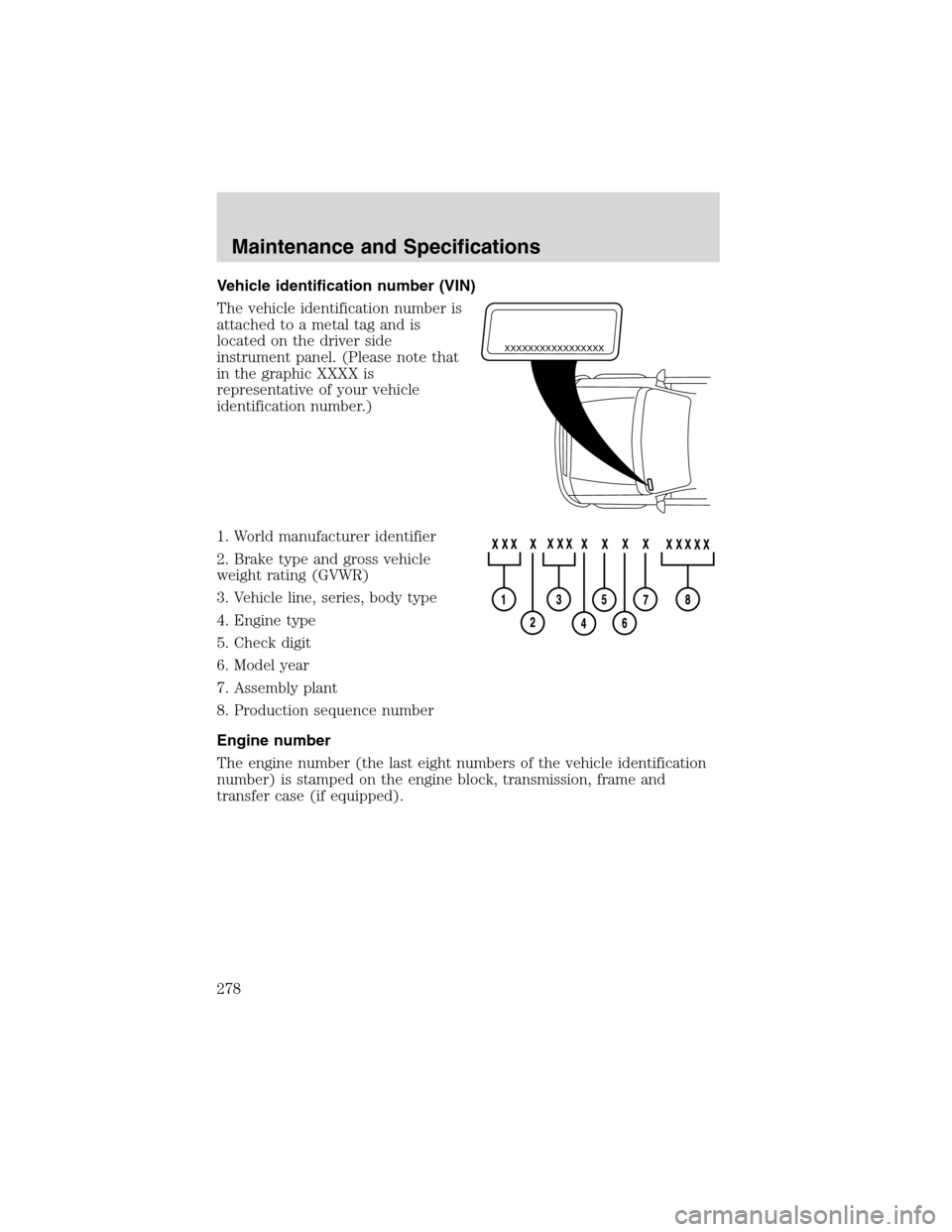
Vehicle identification number (VIN)
The vehicle identification number is
attached to a metal tag and is
located on the driver side
instrument panel. (Please note that
in the graphic XXXX is
representative of your vehicle
identification number.)
1. World manufacturer identifier
2. Brake type and gross vehicle
weight rating (GVWR)
3. Vehicle line, series, body type
4. Engine type
5. Check digit
6. Model year
7. Assembly plant
8. Production sequence number
Engine number
The engine number (the last eight numbers of the vehicle identification
number) is stamped on the engine block, transmission, frame and
transfer case (if equipped).
XXXXXXXXXXXXXXXXX
Maintenance and Specifications
278