Page 179 of 392

�µ
�´
Select BAL or FAD by pressing the
TUNE knob. Adjust the Balance or
Fader to your liking by turning the
TUNE knob.
The displayed number shows you
the current setting.
When the adjustment level reaches
the center, you will see ‘‘ ’’.
The system will automatically return
the display to the selected audio
mode about f ive seconds af ter you
stop adjusting a mode with the
TUNE knob.
You can use the instrument panel
brightness control knob to adjust the
illumination of the audio system (see
page ). The audio system
illuminates when the parking lights
are on, even if the radio is turned of f .
The right display usually shows the
time when the ignition is in
ACCESSORY (I) or ON (II). It
shows the operation mode of the
radio, cassette player, CD player, or
rear entertainment system when you
operate them, then goes back to the
time display af ter f ive seconds.
To set the clock, press and hold the
SET (TUNE) button until the
numbers f lash. Change the hours by
pressing the H ( ) button until the
numbers advance to the desired time.
Change the minutes by pressing the
M ( ) button until the numbers
advance to the desired time. When
you are f inished, press the SET
button again.
C
73
Audio System
Comf ort and Convenience Feat ures
A udio System L ighting
Digital Clock
175
Page 197 of 392
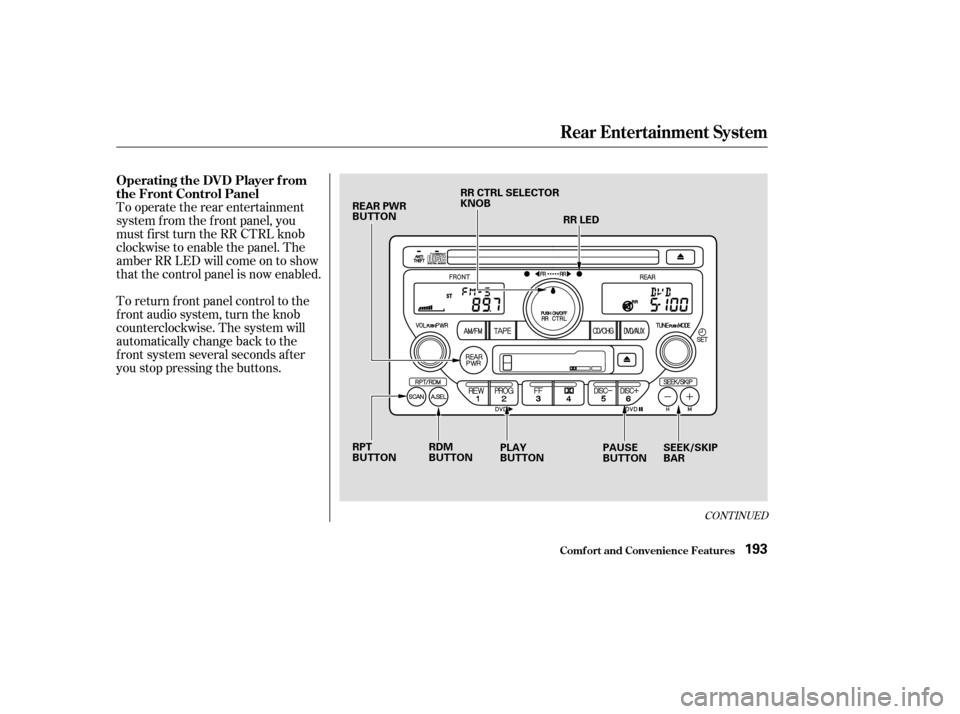
To return f ront panel control to the
front audio system, turn the knob
counterclockwise. The system will
automatically change back to the
f ront system several seconds af ter
you stop pressing the buttons. To operate the rear entertainment
system f rom the f ront panel, you
must first turn the RR CTRL knob
clockwise to enable the panel. The
amber RR LED will come on to show
that the control panel is now enabled.
CONT INUED
Operating the DVD Player f rom
the Front Control Panel
Rear Entertainment System
Comf ort and Convenience Feat ures193
REAR PWR
BUTTONRR CTRL SELECTOR
KNOB
RR LED
RPT
BUTTON PLAY
BUTTONPAUSE
BUTTONSEEK/SKIP
BAR
RDM
BUTTON
Page 205 of 392

�Û�Ý
An audio CD can be played in either
the main CD player in the f ront panel,
in the DVD/CD player below the
f ront panel, or in the optional CD
changer. This allows the f ront and
rear passengers to listen to dif f erent
CDs.
Select the rear system by turning the
RR CTRL knob clockwise. If the CD
is loaded in the main CD player, or
CD changer, select CD/CHG. If the
CD is loaded in the lower player,
select DVD/AUX.
If theCDisloadedinthemainCD
player or CD changer, ref er to pagesand f or operating
instructions. If the CD is loaded in
the DVD/AUX player, ref er to page . If theCDisloadedinthemainCD
player or optional CD changer, select
it by pressing the CD/CHG button.
If it is loaded in the lower player,
press DVD/AUX.
Pressthe buttontoskiptothe
beginning of the next track. Press
the button to return to the
beginning of current track. Press it
again to go to the beginning of the
previous track.
If the CD changer is selected, use
the and buttons to change
discs.
If theCDisloadedinthemainCD
player or optional CD changer, select
it by pressing the CD/CHG button.
If it is loaded in the lower player,
press DVD/AUX. To move rapidly within a track, press
andholdeithertheFWDorREW
buttons. When you press FWD, you
will see ‘‘CUE’’ in the display. When
you press REW, you will see ‘‘REW’’
in the display. Release the button
when the system reaches the desired
point.
Pressthe buttontoskiptothe
beginning of the next track. Press
the button to return to the
beginning of the current track. Press
it again to go to the beginning of the
previous track.
182 184 193
Playing a CD With the Rear
Entertainment System
Playing a CD Wit h t he Front Panel
Playing a CD Wit h t he Rear Cont rol
Panel
Playing a CD Wit h t he Remot eCont rol
Rear Entertainment System
Comf ort and Convenience Feat ures201
Page 207 of 392
�Û
As required by the FCC:This device complies with Part 15 of theFCC rules. Operation is subject to thef ollowing two conditions: (1) This devicemay not cause harmf ul interf erence, and(2) this device must accept anyinterf erence received, includinginterf erence that may cause undesiredoperation.
Changes or modif ications not expresslyapproved by the party responsible f orcompliance could void the user’sauthority to operate the equipment.
This device complies with IndustryCanada Standard RSS-210.Operation is subject to the f ollowing twoconditions: (1) this device may not causeinterf erence, and (2) this device mustaccept any interf erence that may causeundesired operation of the device.
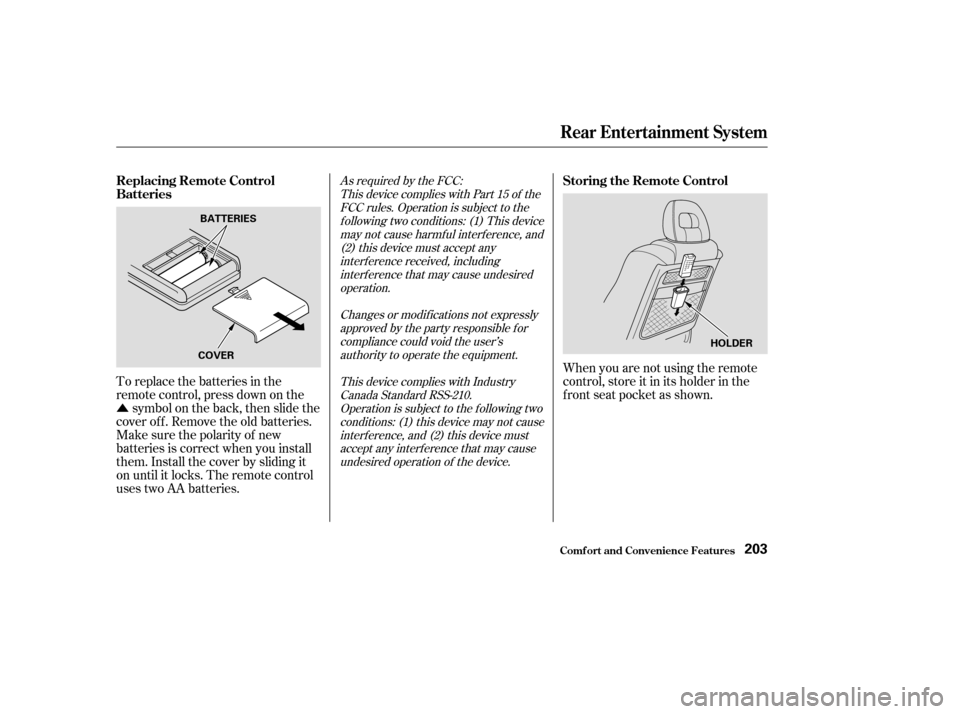
To replace the batteries in the
remote control, press down on the symbol on the back, then slide the
cover off. Remove the old batteries.
Make sure the polarity of new
batteries is correct when you install
them. Install the cover by sliding it
on until it locks. The remote control
uses two AA batteries. When you are not using the remote
control, store it in its holder in the
f ront seat pocket as shown.
Replacing Remote Control
Batteries
Storing the Remote Control
Rear Entertainment System
Comf ort and Convenience Feat ures203
BATTERIES
COVER HOLDER
Page 208 of 392
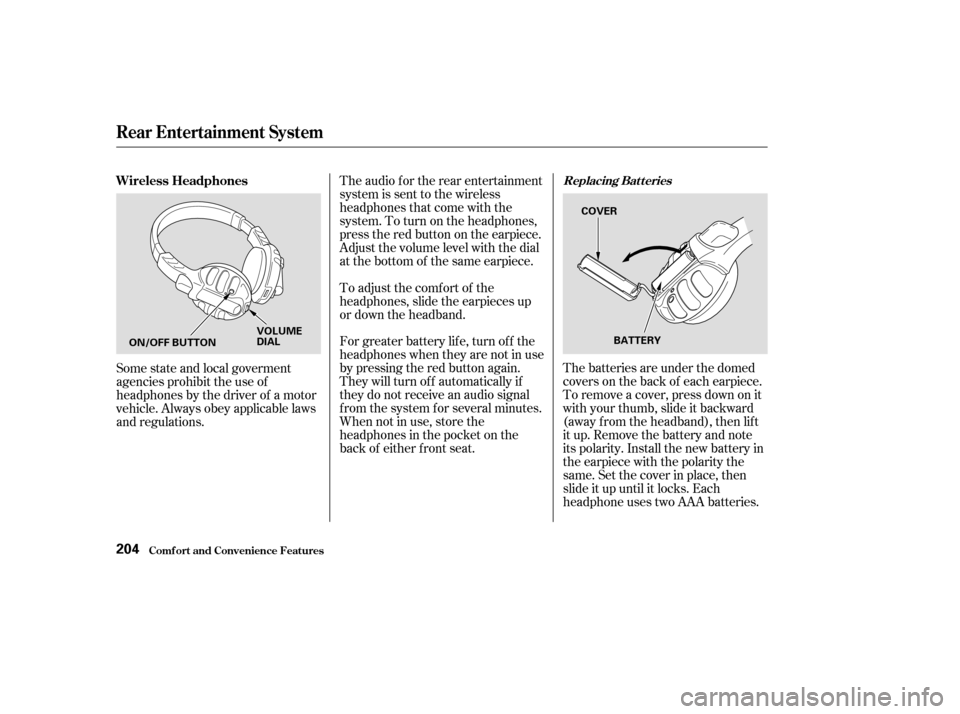
The batteries are under the domed
covers on the back of each earpiece.
To remove a cover, press down on it
with your thumb, slide it backward
(away f rom the headband), then lif t
it up. Remove the battery and note
its polarity. Install the new battery in
theearpiecewiththepolaritythe
same. Set the cover in place, then
slide it up until it locks. Each
headphone uses two AAA batteries.
The audio f or the rear entertainment
system is sent to the wireless
headphones that come with the
system. To turn on the headphones,
presstheredbuttonontheearpiece.
Adjust the volume level with the dial
at the bottom of the same earpiece.
To adjust the comf ort of the
headphones, slide the earpieces up
or down the headband.
For greater battery lif e, turn of f the
headphones when they are not in use
by pressing the red button again.
They will turn of f automatically if
they do not receive an audio signal
f rom the system f or several minutes.
When not in use, store the
headphones in the pocket on the
back of either f ront seat.
Some state and local goverment
agencies prohibit the use of
headphones by the driver of a motor
vehicle. Always obey applicable laws
and regulations. Wireless Headphones
Replacing Bat t eries
Rear Entertainment System
Comf ort and Convenience Feat ures204
ON/OFF BUTTON
VOLUME
DIAL
BATTERY
COVER
Page 210 of 392
Once the security system is set,
opening any door (without using the
key or the remote transmitter), or
the hood, will cause it to alarm. It
also alarms if the radio is removed
f rom the dashboard or the wiring is
cut.Do not attempt to alter this system
or add other devices to it. The security system will not set if
the hood, tailgate, or any door is not
f ully closed. If the system will not set,
check the Door and Tailgate Open
Monitor on the instrument panel
(see page ) to see if the doors and
tailgate are f ully closed. Since it is
notpartofthemonitordisplay,
manually check the hood.
The security system helps to protect
your vehicle and valuables f rom thef t.
The horn sounds and a combination
of headlights, parking lights, side
marker lights, and taillights f lash if
someone attempts to break into your
vehicleorremovetheradio.This
alarm continues f or two minutes,
then the system resets. To reset an
alarming system before the two
minutes have elapsed, unlock the
driver’s f ront door with the key or
the remote transmitter.
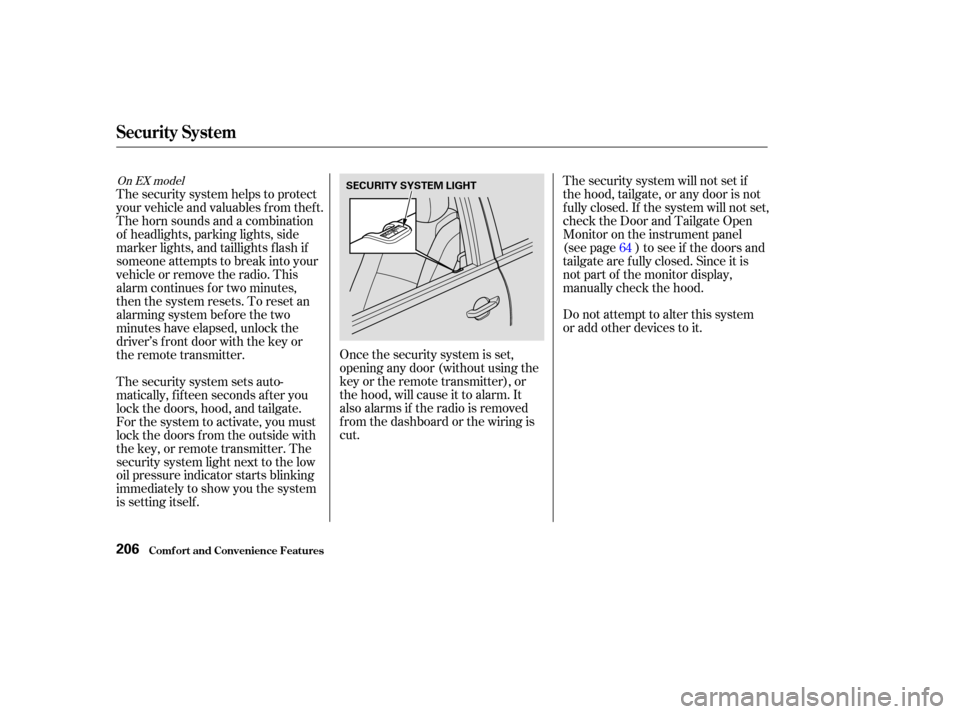
The security system sets auto-
matically, f if teen seconds af ter you
lock the doors, hood, and tailgate.
For the system to activate, you must
lock the doors f rom the outside with
the key, or remote transmitter. The
security system light next to the low
oil pressure indicator starts blinking
immediately to show you the system
is setting itself . 64
On EX model
Security System
Comf ort and Convenience Feat ures206
SECURITY SYSTEM LIGHT
Page 215 of 392
�µ
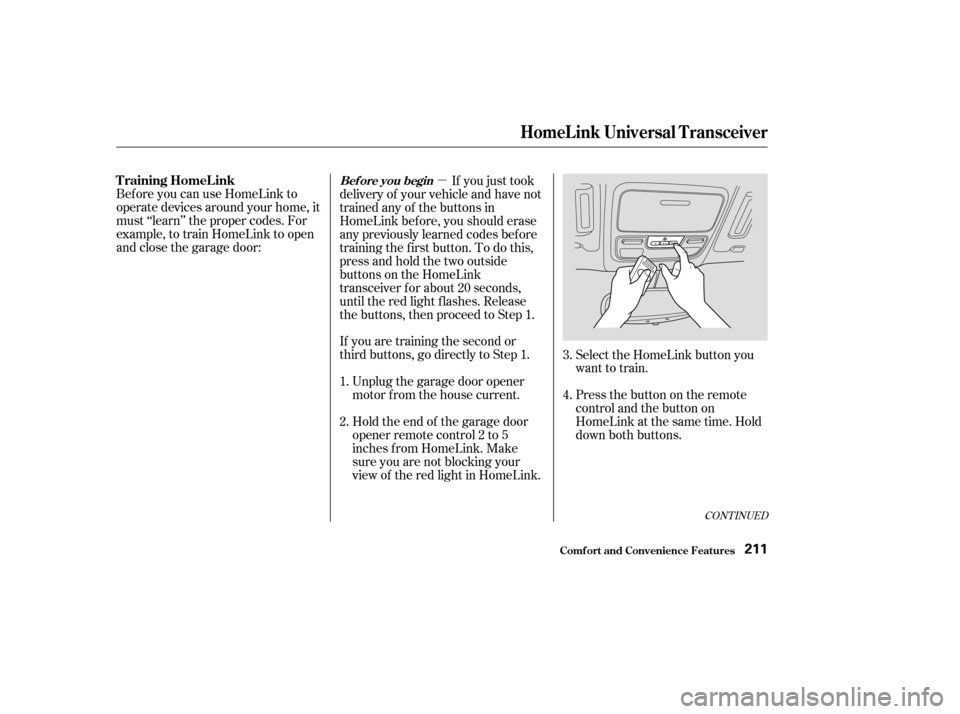
If you are training the second or
third buttons, go directly to Step 1. Unplug the garage door opener
motor f rom the house current.
Bef ore you can use HomeLink to
operate devices around your home, it
must ‘‘learn’’ the proper codes. For
example, to train HomeLink to open
and close the garage door:
If you just took
delivery of your vehicle and have not
trained any of the buttons in
HomeLink bef ore, you should erase
any previously learned codes bef ore
training the f irst button. To do this,
press and hold the two outside
buttons on the HomeLink
transceiver for about 20 seconds,
until the red light f lashes. Release
the buttons, then proceed to Step 1.
Holdtheendof thegaragedoor
opener remote control 2 to 5
inches f rom HomeLink. Make
sure you are not blocking your
view of the red light in HomeLink. Select the HomeLink button you
want to train.
Press the button on the remote
control and the button on
HomeLink at the same time. Hold
down both buttons.
2. 3.
4.
1.
CONT INUED
T raining HomeL inkBef ore you begin
HomeL ink Universal T ransceiver
Comf ort and Convenience Feat ures211
Page 227 of 392
However, if electronic accessories
are improperly installed, or exceed
your vehicle’s electrical system
capacity, they can interf ere with theoperation of your vehicle, or even
cause the airbags to deploy.
Make sure the accessory does not
obscure any lights, or interf ere
with proper vehicle operation or
perf ormance.
Be sure electronic accessories do
not overload electrical circuits
(see page ).
Bef ore installing any accessory:
When properly installed, cellular
phones, alarms, two-way radios, and
low-powered audio systems should
not interf ere with your vehicle’s
computer-controlled systems, such
as the SRS and anti-lock brake
system.
Modif ying your vehicle, or installing
some non-Honda accessories, can
make your vehicle unsaf e. Bef ore
you make any modif ications or add
anyaccessories,besuretoreadthe
f ollowing inf ormation.
Your dealer has genuine Honda
accessories that allow you to
personalize your vehicle. These
accessories have been designed and
approved f or your vehicle, and are
covered by warranty.
Non-Honda accessories are usually
designed f or universal applications.
Although aftermarket accessories
may f it on your vehicle, they may not
meet f actory specif ications, and
could adversely af f ect your vehicle’s
handling and stability. (See
‘‘Modif ications’’ on page f or
additional information.)
Have the installer contact your
Honda dealer f or assistance bef ore
installing any electronic accessory.
If possible, have your Honda dealer
inspect the f inal installation. 356
224
A ccessories
A ccessories and Modif ications
Bef ore Driving223
Improper accessories or
modifications can affect your
vehicle’s handling, stability and
performance, and cause a
crash in which you can be hurt
or killed.
Follow all instructions in this
owner’s manual regarding
accessories and modifications.