Page 228 of 392

Any object
attached to or placed on the covers
marked ‘‘SRS AIRBAG,’’ in the
center of the steering wheel and
on top of the dashboard, could
interf ere with the proper operation
of the airbags. Or, if the airbags
inf late, the objects could be
propelled inside the vehicle and
hurt someone.
If a side airbag
inflates,acupholderorotherhard
object attached on or near the
door could be propelled inside the
vehicle and hurt someone.
Covering the outside edge of a
f ront seat-back, with a non-Honda
seat cover for example, could
prevent the airbag from inflating
properly.
Some examples are:
Lowering the vehicle with an
aftermarket suspension kit that
signif icantly reduces ground
clearance can allow the
undercarriage to impact speed
bumps or other raised objects,
which could cause the airbags to
deploy.
Raising the vehicle with an
af termarket suspension kit can
af f ect the handling and stability.
Af termarket wheels, because they
are a universal design, can cause
excessive stress on suspension
components. Do not modif y your steering wheel
or any other part of your
Supplemental Restraint System.
Modif ications could make the
system inef f ective.
If you plan to modif y your vehicle,
consult with your Honda dealer.
Larger or smaller wheels and tires
can interf ere with the operation of
your vehicle’s anti-lock brakes and
other systems.
Removing parts f rom your vehicle,
or replacing components with non-
Honda (af termarket) components
could seriously af f ect your vehicle’s
handling, stability, and reliability. Modif ications
Additional Saf ety Precaution
A ccessories and Modif ications
Bef ore Driving
Do not at t ach or place object s on
the airbag covers.
Do not at t ach hard object s on ornear a f ront door.
Do not place any object s over t heoutsideedgeof afront seat-back.
224
Page 233 of 392

This section gives you tips on
starting the engine under various
conditions, and how to operate the
automatic transmission. It also
includes important inf ormation on
parking your vehicle, the braking
system, the VTM-4 System, and
f acts you need if you are planning to
tow a trailer.........................
Driving Guidelines .230
........................
Preparing to Drive .231
.......................
Starting the Engine .232
Starting in Cold Weather ....................
at High Altitude .232
..............
Automatic Transmission . 233
.
Shif t Lever Position Indicator . 233
................
Shif t Lever Positions . 234
..............
Engine Speed Limiter . 236
....................
Shif t Lock Release . 236
Variable Torque Management ..............................
4WD System .238
..............................
VTM-4 Lock .238
...........................................
Parking .240
.....................
The Braking System .241
.............
Brake Wear Indicators . 241
...............
Brake System Design . 242
.......................
Anti-lock Brakes .242
Important Saf ety .........................
Reminders .243
........................
ABS Indicator .243
...............
Driving in Bad Weather . 245
...........................
Towing a Trailer .247
Towing Your Vehicle Behind a ................................
Motorhome .259
..............
Of f -Highway Guidelines . 261
Driving
Driving229
Page 235 of 392

Youshoulddothefollowingchecks
and adjustments every day bef ore
you drive your vehicle.Make sure all windows, mirrors,
and outside lights are clean and
unobstructed. Remove f rost, snow,
or ice. Check the adjustment of the seat
(see page ).
Check the adjustment of the
inside and outside mirrors (see
page ).
Check the adjustment of the
steering wheel (see page ).
Fasten your seat belt. Check that
your passengers have f astened
their seat belts (see page ).Turn the ignition switch ON (II).
Check the indicator lights in the
instrument panel.
Start the engine (see page ).
Check the gauges and indicator
lights in the instrument panel (see
page ).
Check that any items you may be
carrying with you inside are stored
properly or f astened down
securely. Visually check the tires. If a tire
looks low, use a gauge to check its
pressure. Check that the hood and tailgate
arefullyclosed. Makesurethedoorsandtailgate
are securely closed and locked.
3. 2.
1.
4. 5.
6.
7.
8.
9. 11.
12. 10.
15
78
61
102
232
89
Preparing to Drive
Driving231
Page 237 of 392
This indicator on the instrument
panel shows which position the shif t
lever is in.
Your Honda’s transmission has f ive
f orward speeds, and is electronically
controlled f or smoother shif ting. It
also has a ‘‘lock-up’’ torque converter
forbetterfueleconomy.Youmay
f eel what seems like another shif t
when the converter locks.
The ‘‘D’’ indicator comes on f or a
f ew seconds when you turn the
ignition switch ON (II). If it f lashes
while driving (in any shif t position),
it indicates a possible problem in the
transmission. Avoid rapid acceler-
ation and have the transmission
checkedbyanauthorizedHonda
dealer as soon as possible.
The malf unction indicator lamp may
come on along with the ‘‘D’’ indicator
if there is a problem in the automatic
transmission control system.
Shif t L ever Position Indicator
Automatic Transmission
Driving233
Page 238 of 392
�µ
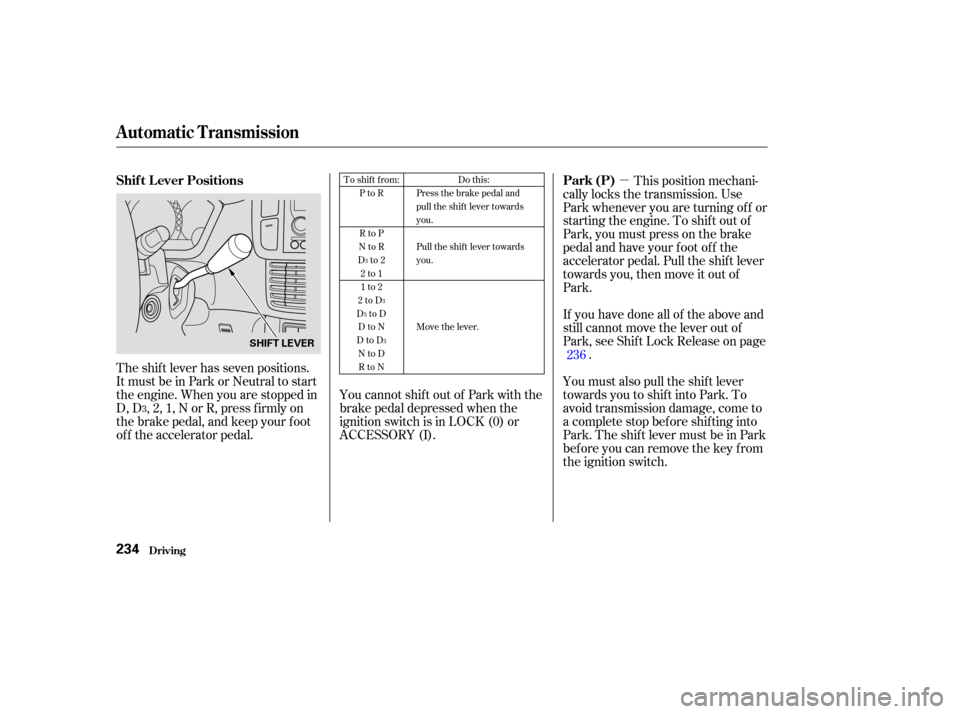
The shift lever has seven positions.
It must be in Park or Neutral to start
the engine. When you are stopped in
D, D , 2, 1, N or R, press f irmly on
the brake pedal, and keep your f oot
of f the accelerator pedal. This position mechani-
cally locks the transmission. Use
Park whenever you are turning of f or
starting the engine. To shif t out of
Park, you must press on the brake
pedal and have your f oot of f the
accelerator pedal. Pull the shif t lever
towards you, then move it out of
Park.
If you have done all of the above and
still cannot move the lever out of
Park, see Shif t Lock Release on page .
You must also pull the shif t lever
towards you to shift into Park. To
avoid transmission damage, come to
a complete stop bef ore shif ting into
Park. The shif t lever must be in Park
bef ore you can remove the key f rom
the ignition switch.
YoucannotshiftoutofParkwiththe
brake pedal depressed when the
ignition switch is in LOCK (0) or
ACCESSORY (I). 236
3 To shift from:
PtoR
RtoP
NtoR
Dto2 2to1
1to2
2toD
DtoD DtoN
DtoD NtoDRtoN Do this:
Press the brake pedal and
pull the shift lever towards
you.
Pull the shift lever towards
you.
Move the lever.
3
3
3
3
Shif t L ever Positions Park (P)
Automatic Transmission
Driving234
SHIFT LEVER
Page 240 of 392

�µ�µ
If you exceed the maximum speed
f or the gear you are in, the engine
speed will enter into the tachometer’s
red zone. If this occurs, you may f eel
the engine cut in and out. This is
caused by a limiter in the engine’s
computer controls. The engine will
run normally when you reduce the
RPM below the red zone.
When driving down hill with a trailer,
use the Second position. To shif t f rom Second
to First, pull the shift lever
towards you, then shift to the
lower gear. With the lever in this
position, the transmission locks in
First gear. By upshif ting and
downshif ting through 1, 2, D and
D, you can operate this
transmission much like a manual
transmission without a clutch
pedal. This allows you to move the shif t
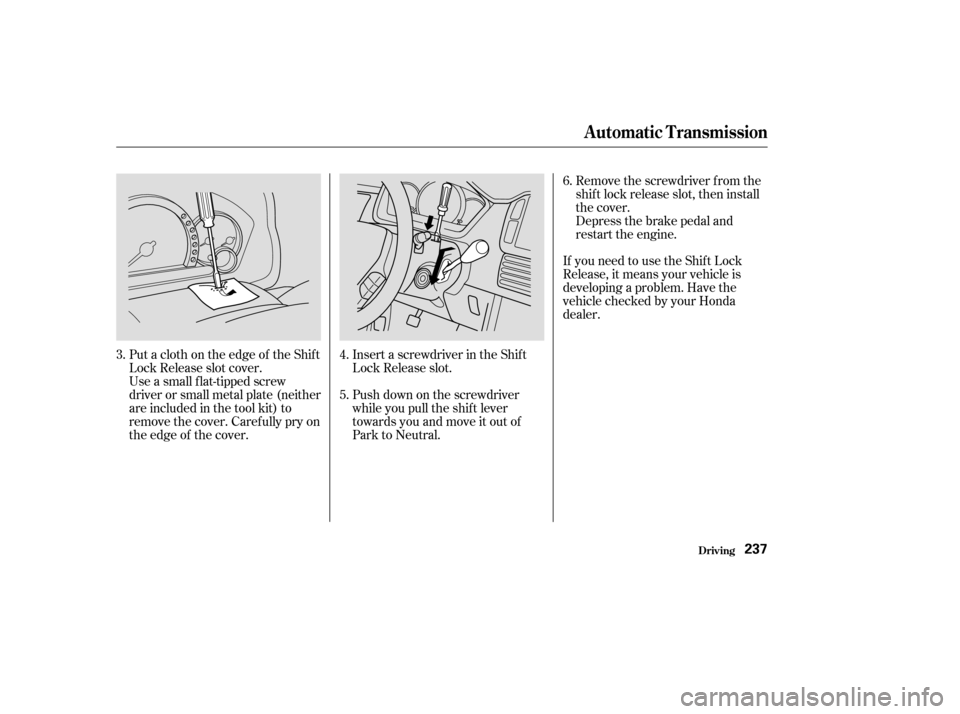
lever out of Park if the normal
method of pushing on the brake
pedal and pulling the shif t lever does
not work.
Set the Parking brake.
Make sure the key is in the
ignition switch LOCK (0) position.
To shif t to Second,
pull the shif t lever towards you, then
shif t to the lower gear. This position
locks the transmission in second
gear. It does not downshif t to f irst
gear when you come to a stop.
Second gives you more power when
climbing, and increased engine
braking when going down steep hills.
Usesecondgearwhenstartingout
on a slippery surf ace or in deep snow.
It will help reduce wheelspin. 1.
2.
3
Engine Speed Limiter
Shift Lock Release
First (1) Second (2)
Automatic Transmission
Driving236
Page 241 of 392
If you need to use the Shif t Lock
Release, it means your vehicle is
developing a problem. Have the
vehicle checked by your Honda
dealer.
Put a cloth on the edge of the Shif t
Lock Release slot cover.
Use a small flat-tipped screw
driver or small metal plate (neither
are included in the tool kit) to
remove the cover. Caref ully pry on
the edge of the cover. Insert a screwdriver in the Shif t
Lock Release slot.
Push down on the screwdriver
while you pull the shif t lever
towards you and move it out of
Park to Neutral.Remove the screwdriver f rom the
shif t lock release slot, then install
the cover.
Depress the brake pedal and
restart the engine.
3. 4.
5.6.
Driving
Automatic Transmission
237
Page 242 of 392
The Variable Torque Management
4WD System (VTM-4) automatically
transf ers varying amounts of engine
torque to the rear wheels under low
traction conditions.If more traction is needed when your
Pilot is stuck or is likely to become
stuck, you can use the VTM-4 Lock
button to increase torque to the rear
wheels. As soon as this feature is no
longer needed, press the VTM-4
Lock button again to disengage the
VTM-4 Lock. VTM-4 Lock
Variable Torque Management 4WD System
Driving238
Do not use the VTM-4 Lock button on
dry, paved roads. Driving on dry,
paved roads with VTM-4 Lock ON may
damage the rear dif f erential when
making a turn. Strange noises and
vibration can also result.