2003 DODGE RAM tow
[x] Cancel search: towPage 492 of 2895
5.7L V-8
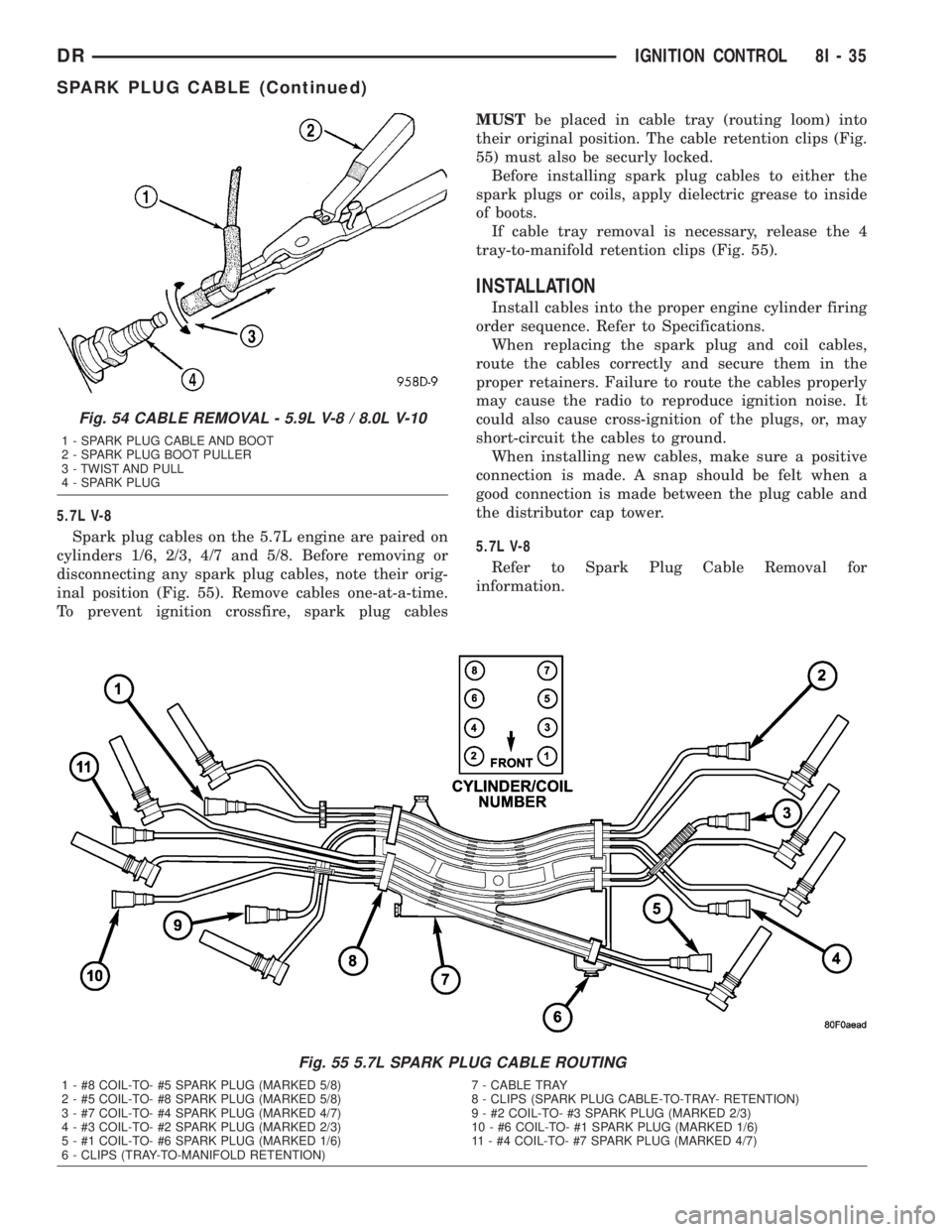
Spark plug cables on the 5.7L engine are paired on
cylinders 1/6, 2/3, 4/7 and 5/8. Before removing or
disconnecting any spark plug cables, note their orig-
inal position (Fig. 55). Remove cables one-at-a-time.
To prevent ignition crossfire, spark plug cablesMUSTbe placed in cable tray (routing loom) into
their original position. The cable retention clips (Fig.
55) must also be securly locked.
Before installing spark plug cables to either the
spark plugs or coils, apply dielectric grease to inside
of boots.
If cable tray removal is necessary, release the 4
tray-to-manifold retention clips (Fig. 55).
INSTALLATION
Install cables into the proper engine cylinder firing
order sequence. Refer to Specifications.
When replacing the spark plug and coil cables,
route the cables correctly and secure them in the
proper retainers. Failure to route the cables properly
may cause the radio to reproduce ignition noise. It
could also cause cross-ignition of the plugs, or, may
short-circuit the cables to ground.
When installing new cables, make sure a positive
connection is made. A snap should be felt when a
good connection is made between the plug cable and
the distributor cap tower.
5.7L V-8
Refer to Spark Plug Cable Removal for
information.
Fig. 55 5.7L SPARK PLUG CABLE ROUTING
1 - #8 COIL-TO- #5 SPARK PLUG (MARKED 5/8) 7 - CABLE TRAY
2 - #5 COIL-TO- #8 SPARK PLUG (MARKED 5/8) 8 - CLIPS (SPARK PLUG CABLE-TO-TRAY- RETENTION)
3 - #7 COIL-TO- #4 SPARK PLUG (MARKED 4/7) 9 - #2 COIL-TO- #3 SPARK PLUG (MARKED 2/3)
4 - #3 COIL-TO- #2 SPARK PLUG (MARKED 2/3) 10 - #6 COIL-TO- #1 SPARK PLUG (MARKED 1/6)
5 - #1 COIL-TO- #6 SPARK PLUG (MARKED 1/6) 11 - #4 COIL-TO- #7 SPARK PLUG (MARKED 4/7)
6 - CLIPS (TRAY-TO-MANIFOLD RETENTION)
Fig. 54 CABLE REMOVAL - 5.9L V-8 / 8.0L V-10
1 - SPARK PLUG CABLE AND BOOT
2 - SPARK PLUG BOOT PULLER
3 - TWIST AND PULL
4 - SPARK PLUG
DRIGNITION CONTROL 8I - 35
SPARK PLUG CABLE (Continued)
Page 518 of 2895

layer of the overlay causes the icon to appear in red
through the translucent outer layer of the overlay
when the indicator is illuminated from behind by the
LED, which is soldered onto the instrument cluster
electronic circuit board. The ETC indicator is ser-
viced as a unit with the instrument cluster.
OPERATION
The Electronic Throttle Control (ETC) indicator
gives an indication to the vehicle operator when the
ETC system is faulty or inoperative. The ETC indi-
cator is controlled by a transistor on the instrument
cluster circuit board based upon cluster programming
and electronic messages received by the cluster from
the Powertrain Control Module (PCM) over the Pro-
grammable Communications Interface (PCI) data
bus. The ETC indicator Light Emitting Diode (LED)
is completely controlled by the instrument cluster
logic circuit, and that logic will only allow this indi-
cator to operate when the instrument cluster receives
a battery current input on the fused ignition switch
output (run-start) circuit. Therefore, the LED will
always be off when the ignition switch is in any posi-
tion except On or Start. The LED only illuminates
when it is provided a path to ground by the instru-
ment cluster transistor. The instrument cluster will
turn on the ETC indicator for the following reasons:
²Bulb Test- Each time the ignition switch is
turned to the On position the ETC indicator is illu-
minated for about six seconds. The entire six second
bulb test is a function of the PCM.
²ETC Lamp-On Message- Each time the clus-
ter receives a lamp-on message from the PCM, the
ETC indicator will be illuminated. The indicator can
be flashed on and off, or illuminated solid, as dic-
tated by the PCM message. The indicator remains
illuminated solid or continues to flash for about
twelve seconds or until the cluster receives a lamp-off
message from the PCM, whichever is longer. If the
indicator is illuminated solid with the engine run-
ning the vehicle will usually remain drivable. If the
indicator is flashing with the engine running the
vehicle may require towing. A flashing indicator
means the ETC system requires immediate service.
²Communication Error- If the cluster receives
no ETC lamp messages for three consecutive seconds,
the ETC indicator is illuminated. The indicator
remains illuminated until the cluster receives a sin-
gle lamp-off message from the PCM.
²Actuator Test- Each time the cluster is put
through the actuator test, the ETC indicator will be
turned on, then off again during the bulb check por-
tion of the test to confirm the functionality of the
LED and the cluster control circuitry. The actuator
test illumination of the ETC indicator is a function of
the PCM.The PCM continually monitors the ETC system cir-
cuits and sensors to decide whether the system is in
good operating condition. The PCM then sends the
proper lamp-on or lamp-off messages to the instru-
ment cluster. If the PCM sends a lamp-on message
after the bulb test, it indicates that the PCM has
detected a system malfunction and/or that the ETC
system is inoperative. The PCM will store a Diagnos-
tic Trouble Code (DTC) for any malfunction it
detects. Each time the ETC indicator fails to illumi-
nate due to an open or short in the cluster ETC indi-
cator circuit, the cluster sends a message notifying
the PCM of the condition, the instrument cluster and
the PCM will each store a DTC. For proper diagnosis
of the ETC system, the PCM, the PCI data bus, or
the electronic message inputs to the instrument clus-
ter that control the ETC indicator, a DRBIIItscan
tool is required. Refer to the appropriate diagnostic
information.
FUEL GAUGE
DESCRIPTION
A fuel gauge is standard equipment on all instru-
ment clusters. The fuel gauge is located in the lower
left quadrant of the instrument cluster, below the
voltage gauge. The fuel gauge consists of a movable
gauge needle or pointer controlled by the instrument
cluster circuitry and a fixed 90 degree scale on the
cluster overlay that reads left-to-right from ªEº (or
Empty) to ªFº (or Full). An International Control and
Display Symbol icon for ªFuelº is located on the clus-
ter overlay, directly below the right end of the gauge
scale. An arrowhead pointed to the left side of the
vehicle is imprinted on the cluster overlay next to the
ªFuelº icon in the fuel gauge to provide the driver
with a reminder as to the location of the fuel filler
access. On vehicles equipped with a diesel engine,
text that specifies ªDIESEL ONLYº is located across
the fuel gauge below the gauge scale, but above the
hub of the gauge needle. The fuel gauge graphics are
black against a white field except for a single red
graduation at the low end of the gauge scale, making
them clearly visible within the instrument cluster in
daylight. When illuminated from behind by the panel
lamps dimmer controlled cluster illumination lighting
with the exterior lamps turned On, the black graph-
ics appear blue and the red graphics still appear red.
The orange gauge needle is internally illuminated.
Gauge illumination is provided by replaceable incan-
descent bulb and bulb holder units located on the
instrument cluster electronic circuit board. The fuel
gauge is serviced as a unit with the instrument clus-
ter.
DRINSTRUMENT CLUSTER 8J - 25
ETC INDICATOR (Continued)
Page 539 of 2895
MULTI-FUNCTION SWITCH
DESCRIPTION - TURN SIGNAL SYSTEM.....17
OPERATION - TURN SIGNAL SYSTEM.......18
DIAGNOSIS AND TESTING - MULTI-
FUNCTION SWITCH...................18
REMOVAL.............................18
INSTALLATION.........................19
PARK LAMP RELAY
DESCRIPTION.........................19
OPERATION...........................19
DIAGNOSIS AND TESTING - PARK LAMP
RELAY..............................20
REMOVAL.............................20
INSTALLATION.........................21
PARK/TURN SIGNAL LAMP
REMOVAL.............................21
INSTALLATION.........................21TAIL LAMP
REMOVAL.............................21
INSTALLATION.........................21
TAIL LAMP UNIT
REMOVAL.............................21
INSTALLATION.........................21
TRAILER TOW WIRING
DESCRIPTION.........................22
TURN LAMP
REMOVAL.............................22
INSTALLATION.........................22
UNDERHOOD LAMP
REMOVAL.............................22
INSTALLATION.........................22
UNDERHOOD LAMP UNIT
REMOVAL.............................22
INSTALLATION.........................23
LAMPS/LIGHTING - EXTERIOR
DESCRIPTION
The exterior lighting system for this model include
the following components:
²Backup Lamps
²Brake Lamps
²Daytime Running Lamps
²Front Fog Lamps
²Hazard Warning Lamps
²Headlamps
²Park Lamps
²Turn Signal Lamps
Other components of the exterior lighting system
for this model include:
²Backup Lamp Switch
²Brake Lamp Switch
²Front Control Module
²Front Fog Lamp Relay
²Hazard Switch
²Multi-Function Switch
²Park Lamp Relay
²Trailer Tow Connectors
Some of the interior and exterior lighting functions
are governed by the front control module. The head-
lamp, dome, and door ajar switchs provide signals to
the instrument cluster. The instrument cluster sends
a J1850 message to the front control module to
enable the necessary components for illumination.
Hard wired circuitry connects the exterior lighting
system components to the electrical system of the
vehicle. Refer to the appropriate wiring information.
OPERATION
DAYTIME RUNNING LAMPS
Power is reduced using pulse-width modulation to
the high beams, where by the power is switched on
and off rapidly instead of remaining on continuously.
The duration and interval of the power pulses is pro-
grammed into the Front Control Module (FCM).
HEADLAMP SYSTEM
The instrument cluster monitors both the multi-
plexed headlamp and multifunction switches. The
instrument cluster transmits a J1850 bus message to
the front control module (FCM) to activate the head-
lamps. The headlamp system will default to head-
lamps ON position when ignition switch is ON and
when an open or short circuit failure occurs on the
headlamp switch input to the instrument cluster. The
system will return to normal operation when the
open or short is repaired. A fault will be reported by
the Instrument Cluster when a failure occurs on the
dimmer or headlamp switch input.
If the exterior lamps are ON, and the headlamp
switch is in any position other than OFF, with the
ignition switch OFF (LOCK) after 5 minutes, the
Instrument Cluster transmits a message via J1850
informing the the FCM. The FCM will then turn off
the headlamps, park lamps and fog lamps. This fea-
ture (load shed) prevents the vehicle battery from
being discharged when the vehicle lights have been
left ON.
HEADLAMP TIME DELAY SYSTEM
The headlamp time delay system is activated by
turning the headlamps ON (high or low beam) while
the engine is running, turning the ignition switch
OFF, and then turning the headlamp switch OFF
8L - 2 LAMPS/LIGHTING - EXTERIORDR
Page 559 of 2895
TRAILER TOW WIRING
DESCRIPTION
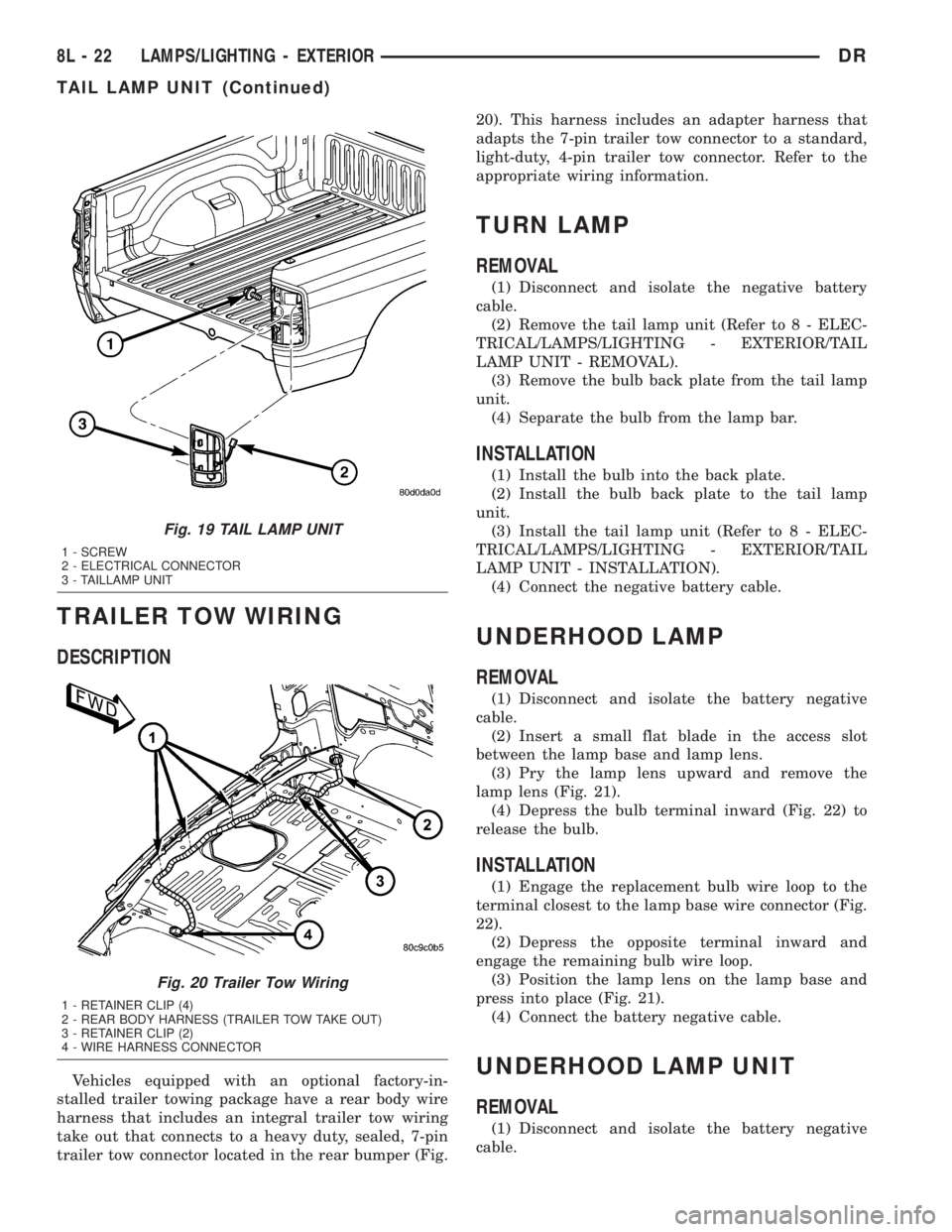
Vehicles equipped with an optional factory-in-
stalled trailer towing package have a rear body wire
harness that includes an integral trailer tow wiring
take out that connects to a heavy duty, sealed, 7-pin
trailer tow connector located in the rear bumper (Fig.20). This harness includes an adapter harness that
adapts the 7-pin trailer tow connector to a standard,
light-duty, 4-pin trailer tow connector. Refer to the
appropriate wiring information.
TURN LAMP
REMOVAL
(1) Disconnect and isolate the negative battery
cable.
(2) Remove the tail lamp unit (Refer to 8 - ELEC-
TRICAL/LAMPS/LIGHTING - EXTERIOR/TAIL
LAMP UNIT - REMOVAL).
(3) Remove the bulb back plate from the tail lamp
unit.
(4) Separate the bulb from the lamp bar.
INSTALLATION
(1) Install the bulb into the back plate.
(2) Install the bulb back plate to the tail lamp
unit.
(3) Install the tail lamp unit (Refer to 8 - ELEC-
TRICAL/LAMPS/LIGHTING - EXTERIOR/TAIL
LAMP UNIT - INSTALLATION).
(4) Connect the negative battery cable.
UNDERHOOD LAMP
REMOVAL
(1) Disconnect and isolate the battery negative
cable.
(2) Insert a small flat blade in the access slot
between the lamp base and lamp lens.
(3) Pry the lamp lens upward and remove the
lamp lens (Fig. 21).
(4) Depress the bulb terminal inward (Fig. 22) to
release the bulb.
INSTALLATION
(1) Engage the replacement bulb wire loop to the
terminal closest to the lamp base wire connector (Fig.
22).
(2) Depress the opposite terminal inward and
engage the remaining bulb wire loop.
(3) Position the lamp lens on the lamp base and
press into place (Fig. 21).
(4) Connect the battery negative cable.
UNDERHOOD LAMP UNIT
REMOVAL
(1) Disconnect and isolate the battery negative
cable.
Fig. 19 TAIL LAMP UNIT
1 - SCREW
2 - ELECTRICAL CONNECTOR
3 - TAILLAMP UNIT
Fig. 20 Trailer Tow Wiring
1 - RETAINER CLIP (4)
2 - REAR BODY HARNESS (TRAILER TOW TAKE OUT)
3 - RETAINER CLIP (2)
4 - WIRE HARNESS CONNECTOR
8L - 22 LAMPS/LIGHTING - EXTERIORDR
TAIL LAMP UNIT (Continued)
Page 563 of 2895

(4) Push the glove box lamp and switch unit into
the hole in the mounting bracket on the instrument
panel glove box opening upper reinforcement.
(5) Install the glove box onto the instrument panel.
(Refer to 23 - BODY/INSTRUMENT PANEL/GLOVE
BOX - INSTALLATION) for the procedures.
(6) Close the glove box.
(7) Reconnect the battery negative cable.
READING LAMP
DESCRIPTION
The overhead console in this vehicle is equipped
with two individual reading and courtesy lamps. The
lamp lenses are the only visible components of these
lamps. Each lamp has its own switch, bulb, reflector
and lens within the overhead console.
The overhead console reading and courtesy lamps
are controlled by the instrument cluster which pro-
vides power at all times, regardless of the ignition
switch position. The ground circuit for the lamps is
switched through the integral reading and courtesy
lamp switches or through the door ajar switches.
Each lamp is designed and aimed to provide illumi-
nation that will be directed only to that side of the
vehicle on which the lamp is located.
The reading and courtesy lamp lenses and bulbs
are available for service replacement. The reading
and courtesy lamp switches, bulb holders and wiring
are only available as part of the overhead console
wire harness. If either of the lamp switches or bulb
holders is faulty or damaged, the entire overhead
console wire harness assembly must be replaced.
For service of the reading and courtesy lamp bulbs,
refer to the appropriate wiring information.
OPERATION
All reading and courtesy lamps located in the over-
head console are activated by the door ajar switches
via the instrument cluster. When all of the doors are
closed, these lamps can be individually activated by
depressing the corresponding lens. When any door is
open, depressing the lamp lenses to activate the lamp
switches will not turn the lamps off.
The instrument cluster monitors the door ajar
switches. When a door is open the instrument cluster
grounds the low side drivers to turn on the lamps.
Upon closing all doors, the instrument cluster ini-
tiates a 30 second timer. If any of the doors are
opened during the ªtime outº cycle, the instrument
cluster will reset the timer until all doors are closed.
The instrument cluster will faid to off when the doors
are closed and the ignition is turned ON, the time
out expires or the power locks are activated.
REMOVAL
(1) Disconnect and isolate the battery negative
cable.
(2) Insert a long, narrow, flat-bladed tool between
the curved (outboard) edge of the reading and cour-
tesy lamp lens and the overhead console housing
(Fig. 4).
(3) Gently pry inward and downward against the
lens until the latch tab in the center of the outboard
edge of the reading and courtesy lamp lens is disen-
gaged from the overhead console housing.
(4)
Pull firmly on the lens toward the outboard side
of the vehicle to disengage the two pivot tabs on the
inboard edge of the reading and courtesy lamp lens
are disengaged from the overhead console housing.
(5) Remove the reading and courtesy lamp lens
from the overhead console housing.
INSTALLATION
(1) Position the reading and courtesy lamp lens
onto the overhead console housing.
(2) Align the two pivot tabs on the inboard edge of
the reading and courtesy lamp lens with the two
pivot holes in the overhead console housing.
(3) Push firmly on the lens toward the inboard
side of the vehicle to insert the two pivot tabs on the
inboard edge of the reading and courtesy lamp lens
into the two pivot holes in the overhead console hous-
ing.
(4) Pivot the lens back up into position and press
upward firmly until the latch tab in the center of the
outboard edge of the reading and courtesy lamp lens
snaps back into the overhead console housing.
(5) Reconnect the battery negative cable.
Fig. 4 Overhead Console Reading Lamp Bulb
Removal
1 - LENS
2 - FLAT BLADE
3 - CONSOLE
8L - 26 LAMPS/LIGHTING - INTERIORDR
GLOVE BOX LAMP/SWITCH (Continued)
Page 573 of 2895

memory setting 1 and the second transmitter trained
will be associated with memory setting 2. Additional
transmitters will not be associated with a memory
setting. When you have finished training the trans-
mitters, press the menu button again and the EVIC
will display ªTRAIN DONE ªXº TRAINED. If no
transmitters are trained within approximately 30
seconds the EVIC will display ªTRAIN TIMEOUTº.
REMOVAL
(1) Disconnect and isolate the battery negative
cable.
(2) Remove the overhead console from the headlin-
er.(Refer to 8 - ELECTRICAL/OVERHEAD CON-
SOLE - REMOVAL).
(3) Disconnect the EVIC module electrical connec-
tor. Depress the retaining tab and pull straight
apart.
(4) Remove the screws holding the EVIC module in
the overhead console (Fig. 6).
(5) Remove EVIC module from console assembly.
INSTALLATION
(1) Position the EVIC module in the overhead con-
sole.
(2) Install the screws holding the EVIC module in
the overhead console.
(3) Connect the EVIC module electrical connector.(4) Install the overhead console on the headlin-
er(Refer to 8 - ELECTRICAL/OVERHEAD CON-
SOLE - INSTALLATION).
(5) Connect the battery negative cable.
(6) Check EVIC module function.
NOTE: If a new EVIC module has been installed, the
compass will have to be calibrated and the variance
set. Refer to Compass Variation Adjustment and
Compass Calibration in the Standard Procedures
section of this group for the procedures.
AMBIENT TEMP SENSOR
DESCRIPTION
Ambient air temperature is monitored by the over-
head console. The ambient temperature messages are
received from the Front Control Module (FCM) over
the Programmable Communications Interface (PCI)
J1850 data bus circuit. The FCM receives a hard
wired input from the ambient temperature sensor
(Fig. 7). The ambient temperature sensor is a vari-
able resistor mounted to the underside of the hood,
in the engine compartment.
For more information on the front control module,
refer toFront Control Modulein the Electronic
Control Modules section of this manual. For complete
circuit diagrams, refer toWiring. The ambient tem-
perature sensor cannot be adjusted or repaired and,
if faulty or damaged, it must be replaced.
OPERATION
The ambient temperature sensor is a variable
resistor that operates on a five-volt reference signal
sent to it by the Front Control Module. The resis-
tance in the sensor changes as temperature changes,
changing the temperature sensor signal circuit volt-
age to the Front Control Module. Based upon the
resistance in the sensor, the Front Control Module
senses a specific voltage on the temperature sensor
signal circuit, which it is programmed to correspond
to a specific temperature. The Front Control Module
Fig. 6 OVERHEAD CONSOLE MODULE REMOVAL
1 - ELECTRONIC VEHICLE INFORMATION MODULE
2 - OVERHEAD CONSOLE
Fig. 7 Ambient Temperature Sensor - Typical
8M - 10 MESSAGE SYSTEMSDR
ELECTRONIC VEHICLE INFO CENTER (Continued)
Page 574 of 2895

then sends the proper ambient temperature mes-
sages to the EVIC, CMTC over the PCI J1850 data
bus.
The temperature function is supported by the
ambient temperature sensor, a wiring circuit, the
Front Control Module, the Programmable Communi-
cations Interface (PCI) data bus, and a portion of the
Electronics module. If any portion of the ambient
temperature sensor circuit fails, the Front Control
Module will self-diagnose the circuit.
For complete circuit diagrams, refer toWiring.
DIAGNOSIS AND TESTING
DIAGNOSIS AND TESTING - AMBIENT
TEMPERATURE SENSOR
(1) Turn the ignition switch to the Off position.
Disconnect and isolate the battery negative cable.
Disconnect the ambient temperature sensor wire har-
ness connector.
(2) Measure the resistance of the ambient temper-
ature sensor. At 24É C (75É F), the sensor resistance
should be approximately 10.3 kilohms. At 30É C (86É
F), the sensor resistance should be approximately
7.57 kilohms. The sensor resistance should decrease
as the temperature rises. If OK, refer toDiagnosis
and Testing - Ambient Temperature Sensor Cir-
cuitin this group. If not OK, replace the faulty
ambient temperature sensor.
NOTE: The ambient temperature sensor is a very
sensitive device. When testing, be certain the tem-
perature sensor has had time to stabilize (room
temperature) before attempting to read the sensor
resistance. Failure to let the ambient temperature
sensor temperature stabilize could result in a mis-
leading test.
DIAGNOSIS AND TESTING - AMBIENT
TEMPERATURE SENSOR CIRCUIT
(1) Turn the ignition switch to the Off position.
Disconnect and isolate the battery negative cable.
Disconnect the ambient temperature sensor wire har-
ness connector and the Front Control Module wire
harness connector.
(2) Connect a jumper wire between the two termi-
nals of the ambient temperature sensor wire harness
connector.
(3) Check for continuity between the sensor return
circuit and the ambient temperature sensor signal
circuit cavities of the Front Control Module wire har-
ness connector. There should be continuity. If OK, go
to Step 4. If not OK, repair the open sensor return or
signal circuit as required.(4) Remove the jumper wire from the ambient tem-
perature sensor wire harness connector. Check for
continuity between the sensor return circuit cavity of
the Front Control Module wire harness connector
and a good ground. There should be no continuity. If
OK, go to Step 5. If not OK, repair the shorted sen-
sor return circuit as required.
(5) Check for continuity between the ambient tem-
perature sensor signal circuit cavity of the Front
Control Module wire harness connector and a good
ground. There should be no continuity. If OK, refer to
Diagnosis and Testing - Overhead Consolein
this group. If not OK, repair the shorted ambient
temperature sensor signal circuit as required.
REMOVAL
(1) Open the hood.
(2) Disconnect and isolate the battery negative
cable.
(3) Working on the underside of the hood, remove
screw holding sensor to hood panel.
(4) Disconnect the sensor electrical connector and
remove sensor from vehicle.
INSTALLATION
(1) Connect the sensor electrical connector.
(2) Working on the underside of the hood, install
screw holding sensor to hood panel.
(3) Connect the battery negative cable.
(4) Close the hood.
UNIVERSAL TRANSMITTER
DESCRIPTION
Some DR models are equipped with a universal
transmitter transceiver. The universal transmitter is
integral to the Electronic Vehicle Information Center
(EVIC) and the Compass Mini-Trip Computer
(CMTC), which is located in the overhead console.
The only visible component of the universal transmit-
ter are the three transmitter push buttons centered
between the modules push buttons located just rear-
ward of the display screen in the overhead console.
The three universal transmitter push buttons are
identified with one, two or three light indicators so
that they be easily identified.
Each of the three universal transmitter push but-
tons control an independent radio transmitter chan-
nel. Each of these three channels can be trained to
transmit a different radio frequency signal for the
remote operation of garage door openers, motorized
gate openers, home or office lighting, security sys-
tems or just about any other device that can be
equipped with a radio receiver in the 286 to 399
MegaHertz (MHz) frequency range for remote opera-
DRMESSAGE SYSTEMS 8M - 11
AMBIENT TEMP SENSOR (Continued)
Page 597 of 2895
to a molded plastic back panel and to the seat back
frame.
The power lumbar adjuster cannot be repaired, and
is serviced only as a unit with the seat back frame. If
the power lumbar adjuster or the seat back frame
are damaged or faulty, the entire seat back frame
unit must be replaced (Refer to 23 - BODY/SEATS/
SEAT BACK - REMOVAL).
OPERATION
The power lumbar adjuster mechanism includes a
reversible electric motor that is secured to the
inboard side of the seat back panel and is connected
to a worm-drive gearbox. The motor and gearbox
operate the lumbar adjuster mechanism in the center
of the seat back by extending and retracting a cable
that actuates a lever. The action of this lever com-
presses or relaxes a grid of flexible slats. The more
this grid is compressed, the more the slats bow out-
ward against the center of the seat back padding,
providing additional lumbar support.
DIAGNOSIS AND TESTING - LUMBAR MOTOR
Actuate the power lumbar switch to move the
power lumbar adjuster in each direction. The power
lumbar adjuster should move in both directions. It
should be noted that the power lumber adjuster nor-
mally operates very quietly and exhibits little visible
movement. If the power lumbar adjuster fails to oper-
ate in only one direction, move the adjuster a short
distance in the opposite direction and test again to be
certain that the adjuster is not at its travel limit. If
the power lumbar adjuster fails to operate in onlyone direction, Test the appropriate power seat switch
as described in this group. If the power lumbar
adjuster fails to operate in either direction, perform
the following tests. For complete circuit diagrams,
refer toWiring.
(1) Check the power seat circuit breaker. If OK, go
to Step 2. If not OK, replace the faulty power seat
circuit breaker.
(2) Check for battery voltage at the power seat cir-
cuit breaker. If OK, go to Step 3. If not OK, repair
the open fused B(+) circuit to the fuse in the Inte-
grated Power Module as required.
(3) Remove the outboard seat cushion side shield
from the seat. Disconnect the seat wire harness con-
nector from the power lumbar switch connector
receptacle. Check for battery voltage at the fused
B(+) circuit cavity of the power seat wire harness
connector for the power lumbar switch. If OK, go to
Step 4. If not OK, repair the open fused B(+) circuit
to the power seat as required.
(4) Check for continuity between the ground cir-
cuit cavity of the power seat wire harness connector
for the power lumbar switch and a good ground.
There should be continuity. If OK, go to Step 5. If not
OK, repair the open ground circuit to ground as
required.
(5) Test the power lumbar switch. . If the switch
tests OK, test the circuits of the power seat wire har-
ness between the power lumbar adjuster motor and
the power lumbar switch for shorts or opens. If the
circuits check OK, replace the faulty seat back frame
assembly. If the circuits are not OK, repair the power
seat wire harness as required.
8N - 20 POWER SEATSDR
LUMBAR MOTOR (Continued)