2003 DODGE RAM battery
[x] Cancel search: batteryPage 1761 of 2895
heater. The heater can be check at room tempera-
ture. Operating range is 0.3 Ð 0.45 Ohms.
(3) Replace heater if resistance is not within oper-
ating range.
(4) If heater is within operating range, replace
heater thermostat.
REMOVAL
REMOVAL/INSTALLATION
The fuel heater/element/sensor assembly is located
inside of the fuel filter housing. Refer to Fuel Filter/
Water Separator Removal/Installation for procedures.
FUEL HEATER RELAY
DESCRIPTION
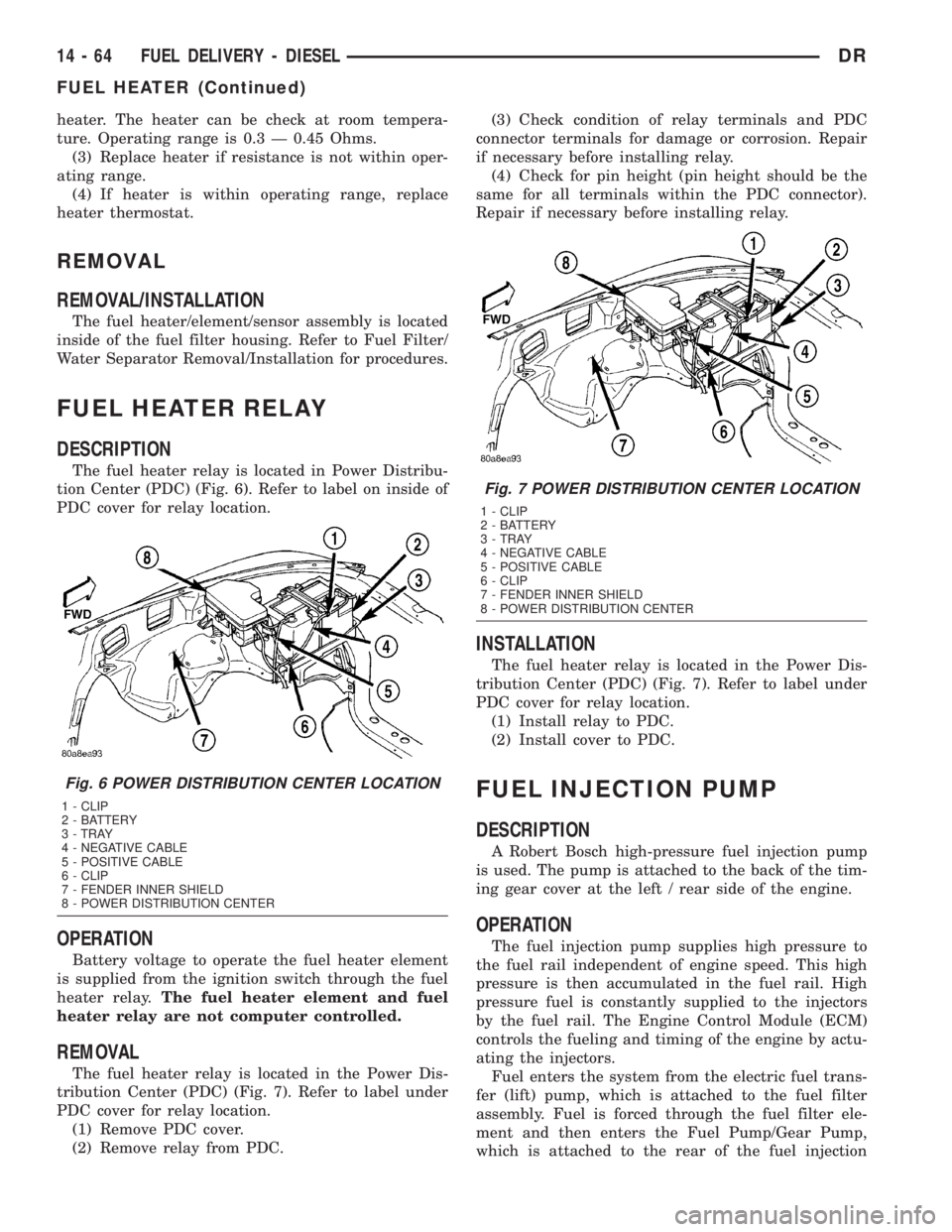
The fuel heater relay is located in Power Distribu-
tion Center (PDC) (Fig. 6). Refer to label on inside of
PDC cover for relay location.
OPERATION
Battery voltage to operate the fuel heater element
is supplied from the ignition switch through the fuel
heater relay.The fuel heater element and fuel
heater relay are not computer controlled.
REMOVAL
The fuel heater relay is located in the Power Dis-
tribution Center (PDC) (Fig. 7). Refer to label under
PDC cover for relay location.
(1) Remove PDC cover.
(2) Remove relay from PDC.(3) Check condition of relay terminals and PDC
connector terminals for damage or corrosion. Repair
if necessary before installing relay.
(4) Check for pin height (pin height should be the
same for all terminals within the PDC connector).
Repair if necessary before installing relay.
INSTALLATION
The fuel heater relay is located in the Power Dis-
tribution Center (PDC) (Fig. 7). Refer to label under
PDC cover for relay location.
(1) Install relay to PDC.
(2) Install cover to PDC.
FUEL INJECTION PUMP
DESCRIPTION
A Robert Bosch high-pressure fuel injection pump
is used. The pump is attached to the back of the tim-
ing gear cover at the left / rear side of the engine.
OPERATION
The fuel injection pump supplies high pressure to
the fuel rail independent of engine speed. This high
pressure is then accumulated in the fuel rail. High
pressure fuel is constantly supplied to the injectors
by the fuel rail. The Engine Control Module (ECM)
controls the fueling and timing of the engine by actu-
ating the injectors.
Fuel enters the system from the electric fuel trans-
fer (lift) pump, which is attached to the fuel filter
assembly. Fuel is forced through the fuel filter ele-
ment and then enters the Fuel Pump/Gear Pump,
which is attached to the rear of the fuel injection
Fig. 6 POWER DISTRIBUTION CENTER LOCATION
1 - CLIP
2 - BATTERY
3 - TRAY
4 - NEGATIVE CABLE
5 - POSITIVE CABLE
6 - CLIP
7 - FENDER INNER SHIELD
8 - POWER DISTRIBUTION CENTER
Fig. 7 POWER DISTRIBUTION CENTER LOCATION
1 - CLIP
2 - BATTERY
3 - TRAY
4 - NEGATIVE CABLE
5 - POSITIVE CABLE
6 - CLIP
7 - FENDER INNER SHIELD
8 - POWER DISTRIBUTION CENTER
14 - 64 FUEL DELIVERY - DIESELDR
FUEL HEATER (Continued)
Page 1762 of 2895
pump. The Fuel Pump/Gear Pump is a low-pressure
pump and produce pressures ranging from 551.5 kpa
(80 psi) to 1241 kpa (180) psi. Fuel then enters the
fuel injection pump. Low pressure fuel is then sup-
plied to the FAC (Fuel Control Actuator).
The FAC is an electronically controlled solenoid
valve. The ECM controls the amount of fuel that
enters the high-pressure pumping chambers by open-
ing and closing the FAC based on a demanded fuel
pressure. The FPS (Fuel Pressure Sensor) on the fuel
rail provides the actual fuel pressure. When the
actuator is opened, the maximum amount of fuel is
being supplied to the fuel injection pump. Any fuel
that does not enter the injection pump is directed to
the overflow valve. The overflow valve regulates how
much excess fuel is used for lubrication of the pump
and how much is returned to the tank through the
drain manifold.
Fuel entering the injection pump is pressurized to
between 300 - 1600 bar by three radial pumping
chambers. The pressurized fuel is then supplied to
the fuel rail.
DIAGNOSIS AND TESTING - FUEL INJECTION
PUMP TIMING
With the Bosch injection pump, there are no
mechanical adjustments needed or necessary to
accomplish fuel injection timing. All timing and fuel
adjustments are electrically made by the engine
mounted Engine Control Module (ECM).
REMOVAL
CAUTION: Cleanliness cannot be overemphasized
when handling or replacing diesel fuel system com-
ponents. This especially includes the fuel injectors,
high-pressure fuel lines and fuel injection pump.
Very tight tolerances are used with these parts. Dirt
contamination could cause rapid part wear and pos-
sible plugging of fuel injector nozzle tip holes. This
in turn could lead to possible engine misfire.
Always wash/clean any fuel system component
thoroughly before disassembly and then air dry.
Cap or cover any open part after disassembly.
Before assembly, examine each part for dirt, grease
or other contaminants and clean if necessary. When
installing new parts, lubricate them with clean
engine oil or clean diesel fuel only.
(1) Disconnect both negative battery cables at both
batteries. Cover and isolate ends of both cables.
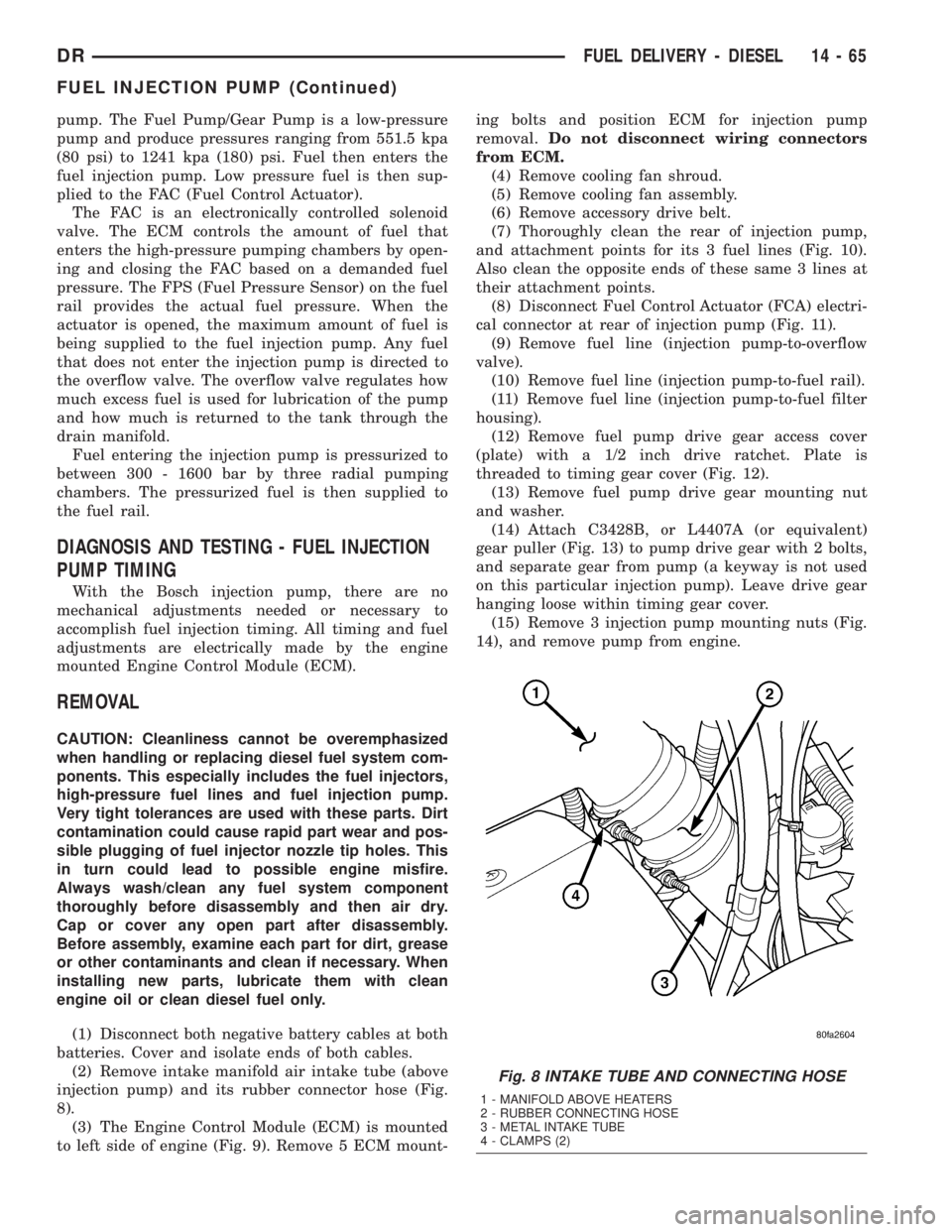
(2) Remove intake manifold air intake tube (above
injection pump) and its rubber connector hose (Fig.
8).
(3) The Engine Control Module (ECM) is mounted
to left side of engine (Fig. 9). Remove 5 ECM mount-ing bolts and position ECM for injection pump
removal.Do not disconnect wiring connectors
from ECM.
(4) Remove cooling fan shroud.
(5) Remove cooling fan assembly.
(6) Remove accessory drive belt.
(7) Thoroughly clean the rear of injection pump,
and attachment points for its 3 fuel lines (Fig. 10).
Also clean the opposite ends of these same 3 lines at
their attachment points.
(8) Disconnect Fuel Control Actuator (FCA) electri-
cal connector at rear of injection pump (Fig. 11).
(9) Remove fuel line (injection pump-to-overflow
valve).
(10) Remove fuel line (injection pump-to-fuel rail).
(11) Remove fuel line (injection pump-to-fuel filter
housing).
(12) Remove fuel pump drive gear access cover
(plate) with a 1/2 inch drive ratchet. Plate is
threaded to timing gear cover (Fig. 12).
(13) Remove fuel pump drive gear mounting nut
and washer.
(14) Attach C3428B, or L4407A (or equivalent)
gear puller (Fig. 13) to pump drive gear with 2 bolts,
and separate gear from pump (a keyway is not used
on this particular injection pump). Leave drive gear
hanging loose within timing gear cover.
(15) Remove 3 injection pump mounting nuts (Fig.
14), and remove pump from engine.
Fig. 8 INTAKE TUBE AND CONNECTING HOSE
1 - MANIFOLD ABOVE HEATERS
2 - RUBBER CONNECTING HOSE
3 - METAL INTAKE TUBE
4 - CLAMPS (2)
DRFUEL DELIVERY - DIESEL 14 - 65
FUEL INJECTION PUMP (Continued)
Page 1765 of 2895
(4) Apply clean engine oilto injection pump
o-ring only.
The machined tapers on both injection pump
shaft and injection pump gear must be abso-
lutely dry, clean and free of any dirt or oil film.
This will ensure proper gear-to-shaft tighten-
ing.
(5) Clean pump gear and pump shaft at machined
tapers with an evaporative type cleaner such as
brake cleaner.
(6) Position injection pump to mounting flange on
gear cover while aligning injection pump shaft
through back of injection pump gear.
(7) After pump is positioned flat to mounting
flange, install 3 pump mounting nuts and tighten
finger tight only.Do not attempt a final tightening
at this time.Do not attempt to tighten (pull)
pump to gear cover using mounting nuts. Dam-
age to pump or gear cover may occur. The
pump must be positioned flat to its mounting
flange before attempting to tighten 3 mounting
nuts.
(8) To prevent damage or cracking of components,
install and tighten nuts in the following sequence:
(a) Install injection pump shaft washer and nut
to pump shaft. Tighten nutfinger tight only.
(b) Do preliminary (light) tightening of injection
pump shaft nut.
(c) Tighten 3 injection pump mounting nuts to 8
N´m (70.8 in. lbs.).
(d) Do a final tightening of pump shaft nut to
105 N´m (77 ft. lbs.).
(9) Install drive gear access cover (plate) using a
1/2 inch drive ratchet. Plate is threaded to timing
gear cover.
(10) Install Engine Control Module (ECM) to left
side of engine.
(11) Install fuel line (injection pump-to-overflow
valve). Tighten bolts to 24 N´m (17 ft. lbs.) torque.
(12) Install fuel line (injection pump-to-fuel rail).
Tighten to 24 N´m (17 ft. lbs.) torque.
(13) Install fuel line (injection pump-to-fuel filter
housing). Tighten to 24 N´m (17 ft. lbs.) torque.
(14) Connect Fuel Control Actuator (FCA) electri-
cal connector to rear of injection pump.
(15) Install intake manifold air intake tube (above
injection pump). Tighten clamps.
(16) Install accessory drive belt.
(17) Install cooling fan shroud.
(18) Install cooling fan assembly.
(19) Connect both negative battery cables to both
batteries.
(20) Check system for fuel or engine oil leaks.FUEL LEVEL SENDING UNIT /
SENSOR
DESCRIPTION
The fuel gauge sending unit (fuel level sensor) is
attached to the side of the fuel tank module. The
sending unit consists of a float, an arm, and a vari-
able resistor track (card).
OPERATION
The fuel tank module on diesel powered models
has 3 different circuits (wires). Two of these circuits
are used at the fuel gauge sending unit for fuel
gauge operation. The other wire is used for a ground.
The diesel engine does not have a fuel tank module
mounted electric fuel pump. The electric fuel pump
(fuel transfer pump) is mounted to the engine.
For Fuel Gauge Operation:A constant input
voltage source of about 12 volts (battery voltage) is
supplied to the resistor track on the fuel gauge send-
ing unit. This is fed directly from the Powertrain
Control Module (PCM).NOTE: For diagnostic pur-
poses, this 12V power source can only be veri-
fied with the circuit opened (fuel tank module
electrical connector unplugged). With the con-
nectors plugged, output voltages will vary from
about .6 volts at FULL, to about 7.0 volts at
EMPTY.The resistor track is used to vary the volt-
age (resistance) depending on fuel tank float level. As
fuel level increases, the float and arm move up,
which decreases voltage. As fuel level decreases, the
float and arm move down, which increases voltage.
The varied voltage signal is returned back to the
ECM through the sensor return circuit.
Both of the electrical circuits between the fuel
gauge sending unit and the ECM are hard-wired (not
multi-plexed). After the voltage signal is sent from
the resistor track, and back to the ECM, the ECM
will interpret the resistance (voltage) data and send
a message across the multi-plex bus circuits to the
instrument panel cluster. Here it is translated into
the appropriate fuel gauge level reading. Refer to
Instrument Panel for additional information.
REMOVAL
REMOVAL/INSTALLATION
For diesel removal and installation procedures,
refer to the gas section of Fuel System/Fuel Delivery.
See Fuel Level Sending Unit/Sensor Removal/Instal-
lation.
14 - 68 FUEL DELIVERY - DIESELDR
FUEL INJECTION PUMP (Continued)
Page 1767 of 2895
(1) Disconnect both negative battery cables from
both batteries. Cover and isolate ends of cables.
(2) Thoroughly clean fuel lines at both the cylinder
head and injection pump ends.
(3) If removing fuel line at either #1 or #2 cylinder,
the intake manifold air heater elements must first be
removed from top of intake manifold. Refer to Intake
Air Heater Removal / Installation for procedures.
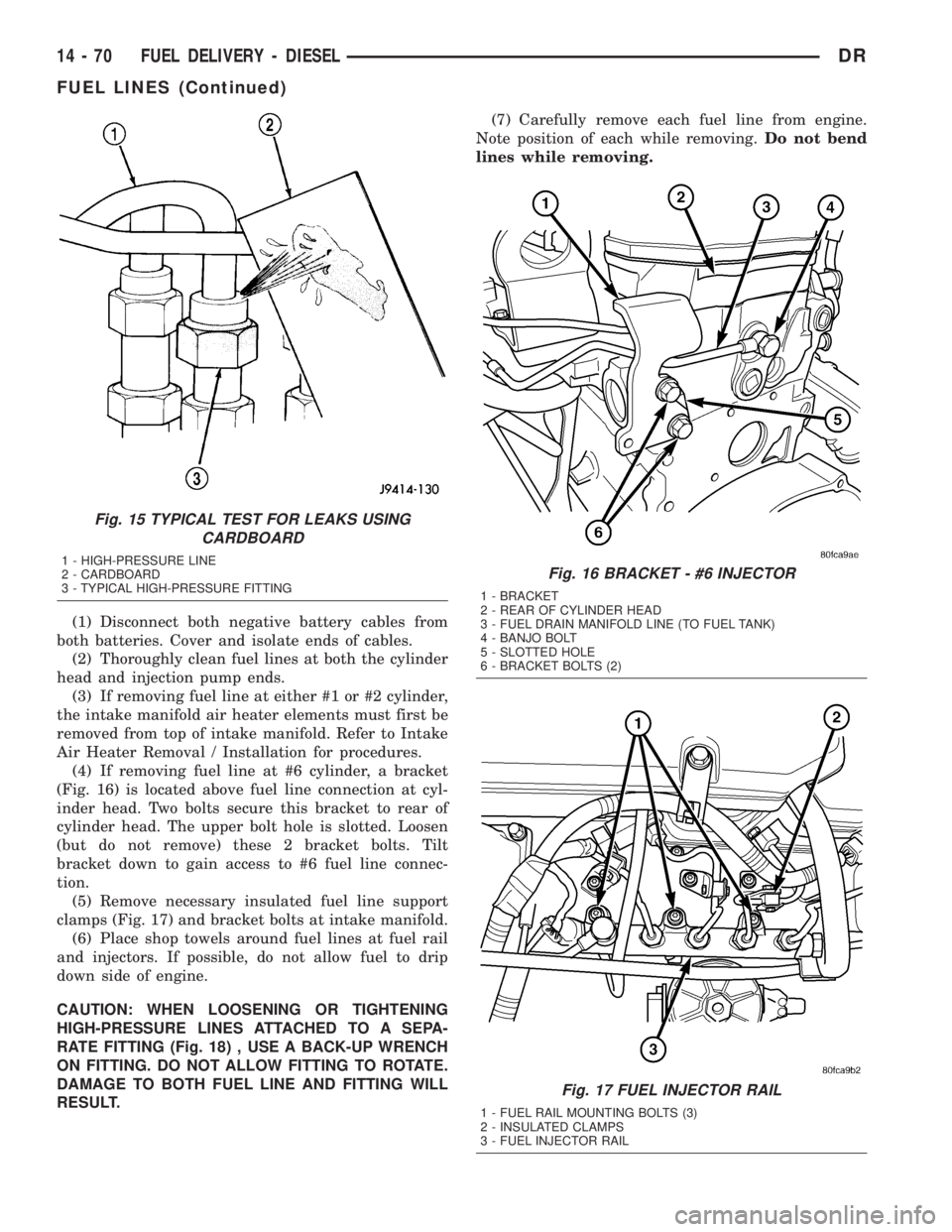
(4) If removing fuel line at #6 cylinder, a bracket
(Fig. 16) is located above fuel line connection at cyl-
inder head. Two bolts secure this bracket to rear of
cylinder head. The upper bolt hole is slotted. Loosen
(but do not remove) these 2 bracket bolts. Tilt
bracket down to gain access to #6 fuel line connec-
tion.
(5) Remove necessary insulated fuel line support
clamps (Fig. 17) and bracket bolts at intake manifold.
(6) Place shop towels around fuel lines at fuel rail
and injectors. If possible, do not allow fuel to drip
down side of engine.
CAUTION: WHEN LOOSENING OR TIGHTENING
HIGH-PRESSURE LINES ATTACHED TO A SEPA-
RATE FITTING (Fig. 18) , USE A BACK-UP WRENCH
ON FITTING. DO NOT ALLOW FITTING TO ROTATE.
DAMAGE TO BOTH FUEL LINE AND FITTING WILL
RESULT.(7) Carefully remove each fuel line from engine.
Note position of each while removing.Do not bend
lines while removing.
Fig. 15 TYPICAL TEST FOR LEAKS USING
CARDBOARD
1 - HIGH-PRESSURE LINE
2 - CARDBOARD
3 - TYPICAL HIGH-PRESSURE FITTINGFig. 16 BRACKET - #6 INJECTOR
1 - BRACKET
2 - REAR OF CYLINDER HEAD
3 - FUEL DRAIN MANIFOLD LINE (TO FUEL TANK)
4 - BANJO BOLT
5 - SLOTTED HOLE
6 - BRACKET BOLTS (2)
Fig. 17 FUEL INJECTOR RAIL
1 - FUEL RAIL MOUNTING BOLTS (3)
2 - INSULATED CLAMPS
3 - FUEL INJECTOR RAIL
14 - 70 FUEL DELIVERY - DIESELDR
FUEL LINES (Continued)
Page 1768 of 2895
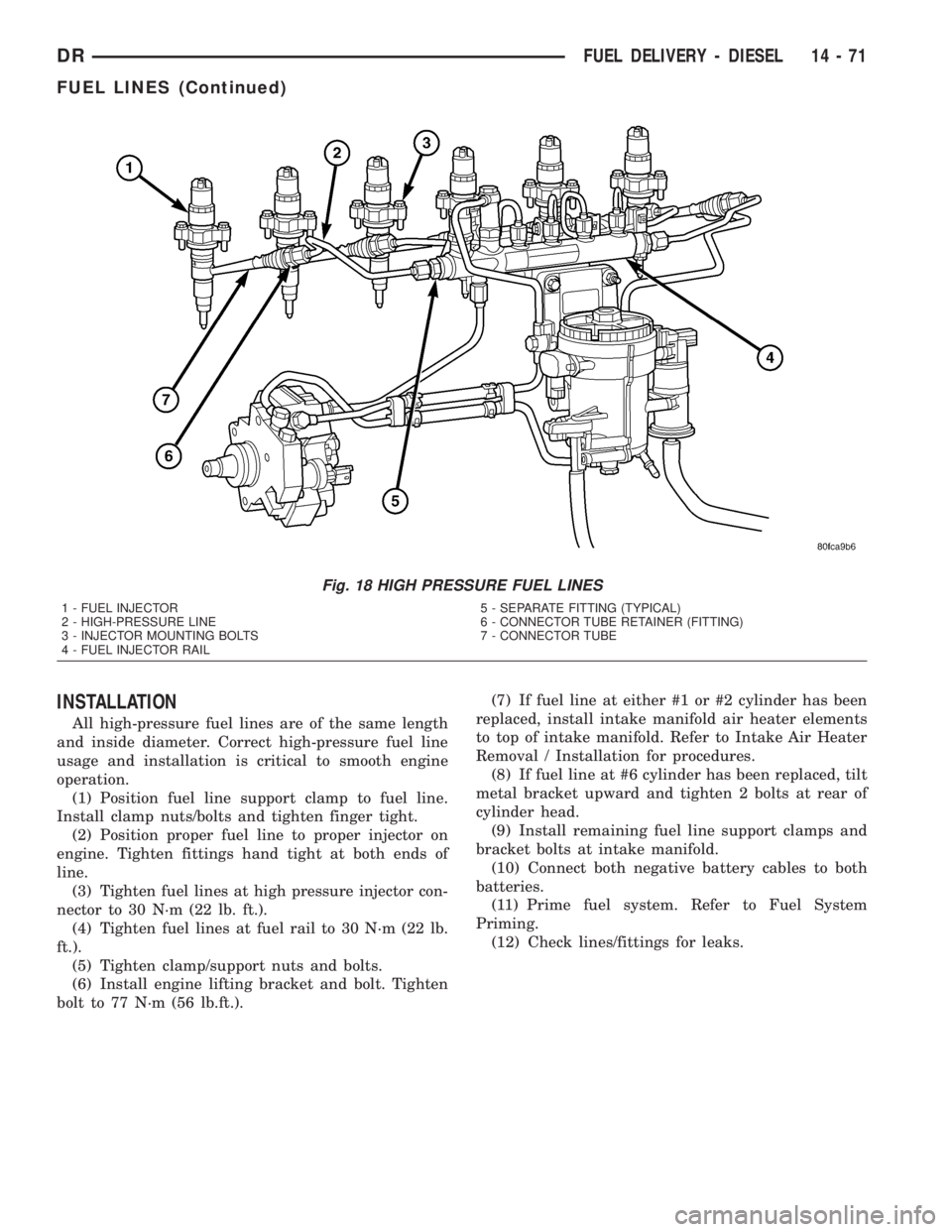
INSTALLATION
All high-pressure fuel lines are of the same length
and inside diameter. Correct high-pressure fuel line
usage and installation is critical to smooth engine
operation.
(1) Position fuel line support clamp to fuel line.
Install clamp nuts/bolts and tighten finger tight.
(2) Position proper fuel line to proper injector on
engine. Tighten fittings hand tight at both ends of
line.
(3) Tighten fuel lines at high pressure injector con-
nector to 30 N´m (22 lb. ft.).
(4) Tighten fuel lines at fuel rail to 30 N´m (22 lb.
ft.).
(5) Tighten clamp/support nuts and bolts.
(6) Install engine lifting bracket and bolt. Tighten
bolt to 77 N´m (56 lb.ft.).(7) If fuel line at either #1 or #2 cylinder has been
replaced, install intake manifold air heater elements
to top of intake manifold. Refer to Intake Air Heater
Removal / Installation for procedures.
(8) If fuel line at #6 cylinder has been replaced, tilt
metal bracket upward and tighten 2 bolts at rear of
cylinder head.
(9) Install remaining fuel line support clamps and
bracket bolts at intake manifold.
(10) Connect both negative battery cables to both
batteries.
(11) Prime fuel system. Refer to Fuel System
Priming.
(12) Check lines/fittings for leaks.
Fig. 18 HIGH PRESSURE FUEL LINES
1 - FUEL INJECTOR
2 - HIGH-PRESSURE LINE
3 - INJECTOR MOUNTING BOLTS
4 - FUEL INJECTOR RAIL5 - SEPARATE FITTING (TYPICAL)
6 - CONNECTOR TUBE RETAINER (FITTING)
7 - CONNECTOR TUBE
DRFUEL DELIVERY - DIESEL 14 - 71
FUEL LINES (Continued)
Page 1776 of 2895
FUEL INJECTION - DIESEL
TABLE OF CONTENTS
page page
ACCELERATOR PEDAL POSITION SENSOR
DESCRIPTION
DESCRIPTION (EARLY)................79
DESCRIPTION (LATE)..................79
OPERATION...........................79
REMOVAL.............................79
INSTALLATION.........................82
CAMSHAFT POSITION SENSOR
DESCRIPTION.........................82
OPERATION...........................82
REMOVAL.............................83
INSTALLATION.........................83
CRANKSHAFT POSITION SENSOR
DESCRIPTION.........................83
OPERATION...........................83
REMOVAL.............................84
INSTALLATION.........................84
FUEL CONTROL ACTUATOR
DESCRIPTION.........................85
OPERATION...........................85
REMOVAL.............................85
INSTALLATION.........................85
FUEL INJECTOR
DESCRIPTION.........................85
OPERATION...........................86
REMOVAL.............................87
INSTALLATION.........................87
FUEL INJECTOR RAIL
DESCRIPTION.........................89
OPERATION...........................89REMOVAL.............................89
INSTALLATION.........................90
INLET AIR TEMPERATURE SENSOR/
PRESSURE SENSOR
DESCRIPTION.........................90
OPERATION...........................90
REMOVAL.............................90
INSTALLATION.........................90
INTAKE AIR HEATER
DESCRIPTION.........................91
OPERATION...........................91
REMOVAL.............................91
INSTALLATION.........................91
INTAKE AIR HEATER RELAY
DESCRIPTION.........................92
OPERATION...........................92
REMOVAL.............................93
INSTALLATION.........................93
INTAKE AIR TEMPERATURE SENSOR/MAP
SENSOR
DESCRIPTION.........................93
OPERATION...........................93
REMOVAL.............................93
INSTALLATION.........................94
MAP SENSOR
DESCRIPTION.........................94
THROTTLE CONTROL CABLE
REMOVAL.............................94
INSTALLATION.........................96
ACCELERATOR PEDAL
POSITION SENSOR
DESCRIPTION
DESCRIPTION (EARLY)
The APPS assembly is located at the top-left-front
of the engine. A plastic cover is used to cover the
assembly. The actual sensor is located behind its
mounting bracket.
DESCRIPTION (LATE)
The Accelerator Pedal Position Sensor (APPS)
assembly is located under the vehicle battery tray. A
cable connects the assembly to the accelerator pedal.A plastic cover with a movable door is used to cover
the assembly.
OPERATION
The Accelerator Pedal Position Sensor (APPS) is a
linear potentiometer. It provides the Engine Control
Module (ECM) with a DC voltage signal proportional
to the angle, or position of the accelerator pedal.
REMOVAL
Early Diesel Engines
The APPS is serviced (replaced) as one assembly
including the lever, brackets and sensor. The APPS is
calibrated to its mounting bracket. The APPS assem-
bly is located at left-front of engine below plastic
cable/lever/linkage cover (Fig. 1).
DRFUEL INJECTION - DIESEL 14 - 79
Page 1777 of 2895
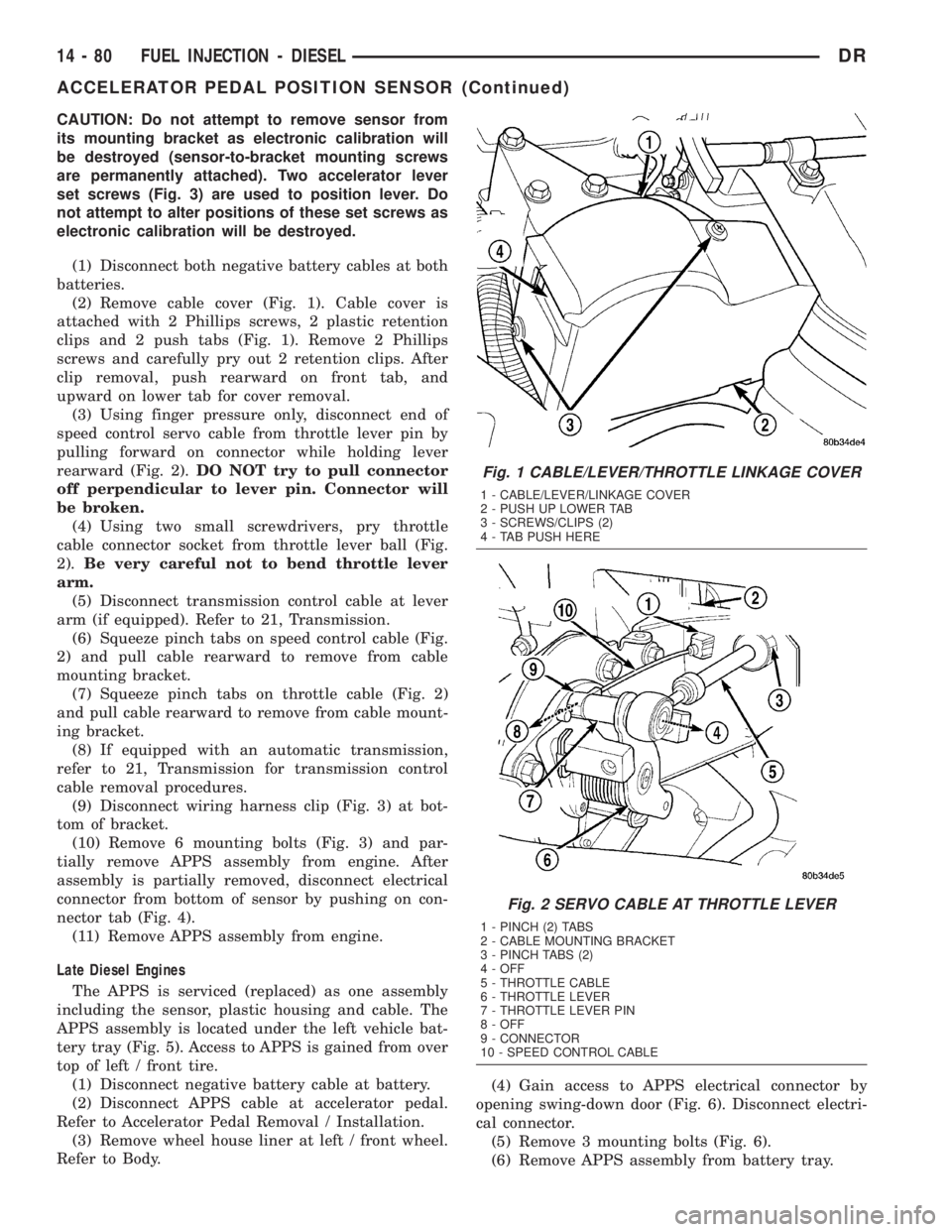
CAUTION: Do not attempt to remove sensor from
its mounting bracket as electronic calibration will
be destroyed (sensor-to-bracket mounting screws
are permanently attached). Two accelerator lever
set screws (Fig. 3) are used to position lever. Do
not attempt to alter positions of these set screws as
electronic calibration will be destroyed.
(1) Disconnect both negative battery cables at both
batteries.
(2) Remove cable cover (Fig. 1). Cable cover is
attached with 2 Phillips screws, 2 plastic retention
clips and 2 push tabs (Fig. 1). Remove 2 Phillips
screws and carefully pry out 2 retention clips. After
clip removal, push rearward on front tab, and
upward on lower tab for cover removal.
(3) Using finger pressure only, disconnect end of
speed control servo cable from throttle lever pin by
pulling forward on connector while holding lever
rearward (Fig. 2).DO NOT try to pull connector
off perpendicular to lever pin. Connector will
be broken.
(4) Using two small screwdrivers, pry throttle
cable connector socket from throttle lever ball (Fig.
2).Be very careful not to bend throttle lever
arm.
(5) Disconnect transmission control cable at lever
arm (if equipped). Refer to 21, Transmission.
(6) Squeeze pinch tabs on speed control cable (Fig.
2) and pull cable rearward to remove from cable
mounting bracket.
(7) Squeeze pinch tabs on throttle cable (Fig. 2)
and pull cable rearward to remove from cable mount-
ing bracket.
(8) If equipped with an automatic transmission,
refer to 21, Transmission for transmission control
cable removal procedures.
(9) Disconnect wiring harness clip (Fig. 3) at bot-
tom of bracket.
(10) Remove 6 mounting bolts (Fig. 3) and par-
tially remove APPS assembly from engine. After
assembly is partially removed, disconnect electrical
connector from bottom of sensor by pushing on con-
nector tab (Fig. 4).
(11) Remove APPS assembly from engine.
Late Diesel Engines
The APPS is serviced (replaced) as one assembly
including the sensor, plastic housing and cable. The
APPS assembly is located under the left vehicle bat-
tery tray (Fig. 5). Access to APPS is gained from over
top of left / front tire.
(1) Disconnect negative battery cable at battery.
(2) Disconnect APPS cable at accelerator pedal.
Refer to Accelerator Pedal Removal / Installation.
(3) Remove wheel house liner at left / front wheel.
Refer to Body.(4) Gain access to APPS electrical connector by
opening swing-down door (Fig. 6). Disconnect electri-
cal connector.
(5) Remove 3 mounting bolts (Fig. 6).
(6) Remove APPS assembly from battery tray.
Fig. 1 CABLE/LEVER/THROTTLE LINKAGE COVER
1 - CABLE/LEVER/LINKAGE COVER
2 - PUSH UP LOWER TAB
3 - SCREWS/CLIPS (2)
4 - TAB PUSH HERE
Fig. 2 SERVO CABLE AT THROTTLE LEVER
1 - PINCH (2) TABS
2 - CABLE MOUNTING BRACKET
3 - PINCH TABS (2)
4 - OFF
5 - THROTTLE CABLE
6 - THROTTLE LEVER
7 - THROTTLE LEVER PIN
8 - OFF
9 - CONNECTOR
10 - SPEED CONTROL CABLE
14 - 80 FUEL INJECTION - DIESELDR
ACCELERATOR PEDAL POSITION SENSOR (Continued)
Page 1778 of 2895
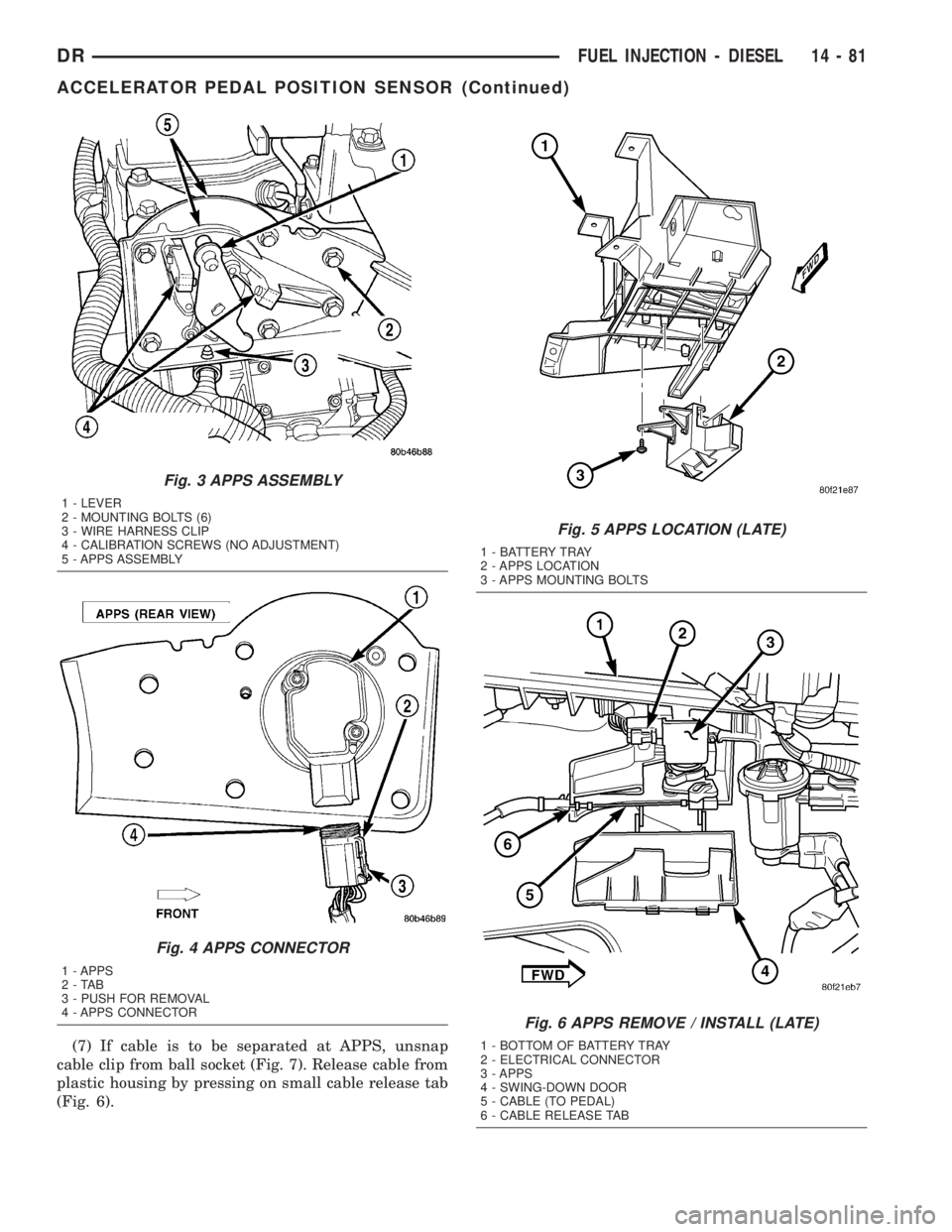
(7) If cable is to be separated at APPS, unsnap
cable clip from ball socket (Fig. 7). Release cable from
plastic housing by pressing on small cable release tab
(Fig. 6).
Fig. 3 APPS ASSEMBLY
1 - LEVER
2 - MOUNTING BOLTS (6)
3 - WIRE HARNESS CLIP
4 - CALIBRATION SCREWS (NO ADJUSTMENT)
5 - APPS ASSEMBLY
Fig. 4 APPS CONNECTOR
1 - APPS
2-TAB
3 - PUSH FOR REMOVAL
4 - APPS CONNECTOR
Fig. 5 APPS LOCATION (LATE)
1 - BATTERY TRAY
2 - APPS LOCATION
3 - APPS MOUNTING BOLTS
Fig. 6 APPS REMOVE / INSTALL (LATE)
1 - BOTTOM OF BATTERY TRAY
2 - ELECTRICAL CONNECTOR
3 - APPS
4 - SWING-DOWN DOOR
5 - CABLE (TO PEDAL)
6 - CABLE RELEASE TAB
DRFUEL INJECTION - DIESEL 14 - 81
ACCELERATOR PEDAL POSITION SENSOR (Continued)