2003 DODGE RAM ECU
[x] Cancel search: ECUPage 2252 of 2895
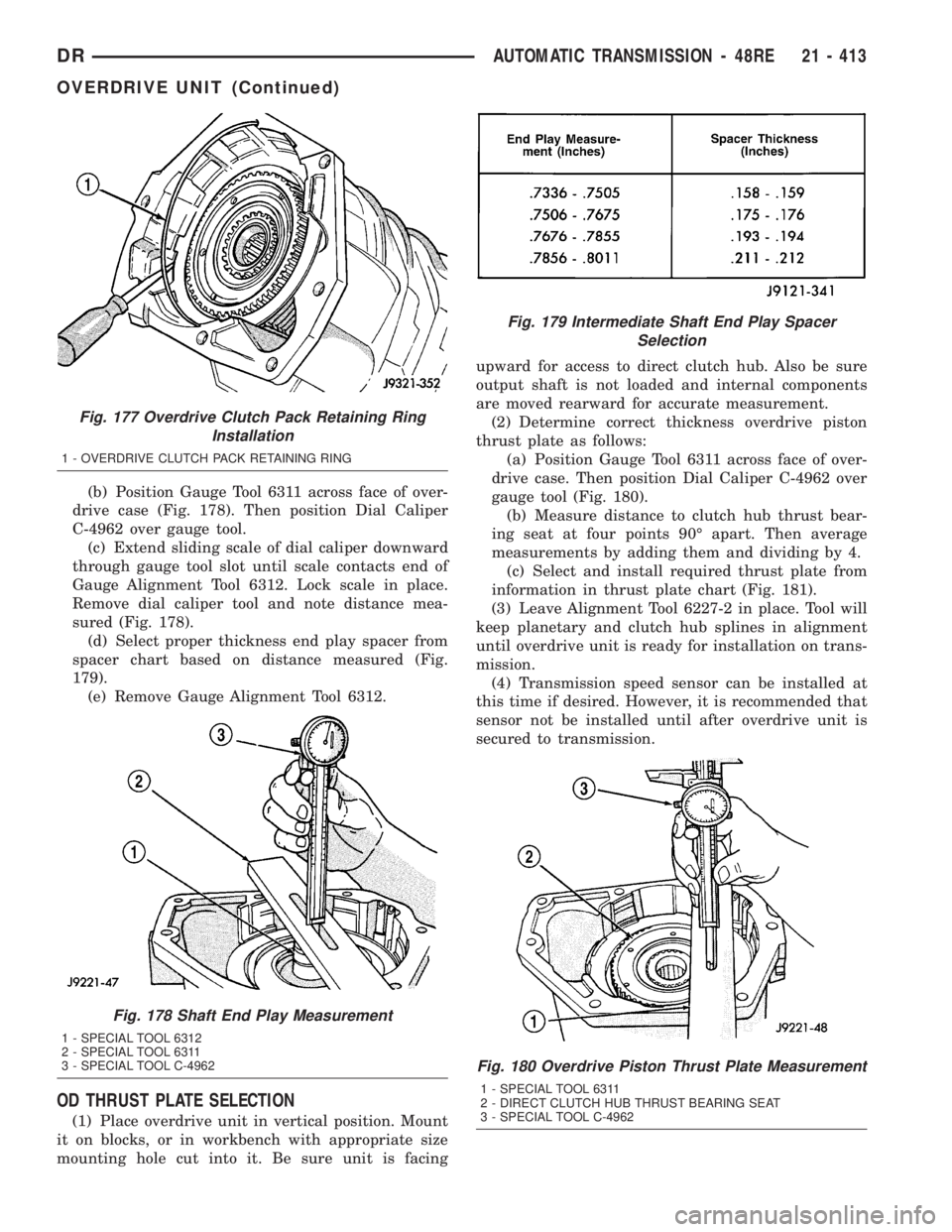
(b) Position Gauge Tool 6311 across face of over-
drive case (Fig. 178). Then position Dial Caliper
C-4962 over gauge tool.
(c) Extend sliding scale of dial caliper downward
through gauge tool slot until scale contacts end of
Gauge Alignment Tool 6312. Lock scale in place.
Remove dial caliper tool and note distance mea-
sured (Fig. 178).
(d) Select proper thickness end play spacer from
spacer chart based on distance measured (Fig.
179).
(e) Remove Gauge Alignment Tool 6312.
OD THRUST PLATE SELECTION
(1) Place overdrive unit in vertical position. Mount
it on blocks, or in workbench with appropriate size
mounting hole cut into it. Be sure unit is facingupward for access to direct clutch hub. Also be sure
output shaft is not loaded and internal components
are moved rearward for accurate measurement.
(2) Determine correct thickness overdrive piston
thrust plate as follows:
(a) Position Gauge Tool 6311 across face of over-
drive case. Then position Dial Caliper C-4962 over
gauge tool (Fig. 180).
(b) Measure distance to clutch hub thrust bear-
ing seat at four points 90É apart. Then average
measurements by adding them and dividing by 4.
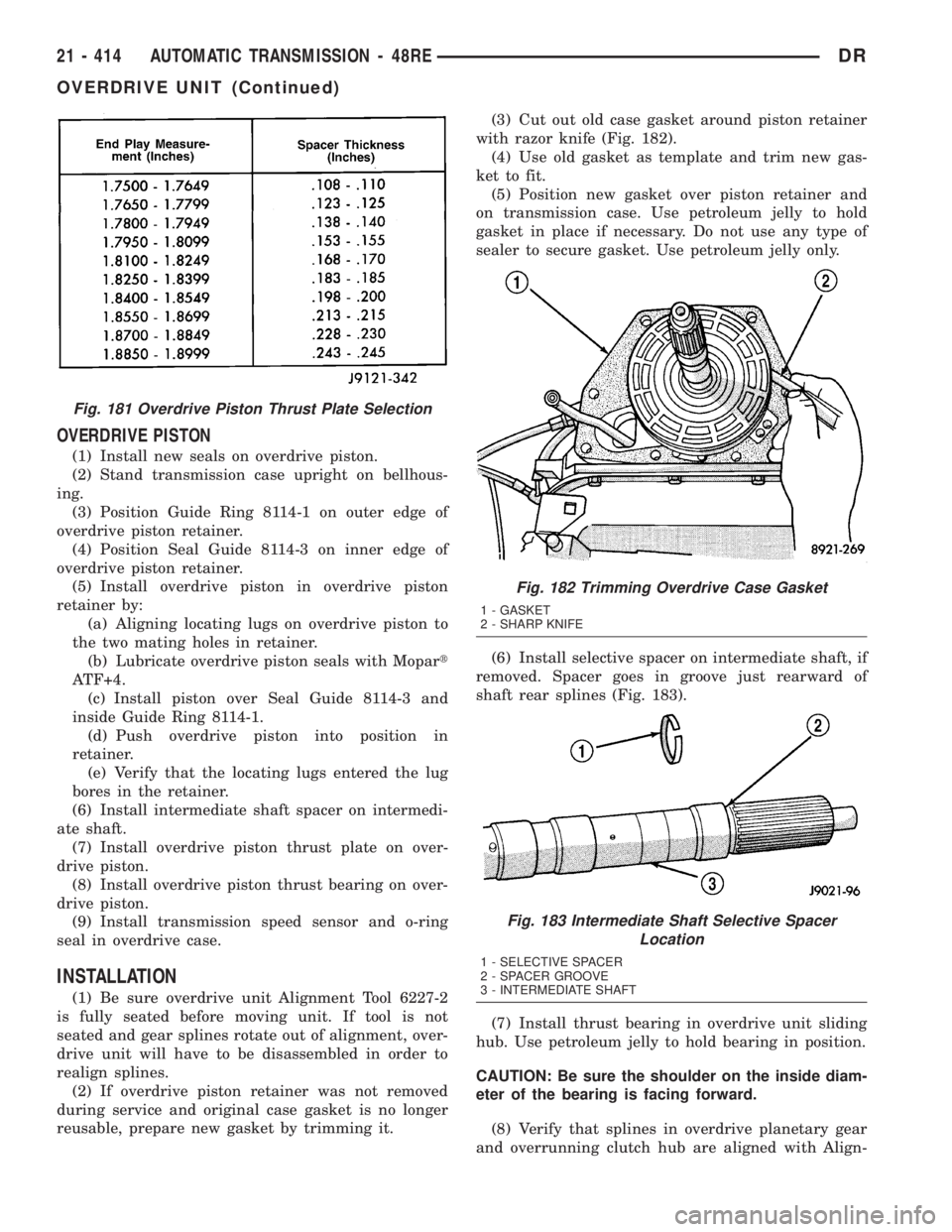
(c) Select and install required thrust plate from
information in thrust plate chart (Fig. 181).
(3) Leave Alignment Tool 6227-2 in place. Tool will
keep planetary and clutch hub splines in alignment
until overdrive unit is ready for installation on trans-
mission.
(4) Transmission speed sensor can be installed at
this time if desired. However, it is recommended that
sensor not be installed until after overdrive unit is
secured to transmission.
Fig. 177 Overdrive Clutch Pack Retaining Ring
Installation
1 - OVERDRIVE CLUTCH PACK RETAINING RING
Fig. 178 Shaft End Play Measurement
1 - SPECIAL TOOL 6312
2 - SPECIAL TOOL 6311
3 - SPECIAL TOOL C-4962
Fig. 179 Intermediate Shaft End Play Spacer
Selection
Fig. 180 Overdrive Piston Thrust Plate Measurement
1 - SPECIAL TOOL 6311
2 - DIRECT CLUTCH HUB THRUST BEARING SEAT
3 - SPECIAL TOOL C-4962
DRAUTOMATIC TRANSMISSION - 48RE 21 - 413
OVERDRIVE UNIT (Continued)
Page 2253 of 2895
OVERDRIVE PISTON
(1) Install new seals on overdrive piston.
(2) Stand transmission case upright on bellhous-
ing.
(3) Position Guide Ring 8114-1 on outer edge of
overdrive piston retainer.
(4) Position Seal Guide 8114-3 on inner edge of
overdrive piston retainer.
(5) Install overdrive piston in overdrive piston
retainer by:
(a) Aligning locating lugs on overdrive piston to
the two mating holes in retainer.
(b) Lubricate overdrive piston seals with Mopart
ATF+4.
(c) Install piston over Seal Guide 8114-3 and
inside Guide Ring 8114-1.
(d) Push overdrive piston into position in
retainer.
(e) Verify that the locating lugs entered the lug
bores in the retainer.
(6) Install intermediate shaft spacer on intermedi-
ate shaft.
(7) Install overdrive piston thrust plate on over-
drive piston.
(8) Install overdrive piston thrust bearing on over-
drive piston.
(9) Install transmission speed sensor and o-ring
seal in overdrive case.
INSTALLATION
(1) Be sure overdrive unit Alignment Tool 6227-2
is fully seated before moving unit. If tool is not
seated and gear splines rotate out of alignment, over-
drive unit will have to be disassembled in order to
realign splines.
(2) If overdrive piston retainer was not removed
during service and original case gasket is no longer
reusable, prepare new gasket by trimming it.(3) Cut out old case gasket around piston retainer
with razor knife (Fig. 182).
(4) Use old gasket as template and trim new gas-
ket to fit.
(5) Position new gasket over piston retainer and
on transmission case. Use petroleum jelly to hold
gasket in place if necessary. Do not use any type of
sealer to secure gasket. Use petroleum jelly only.
(6) Install selective spacer on intermediate shaft, if
removed. Spacer goes in groove just rearward of
shaft rear splines (Fig. 183).
(7) Install thrust bearing in overdrive unit sliding
hub. Use petroleum jelly to hold bearing in position.
CAUTION: Be sure the shoulder on the inside diam-
eter of the bearing is facing forward.
(8) Verify that splines in overdrive planetary gear
and overrunning clutch hub are aligned with Align-
Fig. 181 Overdrive Piston Thrust Plate Selection
Fig. 182 Trimming Overdrive Case Gasket
1 - GASKET
2 - SHARP KNIFE
Fig. 183 Intermediate Shaft Selective Spacer
Location
1 - SELECTIVE SPACER
2 - SPACER GROOVE
3 - INTERMEDIATE SHAFT
21 - 414 AUTOMATIC TRANSMISSION - 48REDR
OVERDRIVE UNIT (Continued)
Page 2255 of 2895
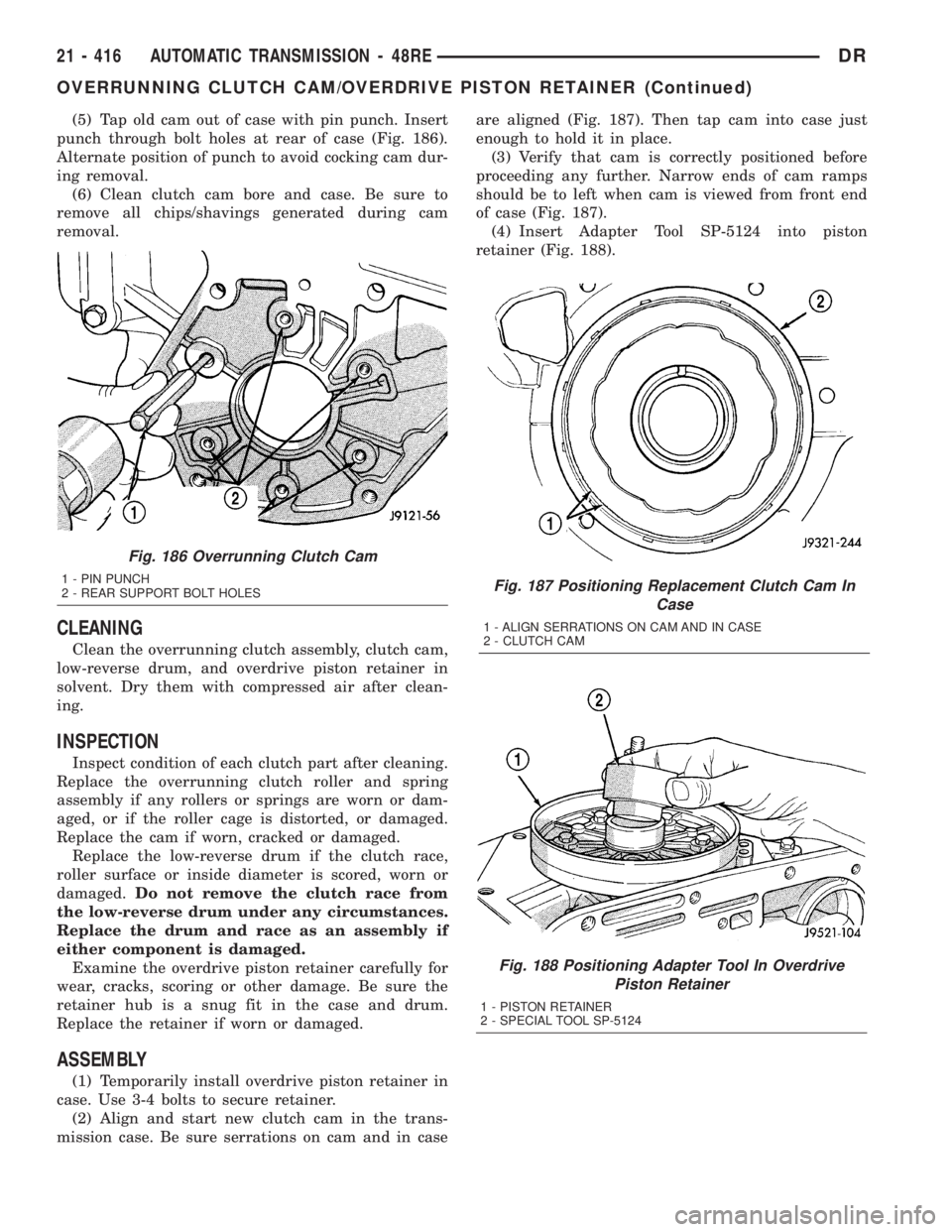
(5) Tap old cam out of case with pin punch. Insert
punch through bolt holes at rear of case (Fig. 186).
Alternate position of punch to avoid cocking cam dur-
ing removal.
(6) Clean clutch cam bore and case. Be sure to
remove all chips/shavings generated during cam
removal.
CLEANING
Clean the overrunning clutch assembly, clutch cam,
low-reverse drum, and overdrive piston retainer in
solvent. Dry them with compressed air after clean-
ing.
INSPECTION
Inspect condition of each clutch part after cleaning.
Replace the overrunning clutch roller and spring
assembly if any rollers or springs are worn or dam-
aged, or if the roller cage is distorted, or damaged.
Replace the cam if worn, cracked or damaged.
Replace the low-reverse drum if the clutch race,
roller surface or inside diameter is scored, worn or
damaged.Do not remove the clutch race from
the low-reverse drum under any circumstances.
Replace the drum and race as an assembly if
either component is damaged.
Examine the overdrive piston retainer carefully for
wear, cracks, scoring or other damage. Be sure the
retainer hub is a snug fit in the case and drum.
Replace the retainer if worn or damaged.
ASSEMBLY
(1) Temporarily install overdrive piston retainer in
case. Use 3-4 bolts to secure retainer.
(2) Align and start new clutch cam in the trans-
mission case. Be sure serrations on cam and in caseare aligned (Fig. 187). Then tap cam into case just
enough to hold it in place.
(3) Verify that cam is correctly positioned before
proceeding any further. Narrow ends of cam ramps
should be to left when cam is viewed from front end
of case (Fig. 187).
(4) Insert Adapter Tool SP-5124 into piston
retainer (Fig. 188).
Fig. 187 Positioning Replacement Clutch Cam In
Case
1 - ALIGN SERRATIONS ON CAM AND IN CASE
2 - CLUTCH CAM
Fig. 188 Positioning Adapter Tool In Overdrive
Piston Retainer
1 - PISTON RETAINER
2 - SPECIAL TOOL SP-5124
Fig. 186 Overrunning Clutch Cam
1 - PIN PUNCH
2 - REAR SUPPORT BOLT HOLES
21 - 416 AUTOMATIC TRANSMISSION - 48REDR
OVERRUNNING CLUTCH CAM/OVERDRIVE PISTON RETAINER (Continued)
Page 2256 of 2895
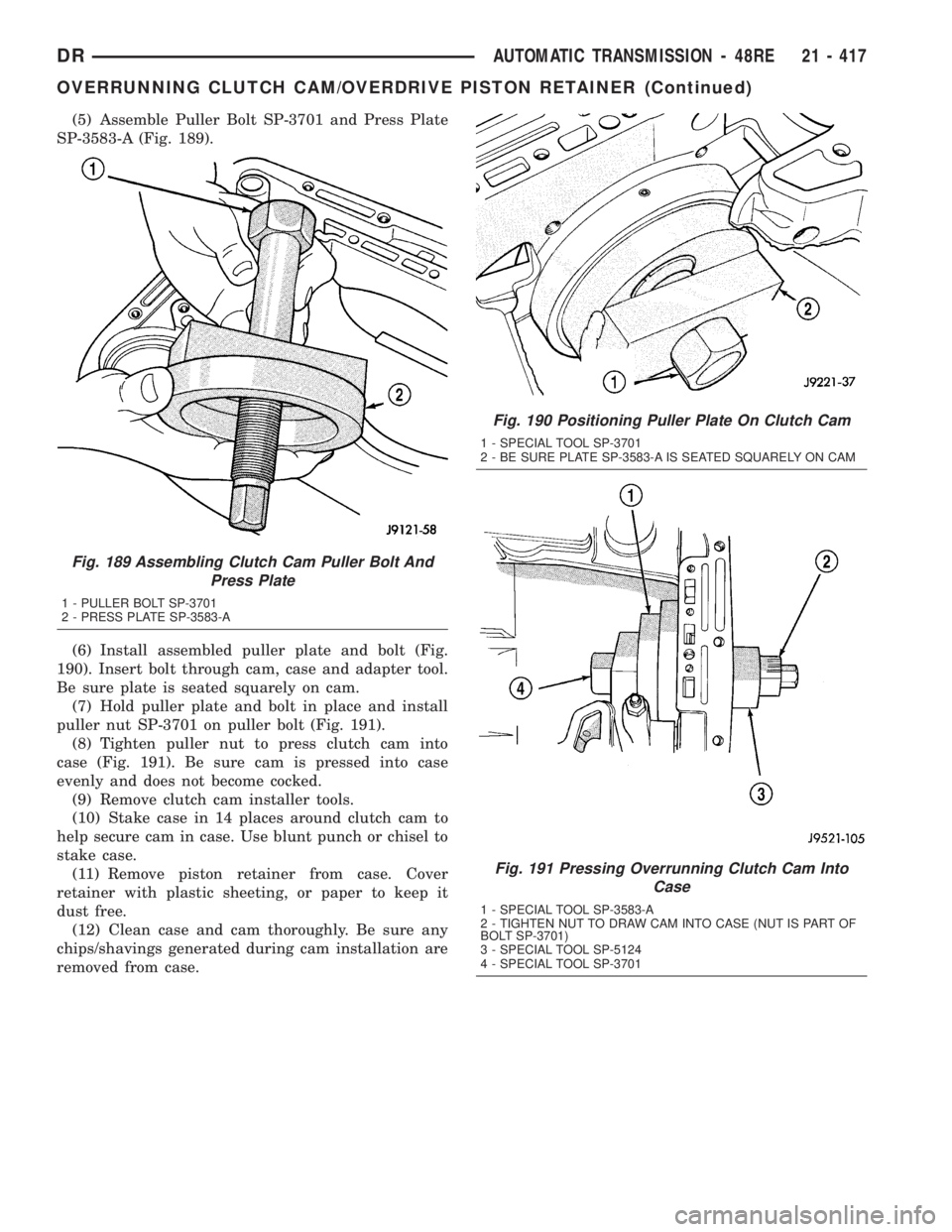
(5) Assemble Puller Bolt SP-3701 and Press Plate
SP-3583-A (Fig. 189).
(6) Install assembled puller plate and bolt (Fig.
190). Insert bolt through cam, case and adapter tool.
Be sure plate is seated squarely on cam.
(7) Hold puller plate and bolt in place and install
puller nut SP-3701 on puller bolt (Fig. 191).
(8) Tighten puller nut to press clutch cam into
case (Fig. 191). Be sure cam is pressed into case
evenly and does not become cocked.
(9) Remove clutch cam installer tools.
(10) Stake case in 14 places around clutch cam to
help secure cam in case. Use blunt punch or chisel to
stake case.
(11) Remove piston retainer from case. Cover
retainer with plastic sheeting, or paper to keep it
dust free.
(12) Clean case and cam thoroughly. Be sure any
chips/shavings generated during cam installation are
removed from case.
Fig. 189 Assembling Clutch Cam Puller Bolt And
Press Plate
1 - PULLER BOLT SP-3701
2 - PRESS PLATE SP-3583-A
Fig. 190 Positioning Puller Plate On Clutch Cam
1 - SPECIAL TOOL SP-3701
2 - BE SURE PLATE SP-3583-A IS SEATED SQUARELY ON CAM
Fig. 191 Pressing Overrunning Clutch Cam Into
Case
1 - SPECIAL TOOL SP-3583-A
2 - TIGHTEN NUT TO DRAW CAM INTO CASE (NUT IS PART OF
BOLT SP-3701)
3 - SPECIAL TOOL SP-5124
4 - SPECIAL TOOL SP-3701
DRAUTOMATIC TRANSMISSION - 48RE 21 - 417
OVERRUNNING CLUTCH CAM/OVERDRIVE PISTON RETAINER (Continued)
Page 2262 of 2895
ASSEMBLY
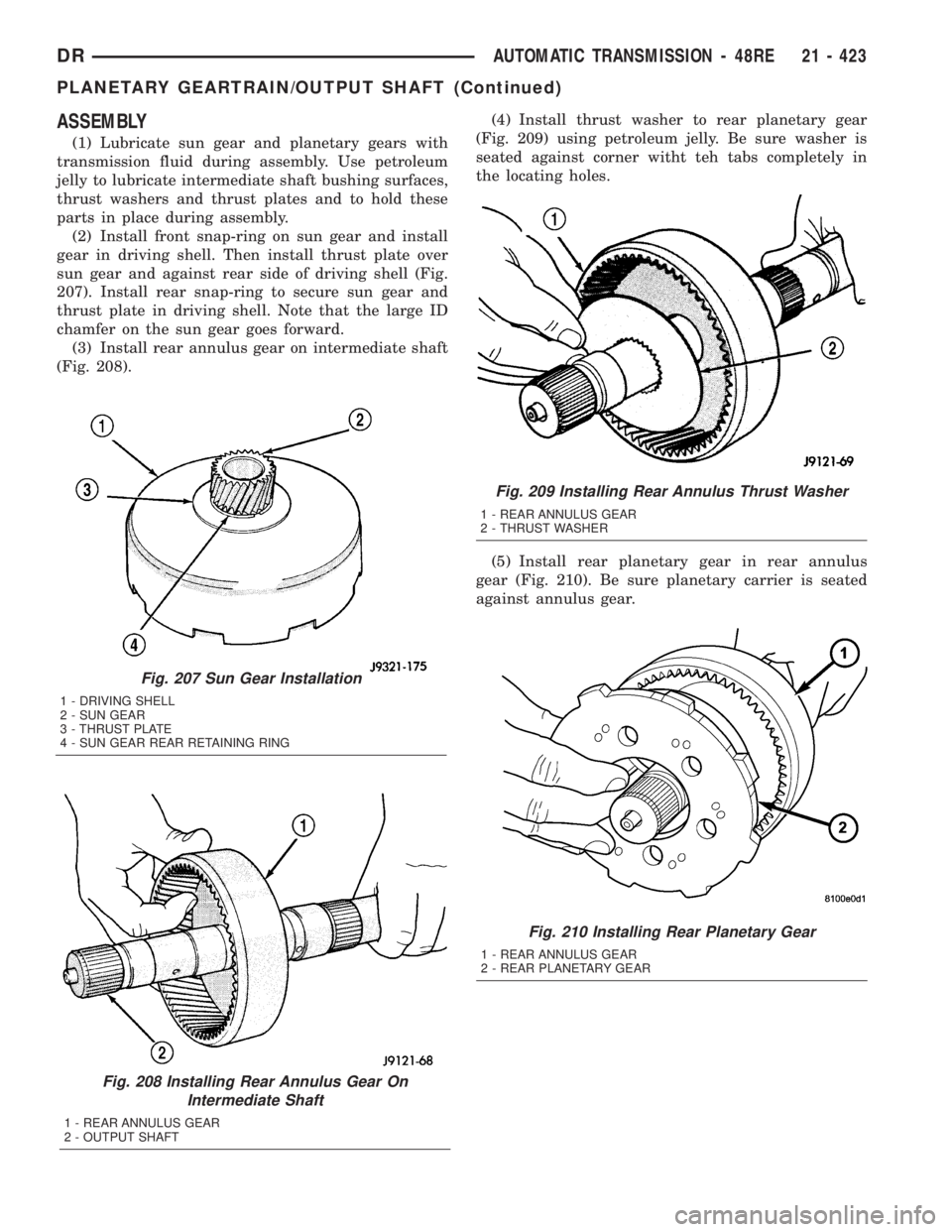
(1) Lubricate sun gear and planetary gears with
transmission fluid during assembly. Use petroleum
jelly to lubricate intermediate shaft bushing surfaces,
thrust washers and thrust plates and to hold these
parts in place during assembly.
(2) Install front snap-ring on sun gear and install
gear in driving shell. Then install thrust plate over
sun gear and against rear side of driving shell (Fig.
207). Install rear snap-ring to secure sun gear and
thrust plate in driving shell. Note that the large ID
chamfer on the sun gear goes forward.
(3) Install rear annulus gear on intermediate shaft
(Fig. 208).(4) Install thrust washer to rear planetary gear
(Fig. 209) using petroleum jelly. Be sure washer is
seated against corner witht teh tabs completely in
the locating holes.
(5) Install rear planetary gear in rear annulus
gear (Fig. 210). Be sure planetary carrier is seated
against annulus gear.
Fig. 207 Sun Gear Installation
1 - DRIVING SHELL
2 - SUN GEAR
3 - THRUST PLATE
4 - SUN GEAR REAR RETAINING RING
Fig. 208 Installing Rear Annulus Gear On
Intermediate Shaft
1 - REAR ANNULUS GEAR
2 - OUTPUT SHAFT
Fig. 210 Installing Rear Planetary Gear
1 - REAR ANNULUS GEAR
2 - REAR PLANETARY GEAR
Fig. 209 Installing Rear Annulus Thrust Washer
1 - REAR ANNULUS GEAR
2 - THRUST WASHER
DRAUTOMATIC TRANSMISSION - 48RE 21 - 423
PLANETARY GEARTRAIN/OUTPUT SHAFT (Continued)
Page 2278 of 2895
STATOR
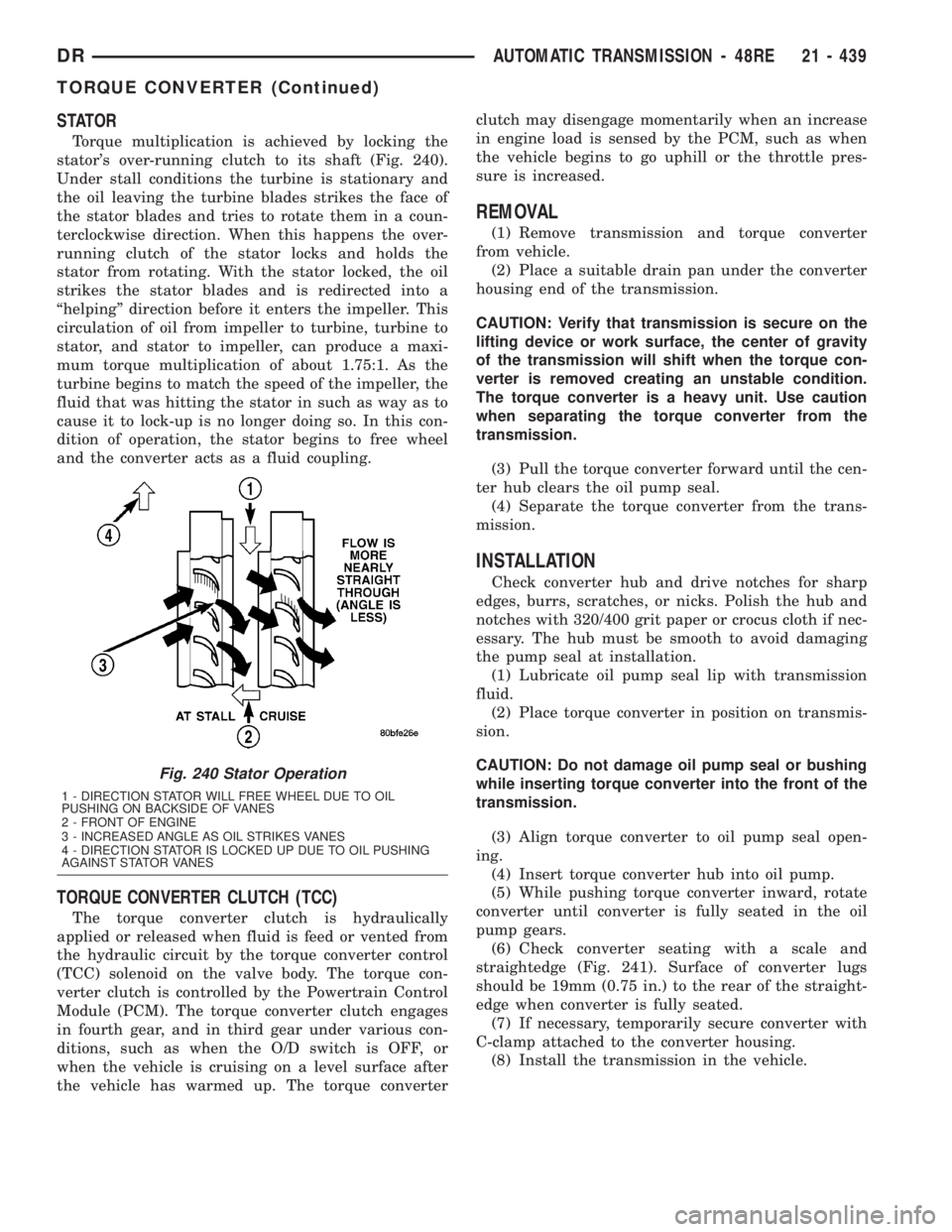
Torque multiplication is achieved by locking the
stator's over-running clutch to its shaft (Fig. 240).
Under stall conditions the turbine is stationary and
the oil leaving the turbine blades strikes the face of
the stator blades and tries to rotate them in a coun-
terclockwise direction. When this happens the over-
running clutch of the stator locks and holds the
stator from rotating. With the stator locked, the oil
strikes the stator blades and is redirected into a
ªhelpingº direction before it enters the impeller. This
circulation of oil from impeller to turbine, turbine to
stator, and stator to impeller, can produce a maxi-
mum torque multiplication of about 1.75:1. As the
turbine begins to match the speed of the impeller, the
fluid that was hitting the stator in such as way as to
cause it to lock-up is no longer doing so. In this con-
dition of operation, the stator begins to free wheel
and the converter acts as a fluid coupling.
TORQUE CONVERTER CLUTCH (TCC)
The torque converter clutch is hydraulically
applied or released when fluid is feed or vented from
the hydraulic circuit by the torque converter control
(TCC) solenoid on the valve body. The torque con-
verter clutch is controlled by the Powertrain Control
Module (PCM). The torque converter clutch engages
in fourth gear, and in third gear under various con-
ditions, such as when the O/D switch is OFF, or
when the vehicle is cruising on a level surface after
the vehicle has warmed up. The torque converterclutch may disengage momentarily when an increase
in engine load is sensed by the PCM, such as when
the vehicle begins to go uphill or the throttle pres-
sure is increased.
REMOVAL
(1) Remove transmission and torque converter
from vehicle.
(2) Place a suitable drain pan under the converter
housing end of the transmission.
CAUTION: Verify that transmission is secure on the
lifting device or work surface, the center of gravity
of the transmission will shift when the torque con-
verter is removed creating an unstable condition.
The torque converter is a heavy unit. Use caution
when separating the torque converter from the
transmission.
(3) Pull the torque converter forward until the cen-
ter hub clears the oil pump seal.
(4) Separate the torque converter from the trans-
mission.
INSTALLATION
Check converter hub and drive notches for sharp
edges, burrs, scratches, or nicks. Polish the hub and
notches with 320/400 grit paper or crocus cloth if nec-
essary. The hub must be smooth to avoid damaging
the pump seal at installation.
(1) Lubricate oil pump seal lip with transmission
fluid.
(2) Place torque converter in position on transmis-
sion.
CAUTION: Do not damage oil pump seal or bushing
while inserting torque converter into the front of the
transmission.
(3) Align torque converter to oil pump seal open-
ing.
(4) Insert torque converter hub into oil pump.
(5) While pushing torque converter inward, rotate
converter until converter is fully seated in the oil
pump gears.
(6) Check converter seating with a scale and
straightedge (Fig. 241). Surface of converter lugs
should be 19mm (0.75 in.) to the rear of the straight-
edge when converter is fully seated.
(7) If necessary, temporarily secure converter with
C-clamp attached to the converter housing.
(8) Install the transmission in the vehicle.
Fig. 240 Stator Operation
1 - DIRECTION STATOR WILL FREE WHEEL DUE TO OIL
PUSHING ON BACKSIDE OF VANES
2 - FRONT OF ENGINE
3 - INCREASED ANGLE AS OIL STRIKES VANES
4 - DIRECTION STATOR IS LOCKED UP DUE TO OIL PUSHING
AGAINST STATOR VANES
DRAUTOMATIC TRANSMISSION - 48RE 21 - 439
TORQUE CONVERTER (Continued)
Page 2304 of 2895
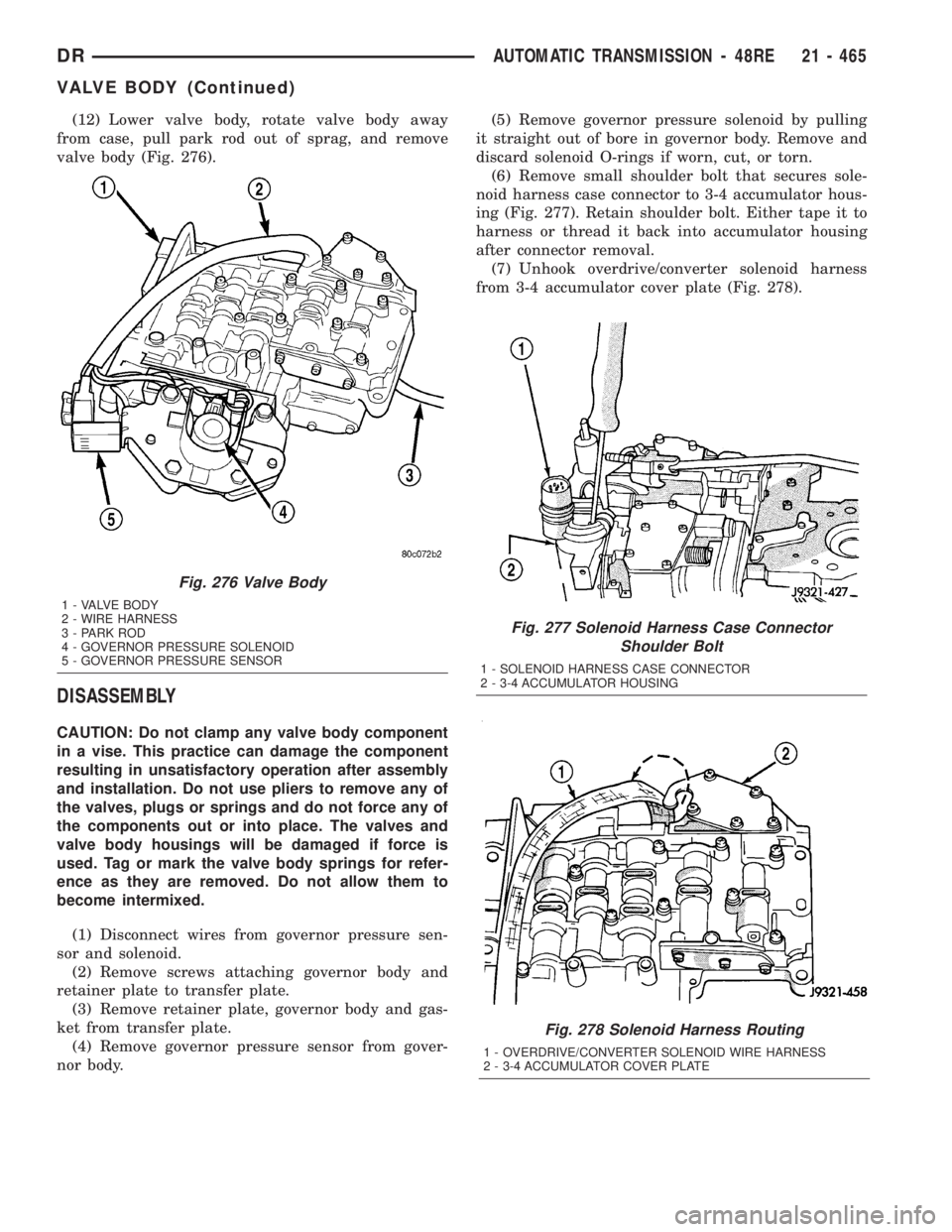
(12) Lower valve body, rotate valve body away
from case, pull park rod out of sprag, and remove
valve body (Fig. 276).
DISASSEMBLY
CAUTION: Do not clamp any valve body component
in a vise. This practice can damage the component
resulting in unsatisfactory operation after assembly
and installation. Do not use pliers to remove any of
the valves, plugs or springs and do not force any of
the components out or into place. The valves and
valve body housings will be damaged if force is
used. Tag or mark the valve body springs for refer-
ence as they are removed. Do not allow them to
become intermixed.
(1) Disconnect wires from governor pressure sen-
sor and solenoid.
(2) Remove screws attaching governor body and
retainer plate to transfer plate.
(3) Remove retainer plate, governor body and gas-
ket from transfer plate.
(4) Remove governor pressure sensor from gover-
nor body.(5) Remove governor pressure solenoid by pulling
it straight out of bore in governor body. Remove and
discard solenoid O-rings if worn, cut, or torn.
(6) Remove small shoulder bolt that secures sole-
noid harness case connector to 3-4 accumulator hous-
ing (Fig. 277). Retain shoulder bolt. Either tape it to
harness or thread it back into accumulator housing
after connector removal.
(7) Unhook overdrive/converter solenoid harness
from 3-4 accumulator cover plate (Fig. 278).
Fig. 277 Solenoid Harness Case Connector
Shoulder Bolt
1 - SOLENOID HARNESS CASE CONNECTOR
2 - 3-4 ACCUMULATOR HOUSING
Fig. 278 Solenoid Harness Routing
1 - OVERDRIVE/CONVERTER SOLENOID WIRE HARNESS
2 - 3-4 ACCUMULATOR COVER PLATE
Fig. 276 Valve Body
1 - VALVE BODY
2 - WIRE HARNESS
3 - PARK ROD
4 - GOVERNOR PRESSURE SOLENOID
5 - GOVERNOR PRESSURE SENSOR
DRAUTOMATIC TRANSMISSION - 48RE 21 - 465
VALVE BODY (Continued)
Page 2305 of 2895
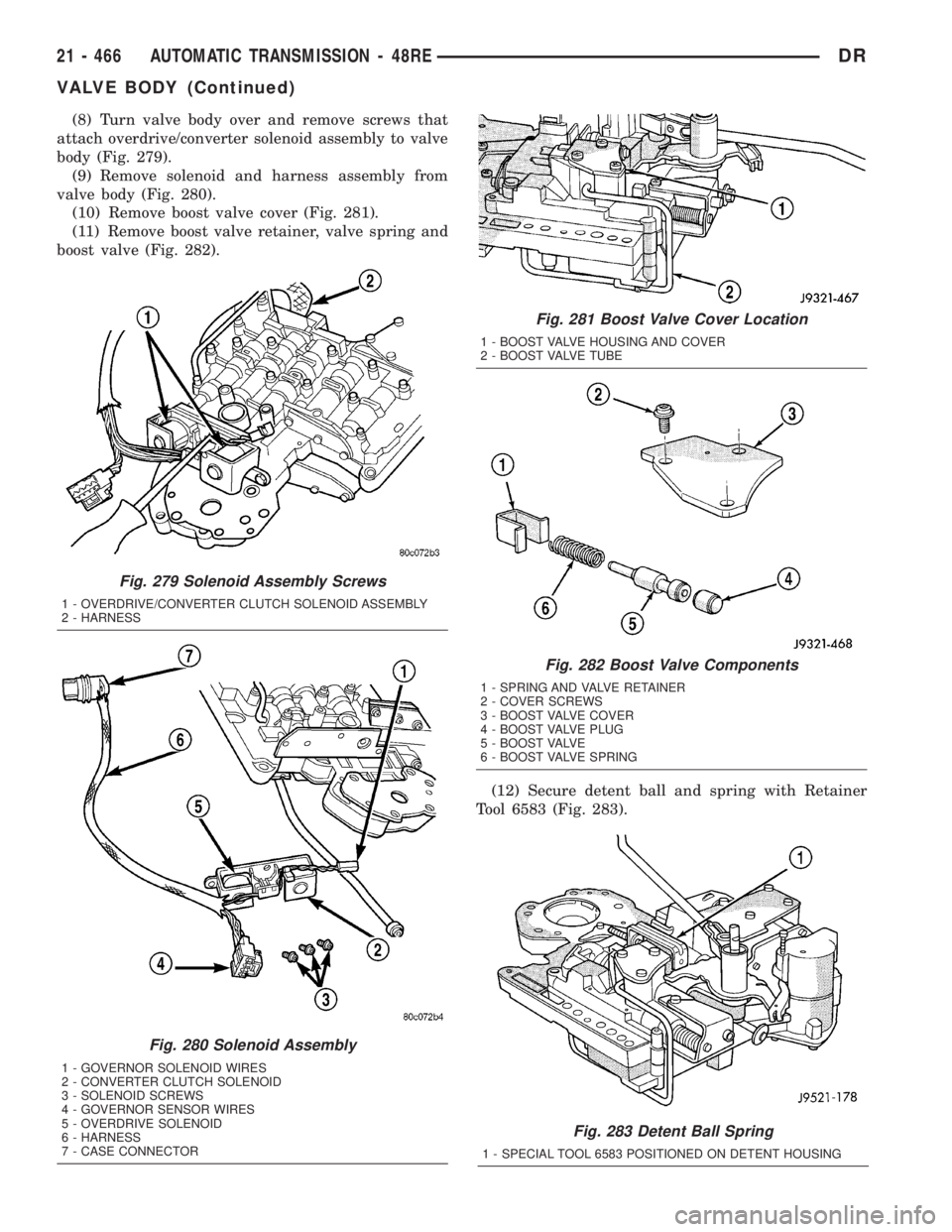
(8) Turn valve body over and remove screws that
attach overdrive/converter solenoid assembly to valve
body (Fig. 279).
(9) Remove solenoid and harness assembly from
valve body (Fig. 280).
(10) Remove boost valve cover (Fig. 281).
(11) Remove boost valve retainer, valve spring and
boost valve (Fig. 282).
(12) Secure detent ball and spring with Retainer
Tool 6583 (Fig. 283).
Fig. 283 Detent Ball Spring
1 - SPECIAL TOOL 6583 POSITIONED ON DETENT HOUSING
Fig. 279 Solenoid Assembly Screws
1 - OVERDRIVE/CONVERTER CLUTCH SOLENOID ASSEMBLY
2 - HARNESS
Fig. 280 Solenoid Assembly
1 - GOVERNOR SOLENOID WIRES
2 - CONVERTER CLUTCH SOLENOID
3 - SOLENOID SCREWS
4 - GOVERNOR SENSOR WIRES
5 - OVERDRIVE SOLENOID
6 - HARNESS
7 - CASE CONNECTOR
Fig. 281 Boost Valve Cover Location
1 - BOOST VALVE HOUSING AND COVER
2 - BOOST VALVE TUBE
Fig. 282 Boost Valve Components
1 - SPRING AND VALVE RETAINER
2 - COVER SCREWS
3 - BOOST VALVE COVER
4 - BOOST VALVE PLUG
5 - BOOST VALVE
6 - BOOST VALVE SPRING
21 - 466 AUTOMATIC TRANSMISSION - 48REDR
VALVE BODY (Continued)