2003 DODGE RAM dash
[x] Cancel search: dashPage 296 of 2895

CONDITION POSSIBLE CAUSES CORRECTION
TEMPERATURE GAUGE READING
INCONSISTENT (ERRATIC,
CYCLES OR FLUCTUATES)NOTE:
Information on dash cluster is
displayed based on broadcast data
from ECM. DTC will be set for
engine sensor circuit concern.1. Heavy duty cooling system,
extreme cold ambient (outside)
temperature or heater blower motor
in high position.1. None. System operating normally.
2. Temperature gauge or sensor
defective.2. Check cluster or engine coolant
temp sensor (Refer to 8 -
ELECTRICAL/INSTRUMENT
CLUSTER - DIAGNOSIS AND
TESTING)
3. Temporary heavy usage or load. 3. None. Normal condition.
4. Air trapped in cooling system. 4. Fill cooling system (Refer to 7 -
COOLING - STANDARD
PROCEDURE).
5. Water pump 5. Replace water pump.
6. Air leak on suction side of water
pump.6. Check for leak. (Refer to 7 -
COOLING - DIAGNOSIS AND
TESTING)
RADIATOR CAP LEAKING STEAM
AND /OR COOLANT INTO
RESERVOIR BOTTLE.
(TEMPERATURE GAUGE MAY
READ HIGH)1. Radiator cap defective. 1. Replace radiator cap.
2. Radiator neck surface damaged. 2. Replace radiator.
HOSE OR HOSES COLLAPSE
WHEN ENGINE IS COOLING.1. Vacuum created in cooling
system on engine cool-down is not
being relieved through coolant
reservoir/overflow system.1. Replace radiator cap, check vent
hose between radiator and reservoir
bottle for blockage also check
reservoir bottle vent for blockage.
NOISY FAN 1. Fan blade(s) loose, damaged. 1. Replace fan blade assembly.
2. Electronically controlled viscous
fan drive.2. None. Normal condition.
3. Fan blades striking surrounding
objects.3. Locate contact point and repair
as necessary.
4. Electronically controlled viscous
fan drive bearing.4. Check viscous fan (Refer to 7 -
COOLING/ENGINE/FAN DRIVE
VISCOUS CLUTCH - DIAGNOSIS
AND TESTING)
5. Electronically controlled viscous
fan stuck on5. Check viscous fan (Refer to 7 -
COOLING/ENGINE/FAN DRIVE
VISCOUS CLUTCH - DIAGNOSIS
AND TESTING)
6. Obstructed air flow through
radiator.6. Remove obstruction.
DRCOOLING 7 - 9
COOLING (Continued)
Page 393 of 2895

²supplies a reference voltage for the Throttle
Position Sensor (TPS) sensor.
Secondary 5±volt supply:
²supplies the required 5 volt power source to the
oil pressure sensor.
²supplies the required 5 volt power source for the
Vehicle Speed Sensor (VSS) (if equipped).
²supplies the 5 volt power source to the transmis-
sion pressure sensor (certain automatic transmis-
sions).
OPERATION - IGNITION CIRCUIT SENSE
The ignition circuit sense input tells the PCM the
ignition switch has energized the ignition circuit.
Battery voltage is also supplied to the PCM
through the ignition switch when the ignition is in
the RUN or START position. This is referred to as
the9ignition sense9circuit and is used to9wake up9
the PCM. Voltage on the ignition input can be as low
as 6 volts and the PCM will still function. Voltage is
supplied to this circuit to power the PCM's 8-volt reg-
ulator and to allow the PCM to perform fuel, ignition
and emissions control functions.
REMOVAL
USE THE DRB SCAN TOOL TO REPROGRAM
THE NEW POWERTRAIN CONTROL MODULE
(PCM) WITH THE VEHICLES ORIGINAL IDEN-
TIFICATION NUMBER (VIN) AND THE VEHI-
CLES ORIGINAL MILEAGE. IF THIS STEP IS
NOT DONE, A DIAGNOSTIC TROUBLE CODE
(DTC) MAY BE SET.
The PCM is located in the engine compartment
attached to the dash panel (Fig. 6).
To avoid possible voltage spike damage to the
PCM, ignition key must be off, and negative battery
cable must be disconnected before unplugging PCM
connectors.
(1) Disconnect negative battery cable at battery.
(2) Remove cover over electrical connectors. Cover
snaps onto PCM.
(3) Carefully unplug the three 32±way connectors
(four 38±way connectors if equipped with NGC) from
PCM (Fig. 7).
(4) Remove three PCM mounting bolts (Fig. 7) and
remove PCM from vehicle.
INSTALLATION
USE THE DRB SCAN TOOL TO REPROGRAM
THE NEW POWERTRAIN CONTROL MODULE
(PCM) WITH THE VEHICLES ORIGINAL IDEN-
TIFICATION NUMBER (VIN) AND THE VEHI-
CLES ORIGINAL MILEAGE. IF THIS STEP IS
NOT DONE, A DIAGNOSTIC TROUBLE CODE
(DTC) MAY BE SET.
(1) Install PCM and 3 mounting bolts to vehicle.
Fig. 6 PCM LOCATION
1 - COWL GRILL
2 - PCM
3 - COWL (RIGHT-REAR)
Fig. 7 PCM REMOVAL / INSTALLATION
1 - THREE 32-WAY CONNECTORS WITH JTEC (FOUR 38-WAY
CONNECTORS WITH NGC)
2 - PCM MOUNTING BRACKET
3 - PCM
4 - PCM MOUNTING SCREWS (3)
8E - 12 ELECTRONIC CONTROL MODULESDR
POWERTRAIN CONTROL MODULE (Continued)
Page 474 of 2895

REMOVAL
CAUTION: Base ignition timing is not adjustable on
any engine. Distributors do not have built in centrif-
ugal or vacuum assisted advance. Base ignition
timing and timing advance are controlled by the
Powertrain Control Module (PCM). Because a con-
ventional timing light can not be used to adjust dis-
tributor position after installation, note position of
distributor before removal.
(1) Disconnect negative cable from battery.
(2) Remove air cleaner tubing.
(3) Remove distributor cap from distributor (two
screws).
(4) Mark the position of distributor housing in
relationship to engine or dash panel. This is done to
aid in installation.
(5) Before distributor is removed, the number one
cylinder must be brought to the Top Dead Center
(TDC) firing position.
(6) Attach a socket to the Crankshaft Vibration
Damper mounting bolt.
(7) Slowly rotate engine clockwise, as viewed from
front, until indicating mark on crankshaft vibration
damper is aligned to 0 degree (TDC) mark on timing
chain cover (Fig. 24).
(8) The distributor rotor should now be aligned to
the CYL. NO. 1 alignment mark (stamped) into the
camshaft position sensor (Fig. 25). If not, rotate the
crankshaft through another complete 360 degree
turn. Note the position of the number one cylinder
spark plug cable (on the cap) in relation to rotor.
Rotor should now be aligned to this position.(9) Disconnect camshaft position sensor wiring
harness from main engine wiring harness.
(10) Remove distributor rotor from distributor
shaft.
(11) Remove distributor holddown clamp bolt and
clamp (Fig. 26). Remove distributor from vehicle.
CAUTION: Do not crank engine with distributor
removed. Distributor/crankshaft relationship will be
lost.
Fig. 24 DAMPER-TO-COVER ALIGNMENT MARKS Ð
TYPICAL
1 - ALIGNMENT MARK
2 - TIMING CHAIN COVER MARKS
3 - CRANKSHAFT VIBRATION DAMPER
Fig. 25 ROTOR ALIGNMENT MARK
1 - CAMSHAFT POSITION SENSOR ALIGNMENT MARK
2 - ROTOR
3 - DISTRIBUTOR
Fig. 26 DISTRIBUTOR HOLDDOWN CLAMP
1 - CLAMP BOLT
2 - HOLDDOWN CLAMP
3 - DISTRIBUTOR HOUSING
DRIGNITION CONTROL 8I - 17
DISTRIBUTOR (Continued)
Page 525 of 2895

must be displaying the odometer information when
the trip odometer reset switch button is pressed in
order to toggle to the engine hours display. The
engine hours will remain displayed for about thirty
seconds, until the engine speed message is greater
than zero, or until the ignition switch is turned to
the Off position, whichever occurs first.
²Trip Odometer Reset- When the trip odome-
ter reset switch button is pressed and held for longer
than about two seconds with the ignition switch in
the On or Start positions, the trip odometer will be
reset to 0.0 kilometers (miles). The VFD must be dis-
playing the trip odometer information in order for
the trip odometer information to be reset.
²Communication Error- If the cluster fails to
receive a distance message during normal operation,
it will hold and display the last data received until
the ignition switch is turned to the Off position. If
the cluster does not receive a distance message
within one second after the ignition switch is turned
to the On position, it will display the last distance
message stored in the cluster memory. If the cluster
is unable to display distance information due to an
error internal to the cluster, the VFD display will be
dashes.
²Actuator Test- Each time the cluster is put
through the actuator test, the odometer VFD will dis-
play all of its segments simultaneously during the
VFD portion of the test to confirm the functionality
of each of the VFD segments and the cluster control
circuitry.
The PCM continually monitors the vehicle speed
pulse information received from the vehicle speed
sensor and engine speed pulse information received
from the crankshaft position sensor, then sends the
proper distance and engine speed messages to the
instrument cluster. For further diagnosis of the
odometer/trip odometer or the instrument cluster cir-
cuitry that controls these functions, (Refer to 8 -
ELECTRICAL/INSTRUMENT CLUSTER - DIAGNO-
SIS AND TESTING). For proper diagnosis of the
vehicle speed sensor, the crankshaft position sensor,
the PCM, the PCI data bus, or the electronic message
inputs to the instrument cluster that control the
odometer/trip odometer, a DRBIIItscan tool is
required. Refer to the appropriate diagnostic infor-
mation.
OIL PRESSURE GAUGE
DESCRIPTION
An oil pressure gauge is standard equipment on all
instrument clusters. The oil pressure gauge is located
in the upper right quadrant of the instrument clus-
ter, above the coolant temperature gauge. The oilpressure gauge consists of a movable gauge needle or
pointer controlled by the instrument cluster circuitry
and a fixed 90 degree scale on the cluster overlay
that reads left-to-right from ªLº (or Low) to ªHº (or
High) for gasoline engines. On vehicles with a diesel
engine the scale reads from ª0º kPa to ª760º kPa in
markets where a metric instrument cluster is speci-
fied, or from ª0º psi to ª110º psi in all other markets.
An International Control and Display Symbol icon for
ªEngine Oilº is located on the cluster overlay, directly
below the left end of the gauge scale. The oil pres-
sure gauge graphics are black against a white field
except for two red graduations at the low end of the
gauge scale, making them clearly visible within the
instrument cluster in daylight. When illuminated
from behind by the panel lamps dimmer controlled
cluster illumination lighting with the exterior lamps
turned On, the black graphics appear blue and the
red graphics still appear red. The orange gauge nee-
dle is internally illuminated. Gauge illumination is
provided by replaceable incandescent bulb and bulb
holder units located on the instrument cluster elec-
tronic circuit board. The oil pressure gauge is ser-
viced as a unit with the instrument cluster.
OPERATION
The oil pressure gauge gives an indication to the
vehicle operator of the engine oil pressure. This
gauge is controlled by the instrument cluster circuit
board based upon cluster programming and elec-
tronic messages received by the cluster from the
Powertrain Control Module (PCM) on vehicles with a
gasoline engine, or from the Engine Control Module
(ECM) on vehicles equipped with a diesel engine over
the Programmable Communications Interface (PCI)
data bus. The oil pressure gauge is an air core mag-
netic unit that receives battery current on the instru-
ment cluster electronic circuit board through the
fused ignition switch output (run-start) circuit when-
ever the ignition switch is in the On or Start posi-
tions. The cluster is programmed to move the gauge
needle back to the low end of the scale after the igni-
tion switch is turned to the Off position. The instru-
ment cluster circuitry controls the gauge needle
position and provides the following features:
²Engine Oil Pressure Message- The instru-
ment cluster circuitry restricts the oil pressure gauge
needle operation in order to provide readings that
are consistent with customer expectations. Each time
the cluster receives a message from the PCM or ECM
indicating the engine oil pressure is above about 41
kPa (6 psi) the cluster holds the gauge needle at a
point near the middle increment within the normal
range on the gauge scale.
²Engine Oil Pressure Low Message- Each
time the cluster receives a message from the PCM or
8J - 32 INSTRUMENT CLUSTERDR
ODOMETER (Continued)
Page 551 of 2895
HEADLAMP SWITCH
DESCRIPTION
The multiplexed headlamp switch is located on the
instrument panel. The headlamp switch controls the
parking lamps, fog lamps and the headlamps. A sep-
arate switch in the module controls the interior
lamps and instrument cluster illumination. This
switch also contains a rheostat for controlling the
illumination level of the cluster lamps.
OPERATION
The multiplexed headlamp switch has an off, park-
ing lamp, fog lamp and a headlamp on position. High
beams are controlled by the multiplexed multifunc-
tion switch on the steering column. The fog lamps
are illuminated by pulling back on the headlamp
switch knob when in the parking lamp or headlamp
ON position.The headlamp switch cannot be
repaired. It must be replaced.
The Instrument Cluster monitors the headlamp
and multifunction switch operation. When the head-
lamp switch is rotated to the parking lamp or On
position the Instrument Cluster sends a J1850 mes-
sage to the Front Control Module, which is mated to
the power distribution center to become the Inte-
grated Control Module, to illuminate the appropriate
bulbs. When the multifunction switch is activated to
the optical horn or high beam position the Instru-
ment Cluster illuminates the high beam indicator
and sends a J1850 message to the Front Control
Module to illuminate the appropriate bulbs.
REMOVAL
WARNING: ON VEHICLES EQUIPPED WITH AIR-
BAGS, DISABLE THE AIRBAG SYSTEM BEFORE
ATTEMPTING ANY STEERING WHEEL, STEERING
COLUMN, OR INSTRUMENT PANEL COMPONENT
DIAGNOSIS OR SERVICE. DISCONNECT AND ISO-
LATE THE BATTERY NEGATIVE (GROUND) CABLE,
THEN WAIT TWO MINUTES FOR THE AIRBAG SYS-
TEM CAPACITOR TO DISCHARGE BEFORE PER-
FORMING FURTHER DIAGNOSIS OR SERVICE. THIS
IS THE ONLY SURE WAY TO DISABLE THE AIRBAG
SYSTEM. FAILURE TO TAKE THE PROPER PRE-
CAUTIONS COULD RESULT IN ACCIDENTAL AIR-
BAG DEPLOYMENT AND POSSIBLE PERSONAL
INJURY.
(1) Disconnect and isolate the battery negative
cable.
(2) Remove the left instrument panel bezel. (Refer
to 23 - BODY/INSTRUMENT PANEL/CLUSTER
BEZEL - REMOVAL).
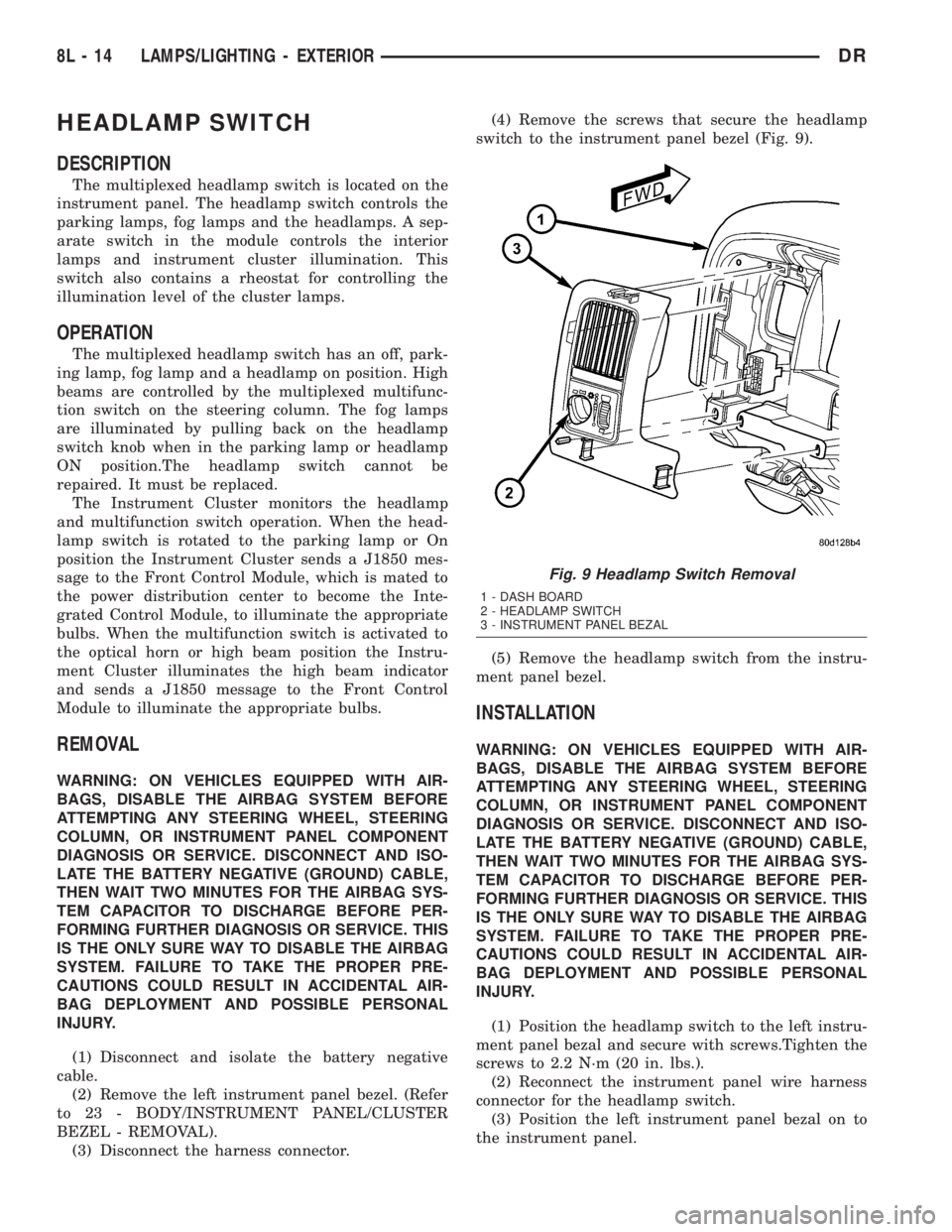
(3) Disconnect the harness connector.(4) Remove the screws that secure the headlamp
switch to the instrument panel bezel (Fig. 9).
(5) Remove the headlamp switch from the instru-
ment panel bezel.
INSTALLATION
WARNING: ON VEHICLES EQUIPPED WITH AIR-
BAGS, DISABLE THE AIRBAG SYSTEM BEFORE
ATTEMPTING ANY STEERING WHEEL, STEERING
COLUMN, OR INSTRUMENT PANEL COMPONENT
DIAGNOSIS OR SERVICE. DISCONNECT AND ISO-
LATE THE BATTERY NEGATIVE (GROUND) CABLE,
THEN WAIT TWO MINUTES FOR THE AIRBAG SYS-
TEM CAPACITOR TO DISCHARGE BEFORE PER-
FORMING FURTHER DIAGNOSIS OR SERVICE. THIS
IS THE ONLY SURE WAY TO DISABLE THE AIRBAG
SYSTEM. FAILURE TO TAKE THE PROPER PRE-
CAUTIONS COULD RESULT IN ACCIDENTAL AIR-
BAG DEPLOYMENT AND POSSIBLE PERSONAL
INJURY.
(1) Position the headlamp switch to the left instru-
ment panel bezal and secure with screws.Tighten the
screws to 2.2 N´m (20 in. lbs.).
(2) Reconnect the instrument panel wire harness
connector for the headlamp switch.
(3) Position the left instrument panel bezal on to
the instrument panel.
Fig. 9 Headlamp Switch Removal
1 - DASH BOARD
2 - HEADLAMP SWITCH
3 - INSTRUMENT PANEL BEZAL
8L - 14 LAMPS/LIGHTING - EXTERIORDR
Page 562 of 2895
DOOR AJAR SWITCH
DESCRIPTION
The door ajar switches are integral to the door
latches on each door. The switches close a path to
ground for the Instrument Cluster when a door is
opened.
The door ajar switches cannot be repaired and, if
faulty or damaged, the door latch unit must be
replaced. Refer to the Body section under Doors for
the removal and installation procedure.
OPERATION
The door ajar switches close a path to ground for
the Instrument Cluster when a door is opened. The
passenger front door is connected in a parallel-series
circuit between ground and the Instrument Cluster,
while the driver side front door ajar switch is con-
nected in series between ground and the Instrument
Cluster to provide a unique input. The Instrument
Cluster reads the switch status, then sends the
proper switch status messages to other electronic
modules over the Programmable Communications
Interface (PCI) data bus network. The door ajar
switches can be diagnosed using conventional diag-
nostic tools and methods. Refer to the Body section
under Doors for the Removal and Installation proce-
dures.
GLOVE BOX LAMP/SWITCH
REMOVAL
(1) Disconnect and isolate the battery negative
cable.
(2) Remove the glove box from the instrument
panel. (Refer to 23 - BODY/INSTRUMENT PANEL/
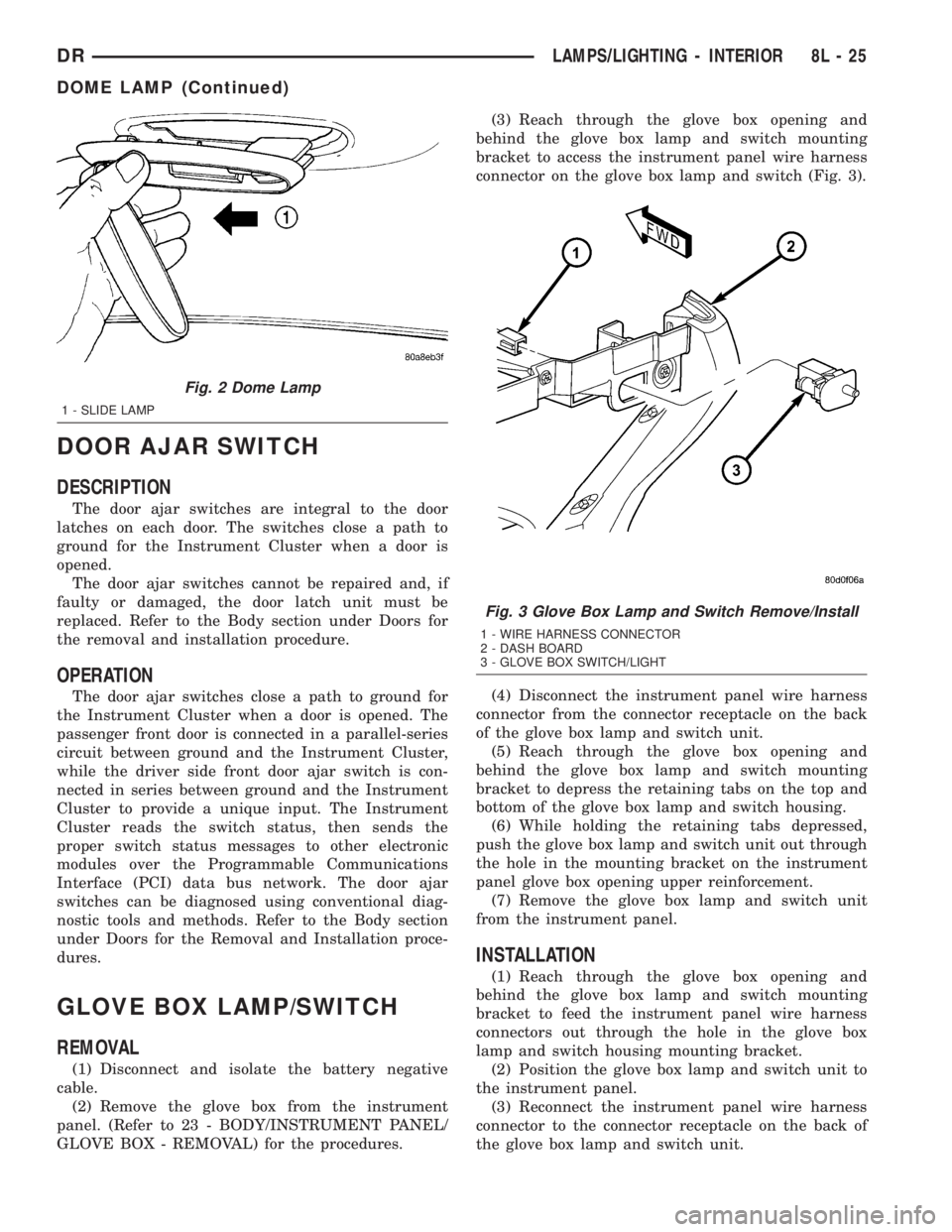
GLOVE BOX - REMOVAL) for the procedures.(3) Reach through the glove box opening and
behind the glove box lamp and switch mounting
bracket to access the instrument panel wire harness
connector on the glove box lamp and switch (Fig. 3).
(4) Disconnect the instrument panel wire harness
connector from the connector receptacle on the back
of the glove box lamp and switch unit.
(5) Reach through the glove box opening and
behind the glove box lamp and switch mounting
bracket to depress the retaining tabs on the top and
bottom of the glove box lamp and switch housing.
(6) While holding the retaining tabs depressed,
push the glove box lamp and switch unit out through
the hole in the mounting bracket on the instrument
panel glove box opening upper reinforcement.
(7) Remove the glove box lamp and switch unit
from the instrument panel.
INSTALLATION
(1) Reach through the glove box opening and
behind the glove box lamp and switch mounting
bracket to feed the instrument panel wire harness
connectors out through the hole in the glove box
lamp and switch housing mounting bracket.
(2) Position the glove box lamp and switch unit to
the instrument panel.
(3) Reconnect the instrument panel wire harness
connector to the connector receptacle on the back of
the glove box lamp and switch unit.
Fig. 2 Dome Lamp
1 - SLIDE LAMP
Fig. 3 Glove Box Lamp and Switch Remove/Install
1 - WIRE HARNESS CONNECTOR
2 - DASH BOARD
3 - GLOVE BOX SWITCH/LIGHT
DRLAMPS/LIGHTING - INTERIOR 8L - 25
DOME LAMP (Continued)
Page 566 of 2895
(1) With the ignition switch in the Off position,
simultaneously depress and hold theSTEP and
RESET buttons.
(2) Turn the ignition switch to the On position.
(3) Following completion of the test, the electronics
module will display one of the following messages:
a.Pass Self Test (EVIC only), PASS (CMTC)-
The electronics module is working properly.
b.Failed Self Test (EVIC only), FAIL (CMTC)-
The electronics module has an internal failure. The
electronics module is faulty and must be replaced.
c.Failed J1850 Communication (EVIC only),
BUS (CMTC)- The electronics module is not receiv-
ing proper message input through the J1850 PCI
data bus circuit. This can result from one or more
faulty electronic modules in the vehicle, or from a
faulty PCI data bus. The use of a DRB IIItscan tool
and the proper Diagnostic Procedures manual are
required for further diagnosis.
NOTE: If the compass functions, but accuracy is
suspect, it may be necessary to perform a variation
adjustment. This procedure allows the compass
unit to accommodate variations in the earth's mag-
netic field strength, based on geographic location.
Refer to Compass Variation Adjustment in the Stan-
dard Procedures section of this group.
NOTE: If the compass reading displays dashes, and
only ªCALº appears in the display, demagnetizing
may be necessary to remove excessive residual
magnetic fields from the vehicle. Refer to Compass
Demagnetizing in the Standard Procedures section
of this group.
STANDARD PROCEDURE
STANDARD PROCEDURE - READING/
COURTESY LAMP REPLACEMENT
(1) Open hood, disconnect and isolate the negative
battery cable.
(2) Remove the reading/courtesy lamp lens. Using
a trim stick, gently pry the forward edge of the read-
ing/courtesy lamp lens outward.
(3) Remove the reading/courtesy lamp socket from
the overhead console. Rotate the reading/courtesy
lamp socket one quarter turn counter clockwise.
(4) Remove the lamp and socket assembly.
(5) Reverse the above procedure to install.
STANDARD PROCEDURE - MODULE LENS
REPLACEMENT
(1) Remove the overhead console (Refer to 8 -
ELECTRICAL/OVERHEAD CONSOLE - REMOV-
AL).
(2) Remove the electronics module from the over-
head console. Refer to the procedure later in this sec-
tion.
(3) Unsnap the lens from the module and replace
lens as necessary.
STANDARD PROCEDURE - MODULE LAMP
REPLACEMENT
(1) Remove the overhead console (Refer to 8 -
ELECTRICAL/OVERHEAD CONSOLE - REMOV-
AL).
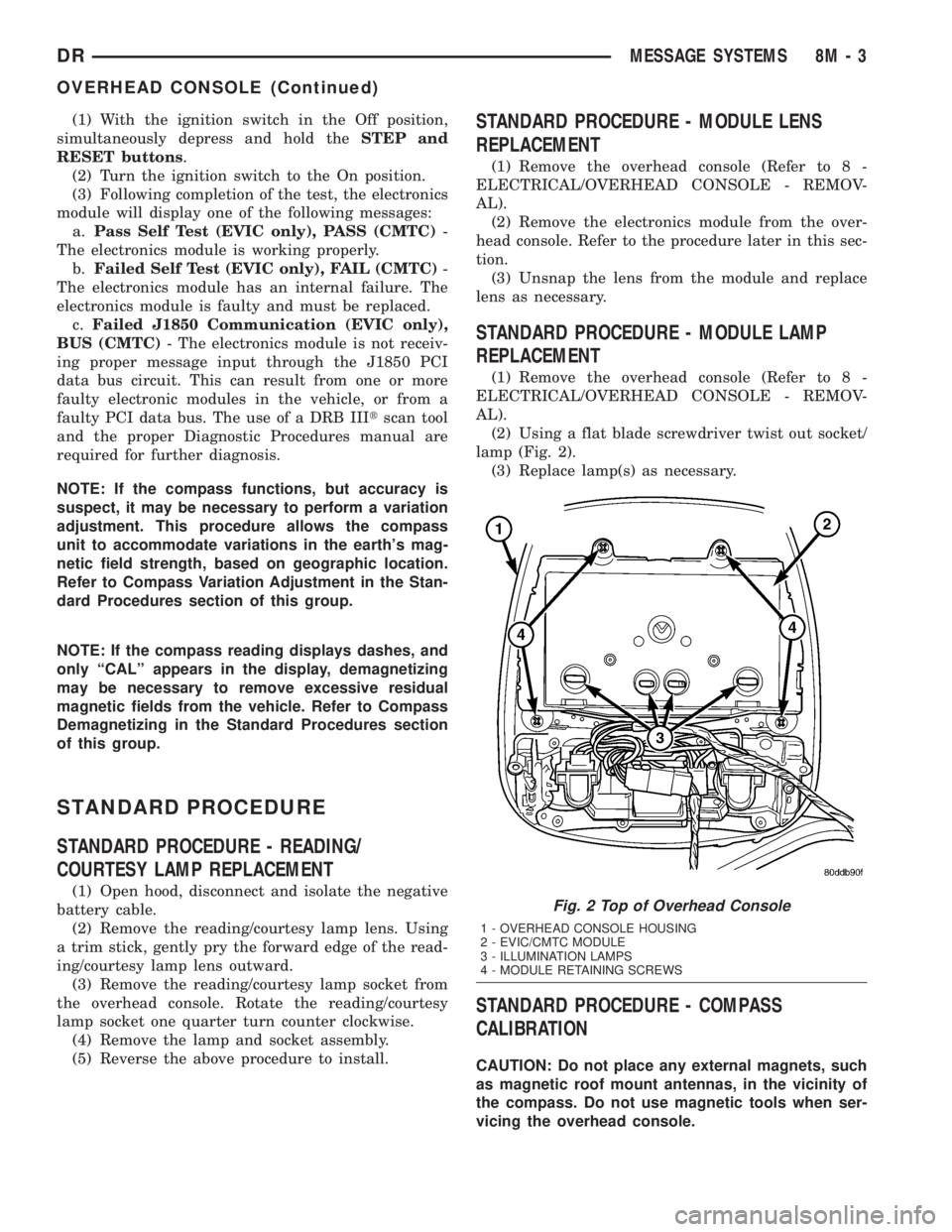
(2) Using a flat blade screwdriver twist out socket/
lamp (Fig. 2).
(3) Replace lamp(s) as necessary.
STANDARD PROCEDURE - COMPASS
CALIBRATION
CAUTION: Do not place any external magnets, such
as magnetic roof mount antennas, in the vicinity of
the compass. Do not use magnetic tools when ser-
vicing the overhead console.
Fig. 2 Top of Overhead Console
1 - OVERHEAD CONSOLE HOUSING
2 - EVIC/CMTC MODULE
3 - ILLUMINATION LAMPS
4 - MODULE RETAINING SCREWS
DRMESSAGE SYSTEMS 8M - 3
OVERHEAD CONSOLE (Continued)
Page 570 of 2895

OPERATION
The Compass Mini-Trip Computer module in the
overhead console has buttons used to select various
functions. The CMTC selector buttons will not oper-
ate until the ignition is in the RUN position.
When the ignition switch is first turned to the
RUN position the CMTC display;
²Returns to the last mode setting selected before
the ignition was last switched OFF.
DIAGNOSIS AND TESTING - COMPASS
MINI-TRIP COMPUTER
Compass Mini-Trip Computer (CMTC) data is
obtained from other electronic modules (CCN, FCM
and JTEC) on the J1850 Data Bus circuit. The
CMTC will display dashes (- -) for any of the screens
it did not receive the bus messages. The label corre-
sponding to the missing information will be lit. If no
compass mini-trip computer data is displayed, check
the J1850 Data Bus circuit communications and the
other modules.
Refer to Overhead Console Diagnosis and Testing
for instructions on performing a CMTC module Self-
Diagnostic Test. The DRB IIItis recommended for
checking the J1850 Data Bus circuit and the other
modules. Perform the CMTC self diagnosis before
replacing the CMTC module.
REMOVAL
(1) Disconnect and isolate the negative battery
cable.
(2) Remove the overhead console from the headlin-
er.(Refer to 8 - ELECTRICAL/OVERHEAD CON-
SOLE - REMOVAL).
(3) Remove the screws holding Compass Mini-Trip
Computer module in the overhead console (Fig. 5).
(4) Disconnect the CMTC module electrical connec-
tor. Depress the retaining tab and pull straight
apart.
(5) Remove CMTC module from console assembly.
INSTALLATION
(1) Position the compass mini-trip computer mod-
ule in the overhead console.
(2) Install the screws holding the compass mini-
trip computer module in the overhead console.
(3) Connect the module electrical connector.
(4) Install the overhead console on the headlin-
er(Refer to 8 - ELECTRICAL/OVERHEAD CON-
SOLE - INSTALLATION).
(5) Connect the negative battery cable.
(6) Check CMTC module function.
NOTE: If a new module has been installed, the com-
pass will have to be calibrated and the variance set.
Refer to Compass Variation Adjustment and Com-pass Calibration in the Standard Procedures sec-
tion of this group for the procedures.
ELECTRONIC VEHICLE INFO
CENTER
DESCRIPTION
The Electronic Vehicle Information Center (EVIC)
is a module located in the overhead console on some
models. The EVIC module features a large Vacuum
Fluorescent Display (VFD) screen for displaying
information, and back-lit push button switches
labeled C/T (compass/temperature), RESET, STEP,
and MENU.
The EVIC module contains a central processing
unit and interfaces with other electronic modules in
the vehicle over the Programmable Communications
Interface (PCI) J1850 data bus circuit. The PCI data
bus circuit allows the sharing of sensor information.
This helps to reduce wire harness complexity, reduce
internal controller hardware, and reduce component
sensor current loads. At the same time, this system
provides increased reliability, enhanced diagnostics,
and allows the addition of many new feature capabil-
ities.
The EVIC ªMenuº push button provides the vehicle
operator with a user interface, which allows the
selection of several optional customer programmable
electronic features to suit individual preferences.
Fig. 5 OVERHEAD CONSOLE MODULE REMOVAL
1 - COMPASS MINI-TRIP COMPUTER MODULE
2 - OVERHEAD CONSOLE
DRMESSAGE SYSTEMS 8M - 7
COMPASS/MINI-TRIP COMPUTER (Continued)