Page 135 of 399
Proper use of the Heating and
Cooling system can make the
interior dry and comf ortable, and
keep the windows clear f or best
visibility.
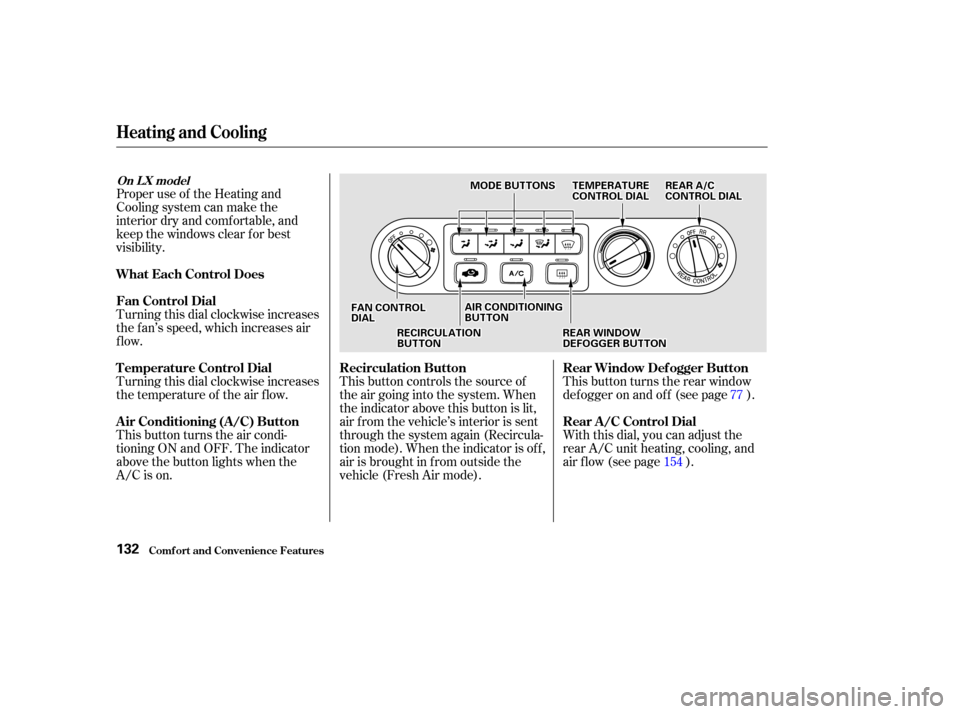
Turning this dial clockwise increases
the f an’s speed, which increases air
flow.
Turning this dial clockwise increases
the temperature of the air flow.
This button turns the air condi-
tioning ON and OFF. The indicator
above the button lights when the
A/C is on.This button controls the source of
the air going into the system. When
the indicator above this button is lit,
air f rom the vehicle’s interior is sent
through the system again (Recircula-
tion mode). When the indicator is off,
air is brought in f rom outside the
vehicle (Fresh Air mode).
With this dial, you can adjust the
rear A/C unit heating, cooling, and
air flow (see page ). This button turns the rear window
def ogger on and of f (see page ).
15477
Comf ort and Convenience Feat ures
Heating and Cooling
What Each Control Does
Fan Control Dial
T emperature Control Dial
Air Conditioning (A/C) Button
Recirculation Button
Rear Window Def ogger Button
Rear A /C Control Dial
On L X model
132
F FAA N
N C
COON NTTR
RO OL L
D
D I
IAA L
L R
RE
EA
A R
R A
A/
/C
C
C
CO ON NTTR
RO OL L D
DI
IAA L
L
R
RE EC
CI IRRC CUUL LAA T
TI
IOON N
B
BU UT TT
TO
ON N A
A
I
IRR C
COON NDDI
ITT I
IOON NIINNG G
B
BU UT TT
TO
ON N
R
REEA
A R
R W
WI INND DO
OW W
D
D E
EF
FOOG GGGEER
R B
BUUT TT
TO
ON N
T
T
E
EM
M P
PE
ER
RA A T
TU
UR REE
C
CO ON NTTR
RO OL L D
DI
IAA L
L
M
M
O
ODDE
E B
BUUT TT
TO
ON NSS
Page 148 of 399
You can manually select the f an
speedbyturningthefancontroldial.
When you turn the dial clockwise,
the fan is taken out of automatic
mode and starts to run at its lowest
speed. Turning the dial f ully
clockwise increases the f an’s speed,
which increases air flow.
With this dial, you can adjust the
rear A/C unit heating, cooling, and
air flow (see page ).
Use the MODE button to select the
vents the air flows from. Some air
will f low f rom the dashboard corner
vents in all modes. Each time you
press the MODE button, the display
shows the mode selected. Press the
button four times to see all the
modes.154
CONT INUED
Fan Cont rol Dial
Rear A /C Cont rol DialMode Button
Climat e Cont rol Syst em
Comf ort and Convenience Feat ures145
M MO
ODDE
E B
BUUT TT
TO
ON N F
FAA N
N C
COON NTTR
RO OL L D
DI
IAA L
L
R
RE EA
A R
R A
A/
/C
C C
COON NTTR
RO OL L D
DI
IAA L
L
Page 158 of 399
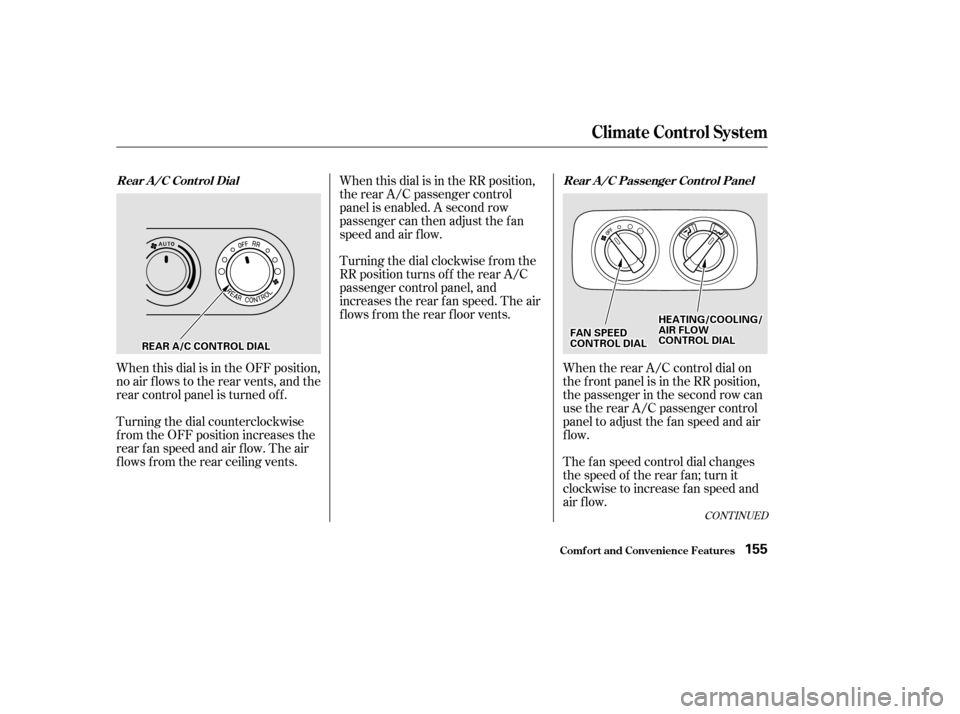
When this dial is in the OFF position,
no air flows to the rear vents, and the
rear control panel is turned of f .
Turning the dial counterclockwise
f rom the OFF position increases the
rear fan speed and air flow. The air
f lows f rom the rear ceiling vents.When this dial is in the RR position,
the rear A/C passenger control
panel is enabled. A second row
passenger can then adjust the fan
speed and air f low.
Turning the dial clockwise f rom the
RR position turns of f the rear A/C
passenger control panel, and
increases the rear f an speed. The air
f lows f rom the rear f loor vents.
When the rear A/C control dial on
the f ront panel is in the RR position,
the passenger in the second row can
use the rear A/C passenger control
panel to adjust the f an speed and air
flow.
The f an speed control dial changes
the speed of the rear f an; turn it
clockwise to increase fan speed and
air flow.
CONT INUED
Climat e Cont rol Syst em
Comf ort and Convenience Feat ures
Rear A/C Control Dial Rear A/C Passenger Control Panel
155
R REEA
A R
R A
A/
/C
C C
COON NTTR
RO OL L D
DI
IAA L
L H
H
E
EA
A T
TI
INNG G//C
CO OO OLLIINNG G//
A
A I
IRR F
FLLOOW W
C
CO ON NTTR
RO OL L D
DI
IAA L
L
F
FA
A N
N S
SPPE
EE
ED
D
C
CO ON NTTR
RO OL L D
DI
IAA L
L
Page 211 of 399
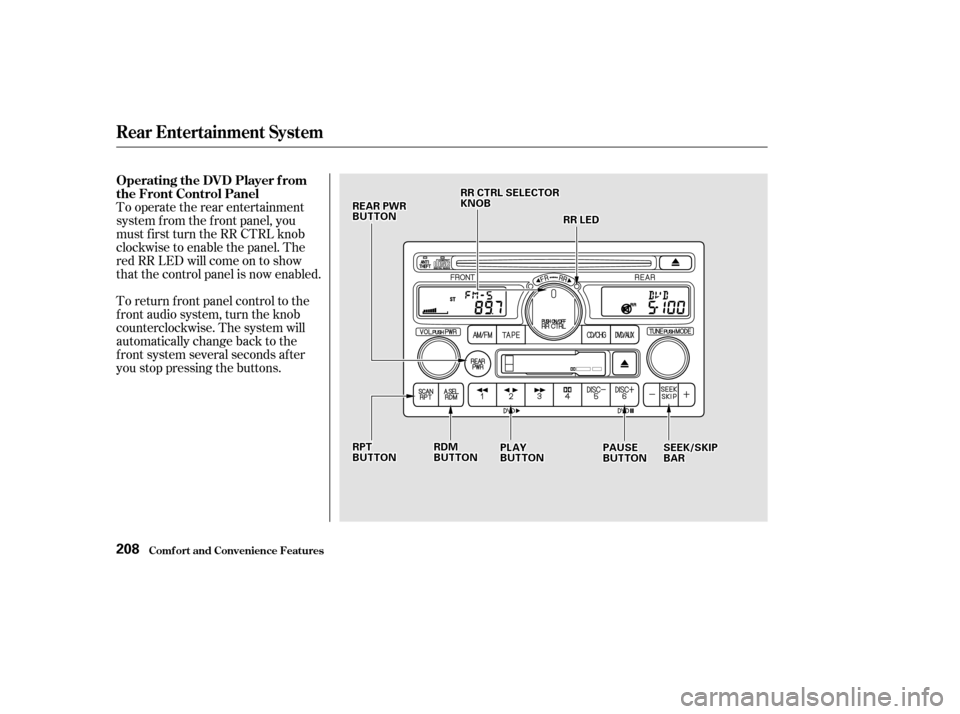
To operate the rear entertainment
system f rom the f ront panel, you
must first turn the RR CTRL knob
clockwise to enable the panel. The
red RR LED will come on to show
that the control panel is now enabled.
To return f ront panel control to the
front audio system, turn the knob
counterclockwise. The system will
automatically change back to the
f ront system several seconds af ter
you stop pressing the buttons.
Comf ort and Convenience Feat ures
Rear Entertainment System
Operating the DVD Player f rom
the Front Control Panel
208
R RPPT
T
B
BU UT TT
TO
ON N
R
RE
EA
A R
R P
PW
WR R
B
BU UT TT
TO
ON N
R
RRR L
LEE D
D
P
P L
LAA Y
Y
B
BU UT TT
TO
ON N P
P
A
A U
US SEE
B
BU UT TT
TO
ON N S
SE
EE
EK
K/ /S
SK KIIPP
B
BA A R
R
R
RR
R C
CTTR
RL L S
SEEL
LEE C
CT TO
OR R
K
KN NO OBB
R
RD D M
M
B
BU UT TT
TO
ON N
Page 219 of 399

�Û�Ý
An audio CD can be played in either
the main CD player in the f ront panel,
in the DVD/CD player below the
f ront panel, or in the optional CD
changer. This allows the f ront and
rear passengers to listen to dif f erent
CDs.
Select the rear system by turning the
RR CTRL knob clockwise. If the CD
is loaded in the main CD player, or
CD changer, select CD/CHG. If the
CD is loaded in the lower player,
select DVD/AUX.
If theCDisloadedinthemainCD
player or CD changer, ref er to pagesand f or operating
instructions. If the CD is loaded in
the DVD/AUX player, ref er to page . If theCDisloadedinthemainCD
player or optional CD changer, select
it by pressing the CD/CHG button.
If it is loaded in the lower player,
press DVD/AUX.
Pressthe buttontoskiptothe
beginning of the next track. Press
the button to return to the
beginning of current track. Press it
again to go to the beginning of the
previous track.
If the CD changer is selected, use
the and buttons to change
discs.
If theCDisloadedinthemainCD
player or optional CD changer, select
it by pressing the CD/CHG button.
If it is loaded in the lower player,
press DVD/AUX. To move rapidly within a track, press
andholdeithertheFWDorREW
buttons. When you press FWD, you
will see ‘‘CUE’’ in the display. When
you press REW, you will see ‘‘REW’’
in the display. Release the button
when the system reaches the desired
point.
Pressthe buttontoskiptothe
beginning of the next track. Press
the button to return to the
beginning of the current track. Press
it again to go to the beginning of the
previous track.
200 202 208
Rear Entertainment System
Comf ort and Convenience Feat ures
Playing a CD With the Rear
Entertainment System
Playing a CD Wit h t he Front Panel Playing a CD Wit h t he Rear Cont rol
Panel
Playing a CD Wit h t he Remot eCont rol
216
Page 221 of 399
�Û
As required by the FCC:This device complies with Part 15 of theFCC rules. Operation is subject to thef ollowing two conditions: (1) This devicemay not cause harmf ul interf erence, and(2) this device must accept anyinterf erence received, includinginterf erence that may cause undesiredoperation.
Changes or modif ications not expresslyapproved by the party responsible f orcompliance could void the user’sauthority to operate the equipment.
This device complies with IndustryCanada Standard RSS-210.Operation is subject to the f ollowing twoconditions: (1) this device may not causeinterf erence, and (2) this device mustaccept any interf erence that may causeundesired operation of the device.
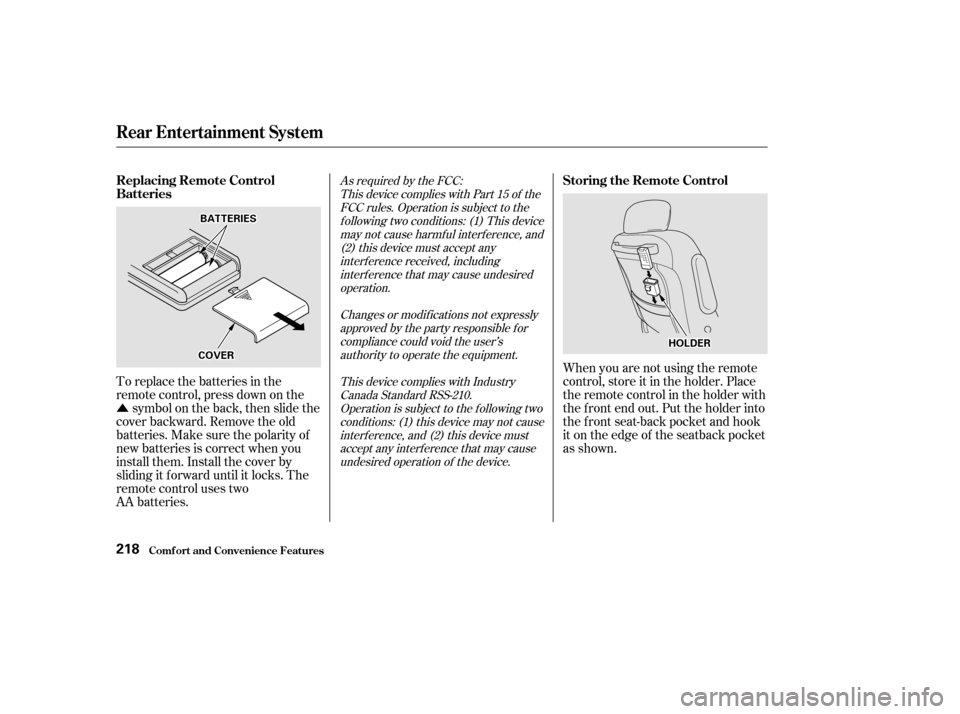
To replace the batteries in the
remote control, press down on the symbol on the back, then slide the
cover backward. Remove the old
batteries.Makesurethepolarityof
new batteries is correct when you
install them. Install the cover by
sliding it f orward until it locks. The
remote control uses two
AA batteries. When you are not using the remote
control, store it in the holder. Place
the remote control in the holder with
the f ront end out. Put the holder into
the f ront seat-back pocket and hook
it on the edge of the seatback pocket
as shown.
Rear Entertainment System
Comf ort and Convenience Feat ures
Replacing Remote Control
Batteries
Storing the Remote Control
218
B BA
A T
TT
TE
ER
RI IEE S
S
H
HO
OL LDD E
ER
R
C
CO OV VE
ER
R
Page 222 of 399
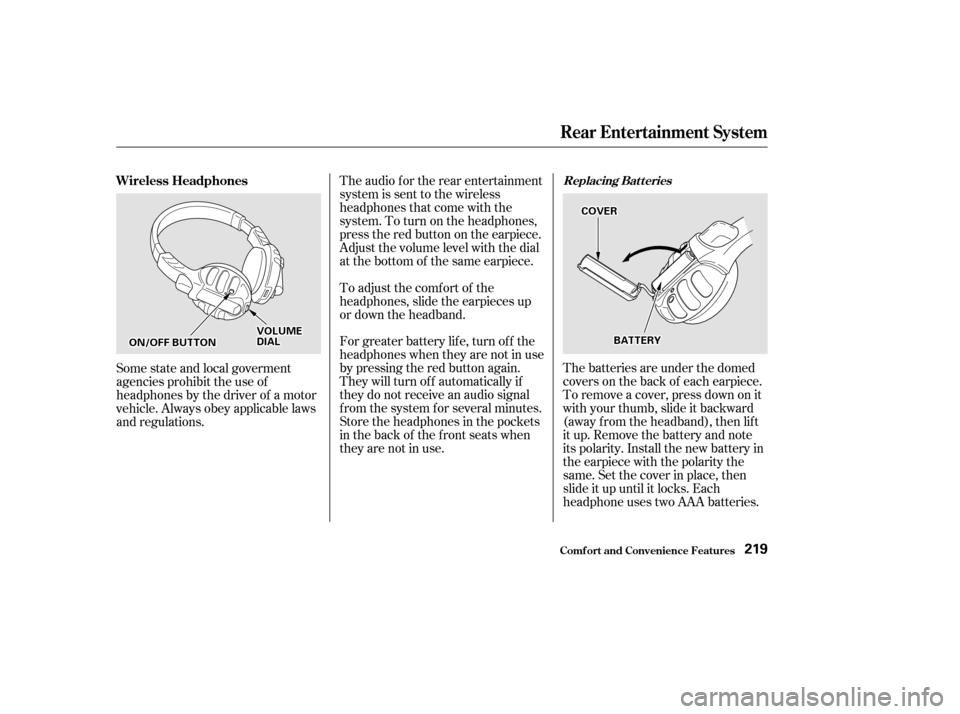
The batteries are under the domed
covers on the back of each earpiece.
To remove a cover, press down on it
with your thumb, slide it backward
(away f rom the headband), then lif t
it up. Remove the battery and note
its polarity. Install the new battery in
theearpiecewiththepolaritythe
same. Set the cover in place, then
slide it up until it locks. Each
headphone uses two AAA batteries.
The audio f or the rear entertainment
system is sent to the wireless
headphones that come with the
system. To turn on the headphones,
presstheredbuttonontheearpiece.
Adjust the volume level with the dial
at the bottom of the same earpiece.
To adjust the comf ort of the
headphones, slide the earpieces up
or down the headband.
For greater battery lif e, turn of f the
headphones when they are not in use
by pressing the red button again.
They will turn of f automatically if
they do not receive an audio signal
f rom the system f or several minutes.
Store the headphones in the pockets
in the back of the front seats when
they are not in use.
Some state and local goverment
agencies prohibit the use of
headphones by the driver of a motor
vehicle. Always obey applicable laws
and regulations. Wireless Headphones
Replacing Bat t eries
Rear Entertainment System
Comf ort and Convenience Feat ures219
O ON
N//O
OF FFF B
BUUT TT
TO
ON N V
V
O
OL LUUM M E
E
D
D I
IAA L
L B
BA
A T
TT
TE
ER
RY Y
C
CO
OV VE
ER
R
Page 224 of 399
Once the security system is set,
opening any door (without using the
key or the remote transmitter), or
the hood, will cause it to alarm. It
also alarms if the radio is removed
f rom the dashboard or the wiring is
cut.Do not attempt to alter this system
or add other devices to it.
The security system helps to protect
your vehicle and valuables f rom thef t.
The horn sounds and a combination
of headlights, parking lights, side
marker lights and taillights f lashes if
someone attempts to break into your
vehicleorremovetheradio.This
alarm continues f or two minutes,
then the alarm stops. To reset an
alarming system before the two
minutes have elapsed, unlock either
f ront door with the key or the
remote transmitter.
The security system sets auto-
matically fifteen seconds after you
lock the doors, hood, and tailgate.
For the system to activate, you must
lock the doors f rom the outside with
the key, or remote transmitter. The
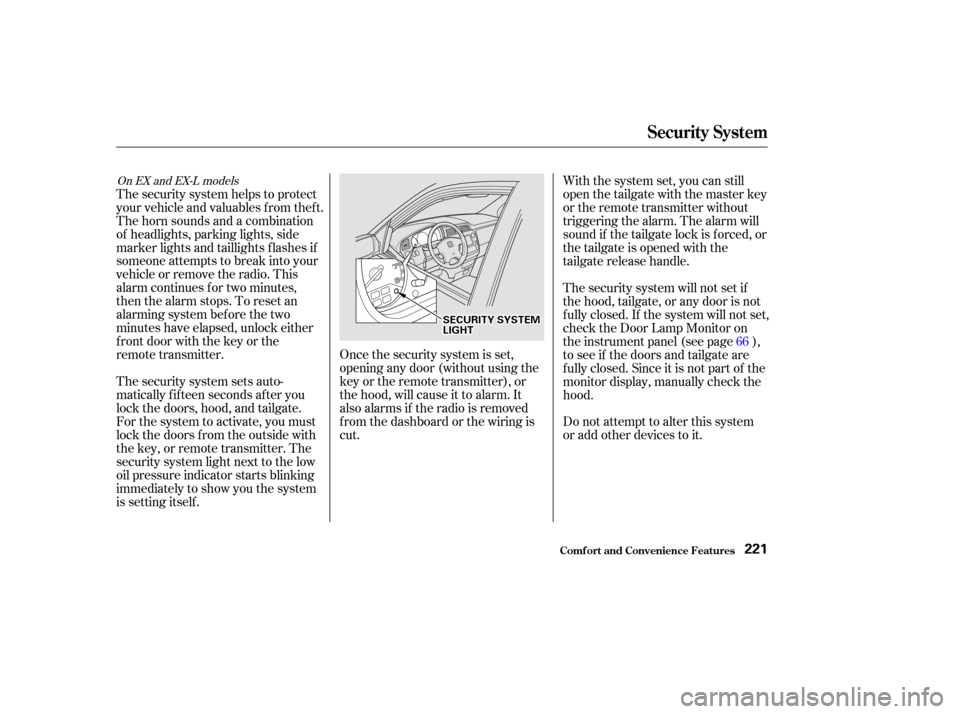
security system light next to the low
oil pressure indicator starts blinking
immediately to show you the system
is setting itself . With the system set, you can still
open the tailgate with the master key
or the remote transmitter without
triggering the alarm. The alarm will
sound if the tailgate lock is f orced, or
the tailgate is opened with the
tailgate release handle.
The security system will not set if
the hood, tailgate, or any door is not
f ully closed. If the system will not set,
check the Door Lamp Monitor on
the instrument panel (see page ),
to see if the doors and tailgate are
f ully closed. Since it is not part of the
monitor display, manually check the
hood.
66
On EX and EX-L models
Security System
Comf ort and Convenience Feat ures221
S SE
EC
CU UR RIITT Y
Y S
SYYSSTTE
EM
M
L
LI IGGH HT
T