Page 255 of 399
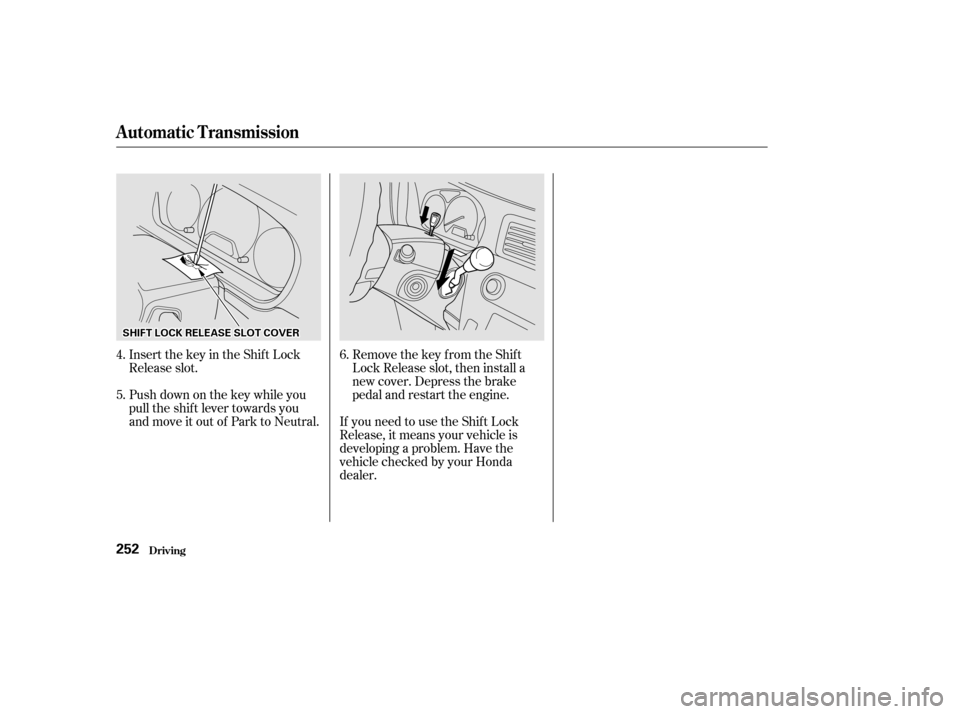
Insert the key in the Shift Lock
Release slot.
Push down on the key while you
pull the shif t lever towards you
and move it out of Park to Neutral.Remove the key from the Shift
Lock Release slot, then install a
new cover. Depress the brake
pedal and restart the engine.
If you need to use the Shif t Lock
Release, it means your vehicle is
developing a problem. Have the
vehicle checked by your Honda
dealer.
4.
5.
6.
Automatic Transmission
Driving252
S SH
H I
IFFT T L
LOOC CKK R
REEL
LEE A
A S
SEE S
SLLOOT T C
COOV VE
ER
R
Page 256 of 399

�µ
Always use the parking brake when
you park your vehicle. The indicator
on the instrument panel shows that
the parking brake is not f ully
released; it does not indicate that the
parking brake is f irmly set. Make
sure the parking brake is set f irmly
or your vehicle may roll if it is
parked on an incline.
Set the parking brake bef ore you put
the transmission in Park. This keeps
the vehicle from moving and putting
pressure on the parking mechanism
in the transmission making it
easier to move the shif t lever out of
Park when you want to drive away. If the vehicle is f acing uphill, turn
the f ront wheels away f rom the curb.
If the vehicle is f acing downhill, turn
the f ront wheels toward the curb.
Make sure the parking brake is f ully
released bef ore driving away.
Driving with the parking brake
partially set can overheat or damage
the rear brakes.
Make sure the windows are closed.
Turn of f the lights.
Place any packages, valuables, etc.,
in the cargo area or take them
with you.
Lockthedoorswiththekeyorthe
remote transmitter.
Never park over dry leaves, tall
grass, or other f lammable
materials. The three way catalytic
converter gets very hot, and could
cause these materials to catch on
fire.
Parking T ips
Parking
Driving253
Page 258 of 399

You will f eel a pulsation in the brake
pedal when the ABS activates, and
you may hear some noise. This is
normal, it is the ABS rapidly
pumping the brakes.this defeats the
purpose of the ABS. Let the ABS
work f or you by always keeping f irm,
steady pressure on the brake pedal
as you steer away from the hazard.
This is sometimes ref erred to as
Activation varies with the amount of
traction your tires have. On dry
pavement, you will need to press on
thebrakepedalveryhardbeforeyou
activate the ABS. However, you may
feel the ABS activate immediately if
you are trying to stop on snow or ice.
Your vehicle has an Anti-lock Brake
System (ABS) as standard
equipment. ABS helps to prevent the
wheels f rom locking up and skidding
during hard braking, allowing you to
retain steering control.
When the f ront tires skid, you lose
steering control; the vehicle
continues straight ahead even
though you turn the steering wheel.
The ABS helps to prevent lock-up
and helps you retain steering control
by pumping the brakes rapidly; much
f aster than a person can do it.
The hydraulic system that operates
the brakes has two separate circuits.
Each circuit works diagonally across
the vehicle (the lef t-f ront brake is
connected with the right-rear brake,
etc.). If one circuit should develop a
problem, you will still have braking
at two wheels.
The ABS also balances the f ront-to
rear braking distribution according
to vehicle loading.
‘‘stomp and steer.’’
CONT INUED
The Braking System
Driving
You should never pump the
brake pedal,
Anti-lock Brakes
Brake System Design
255
F Fr roo n
nt
t
Page 259 of 399
�Î
�Î�Î
�Î
on loose or
uneven surf aces, such as gravel or
snow, than a vehicle without anti-
lock. Slow down and allow a greater
distance between vehicles under
those conditions.
Always steer moderately
when you are braking hard. Severe
or sharp steering wheel movement
can still cause your vehicle to veer
into oncoming traffic or off the road. such as trying to take a
corner too f ast or making a sudden
lane change. Always drive at a safe,
prudent speed f or the road and
weather conditions. it only helps with steering
control during braking. You should
always maintain a saf e f ollowing
distance f rom other vehicles.
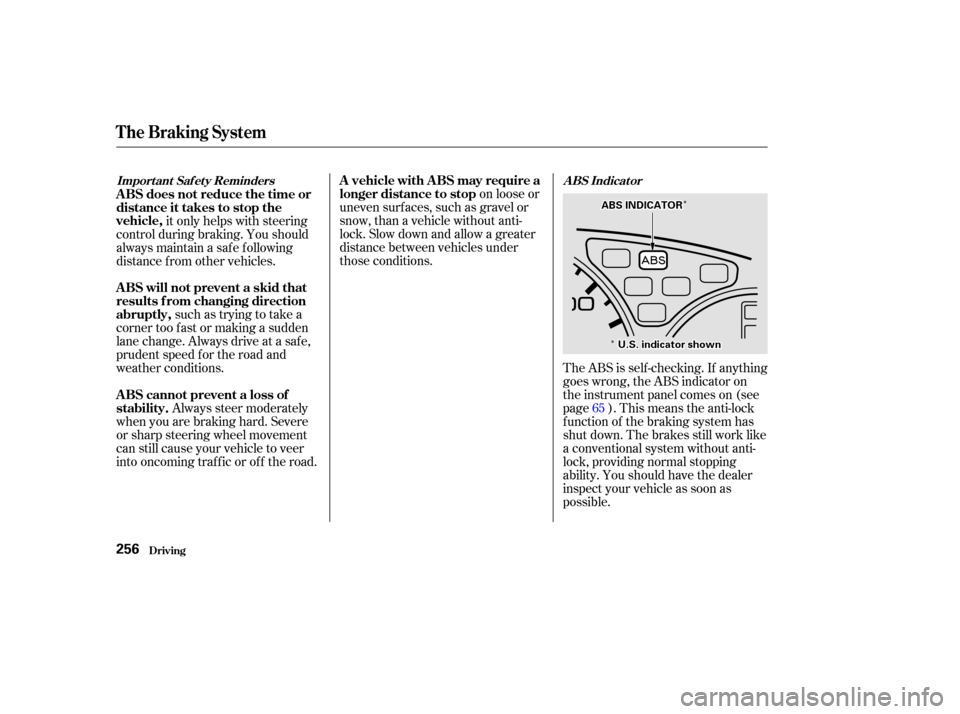
The ABS is self -checking. If anything
goes wrong, the ABS indicator on
the instrument panel comes on (see
page ). This means the anti-lock
f unction of the braking system has
shut down. The brakes still work like
a conventional system without anti-
lock, providing normal stopping
ability. You should have the dealer
inspect your vehicle as soon as
possible.65
A BS Indicat or
Import ant Saf et y RemindersA vehicle with A BS may require a
longer distance to stop
A BS cannot prevent a loss of
stability. A BS will not prevent a skid that
results f rom changing direction
abruptly, A BS does not reduce the time or
distance it takes to stop the
vehicle,
The Braking System
Driving256
U U. .SS. .i
inn d
di
icca at too r
r s
shh o
ow
wn n
A
A
B
BSS I
INND DI
ICCA A T
TO
OR R
Page 260 of 399

CONT INUED
If the ABS indicator and the brake
system indicator come on together,
and the parking brake is f ully
released, the front-to-rear braking
distribution system may also shut
down.
Test your brakes as instructed on
page . If the brakes f eel normal,
drive slowly and have your vehicle
repaired by your dealer as soon as
possible. Avoid sudden hard braking
which could cause the rear wheels to
lock up and possibly lead to a loss of
control.Driving with TCS requires no special
skills or technique. The TCS does
not control your vehicle’s whole
braking system and cannot prevent
skidding if you enter a corner too
f ast. It is still your responsibility to
drive at reasonable speeds and to
leave a sufficient margin of safety.
The TCS indicator will come on
alongwiththeABSindicatorif there
is a problem with the anti-lock brake
system. Your Honda is equipped with a
Traction Control System (TCS) to
assist you in maintaining traction
while driving slowly on loose or
slippery surf aces. The TCS assists
only in low-speed, low-traction
conditions; up to approximately 18
mph (30 km/h).
TCS monitors the speed of all f our
wheels. When it senses a f ront wheel
losing traction, it applies braking to
that wheel. The TCS indicator
f lashes when this occurs.
358
The Braking System, Traction Control System
Driving
Traction Control System
257
T T
R
RA A C
CTTI
IOON N C
COON NTTR
RO OL L
S
SY YSSTTE
EM
M I
INND DI
ICCA A T
TO
OR R
Page 262 of 399

If the TCS indicator comes on and
stays on for more than 10 minutes
while driving, pull to the side of the
road when it is saf e and turn of f the
engine. Reset the system by
restarting the engine, and watch the
TCS indicator. If the indicator
remains on, or comes back on while
driving, have the system inspected
by your Honda dealer. You can still
drive the vehicle without TCS.
This indicator will come on along
with the ABS indicator if there is a
problem in the anti-lock brake
system (seeon page
).
The TCS indicator may occasionally
come on f or one or two seconds and
then go out. This is normal.
The Traction Control System turns
on every time you start the engine,
even if you turned it of f the last time
you drove the vehicle.
The TCS indicator comes on or
f lashes under the f ollowing condi-
tions:
When you turn the ignition switch
to ON (II).
When you manually turn of f TCS.
It f lashes when TCS is regulating
wheelspin.
If the system’s diagnostics senses
a problem with TCS, the indicator
will come on and stay on.
If the brakes overheat, the
indicator will come on. 256
Traction Control System
Driving
ABS Indicator
T CS Indicat or
259
Page 264 of 399
�µCheck your tires
f requently f or wear and proper
pressure. Both are important in
preventing ‘‘hydroplaning’’ (loss of
traction on a wet surface). In the
winter, mount snow tires on all f our
wheels f or the best handling.
Watch road conditions caref ully,
they can change f rom moment to
moment. Wet leaves can be as slip-
pery as ice. ‘‘Clear’’ roads can have
patches of ice. Driving conditions
can be very hazardous when the
outside temperature is near f reezing.
The road surf ace can become
covered with areas of water puddles
mixed with areas of ice, so your
traction can change without warning.
Be caref ul when downshif ting. If
traction is low, you can lock up the
drive wheels f or a moment and cause
askid. Be very cautious when passing, or
beingpassedbyothervehicles.The
spray f rom large vehicles reduces
your visibility, and the wind buf f eting
can cause you to lose control.
Driving in Bad Weather
Driving
Traction
261
Page 281 of 399

�µ
�µ
�Î
�Î�Ì
�Ì �Ì
�Ì
�Î
�Ì�Î
Follow the Severe Conditions
Maintenance Schedule if you
drive your vehicle
under one or more of the
f ollowing conditions:Driving less than 5 miles (8
km) per trip or, in f reezing
temperatures, driving less
than 10 miles (16 km) per trip.
Driving in extremely hot
[over 90°F (32°C)] conditions.
Extensive idling or long
periods of stop-and-go driving.
Trailer towing, driving with a
roof top carrier, or driving in
mountainous conditions.
Driving on muddy, dusty, or
de-iced roads.
Follow the Maintenance
Schedule f or Severe Conditions.
MAINLY
Maint enance
U.S. Owners
Canadian Owners
278
Visually inspect the following items: Replace every 3,750 miles (6,000 km) or 6 months
Check oil and coolant at each fuel stop
Service at the indicated
distance or time whichever
comes first.
miles x 1,000
km x 1,000
months
120,000 miles (192,000 km) or 10 years, then every 60,000 miles (96,000 km) or 5 years
Tie rod ends, steering gear box, and boots
Suspension components
Driveshaft boots
Brake hoses and lines (including ABS)
All fluid levels and conditions of fluids
Cooling system hoses and connections
Exhaust system
Fuel lines and connections
Lights and controls
Vehicle underbody Every 7,500 miles (12,000 km) or 6 months
Rotate tires every 7,500 miles (12,000 km)
Inspect every 7,500 miles (12,000 km) or 6 months 30
48
24
60
96
4890
144 72 120
192
96
Replace engine oil and oil filter
Check engine oil and coolant
Replace air cleaner element Use normal schedule except in dusty
conditions
Inspect valve clearance
Replace spark plugs
Inspect and adjust drive belts
Inspect idle speed
Replace engine coolant
Replace transmission fluid
Inspect front and rear brakes
Replace brake fluid
Check parking brake adjustment
Replace dust and pollen filter
Lubricate all hinges, locks and latches
Rotate tires (Check tire inflation and condition
at least once per month) Every 3 years (independent of mileage)
15
24
12
45
72
3675
120 60 105
168
84
See information on maintenance and
emissions warranty, last column, page.
Refer to page for replacement
information under special driving
conditions.
Refer to page for replacement
information under special driving
conditions.
Adjust only if noisy
1:
2:: 308
275 309
Replace timing belt and inspect water pump,1
2
Maintenance Schedule for Severe Conditions