Page 553 of 1139
EPS Components
Steering Gearbox Overhaul (cont'dl
36. Bend the lock washer against the flat spots on thebracketwith a Iarge pair of pliers.
37. Adjust the rack guide screw {see page 17-13).
17-62
Page 557 of 1139

EPS Components
4
17.
18.
Steering Gearbox Installation (cont'dl
Install the motor on the steering gearbox (see page
17-49).
lnstall the steering joint (A). and reconnect the
steering shaft (B) and pinion shaft (C). Make sure
the steering joint is connected as follows:
. Insertthe upperend of thesteering jointontothe
steering shaft (line up the bolt hole (D) with the
flat portion (E) on the shaft).. Slip the lower end of the steering joint onto thepinion shaft (line up the bolt hole with the groove
(F) around the shaft), and loosely installthe lowerjoint bolt. Be sure that the lower joint bolt is
securely in the groove in the pinion shaft.. Pull on the steering joint to make sure that the
steering joint is fully seated. Then install the
upper joint bolt, and tighten it to the specified
torque. Tighten the lower joint bolt to the
specified torque.
8 x '1.25 mm28 N.m{2.9 kgf.m,21 tbt.ft)
19.
20.
Installthe driver's dashboard lower cover (see
page 20-59) and under cover (see page 20-60).
lf the steering wheel was turned, center the cable
reel by first rotating it clockwise until it stops. Then
rotate it counterclockwise (about two and half
turns) untilthe arrow mark on the label points
straight up. Reinstall the steering wheel (see page
17 -8).
Install the front wheels.)1
17-66
22. After installation, perform the following checks.
. Perform the front toe inspection.. Check the steering wheel spokeangle. lfsteering
spoke angles to the right and left are not equal(steering wheel and rack are not centered),
correct the engagement of the joinvpinion shaft
serrations, then adjust the front toe by turning
the tie-rods, if necessarv.
\
Page 558 of 1139
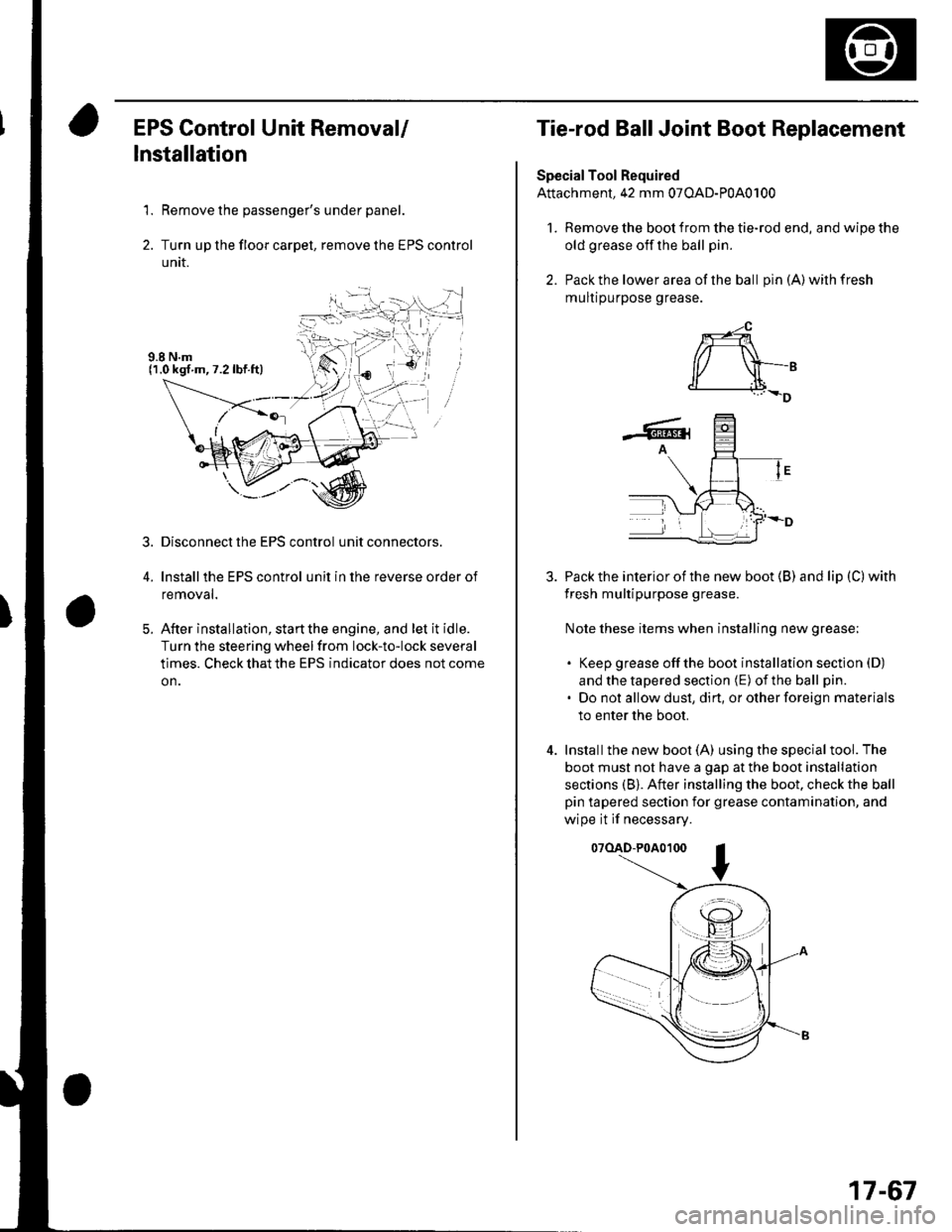
EPS Control Unit Removal/
Installation
1. Remove the passenger's under panel.
2. Turn up the floor carpel, remove lhe EPS control
untr.
Disconnect the EPS control unit connectors.
lnstallthe EPS control unit in the reverse order of
removal.
After installation, start the engine, and let it idle.
Turn the steering wheelfrom lock-to-lock several
times. Check that the EPS indicator does not come
on.
3.
E
Tie-rod Ball Joint Boot Replacement
Special Tool Required
Attachment, 42 mm 07OAD-P0A0100
l. Remove the boot from the tie-rod end, and wipe the
old grease off the ball pin.
2. Pack the lower area of the ball pin(A)wilhfresh
mulr purpose grease.
3. Pack the interior of the new boot (B) and lip (C) with
fresh multipurpose grease.
Note these items when installing new grease;
. Keep grease offthe boot installation section (D)
and the tapered section (E) of the ball pin.
. Do not allow dust, dirt, or other foreign materials
to enter the boot.
4. Installthe new boot (A) using the specialtool. The
boot must not have a gap at the boot installation
sections (B). After installing the boot. check the ball
pin tapered section for grease contamination, and
wipe it if necessary.
07(lAD-P0A0100
*-4
r/ \-,d______i.l+_D
-6rA
17-67
Page 565 of 1139

Front Toe Inspection/Adjustment
Use commercially-available computerized four wheel
alignment equipment to measure wheel alignment(caster, camber, toe, and turning angle). Follow the
equipment manufacturer's instructions,
1. Center the steering wheel spokes.
2. Checkthetoe. lf it is not with in the specif ication, go
to step 3.
Front toe-in: 0 t 3 mm {0 t 0.12 in.)
3. Loosen the locknut (A) while holding the tie-rod end(B ).
A14x 1.5 mm,14 N.m(a.5 kgt m,33 lbt.ftl
5.
Turn the tie-rod (C) untilthe toe is correct.
After adjusting, tighten the locknut while holding
the tie-rod end. Make sure the toe setting does not
change.
1,;
Rear Toe Inspection/Adiustment
Use commercially-available computerized four wheel
alignment equipment to measure wheel alignment(caster, camber, toe, and turning angle). Follow the
equipment manufacturer's instructions.
1, Release the parking brake.
2. Checkthe toe. lf it is not within the specification. go
to step 3.
Rear toe-in {inspection):
1 1 3 mm (0.04 a 0.12 in.)
3. Loosen the self-locking nut (A)while holding the
adjusting bolt (B).
Do not loosen lhe special bolts (C) on the
lower arm to adjust the alignment.
4. Replace the self-locking nut with a new one, and
lightly tighten.
NOTE: Always use a new self-locking nut whenever
it has been loosened.
Turn the adjusting bolt until the toe is correct.
Rear toe.in (adiustment):
2 ' , mm {0.08 "' ,. in.}
Tighten the self-locking nut to the specified torque
while holding the adjusting bolt.
(cont'd )
18-7
Page 571 of 1139
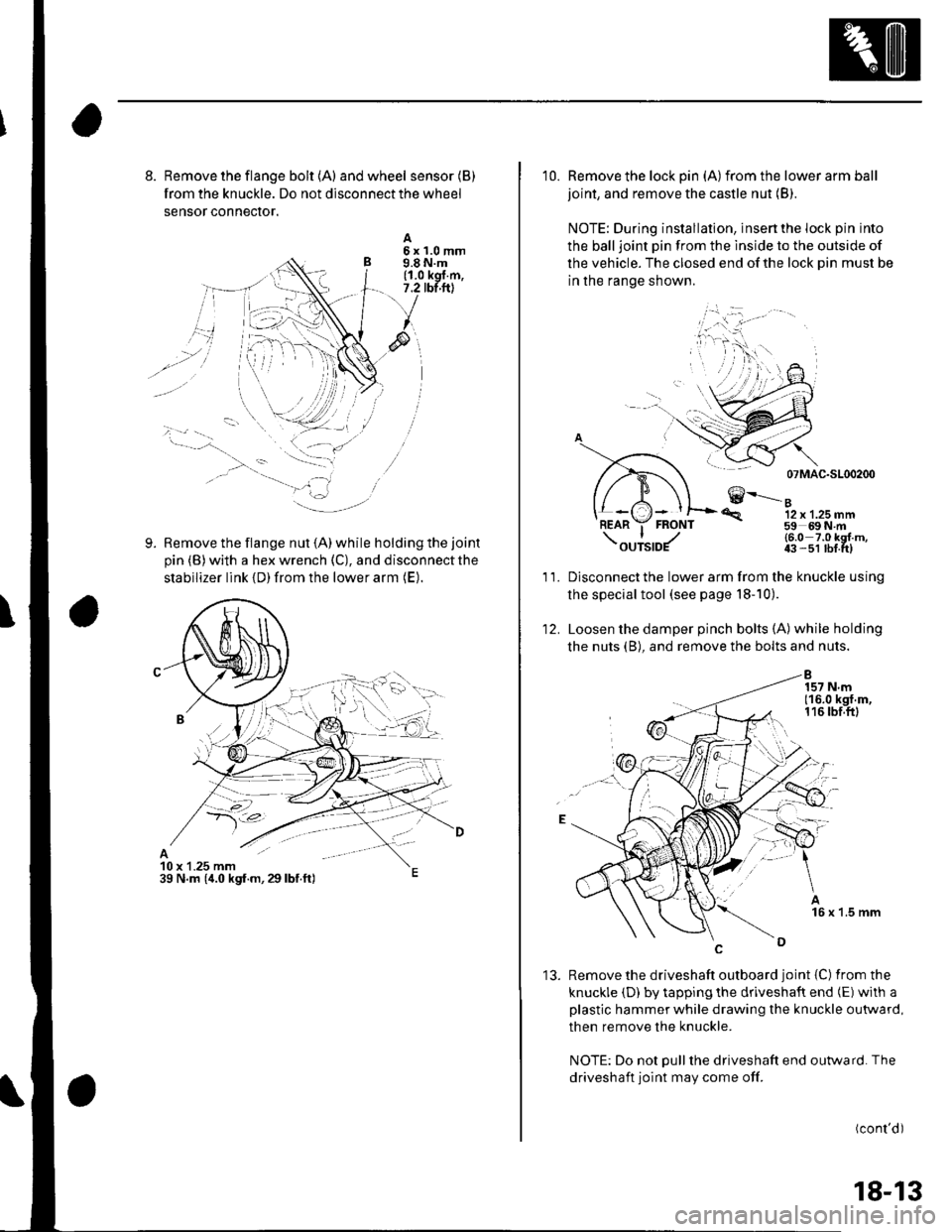
8. Remove the flange bolt {A) andwheel sensor(B)
from the knuckle. Do not disconnect the wheel
sensor conneclor.
Remove the flange nut (A) while holding the joint
pin (B) with a hex wrench (C), and disconnect the
stabilizer link {D) from the lower arm (E).
A5x1.0mm9.8 N.m(1.0 kgl.m,7.2 tbt.ftl
9.
10 x 1.25 mm39 N.m (,1.0 kgf.m,29lbf.ft)
10. Remove the lock pin (A)from the lower arm ball
joint, and remove the castle nut (B).
NOTE: During installation, insert the lock pin into
the balljoint pin from the lnside to the outside of
the vehicle. The closed end of the lock Din must be
in the range shown.
07 MAC-SL00200
€--....-"12 x 1.25 mm59 69N m
'R.
11.
12.
(6.0 7.0 kgl m,43 -51 lbf tt)
Disconnect the lower arm from the knuckle using
the special tool (see page l8-10).
Loosen the damper pinch bolts (A) while holding
the nuts (B), and remove the bolts and nuts.
'13. Remove the driveshaft outboard joint {C) fromthe
knuckle (D) by tapping the driveshaft end (E) with a
plastic hammer while drawing the knuckle outward,
then remove the knuckle.
NOTE: Do not Dull the driveshaft end outward. The
driveshaft joint may come off.
(cont'd)
18-13
Page 575 of 1139
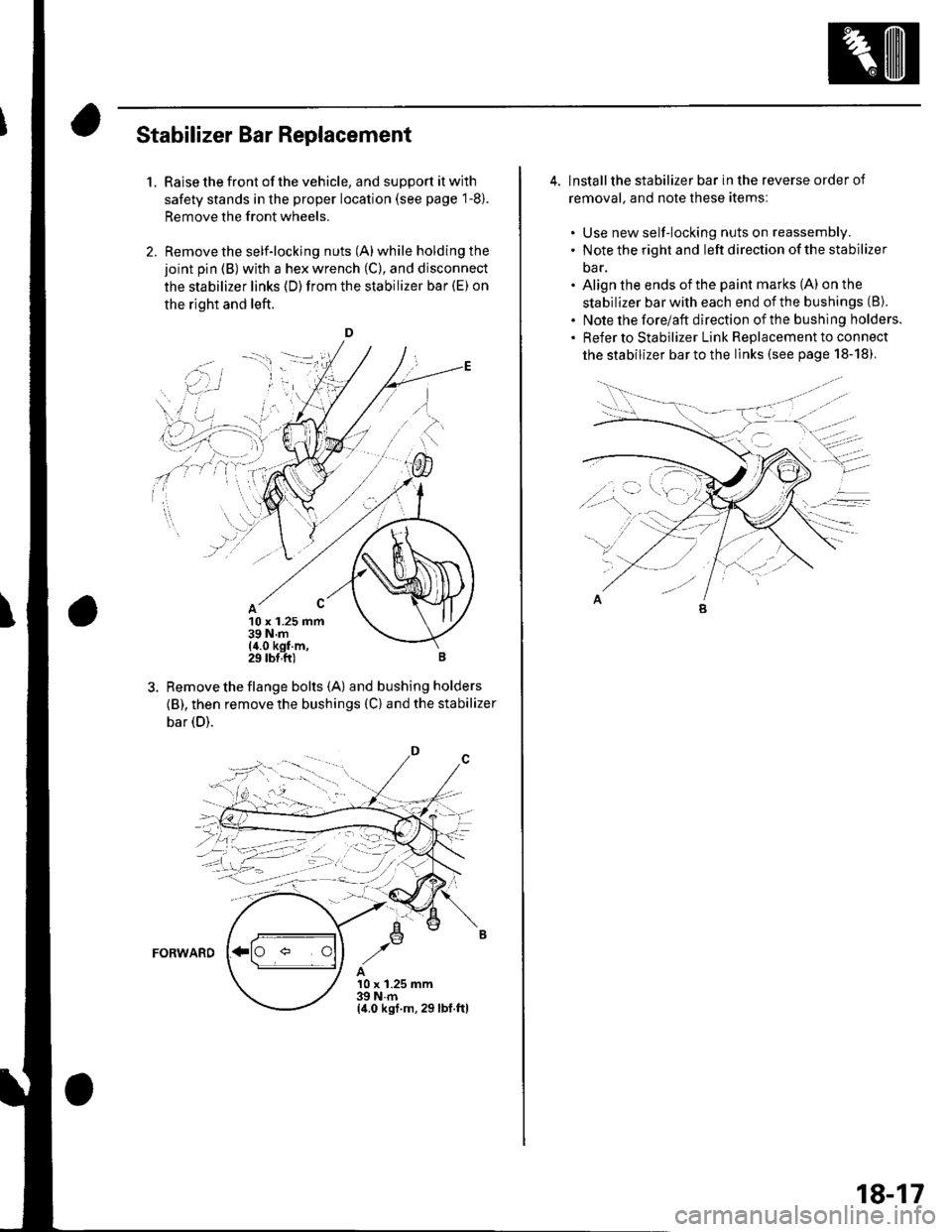
Stabilizer Bar Replacement
1.Raise the front of the vehicle, and support it with
safety stands in the proper location (see page 1-8).
Remove the front wheels.
Remove the self-locking nuts (A) while holding the
joint pin (B) with a hex wrench (C), and disconnect
the stabilizer links (D)from the stabilizer bar (E) on
the right and left.
D
10 x 1.25 mm39Nm(4.0 kgf m,29 tbl,ft)
Remove the flange bolts {A) and bushing holders
{B), then remove the bushings (C) and the stabilizer
bar (D).
FORWARD
A10 x 1.25 mm39Nm(4.0 ksf.m, 29lbl.ftl
,.'i i
''i]
. i.',.:-l I
\' ,r' ,' i :..r'j-- r-'1 _: i'
i-ii::;i
;4-llt,-'j--;
4. lnstallthe stabilizer bar in the reverse order of
removal. and note these itemsl
. Use new self-locking nuts on reassembly.. Note the right and left direction of the stabilizer
oar.. Align the ends ofthe paint marks (A) on the
stabilizer bar with each end of the bushings (8).
. Note the forelaft direction ofthe bushing holders.. Refer to stabilizer Link Replacement to connect
the stabilizer bar to the links (see page 18-18).
18-17
Page 576 of 1139
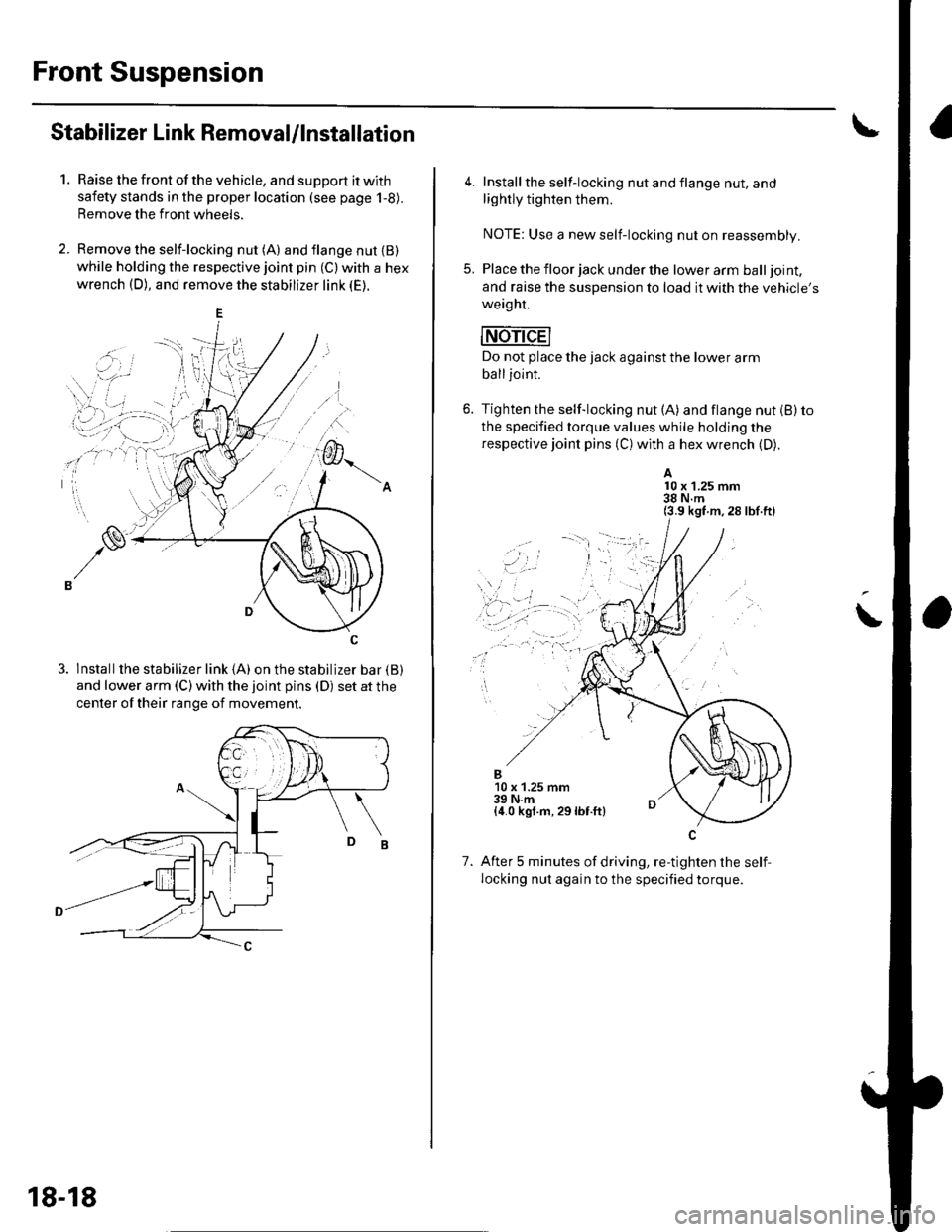
Front Suspension
Stabilizer Link Removal/lnstallation
1.Raise the front of the vehicle, and support it with
safety stands in the proper location (see page 1-8).
Remove the front wheels.
Remove the self-locking nut (A) and flange nut {B)while holding the respective joint pin (C) with a hex
wrench (D), and remove the stabilizer link (E).
3. lnstallthe stabilizer link (A) on the stabilizer bar {B)
and lower arm (C) with the joint pins (D) set at the
center of their range of movement.
18-18
4. Install the self-locking nut and flange nut, and
lightly tighten them.
NOTE: Use a new self-locking nut on reassembly.
5. Place the floor jack under the lower arm balljoint,
and raise the suspension to load it with the vehicle's
weaght.
mri-dEl
Do not place the jack against the lower arm
balljoint.
6. Tighten the self-locking nut (A) and flange nut (B) to
the specified torque values while holding the
respective joint pins (C) with a hex wrench (D).
A10 x 1.25 mm38 N.m(3.9 kgf m,28 lbf.ft)
\
..,
1.
B10 x 1.25 mm39 N.m{4.0 kgf.m, 29lbf.ft}
After 5 minutes of driving, re-tighten the self,
locking nut again to the specified torque.
Page 577 of 1139
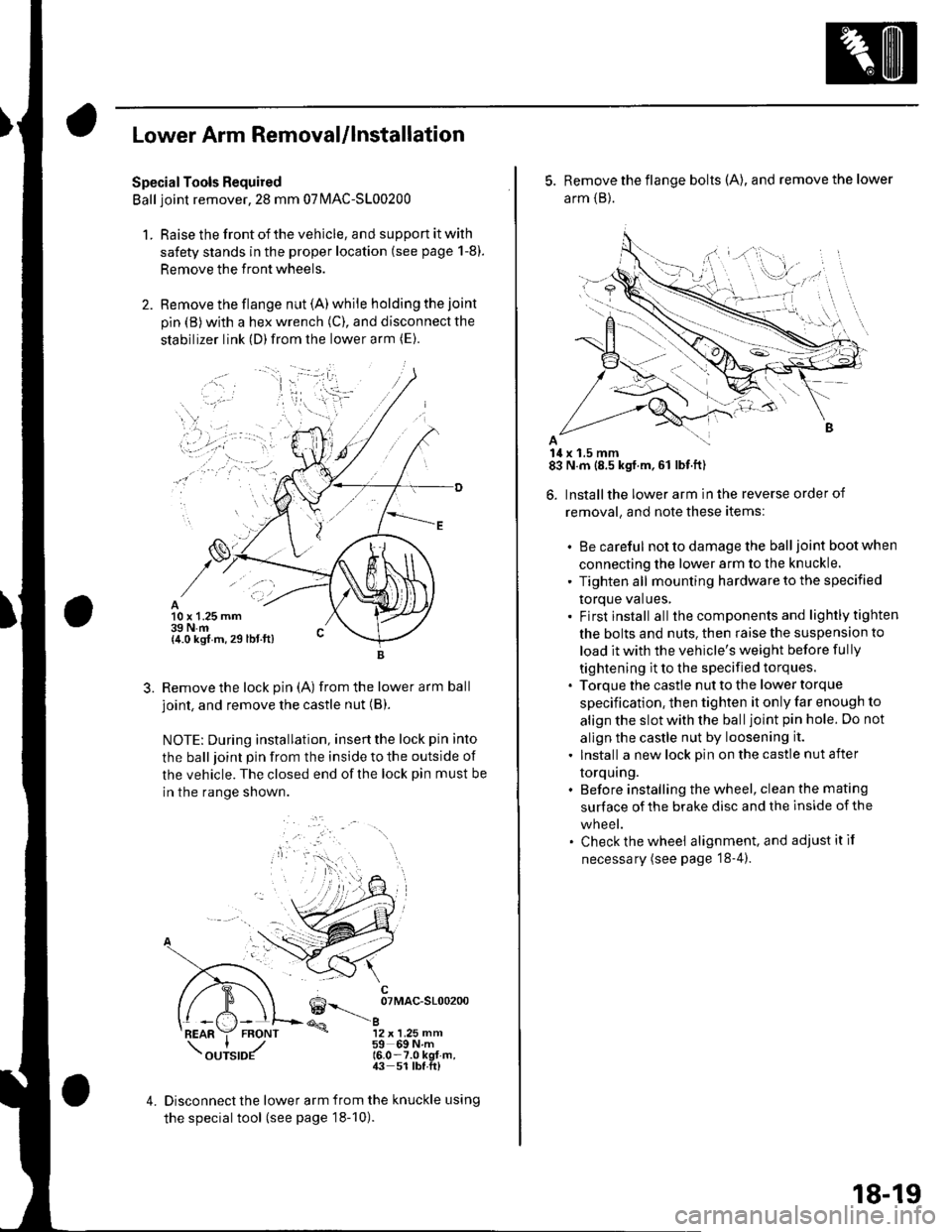
Lower Arm Removal/lnstallation
SpecialTools Required
Ball joint remover,2S mm 07|MAC-S100200
1. Raise the front of the vehicle, and support it with
safety stands in the proper location (see page 1-8).
Remove the front wheels.
Remove the flange nut (A) while holding the joint
pin {B) with a hex wrench (C), and disconnect the
stabilizer link (D)from the lower arm (E).
10 x 1.25 mm39 N.m{4.0 kgf m, 29 lbt.ft)
3.Remove the lock pin (A) from the lower arm ball
joint, and remove the castle nut (B).
NOTE: During installation, insertthe lock pin into
the ball joint pin from the inside to the outside of
the vehicle. The closed end of the lock pin must be
in the range shown.
6--__ oTMAc-sloo2oo
@a12 x 1.25 mm59 69Nm16.0-7.0 kgt-m,43 51 lbf.ft)
4.Disconnect the lower arm from the knuckle using
the special tool (see page 18-10).
5. Remove the flange bolts (A), and remove the lower
arm {B}.
14 x 1.5 mm83 N.m (8.5 kgf.m,61 lbf.ft)
6. Installthe lower arm in the reverse order of
removal, and note these items:
. Be careful not to damage the ball joint boot when
connecting the lower arm to the knuckle.
' Tighten all mounting hardware to the specified
torque values,. Firstinstall all the components and lightlytighten
the bolts and nuts. then raise the suspension to
load it with the vehicle's weight before fully
tightening it to the specified torques.. Torque the castle nut to the lower torque
specification, then tighten it only far enough to
align the slot with the ball joint pin hole. Do not
allgn the castle nut by loosening it.
. Install a new lock pin on the castle nut after
torquing.. Before installing the wheel, clean the mating
surface of the brake disc and the inside of the
wneet.. Check the wheel alignment, and adjustitif
necessary (see page '18-4).
18-19
