Page 500 of 1139

Steering
Steering Wheel Installation
1. Before installing the steering wheel, make sure the
front wheels are aligned straight ahead, then center
the cable reel (A). Do this by first rotating the cable
reel clockwise until it stops. Then rotate it
counterclockwise about two and a half turns. The
arrow mark (B) on the cable reel label should point
straight up.
Position the two tabs (A) of the turn signal
canceling sleeve (B) as shown. Installthe steering
wheel onto the steering column shaft, making sure
the steerlng wheel hub (C) engages the pins (D) of
the cable reel and tabs of the canceling sleeve. Do
not tap on the steering wheel or steering column
shaft when installing the steering wheel.
17-8
3. Install the steering wheel nut (A), and tighten it to
the specified torgue.
A_B39 N.m (4.0 kgf m.29lbt ftl
Connect the cruise control set/resume switch
connector (B). fvlake sure the wire harness is routed
and fastened properly.
Install the driver's airbag, and confirm that the
system is operating properly {see page 23-113).
Check the horn, turn signal canceling and cruise
control switches for proper operation.
Reconnect the battery and do the following:. Do the engine control module (ECM) idle learn
procedure (see page 1l-139),. Power window control unit resetting procedure
\see page 22-1281.. Enter the anti-theft cord for the radio, then enter
the custmer's radio station presets.. Set the clock.
{
7.
lr,',,t
;. _,:!
'' '1i::..'.' l
Page 502 of 1139

Steering
Steering Column Removal
lnstallation
1.
4.
Install the steering column, and make sure the
wires are not caught or pinched by any parts.
Insertthe upper end ofthe steering joint onto the
steering shaft {A) (line up the bolt hole (B) with the
flat portion (C) on the shaft).
8 x 1,25 mm28 N.m{2.9 kgf m,21 rbr.ft)
A
Slip the lower end of the steering joint onto the
pinion shaft {D) (line up the bolt hole with the
groove (E) around the shaft), and loosely lnstallthe
lower joint bolt. Be sure that the lower joint bolt is
securely in the groove in the pinion shaft.
Pull on the steering joint to make su re that the
steering joint is fully seated. Then installthe upper
joint bolt, and tighten it to the specified torque.
Tighten the lower joint bolt to the specified torque.
Finish the installation, and note these items:
. Make sure the wire harness is routed and
fastened properly.
. Make sure the connectors are properly connected.. Reinstallthe steering wheel (see page 17-8).
. Reconnect the battery.- Do the power window control unitreset
procedure {see page 22-128).- Enter the anti-theft code for the radio, then
enter the custmer's radio station presets.
- Set the clock.. Verify horn, turn signal switch, and cruise control
switch operation.. Check wheel alignment, if necessary (see page
18-4).. Do the engine control module (ECM) idle learn
procedu re {see page '11-139).
17-10
and Installation (cont'd){
Page 504 of 1139
Steering
Steering Lock Replacement
NOTE: Do not try to re-key a replacement steering lock.
lf necessary, re-key the other locks.
1. Remove the steering column (see page 17-9).
2. Center punch each ofthe two shear bolts (A), and
drill their heads off with a 5 mm (3i 16 in.) drill bit.
Be careful not to damage the switch body when
removing the shear bolts,
3. Remove the shear bolts from the switch body.
4. Installthe switch body without the key inserted.
5. Loosely tighten the new shear bolts.
6. Insert the ignition key, and check for proper
operation of the steering wheel lock and that the
ignition key turns freely.
:..'-":'
17-12
7. Tighten the shear bolts (A) untilthe hex heads (B)
twist off.
I
A
I
Page 505 of 1139

Rack Guide Adjustment
Special Tool Required
Locknut wrench, 43 mm 07MAA-S100200
1. Set the wheels in the straight ahead position.
2. Remove the heat shield (A).
3.
9.8 N.m (r.0 kgf.m,7.2lbtft)
Remove the transmission mount bracket (see step
32 on page 13-8).
Loosen the rack guide screw locknut (A)with the
special tool, then remove the rack guide screw (B).
Remove the old sealant from rack guide screw, and
apply new sealant to the middle of the threads (A).
Loosely installthe rack guide screw on the steering
gearDox.
'-.i. '' '
07MAA-S100200
6. Tighten the rack guide screw (A)ro 25 N.m (2.5
kgf.m, 18lbf.ft). then loosen it.
5" Max.
j i-rrrr-,
I 4il N.m{a.5 kgf.m,33lbt.ft)
Retighten the rack guide screw to 6 N.m (0.6 kgf m,
4 lbf.ft), then back it off to the specified angle.
Specified Return Angle: 5' Max.
Hold the rack guide screw stationary with a wrench,
and tighten the locknut by hand until it's fully
seated.
Installthe special tool on the locknut (B), and hold
the rack guide screw (A) stationary with a wrench,
Tighten the locknut an additional 30" with the
specialtool.
Reinstall the transmission mount bracket and heat
sh ie ld,
Check for unusual steering effort through the
complete turning travel.
Check the steering wheel rotation play (see page
17-4) and the power assist (see page 17-4).
11.
7.
9.
10.
12.
17-13
Page 507 of 1139
EPS Components
Rel.No.Tool NumberDescriptionotv(!)
at'
o
07MAC-S100200
070AD-P0A0100
07zAA-S5A0100
Ball Joint Remover, 28 mm
Attachment, 42 mm
Locknut Wrench
'1
1'l
SpecialTools\
,.^G) C\
_---1t
-)
)
h5--d-'
u_r-.c_-tt)\L-,
t
I
17-16
a
Page 513 of 1139

EPS Components
DTC Troubleshooting Index
DTCDetection ltemNote
DTC; 12A problem with voltage for torque sensor T/SlG(see page 17-28)
DTC: 16A problem with average of voltage for torque sensor VT3 and VT6(see page 17-29)
DTC: 17A problem with the voltage for torque sensor 12 V power source Vcc 1(see page 17-31)
DTC: 18A problem with the voltage for torque sensor 5 V power source Vcc 2(see page 17-31)
DfC:22A problem with the average for vehicle speed and engine speed(see page 17-33)
Excessive change of the vehicle speed sensor signal{see page 17-33)
DTC: 23A problem with the engine speed signal circuit(see page 17-33)
DTC: 37A problem with the circuit for input motor voltage in the EPS control unit(see page 17-35)
DTC: 41A problem with the motor voltage(see page 17 36)
DfC: 42A problem with the motor driven current (open circuit or short to grounol(see page '17-38)
DTC: 43A problem with the motor driven current (short to power)(see page 17-41)
DTC: 45A problem with the motor driven current (open circuit or short to grou nol(see page 17-38)
DfC: 47A problem with the motor relav in the EPS control unit{see page 17-42)
DTC: 50A problem with the CPU in the EPS control unit(see page 17-43)
DTC: 51A problem with EEPROM in the EPS control unlt(see page 17-43)
DTC: 62Fail-safe relay stuck ON(see page 17-44)
DTC: 64A problem with low battery voltage
Fail-safe relay contact failure
(see page 17-44)
(see page 17-44)
DTC: 66A problem with the motor driven voltage{see page 17 45)
DTC: 67A problem with the torque sensor l/F circuit(see page 17'45)
DTC: 68A problem with the interlock circuit (torque){see page 17-45)
DTC: 69A problem with the interlock circuit (current)(see page 17-46)
17-22
Page 524 of 1139
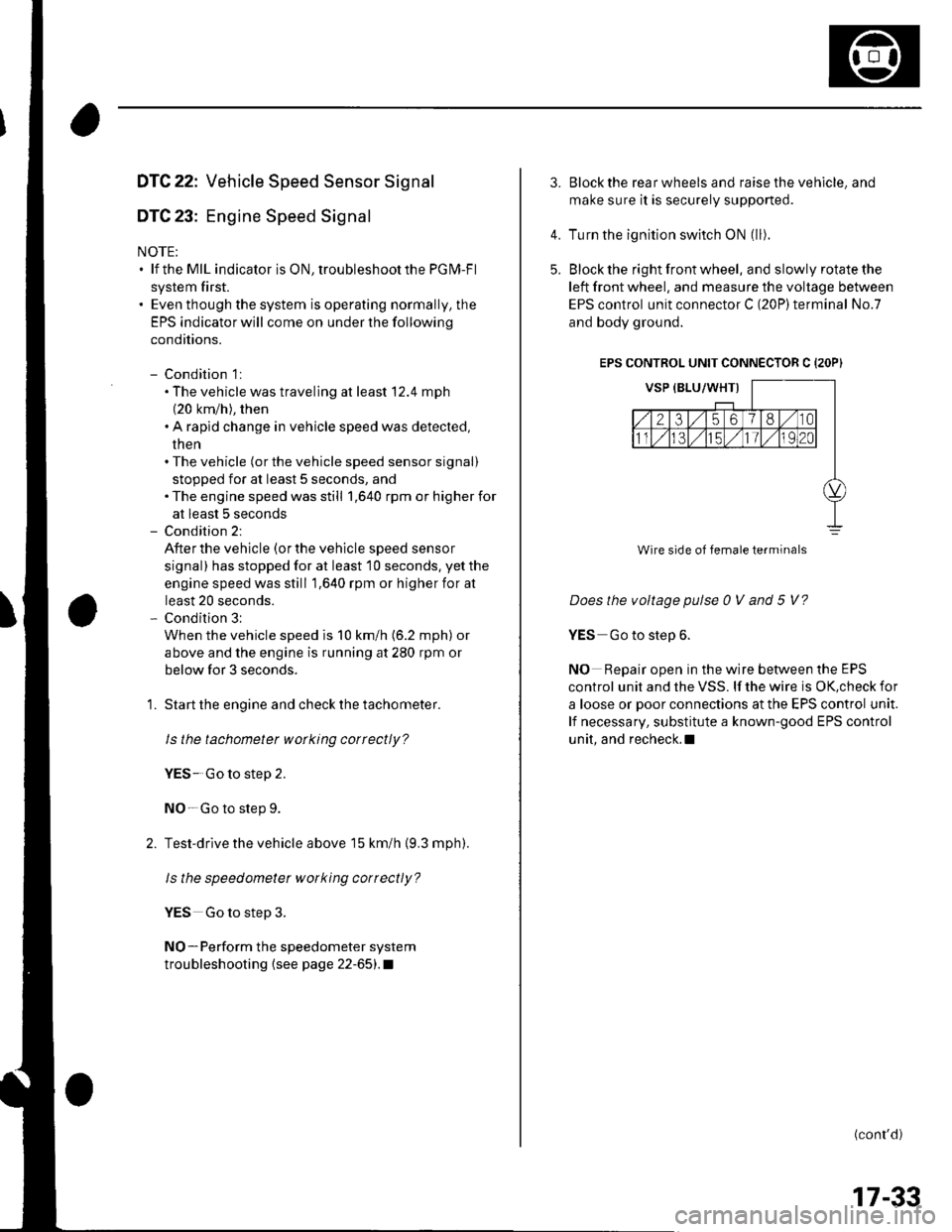
DTC 22: Vehicle Speed Sensor Signal
DTC 23: Engine Speed Signal
NOTE:. lf the MIL indicator is ON, troubleshoot the PGIVI-Fl
system first.. Even though the system is operating normally, the
EPS indicator will come on under the following
conditions.
- Condition 1:. The vehicle was traveling at least '12.4 mph(20 km/h), then. A rapld change in vehicle speed was detected,
then. The vehicle (or the vehicle speed sensor signal)
stopped for at least 5 seconds, and. The engine speed was still 1,640 rpm or higher for
at least 5 seconds- Condition 2:
After the vehicle (or the vehicle speed sensor
signal) has stopped for at least 10 seconds, yetthe
engine speed was still 1,640 rpm or higher for at
least 20 seconds.- Condition 3:
When the vehicle speed is 10 km/h (6.2 mph) or
above and the engine is running at 280 rpm or
below for 3 seconds.
1. Start the engine and check the tachometer.
ls the tachometer working correctly?
YES- Go to step 2.
NO-Go to step 9.
2. Test-drive the vehicle above 15 km/h {9.3 mph).
ls the speedometer working correctly?
YES Go to step 3.
NO-Perform the speedometer system
troubleshooting {see page 22-651.a
3.Block the rear wheels and raise the vehicle, and
make sure it is securely supported.
Turn the ignition switch ON (ll).
Block the right front wheel, and slowly rotate the
left front wheel, and measure the voltage between
EPS control unit connector C (20P)terminal No.7
and body ground.
EPS CONTROL UNIT CONNECTOR C {2OP)
Does the voltage pulse 0 V and 5 V?
YES Go to step 6.
NO Repair open in the wire between the EPS
control unit and the VSS. lf the wire is OK,check for
a loose or poor connections at the EPS control unit.
lf necessary, substitute a known-good EPS control
unit, and recheck.l
(conr'd)
4.
5.
Wire side of female terminals
17-33
Page 526 of 1139

'14. Check for continultv between EPS control unit
connector C (20P)terminal No. 19 and ECM
connector E (31P) terminal No. 26.
ECM CONNECTOR E {31PI
ls thete continuity?
YES-Go to step 15.
NO-Repair open in the wire between the EPS
control unit and ECM.I
Disconnect the gauge assembly 22P connector.
Check for continuity between EPS control unit
connector C (20P)terminal No. 19 and body ground,
EPS CONTROL UNIT CONNECTOR C (2OP}
Wire side of female terminals
ls there continuity?
YES Repair shortto body ground in the wire
between the EPS control unit, the test tachometer
connector, the gauge assembly, and the ECM.I
NO Check for loose ECM control unit connectors.
lf necessary, substitute a known-good ECM control
unit and recheck.I
15.
DTC 37: EPS Control Unit Internal Circuit(lnput Circuit For Motor Voltage)
1. Clear the DTC.
2. Start the engine.
3. Turn the steering wheel from lock-to-lock several
times, and wait 10 seconds or more.
Does the EPS indicator come on?
YES Go to step 4.
NO Check for loose wires or poor connections. lf
the connections are good, the system is OK at this
trme.l
4. Stop the engine, and verify the DTC.
ls DTC 37 indicated?
Y€S Check for loose EPS control unit conneclors.
lf necessary, substitute a known-good EPS control
unit and recheck.l
NO Perform the appropriate troubleshooting for
the code indicated.l
17-35


at
o
07MAC-S100200
070AD-P0A0100
07zAA-S5A0100
Ball Joint Remover, 28 mm
Attachment, 42 mm
Locknut Wrench
1
1l
SpecialTools\
,.^G) C\
_---1t
-)")