2002 BMW 745LI SEDAN garage door opener
[x] Cancel search: garage door openerPage 4 of 208
At a glanceControlsDriving tipsCommunicationsNavigationEntertainmentMobilityReference
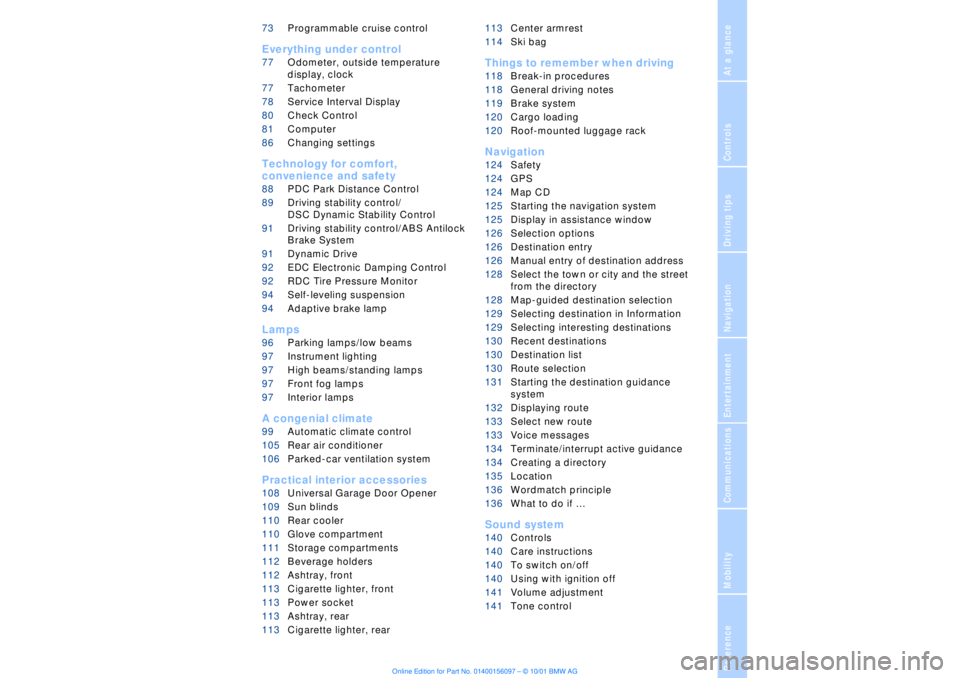
73Programmable cruise control
Everything under control
77Odometer, outside temperature
display, clock
77Tachometer
78Service Interval Display
80Check Control
81Computer
86Changing settings
Technology for comfort,
convenience and safety
88PDC Park Distance Control*
89Driving stability control/
DSC Dynamic Stability Control
91Driving stability control/ABS Antilock
Brake System
91Dynamic Drive
92EDC Electronic Damping Control*
92RDC Tire Pressure Monitor*
94Self-leveling suspension*
94Adaptive brake lamp
Lamps
96Parking lamps/low beams
97Instrument lighting
97High beams/standing lamps
97Front fog lamps
97Interior lamps
A congenial climate
99Automatic climate control
105Rear air conditioner*
106Parked-car ventilation system
Practical interior accessories
108Universal Garage Door Opener*
109Sun blinds*
110Rear cooler*
110Glove compartment
111Storage compartments
112Beverage holders
112Ashtray, front
113Cigarette lighter, front
113Power socket
113Ashtray, rear
113Cigarette lighter, rear113Center armrest
114Ski bag*
Things to remember when driving
118Break-in procedures
118General driving notes
119Brake system
120Cargo loading
120Roof-mounted luggage rack*
Navigation
124Safety
124GPS
124Map CD
125Starting the navigation system
125Display in assistance window*
126Selection options
126Destination entry
126Manual entry of destination address
128Select the town or city and the street
from the directory
128Map-guided destination selection
129Selecting destination in Information
129Selecting interesting destinations
130Recent destinations
130Destination list
130Route selection
131Starting the destination guidance
system
132Displaying route
133Select new route
133Voice messages
134Terminate/interrupt active guidance
134Creating a directory
135Location
136Wordmatch principle
136What to do if É
Sound system
140Controls
140Care instructions
140To switch on/off
140Using with ignition off
141Volume adjustment
141Tone control
Page 109 of 208
Practical interior accessories
108
Practical interior accessoriesUniversal Garage Door
Opener*
The concept The Universal Garage Door Opener can
replace as many as three hand-held trans-
mitters for various accessories, such as
door openers, alarms and door-locking
systems. The Universal Garage Door
Opener registers and stores signals from
the original hand-held transmitters.
The signal of an original hand-held trans-
mitter can be programmed on one of the
three channel keys. Following that, each of
the devices can be actuated with the
appropriately-programmed channel key.
The indicator lamp flashes to confirm trans-
mission of the signal.
If the vehicle is sold, the memory of the
channel keys should be cleared as
described on page 109.
To prevent possible damage or injury,
before programming or using the
Universal Garage Door Opener always
inspect the immediate area to make certain
that no people, animals or objects are
within the travel range of the device. Also,
comply with the safety precautions of the
original hand-held transmitter.< Original hand-held transmitter
If you see this symbol on the pack-
aging or in the manual supplied with
the original remote control unit, it is
safe to assume that it is compatible with
the Universal Garage Door Opener.
To check for alternating codes To determine whether the original hand-
held transmitter operates using an alter-
nating code, you should either consult the
manual enclosed with it or program a
channel key as described in the Program-
ming section. After programming, press and hold down
the key on the Universal Garage Door
Opener. If the indicator lamp on the
Universal Garage Door Opener flashes for
two seconds before remaining on continu-
ously, this indicates that the original hand-
held transmitter uses an alernating code. In
this case, you can program the channel
keys using the procedure described on the
next page in the section on programming
alternating-code transmitters.
If you have additional questions,
please consult your BMW center or
call 1-800-355-3515.
You can also visit these websites:
www.bmwusa.com or
www.homelink.com.
HomeLink is a registered trademark owned
by Johnson Controls, Inc.<
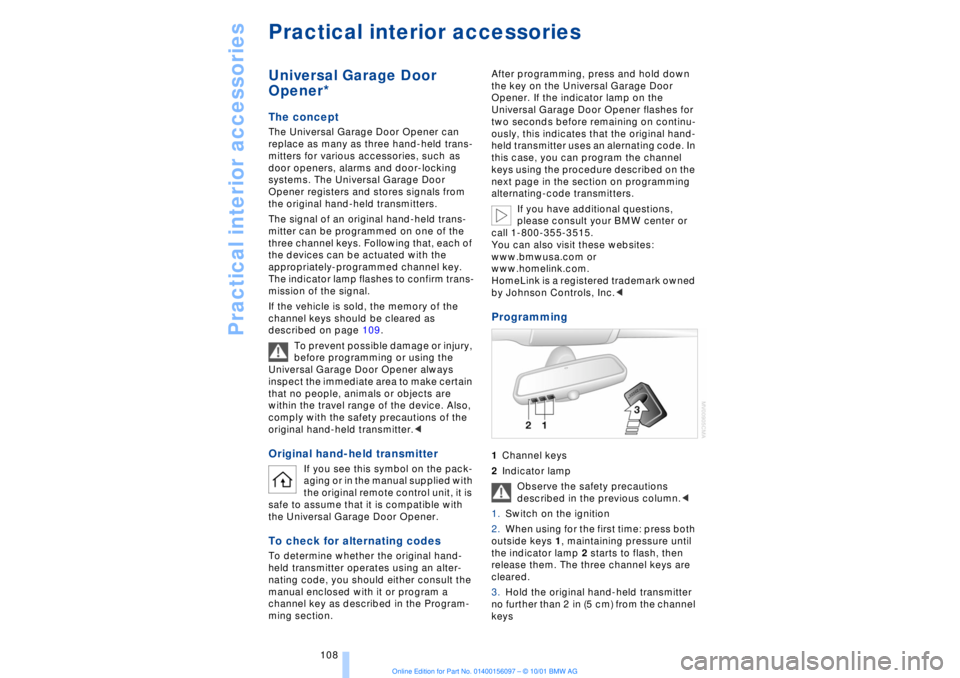
Programming 1Channel keys
2Indicator lamp
Observe the safety precautions
described in the previous column.<
1.Switch on the ignition
2.When using for the first time: press both
outside keys 1, maintaining pressure until
the indicator lamp 2 starts to flash, then
release them. The three channel keys are
cleared.
3.Hold the original hand-held transmitter
no further than 2 in (5 cm) from the channel
keys
Page 110 of 208
At a glanceControlsDriving tipsCommunicationsNavigationEntertainmentMobilityReference
109
4.Simultaneously press the transmit key
on the original hand-held transmitter,
arrow 3 and the selected channel key 1
on the Universal Garage Door Opener.
Release both keys as soon as the indicator
lamp flashes rapidly
5.To program other original hand-held
transmitters, repeat steps 3 and 4.
The corresponding channel key is now
programmed with the signal of the original
hand-held transmitter. Programming alternating-code
transmitters
Observe all of the safety precautions
described on the previous page.<
Consult the unit's operating instructions
when programming the Universal Garage
Door Opener.
When programming hand-held transmitters
that employ an alternating code, please
observe the following supplementary
instructions:
Programming will be easier with the
aid of a second person.<
1.Program the Universal Garage Door
Opener by following the instructions given
above under Programming.
2.Maintain pressure on the alternating-
code transmitter for roughly two seconds,
continuing until the program lamp lights up.
3.Press the selected channel key on the
Universal Garage Door Opener three times.
If you have any additional questions,
please contact your BMW center.<
To clear channel keys
Observe all of the safety precautions
described on the previous page.<
The memory of individual channel keys
cannot be deleted. However, the three
channel keys can be cleared together as
follows:
>Press both outside keys on the Universal
Garage Door Opener; maintain pressure
until the indicator lamp starts to flash, then
release the key.
Sun blinds*
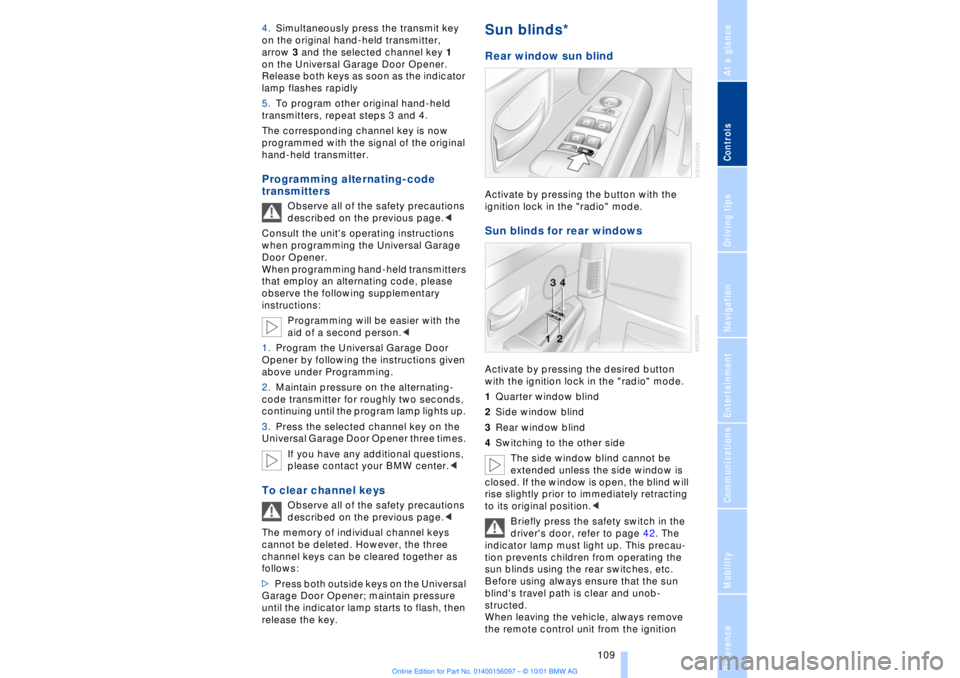
Rear window sun blind Activate by pressing the button with the
ignition lock in the "radio" mode. Sun blinds for rear windows Activate by pressing the desired button
with the ignition lock in the "radio" mode.
1Quarter window blind
2Side window blind
3Rear window blind
4Switching to the other side
The side window blind cannot be
extended unless the side window is
closed. If the window is open, the blind will
rise slightly prior to immediately retracting
to its original position.<
Briefly press the safety switch in the
driver's door, refer to page 42. The
indicator lamp must light up. This precau-
tion prevents children from operating the
sun blinds using the rear switches, etc.
Before using always ensure that the sun
blind's travel path is clear and unob-
structed.
When leaving the vehicle, always remove
the remote control unit from the ignition
Page 199 of 208
Everything from A to Z
198 "EDC" 92
Ð "Comfort" 92
Ð "Sport" 92
EDC (Electronic Damping
Control) 92
Electrical malfunction
Ð automatic transmission
lockout 70
Ð fuel filler door 168
Ð parking brake, emergency
use 65
Ð sliding/tilt sunroof 44
Electric power seats 46
Electric power windows 42
Electric seats 46
Electric steering column
adjustment 53
Electronic Brake-force Dis-
tribution (EBV) 91
Electronic Damping Control
(EDC) 92
Elements of operation 12
Emergency operation
Ð doors 37
Ð fuel filler door 168
Ð luggage compartment
lid 40
Ð sliding/tilt sunroof 44
Ð transmission lockout
(automatic
transmission) 70
Emergency SOS call
Ð automatic activation 161
"Emissions inspection" 79
Energy Control 83
Engine compartment 176
Engine coolant 176, 177
"Engine oil" 179
Engine oil
Ð consumption 176
Ð grades 177
Engine oils 177
Engine output, data 192
Engine specifications 192
"Entertainment" 19, 22
Estimated time of arrival 83
Extended vehicle storage,
see supplemental Car
care manual
Exterior mirrors 52
Ð automatic dimming 52"Extra" in "Climate"
menu 103
"Extra" with rear air
conditioner 105
"Extra" with rear cooler 110
FFactory preparations for
phone installation 161
Fader 141
Failure of an electrical
accessory 186
"Fastest route" 131
Fastest route 131
Fault displays 80
Filling the washer
reservoir 73
Filling the windshield
washer reservoir 73
First-aid kit 187
Fittings, tow-starting and
towing 189
Flashlight 111
Flat tires 171
"FM..." 140, 143
FM waveband 143
Fog lamps 97
"Footwell" 103
Footwell lamps 98
Forward lamps 98
Front armrest 111
Front seat adjustment 45
Fuel 169
Fuel consumption
display 83
Fuel economy 83
Fuel filler cap cover 168
Fuel filler door
Ð releasing in the event of
electrical defect 168
Fuel gauge 82
Fuel level display 82, 83
Fuel specifications 169
Fuel tank capacity 168
Fuses 186
GGarage door opener, refer
to Universal garage door
opener 108
Gasoline 169
General operating
information 118
Glasses compartment 111
Glove compartment 110
GPS, refer to Navigation
system 124
GPS navigation system 124
Ð address book, refer to
Creating a directory 134
Ð current location 135
Ð destination entry 126
Ð destination guidance in
assistance window 125
Ð destination list 130
Ð digital coverage area 124
Ð directory 128
Ð manual entry of destina-
tion address 126
Ð map CD 124
Ð map-guided destination
selection 128
Ð new route 133
Ð recent destinations 130
Ð route display 132
Ð route list 132
Ð route selection 130
Ð safety 124
Ð selecting destination in
"Information" 129
Ð selecting points of
interest 129
Ð selection options 126
Ð start active guidance 131
Ð starting 125
Ð terminate/interrupt active
guidance 134
Ð voice guidance 133
Ð wordmatch principle 136
Guidance
Ð terminate 134
Guidance system
Ð interrupt 134
Ð starting 131
Page 204 of 208
203
At a glanceControlsDriving tipsCommunicationsNavigationEntertainmentMobilityReference
Steptronic 69
Stopwatch 85
Storage, refer to Car care
manual
Storage compartments 111
Storing preset speeds,
refer to Programmable
cruise control 75
Straps, refer to
Loading 120
Summer tires 173
Sun blinds 109
Switch for battery 185
Switching air conditioner
on and off 101
Switching off the engine 62
Switching off with mobile
phone 162
Switching on
Ð audio 140
Ð cassette deck 153
Ð CD changer 149
Ð CD player 146
Ð MD player 151
Ð radio 140
Symbols 6
Ð Control Center 20
System failure reports, refer
to Check Control 80TTachometer 77
Tail lamps 183
Ð bulb replacement 183
"Tape" 140, 153
Technical
modifications 8, 98
Telephone, refer to Mobile
phone 158
Telephone directory
Ð creating voice command
telephone directory 162
Ð dialing numbers 163
Ð updating voice command
telephone directory 162
"Temp. distribution" 51
Temperature
adjustment 101
Temperature display, out-
side temperature 77Third brake lamp 183
Tilt function, passenger-
side mirror 54
Time
Ð of arrival, estimated 83
Timing 85
Tire change 184
Tire inflation pressures 170
Tire pressure monitor 92
Tire Quality Grading 172
Tires
Ð flat tire 184
Ð tire changes 184
Ð tire damage 171
Ð tire inflation
pressures 170
Ð tire pressure monitoring
system 92
Ð tire replacement 172
Ð tire size, refer to Wheel
and tire
combinations 173
Ð tire tread 171
Ð tire tread wear
indicators 171
Title search
Ð cassette deck 154
Tone in audio operation
Ð adjusting 141
"Tone" in sound system
operation 141
Tools 181
"TOP 8" 163
Torque 192
Tow fittings 188
Towing 188
Track 193
Traction Control System,
refer to DSC 89
Traffic congestion, refer to
Selecting new route 133
Transmission
Ð automatic transmission
with L mode 66
Ð automatic transmission
with Steptronic 69
Transmission
lockout 67, 70
Ð manual release 70
Travel route, see Route 132
Tread depth, tires 171"Treble" in sound system
operation 141
Trip odometer 77
Trunk lid
Ð emergency release 40
Ð refer to luggage compart-
ment lid 38
Turning circle 193
Turn signal indicators 71
Ð bulb
replacement 182, 183
UUndercoating, refer to Car
care manual
Uniform Tire Quality Gra-
ding (UTQR) 172
Universal garage door
opener 108
Upholstery care, refer
to Car Care
Used batteries 186
User controls 16
"Using motorway" 130VVacuum cleaner
connection 113
Valve caps 185
Vanity mirror 53
Vehicle battery 185
Vehicle dimensions 193
Vehicle keys 34
Vehicle stability control 89
Ventilation 102
Ventilation, draft-free 102
Ventilation while
parked 106
Vents, ventilation 99
"View" with navigation
system 132, 133
Viscosity 177
Voice command
system 18, 25
Voice command system
notebook 27