2002 BMW 745LI SEDAN key battery
[x] Cancel search: key batteryPage 35 of 208
Opening and closing
34
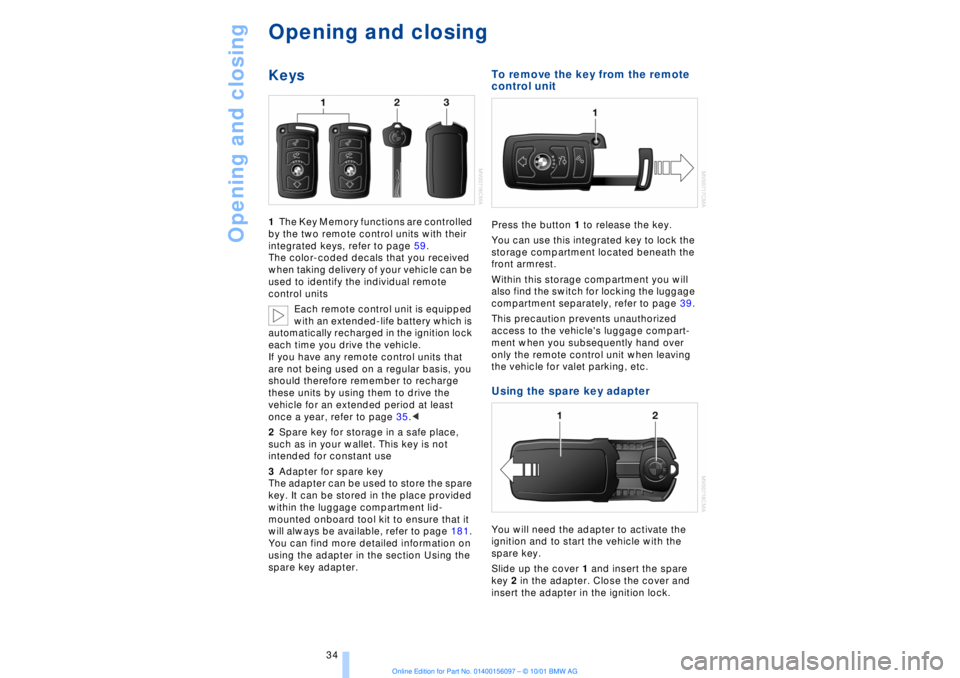
Opening and closingKeys1The Key Memory functions are controlled
by the two remote control units with their
integrated keys, refer to page 59.
The color-coded decals that you received
when taking delivery of your vehicle can be
used to identify the individual remote
control units
Each remote control unit is equipped
with an extended-life battery which is
automatically recharged in the ignition lock
each time you drive the vehicle.
If you have any remote control units that
are not being used on a regular basis, you
should therefore remember to recharge
these units by using them to drive the
vehicle for an extended period at least
once a year, refer to page 35.<
2Spare key for storage in a safe place,
such as in your wallet. This key is not
intended for constant use
3Adapter for spare key
The adapter can be used to store the spare
key. It can be stored in the place provided
within the luggage compartment lid-
mounted onboard tool kit to ensure that it
will always be available, refer to page 181.
You can find more detailed information on
using the adapter in the section Using the
spare key adapter.
To remove the key from the remote
control unit Press the button 1 to release the key.
You can use this integrated key to lock the
storage compartment located beneath the
front armrest.
Within this storage compartment you will
also find the switch for locking the luggage
compartment separately, refer to page 39.
This precaution prevents unauthorized
access to the vehicle's luggage compart-
ment when you subsequently hand over
only the remote control unit when leaving
the vehicle for valet parking, etc. Using the spare key adapter You will need the adapter to activate the
ignition and to start the vehicle with the
spare key.
Slide up the cover 1 and insert the spare
key 2 in the adapter. Close the cover and
insert the adapter in the ignition lock.
Page 36 of 208
At a glanceControlsDriving tipsCommunicationsNavigationEntertainmentMobilityReference
35
Central locking system The concept The central locking system is ready for
operation whenever the driver's door is
closed. This simultaneously engages and
releases the locks on the following:
>Doors
>Luggage compartment lid
>Fuel filler door.
The central locking system can be oper-
ated
>from outside via the remote control as
well as via the driver's door lock
>from inside via the button for the central
locking system.
When the system is locked from inside, the
fuel filler door remains unlocked, refer to
page 37.
The anti-theft system is automatically
armed whenever you activate the central
locking system from outside the vehicle.
The alarm system is armed/deactivated at
the same time.
In the event of an accident, the central
locking system unlocks automatically (only
those doors which were not locked sepa-
rately with the safety lock buttons). Refer to
page 38. In addition, the hazard warning
flashers and interior lamps come on.Opening and closing Ð from
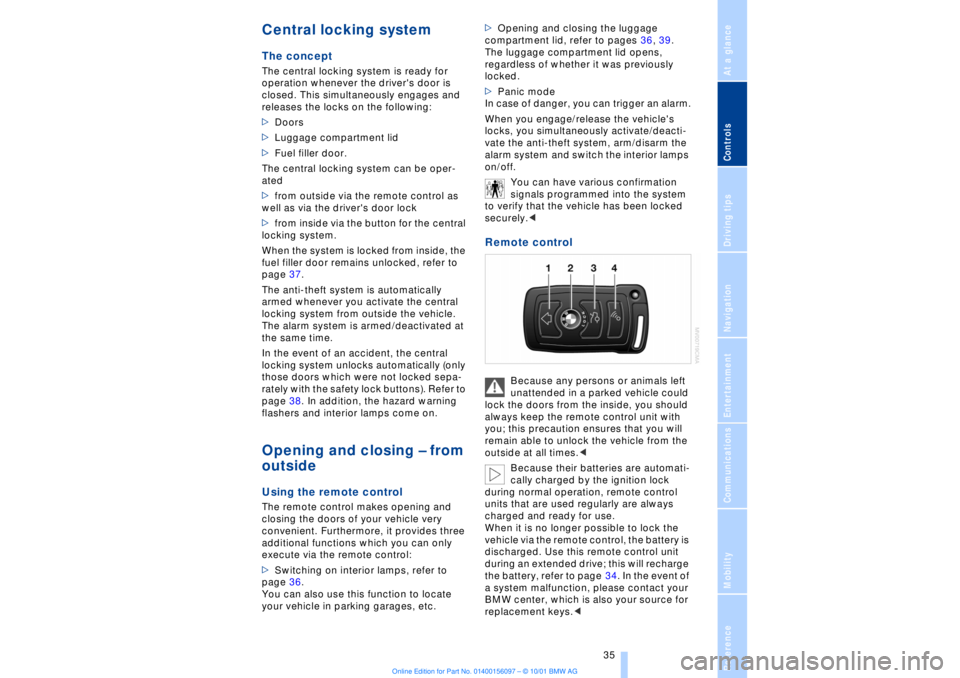
outside Using the remote control The remote control makes opening and
closing the doors of your vehicle very
convenient. Furthermore, it provides three
additional functions which you can only
execute via the remote control:
>Switching on interior lamps, refer to
page 36.
You can also use this function to locate
your vehicle in parking garages, etc. >Opening and closing the luggage
compartment lid, refer to pages 36, 39.
The luggage compartment lid opens,
regardless of whether it was previously
locked.
>Panic mode
In case of danger, you can trigger an alarm.
When you engage/release the vehicle's
locks, you simultaneously activate/deacti-
vate the anti-theft system, arm/disarm the
alarm system
and switch the interior lamps
on/off.
You can have various confirmation
signals programmed into the system
to verify that the vehicle has been locked
securely.<
Remote control
Because any persons or animals left
unattended in a parked vehicle could
lock the doors from the inside, you should
always keep the remote control unit with
you; this precaution ensures that you will
remain able to unlock the vehicle from the
outside at all times.<
Because their batteries are automati-
cally charged by the ignition lock
during normal operation, remote control
units that are used regularly are always
charged and ready for use.
When it is no longer possible to lock the
vehicle via the remote control, the battery is
discharged. Use this remote control unit
during an extended drive; this will recharge
the battery, refer to page 34. In the event of
a system malfunction, please contact your
BMW center, which is also your source for
replacement keys.<
Page 41 of 208
Opening and closing
40 >press the button on the outside of the
luggage compartment lid, refer to page 38
>press the button 3on the remote
control unit, refer to page 36.
During opening the luggage compart-
ment lid pivots upward and to the
rear. Ensure that adequate clearance is
available before opening.<
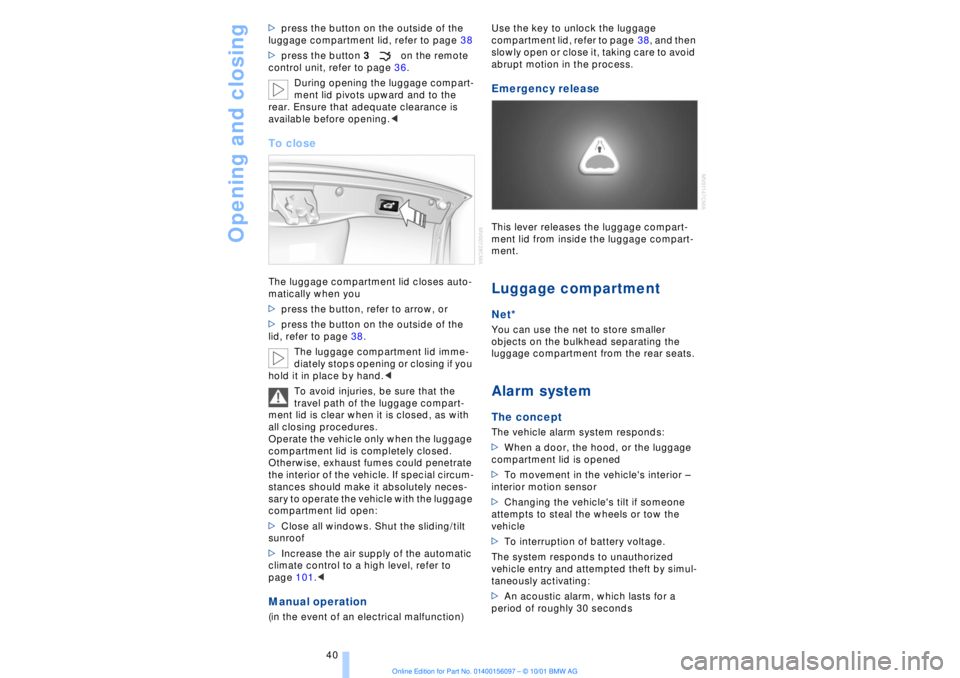
To closeThe luggage compartment lid closes auto-
matically when you
>press the button, refer to arrow, or
>press the button on the outside of the
lid, refer to page 38.
The luggage compartment lid imme-
diately stops opening or closing if you
hold it in place by hand.<
To avoid injuries, be sure that the
travel path of the luggage compart-
ment lid is clear when it is closed, as with
all closing procedures.
Operate the vehicle only when the luggage
compartment lid is completely closed.
Otherwise, exhaust fumes could penetrate
the interior of the vehicle. If special circum-
stances should make it absolutely neces-
sary to operate the vehicle with the luggage
compartment lid open:
>Close all windows. Shut the sliding/tilt
sunroof
>Increase the air supply of the automatic
climate control to a high level, refer to
page 101.< Manual operation(in the event of an electrical malfunction) Use the key to unlock the luggage
compartment lid, refer to page 38, and then
slowly open or close it, taking care to avoid
abrupt motion in the process.
Emergency release This lever releases the luggage compart-
ment lid from inside the luggage compart-
ment. Luggage compartmentNet*You can use the net to store smaller
objects on the bulkhead separating the
luggage compartment from the rear seats. Alarm system The conceptThe vehicle alarm system responds:
>When a door, the hood, or the luggage
compartment lid is opened
>To movement in the vehicle's interior Ð
interior motion sensor
>Changing the vehicle's tilt if someone
attempts to steal the wheels or tow the
vehicle
>To interruption of battery voltage.
The system responds to unauthorized
vehicle entry and attempted theft by simul-
taneously activating:
>An acoustic alarm, which lasts for a
period of roughly 30 seconds
Page 71 of 208
Driving
70 To obtain maximum acceleration (for
passing maneuvers, etc.) during
operation in the manual mode, use the
kickdown or downshift manually.<
Malfunctions A status message will appear in the Check
Control panel to alert you to any malfunc-
tions in the transmission-control system.
Please note any supplementary information
that appears in the Control Display. The
directional arrows also start to flash in the
Info Display.
While it will remain still possible to move
the selector lever to any desired position,
the transmission will revert to operation in
its default mode with only a limited number
of forward gears.
Some types of malfunction will make it
impossible to engage all gears.
The engine may respond with reduced
output when accelerating from a standing
start.
If this happens, avoid extreme engine loads
and consult the nearest BMW center.
If no status messages appear in the
Info Display you should accelerate
carefully to confirm that you are driving in
the desired direction.
Never work in the engine compartment
with any of the forward or reverse gears
engaged, as the vehicle could start to
move. Engage the parking brake, refer to
page 62.< Manual release of transmission
lockout You can respond to any interruptions in the
supply of electrical power, for instance, if
the battery is discharged or disconnected,
by releasing the transmission lockout
manually.
To prevent the drive wheels from
locking up and sliding, the transmis-
sion lockout must always be released
manually before the vehicle is towed.<
Press the brake pedal before
releasing the transmission lockout manually. If the brakes are not applied, the
vehicle could start to roll if parked on a
steep slope.
The transmission lockout should only be
released for towing. Remember to engage
the transmission lockout when you repark
the vehicle after moving it.
Should it also be necessary to release the
parking brake manually (owing to a
discharged battery, etc.), always adhere to
the following sequence:
1.Start by manually releasing the parking
brake, refer to page 65
2.Then proceed to manually release the
transmission lockout.<
Jump-starting and towing, refer to
pages 187 and 188.
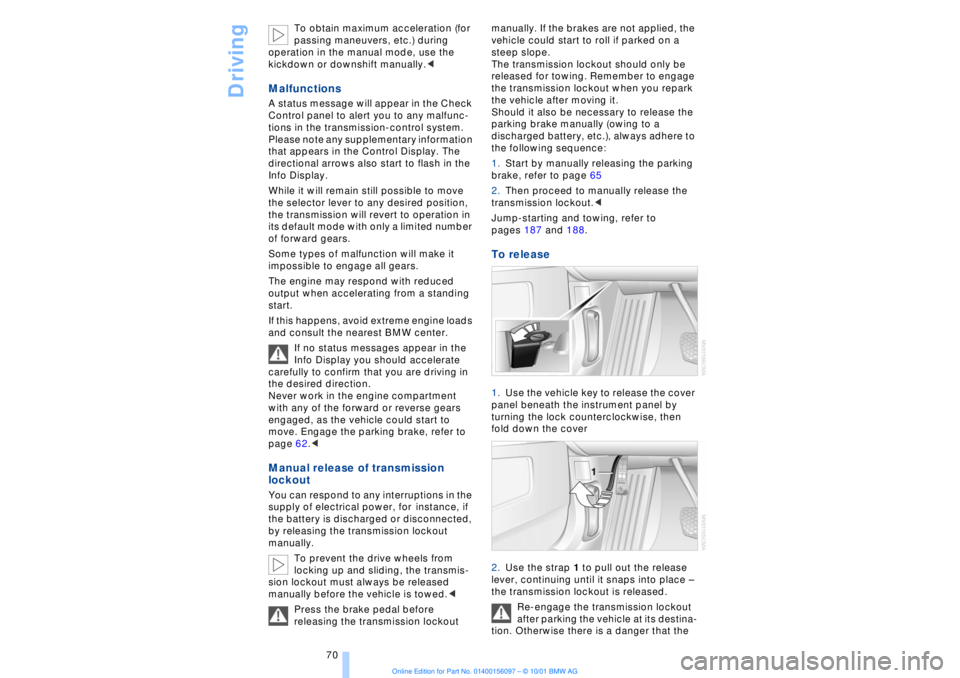
To release 1.Use the vehicle key to release the cover
panel beneath the instrument panel by
turning the lock counterclockwise, then
fold down the cover
2.Use the strap 1 to pull out the release
lever, continuing until it snaps into place Ð
the transmission lockout is released.
Re-engage the transmission lockout
after parking the vehicle at its destina-
tion. Otherwise there is a danger that the
Page 80 of 208
At a glanceControlsDriving tipsCommunicationsNavigationEntertainmentMobilityReference
79
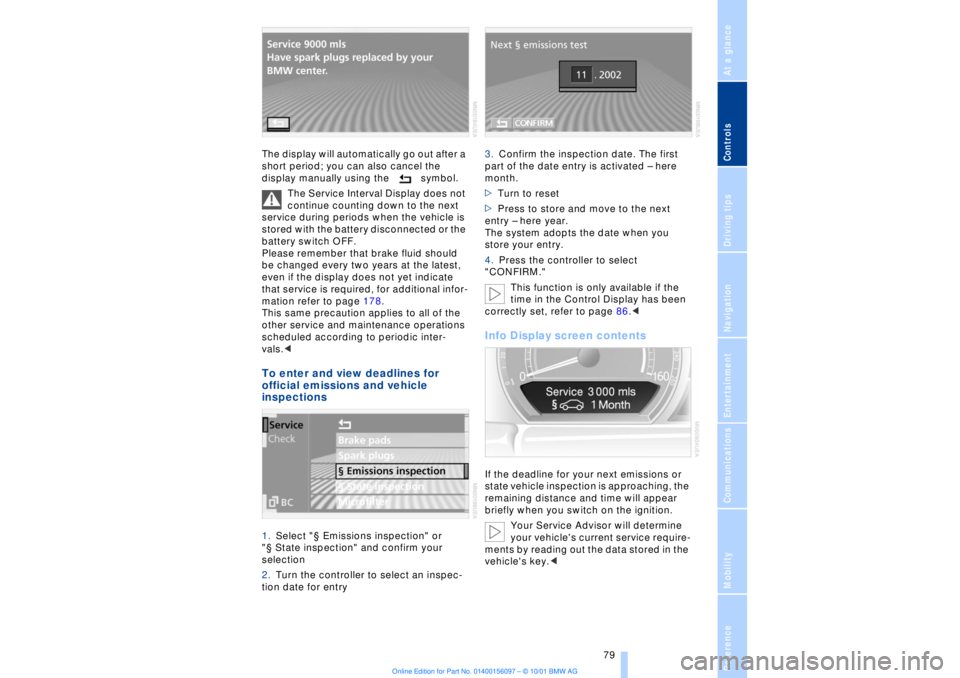
The display will automatically go out after a
short period; you can also cancel the
display manually using the symbol.
The Service Interval Display does not
continue counting down to the next
service during periods when the vehicle is
stored with the battery disconnected or the
battery switch OFF.
Please remember that brake fluid should
be changed every two years at the latest,
even if the display does not yet indicate
that service is required, for additional infor-
mation refer to page 178.
This same precaution applies to all of the
other service and maintenance operations
scheduled according to periodic inter-
vals.< To enter and view deadlines for
official emissions and vehicle
inspections 1.Select "¤ Emissions inspection" or
"¤ State inspection" and confirm your
selection
2.Turn the controller to select an inspec-
tion date for entry 3.Confirm the inspection date. The first
part of the date entry is activated Ð here
month.
>Turn to reset
>Press to store and move to the next
entry Ð here year.
The system adopts the date when you
store your entry.
4.Press the controller to select
"CONFIRM."
This function is only available if the
time in the Control Display has been
correctly set, refer to page 86.<
Info Display screen contents If the deadline for your next emissions or
state vehicle inspection is approaching, the
remaining distance and time will appear
briefly when you switch on the ignition.
Your Service Advisor will determine
your vehicle's current service require-
ments by reading out the data stored in the
vehicle's key.<
Page 160 of 208
At a glanceControlsDriving tipsCommunicationsNavigationEntertainmentMobilityReference
159
Batteries
Never attempt to open your BMW
mobile phone or its battery. Use only
approved battery types Ð the wrong battery
can destroy your cell phone.
To avoid possible short circuits, after
removing a battery you should never allow
it to come into contact with metallic
surfaces of any kind.<
Disposing of used batteries
Return used batteries to a recycling
collection point or to your BMW
center.<
Care instructionsYou can find everything you need to know
about caring for your mobile phone in the
separate "Mobile Phone" manual and in our
supplementary publication on "Car care." Operation
For information on operating your
mobile phone please consult the
separate manual.<
You can also operate your BMW mobile
phone using the
>controls on the steering wheel, refer to
page 18
>Control Display
>Key Pad
>voice command system.
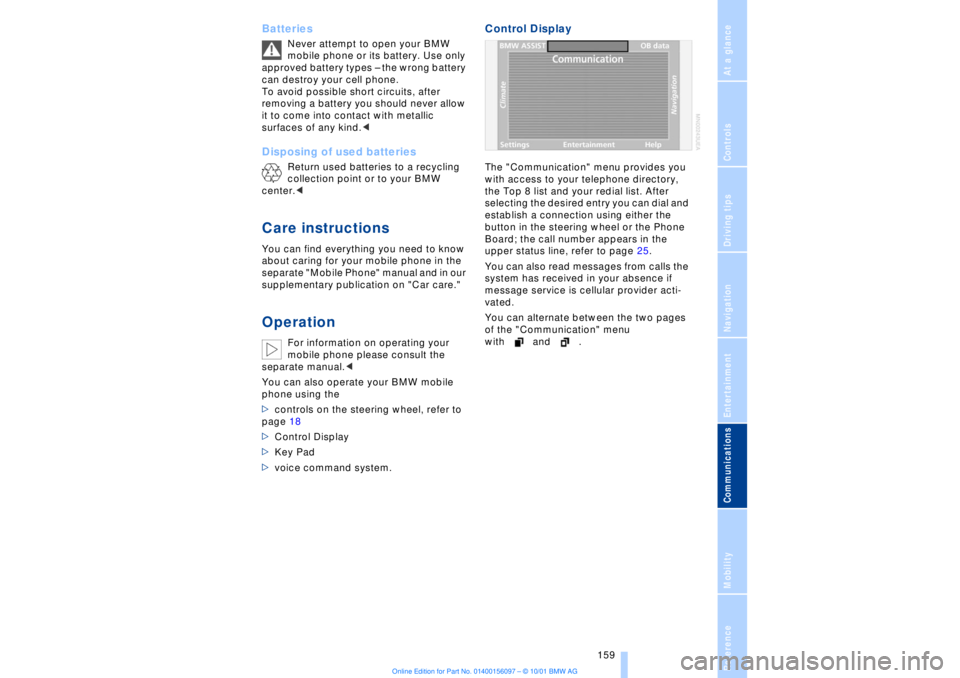
Control DisplayThe "Communication" menu provides you
with access to your telephone directory,
the Top 8 list and your redial list. After
selecting the desired entry you can dial and
establish a connection using either the
button in the steering wheel or the Phone
Board; the call number appears in the
upper status line, refer to page 25.
You can also read messages from calls the
system has received in your absence if
message service is cellular provider acti-
vated.
You can alternate between the two pages
of the "Communication" menu
with and .
Page 201 of 208
Everything from A to Z
200 Manual operation
Ð doors 37
Ð sliding/tilt sunroof 44
Manual release
Ð automatic transmission
lockout 70
Ð fuel filler door 168
Ð luggage compartment
lid 40
Manual station search 143
Map CD 124
"Map facing N." with navi-
gation system 132
Maximum axle loads 194
Maximum roof weight 194
Maximum speed, see
Limit 84
"MD" 140, 151
MD player 151
Ð fast forward 151
Ð random play 152
Ð reverse 151
Ð sampling 152
Ð scan function 152
Ð switching on 151
Ð track skip 151
"Memo" 86
"Memorize"
Ð "Individual" 104
Memory, refer to Seat, mir-
ror and steering wheel
memory 54
"Memory" for audio
system 140
"Menu name" 23
Menus
Ð computer 22
Ð Control Display 22
"MFL" 53
"M FM" 144, 145
"Microfilter" 179
Microfilter 104
Microphone for hands-free
system 161
MiniDisc, refer to MD 151
Mirrors 52
Ð mirror heaters 52
Ð mirror memory 54
"Missed" 164
Missed calls 164Mobile phone
Ð calling 162
Ð call termination 162
Ð controlling with the but-
tons on the steering
wheel 18
Ð emergency calls 161
Ð hands-free system 161
Ð missed calls 164
Ð operating using the
Control Display 159
Ð redialing 164
Ð selecting phone
numbers 162
Ð switching on and off 162
Ð Top 8 list 163
Ð using with Key Pad 160
Mobile phone, refer to
separate mobile phone
manual 158
Mobile phone battery 159
Mobile phone codes 162
Modifications,
technical 8, 98
Monitor, refer to Control
Center 19
Most frequently called
numbers 163
Most recent mobile phone
numbers 164
N"Navigation" 19, 22
Navigation computer
Ð installation location 124
Navigation destination
Ð manual entry 126
Ð selecting with map 128
Navigation system
Ð destination list 130
Ð digital coverage area 124
Ð town and city centers 136
Ð voice guidance 133
Navigation system
"ACCEPT" command 135
Navigation system "View"
function 132
Navigation target
cursor 128, 129
"Navi info" 54"New route" 133
"Next"
Ð map-guided destination
selection 129
Ð searching for points of
interest 130
Nozzles 99
O"OB data" 19, 22
OBD interface socket 180
Occupant-restraint
systems 50, 55
Odometer 77
Oil additives 177
Oil change intervals, refer
to Service Interval
Display 78
Oil consumption 176
Oil dipstick 176
Oil specifications 177
"ON / OFF" speed limit 84
Onboard Diagnostic (OBD)
system 180
Ð interface socket 180
Onboard tool kit 181
"On country" 130
"On current loc." 129
"1,2,3" 163
"On town/city" 130
Opening and closing
Ð from the inside 37
Ð from the outside 37
Oral note 27
Orientation
Ð changing the display 132
Orientation menu 19
Orientation to north 132
Outside temperature
display 77PPaint and finish care, refer
to Car care manual
Panic mode 36
Park Distance Control
(PDC) 88
Parked-car ventilation 106
Parking aid 88
Page 204 of 208
203
At a glanceControlsDriving tipsCommunicationsNavigationEntertainmentMobilityReference
Steptronic 69
Stopwatch 85
Storage, refer to Car care
manual
Storage compartments 111
Storing preset speeds,
refer to Programmable
cruise control 75
Straps, refer to
Loading 120
Summer tires 173
Sun blinds 109
Switch for battery 185
Switching air conditioner
on and off 101
Switching off the engine 62
Switching off with mobile
phone 162
Switching on
Ð audio 140
Ð cassette deck 153
Ð CD changer 149
Ð CD player 146
Ð MD player 151
Ð radio 140
Symbols 6
Ð Control Center 20
System failure reports, refer
to Check Control 80TTachometer 77
Tail lamps 183
Ð bulb replacement 183
"Tape" 140, 153
Technical
modifications 8, 98
Telephone, refer to Mobile
phone 158
Telephone directory
Ð creating voice command
telephone directory 162
Ð dialing numbers 163
Ð updating voice command
telephone directory 162
"Temp. distribution" 51
Temperature
adjustment 101
Temperature display, out-
side temperature 77Third brake lamp 183
Tilt function, passenger-
side mirror 54
Time
Ð of arrival, estimated 83
Timing 85
Tire change 184
Tire inflation pressures 170
Tire pressure monitor 92
Tire Quality Grading 172
Tires
Ð flat tire 184
Ð tire changes 184
Ð tire damage 171
Ð tire inflation
pressures 170
Ð tire pressure monitoring
system 92
Ð tire replacement 172
Ð tire size, refer to Wheel
and tire
combinations 173
Ð tire tread 171
Ð tire tread wear
indicators 171
Title search
Ð cassette deck 154
Tone in audio operation
Ð adjusting 141
"Tone" in sound system
operation 141
Tools 181
"TOP 8" 163
Torque 192
Tow fittings 188
Towing 188
Track 193
Traction Control System,
refer to DSC 89
Traffic congestion, refer to
Selecting new route 133
Transmission
Ð automatic transmission
with L mode 66
Ð automatic transmission
with Steptronic 69
Transmission
lockout 67, 70
Ð manual release 70
Travel route, see Route 132
Tread depth, tires 171"Treble" in sound system
operation 141
Trip odometer 77
Trunk lid
Ð emergency release 40
Ð refer to luggage compart-
ment lid 38
Turning circle 193
Turn signal indicators 71
Ð bulb
replacement 182, 183
UUndercoating, refer to Car
care manual
Uniform Tire Quality Gra-
ding (UTQR) 172
Universal garage door
opener 108
Upholstery care, refer
to Car Care
Used batteries 186
User controls 16
"Using motorway" 130VVacuum cleaner
connection 113
Valve caps 185
Vanity mirror 53
Vehicle battery 185
Vehicle dimensions 193
Vehicle keys 34
Vehicle stability control 89
Ventilation 102
Ventilation, draft-free 102
Ventilation while
parked 106
Vents, ventilation 99
"View" with navigation
system 132, 133
Viscosity 177
Voice command
system 18, 25
Voice command system
notebook 27