2000 AUDI ALLROAD page 57
[x] Cancel search: page 57Page 102 of 306
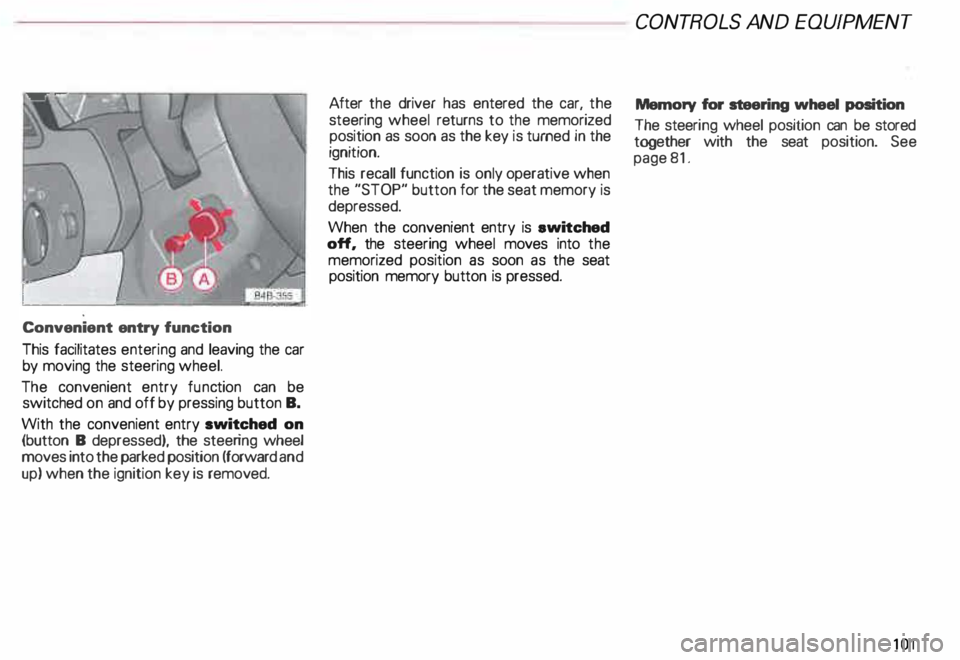
Convenient
entry function
This facilitates entering and leaving the car
by moving the steering wheel.
The convenient entry function can be
switched on and off by pressing button B.
With the convenient entry switched on
(button B depressed), the steering wheel
moves into the parked position (forward and
up) when the ignition key is removed. After
the driver has entered the car, the
steering wheel returns to the memorized
position as soon as the key is turned in the
ignition.
This recall function is only operative when
the "STOP" button for the seat memory is
depressed.
When the convenient entry is ewitched
off, the steering wheel moves into the
memorized position as soon as the seat
position memory button is pressed. CONT
ROLS AND EQUIPMEN T
Memory for steering wheel position
The steeri ng wheel position can be stored
together with the seat position. See
page 81.
101
Page 108 of 306
In selector
lever positions "P" (Park) a no
"N" (Neutral), the instruction "WHEN
STA TIONARY APPLY FOOTBRAKE WHILE
SELECTING GEAR" appears in the instru
ment cluster as a reminder for the driver.
Also, the symbol in the shift console will
light up.
A time delay element prevents the selector
lever from locking when it is moved through
the "N"' (Neutral) position (for example,
going from "R" to "D"). The locking ele
ment only locks the selector lever if it is left
in the "N" (Neutral) position for more than
about one second without the brake pedal
being depressed.
In the N (Neutral) position, the selector le
ver will not lock when the vehicle is driving
faster than 3 mph (5 km/h). Display
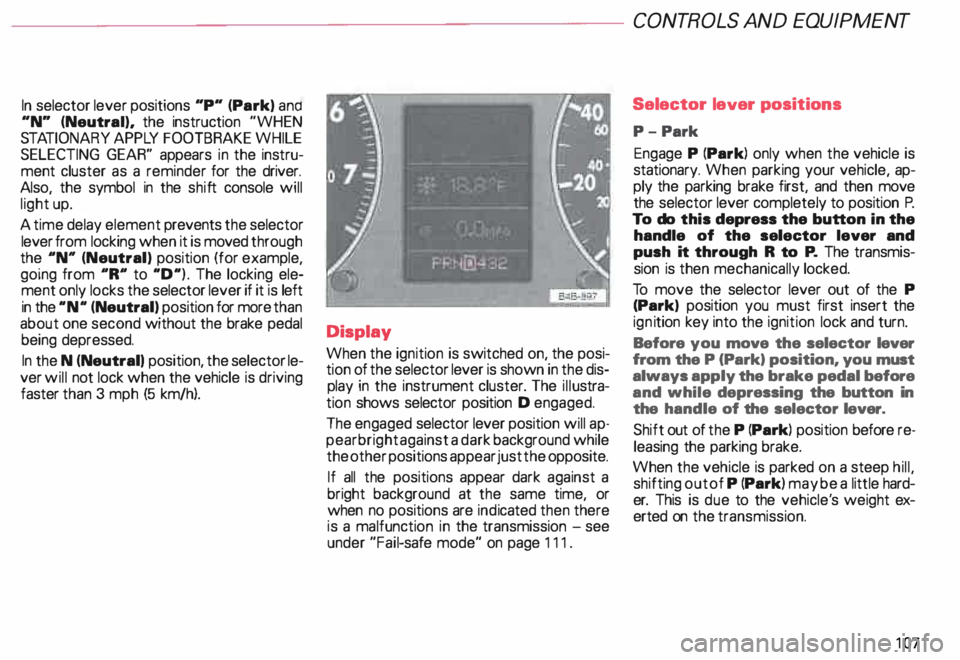
When the ignition is switched on, the posi
tion of the selector lever is shown in the dis
play in the instrument cluster. The illustra
tion shows selector position D engaged.
The engaged selector lever position will ap
pear bright against a dark background while
the other positions appear just the opposite.
If all the positions appear dark against a
bright background at the same time, or
when no positions are indicated then there
is a malfunction in the transmission -see
under "Fail-safe mode" on page 111. CONT
ROLS AND EQUIPMENT
Selector lever positions
P- Park
Engage P (Park) only when the vehicle is
stationary. When parking your vehicle, ap
ply the parking brake first, and then move
the selector lever completely to position P.
To do this depress the button in the
handle of the selector lever and
push it through R to P. The transmis
sion is then mechanically locked.
To move the selector lever out of the P
(Park) position you must first insert the
ign ition key into the ignition lock and turn.
Before you move the selector lever
from the P (Park) position, you must
always apply the brake pedal before
and while depressing the button in
the handle of the selector lever.
Shift out of the P (Park) position before re
leasing the parking brake.
When the vehicle is parked on a steep hill,
shifting out of P (Park) may be a little hard
er. This is due to the vehicle' s weight ex
erted on the transmission.
107
Page 112 of 306

---------------------CONTROLS AND EQUIPMENT
Parking On flat terrain, it is enough to simply set the
selector lever to position P (Park). On an
incline, however, first depress the brake
pedal. engage the parking brake and then
move the selector lever completely to posi
tion P. If you do this. the locking mechanism
will not be overloaded and it will be easier to
release the parking brake.
Always heed all WA RNINGS
on page 103. Emergency
starting
Yo ur Audi with automatic transmission
cannot be started by pushing or tow
ing. If the engine does not start because of
a discharged battery, the vehicle can be
start edwithjumper cables. Referto "Emer
genc y starting with jumper cables." Should
the engine fail to start, consult your nearest
Audi Dealer.
To wing
To tow the vehicle. see instructions "Emer
gency towing" on page 281. Auxiliar
y modes
Yo u can recognize a failure in the electronic
system if the selector lever position display
letters appear bright ·aga in st a dark back
ground. You can still drive because the
transmission will continue to work in an aux
iliary mode. Take your vehicle to your near
est Audi Dealer as soon as possible.
Note
• The electronic lock that protects
the reverse gear while driving is in
operative when the transmission is
in an auxiliary mode. Shifting into R
(Reverse) while driving will cause
serious damage to the vehicle.
• The liptronic® is inoperative when the
transmission is in the fail-safe mode.
111
Page 114 of 306
Ignition
switch
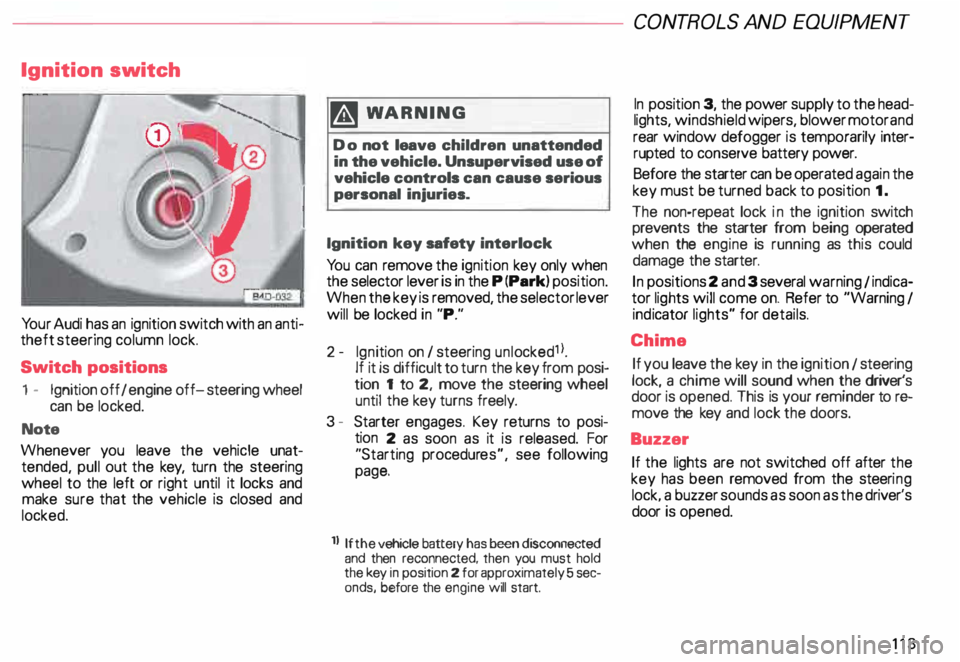
Yo ur Audi has an ignition switch with an anti
theft steering column lock.
Switch positions
1 - Ignition off I engine off-steering wheel
can be locked.
Note
Whenever you leave the vehicle unat
tended, pull out the key, turn the steering
wheel to the left or right until it locks and
make sure that the vehicle is closed and
locked. m
WARNING
Do not leave children unattended
in the vehicle. Unsupervised use of
vehicle controls can cause serious
personal injuries.
Ignition key safety interlock
Yo u can remove the ignition key only when
the selector lever is in the P (Park) position.
When the key is removed, the selector lever
will be locked in "P."
2- Ignition on I steering unlocked1 l.
If it is difficult to turn the key from posi
tion 1 to 2, move the steering wheel
until the key turns freely.
3 - Starter engages. Key returns to posi
tion 2 as soon as it is released. For
"Starting procedures", see following
page.
ll If the
vehicle battery has been disconnected
and then reconnected, then you must hold
the key in position 2 for approximately 5 sec
onds, before the engine will start. CONT
ROLS AND EQUIPMEN T
In position 3, the power supply to the head
lights, windshield wipers, blower motor and
rear window defogger is temporarily inter·
rupted to conserve battery power.
Before the starter can be operated again the
key must be turned back to position 1.
The non-repeat lock in the ignition switch
prevents the starter from being operated
when the engine is running as this could
damage the starter.
In positions 2 and 3 several warning 1 indica
tor lights will come on. Refer to "Warning I
ind icator lights" for details.
Chime If you leave the key in the ignition 1 steering
lock, a chime will sound when the driver's
door is opened. This is your reminder tor&
move the key and lock the doors.
Buzzer If the lights are not switched off after the
key has been removed from the steeri ng
lock. a buzzer sounds as soon as the driver's
door is opened.
113
Page 116 of 306
---------------------CONTROLS AND
EQUIPMENT
Note
• Yo ur Audi with automatic trans
mission cannot be started with
pushing or towing.
• If the battery is discharged. try
jump starting the engine using the
battery from another vehicle -see
page 278. Stopping
engine
Do not stop the engine immediately
after hard or extended driving. Keep
engine running for about two min
utes to prevent excessive heat
build-up.
�W ARNING
• Before you check anything in
the engine compartment, stop the
engine and let it cool down. Hot
components can burn skin on con
tact.
• Never touch the radiator fan.
The auxiliary electric fan can
switch on suddenly and iniure you.
• Always heed all WA RNINGS on
page 232. Note
The ignition should not be switched
off as long the vehicle is still rolling
with a gear engaged. otherwise fuel
could get into the catalytic convert
er and cause damage.
115
Page 117 of 306

CONTROLS AND EQUIPMENT---------------------
Instrument cluster
Pos. see page
1 - Engine oil temperature gauge ... 117
2 - Tachometer ...... ........... .. 117
with digital clock and date display 117
3- Warning I ind icator lights ..... .. 122
4 - Engine coolant temperature gauge 118
5- Fuel gauge
119 Pos.
6 · Speedometer
with odometer,
trip odometer display ... .
7 - Vo ltmeter ............ .
8 - Set I check knob for see
page
119
12 0
12 0
Setting the clock . . . . . .
118
Auto -check system ............ 140
Clock and Odometer lighting .... 12 0
Service indicator . . . . . . . . . . . . . . 121 Pos.
see page
9 - Driver information system
Auto-C heck System display . . . . 138
Outside air temperature display .
137
Trip computer display . . . . . . . . 146
Selector lever position display . .
1 07
Radio frequency display ........ 138
Service interval display . . . . . . 121
1 0 -Reset knob for
Trip odometer ......•.. _ ..... .. 120
Service indicator . . . . . . . . . . . . 121
Page 118 of 306

The illustration on previous page shows the
arrangement of the instrument cluster in a
U.S. vehicle.
1 - Engine oil temperature
gauge �
Of (C)
Engine oil temperature ranges from 150 OF
(60 °C) to 350 °F (180 °C). With the needle
around 150 °F (60 °C), do not accelerate un
der full load.
If the needle moves into the upper zone in
excepti onal cases, reduce your speed. The
needle should then return to the normal
zone.
If the needle stays in upper zone, stop the
vehicle, switch off the engine and check the
oil leve l. If the oil level is correct and the oil
pressure warning light does not flash when
the engine is started, you can drive to the
next authorized Audi Dealer but do·not run
engine at high speeds. 2
- Ta chometer with clock
Ta chometer
The red area at the end of the scale indi
cates maximum permissible engine rpm
(rev olutions per minute) for all gears after
the break-in period. Before reaching this
area, the next higher gear or selector lever
position "D" should be selected or the foot
eased off the accelerator pedal.
r.Gb Upshifting early saves fuel and
1!/!:i reduces engine noise.
Shift to the next lower gear when engine
rpm drops below 1,500 rpm. CONT
ROLS AND EQUIPMENT
Digital clock with date display
The clock and date are located in the
tachometer dial. Adjusting the clock I date:
see next page.
When the ignition is off the clock I date dis
play can be illuminated by pressing the set
butt on. See illustration above.
117
Page 119 of 306
CONTROLS AND
EQUIPMENT-----------------------------------------
Setting the time I date
• Pull the knob to set the hour. The hour
display will flash. Set the desired hour dis
play by turning the knob clockwise or coun
terclockwise.
• To set the minutes, pull the knob out
as often as needed to make the minutes dis
play flash. You can then set the minutes dis
play by turning the knob clockwise or coun
terclockwise.
• To set the date, pull the knob out as
often as needed to make the day, month or
year display flash. You can then set the day,
month or year display by turning the knob
clockwise or counterclockwise.
Yo ur clock will be set once the display stops
flashing after you operate the setting knob.
118 Changing
time zones
If you enter a new time zone, simply change
the hour display to the correct time -see
"Setting the time I date".
Tu rning the date display on and off
• Pull out the knob as often as needed to
make the date display flash.
o Turn the knob counterclockwise to deac
tivate the display, or clockwise to activate it.
The setting will be accepted as soon as the
display stop flashing after you operate the
setti ng knob.
3 - Warning and indicator lights
See page 122. 4
- Engine coolant -¥
-
temperature gauge
The needle in the coolant temperature
gauge will indicate the temperature of the
coolant when the ignition is switched on.
Engine cold
Avoid high engine speeds and heavy
throttle when the needle is still at the left of
the dial.
Normal temperature
During normal running, the needle will re
main somewhere in the middle of the dial.
If the engine is working hard at high outside
temperatures, the needle may also go fur
ther to the right, but this Is no cause for
concern as long as the coolant tem
perature warning light does not
flash.