2000 AUDI ALLROAD page 57
[x] Cancel search: page 57Page 149 of 306
CONTROLS ANDEO�PMENT-----------------------------------------
Switches
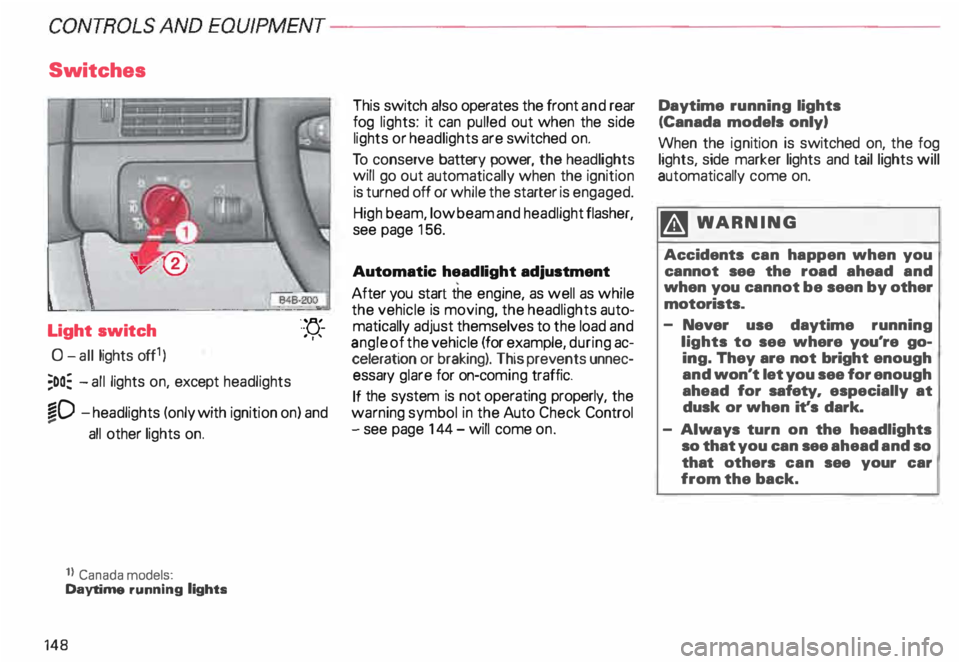
Light switch
0- all lights off1)
;oo: -all lights on, except headlights "-
YJ.-
. ''
�D -headlights (only with ignition on) and
...
all other lights on.
1} Canada models:
Daytime running lights
148 This
switch also operates the front and rear
fog lights: it can pulled out when the side
lights or headlights are switched on.
To conserve battery power, the headlights
will go out automatically when the ignition
is turned off or while the starter is engaged.
High beam, low beam and headlight flasher,
see page 156.
Automatic headlight adjustment
After you start the engine, as well as while
the vehicle is moving, the headlights auto
matically adjust themselves to the load and
angle of the vehicle (for example, during ac
celeration or braking). This prevents unnec
essary glare for on-com ing traffic.
If the system is not operating properly, the
warning symbol in the Auto Check Control
- see page 144- will come on. Daytime
running lights
(Canada models only)
When the ignition is switched on, the fog
lights, side marker lights and taillights will
automatically come on.
�W ARNING
Accidents can happen when you
cannot see the road ahead and
when you cannot be seen by other
motorists.
- Never use daytime running
lights to see where you're go
ing. They are not bright enough
and won't let you see for enough
ahead for safety, especially at
dusk or when it's dark.
- Always turn on the headlights
so that you can see ahead and so
that others can see your car
from the back.
Page 152 of 306
---------------------CONTROLS
AND EQUIPMENT
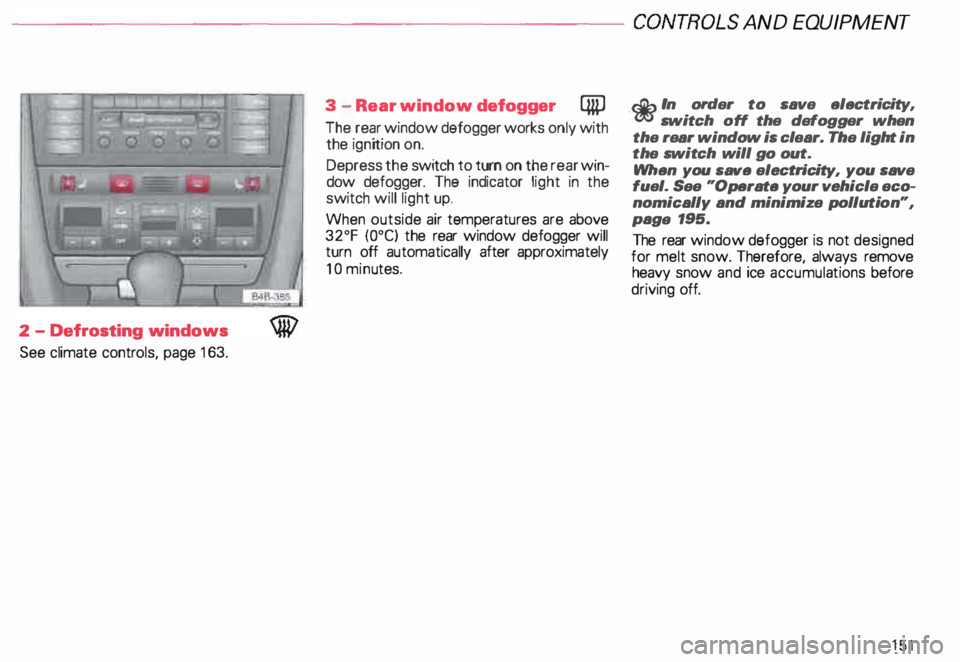
2 -Defrosting windows
See climate controls, page 163. 3
-Rear window defogger QiP
The rear window defogger works only with
the ignition on.
Depress the switch to turn on the rear win
dow defogger. The indicator light in the
switch will light up.
When outside air temperatures are above
32°F {0°C) the rear window defogger will
turn off automatically after approximately
10 minu tes.
r.Gb In order to save electricity, m switch off the defogger when
the rear window is clear. The light in
the switch will go out.
When you save electri city, you save
fuel. See "Operate your vehicle eco
nomically and minimize pollution",
paga 195.
The rear window defogger is not designed
for melt snow. Therefore, always remove
heavy snow and ice accumula tions before
driving off.
151
Page 153 of 306
CONTROLS AND EQUIPMENT---------------------
1
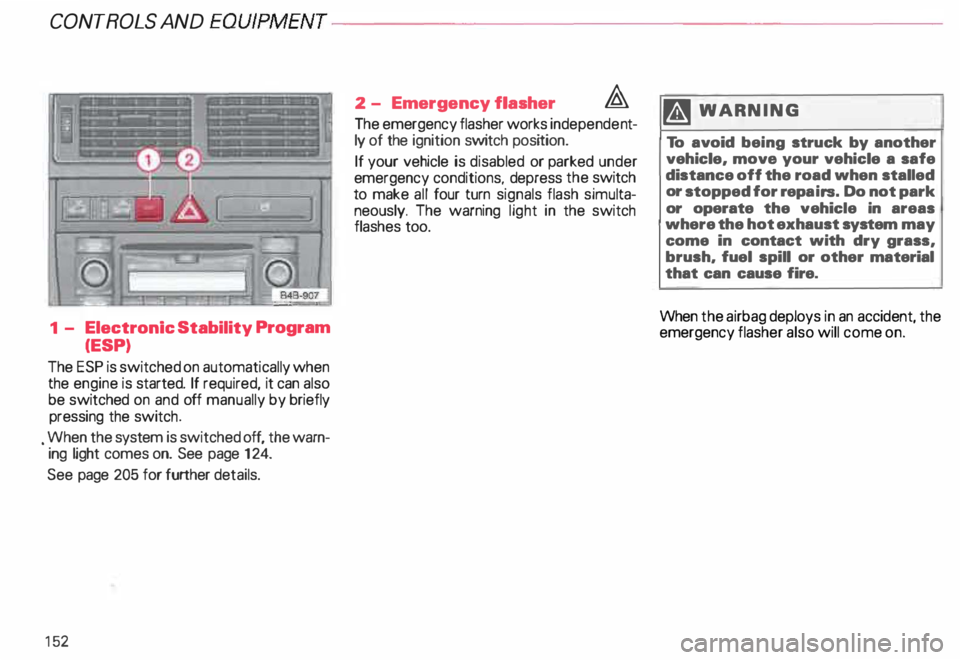
- Electronic Stability Program
(ESP)
The ESP is switched on automatically when
the engine is started. If required, it can also
be switched on and off manually by briefly
pressing the switch .
. When the system is switched off, the warn
ing light comes on. See page 124.
See page 205 for further details.
15 2 2
- Emergency flasher �
The emergency flasher works independe nt
ly of the ignition switch position.
If your vehicle is disabled or parked under
emergency conditions, depress the switch
to make all four turn signals flash simulta
neously. The warning light in the switch
flashes too. ftl
WARN ING
To avoid being struck by another
vehicle, move your vehicle a safe
distance off the road when stalled
or stopped for repairs. Do not park
or operate the vehicle in areas
where the hot exhaust system may
come in contact with dry grass,
brush, fuel spill or other material
that can cause fire.
When the airbag deploys in an accident, the
emergency flasher also will come on.
Page 156 of 306
---------------------CONTROLS AND EQUIPMEN T
Notes continued
• At excessive loads (for example, over
heating caused by frequent changes in the
ride height when the vehicle is stationary),
the system is temporarily deactivated for
safety reasons. The system will return to
full operation once it has cooled down.
• The system automatically switches to
the normal level if the ESP automatically
shuts off (see page 205). If this happens,
switch the ignition off, and then on again.
Now you can select the desired level once
again.
Jack mode
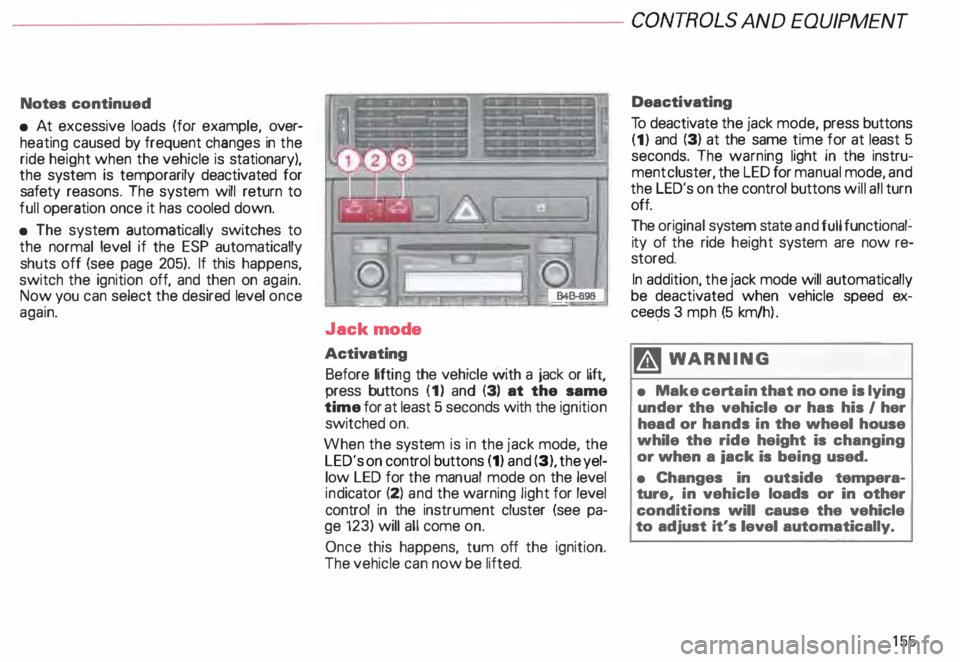
Activating Before lifting the vehicle with a jack or lift,
press buttons (1) and (3) at the same
time for at least 5 seconds with the ignition
switched on.
When the system is in the jack mode, the
LED's on control buttons (1) and (3), the yel
low LED for the manual mode on the level
ind icator (2) and the warning light for level
control in the instrument cluster (see pa
ge 123) will all come on.
Once this happens, tum off the ignition.
The vehicle can now be lifted. Deactivating
To deactivate the jack mode, press buttons
(1) and (3) at the same time for at least 5
seconds. The warning light in the instru
ment cluster, the LED for manual mode, and
the LED's on the control buttons will all turn
off.
The original system state and full functional�
ity of the ride height system are now re
stored.
In addition, the jack mode will automatically
be deactivated when vehicle speed ex
ceec;ls 3 mph (5 km/h ).
�W ARNING
• Make certain that no one is lying
under the vehicle or has his I her
head or hands in the wheel house
while the ride height is changing
or when a iack is being used.
• Changes in outside tempera
ture, in vehicle loads or in other
conditions will cause the vehicle
to adjust it's level automatically.
155
Page 158 of 306
Headlight flasher
You can signal with your headlights by pull
ing the lever toward the steering wheel.
When flashing headlights, the blue indicator
light will come on. Xenon
lights*
After starting the engine the Xenon head
ligh ts are automatically adjusted to the load
and angle of the vehicle (for example, during
acceleration, braking). This prevents on
coming traffic from experiencing unneces
sary glare from your headlights.
If the system is not operating properly, a
warning symbol will be displayed in the
Auto Check Control -see page 144. CONTROLS
AND EQUIPMENT
157
Page 161 of 306
CONT
ROLS AND EQUIPMENT---------------------
Wiper and washer system
The wiper and washer system only works
when the ignition is on.
The heated washer jets do not have a
separate switch. Depending on the outside
temperature, the heated washer jets will
operate when the ignition is on.
To prevent damage to the w1pmg
system. always loosen blades frozen
to glass before operating wipers.
Notes
• Filling washer container, see page 250.
• Replacing wiper blades, see page 251.
� WARNING
Always heed WARNINGS on
page 161.
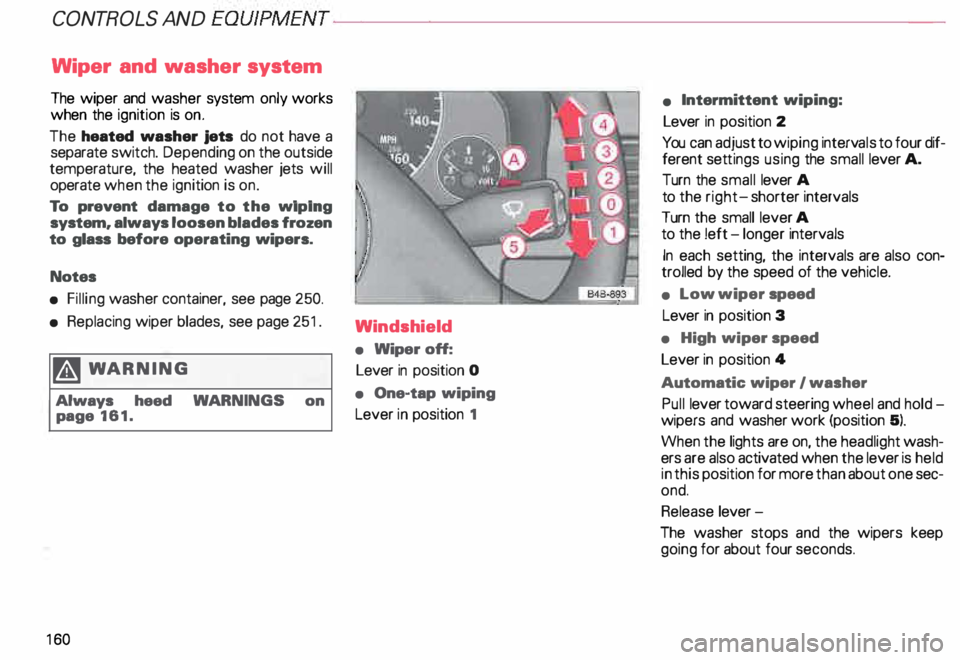
16 0 Windshield
•
Wiper off:
Lever in position 0
• One-tap wiping
Lever in position 1 •
Intermittent wiping:
Lever in position 2
You can adjust to wiping intervals to four dif
ferent settings using the small lever A.
Turn the small lever A
to the right- shorter intervals
Turn the small lever A
to the !eft -longer intervals
In each setting, the intervals are also con
trolled by the speed of the vehicle.
• Low wiper speed
Lever in position 3
• High wiper speed
Lever in position 4
Automatic wiper I washer
Pull lever toward steering wheel and hold
wipers and washer work (position 5).
When the lights are on, the headlight wash
ers are also activated when the lever is held
in this position for more than about one sec
ond.
Release lever-
The washer stops and the wipers keep
going for about four seconds.
Page 162 of 306
---------------------CONTROLS AND
EQUIPMENT
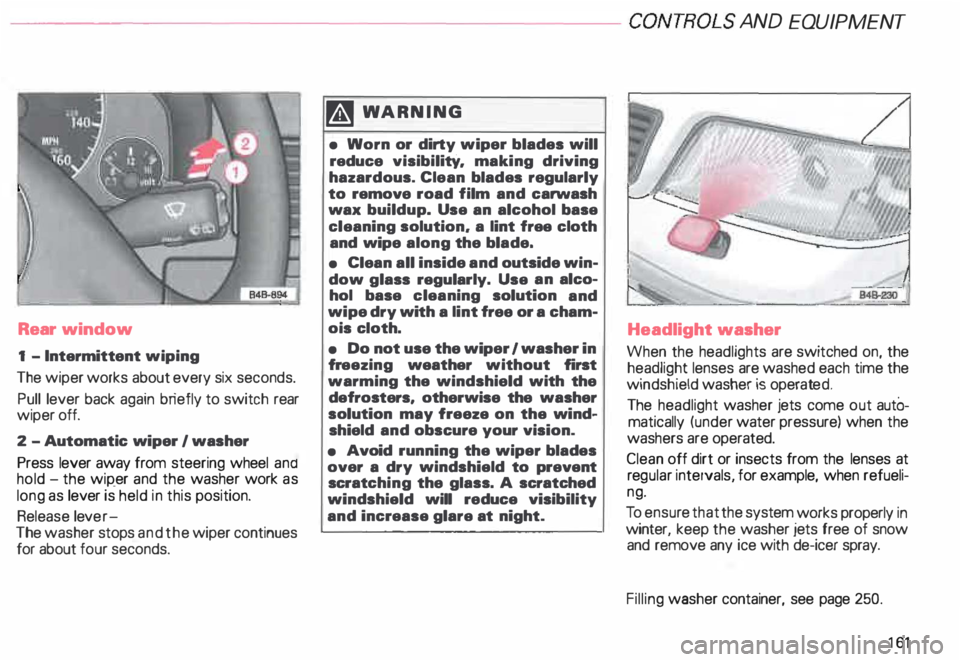
Rear window
1 - Intermittent wiping
The wiper works about every six seconds.
Pull lever back again briefly to switch rear
wiper off.
2 -Automatic wiper I washer
Press lever away from steering wheel and
hold -the wip_er and the washer work as
long as lever is held in this position.
Release lever-
The washer stops and the wiper continues
for about four seconds. �W
ARNING
• Worn or dirty wiper blades will
reduce visibility. making driving
hazardous. Clean blades regularly
to remove road film and carwash
wax buildup. Use an alcohol base
cleaning solution. a lint free cloth
and wipe along the blade.
• Clean all inside and outside win
dow glass regularly. Use an alco
hol base cleaning solution and
wipe dry with a lint free or a cham
ois cloth.
• Do not use the wiper 1 washer in
fr eezing weather without first
warming the windshield with the
defrosters, otherwise the washer
solution may freeze on the wind
shield and obscure your vision.
• Avoid running the wiper blades
over a dry windshield to prevent
scratc hing the glass. A scratched
windshield will reduce visibility
and increase glare at night. Headlight
washer
When the headlights are switched on, the
headlight lenses are washed each time the
windshield washer is operated.
The headlight washer jets come out autO
matically (under water pressure) when the
washers are operated.
Clean off dirt or insects from the lenses at
reg ular intervals, for example, when refueli
ng.
To ensur e that the system works properly in
winter, keep the washer jets free of snow
and remove any ice with de-icer spray.
Filling washer container, see page 250.
161
Page 163 of 306
CONTROLS AND EQUIPMENT---------------------
Cli
mate controls
�W ARNING
• For clear visibility and safe driv
ing, it is extremely important that
you follow the operating instruc
tions on the proper use and func
tion of the ventilation/heating, de
fogg ing{defr osting and air condi
tioning system in this manual. If in
doubt, consult your authorized
Audi Dealer.
• Good visibility comas with
clean windows free of fog, con
densation and frost.
• Maximum heating output and
fast defro sting will occur only af
ter the engine has reached operat
ing temperature. Wait until you
have good visibility before moving
your vehicle.
16 2 The
air conditioner is fully auto
matic, and is designed to maintain a com
fortable and uniform climate inside the ve
hicle .
The temperature of the air supplied to the in
terior, the fan speed, air distribution and vol
ume of air delivery are regulated automati
cally.
This automatic climate control program can
also be adjusted manually by the driver and
the front passenger.
The illustration on the next page shows the
controls for the driver and front passenger
in the center console. The left display indi
cates the temperature selected for the driv
er's side and the right display the tempera
ture selected for the front passenger's side.
The temperature is selected by pressing the
"+" or "-" buttons beneath the respective
displays. Recommended
standard setting for
all-year operation:
After switching on the ignition
• Select a temperature of
75 oF (23°C) and
• Press AUTO button.
With this setting, you attain maximum com
fort in the least amount of time.
You only need to change this setting to
meet your personal needs.
Air outlets - see page 165.