1999 HONDA ODYSSEY service
[x] Cancel search: servicePage 1 of 343
 to navigate through\
this reference.
For a printed owners manual, click on authorized manuals or go")
1999 Odyssey Online Reference Owner's Manual
Use these links (and links throughout this manual) to navigate through\
this reference.
For a printed owner's manual, click on authorized manuals or go to www.h\
elminc.com.
Contents
Introduction ........................................................................\
................................................................. i
A Few Words About Safety........................................................................\
.........................................ii
Your Vehicle at a Glanc e........................................................................\
............................................ .2
Driver and Passenger Safety ........................................................................\
......................................5
Proper use and care of your vehicle's seat belts, and Supplemental Restr\
aint System.
Instruments and Control s........................................................................\
.........................................55
Instrume nt panel indicator and gauge, and how to use dashboard and steering colu\
mn controls.
Comfort and Convenience Features ........................................................................\
......................129
How to operate the climate control system, the audio system, and other c\
onvenience features.
Before Driving........................................................................\
..........................................................181
What gasoline to use, how to break -in your new vehicle, and how to load luggage and other cargo.
Driving ........................................................................\
......................................................................195
The proper way to start the engine, shift the transmission, and park, pl\
us towing a trailer.
Maintenance........................................................................\
.............................................................219
The Maintenance Schedule shows you when you need to take you r vehicle to the dealer.
Appearance Car e........................................................................\
..................................................... .277
Tips on cleaning and protecting your vehicle. Things to look for if your\
vehicle ever needs body repairs.
Taking Care of the Unexpecte d........................................................................\
..............................285
This section covers several problems motorists sometimes experience, an d how to handle them.
Technical Informatio n........................................................................\
.............................................313
ID numbers, dimensions, capacities, and technical information.
Warranty and Customer Relations (U.S. and Canad a
)...............................................................
.327
A summary of the warranties covering your new Acura, and how to contact \
us.
Authorized Manu als (U.S. only)........................................................................\
..............................333
How to order manuals and other technical literature.
Index........................................................................\
.............................................................................. I
Service Information Summary
A summary of information you need when you pull up to the fuel pump.
Owner's Identification Form
ProCarManuals.com
Page 6 of 343
Driver and Passenger Safety
This section gives you important
information about how to protect
yourself and your passengers. It shows you how to use seat belts
properly. It explains your Supple- mental Restraint System. And it tells
you how to properly restrain infants
and children in your vehicle.
Important Safety Precautions .......... 6
Your Vehicle's Safety Features........ 7
Seat Belts........................................ 8
Airbags............................................ 9
Seats & Seat-Backs...................... 10 Head Restraints........................... 10
Door Locks................................... 10
Pre-Drive Safety Checklist......... 11
Protecting Adults............................. 12 1. Close and Lock the Doors...... 12
2. Adjust the Front Seats............ 12
3. Adjust the Seat-Backs............. 13
4. Adjust the Head Restraints.... 14
5. Fasten and Position the Seat
Belts...................................... 15
6. Adjust the Steering Wheel..... 19
7. Maintain a Proper Sitting
Position................................. 19
Advice for Pregnant Women...... 20
Additional Safety Precautions.... 20
Protecting Children......................... 22
All Children Must Be
Restrained................................ 22
Children Should Sit in the Back Seat............................................23
The Passenger's Airbag Poses Serious Risks to Children....... 23
If You Must Drive with Several Children....................................25
If a Child Requires Close
Attention................................... 25
Additional Safety Precautions.... 25
General Guidelines for Using Child Seats................................ 26
Protecting Infants........................ 30
Protecting Small Children.......... 35
Protecting Larger Children........ 39
Using Child Seats with
Tethers......................................43
Additional Information About Your
Seat Belts.................................. 45
Seat Belt System Components... 45
Lap/Shoulder Belt....................... 45
Seat Belt Maintenance................ 47
Additional Information About Your
SRS............................................ 48
SRS Components......................... 48
How Your Airbags Work............ 48
How the Automatic Seat Belt
Tensioners Work..................... 50
How the SRS Indicator Light
Works........................................ 50
SRS Service................................... 51
Additional Safety Precautions.... 52
Carbon Monoxide Hazard.............. 53
Safety Labels.................................... 54
Driver and Passenger SafetyProCarManuals.comMain Menu s t
Page 52 of 343

Additional Information About Your SRS
If the light comes on or flashes on
and off while you drive.
If you see any of these indications,
your airbags may not deploy or your seat belt tensioners may not work
when you need them. See your Honda dealer as soon as possible. SRS Service
Your Supplemental Restraint System is virtually maintenance-free, and
there are no parts you can safely service. However, you must have
your vehicle serviced if:
Your airbags ever inflate. The
airbags, seat belt tensioners, and
control unit must be replaced. Do
not try to remove or replace the airbags yourself.
This must be done by a Honda dealer or a knowledgeable body
shop.
The SRS indicator light alerts you
to a problem. Take your vehicle to
an authorized Honda dealer as soon as possible. If you ignore this
indication, the airbags might not
inflate when you need them (see
page 50).
Driver and Passenger Safety
Ignoring the SRS indicator light
can result in serious injury or
death if the airbags do not inflate when needed.
Have your vehicle checked by a
dealer as soon as possible if
the SRS light alerts you to a potential problem.ProCarManuals.comMain Menu Table of Contents s t
Page 182 of 343

Before Driving
Before you begin driving your Honda,
you should know what gasoline to use, and how to check the levels of
important fluids. You also need to
know how to properly store luggageor packages. The information in thissection will help you. If you plan to
add any accessories to your vehicle,
please read the information in this section first. Break-in Period.............................. 182
Gasoline.......................................... 182
Service Station Procedures .......... 183 Filling the Fuel Tank................. 183Opening the Hood..................... 184 Oil Check................................ 186
Engine Coolant Check.......... 187
Fuel Economy................................ 188
Vehicle Condition...................... 188Driving Habits............................ 188
Accessories and Modifications.... 189 Carrying Cargo.............................. 191
Before DrivingProCarManuals.comMain Menu s t
Page 184 of 343
Gasoline, Service Station Procedures
In Canada, some gasolines contain
an octane-enhancing additive called
MMT. If you use such gasolines,
your emission control system performance may deteriorate and
the Malfunction Indicator Lamp on
your instrument panel may turn on. If this happens, contact your
authorized Honda dealer for service.
Filling the Fuel Tank
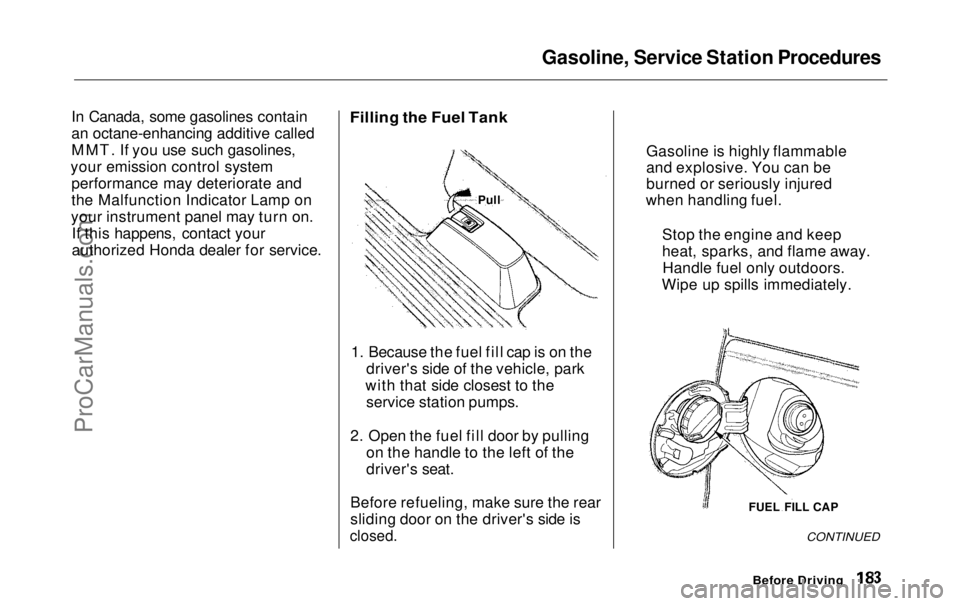
1. Because the fuel fill cap is on the driver's side of the vehicle, park
with that side closest to the service station pumps.
2. Open the fuel fill door by pulling on the handle to the left of the
driver's seat.
Before refueling, make sure the rear
sliding door on the driver's side is
closed.
CONTINUED
Before Driving
FUEL FILL CAP
Gasoline is highly flammable
and explosive. You can be
burned or seriously injured
when handling fuel.
Stop the engine and keep
heat, sparks, and flame away.Handle fuel only outdoors.
Wipe up spills immediately.
PullProCarManuals.comMain Menu Table of Contents s t
Page 185 of 343
Service Station Procedures
3. Remove the fuel fill cap slowly.
You may hear a hissing sound aspressure inside the tank escapes.Place the cap in the holder on the
fuel fill door.
4. Stop filling the tank after the fuel pump automatically clicks off. Donot try to "top off" the tank, leavesome room for the fuel to expand
with temperature changes.
5. Screw the fuel fill cap back on, tighten it until it clicks at least
three times. If you do not properly
tighten the cap, the MalfunctionIndicator Lamp may come on (see
page 303 ).
6. Push the fuel fill door closed until it latches.
Opening the Hood
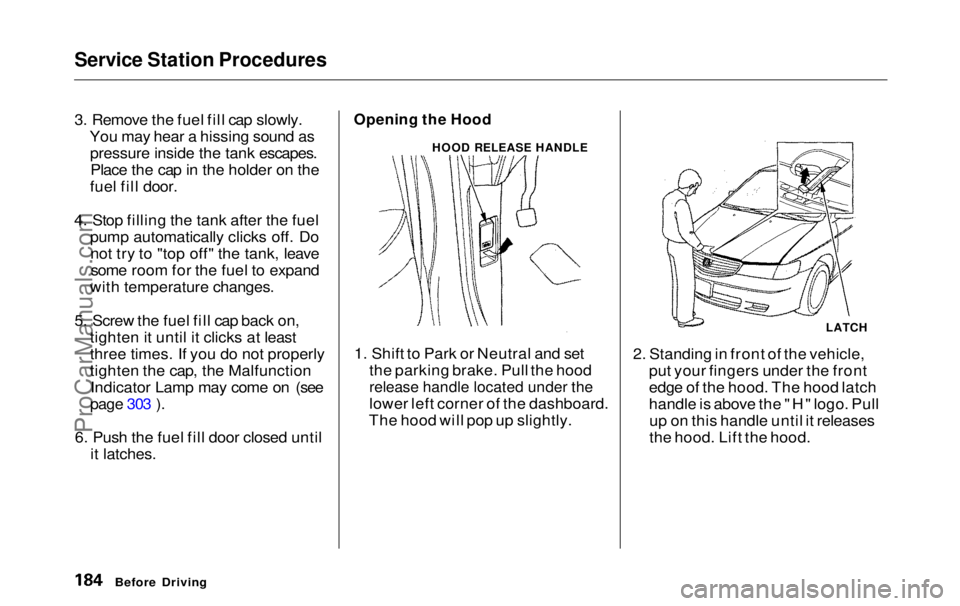
1. Shift to Park or Neutral and set the parking brake. Pull the hood
release handle located under the
lower left corner of the dashboard.
The hood will pop up slightly. 2. Standing in front of the vehicle,
put your fingers under the front
edge of the hood. The hood latch
handle is above the "H" logo. Pullup on this handle until it releases
the hood. Lift the hood.
Before Driving
HOOD RELEASE HANDLE
LATCHProCarManuals.comMain Menu Table of Contents s t
Page 186 of 343
Service Station Procedures
If you can open the hood without
lifting the hood latch handle, or the
hood latch handle moves stiffly or does not spring back as before, the
mechanism should be cleaned and
lubricated (see page 248 ).
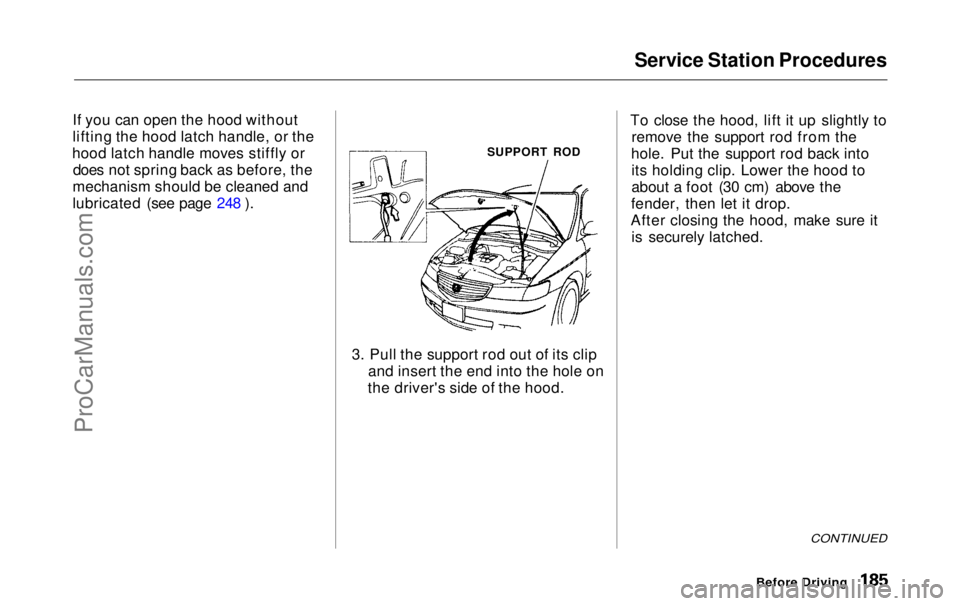
3. Pull the support rod out of its clipand insert the end into the hole on
the driver's side of the hood. To close the hood, lift it up slightly to
remove the support rod from the
hole. Put the support rod back into its holding clip. Lower the hood to
about a foot (30 cm) above the
fender, then let it drop.
After closing the hood, make sure it is securely latched.
CONTINUED
Before Driving
SUPPORT RODProCarManuals.comMain Menu Table of Contents s t
Page 187 of 343
Service Station Procedures
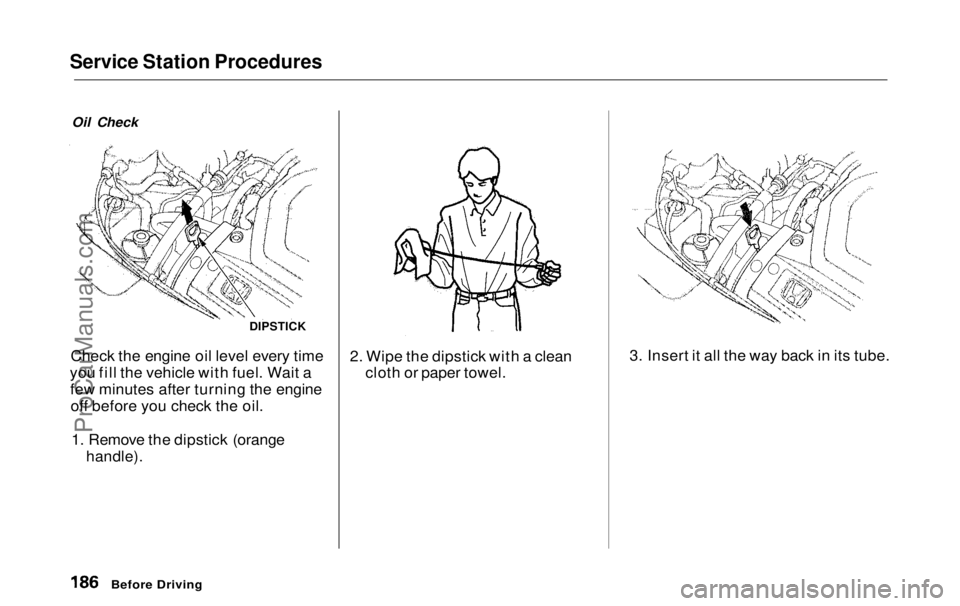
Oil Check
Check the engine oil level every time
you fill the vehicle with fuel. Wait a few minutes after turning the engineoff before you check the oil.
1. Remove the dipstick (orange
handle).
2. Wipe the dipstick with a clean
cloth or paper towel. 3. Insert it all the way back in its tube.
Before Driving
DIPSTICKProCarManuals.comMain Menu Table of Contents s t