Page 152 of 343
Audio System
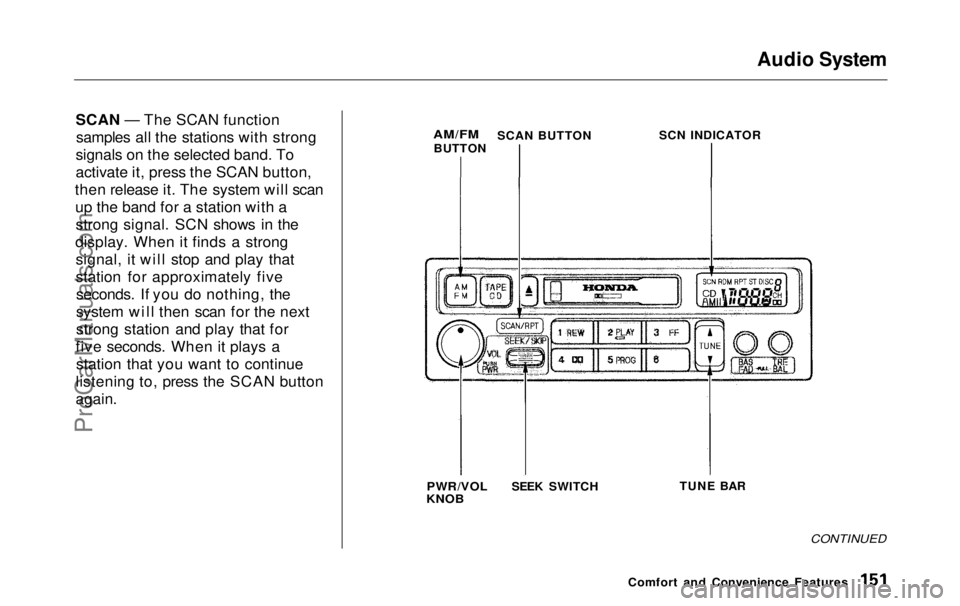
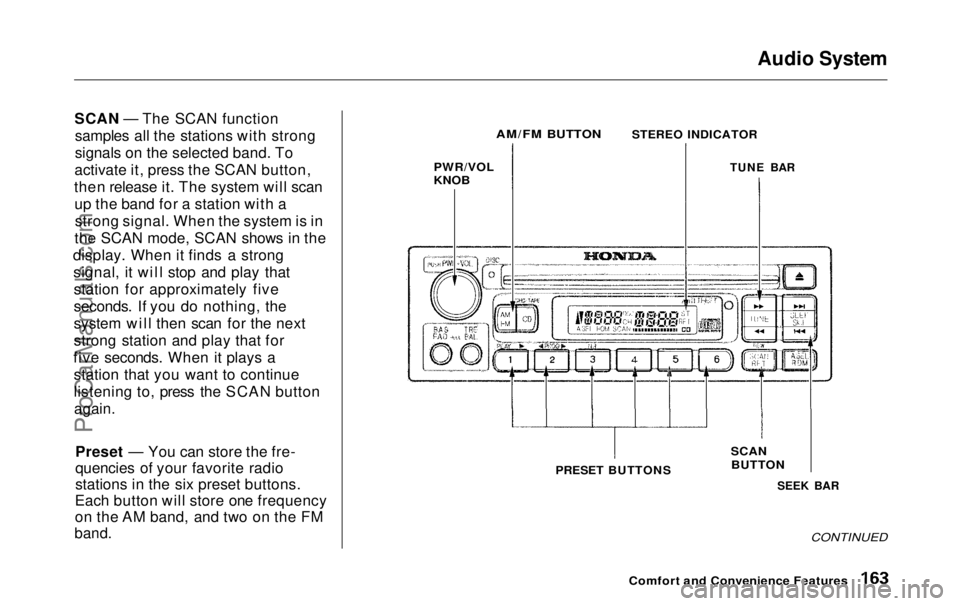
SCAN — The SCAN function samples all the stations with strong
signals on the selected band. To
activate it, press the SCAN button,
then release it. The system will scan up the band for a station with astrong signal. SCN shows in the
display. When it finds a strong signal, it will stop and play that
station for approximately fiveseconds. If you do nothing, the
system will then scan for the next
strong station and play that for
five seconds. When it plays a station that you want to continue
listening to, press the SCAN button
again.
AM/FM
BUTTON SCN INDICATOR
PWR/VOL
KNOB
TUNE BAR
CONTINUED
Comfort and Convenience Features
SCAN BUTTON
SEEK SWITCHProCarManuals.comMain Menu Table of Contents s t
Page 155 of 343
Audio System
Audio System LightingYou can use the instrument panelbrightness control knob to adjust theillumination of the audio system (see
page 67 ). The audio system
illuminates when the parking lightsare on, even if the radio is turned off.
Operating the Cassette Player
Turn the audio system ON. Make sure the tape opening on the cassette
is facing to the right, then insert the
cassette most of the way into the slot.
The system will pull it in the rest of the way, and begin to play.
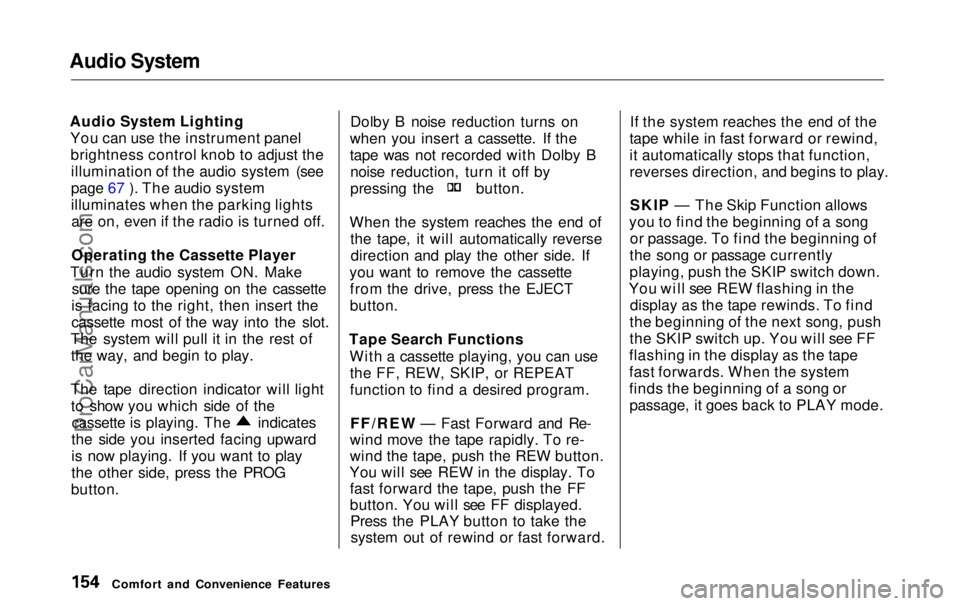
The tape direction indicator will light to show you which side of the cassette is playing. The indicates
the side you inserted facing upward
is now playing. If you want to play
the other side, press the PROG
button. Dolby B noise reduction turns on
when you insert a cassette. If the
tape was not recorded with Dolby B noise reduction, turn it off by pressing the button.
When the system reaches the end of the tape, it will automatically reversedirection and play the other side. If
you want to remove the cassette from the drive, press the EJECT
button.
Tape Search Functions With a cassette playing, you can usethe FF, REW, SKIP, or REPEAT
function to find a desired program.
FF/REW — Fast Forward and Re-
wind move the tape rapidly. To re-
wind the tape, push the REW button.
You will see REW in the display. To fast forward the tape, push the FF
button. You will see FF displayed.Press the PLAY button to take thesystem out of rewind or fast forward. If the system reaches the end of the
tape while in fast forward or rewind,
it automatically stops that function,
reverses direction, and begins to play.
SKIP — The Skip Function allows
you to find the beginning of a song or passage. To find the beginning of
the song or passage currently
playing, push the SKIP switch down.
You will see REW flashing in the display as the tape rewinds. To find
the beginning of the next song, push
the SKIP switch up. You will see FF
flashing in the display as the tape
fast forwards. When the system
finds the beginning of a song or passage, it goes back to PLAY mode.
Comfort and Convenience FeaturesProCarManuals.comMain Menu Table of Contents s t
Page 156 of 343
Audio System
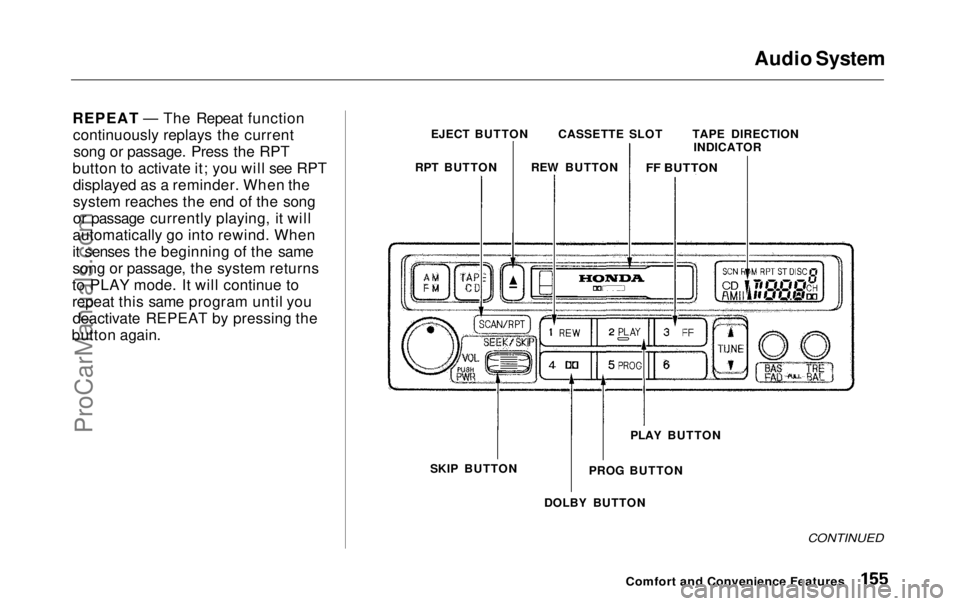
REPEAT — The Repeat function continuously replays the currentsong or passage. Press the RPT
button to activate it; you will see RPT displayed as a reminder. When the
system reaches the end of the song
or passage currently playing, it will
automatically go into rewind. When
it senses the beginning of the same
song or passage, the system returns
to PLAY mode. It will continue to
repeat this same program until you deactivate REPEAT by pressing the
button again. EJECT BUTTON
RPT BUTTON TAPE DIRECTION
INDICATOR
SKIP BUTTON PLAY BUTTON
DOLBY BUTTON
CONTINUED
Comfort and Convenience Features
PROG BUTTON
CASSETTE SLOT
REW BUTTON
FF BUTTONProCarManuals.comMain Menu Table of Contents s t
Page 159 of 343
Audio System
To operate the CD changer or player,the ignition must be in ACCESSORY (I) or ON (II) and the audio system
must be on.
Press the CD button until "CD" appears in the display. The system
will start to play the first track of the first disc in the magazine. Play onlystandard round discs.
When that disc ends, the next disc in the magazine is loaded and played.
After the last disc finishes, the system returns to disc 1.
To select a different disc, press the appropriate preset button (1 — 6). If
you select an empty slot in the magazine, the changer will, after
finding that slot empty, try to load the CD in the next slot. Thiscontinues until it finds a CD to load
and play. You can use the SKIP switch to
select tracks within a disc. If you
push and release the SKIP switch, the system will move to the
beginning of a track. Push the switch up to move to the beginning of thenext track, and push the switch
down to move to the beginning of
the current track.
If you push and hold the SKIP switch,
you will hear a beep and the system
will continue to move across tracks. Release the switch when you think it
has reached the desired place on the
disc.
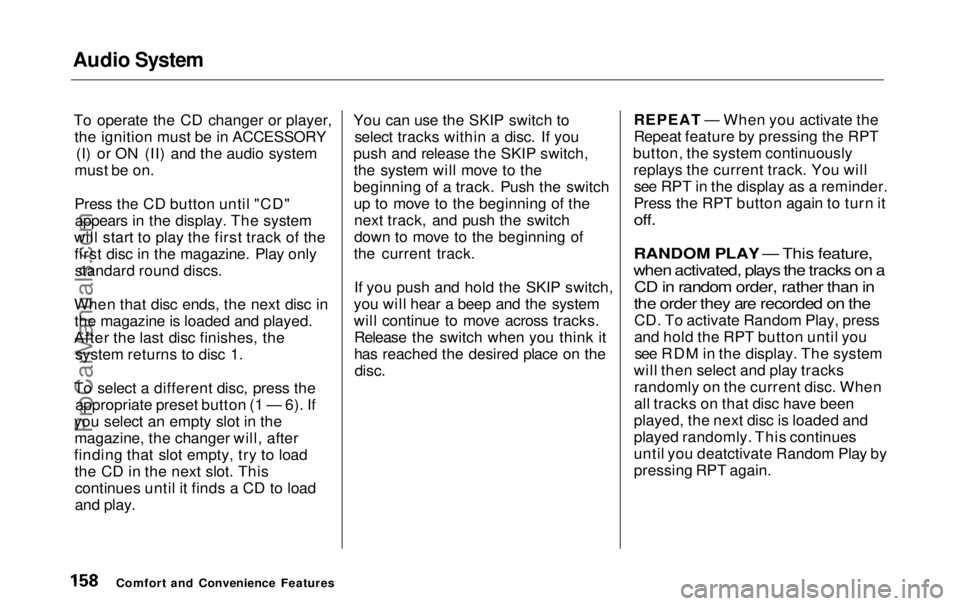
REPEAT — When you activate the
Repeat feature by pressing the RPT
button, the system continuously replays the current track. You willsee RPT in the display as a reminder.
Press the RPT button again to turn it
off.
RANDOM PLAY — This feature,
when activated, plays the tracks on a CD in random order, rather than in
the order they are recorded on the
CD. To activate Random Play, press
and hold the RPT button until yousee RDM in the display. The system
will then select and play tracks randomly on the current disc. When
all tracks on that disc have been
played, the next disc is loaded and
played randomly. This continues
until you deatctivate Random Play by
pressing RPT again.
Comfort and Convenience FeaturesProCarManuals.comMain Menu Table of Contents s t
Page 160 of 343
Audio System
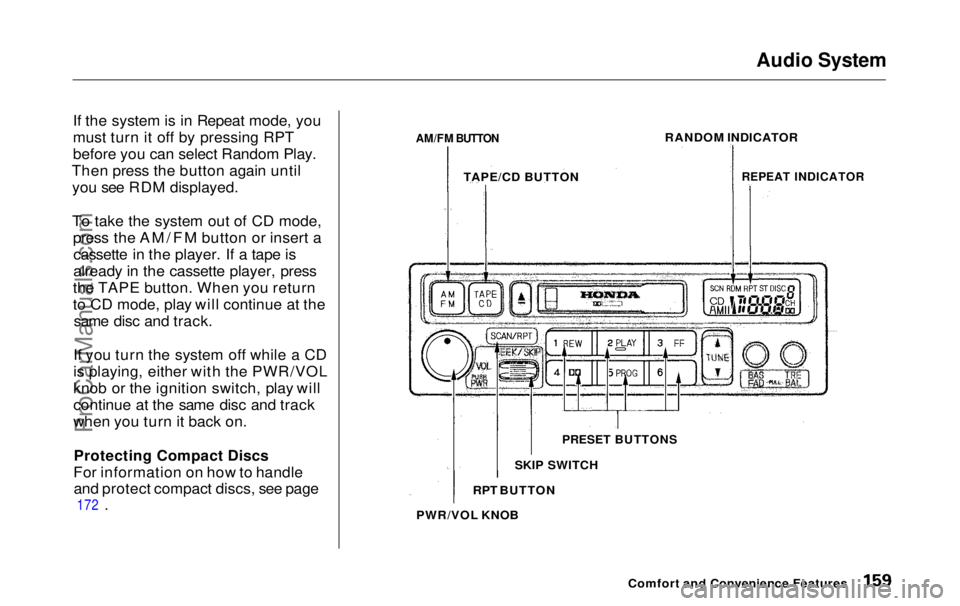
If the system is in Repeat mode, you
must turn it off by pressing RPT
before you can select Random Play.
Then press the button again until you see RDM displayed.
To take the system out of CD mode, press the AM/FM button or insert acassette in the player. If a tape is
already in the cassette player, press
the TAPE button. When you return
to CD mode, play will continue at the same disc and track.
If you turn the system off while a CD
is playing, either with the PWR/VOL
knob or the ignition switch, play will
continue at the same disc and track
when you turn it back on.
Protecting Compact Discs
For information on how to handle and protect compact discs, see page
172
.
AM/FM BUTTON
RANDOM INDICATOR
REPEAT INDICATOR
Comfort and Convenience Features
PRESET BUTTONS
SKIP SWITCH
RPT BUTTON
PWR/VOL KNOB TAPE/CD BUTTONProCarManuals.comMain Menu Table of Contents s t
Page 161 of 343
Audio System
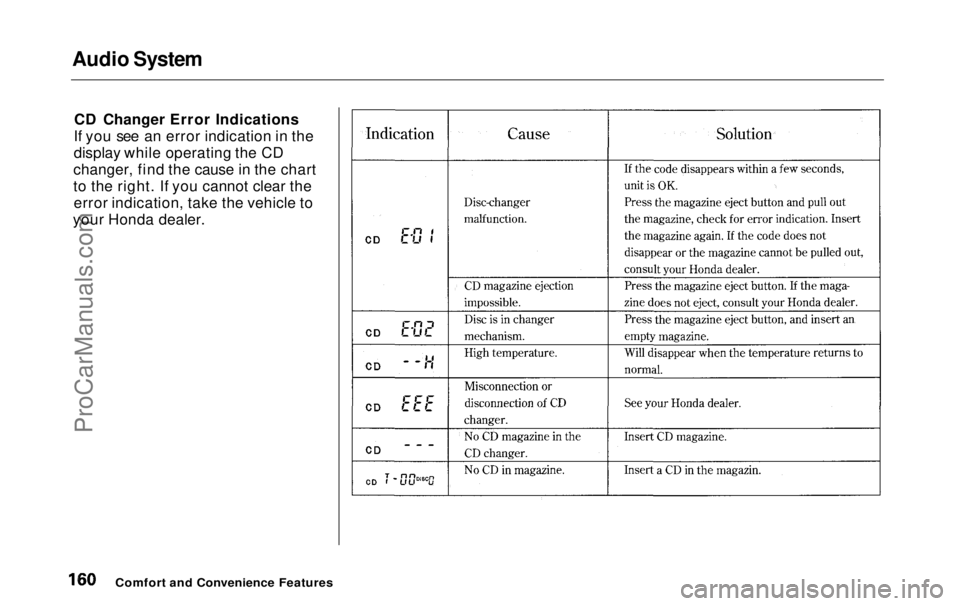
CD Changer Error Indications
If you see an error indication in the
display while operating the CD
changer, find the cause in the chart
to the right. If you cannot clear the error indication, take the vehicle to
your Honda dealer.
Comfort and Convenience FeaturesProCarManuals.comMain Menu Table of Contents s t
Page 163 of 343

Audio System
Operating the Radio
The ignition switch must be in
ACCESSORY (I) or ON (II) to operate the audio system. Turn thesystem on by pushing the PWR/
VOL knob. Adjust the volume by turning the same knob.
The band and frequency that the radio was last tuned to is displayed.
To change bands, press the AM/FM button. On the FM band, ST will bedisplayed if the station is broadcast-
ing in stereo. Stereo reproduction on
AM is not available.
You can use any of four methods to find radio stations on the selected band: TUNE, SEEK, SCAN or thePreset buttons. TUNE — Use the TUNE bar to tune
the radio to a desired frequency. Press the side of the bar to tune
to a higher frequency, and the
side to tune to a lower
frequency. The frequency numbers
will start to change rapidly. Release the bar when the display reaches thedesired frequency. To change the
frequency in small increments, press and release the TUNE bar quickly. SEEK — The SEEK function
searches the band for a station with
a strong signal. To activate it, press the SEEK bar on either the or
side, then release it.
Depending on which side you press,
the system scans upward or down-
ward from the current frequency. It stops when it finds a station with a
strong signal.
Comfort and Convenience FeaturesProCarManuals.comMain Menu Table of Contents s t
Page 164 of 343
Audio System
SCAN — The SCAN function samples all the stations with strong
signals on the selected band. To
activate it, press the SCAN button,
then release it. The system will scan up the band for a station with astrong signal. When the system is in
the SCAN mode, SCAN shows in the
display. When it finds a strong signal, it will stop and play thatstation for approximately five
seconds. If you do nothing, the
system will then scan for the next
strong station and play that for
five seconds. When it plays a station that you want to continue
listening to, press the SCAN button
again.
Preset — You can store the fre-
quencies of your favorite radio
stations in the six preset buttons.
Each button will store one frequency
on the AM band, and two on the FM
band.
PWR/VOL
KNOB
SEEK BAR
CONTINUED
Comfort and Convenience Features
SCAN
BUTTON
PRESET BUTTONS
AM/FM BUTTON
STEREO INDICATOR
TUNE BARProCarManuals.comMain Menu Table of Contents s t