1999 DODGE NEON instrument cluster
[x] Cancel search: instrument clusterPage 88 of 1200
boosters differ at the interface to the master cylinder.
If the power brake booster requires replacement be
sure it is replaced with the correct part.
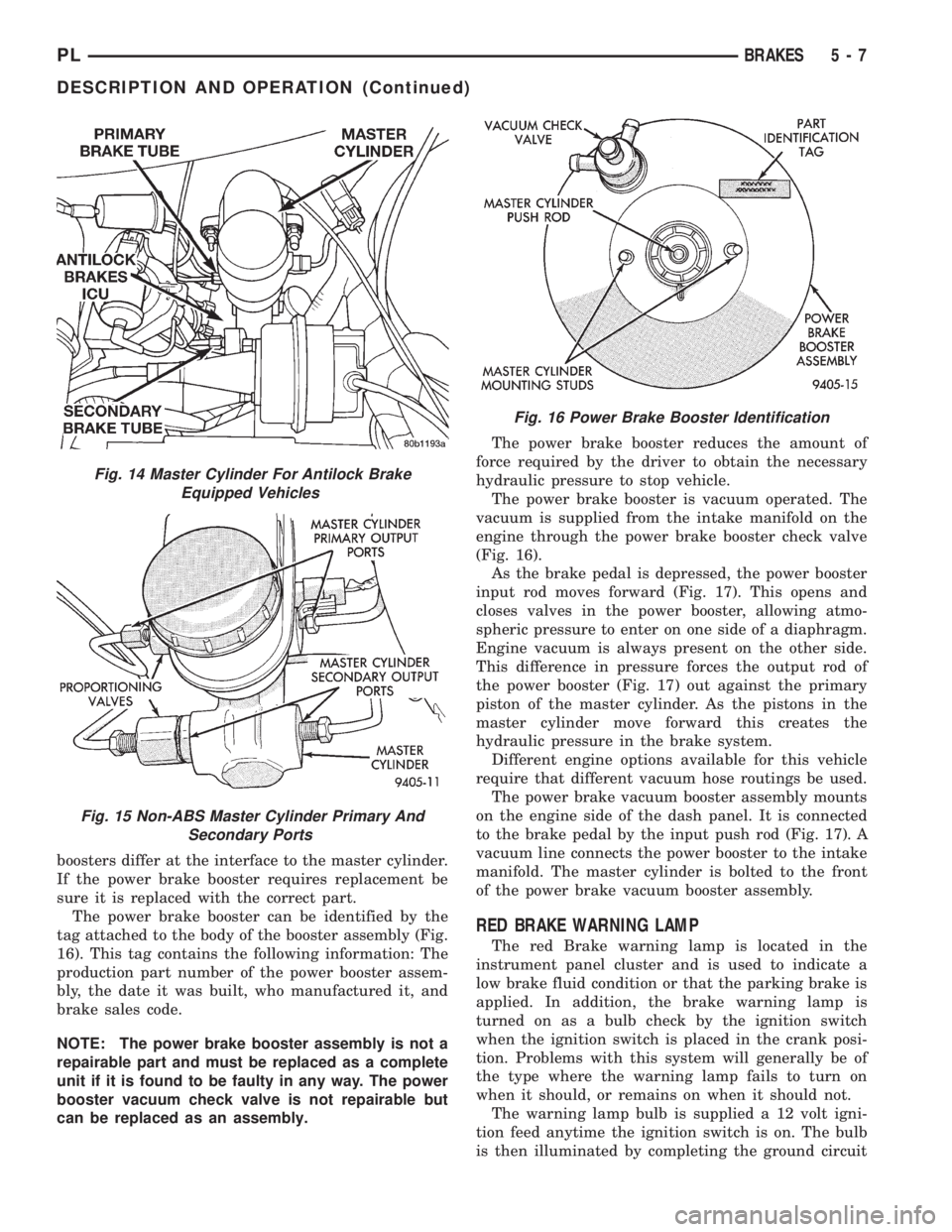
The power brake booster can be identified by the
tag attached to the body of the booster assembly (Fig.
16). This tag contains the following information: The
production part number of the power booster assem-
bly, the date it was built, who manufactured it, and
brake sales code.
NOTE: The power brake booster assembly is not a
repairable part and must be replaced as a complete
unit if it is found to be faulty in any way. The power
booster vacuum check valve is not repairable but
can be replaced as an assembly.The power brake booster reduces the amount of
force required by the driver to obtain the necessary
hydraulic pressure to stop vehicle.
The power brake booster is vacuum operated. The
vacuum is supplied from the intake manifold on the
engine through the power brake booster check valve
(Fig. 16).
As the brake pedal is depressed, the power booster
input rod moves forward (Fig. 17). This opens and
closes valves in the power booster, allowing atmo-
spheric pressure to enter on one side of a diaphragm.
Engine vacuum is always present on the other side.
This difference in pressure forces the output rod of
the power booster (Fig. 17) out against the primary
piston of the master cylinder. As the pistons in the
master cylinder move forward this creates the
hydraulic pressure in the brake system.
Different engine options available for this vehicle
require that different vacuum hose routings be used.
The power brake vacuum booster assembly mounts
on the engine side of the dash panel. It is connected
to the brake pedal by the input push rod (Fig. 17). A
vacuum line connects the power booster to the intake
manifold. The master cylinder is bolted to the front
of the power brake vacuum booster assembly.
RED BRAKE WARNING LAMP
The red Brake warning lamp is located in the
instrument panel cluster and is used to indicate a
low brake fluid condition or that the parking brake is
applied. In addition, the brake warning lamp is
turned on as a bulb check by the ignition switch
when the ignition switch is placed in the crank posi-
tion. Problems with this system will generally be of
the type where the warning lamp fails to turn on
when it should, or remains on when it should not.
The warning lamp bulb is supplied a 12 volt igni-
tion feed anytime the ignition switch is on. The bulb
is then illuminated by completing the ground circuit
Fig. 14 Master Cylinder For Antilock Brake
Equipped Vehicles
Fig. 15 Non-ABS Master Cylinder Primary And
Secondary Ports
Fig. 16 Power Brake Booster Identification
PLBRAKES 5 - 7
DESCRIPTION AND OPERATION (Continued)
Page 270 of 1200
INSTRUMENT PANEL AND SYSTEMS
CONTENTS
page page
GENERAL INFORMATION
INTRODUCTION......................... 1
DESCRIPTION AND OPERATION
DOME LAMP............................ 1
ELECTRONIC DIGITAL CLOCK.............. 1
INSTRUMENT CLUSTER................... 2
WARNING AND INDICATOR LAMPS......... 2
DIAGNOSIS AND TESTING
AIRBAG WARNING SYSTEM............... 2
BRAKE SYSTEM WARNING LAMP TEST...... 2
FOG LAMP SWITCH TEST................. 2
FUEL TANK SENDING UNIT TEST........... 3
HEADLAMP SWITCH TEST................. 3
HEATER A/C BLOWER SWITCH TEST........ 3
HEATER BLOWER SWITCH TEST............ 3
INDIVIDUAL GAUGE INOPERATIVE.......... 4
INSTRUMENT PANEL AND COMPONENTS.... 4
LOW OIL PRESSURE WARNING LAMP TEST . . 4
MULTIPLE GAUGE INOPERATIVE TEST....... 4
SEAT BELT REMINDER SYSTEM TEST....... 6
SENDING UNIT......................... 6
SERVICE ENGINE SOON INDICATOR......... 6
VEHICLE SPEED SENSOR TEST............. 6
REMOVAL AND INSTALLATION
ASH RECEIVER RETAINER AND LAMP....... 6
CENTER BEZEL.......................... 6
CIGAR LIGHTER RECEPTACLE.............. 6
CLUSTER LAMP......................... 7
CLUSTER PRINTED CIRCUIT BOARD........ 7CLUSTER.............................. 7
DOME LENS/LAMP....................... 8
FLOOR CONSOLE........................ 8
GAUGE................................ 8
GLOVE BOX DOOR/BIN................... 8
GLOVE BOX SWITCH/LAMP................ 9
HEADLAMP SWITCH..................... 9
HEATER A/C CONTROL BLOWER SWITCH . . . 10
HEATER A/C CONTROL LAMP............ 10
HEATER A/C CONTROL................... 9
HEATER CONTROL BLOWER SWITCH....... 10
IGNITION KEY LAMP.................... 10
INSTRUMENT PANEL.................... 10
LEFT TRIM PANEL...................... 10
ODOMETER............................ 10
RADIO................................ 12
REAR WINDOW DEFOGGER AND/OR FOG
LAMP SWITCH....................... 12
RIGHT TRIM PANEL..................... 12
SHIFTER KNOB......................... 13
STEERING COLUMN COVER LINER......... 13
STEERING COLUMN COVER.............. 13
STEERING COLUMN SHROUDS............ 13
TOP COVER AND CLUSTER BEZEL
REMOVAL........................... 14
TRANSMISSION RANGE INDICATOR LAMP . . 14
TRUNK LAMP/LENS..................... 14
VEHICLE SPEED SENSOR................ 14
GENERAL INFORMATION
INTRODUCTION
The purpose of the dash gauges and indicator
lamps is to keep the driver informed about the oper-
ating condition of the vehicle. If an abnormal condi-
tion occurs, the driver is informed by indicator lamp.
The driver can seek service before damage occurs.
Indicator lamps use ON/OFF switch functions for
operation, while gauges use a sending unit or sensor.
DESCRIPTION AND OPERATION
DOME LAMP
The Dome Lamp operates when a door is open or
when the headlamp switch is placed in courtesy posi-
tion.
ELECTRONIC DIGITAL CLOCK
The electronic digital clock is in the radio. The
clock and radio each use the display panel built into
the radio. A digital readout indicates the time in
hours and minutes whenever the ignition switch is in
the ON or ACC position.
PLINSTRUMENT PANEL AND SYSTEMS 8E - 1
Page 271 of 1200
When the ignition switch is in the OFF position, or
when the radio frequency is being displayed, time
keeping is accurately maintained.
The procedure for setting the clock varies slightly
with each radio. The correct procedure is described in
the individual radio operating instructions. Refer to
the Owner's Manual supplied with the vehicle.
INSTRUMENT CLUSTER
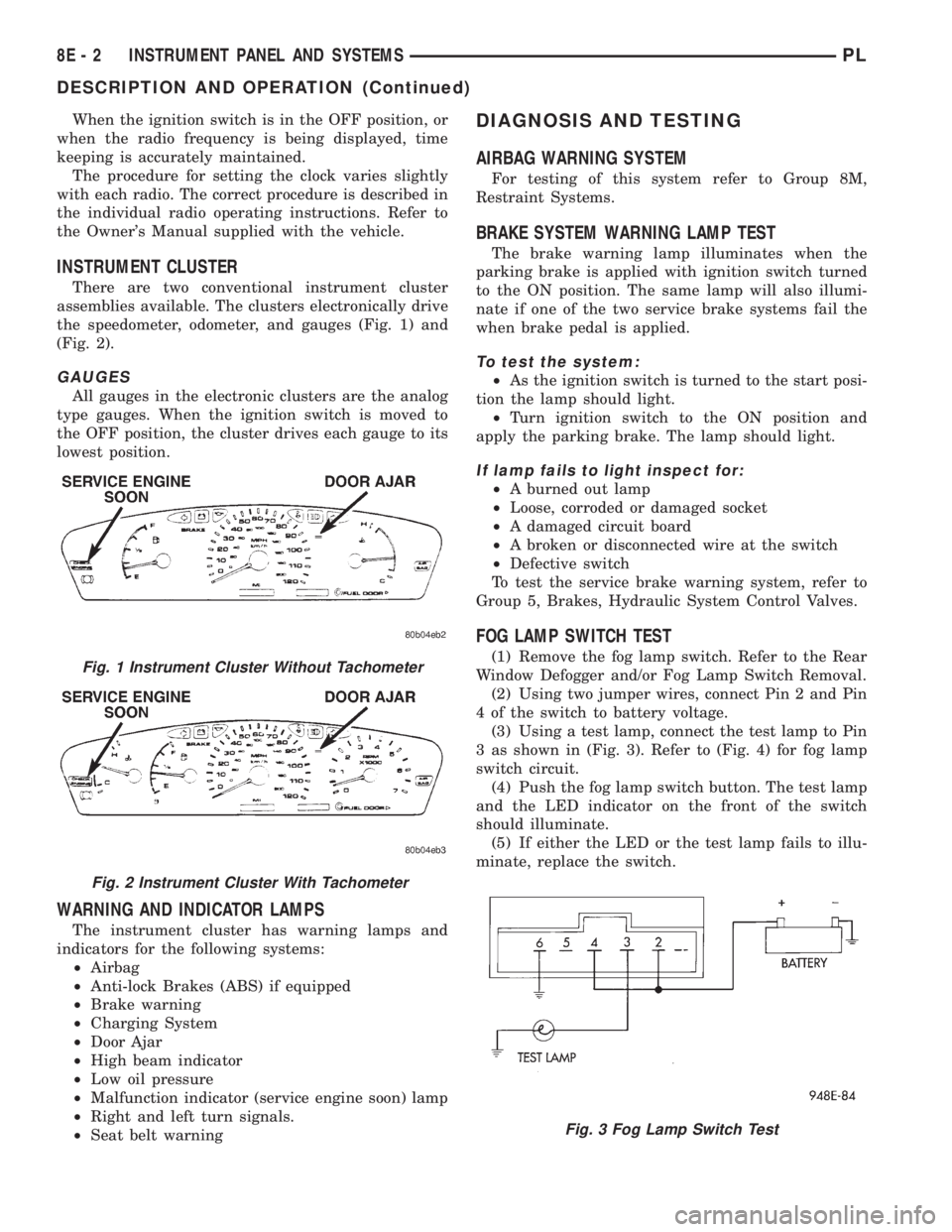
There are two conventional instrument cluster
assemblies available. The clusters electronically drive
the speedometer, odometer, and gauges (Fig. 1) and
(Fig. 2).
GAUGES
All gauges in the electronic clusters are the analog
type gauges. When the ignition switch is moved to
the OFF position, the cluster drives each gauge to its
lowest position.
WARNING AND INDICATOR LAMPS
The instrument cluster has warning lamps and
indicators for the following systems:
²Airbag
²Anti-lock Brakes (ABS) if equipped
²Brake warning
²Charging System
²Door Ajar
²High beam indicator
²Low oil pressure
²Malfunction indicator (service engine soon) lamp
²Right and left turn signals.
²Seat belt warning
DIAGNOSIS AND TESTING
AIRBAG WARNING SYSTEM
For testing of this system refer to Group 8M,
Restraint Systems.
BRAKE SYSTEM WARNING LAMP TEST
The brake warning lamp illuminates when the
parking brake is applied with ignition switch turned
to the ON position. The same lamp will also illumi-
nate if one of the two service brake systems fail the
when brake pedal is applied.
To test the system:
²As the ignition switch is turned to the start posi-
tion the lamp should light.
²Turn ignition switch to the ON position and
apply the parking brake. The lamp should light.
If lamp fails to light inspect for:
²A burned out lamp
²Loose, corroded or damaged socket
²A damaged circuit board
²A broken or disconnected wire at the switch
²Defective switch
To test the service brake warning system, refer to
Group 5, Brakes, Hydraulic System Control Valves.
FOG LAMP SWITCH TEST
(1) Remove the fog lamp switch. Refer to the Rear
Window Defogger and/or Fog Lamp Switch Removal.
(2) Using two jumper wires, connect Pin 2 and Pin
4 of the switch to battery voltage.
(3) Using a test lamp, connect the test lamp to Pin
3 as shown in (Fig. 3). Refer to (Fig. 4) for fog lamp
switch circuit.
(4) Push the fog lamp switch button. The test lamp
and the LED indicator on the front of the switch
should illuminate.
(5) If either the LED or the test lamp fails to illu-
minate, replace the switch.Fig. 1 Instrument Cluster Without Tachometer
Fig. 2 Instrument Cluster With Tachometer
Fig. 3 Fog Lamp Switch Test
8E - 2 INSTRUMENT PANEL AND SYSTEMSPL
DESCRIPTION AND OPERATION (Continued)
Page 273 of 1200
(2) Use a ohmmeter, and check continuity between
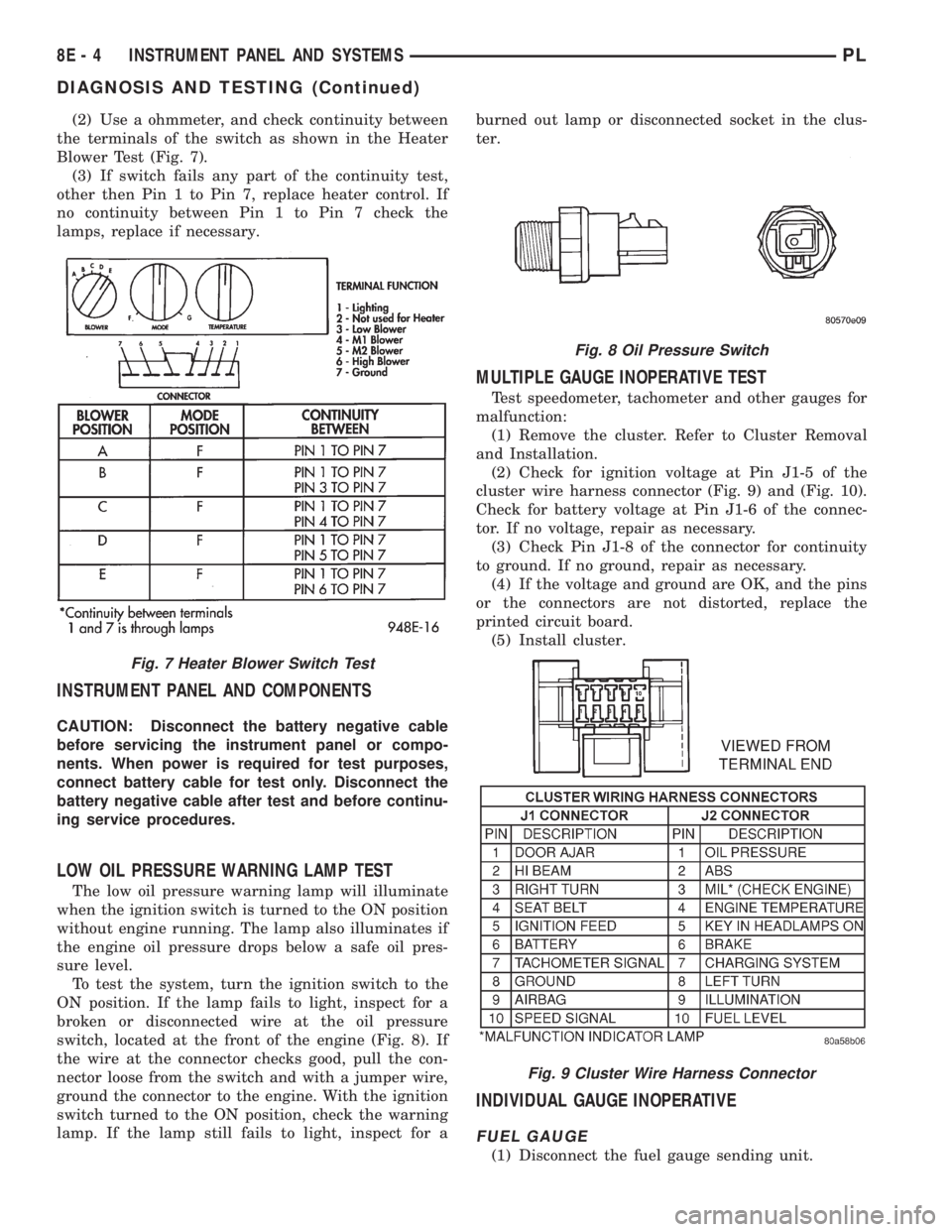
the terminals of the switch as shown in the Heater
Blower Test (Fig. 7).
(3) If switch fails any part of the continuity test,
other then Pin 1 to Pin 7, replace heater control. If
no continuity between Pin 1 to Pin 7 check the
lamps, replace if necessary.
INSTRUMENT PANEL AND COMPONENTS
CAUTION: Disconnect the battery negative cable
before servicing the instrument panel or compo-
nents. When power is required for test purposes,
connect battery cable for test only. Disconnect the
battery negative cable after test and before continu-
ing service procedures.
LOW OIL PRESSURE WARNING LAMP TEST
The low oil pressure warning lamp will illuminate
when the ignition switch is turned to the ON position
without engine running. The lamp also illuminates if
the engine oil pressure drops below a safe oil pres-
sure level.
To test the system, turn the ignition switch to the
ON position. If the lamp fails to light, inspect for a
broken or disconnected wire at the oil pressure
switch, located at the front of the engine (Fig. 8). If
the wire at the connector checks good, pull the con-
nector loose from the switch and with a jumper wire,
ground the connector to the engine. With the ignition
switch turned to the ON position, check the warning
lamp. If the lamp still fails to light, inspect for aburned out lamp or disconnected socket in the clus-
ter.
MULTIPLE GAUGE INOPERATIVE TEST
Test speedometer, tachometer and other gauges for
malfunction:
(1) Remove the cluster. Refer to Cluster Removal
and Installation.
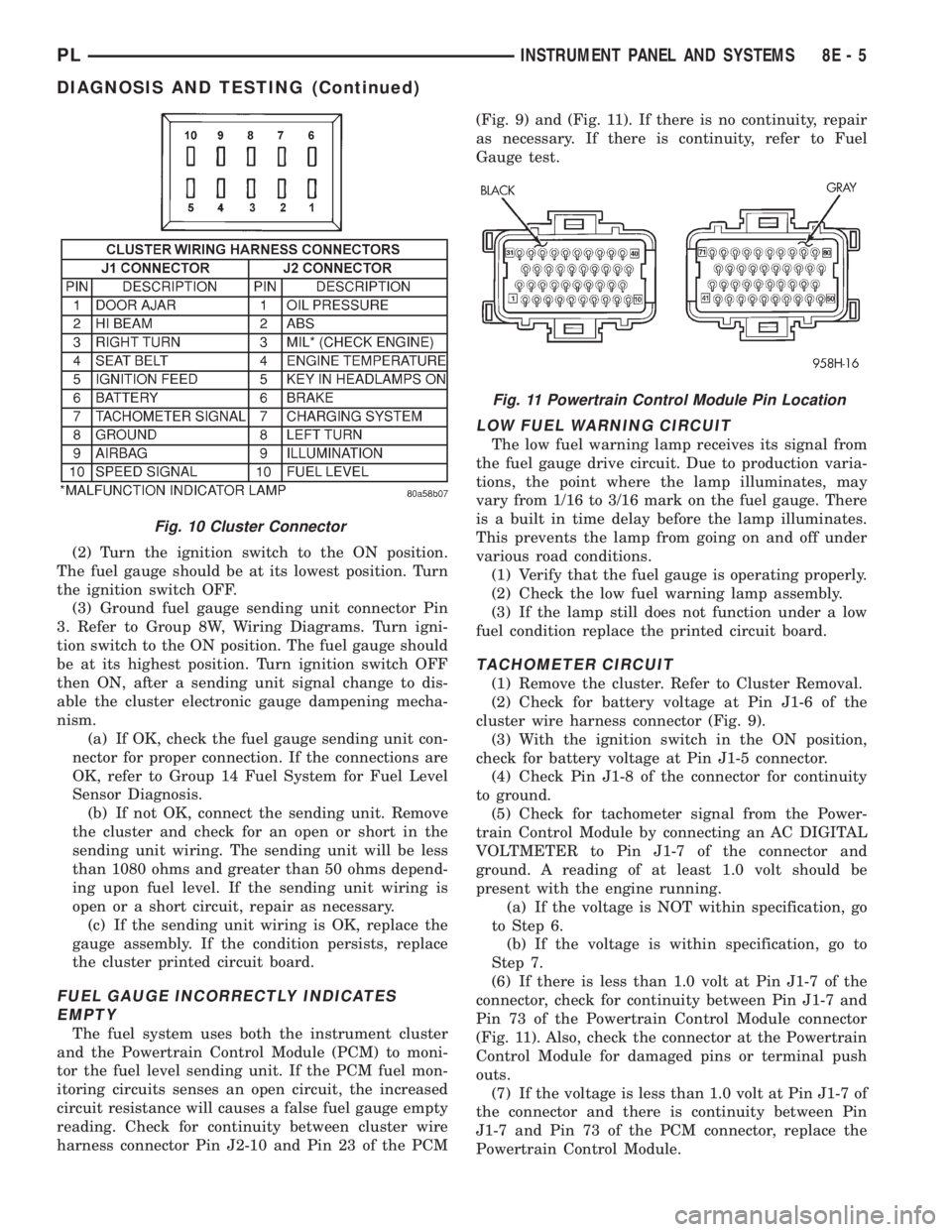
(2) Check for ignition voltage at Pin J1-5 of the
cluster wire harness connector (Fig. 9) and (Fig. 10).
Check for battery voltage at Pin J1-6 of the connec-
tor. If no voltage, repair as necessary.
(3) Check Pin J1-8 of the connector for continuity
to ground. If no ground, repair as necessary.
(4) If the voltage and ground are OK, and the pins
or the connectors are not distorted, replace the
printed circuit board.
(5) Install cluster.
INDIVIDUAL GAUGE INOPERATIVE
FUEL GAUGE
(1) Disconnect the fuel gauge sending unit.
Fig. 7 Heater Blower Switch Test
Fig. 8 Oil Pressure Switch
Fig. 9 Cluster Wire Harness Connector
8E - 4 INSTRUMENT PANEL AND SYSTEMSPL
DIAGNOSIS AND TESTING (Continued)
Page 274 of 1200
(2) Turn the ignition switch to the ON position.
The fuel gauge should be at its lowest position. Turn
the ignition switch OFF.
(3) Ground fuel gauge sending unit connector Pin
3. Refer to Group 8W, Wiring Diagrams. Turn igni-
tion switch to the ON position. The fuel gauge should
be at its highest position. Turn ignition switch OFF
then ON, after a sending unit signal change to dis-
able the cluster electronic gauge dampening mecha-
nism.
(a) If OK, check the fuel gauge sending unit con-
nector for proper connection. If the connections are
OK, refer to Group 14 Fuel System for Fuel Level
Sensor Diagnosis.
(b) If not OK, connect the sending unit. Remove
the cluster and check for an open or short in the
sending unit wiring. The sending unit will be less
than 1080 ohms and greater than 50 ohms depend-
ing upon fuel level. If the sending unit wiring is
open or a short circuit, repair as necessary.
(c) If the sending unit wiring is OK, replace the
gauge assembly. If the condition persists, replace
the cluster printed circuit board.
FUEL GAUGE INCORRECTLY INDICATES
EMPTY
The fuel system uses both the instrument cluster
and the Powertrain Control Module (PCM) to moni-
tor the fuel level sending unit. If the PCM fuel mon-
itoring circuits senses an open circuit, the increased
circuit resistance will causes a false fuel gauge empty
reading. Check for continuity between cluster wire
harness connector Pin J2-10 and Pin 23 of the PCM(Fig. 9) and (Fig. 11). If there is no continuity, repair
as necessary. If there is continuity, refer to Fuel
Gauge test.
LOW FUEL WARNING CIRCUIT
The low fuel warning lamp receives its signal from
the fuel gauge drive circuit. Due to production varia-
tions, the point where the lamp illuminates, may
vary from 1/16 to 3/16 mark on the fuel gauge. There
is a built in time delay before the lamp illuminates.
This prevents the lamp from going on and off under
various road conditions.
(1) Verify that the fuel gauge is operating properly.
(2) Check the low fuel warning lamp assembly.
(3) If the lamp still does not function under a low
fuel condition replace the printed circuit board.
TACHOMETER CIRCUIT
(1) Remove the cluster. Refer to Cluster Removal.
(2) Check for battery voltage at Pin J1-6 of the
cluster wire harness connector (Fig. 9).
(3) With the ignition switch in the ON position,
check for battery voltage at Pin J1-5 connector.
(4) Check Pin J1-8 of the connector for continuity
to ground.
(5) Check for tachometer signal from the Power-
train Control Module by connecting an AC DIGITAL
VOLTMETER to Pin J1-7 of the connector and
ground. A reading of at least 1.0 volt should be
present with the engine running.
(a) If the voltage is NOT within specification, go
to Step 6.
(b) If the voltage is within specification, go to
Step 7.
(6) If there is less than 1.0 volt at Pin J1-7 of the
connector, check for continuity between Pin J1-7 and
Pin 73 of the Powertrain Control Module connector
(Fig. 11). Also, check the connector at the Powertrain
Control Module for damaged pins or terminal push
outs.
(7) If the voltage is less than 1.0 volt at Pin J1-7 of
the connector and there is continuity between Pin
J1-7 and Pin 73 of the PCM connector, replace the
Powertrain Control Module.
Fig. 10 Cluster Connector
Fig. 11 Powertrain Control Module Pin Location
PLINSTRUMENT PANEL AND SYSTEMS 8E - 5
DIAGNOSIS AND TESTING (Continued)
Page 275 of 1200

(8) If all tests performed test good, replace the dial
and gauge assembly.
(9) If the tachometer continues to be inoperative,
replace the print circuit board.
TEMPERATURE GAUGE
(1) Disconnect the coolant temperature sensor
(Fig. 12).
(2) Turn ignition switch ON. The temperature
gauge should be at its lowest position. Turn ignition
switch OFF.
(3) Ground temperature gauge sending unit con-
nector Pin 3. Refer to Group 8W, wiring Diagrams.
Turn ignition switch ON. The temperature gauge
should be at its highest position. After the seat belt
lamp goes out, the cluster should chime for about
eight seconds.
(a) If OK, check temperature sending unit con-
nector for proper connection. If connections are OK,
replace the sending unit.
(b) If not OK, and the high temperature chime
sounds but the gauge shows cold, replace the gauge
assembly. If gauge is still not working, replace the
printed circuit board.
SPEEDOMETER SYSTEM
The vehicle is equipped with a electronically driven
speedometer and odometer assemblies. A signal is
sent from a transmission-mounted vehicle speed sen-
sor to the speedometer circuitry through the wiring
harness.
SEAT BELT REMINDER SYSTEM TEST
For testing of this system refer to Group 8U,
Chime Warning/Reminder Systems.
SENDING UNIT
When a problem occurs with a cluster gauge check
for a defective sending unit or wiring. Do this before
disassembling the cluster.(1) Sending units and wiring can be checked by
grounding the connector leads at the sending unit in
the vehicle.
(2) With the ignition in the ON position, a
grounded input will cause the fuel or temperature
gauge to read at or above maximum.
SERVICE ENGINE SOON INDICATOR
Refer to Group 25, Emission Control Systems for
procedures.
VEHICLE SPEED SENSOR TEST
To test the vehicle speed sensor and related compo-
nents use a scan tool (DRB), and refer to the appro-
priate Powertrain Diagnostics Test Procedure
Manual.
REMOVAL AND INSTALLATION
ASH RECEIVER RETAINER AND LAMP
REMOVAL
(1) Open up and remove the ash receiver recepta-
cle.
(2) Remove the center bezel.
(3) Remove the two ash receiver retainer attaching
screws from the upper-rearward face and remove
retainer.
(4) For lamp replacement, remove the clamp and
lamp hood from the top of the retainer. Remove the
wiring clip at the forward edge of the retainer and
remove the lamp socket from the hood and replace
lamp.
INSTALLATION
For installation reverse the above procedures.
When installing the retainer ensure that the forward
tabs are inserted properly into the slots in the instru-
ment panel.
CENTER BEZEL
REMOVAL
(1) Open the ash receiver receptacle.
(2) Grasp the bezel and pull rearward disengaging
the clips.
INSTALLATION
For installation, reverse the above procedures.
CIGAR LIGHTER RECEPTACLE
REMOVAL
(1) Remove the cigar lighter element.
(2) Reach underneath the instrument panel
through the bottom access hole and disconnect the
cigar lighter receptacle wiring connectors.
Fig. 12 Engine Coolant Temperature Sensor
8E - 6 INSTRUMENT PANEL AND SYSTEMSPL
DIAGNOSIS AND TESTING (Continued)
Page 276 of 1200
(3) Press the cigar lighter receptacle from the
mounting ring by pushing it rearward from the back
side of the panel. Considerable force may be required
to disengage the receptacle. Remove the mounting
ring from the panel and discard. A new ring should
be used upon reinstallation to assure retention.
INSTALLATION
For installation, reverse the above procedures.
CLUSTER
CAUTION: Cluster MUST be stored in a face up posi-
tion or damage will occur to the gauge operation.
REMOVAL
(1) Disconnect the battery to ensure no DTCs are
generated.
(2) Remove the instrument panel top cover and
cluster bezel.
(3) Remove the four screws attaching cluster hous-
ing to the base panel.
(4) Pull the cluster rearward to disconnect from
base panel.
(5) Remove the cluster assembly.
INSTALLATION
For installation, reverse the above procedures.
CLUSTER LAMP
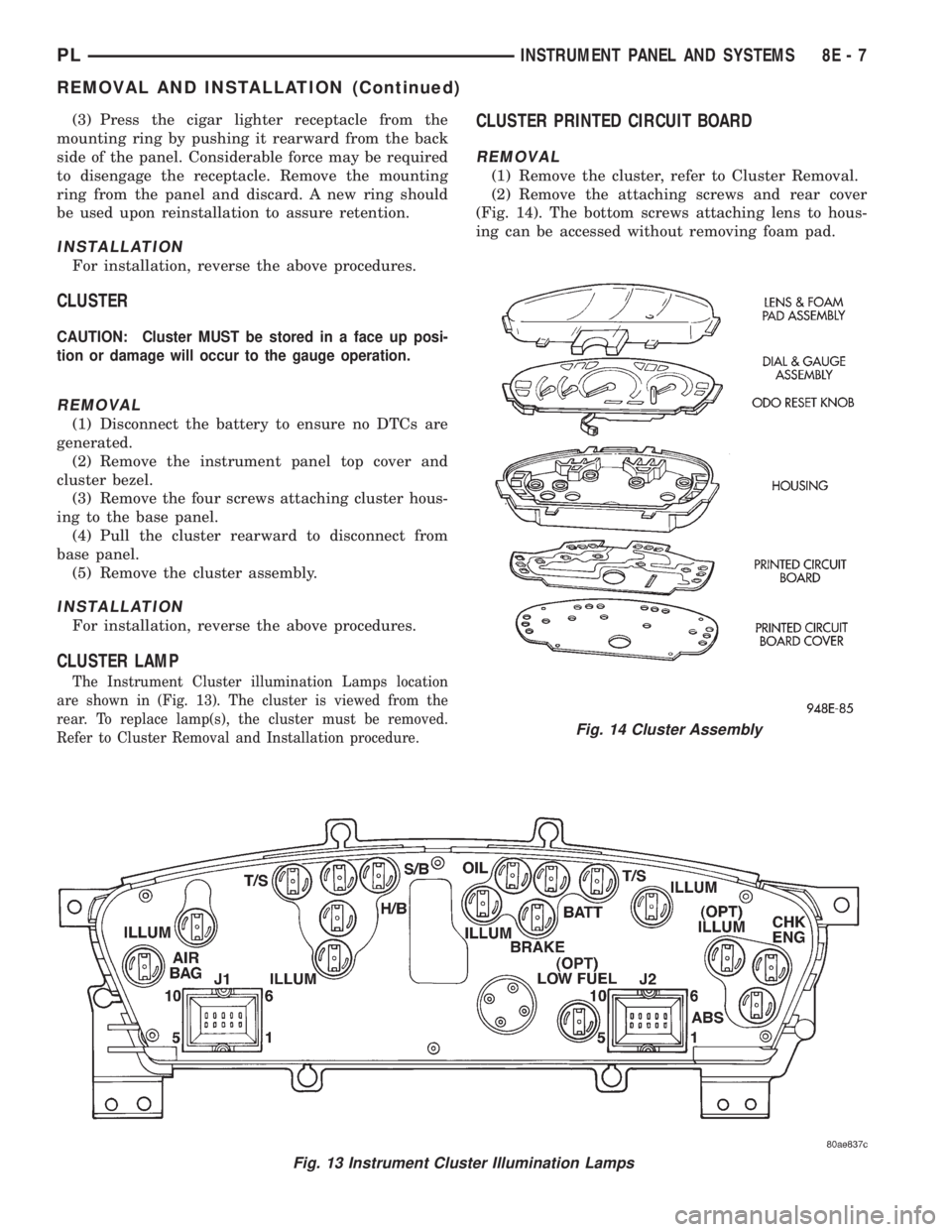
The Instrument Cluster illumination Lamps location
are shown in (Fig. 13). The cluster is viewed from the
rear. To replace lamp(s), the cluster must be removed.
Refer to Cluster Removal and Installation procedure.
CLUSTER PRINTED CIRCUIT BOARD
REMOVAL
(1) Remove the cluster, refer to Cluster Removal.
(2) Remove the attaching screws and rear cover
(Fig. 14). The bottom screws attaching lens to hous-
ing can be accessed without removing foam pad.
Fig. 13 Instrument Cluster Illumination Lamps
Fig. 14 Cluster Assembly
PLINSTRUMENT PANEL AND SYSTEMS 8E - 7
REMOVAL AND INSTALLATION (Continued)
Page 277 of 1200
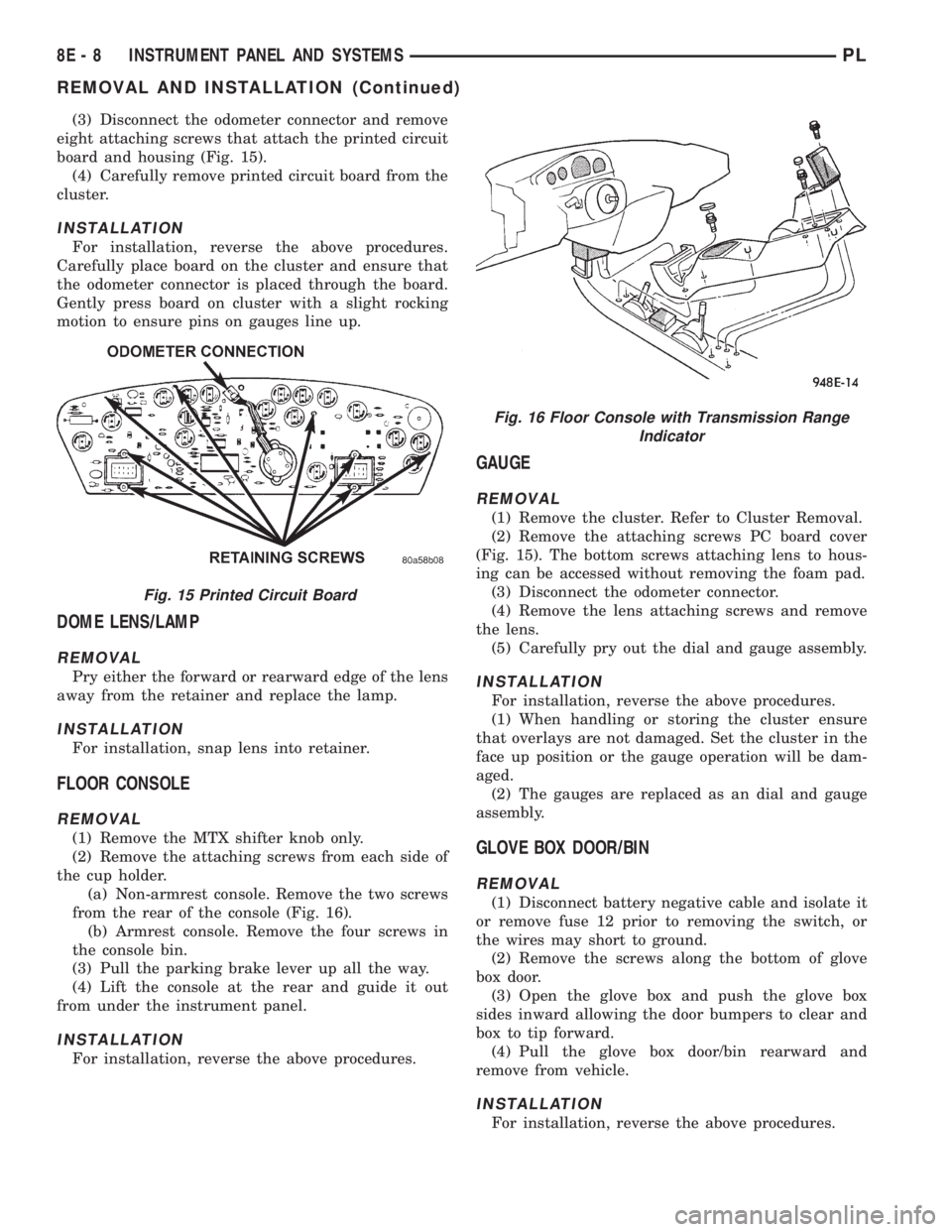
(3) Disconnect the odometer connector and remove
eight attaching screws that attach the printed circuit
board and housing (Fig. 15).
(4) Carefully remove printed circuit board from the
cluster.
INSTALLATION
For installation, reverse the above procedures.
Carefully place board on the cluster and ensure that
the odometer connector is placed through the board.
Gently press board on cluster with a slight rocking
motion to ensure pins on gauges line up.
DOME LENS/LAMP
REMOVAL
Pry either the forward or rearward edge of the lens
away from the retainer and replace the lamp.
INSTALLATION
For installation, snap lens into retainer.
FLOOR CONSOLE
REMOVAL
(1) Remove the MTX shifter knob only.
(2) Remove the attaching screws from each side of
the cup holder.
(a) Non-armrest console. Remove the two screws
from the rear of the console (Fig. 16).
(b) Armrest console. Remove the four screws in
the console bin.
(3) Pull the parking brake lever up all the way.
(4) Lift the console at the rear and guide it out
from under the instrument panel.
INSTALLATION
For installation, reverse the above procedures.
GAUGE
REMOVAL
(1) Remove the cluster. Refer to Cluster Removal.
(2) Remove the attaching screws PC board cover
(Fig. 15). The bottom screws attaching lens to hous-
ing can be accessed without removing the foam pad.
(3) Disconnect the odometer connector.
(4) Remove the lens attaching screws and remove
the lens.
(5) Carefully pry out the dial and gauge assembly.
INSTALLATION
For installation, reverse the above procedures.
(1) When handling or storing the cluster ensure
that overlays are not damaged. Set the cluster in the
face up position or the gauge operation will be dam-
aged.
(2) The gauges are replaced as an dial and gauge
assembly.
GLOVE BOX DOOR/BIN
REMOVAL
(1) Disconnect battery negative cable and isolate it
or remove fuse 12 prior to removing the switch, or
the wires may short to ground.
(2) Remove the screws along the bottom of glove
box door.
(3) Open the glove box and push the glove box
sides inward allowing the door bumpers to clear and
box to tip forward.
(4) Pull the glove box door/bin rearward and
remove from vehicle.
INSTALLATION
For installation, reverse the above procedures.
Fig. 15 Printed Circuit Board
Fig. 16 Floor Console with Transmission Range
Indicator
8E - 8 INSTRUMENT PANEL AND SYSTEMSPL
REMOVAL AND INSTALLATION (Continued)