1999 DODGE NEON clock
[x] Cancel search: clockPage 853 of 1200
WARNING: THE FUEL RESERVOIR OF THE FUEL
PUMP MODULE DOES NOT EMPTY OUT WHEN THE
TANK IS DRAINED. THE FUEL IN THE RESERVOIR
WILL SPILL OUT WHEN THE MODULE IS
REMOVED.
(2) Disconnect fuel line from fuel pump module by
depressing quick connect retainers with thumb and
fore finger.
(3) Slide fuel pump module electrical connecter
lock to unlock.
(4) Disconnect the electrical connection from the
fuel pump module, by pushing down on connector
retainer and pulling connector off of module.
(5) Use a transmission jack to support the fuel
tank. remove bolts from fuel tank straps.
(6) Lower tank slightly.
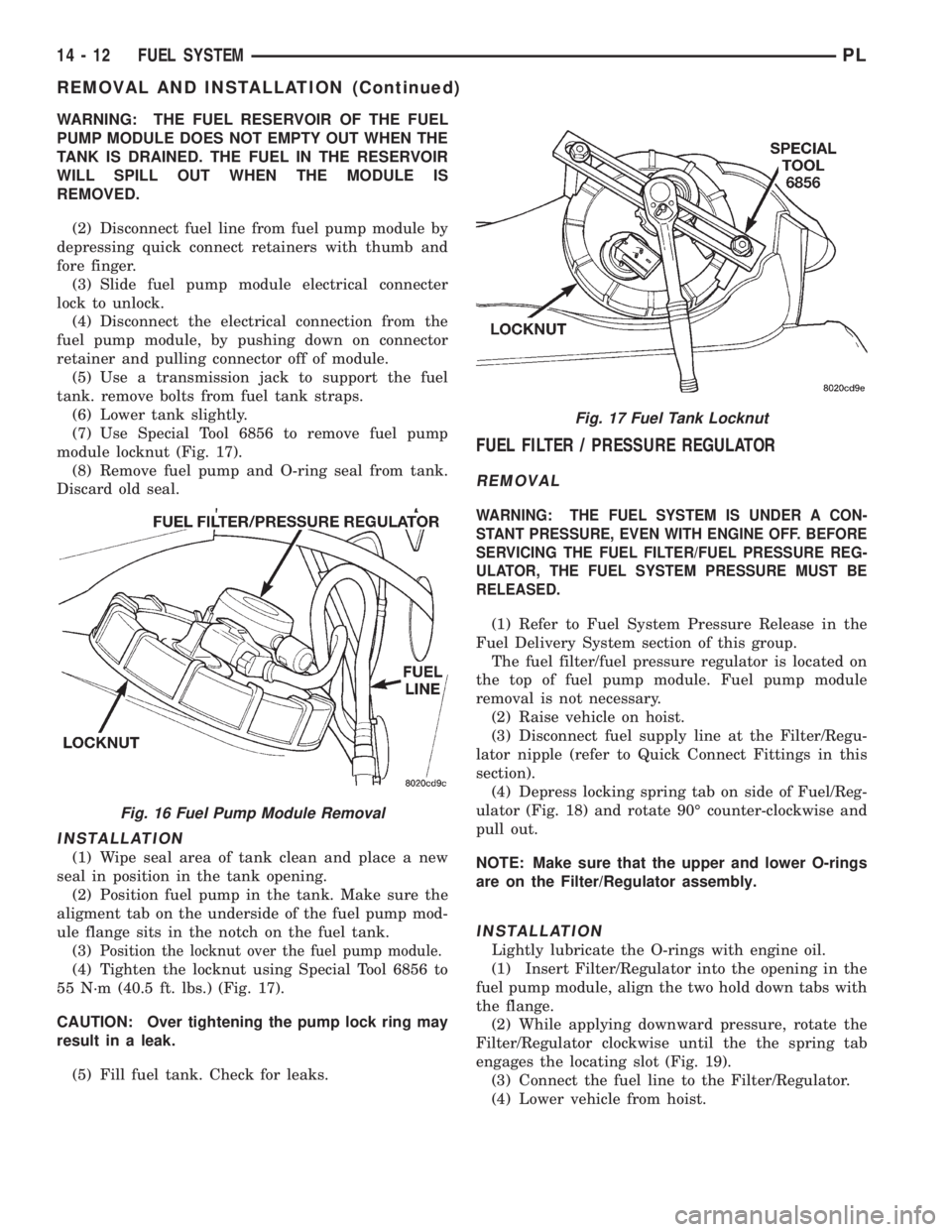
(7) Use Special Tool 6856 to remove fuel pump
module locknut (Fig. 17).
(8) Remove fuel pump and O-ring seal from tank.
Discard old seal.
INSTALLATION
(1) Wipe seal area of tank clean and place a new
seal in position in the tank opening.
(2) Position fuel pump in the tank. Make sure the
aligment tab on the underside of the fuel pump mod-
ule flange sits in the notch on the fuel tank.
(3)
Position the locknut over the fuel pump module.
(4) Tighten the locknut using Special Tool 6856 to
55 N´m (40.5 ft. lbs.) (Fig. 17).
CAUTION: Over tightening the pump lock ring may
result in a leak.
(5) Fill fuel tank. Check for leaks.
FUEL FILTER / PRESSURE REGULATOR
REMOVAL
WARNING: THE FUEL SYSTEM IS UNDER A CON-
STANT PRESSURE, EVEN WITH ENGINE OFF. BEFORE
SERVICING THE FUEL FILTER/FUEL PRESSURE REG-
ULATOR, THE FUEL SYSTEM PRESSURE MUST BE
RELEASED.
(1) Refer to Fuel System Pressure Release in the
Fuel Delivery System section of this group.
The fuel filter/fuel pressure regulator is located on
the top of fuel pump module. Fuel pump module
removal is not necessary.
(2) Raise vehicle on hoist.
(3) Disconnect fuel supply line at the Filter/Regu-
lator nipple (refer to Quick Connect Fittings in this
section).
(4) Depress locking spring tab on side of Fuel/Reg-
ulator (Fig. 18) and rotate 90É counter-clockwise and
pull out.
NOTE: Make sure that the upper and lower O-rings
are on the Filter/Regulator assembly.
INSTALLATION
Lightly lubricate the O-rings with engine oil.
(1) Insert Filter/Regulator into the opening in the
fuel pump module, align the two hold down tabs with
the flange.
(2) While applying downward pressure, rotate the
Filter/Regulator clockwise until the the spring tab
engages the locating slot (Fig. 19).
(3) Connect the fuel line to the Filter/Regulator.
(4) Lower vehicle from hoist.
Fig. 16 Fuel Pump Module Removal
Fig. 17 Fuel Tank Locknut
14 - 12 FUEL SYSTEMPL
REMOVAL AND INSTALLATION (Continued)
Page 893 of 1200
(9) Rotate throttle lever forward to the wide open
position and slide kickdown cable connector onto nail
head.
(10) Install throttle cable cover. Tighten bolt to 5.6
N´m (50 ins. lbs.).
THROTTLE POSITION SENSOR (TPS)
The throttle position sensor attaches to the side of
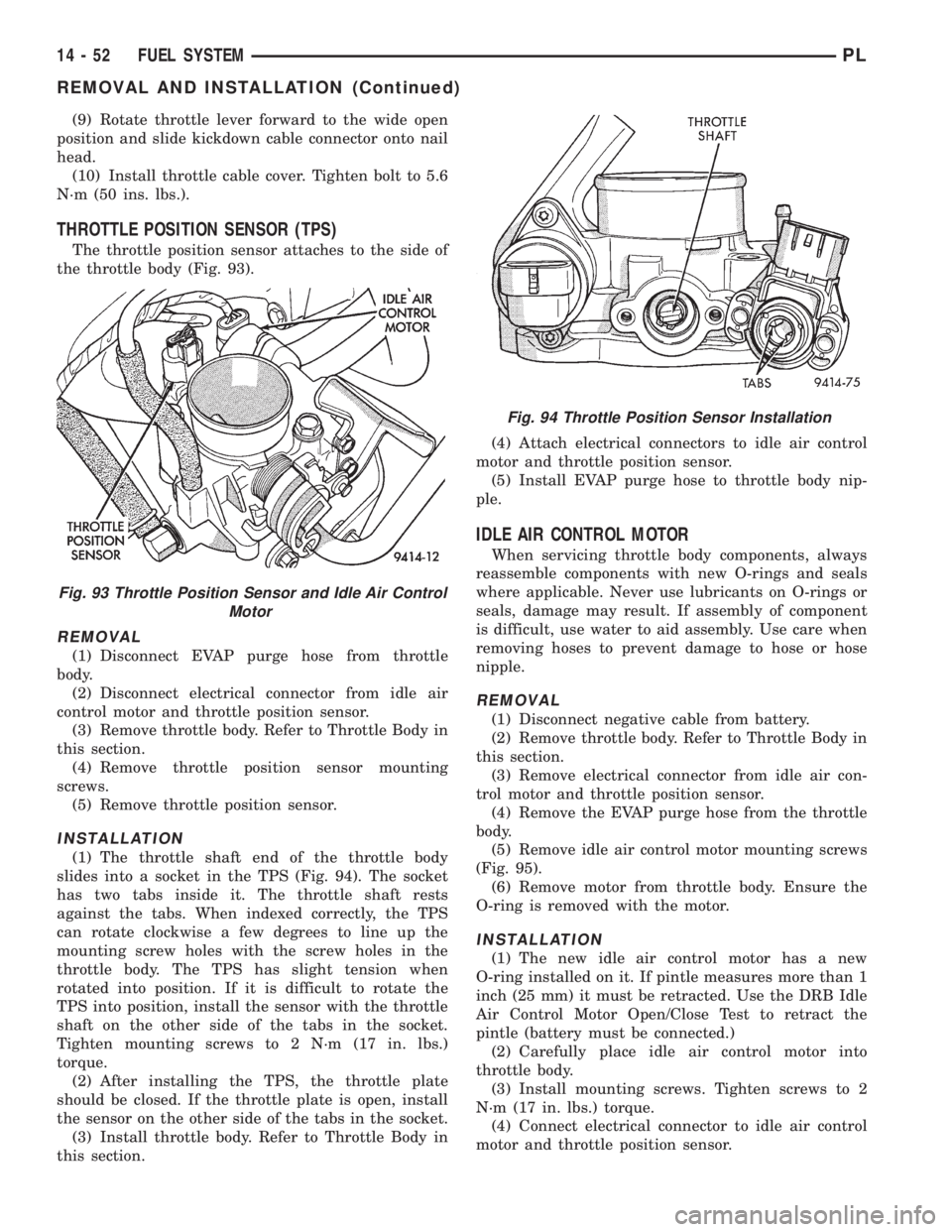
the throttle body (Fig. 93).
REMOVAL
(1) Disconnect EVAP purge hose from throttle
body.
(2) Disconnect electrical connector from idle air
control motor and throttle position sensor.
(3) Remove throttle body. Refer to Throttle Body in
this section.
(4) Remove throttle position sensor mounting
screws.
(5) Remove throttle position sensor.
INSTALLATION
(1) The throttle shaft end of the throttle body
slides into a socket in the TPS (Fig. 94). The socket
has two tabs inside it. The throttle shaft rests
against the tabs. When indexed correctly, the TPS
can rotate clockwise a few degrees to line up the
mounting screw holes with the screw holes in the
throttle body. The TPS has slight tension when
rotated into position. If it is difficult to rotate the
TPS into position, install the sensor with the throttle
shaft on the other side of the tabs in the socket.
Tighten mounting screws to 2 N´m (17 in. lbs.)
torque.
(2) After installing the TPS, the throttle plate
should be closed. If the throttle plate is open, install
the sensor on the other side of the tabs in the socket.
(3) Install throttle body. Refer to Throttle Body in
this section.(4) Attach electrical connectors to idle air control
motor and throttle position sensor.
(5) Install EVAP purge hose to throttle body nip-
ple.
IDLE AIR CONTROL MOTOR
When servicing throttle body components, always
reassemble components with new O-rings and seals
where applicable. Never use lubricants on O-rings or
seals, damage may result. If assembly of component
is difficult, use water to aid assembly. Use care when
removing hoses to prevent damage to hose or hose
nipple.
REMOVAL
(1) Disconnect negative cable from battery.
(2) Remove throttle body. Refer to Throttle Body in
this section.
(3) Remove electrical connector from idle air con-
trol motor and throttle position sensor.
(4) Remove the EVAP purge hose from the throttle
body.
(5) Remove idle air control motor mounting screws
(Fig. 95).
(6) Remove motor from throttle body. Ensure the
O-ring is removed with the motor.
INSTALLATION
(1) The new idle air control motor has a new
O-ring installed on it. If pintle measures more than 1
inch (25 mm) it must be retracted. Use the DRB Idle
Air Control Motor Open/Close Test to retract the
pintle (battery must be connected.)
(2) Carefully place idle air control motor into
throttle body.
(3) Install mounting screws. Tighten screws to 2
N´m (17 in. lbs.) torque.
(4) Connect electrical connector to idle air control
motor and throttle position sensor.
Fig. 93 Throttle Position Sensor and Idle Air Control
Motor
Fig. 94 Throttle Position Sensor Installation
14 - 52 FUEL SYSTEMPL
REMOVAL AND INSTALLATION (Continued)
Page 936 of 1200
STEERING COLUMN
INDEX
page page
DESCRIPTION AND OPERATION
STEERING COLUMN ASSEMBLY............ 35
STEERING GEAR TO STEERING
COLUMN COUPLING................... 36
DIAGNOSIS AND TESTING
STEERING COLUMN TO STEERING
GEAR COUPLING...................... 36
STEERING COLUMN..................... 36REMOVAL AND INSTALLATION
STEERING COLUMN SERVICE
PROCEDURE WARNINGS............... 37
STEERING COLUMN..................... 38
SPECIFICATIONS
STEERING COLUMN FASTEER
TORQUE SPECIFICATIONS.............. 42
DESCRIPTION AND OPERATION
STEERING COLUMN ASSEMBLY
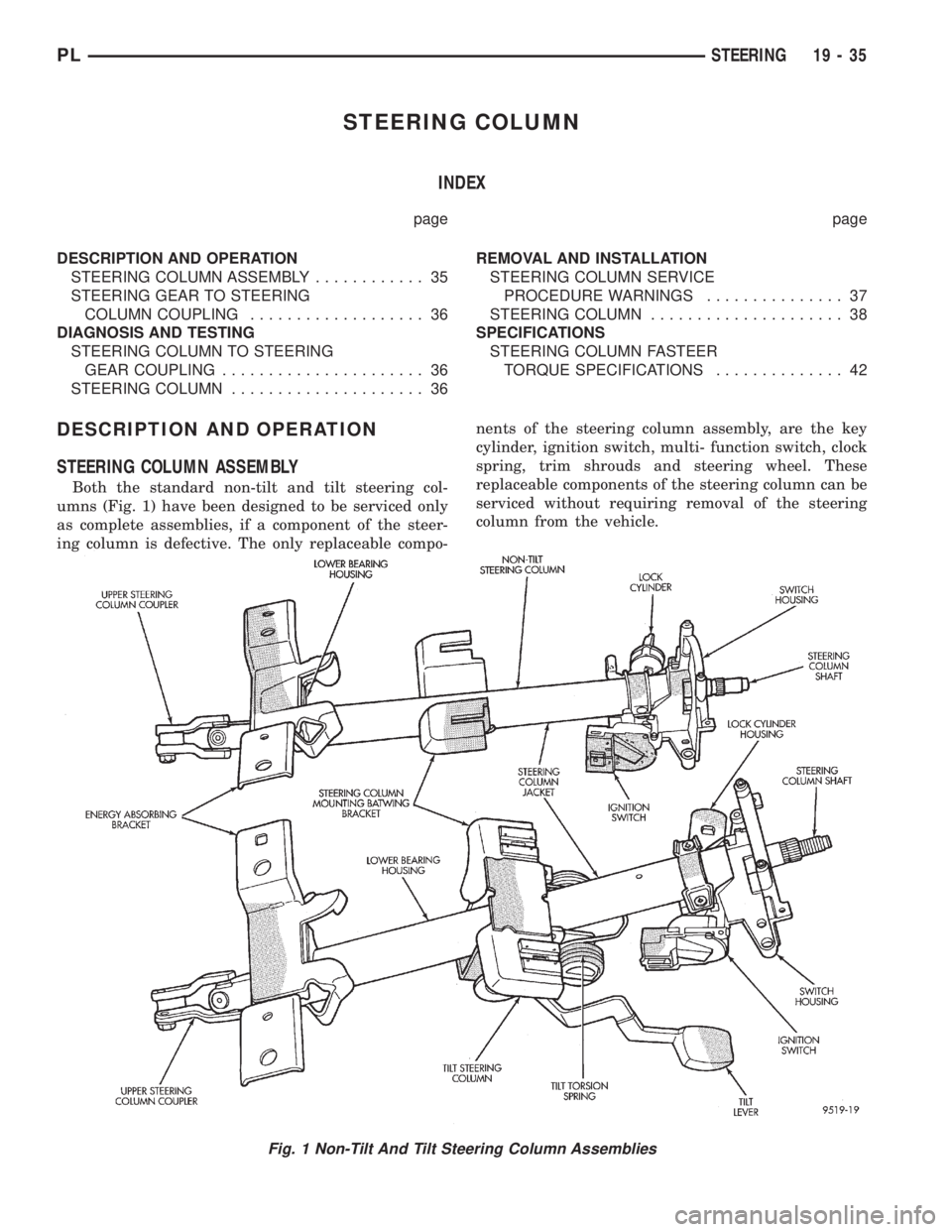
Both the standard non-tilt and tilt steering col-
umns (Fig. 1) have been designed to be serviced only
as complete assemblies, if a component of the steer-
ing column is defective. The only replaceable compo-nents of the steering column assembly, are the key
cylinder, ignition switch, multi- function switch, clock
spring, trim shrouds and steering wheel. These
replaceable components of the steering column can be
serviced without requiring removal of the steering
column from the vehicle.
Fig. 1 Non-Tilt And Tilt Steering Column Assemblies
PLSTEERING 19 - 35
Page 940 of 1200
WARNING: WHEN HANDLING AN UNDEPLOYED
AIR BAG MODULE DURING SERVICING OF THE
STEERING COLUMN THE FOLLOWING PRECAU-
TIONS SHOULD BE OBSERVED. AT NO TIME
SHOULD ANY SOURCE OF ELECTRICITY BE PER-
MITTED NEAR THE INFLATOR ON THE BACK OF
THE AIR BAG MODULE. WHEN CARRYING A LIVE
MODULE, THE TRIM COVER SHOULD BE POINTED
AWAY FROM THE BODY TO MINIMIZE INJURY IF
MODULE ACCIDENTLY DEPLOYS. IF AIR BAG MOD-
ULE IS PLACED ON A BENCH OR OTHER SUR-
FACE, PLASTIC COVER SHOULD BE FACE UP TO
MINIMIZE MOVEMENT IN CASE OF ACCIDENTAL
DEPLOYMENT.
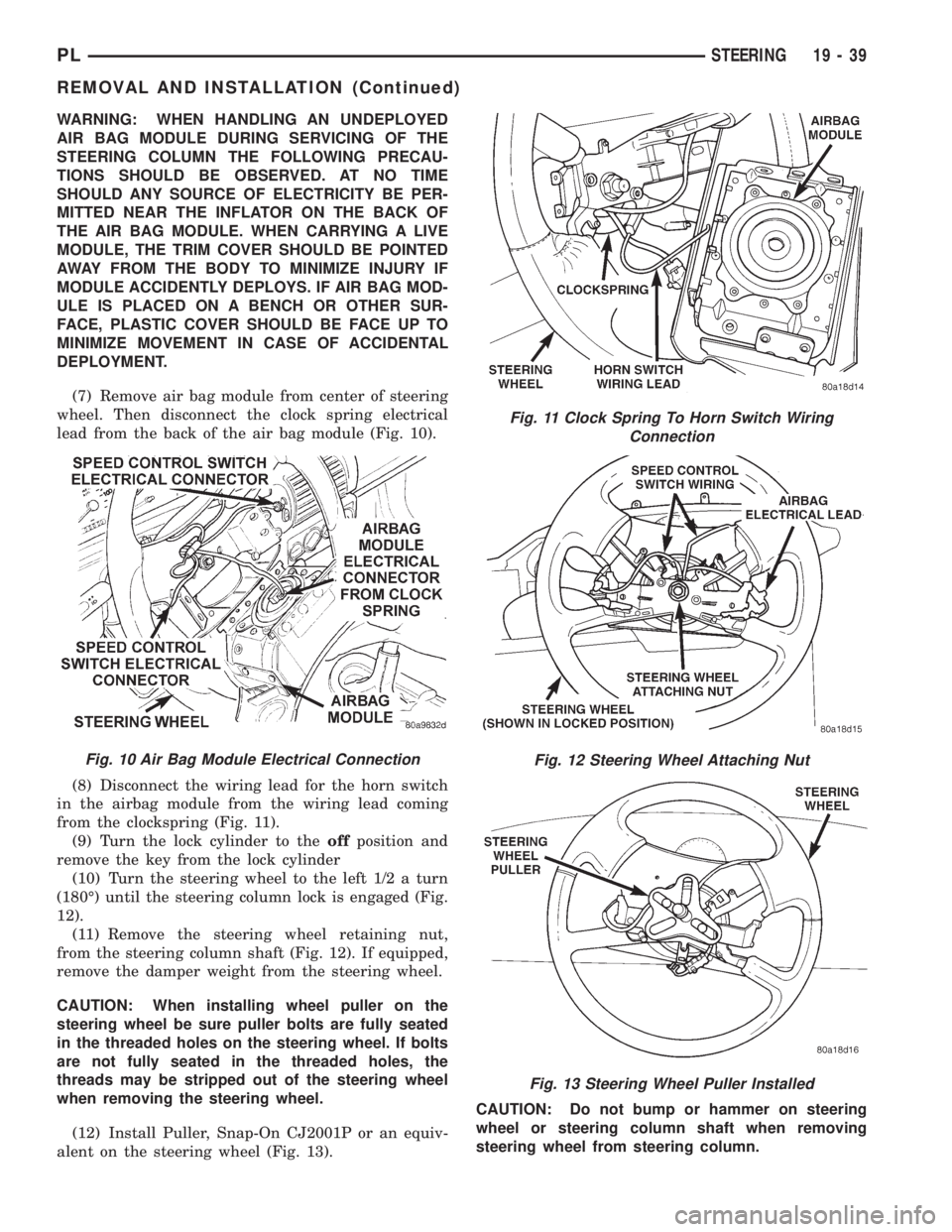
(7) Remove air bag module from center of steering
wheel. Then disconnect the clock spring electrical
lead from the back of the air bag module (Fig. 10).
(8) Disconnect the wiring lead for the horn switch
in the airbag module from the wiring lead coming
from the clockspring (Fig. 11).
(9) Turn the lock cylinder to theoffposition and
remove the key from the lock cylinder
(10) Turn the steering wheel to the left 1/2 a turn
(180É) until the steering column lock is engaged (Fig.
12).
(11) Remove the steering wheel retaining nut,
from the steering column shaft (Fig. 12). If equipped,
remove the damper weight from the steering wheel.
CAUTION: When installing wheel puller on the
steering wheel be sure puller bolts are fully seated
in the threaded holes on the steering wheel. If bolts
are not fully seated in the threaded holes, the
threads may be stripped out of the steering wheel
when removing the steering wheel.
(12) Install Puller, Snap-On CJ2001P or an equiv-
alent on the steering wheel (Fig. 13).CAUTION: Do not bump or hammer on steering
wheel or steering column shaft when removing
steering wheel from steering column.
Fig. 11 Clock Spring To Horn Switch Wiring
Connection
Fig. 12 Steering Wheel Attaching Nut
Fig. 13 Steering Wheel Puller Installed
Fig. 10 Air Bag Module Electrical Connection
PLSTEERING 19 - 39
REMOVAL AND INSTALLATION (Continued)
Page 941 of 1200
(13) Remove steering wheel assembly from steer-
ing column shaft using Puller, Special Tool C-3428-B
or equivalent.
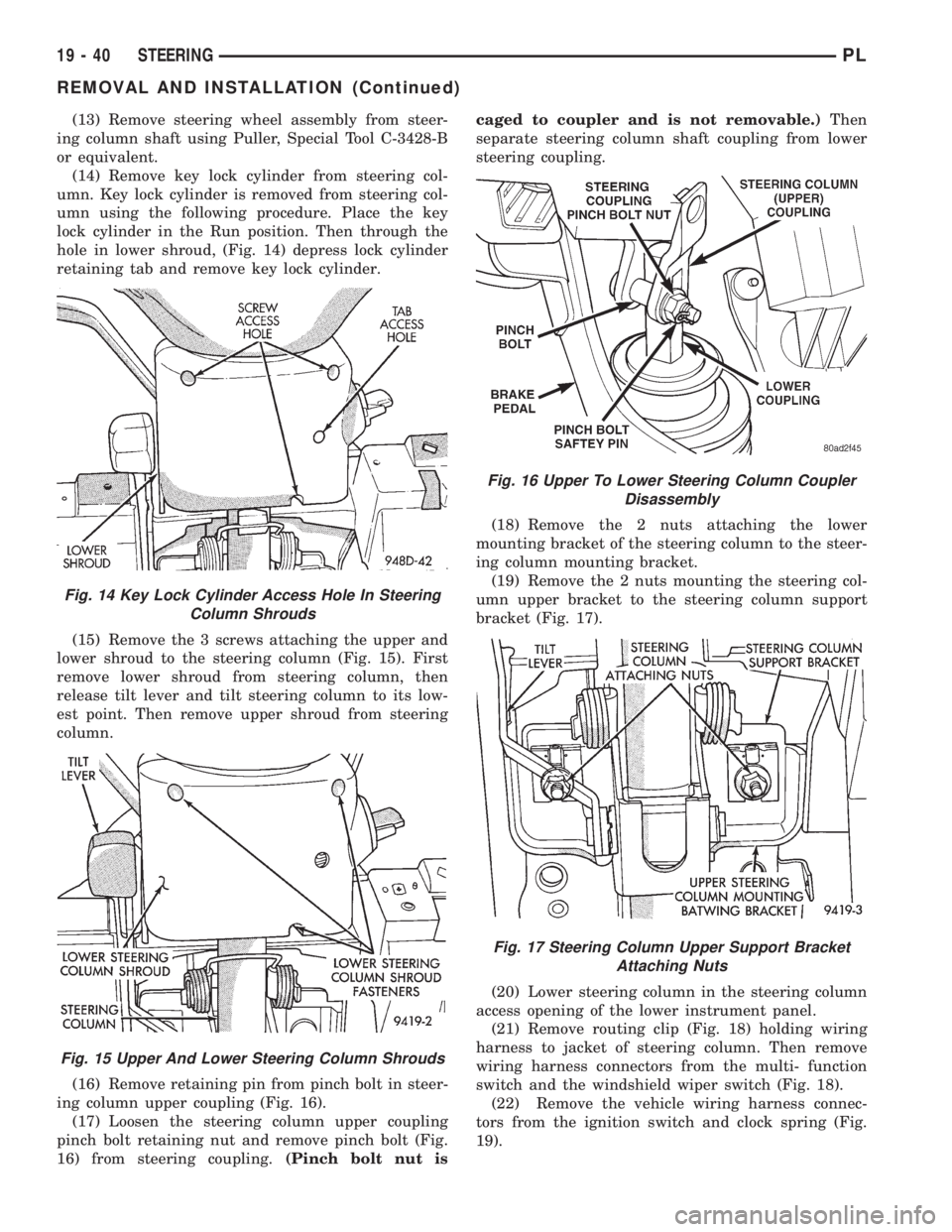
(14) Remove key lock cylinder from steering col-
umn. Key lock cylinder is removed from steering col-
umn using the following procedure. Place the key
lock cylinder in the Run position. Then through the
hole in lower shroud, (Fig. 14) depress lock cylinder
retaining tab and remove key lock cylinder.
(15) Remove the 3 screws attaching the upper and
lower shroud to the steering column (Fig. 15). First
remove lower shroud from steering column, then
release tilt lever and tilt steering column to its low-
est point. Then remove upper shroud from steering
column.
(16) Remove retaining pin from pinch bolt in steer-
ing column upper coupling (Fig. 16).
(17) Loosen the steering column upper coupling
pinch bolt retaining nut and remove pinch bolt (Fig.
16) from steering coupling.(Pinch bolt nut iscaged to coupler and is not removable.)Then
separate steering column shaft coupling from lower
steering coupling.
(18) Remove the 2 nuts attaching the lower
mounting bracket of the steering column to the steer-
ing column mounting bracket.
(19) Remove the 2 nuts mounting the steering col-
umn upper bracket to the steering column support
bracket (Fig. 17).
(20) Lower steering column in the steering column
access opening of the lower instrument panel.
(21) Remove routing clip (Fig. 18) holding wiring
harness to jacket of steering column. Then remove
wiring harness connectors from the multi- function
switch and the windshield wiper switch (Fig. 18).
(22) Remove the vehicle wiring harness connec-
tors from the ignition switch and clock spring (Fig.
19).
Fig. 14 Key Lock Cylinder Access Hole In Steering
Column Shrouds
Fig. 15 Upper And Lower Steering Column Shrouds
Fig. 16 Upper To Lower Steering Column Coupler
Disassembly
Fig. 17 Steering Column Upper Support Bracket
Attaching Nuts
19 - 40 STEERINGPL
REMOVAL AND INSTALLATION (Continued)
Page 942 of 1200
(23) Remove steering column from vehicle through
the drivers door of the passenger compartment. Use
care to avoid damaging the paint or interior trim.
INSTALL
(1) Install steering column into steering column
access opening in lower instrument panel.
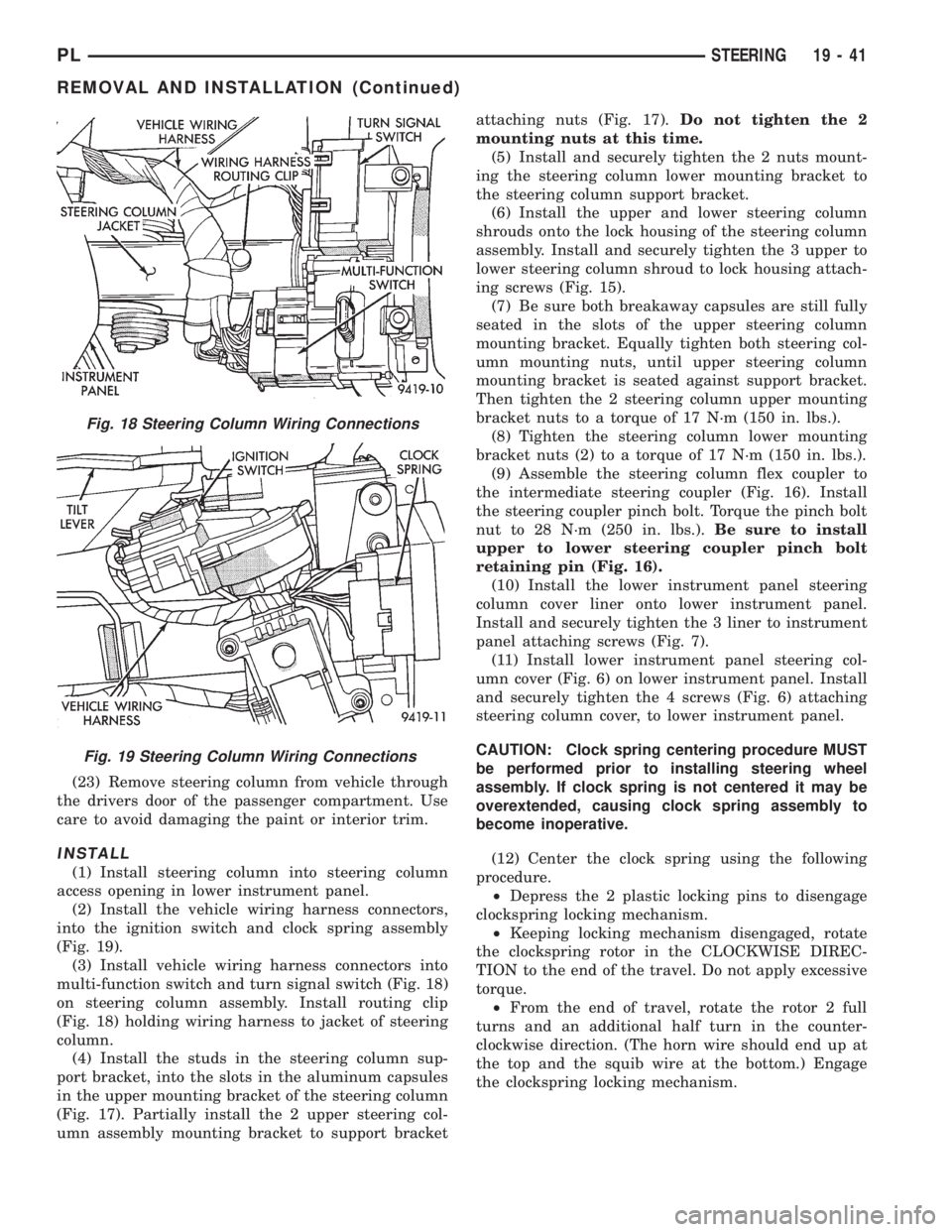
(2) Install the vehicle wiring harness connectors,
into the ignition switch and clock spring assembly
(Fig. 19).
(3) Install vehicle wiring harness connectors into
multi-function switch and turn signal switch (Fig. 18)
on steering column assembly. Install routing clip
(Fig. 18) holding wiring harness to jacket of steering
column.
(4) Install the studs in the steering column sup-
port bracket, into the slots in the aluminum capsules
in the upper mounting bracket of the steering column
(Fig. 17). Partially install the 2 upper steering col-
umn assembly mounting bracket to support bracketattaching nuts (Fig. 17).Do not tighten the 2
mounting nuts at this time.
(5) Install and securely tighten the 2 nuts mount-
ing the steering column lower mounting bracket to
the steering column support bracket.
(6) Install the upper and lower steering column
shrouds onto the lock housing of the steering column
assembly. Install and securely tighten the 3 upper to
lower steering column shroud to lock housing attach-
ing screws (Fig. 15).
(7) Be sure both breakaway capsules are still fully
seated in the slots of the upper steering column
mounting bracket. Equally tighten both steering col-
umn mounting nuts, until upper steering column
mounting bracket is seated against support bracket.
Then tighten the 2 steering column upper mounting
bracket nuts to a torque of 17 N´m (150 in. lbs.).
(8) Tighten the steering column lower mounting
bracket nuts (2) to a torque of 17 N´m (150 in. lbs.).
(9) Assemble the steering column flex coupler to
the intermediate steering coupler (Fig. 16). Install
the steering coupler pinch bolt. Torque the pinch bolt
nut to 28 N´m (250 in. lbs.).Be sure to install
upper to lower steering coupler pinch bolt
retaining pin (Fig. 16).
(10) Install the lower instrument panel steering
column cover liner onto lower instrument panel.
Install and securely tighten the 3 liner to instrument
panel attaching screws (Fig. 7).
(11) Install lower instrument panel steering col-
umn cover (Fig. 6) on lower instrument panel. Install
and securely tighten the 4 screws (Fig. 6) attaching
steering column cover, to lower instrument panel.
CAUTION: Clock spring centering procedure MUST
be performed prior to installing steering wheel
assembly. If clock spring is not centered it may be
overextended, causing clock spring assembly to
become inoperative.
(12) Center the clock spring using the following
procedure.
²Depress the 2 plastic locking pins to disengage
clockspring locking mechanism.
²Keeping locking mechanism disengaged, rotate
the clockspring rotor in the CLOCKWISE DIREC-
TION to the end of the travel. Do not apply excessive
torque.
²From the end of travel, rotate the rotor 2 full
turns and an additional half turn in the counter-
clockwise direction. (The horn wire should end up at
the top and the squib wire at the bottom.) Engage
the clockspring locking mechanism.
Fig. 18 Steering Column Wiring Connections
Fig. 19 Steering Column Wiring Connections
PLSTEERING 19 - 41
REMOVAL AND INSTALLATION (Continued)
Page 943 of 1200
CAUTION: Do not install steering wheel onto shaft
of steering column assembly by driving it onto the
shaft. Pull steering wheel down onto steering col-
umn shaft using ONLY the steering wheel retaining
nut.
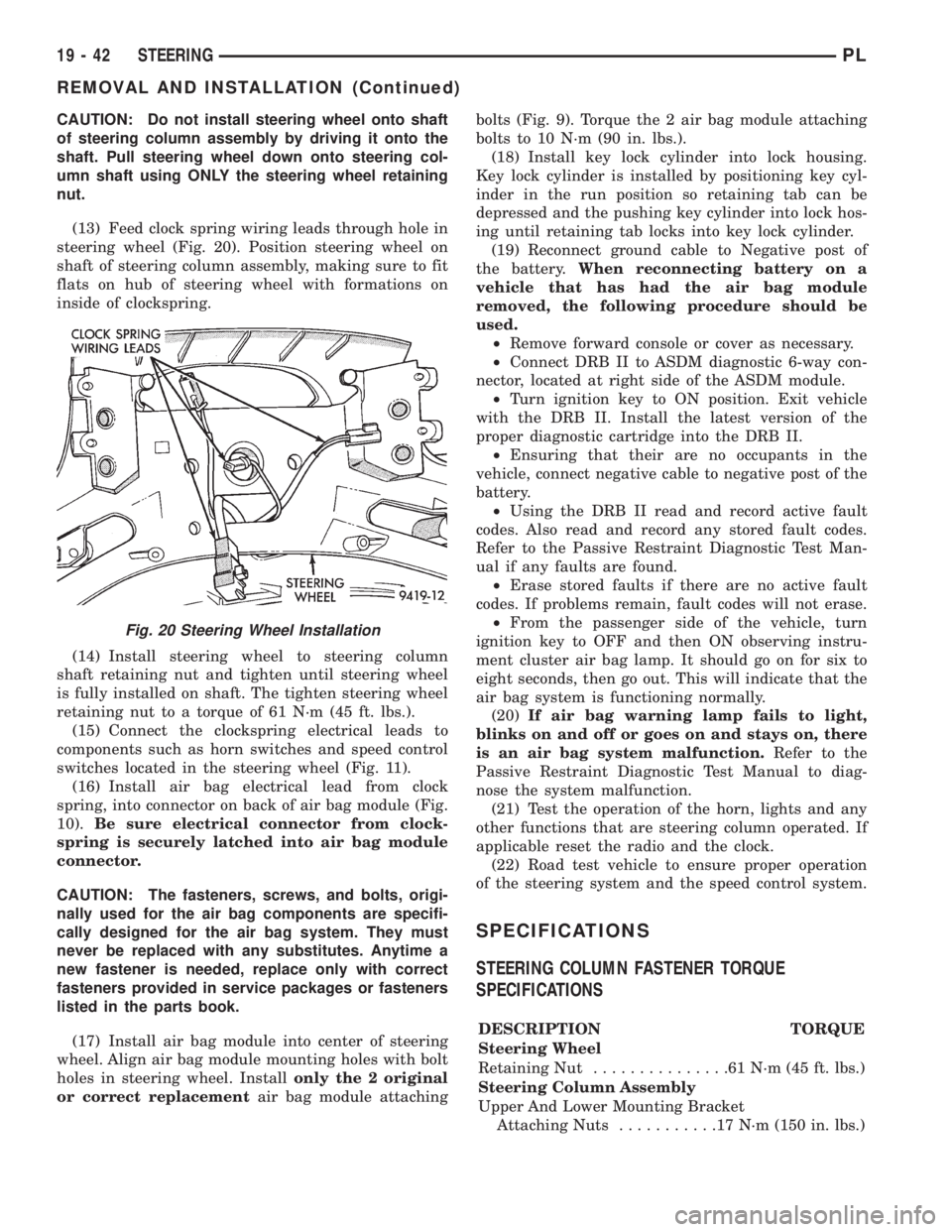
(13) Feed clock spring wiring leads through hole in
steering wheel (Fig. 20). Position steering wheel on
shaft of steering column assembly, making sure to fit
flats on hub of steering wheel with formations on
inside of clockspring.
(14) Install steering wheel to steering column
shaft retaining nut and tighten until steering wheel
is fully installed on shaft. The tighten steering wheel
retaining nut to a torque of 61 N´m (45 ft. lbs.).
(15) Connect the clockspring electrical leads to
components such as horn switches and speed control
switches located in the steering wheel (Fig. 11).
(16) Install air bag electrical lead from clock
spring, into connector on back of air bag module (Fig.
10).Be sure electrical connector from clock-
spring is securely latched into air bag module
connector.
CAUTION: The fasteners, screws, and bolts, origi-
nally used for the air bag components are specifi-
cally designed for the air bag system. They must
never be replaced with any substitutes. Anytime a
new fastener is needed, replace only with correct
fasteners provided in service packages or fasteners
listed in the parts book.
(17) Install air bag module into center of steering
wheel. Align air bag module mounting holes with bolt
holes in steering wheel. Installonly the 2 original
or correct replacementair bag module attachingbolts (Fig. 9). Torque the 2 air bag module attaching
bolts to 10 N´m (90 in. lbs.).
(18) Install key lock cylinder into lock housing.
Key lock cylinder is installed by positioning key cyl-
inder in the run position so retaining tab can be
depressed and the pushing key cylinder into lock hos-
ing until retaining tab locks into key lock cylinder.
(19) Reconnect ground cable to Negative post of
the battery.When reconnecting battery on a
vehicle that has had the air bag module
removed, the following procedure should be
used.
²Remove forward console or cover as necessary.
²Connect DRB II to ASDM diagnostic 6-way con-
nector, located at right side of the ASDM module.
²Turn ignition key to ON position. Exit vehicle
with the DRB II. Install the latest version of the
proper diagnostic cartridge into the DRB II.
²Ensuring that their are no occupants in the
vehicle, connect negative cable to negative post of the
battery.
²Using the DRB II read and record active fault
codes. Also read and record any stored fault codes.
Refer to the Passive Restraint Diagnostic Test Man-
ual if any faults are found.
²Erase stored faults if there are no active fault
codes. If problems remain, fault codes will not erase.
²From the passenger side of the vehicle, turn
ignition key to OFF and then ON observing instru-
ment cluster air bag lamp. It should go on for six to
eight seconds, then go out. This will indicate that the
air bag system is functioning normally.
(20)If air bag warning lamp fails to light,
blinks on and off or goes on and stays on, there
is an air bag system malfunction.Refer to the
Passive Restraint Diagnostic Test Manual to diag-
nose the system malfunction.
(21) Test the operation of the horn, lights and any
other functions that are steering column operated. If
applicable reset the radio and the clock.
(22) Road test vehicle to ensure proper operation
of the steering system and the speed control system.
SPECIFICATIONS
STEERING COLUMN FASTENER TORQUE
SPECIFICATIONS
DESCRIPTION TORQUE
Steering Wheel
Retaining Nut...............61N´m(45ft.lbs.)
Steering Column Assembly
Upper And Lower Mounting Bracket
Attaching Nuts...........17N´m(150 in. lbs.)
Fig. 20 Steering Wheel Installation
19 - 42 STEERINGPL
REMOVAL AND INSTALLATION (Continued)
Page 953 of 1200
(22) Rotate engine crankshaft clockwise to expose
driveplate±to±modular clutch bolts.
NOTE: Before removal of bolts, mark the driveplate
and clutch pressure plate for ease of assembly
alignment.
(23) Remove four driveplate±to±modular clutch
bolts to separate driveplate from clutch assembly.
(24) Push modular clutch assembly into the tran-
saxle bellhousing for easier transaxle removal.
(25) Remove frame rail to left transaxle mount
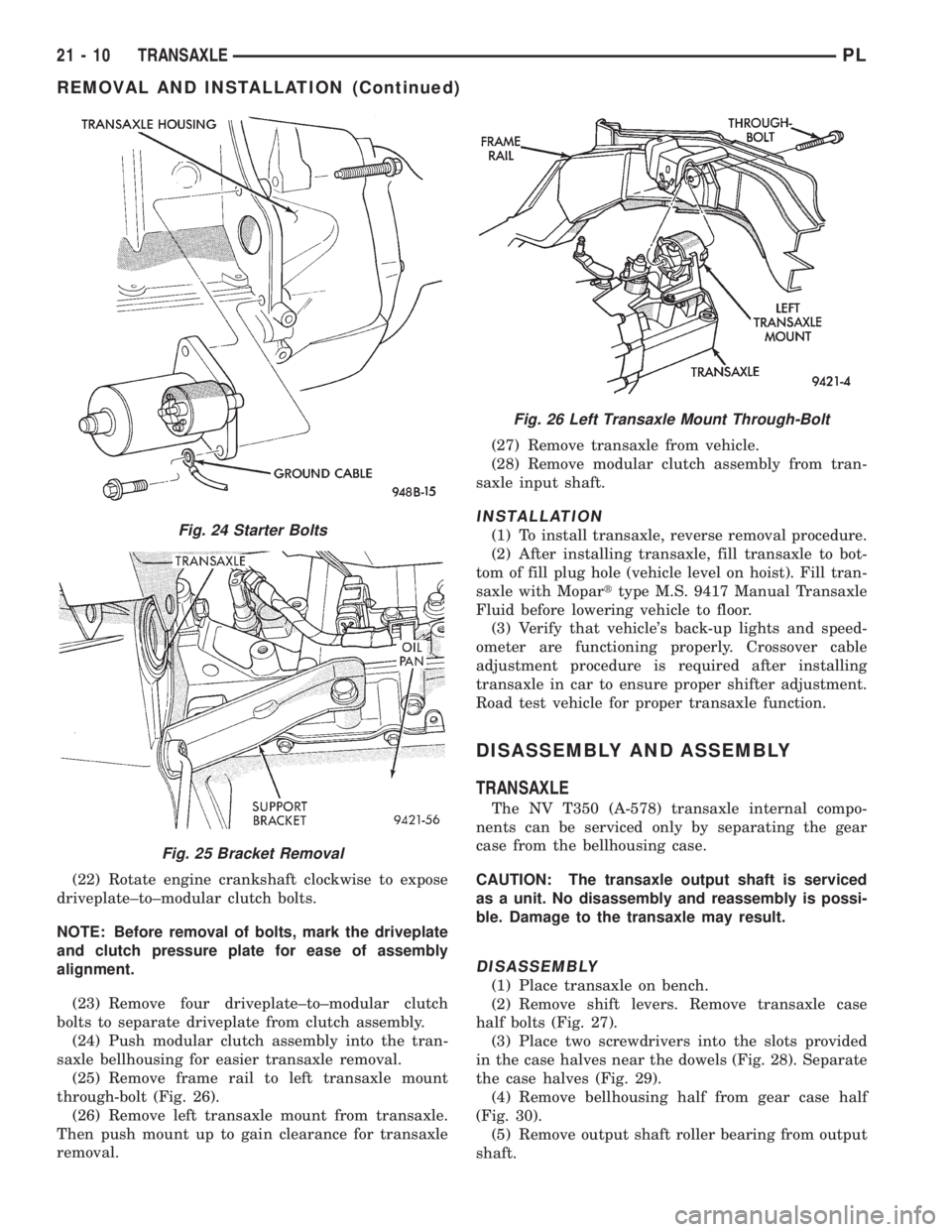
through-bolt (Fig. 26).
(26) Remove left transaxle mount from transaxle.
Then push mount up to gain clearance for transaxle
removal.(27) Remove transaxle from vehicle.
(28) Remove modular clutch assembly from tran-
saxle input shaft.
INSTALLATION
(1) To install transaxle, reverse removal procedure.
(2) After installing transaxle, fill transaxle to bot-
tom of fill plug hole (vehicle level on hoist). Fill tran-
saxle with Moparttype M.S. 9417 Manual Transaxle
Fluid before lowering vehicle to floor.
(3) Verify that vehicle's back-up lights and speed-
ometer are functioning properly. Crossover cable
adjustment procedure is required after installing
transaxle in car to ensure proper shifter adjustment.
Road test vehicle for proper transaxle function.
DISASSEMBLY AND ASSEMBLY
TRANSAXLE
The NV T350 (A-578) transaxle internal compo-
nents can be serviced only by separating the gear
case from the bellhousing case.
CAUTION: The transaxle output shaft is serviced
as a unit. No disassembly and reassembly is possi-
ble. Damage to the transaxle may result.
DISASSEMBLY
(1) Place transaxle on bench.
(2) Remove shift levers. Remove transaxle case
half bolts (Fig. 27).
(3) Place two screwdrivers into the slots provided
in the case halves near the dowels (Fig. 28). Separate
the case halves (Fig. 29).
(4) Remove bellhousing half from gear case half
(Fig. 30).
(5) Remove output shaft roller bearing from output
shaft.
Fig. 24 Starter Bolts
Fig. 25 Bracket Removal
Fig. 26 Left Transaxle Mount Through-Bolt
21 - 10 TRANSAXLEPL
REMOVAL AND INSTALLATION (Continued)