1999 DODGE NEON ECU
[x] Cancel search: ECUPage 1104 of 1200
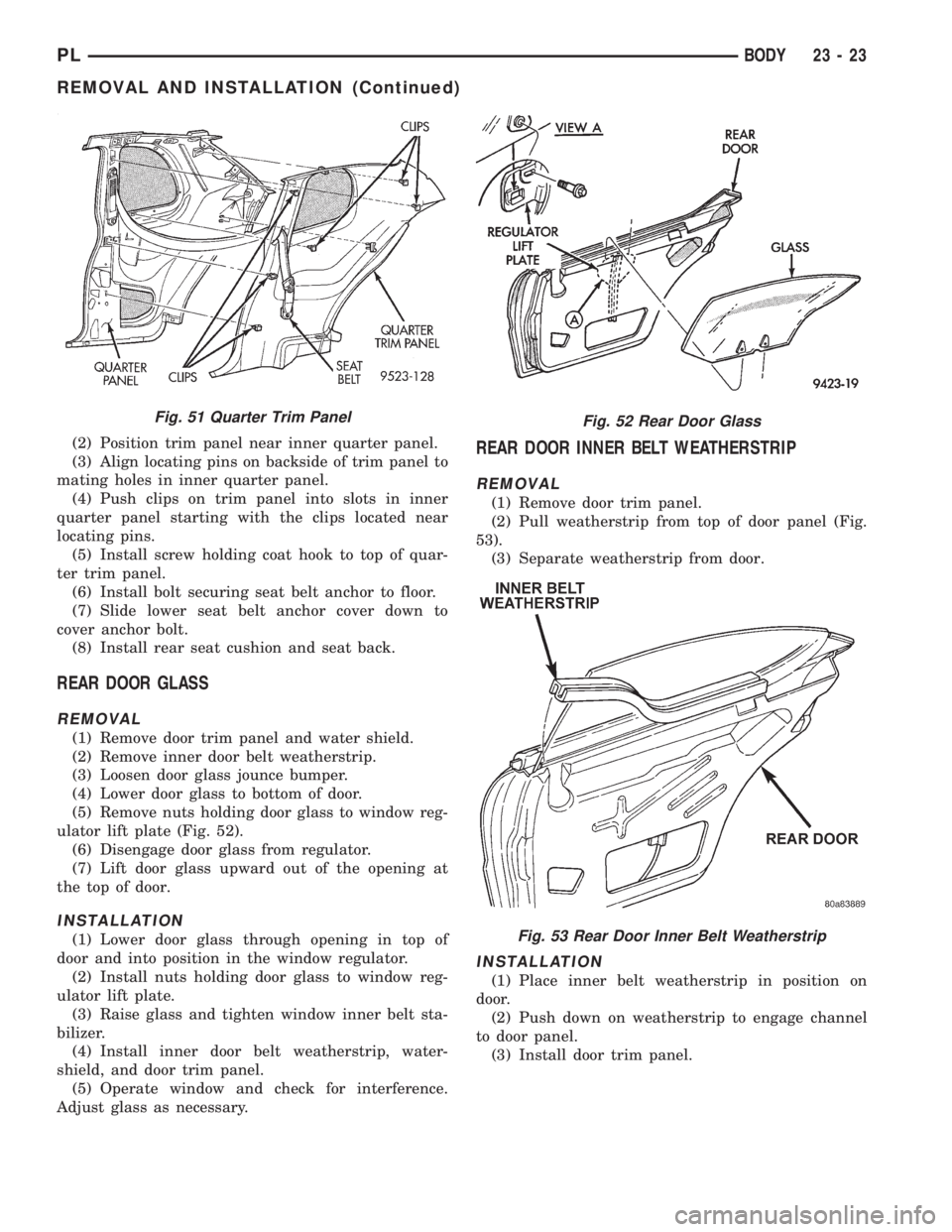
(2) Position trim panel near inner quarter panel.
(3) Align locating pins on backside of trim panel to
mating holes in inner quarter panel.
(4) Push clips on trim panel into slots in inner
quarter panel starting with the clips located near
locating pins.
(5) Install screw holding coat hook to top of quar-
ter trim panel.
(6) Install bolt securing seat belt anchor to floor.
(7) Slide lower seat belt anchor cover down to
cover anchor bolt.
(8) Install rear seat cushion and seat back.
REAR DOOR GLASS
REMOVAL
(1) Remove door trim panel and water shield.
(2) Remove inner door belt weatherstrip.
(3) Loosen door glass jounce bumper.
(4) Lower door glass to bottom of door.
(5) Remove nuts holding door glass to window reg-
ulator lift plate (Fig. 52).
(6) Disengage door glass from regulator.
(7) Lift door glass upward out of the opening at
the top of door.
INSTALLATION
(1) Lower door glass through opening in top of
door and into position in the window regulator.
(2) Install nuts holding door glass to window reg-
ulator lift plate.
(3) Raise glass and tighten window inner belt sta-
bilizer.
(4) Install inner door belt weatherstrip, water-
shield, and door trim panel.
(5) Operate window and check for interference.
Adjust glass as necessary.
REAR DOOR INNER BELT WEATHERSTRIP
REMOVAL
(1) Remove door trim panel.
(2) Pull weatherstrip from top of door panel (Fig.
53).
(3) Separate weatherstrip from door.
INSTALLATION
(1) Place inner belt weatherstrip in position on
door.
(2) Push down on weatherstrip to engage channel
to door panel.
(3) Install door trim panel.
Fig. 51 Quarter Trim PanelFig. 52 Rear Door Glass
Fig. 53 Rear Door Inner Belt Weatherstrip
PLBODY 23 - 23
REMOVAL AND INSTALLATION (Continued)
Page 1109 of 1200
ROOF APERTURE (RAP) MOLDING
The RAP molding is set in urethane adhesive. The
RAP molding is difficult to salvage during removal.
Verify part availability before proceeding with
removal procedure. The temperature in the work
area and the vehicle should be at least 21ÉC (70ÉF) to
avoid damaging the rear window and windshield
moldings. Apply masking tape to surrounding area of
the RAP molding to protect the finish.
REMOVAL
(1) Using a trim stick, gently lift rear window
molding upward to gain access to end of RAP mold-
ing.
(2) Using a sharp hook tool, pierce the rear end of
the molding.
(3) Lift the rear of the RAP molding upward until
it clears the rear window molding.
(4) Using a common plier, pull the RAP molding
forward to separate molding from urethane bonding.
(5) Separate RAP molding from vehicle.
INSTALLATION
(1) Using a sharpened trim stick, scrape urethane
bonding material from the roof seam trough.
(2) Using touch-up paint, repair scratches in roof
seam trough to prevent corrosion.
(3) Inspect the bottom of the roof seam trough for
gaps in caulking. Repair gaps with suitable seam
sealer following manufacturers instructions.
(4) Apply black-out primer to bottom of roof seam
trough. Allow at lease three minutes before bonding
is applied.
(5) Install RAP molding into the roof seam trough
and position molding so both ends are covered by the
glass moldings. If the molding will not lay flat on the
bottom of the trough, trim the ends of the molding
until proper fit achieved.
(6) Using a suitable marking pencil, mark an
index line across the RAP molding and the adjacent
surfaces.
(7) Remove the RAP molding from the roof seam
trough.
(8) Applya5mm(0.2 in.) bead of urethane adhe-
sive on the bottom/center of the trough along the
entire length.
(9) Place RAP molding in position in roof seam
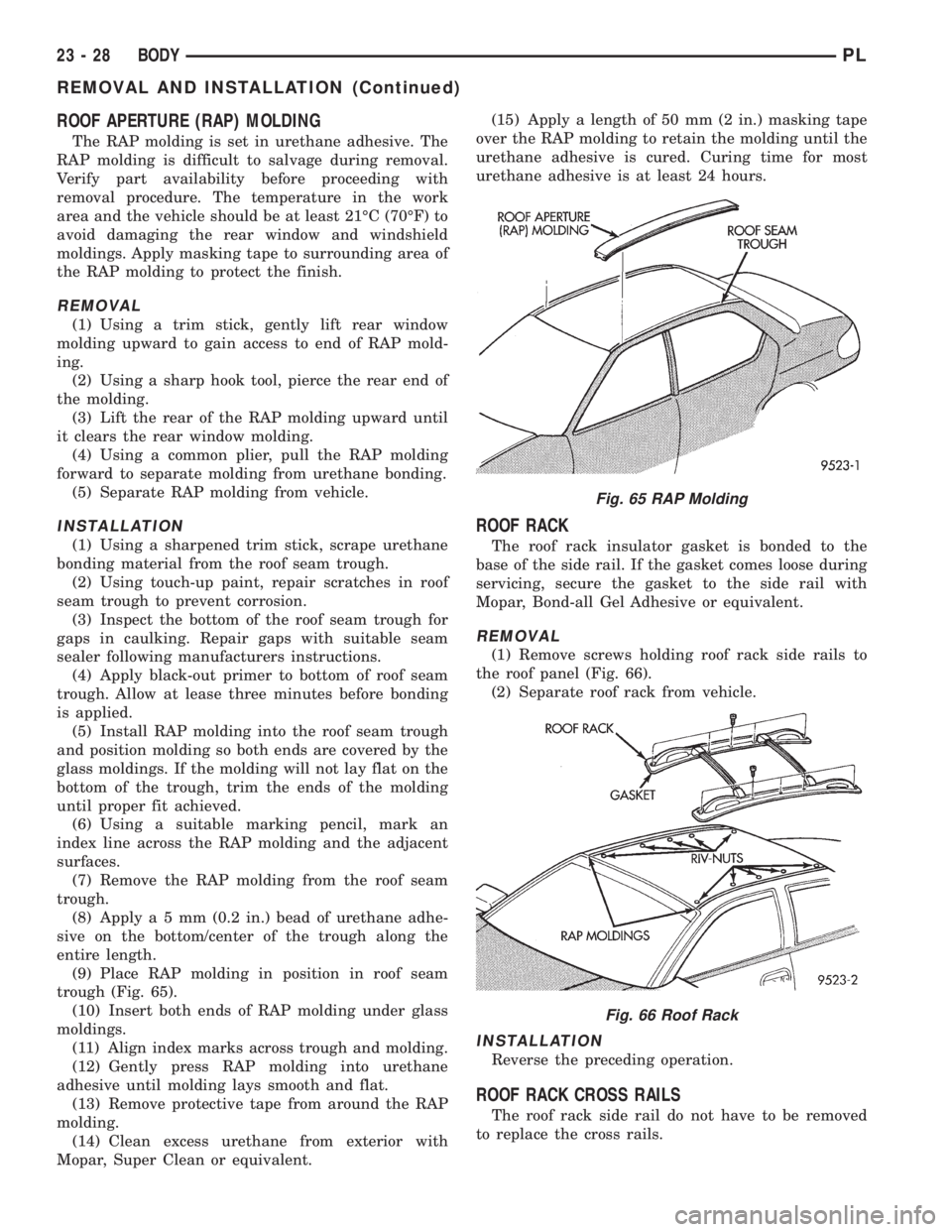
trough (Fig. 65).
(10) Insert both ends of RAP molding under glass
moldings.
(11) Align index marks across trough and molding.
(12) Gently press RAP molding into urethane
adhesive until molding lays smooth and flat.
(13) Remove protective tape from around the RAP
molding.
(14) Clean excess urethane from exterior with
Mopar, Super Clean or equivalent.(15) Apply a length of 50 mm (2 in.) masking tape
over the RAP molding to retain the molding until the
urethane adhesive is cured. Curing time for most
urethane adhesive is at least 24 hours.
ROOF RACK
The roof rack insulator gasket is bonded to the
base of the side rail. If the gasket comes loose during
servicing, secure the gasket to the side rail with
Mopar, Bond-all Gel Adhesive or equivalent.
REMOVAL
(1) Remove screws holding roof rack side rails to
the roof panel (Fig. 66).
(2) Separate roof rack from vehicle.
INSTALLATION
Reverse the preceding operation.
ROOF RACK CROSS RAILS
The roof rack side rail do not have to be removed
to replace the cross rails.
Fig. 65 RAP Molding
Fig. 66 Roof Rack
23 - 28 BODYPL
REMOVAL AND INSTALLATION (Continued)
Page 1113 of 1200
(3) Pull carpet from under the springs.
(4) Remove trunk carpet from vehicle.
INSTALLATION
(1) Place carpet in truck and smooth out.
(2) Tuck both sides of the carpet ends under
springs.
(3) Position the leading flaps of the carpet through
the opening onto the shelf panel.
(4) Install push in fasteners to secure the carpet to
shelf panel (install fasteners from inside the vehicle).
(5) Overlap the slits in the back of the carpet so
the center section lays over the outer sections.
TRUNK LATCH
REMOVAL
(1) Release trunk lid latch and open trunk lid.
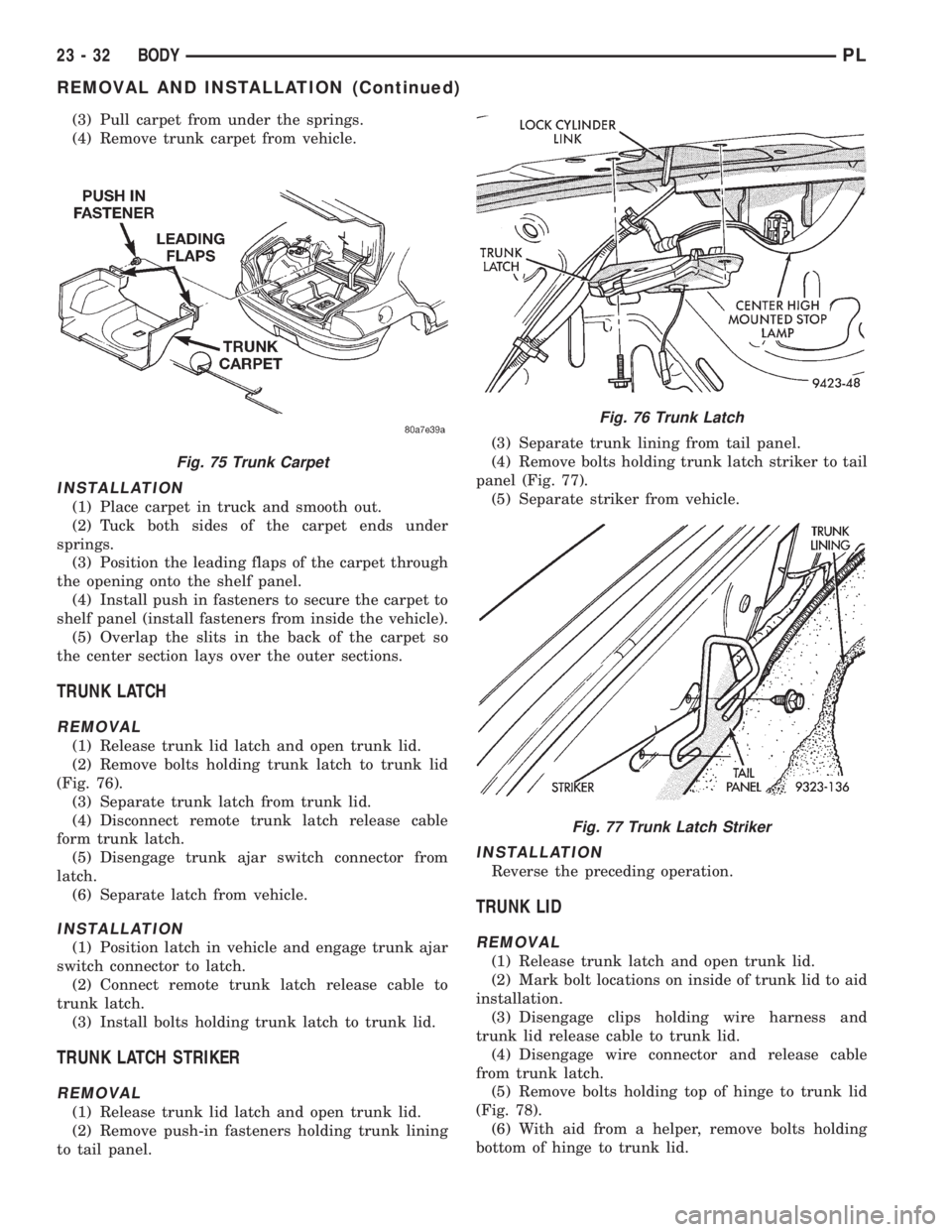
(2) Remove bolts holding trunk latch to trunk lid
(Fig. 76).
(3) Separate trunk latch from trunk lid.
(4) Disconnect remote trunk latch release cable
form trunk latch.
(5) Disengage trunk ajar switch connector from
latch.
(6) Separate latch from vehicle.
INSTALLATION
(1) Position latch in vehicle and engage trunk ajar
switch connector to latch.
(2) Connect remote trunk latch release cable to
trunk latch.
(3) Install bolts holding trunk latch to trunk lid.
TRUNK LATCH STRIKER
REMOVAL
(1) Release trunk lid latch and open trunk lid.
(2) Remove push-in fasteners holding trunk lining
to tail panel.(3) Separate trunk lining from tail panel.
(4) Remove bolts holding trunk latch striker to tail
panel (Fig. 77).
(5) Separate striker from vehicle.
INSTALLATION
Reverse the preceding operation.
TRUNK LID
REMOVAL
(1) Release trunk latch and open trunk lid.
(2) Mark bolt locations on inside of trunk lid to aid
installation.
(3) Disengage clips holding wire harness and
trunk lid release cable to trunk lid.
(4) Disengage wire connector and release cable
from trunk latch.
(5) Remove bolts holding top of hinge to trunk lid
(Fig. 78).
(6) With aid from a helper, remove bolts holding
bottom of hinge to trunk lid.
Fig. 75 Trunk Carpet
Fig. 76 Trunk Latch
Fig. 77 Trunk Latch Striker
23 - 32 BODYPL
REMOVAL AND INSTALLATION (Continued)
Page 1116 of 1200
INSTALLATION
Reverse the preceding operation. Adjust inner belt
stabilizer against glass with enough tension to allow
free up and down movement.
WINDOW REGULATORÐ2 DOOR
NOTE: Power and manual door glass regulators are
serviced using the same procedures. For power
window motor service procedures, refer to Group
8S, Power Windows.
REMOVAL
(1) Remove door trim panel and water shield.
(2) Disconnect wire connector to power window
motor, if so equipped.
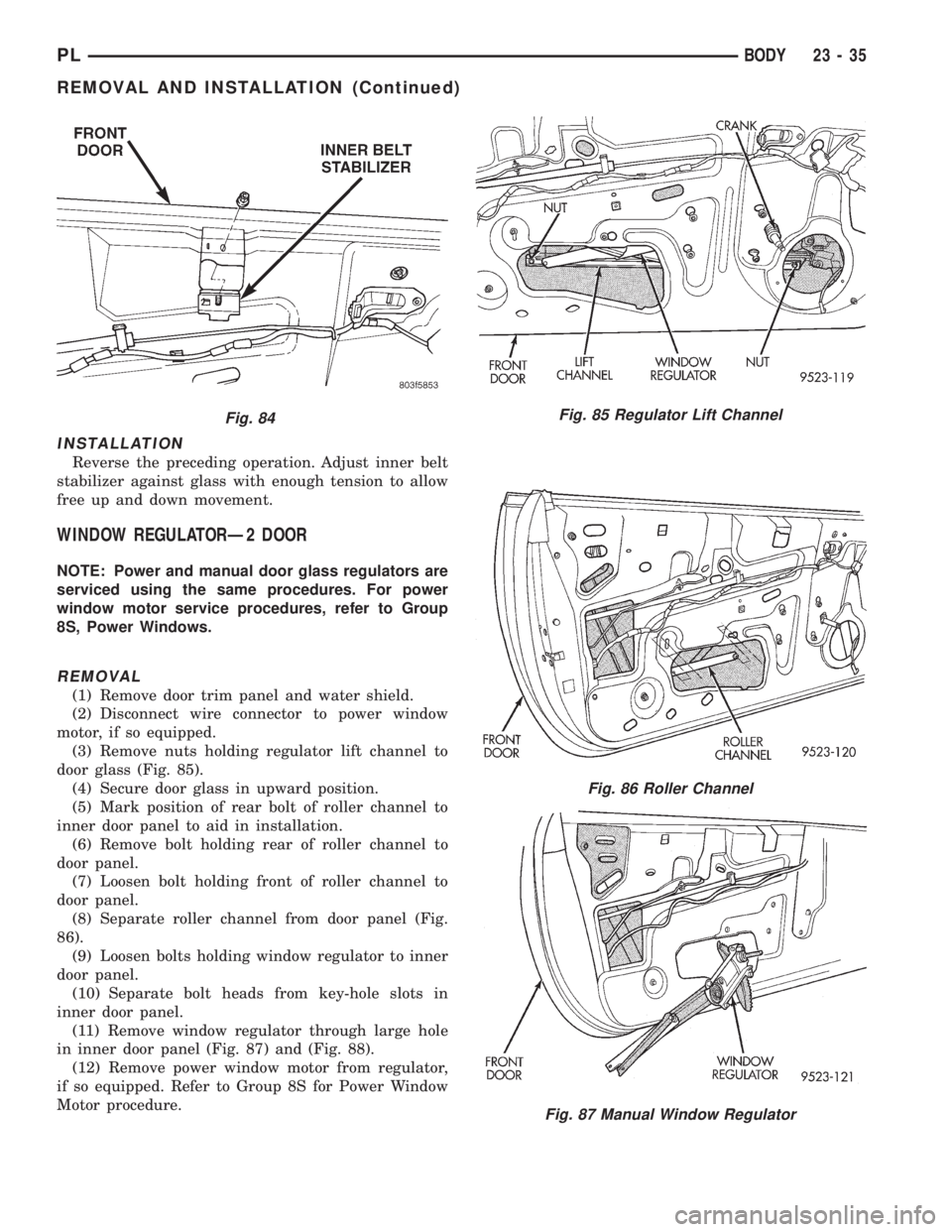
(3) Remove nuts holding regulator lift channel to
door glass (Fig. 85).
(4) Secure door glass in upward position.
(5) Mark position of rear bolt of roller channel to
inner door panel to aid in installation.
(6) Remove bolt holding rear of roller channel to
door panel.
(7) Loosen bolt holding front of roller channel to
door panel.
(8) Separate roller channel from door panel (Fig.
86).
(9) Loosen bolts holding window regulator to inner
door panel.
(10) Separate bolt heads from key-hole slots in
inner door panel.
(11) Remove window regulator through large hole
in inner door panel (Fig. 87) and (Fig. 88).
(12) Remove power window motor from regulator,
if so equipped. Refer to Group 8S for Power Window
Motor procedure.
Fig. 84Fig. 85 Regulator Lift Channel
Fig. 86 Roller Channel
Fig. 87 Manual Window Regulator
PLBODY 23 - 35
REMOVAL AND INSTALLATION (Continued)
Page 1124 of 1200
STATIONARY GLASS
INDEX
page page
DESCRIPTION AND OPERATION
SAFETY PRECAUTIONS.................. 43
REMOVAL AND INSTALLATION
QUARTER GLASS....................... 45REAR WINDOW......................... 46
WINDSHIELD........................... 43
DESCRIPTION AND OPERATION
SAFETY PRECAUTIONS
WARNING: DO NOT OPERATE THE VEHICLE
WITHIN 24 HOURS OF WINDSHIELD INSTALLATION.
IT TAKES AT LEAST 24 HOURS FOR URETHANE
ADHESIVE TO CURE. IF IT IS NOT CURED, THE
WINDSHIELD MAY NOT PERFORM PROPERLY IN
AN ACCIDENT.
URETHANE ADHESIVES ARE APPLIED AS A SYS-
TEM. USE GLASS CLEANER, GLASS PREP SOL-
VENT, GLASS PRIMER, PVC (VINYL) PRIMER AND
PINCHWELD (FENCE) PRIMER PROVIDED BY THE
ADHESIVE MANUFACTURER. IF NOT, STRUCTURAL
INTEGRITY COULD BE COMPROMISED.
CHRYSLER DOES NOT RECOMMEND GLASS
ADHESIVE BY BRAND. TECHNICIANS SHOULD
REVIEW PRODUCT LABELS AND TECHNICAL DATA
SHEETS, AND USE ONLY ADHESIVES THAT THEIR
MANUFACTURES WARRANT WILL RESTORE A
VEHICLE TO THE REQUIREMENTS OF FMVSS 212.
TECHNICIANS SHOULD ALSO INSURE THAT PRIM-
ERS AND CLEANERS ARE COMPATIBLE WITH THE
PARTICULAR ADHESIVE USED.
BE SURE TO REFER TO THE URETHANE MANU-
FACTURER'S DIRECTIONS FOR CURING TIME
SPECIFICATIONS, AND DO NOT USE ADHESIVE
AFTER ITS EXPIRATION DATE.
VAPORS THAT ARE EMITTED FROM THE URE-
THANE ADHESIVE OR PRIMER COULD CAUSE
PERSONAL INJURY. USE THEM IN A WELL-VENTI-
LATED AREA.
SKIN CONTACT WITH URETHANE ADHESIVE
SHOULD BE AVOIDED. PERSONAL INJURY MAY
RESULT.
ALWAYS WEAR EYE AND HAND PROTECTION
WHEN WORKING WITH GLASS.CAUTION: Protect all painted and trimmed surfaces
from coming in contact with urethane or primers.
Be careful not to damage painted surfaces when
removing moldings or cutting urethane around
windshield.
It is difficult to salvage a windshield during the
removal operation. The windshield is part of the
structural support for the roof. The urethane bonding
used to secure the windshield to the fence is difficult
to cut or clean from any surface. If the moldings are
set in urethane, it would also be unlikely they could
be salvaged. Before removing the windshield, check
the availability of the windshield and moldings from
the parts supplier.
REMOVAL AND INSTALLATION
WINDSHIELD
The urethane adhesive holding the windshield to
the opening pinch weld (fence) can be cut using a
sharp cold knife from the exterior of the vehicle.
Using the cold knife method is effective if the wind-
shield is already broken. If the glass must be sal-
vaged, cutting the urethane adhesive from the
interior of the vehicle using a reciprocating or oscil-
lating power knife is recommended.
WINDSHIELD REMOVAL ± EXTERIOR METHOD
(1) Remove inside rear view mirror.
(2) Remove windshield wiper arms.
(3) Remove cowl cover.
(4) Place protective covers over instrument panel
and hood.
PLBODY 23 - 43
Page 1156 of 1200
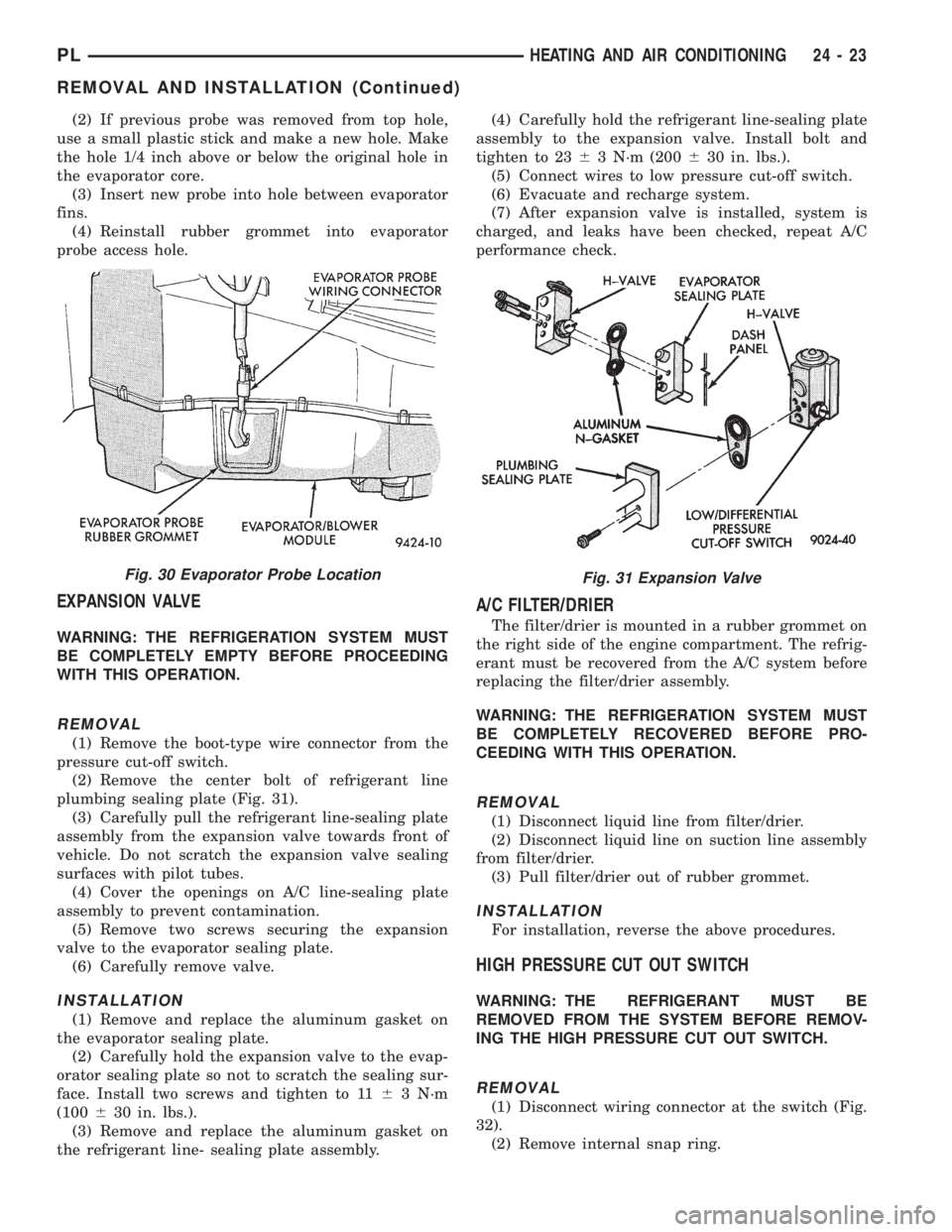
(2) If previous probe was removed from top hole,
use a small plastic stick and make a new hole. Make
the hole 1/4 inch above or below the original hole in
the evaporator core.
(3) Insert new probe into hole between evaporator
fins.
(4) Reinstall rubber grommet into evaporator
probe access hole.
EXPANSION VALVE
WARNING: THE REFRIGERATION SYSTEM MUST
BE COMPLETELY EMPTY BEFORE PROCEEDING
WITH THIS OPERATION.
REMOVAL
(1) Remove the boot-type wire connector from the
pressure cut-off switch.
(2) Remove the center bolt of refrigerant line
plumbing sealing plate (Fig. 31).
(3) Carefully pull the refrigerant line-sealing plate
assembly from the expansion valve towards front of
vehicle. Do not scratch the expansion valve sealing
surfaces with pilot tubes.
(4) Cover the openings on A/C line-sealing plate
assembly to prevent contamination.
(5) Remove two screws securing the expansion
valve to the evaporator sealing plate.
(6) Carefully remove valve.
INSTALLATION
(1) Remove and replace the aluminum gasket on
the evaporator sealing plate.
(2) Carefully hold the expansion valve to the evap-
orator sealing plate so not to scratch the sealing sur-
face. Install two screws and tighten to 1163 N´m
(100630 in. lbs.).
(3) Remove and replace the aluminum gasket on
the refrigerant line- sealing plate assembly.(4) Carefully hold the refrigerant line-sealing plate
assembly to the expansion valve. Install bolt and
tighten to 2363 N´m (200630 in. lbs.).
(5) Connect wires to low pressure cut-off switch.
(6) Evacuate and recharge system.
(7) After expansion valve is installed, system is
charged, and leaks have been checked, repeat A/C
performance check.
A/C FILTER/DRIER
The filter/drier is mounted in a rubber grommet on
the right side of the engine compartment. The refrig-
erant must be recovered from the A/C system before
replacing the filter/drier assembly.
WARNING: THE REFRIGERATION SYSTEM MUST
BE COMPLETELY RECOVERED BEFORE PRO-
CEEDING WITH THIS OPERATION.
REMOVAL
(1) Disconnect liquid line from filter/drier.
(2) Disconnect liquid line on suction line assembly
from filter/drier.
(3) Pull filter/drier out of rubber grommet.
INSTALLATION
For installation, reverse the above procedures.
HIGH PRESSURE CUT OUT SWITCH
WARNING: THE REFRIGERANT MUST BE
REMOVED FROM THE SYSTEM BEFORE REMOV-
ING THE HIGH PRESSURE CUT OUT SWITCH.
REMOVAL
(1) Disconnect wiring connector at the switch (Fig.
32).
(2) Remove internal snap ring.
Fig. 30 Evaporator Probe LocationFig. 31 Expansion Valve
PLHEATING AND AIR CONDITIONING 24 - 23
REMOVAL AND INSTALLATION (Continued)
Page 1165 of 1200
cranking. Whenever the Powertrain Control Module
(PCM) sets a Diagnostic Trouble Code (DTC) that
affects vehicle emissions, it illuminates the MIL. If a
problem is detected, the PCM sends a message over
the CCD Bus to the instrument cluster to illuminate
the lamp. The PCM illuminates the MIL only for
DTC's that affect vehicle emissions. The MIL stays
on continuously when the PCM has entered a
Limp-In mode or identified a failed emission compo-
nent or system. The MIL remains on until the DTC
is erased. Refer to the Diagnostic Trouble Code
charts in this group for emission related codes.
Also, the MIL either flashes or illuminates contin-
uously when the PCM detects active engine misfire.
Refer to Misfire Monitoring in this section.
Additionally, the PCM may reset (turn off) the MIL
when one of the following occur:
²PCM does not detect the malfunction for 3 con-
secutive trips (except misfire and fuel system moni-
tors).
²PCM does not detect a malfunction while per-
forming three successive engine misfire or fuel sys-
tem tests. The PCM performs these tests while the
engine is operating within6375 RPM of and within
10 % of the load of the operating condition at which
the malfunction was first detected.
STATE DISPLAY TEST MODE
The switch inputs to the Powertrain Control Mod-
ule (PCM) have two recognized states; HIGH and
LOW. For this reason, the PCM cannot recognize the
difference between a selected switch position versus
an open circuit, a short circuit, or a defective switch.
If the State Display screen shows the change from
HIGH to LOW or LOW to HIGH, assume the entire
switch circuit to the PCM functions properly. From
the state display screen, access either State Display
Inputs and Outputs or State Display Sensors.
CIRCUIT ACTUATION TEST MODE
The Circuit Actuation Test Mode checks for proper
operation of output circuits or devices the Powertrain
Control Module (PCM) may not internally recognize.
The PCM attempts to activate these outputs and
allow an observer to verify proper operation. Most of
the tests provide an audible or visual indication of
device operation (click of relay contacts, fuel spray,
etc.). Except for intermittent conditions, if a device
functions properly during testing, assume the device,
its associated wiring, and driver circuit work cor-
rectly.
DIAGNOSTIC TROUBLE CODES
A Diagnostic Trouble Code (DTC) indicates the
PCM has recognized an abnormal condition in the
system.
²The preferred and most accurate method of
retrieving a DTC is by using the DRB scan tool. The
scan tool supplies detailed diagnostic information
which can be used to more accurately diagnose
causes for a DTC.
Remember that DTC's are the results of a sys-
tem or circuit failure, but do not directly iden-
tify the failed component or components.
NOTE: For a list of DTC's, refer to the charts in this
section.
BULB CHECK
Each time the ignition key is turned to the ON
position, the malfunction indicator (check engine)
lamp on the instrument panel should illuminate for
approximately 2 seconds then go out. This is done for
a bulb check.
OBTAINING DTC'S USING DRB SCAN TOOL
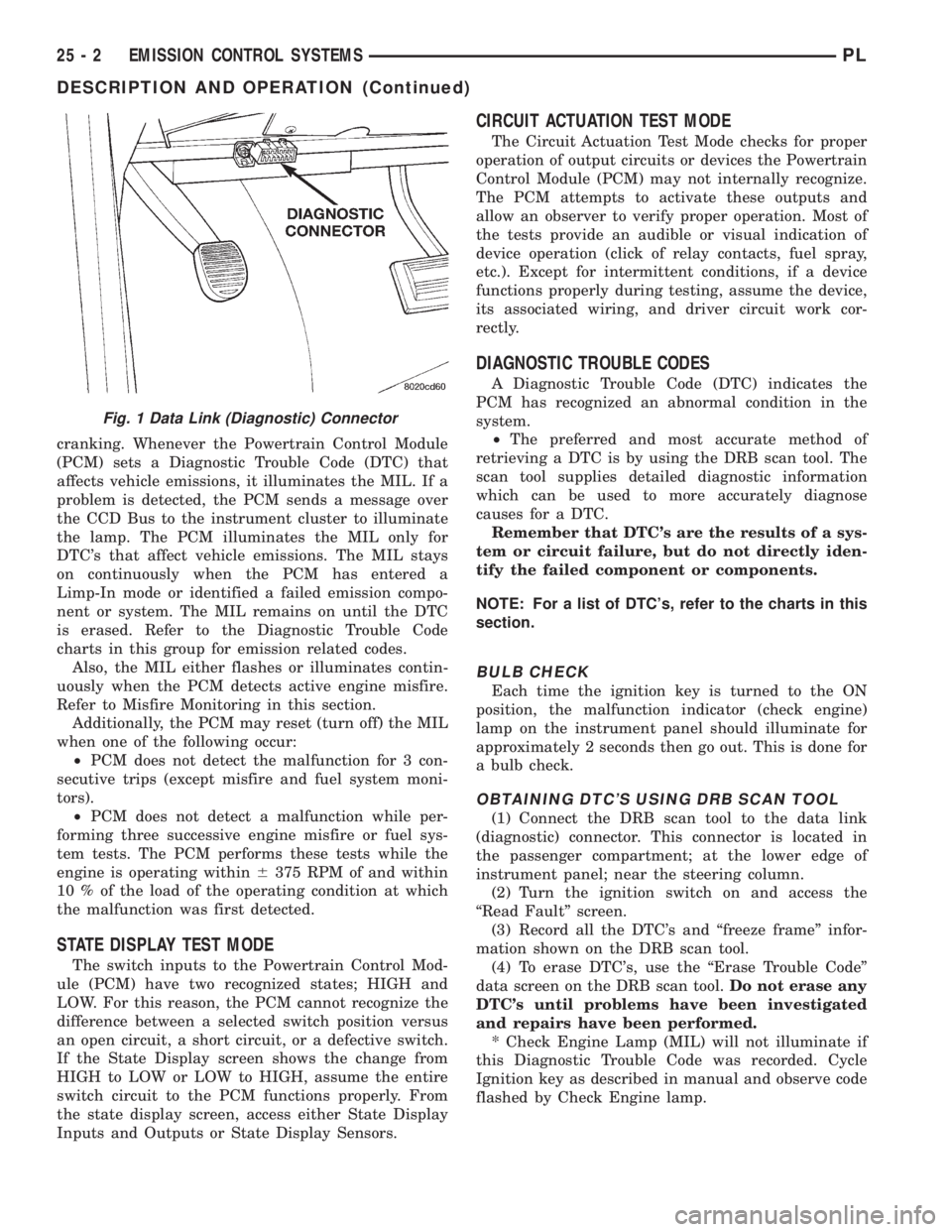
(1) Connect the DRB scan tool to the data link
(diagnostic) connector. This connector is located in
the passenger compartment; at the lower edge of
instrument panel; near the steering column.
(2) Turn the ignition switch on and access the
ªRead Faultº screen.
(3) Record all the DTC's and ªfreeze frameº infor-
mation shown on the DRB scan tool.
(4) To erase DTC's, use the ªErase Trouble Codeº
data screen on the DRB scan tool.Do not erase any
DTC's until problems have been investigated
and repairs have been performed.
* Check Engine Lamp (MIL) will not illuminate if
this Diagnostic Trouble Code was recorded. Cycle
Ignition key as described in manual and observe code
flashed by Check Engine lamp.
Fig. 1 Data Link (Diagnostic) Connector
25 - 2 EMISSION CONTROL SYSTEMSPL
DESCRIPTION AND OPERATION (Continued)
Page 1172 of 1200
system begins to pump up to this pressure. As the
pressure increases, the cycle rate starts to drop off. If
there is no leak in the system, the pump would even-
tually stop pumping at the equalized pressure. If
there is a leak, it will continue to pump at a rate rep-
resentative of the flow characteristic of the size of the
leak. From this information we can determine if the
leak is larger than the required detection limit (cur-
rently set at .020º orifice by CARB). If a leak is
revealed during the leak test portion of the test, the
test is terminated at the end of the test mode and no
further system checks will be performed.
After passing the leak detection phase of the test,
system pressure is maintained by turning on the
LDP's solenoid until the purge system is activated.
Purge activation in effect creates a leak. The cycle
rate is again interrogated and when it increases due
to the flow through the purge system, the leak check
portion of the diagnostic is complete.
The canister vent valve will unseal the system
after completion of the test sequence as the pump
diaphragm assembly moves to the full travel position.
Evaporative system functionality will be verified by
using the stricter evap purge flow monitor. At an
appropriate warm idle the LDP will be energized to
seal the canister vent. The purge flow will be clocked
up from some small value in an attempt to see a
shift in the 02 control system. If fuel vapor, indicated
by a shift in the 02 control, is present the test is
passed. If not, it is assumed that the purge system is
not functioning in some respect. The LDP is again
turned off and the test is ended.
TRIP DEFINITION
A ªTripº means vehicle operation (following an
engine-off period) of duration and driving mode such
that all components and systems are monitored at
least once by the diagnostic system. The monitors
must successfully pass before the PCM can verify
that a previously malfunctioning component is meet-
ing the normal operating conditions of that compo-
nent. For misfire or fuel system malfunction, the
MIL may be extinguished if the fault does not recur
when monitored during three subsequent sequential
driving cycles in which conditions are similar to
those under which the malfunction was first deter-
mined.
Anytime the MIL is illuminated, a DTC is stored.
The DTC can self erase only when the MIL has been
extinguished. Once the MIL is extinguished, the
PCM must pass the diagnostic test for the most
recent DTC for 40 warm-up cycles (80 warm-up
cycles for the Fuel System Monitor and the Misfire
Monitor). A warm-up cycle can best be described by
the following:
²The engine must be running²A rise of 40ÉF in engine temperature must occur
from the time when the engine was started
²Engine coolant temperature must reach at least
160ÉF
²A ªdriving cycleº that consists of engine start up
and engine shut off.
Once the above conditions occur, the PCM is con-
sidered to have passed a warm-up cycle. Due to the
conditions required to extinguish the MIL and erase
the DTC, it is most important that after a repair has
been made, all DTC's be erased and the repair veri-
fied.
COMPONENT MONITORS
There are several components that will affect vehi-
cle emissions if they malfunction. If one of these com-
ponents malfunctions the Malfunction Indicator
Lamp (Check Engine) will illuminate.
Some of the component monitors are checking for
proper operation of the part. Electrically operated
components now have input (rationality) and output
(functionality) checks. Previously, a component like
the Throttle Position sensor (TPS) was checked by
the PCM for an open or shorted circuit. If one of
these conditions occurred, a DTC was set. Now there
is a check to ensure that the component is working.
This is done by watching for a TPS indication of a
greater or lesser throttle opening than MAP and
engine rpm indicate. In the case of the TPS, if engine
vacuum is high and engine rpm is 1600 or greater
and the TPS indicates a large throttle opening, a
DTC will be set. The same applies to low vacuum
and 1600 rpm.
Any component that has an associated limp in will
set a fault after 1 trip with the malfunction present.
Refer to the Diagnostic Trouble Codes Description
Charts in this section and the appropriate Power-
train Diagnostic Procedure Manual for diagnostic
procedures.
NON-MONITORED CIRCUITS
The PCM does not monitor all circuits, systems
and conditions that could have malfunctions causing
driveability problems. However, problems with these
systems may cause the PCM to store diagnostic trou-
ble codes for other systems or components. For exam-
ple, a fuel pressure problem will not register a fault
directly, but could cause a rich/lean condition or mis-
fire. This could cause the PCM to store an oxygen
sensor or misfire diagnostic trouble code.
The major non-monitored circuits are listed below
along with examples of failures modes that do not
directly cause the PCM to set a DTC, but for a sys-
tem that is monitored.
PLEMISSION CONTROL SYSTEMS 25 - 9
DESCRIPTION AND OPERATION (Continued)